Quiz XK0-005: CompTIA Linux+ Certification
Quiz
server. You have been tasked with installing the Apache web server on the Linux server and resolving
the issue that prevented the junior administrator from running Apache.
INSTRUCTIONS
Install Apache and start the service. Verify that the Apache service is running with the defaults.
Typing “help” in the terminal will show a list of relevant event commands.
If at any time you would like to bring back the initial state of the simulation, please click the Reset All
button.

below.
yum install httpd
systemctl --now enable httpd
systemctl status httpd
netstat -tunlp | grep 80
pkill <processname>
systemctl restart httpd
systemctl status httpd
Quiz
server is rebooted. Which of the following commands should the administrator use to identify the
correct version of this file?
Quiz
following files should the engineer modify to change the port number to the desired value?
Quiz
with the contents of the main repository. Which of the following commands should the administrator
use for this task?
Quiz
192.0.2.25 on port 3128. Which of the following commands will accomplish this task?
Quiz
Packets sent over the interface eth0 to 10.0.213.5/32 should be routed via 10.0.5.1. Which of the
following commands should the administrator run to achieve this goal?
Quiz
exists. Given the following:
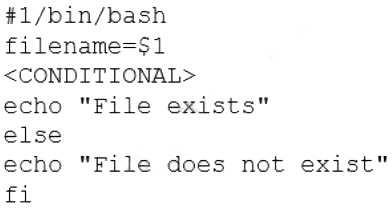
Which of the following commands should replace the <CONDITIONAL> string?
Quiz
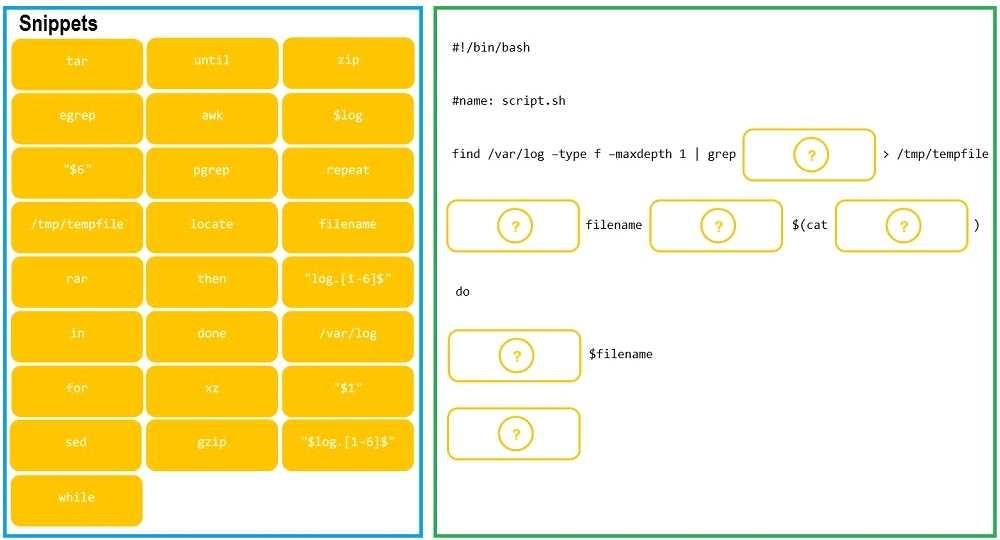
As a Systems Administrator, to reduce disk space, you were tasked to create a shell script that does
the following:
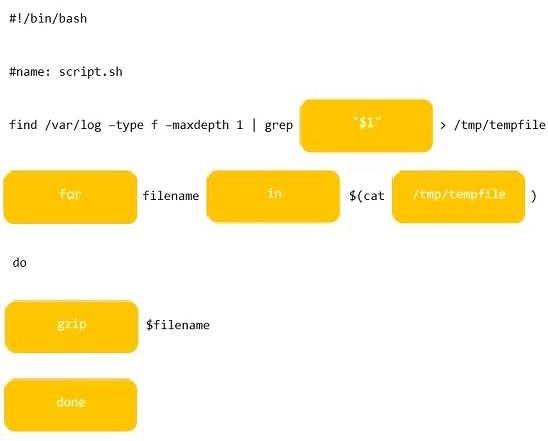
Add relevant content to /tmp/script.sh, so that it finds and compresses rotated files in /var/log
without recursion.
INSTRUCTIONS
Fill the blanks to build a script that performs the actual compression of rotated log files.
If at any time you would like to bring back the initial state of the simulation, please click the Reset All
button.
Quiz
the following code to complete the task:
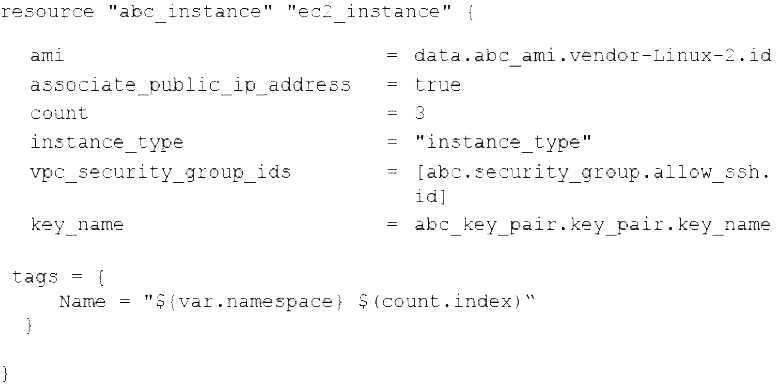
Which of the following technologies is the administrator using?
Quiz
XK0-005: CompTIA Linux+ Certification Practice test unlocks all online simulator questions
Thank you for choosing the free version of the XK0-005: CompTIA Linux+ Certification practice test! Further deepen your knowledge on CompTIA Simulator; by unlocking the full version of our XK0-005: CompTIA Linux+ Certification Simulator you will be able to take tests with over 152 constantly updated questions and easily pass your exam. 98% of people pass the exam in the first attempt after preparing with our 152 questions.
BUY NOWWhat to expect from our XK0-005: CompTIA Linux+ Certification practice tests and how to prepare for any exam?
The XK0-005: CompTIA Linux+ Certification Simulator Practice Tests are part of the CompTIA Database and are the best way to prepare for any XK0-005: CompTIA Linux+ Certification exam. The XK0-005: CompTIA Linux+ Certification practice tests consist of 152 questions and are written by experts to help you and prepare you to pass the exam on the first attempt. The XK0-005: CompTIA Linux+ Certification database includes questions from previous and other exams, which means you will be able to practice simulating past and future questions. Preparation with XK0-005: CompTIA Linux+ Certification Simulator will also give you an idea of the time it will take to complete each section of the XK0-005: CompTIA Linux+ Certification practice test . It is important to note that the XK0-005: CompTIA Linux+ Certification Simulator does not replace the classic XK0-005: CompTIA Linux+ Certification study guides; however, the Simulator provides valuable insights into what to expect and how much work needs to be done to prepare for the XK0-005: CompTIA Linux+ Certification exam.
BUY NOWXK0-005: CompTIA Linux+ Certification Practice test therefore represents an excellent tool to prepare for the actual exam together with our CompTIA practice test . Our XK0-005: CompTIA Linux+ Certification Simulator will help you assess your level of preparation and understand your strengths and weaknesses. Below you can read all the quizzes you will find in our XK0-005: CompTIA Linux+ Certification Simulator and how our unique XK0-005: CompTIA Linux+ Certification Database made up of real questions:
Info quiz:
- Quiz name:XK0-005: CompTIA Linux+ Certification
- Total number of questions:152
- Number of questions for the test:50
- Pass score:80%
You can prepare for the XK0-005: CompTIA Linux+ Certification exams with our mobile app. It is very easy to use and even works offline in case of network failure, with all the functions you need to study and practice with our XK0-005: CompTIA Linux+ Certification Simulator.
Use our Mobile App, available for both Android and iOS devices, with our XK0-005: CompTIA Linux+ Certification Simulator . You can use it anywhere and always remember that our mobile app is free and available on all stores.
Our Mobile App contains all XK0-005: CompTIA Linux+ Certification practice tests which consist of 152 questions and also provide study material to pass the final XK0-005: CompTIA Linux+ Certification exam with guaranteed success. Our XK0-005: CompTIA Linux+ Certification database contain hundreds of questions and CompTIA Tests related to XK0-005: CompTIA Linux+ Certification Exam. This way you can practice anywhere you want, even offline without the internet.
BUY NOW