The new flashcard feature is useful to memorize questions.
?Change your study mode
At any time, you can change the study mode, and alternate between the practice mode and the exam mode. In practice mode, you can configure for example the number of questions or tests, and other parameters to help you study.
Randomized | 10 Questions per Test | 20 Minutes | 70% to pass|
To re-configure your study mode again and change - for example - the number of tests, whether you have random questions and all other configuration parameters.
?Simulator Configuration
Auto-scroll: You can use the automatic scrolling of the questionnaire that occurs as soon as you answer one or all of the answers to a question correctly. Auto scrolling is activated if you answer a single answer, or as soon as you answer all the mandatory answers. Learning Mode: During learning mode you can get a real time result for your answer.
Free Test
Question: / 10
20:00Min. left
?Restart the current test
To restart the current test by clearing all your answers and the time used up to now. Warning: all answers will be lost.
Question: / 10
4.7(568 Votes)
Quiz
Question 1/101/10
Where can MFA filters be used? (Choose three.)
Select multiple answer: (Choose 3)Select the answer
3 correct answers
A.
User and Admin Portal login
B.
App level 2FA/MFA
C.
RADIUS
D.
Self-service password reset
E.
Editing personal profile attributes
F.
OAUTH2 connections
MFA filters are used to enforce multi-factor authentication at specific entry points or actions in an identity and access management system. In this question, the correct choices are A, B, and D. Correct answer: A. User and Admin Portal login, B. App level 2FA/MFA, D. Self-service password reset Explanation of each correct option: A. User and Admin Portal login MFA filters can be applied to require additional verification when users or administrators sign in to the portal. This is a common use case because it helps protect access to sensitive accounts and administrative functions. B. App level 2FA/MFA MFA filters can be used at the application level to require two-factor or multi-factor authentication for accessing specific applications. This lets organizations enforce stronger access controls based on the app’s sensitivity. D. Self-service password reset MFA filters can also protect self-service password reset flows. Since password reset is a sensitive operation that can lead to account compromise if abused, MFA is often required to verify the user’s identity before allowing the reset. Why the other options are not correct: C. RADIUS RADIUS is an authentication protocol, but MFA filters are not typically described as being used directly as a RADIUS feature in this context. RADIUS integration may support MFA, but it is not one of the intended use cases here. E. Editing personal profile attributes Changing profile attributes is usually not one of the standard places where MFA filters are applied. This action may have its own authorization controls, but it is not a typical MFA filter use case. F. OAUTH2 connections OAuth2 connections are generally about authorization and delegated access, not a direct use case for MFA filters in this question. MFA may be part of an overall authentication flow, but this is not listed as a standard MFA filter location here. Summary: MFA filters are commonly used to secure login processes, protect application access, and safeguard password reset actions. Therefore, the correct answers are A, B, and D.
Right Answer: A, B, D
Quiz
Question 2/102/10
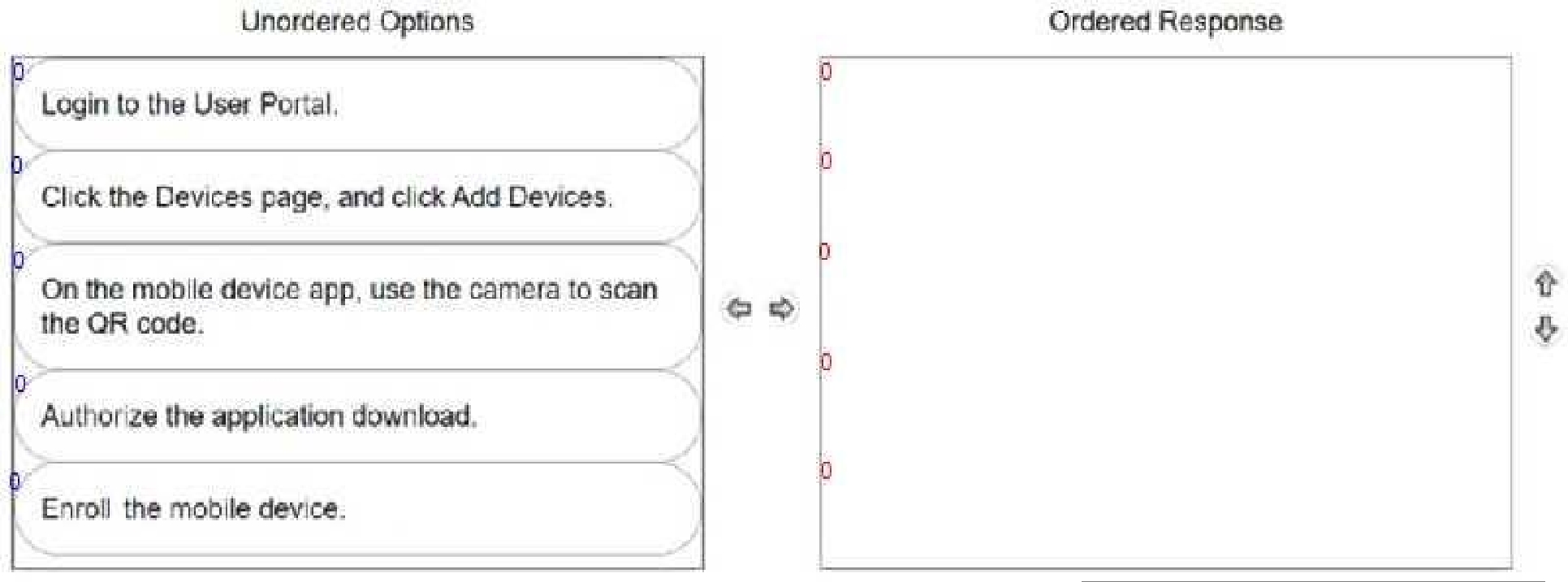
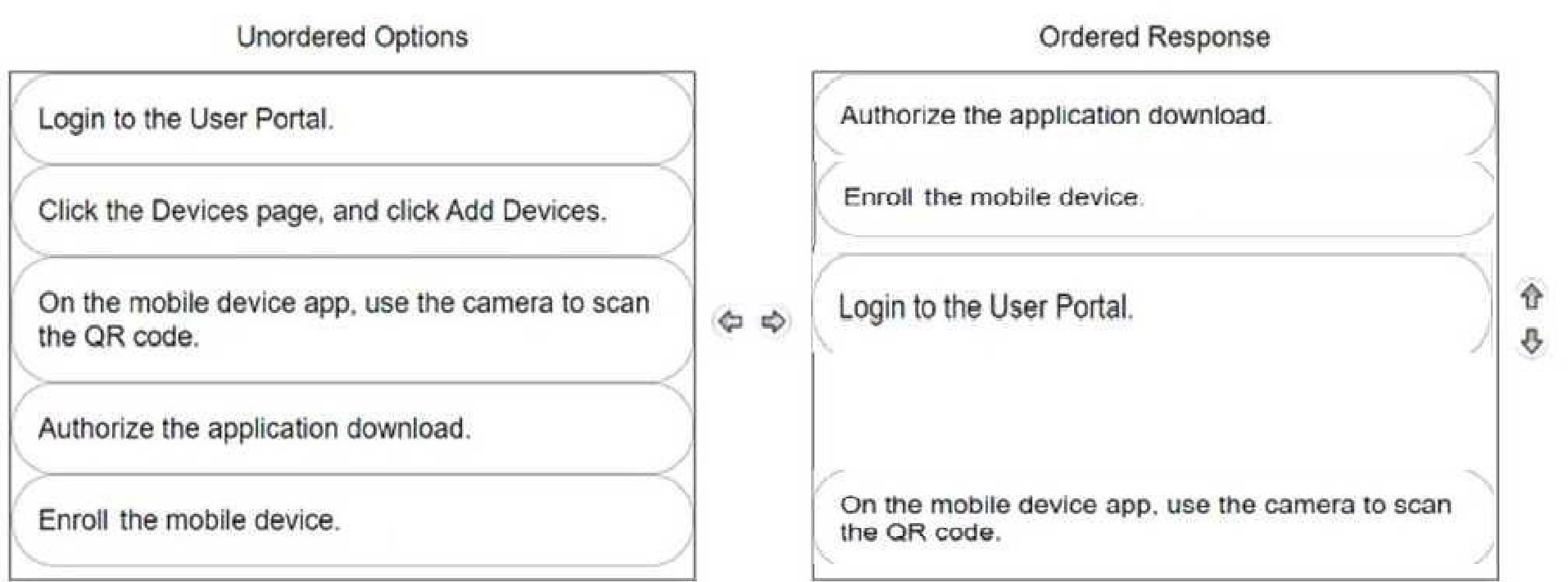
DRAG DROP A user wants to install the CyberArk Identity mobile app by using a QR code.
Arrange the steps to do this in the correct sequence.
Check the image below to see the right answer:Select the answer
1 correct answer
Right Answer: A
Quiz
Question 3/103/10
Which 2FA/MFA options can be used if users cannot use their mobile device? (Choose two.)
Select multiple answer: (Choose 2)Select the answer
2 correct answers
A.
FID02
B.
Security questions
C.
OAUTH2
D.
QRcode
E.
Push notification app
The correct answers are A. FIDO2 and B. Security questions. Here’s why: The question asks which 2FA/MFA options can be used when users cannot use their mobile device. So we need options that do not depend on a phone or mobile app. A. FIDO2 FIDO2 is a passwordless or multi-factor authentication method that uses a security key or built-in device authenticator, such as a USB security key, NFC key, or biometric-capable device. Since it does not require a mobile device, it is a valid choice. B. Security questions Security questions can be used as an alternative authentication factor without needing a mobile device. While not considered a strong modern MFA method by itself, it is still an authentication option that can work when a phone is unavailable. Why the others are not correct: C. OAUTH2 OAuth2 is an authorization framework, not a direct user authentication method. It is not typically used as a standalone 2FA/MFA option. D. QRcode QR code-based authentication often involves scanning with a mobile device or app, so it generally requires access to a mobile device. E. Push notification app Push notifications typically require a mobile authenticator app on a smartphone, so this option cannot be used if the user cannot access their mobile device. Therefore, the correct answer is A and B.
Right Answer: A, B
Quiz
Question 4/104/10
A user's account information required for multi-factor authentication is not set up properly and is preventing the user from logging in. What should you do?
Select the answer:Select the answer
1 correct answer
A.
Use the MFA Unlock command in the Admin Portal to suspend multifactor authentication for 10 minutes.
B.
Delete the user's account and create a new one.
C.
Ask the user to delete all browser cookies, then try again.
D.
Change the user's director/ source from Active Directory to LDAP for authentication.
The correct answer is A. Use the MFA Unlock command in the Admin Portal to suspend multifactor authentication for 10 minutes. The issue described is that the user’s MFA account information is not set up correctly, which is stopping the login process. In this situation, the best approach is to temporarily bypass MFA using the administrative recovery option designed for this exact type of problem. Why A is correct: - The MFA Unlock command temporarily suspends MFA for the user. - This gives the user a short window, such as 10 minutes, to log in and correct or re-register their MFA settings. - It is the proper administrative fix when MFA setup problems prevent authentication. Why the other options are incorrect: B. Delete the user's account and create a new one. - This is unnecessary and overly destructive. - Deleting an account can cause loss of data, settings, and audit history. - MFA issues should be resolved without recreating the account. C. Ask the user to delete all browser cookies, then try again. - Clearing cookies may help with browser session problems, but it does not fix a broken or incomplete MFA setup. - This is not the right solution for an MFA configuration issue. D. Change the user's director/source from Active Directory to LDAP for authentication. - Switching identity sources is unrelated to the MFA setup problem. - This would likely create additional authentication issues rather than resolve them. Summary: When MFA configuration is preventing access, use the administrative MFA Unlock feature to temporarily suspend MFA and allow the user to regain access.
Right Answer: A
Quiz
Question 5/105/10
Which statement is correct about the CyberArk Identity Windows Device Trust enrollment process?
Select the answer:Select the answer
1 correct answer
A.
An enrollment code is optional.
B.
The endpoint does not need to be a domain-joined machine.
C.
You can define the maximum number of joinable endpoints.
D.
You can define the minimum number of joinable endpoints.
The correct answer is C. You can define the maximum number of joinable endpoints. Here is why: CyberArk Identity Windows Device Trust enrollment is used to register Windows devices so they can be trusted and managed as part of the identity and access control process. During this enrollment process, administrators can set limits on how many devices a user or organization is allowed to enroll. Why C is correct: - CyberArk allows administrators to control the number of endpoints that can be joined or enrolled. - This helps enforce policy, prevent excessive device registrations, and maintain better security governance. - The option specifically referring to the maximum number of joinable endpoints matches this capability. Why the other options are not correct: A. An enrollment code is optional. - This is not generally true. Enrollment typically requires an enrollment code or similar authorization mechanism to validate and secure the device trust process. B. The endpoint does not need to be a domain-joined machine. - This is not the defining correct statement for this enrollment process. The trust enrollment has specific requirements, and this option is not the best accurate description of a built-in enrollment setting. D. You can define the minimum number of joinable endpoints. - This is incorrect because the system controls the maximum number of devices that can enroll, not a minimum number. - Security policies usually limit enrollment rather than require a minimum quantity of devices. In short, the key feature is the ability to cap how many endpoints can be enrolled, which makes C the correct answer.
Right Answer: C
Quiz
Question 6/106/10
ACME Corporation employees access critical business web applications through CyberArk Identity. You notice a constant high volume of unauthorized traffic from 103.1.200.0/24 trying to gain access to the CyberArk Identity portal. Access to the CyberArk Identity portal is time sensitive. ACME decides to enforce IP restrictions to reduce vulnerability. Which configuration can help achieve this?
Select the answer:Select the answer
1 correct answer
A.
Login in to the CyberArk Identity Admin portal and define the IP range of 103 1 200 0/24 into the ACME Corporation IP range.
B.
Log in to the CyberArk Identity Admin portal and define the IP range of 103 1 200 0/24 into the blocked IP range.
C.
Implement device trust through the Windows Cloud Agent.
D.
Implement zero trust through the App Gateway.
The correct answer is B. Log in to the CyberArk Identity Admin portal and define the IP range of 103.1.200.0/24 into the blocked IP range. CyberArk Identity allows administrators to control access by using IP-based policies. If there is a known source of malicious or unauthorized traffic, one effective mitigation is to explicitly block that source network. In this case, ACME is seeing repeated unauthorized access attempts from 103.1.200.0/24, so placing that subnet in the blocked IP range prevents requests from that network from reaching the CyberArk Identity portal. Why B is correct: - The organization wants to reduce exposure from a specific abusive source. - Blocking the offending subnet directly stops traffic from that range. - This is a straightforward IP restriction that fits the requirement. Why the other options are incorrect: A. Define the IP range in the ACME Corporation IP range - This would typically be used to allow or recognize trusted corporate network ranges, not to block suspicious external traffic. - Adding the attacker’s subnet as a corporate IP range would be the opposite of the desired action. C. Implement device trust through the Windows Cloud Agent - Device trust is about verifying the security posture or identity of a device, not about blocking traffic from a malicious IP subnet. - It does not address the problem of repeated unauthorized access attempts from a specific network. D. Implement zero trust through the App Gateway - Zero trust is a broader access model, not a direct IP blocking configuration. - It does not specifically provide the simple IP restriction needed here. Key takeaway: If you need to stop access from a known hostile source network in CyberArk Identity, add that subnet to the blocked IP range in the Admin portal.
Right Answer: B
Quiz
Question 7/107/10
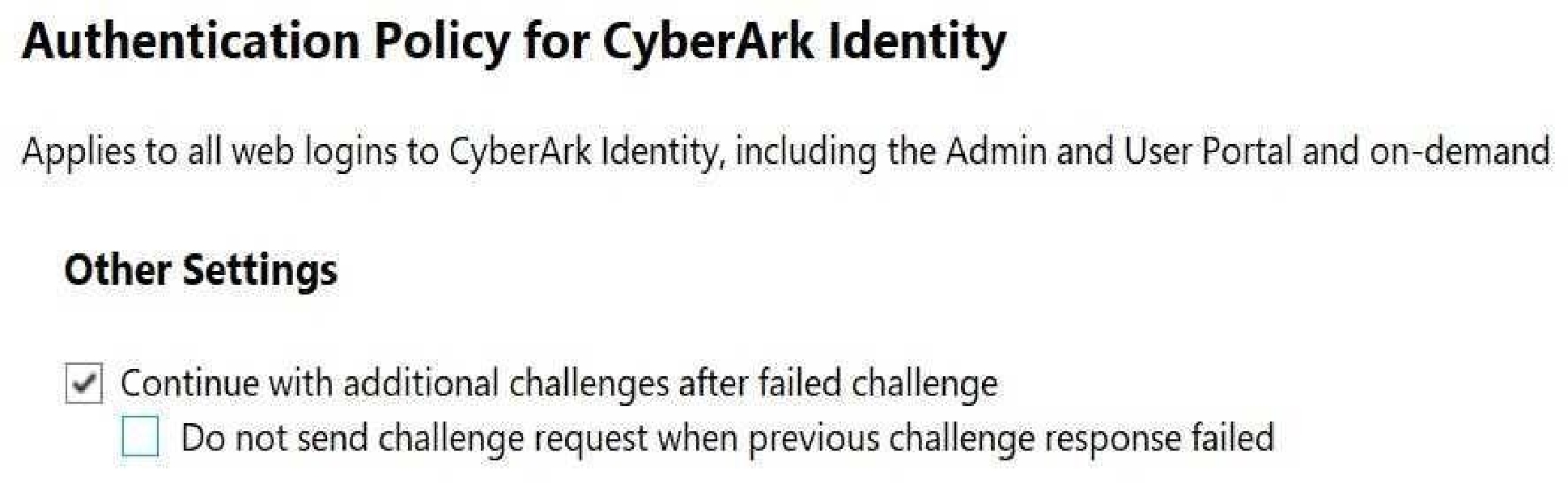
Refer to the exhibit.
Which statements are correct regarding this Authentication Policy? (Choose two.)
Select multiple answer: (Choose 2)Select the answer
2 correct answers
A.
Users will still be asked for their MFA even if they mistyped their username.
B.
If users have set up CyberArk Mobile Authenticator as an MFA, they will still receive the Push Notification to confirm the request even if they mistyped their password.
C.
Users will not be notified which challenge they failed if their login attempt failed.
D.
If users have set up a Security Question as an MFA, the Security Question will not be displayed to the user to answer even if they mistyped their password.
E.
If the first factor is password and the user is an Active Directory user and the Active Directory is unavailable, this setting does not matter because the user will not be able to authenticate through Active Directory credentials and will see the message "Active Directory not available".
The correct answers are B and C. Here is why: This Authentication Policy is configured so that MFA is triggered after the first factor is successfully identified and validated, but the system is designed not to reveal too much information to the user during failed logins. The key idea is that the policy avoids leaking whether the username, password, or MFA challenge was the part that failed. Why B is correct: If CyberArk Mobile Authenticator is configured as the MFA method, the Push Notification is still sent even if the user mistyped the password, as long as the login flow reaches the MFA step. In these setups, the MFA challenge is not skipped just because the password was entered incorrectly in a way that still allows the authentication flow to continue to the challenge stage. Why C is correct: Users will not be told which specific challenge failed. This is a common security behavior in authentication policies because revealing whether the username, password, or MFA step failed can help attackers narrow down valid credentials or understand the authentication process. Why the other options are incorrect: A. Users will still be asked for their MFA even if they mistyped their username. This is not correct because if the username is not recognized, the authentication flow generally cannot proceed normally to MFA for that user. D. If users have set up a Security Question as an MFA, the Security Question will not be displayed to the user to answer even if they mistyped their password. This is incorrect. If the policy reaches the MFA step and the security question is the configured factor, then it would be presented as part of the authentication flow rather than being suppressed simply because the password was mistyped. E. If the first factor is password and the user is an Active Directory user and the Active Directory is unavailable, this setting does not matter because the user will not be able to authenticate through Active Directory credentials and will see the message "Active Directory not available". This is not a correct statement about the policy behavior shown in the exhibit. Authentication policy settings can still affect how the login flow behaves, but AD unavailability is handled separately and does not make the policy setting irrelevant in the way described. Summary: B is correct because the MFA push can still be triggered even when the password is mistyped in this scenario. C is correct because the system does not reveal which authentication step failed. If you want, I can also explain the exhibit itself and how each policy setting affects the login flow step by step.
Right Answer: B, C
Quiz
Question 8/108/10
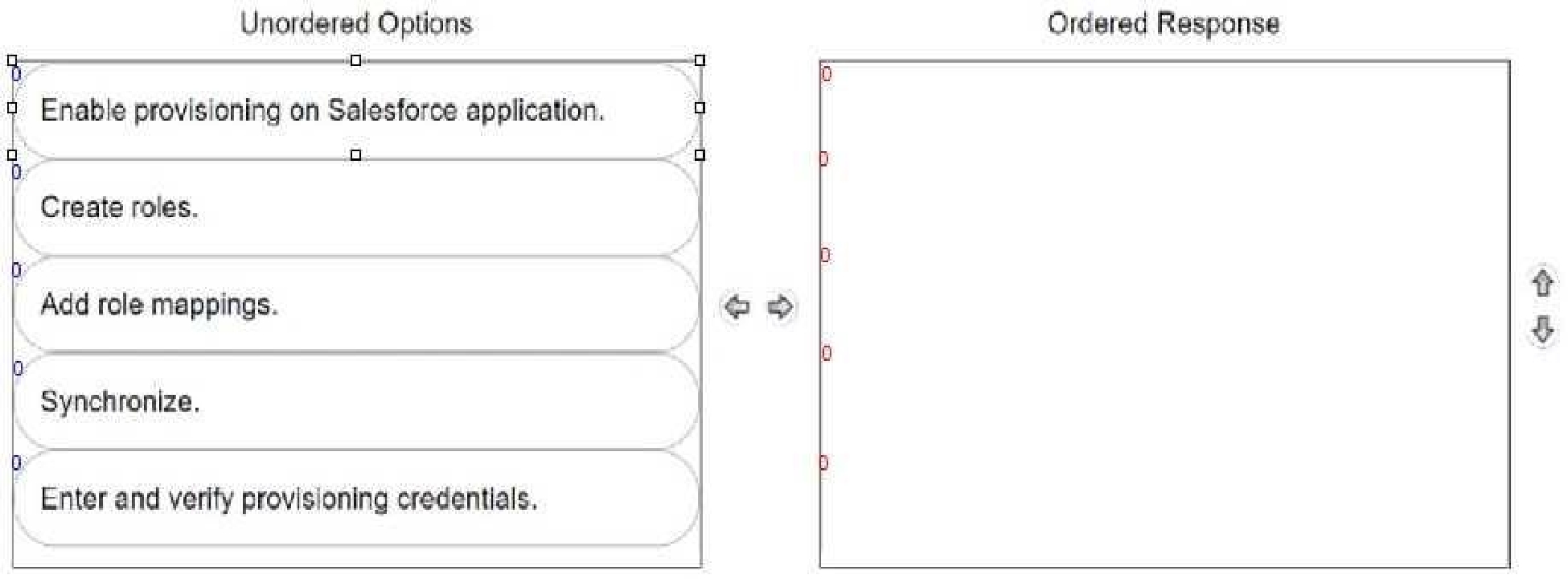
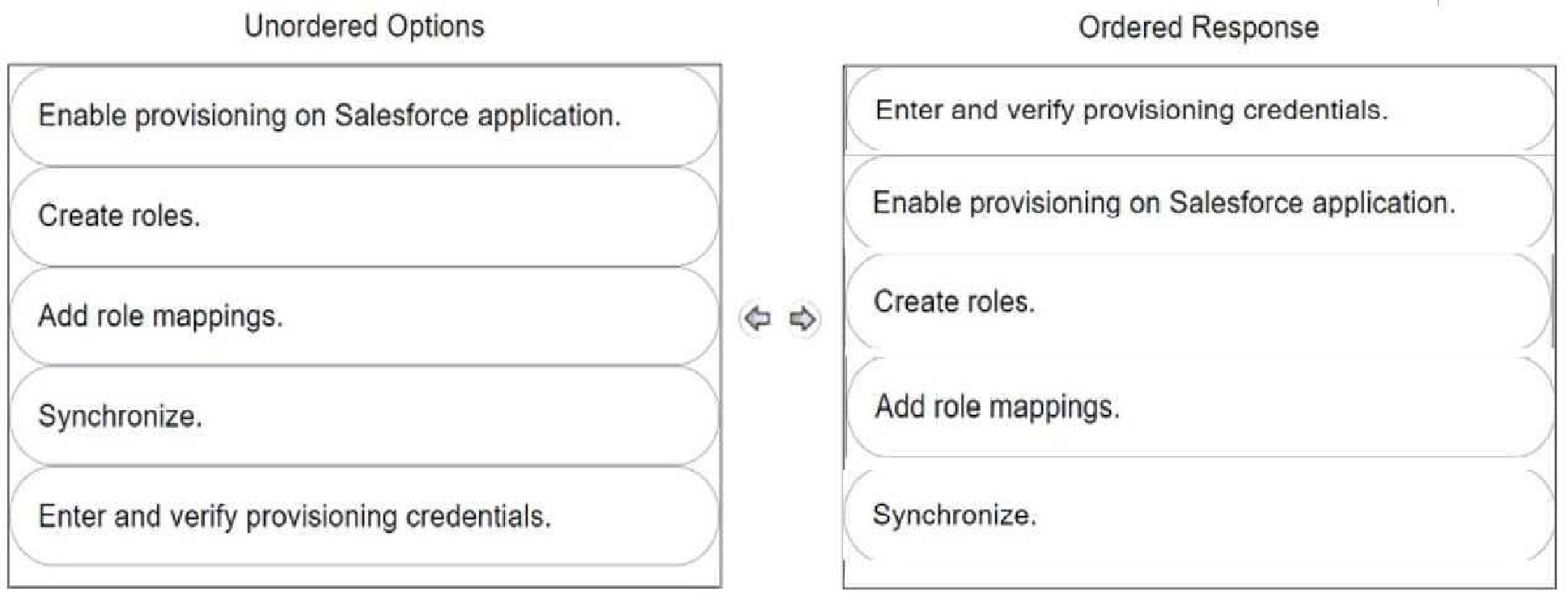
DRAG DROP Your organization wants to automatically create user accounts with different Salesforce licenses (e.g., Salesforce, Identity, Chatter External).
In CyberArk Identity, arrange the steps to achieve this in the correct sequence.
Check the image below to see the right answer:Select the answer
1 correct answer
Right Answer: A
Quiz
Question 9/109/10
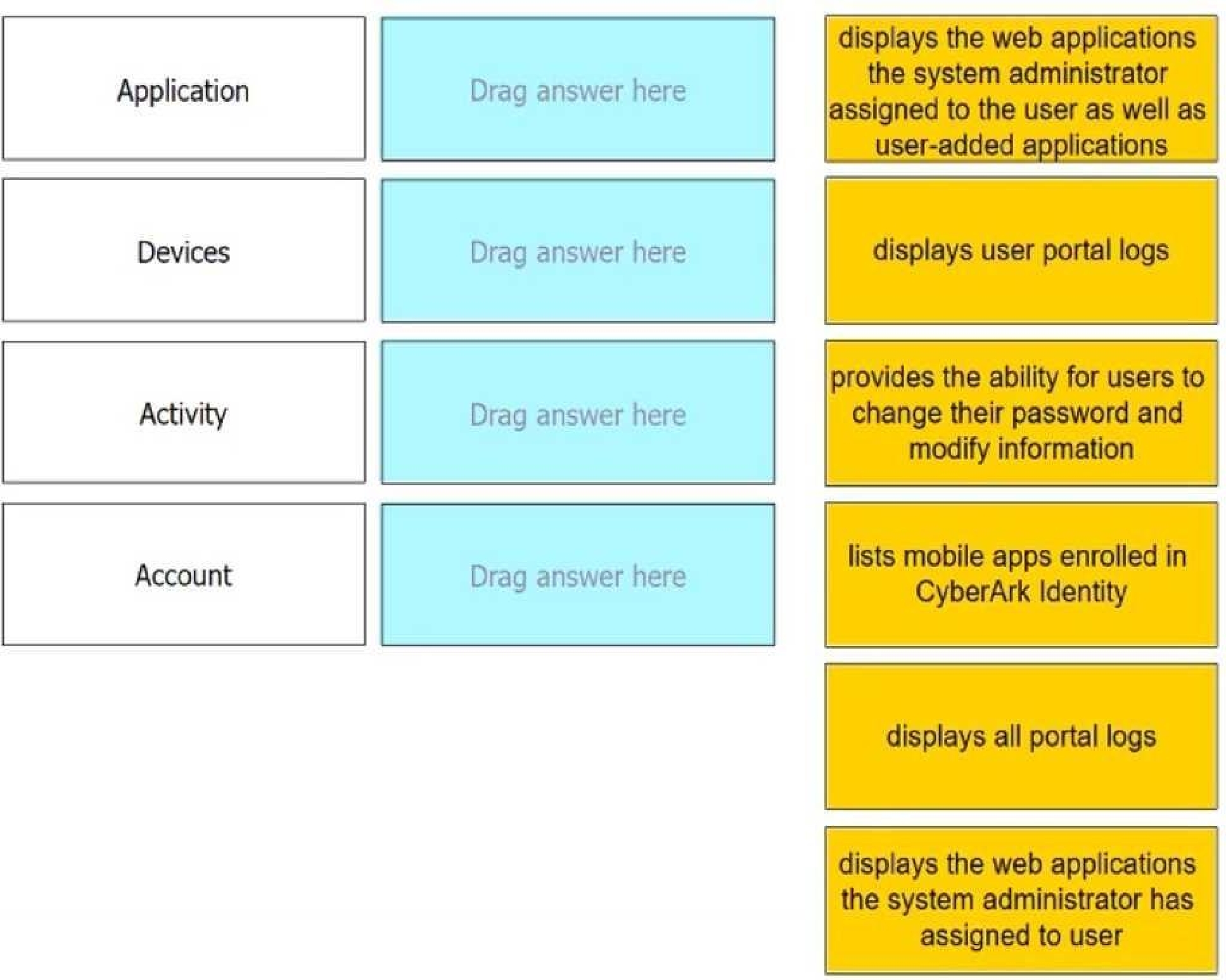
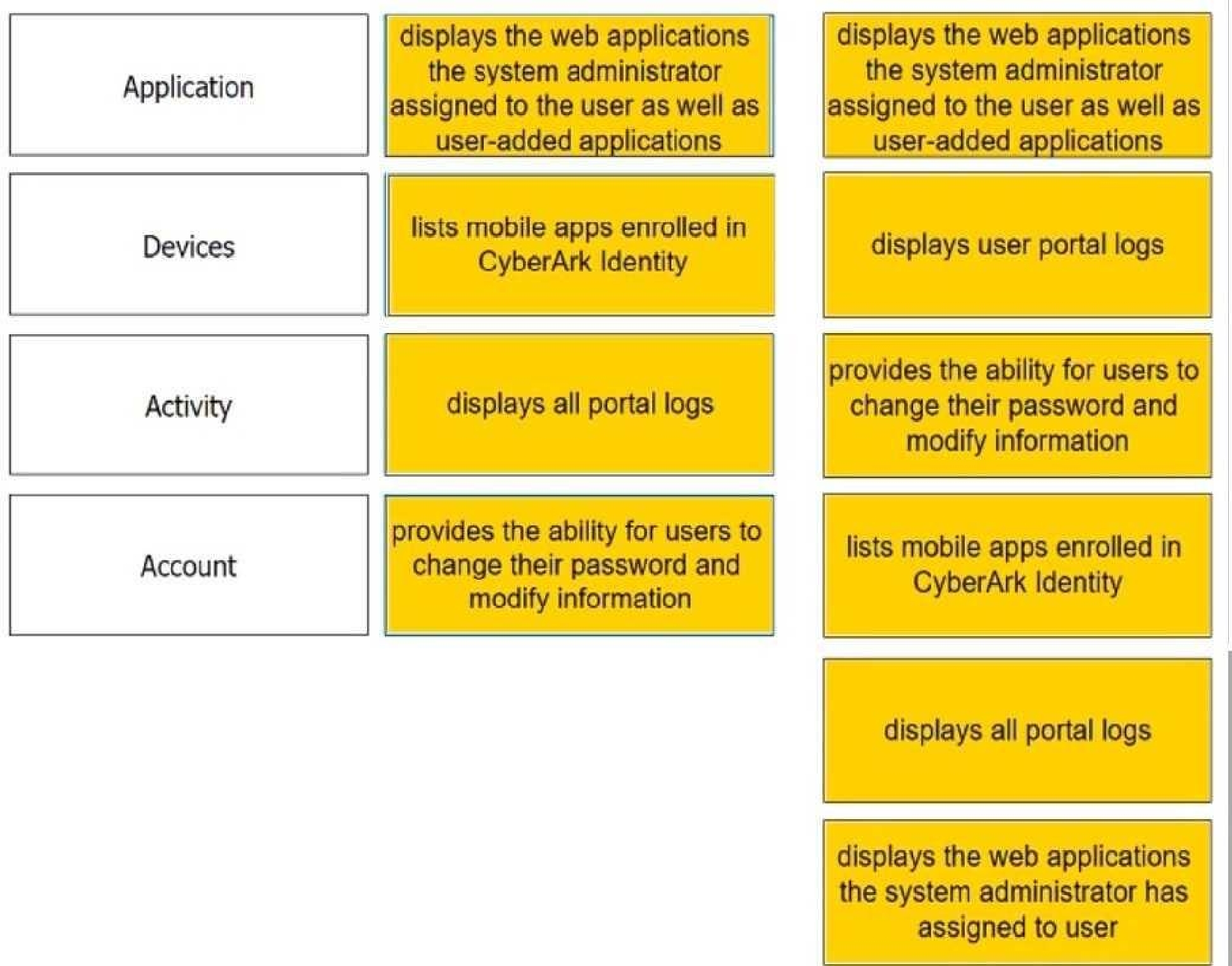
DRAG DROP Match each User Portal tab to the correct description.
Check the image below to see the right answer:Select the answer
1 correct answer
Right Answer: A
Quiz
Question 10/1010/10
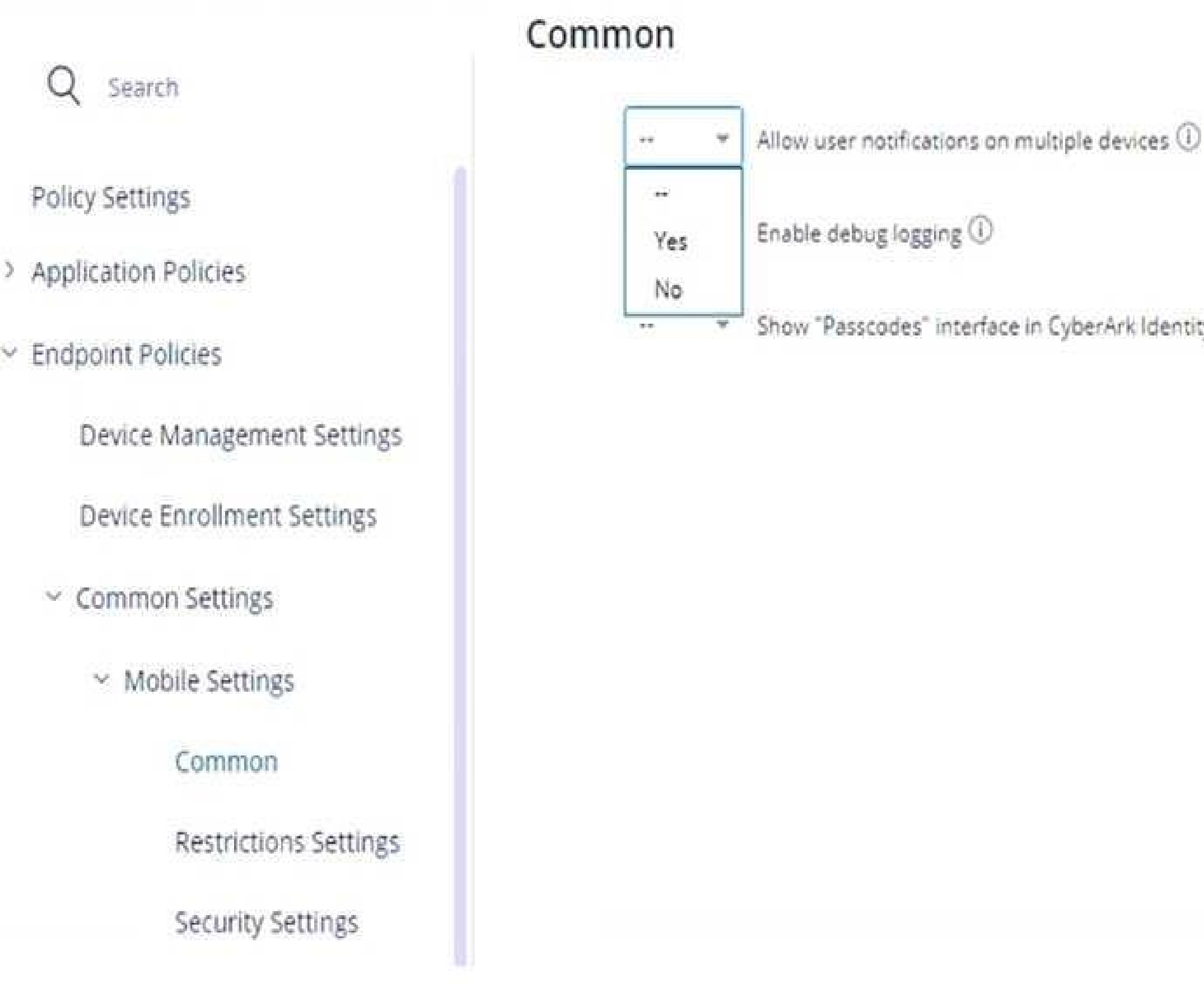
Refer to the exhibit. Within the "Allow user notifications on multiple devices", if you leave the setting as Default (--), what happens if a user triggers a MFA Push notification and has enrolled three different devices?
Select the answer:Select the answer
1 correct answer
A.
The push notification will be sent to none of the enrolled devices.
B.
The push notification will be sent to the first enrolled device only.
C.
The push notification will be sent to all enrolled devices.
D.
The push notification will be sent to the last enrolled device only.
The correct answer is B. The push notification will be sent to the first enrolled device only. The setting "Allow user notifications on multiple devices" controls whether a single MFA push notification can be delivered to more than one enrolled device for the same user. If this setting is left at Default (--), the system uses the platform’s default behavior. In this case, the default behavior is to send the push notification to only one device, specifically the first enrolled device. Why the other options are incorrect: A. The push notification will be sent to none of the enrolled devices. Incorrect because MFA Push will still be delivered. C. The push notification will be sent to all enrolled devices. Incorrect because multiple-device push delivery is not enabled by the default setting. D. The push notification will be sent to the last enrolled device only. Incorrect because the default behavior is not based on the last enrolled device. So, with the setting left as Default (--), only the first enrolled device receives the MFA push notification.
ACCESS-DEF: CyberArk Defender Access Practice test unlocks all online simulator questions
Thank you for choosing the free version of the ACCESS-DEF: CyberArk Defender Access practice test! Further deepen your knowledge on CyberArk Simulator; by unlocking the full version of our ACCESS-DEF: CyberArk Defender Access Simulator you will be able to take tests with over 64 constantly updated questions and easily pass your exam. 98% of people pass the exam in the first attempt after preparing with our 64 questions.
What to expect from our ACCESS-DEF: CyberArk Defender Access practice tests and how to prepare for any exam?
The ACCESS-DEF: CyberArk Defender Access Simulator Practice Tests are part of the CyberArk Database and are the best way to prepare for any ACCESS-DEF: CyberArk Defender Access exam. The ACCESS-DEF: CyberArk Defender Access practice tests consist of 64 questions and are written by experts to help you and prepare you to pass the exam on the first attempt. The ACCESS-DEF: CyberArk Defender Access database includes questions from previous and other exams, which means you will be able to practice simulating past and future questions. Preparation with ACCESS-DEF: CyberArk Defender Access Simulator will also give you an idea of the time it will take to complete each section of the ACCESS-DEF: CyberArk Defender Access practice test . It is important to note that the ACCESS-DEF: CyberArk Defender Access Simulator does not replace the classic ACCESS-DEF: CyberArk Defender Access study guides; however, the Simulator provides valuable insights into what to expect and how much work needs to be done to prepare for the ACCESS-DEF: CyberArk Defender Access exam.
ACCESS-DEF: CyberArk Defender Access Practice test therefore represents an excellent tool to prepare for the actual exam together with our CyberArk practice test . Our ACCESS-DEF: CyberArk Defender Access Simulator will help you assess your level of preparation and understand your strengths and weaknesses. Below you can read all the quizzes you will find in our ACCESS-DEF: CyberArk Defender Access Simulator and how our unique ACCESS-DEF: CyberArk Defender Access Database made up of real questions:
Info quiz:
Quiz name:ACCESS-DEF: CyberArk Defender Access
Total number of questions:64
Number of questions for the test:50
Pass score:80%
You can prepare for the ACCESS-DEF: CyberArk Defender Access exams with our mobile app. It is very easy to use and even works offline in case of network failure, with all the functions you need to study and practice with our ACCESS-DEF: CyberArk Defender Access Simulator.
Use our Mobile App, available for both Android and iOS devices, with our ACCESS-DEF: CyberArk Defender Access Simulator . You can use it anywhere and always remember that our mobile app is free and available on all stores.
Our Mobile App contains all ACCESS-DEF: CyberArk Defender Access practice tests which consist of 64 questions and also provide study material to pass the final ACCESS-DEF: CyberArk Defender Access exam with guaranteed success.
Our ACCESS-DEF: CyberArk Defender Access database contain hundreds of questions and CyberArk Tests related to ACCESS-DEF: CyberArk Defender Access Exam. This way you can practice anywhere you want, even offline without the internet.