The new flashcard feature is useful to memorize questions.
?Change your study mode
At any time, you can change the study mode, and alternate between the practice mode and the exam mode. In practice mode, you can configure for example the number of questions or tests, and other parameters to help you study.
Randomized | 10 Questions per Test | 20 Minutes | 70% to pass|
To re-configure your study mode again and change - for example - the number of tests, whether you have random questions and all other configuration parameters.
?Simulator Configuration
Auto-scroll: You can use the automatic scrolling of the questionnaire that occurs as soon as you answer one or all of the answers to a question correctly. Auto scrolling is activated if you answer a single answer, or as soon as you answer all the mandatory answers. Learning Mode: During learning mode you can get a real time result for your answer.
Free Test
Question: / 10
20:00Min. left
?Restart the current test
To restart the current test by clearing all your answers and the time used up to now. Warning: all answers will be lost.
Question: / 10
4.8(63 Votes)
Quiz
Question 1/101/10
When working with Summon, what is the purpose of the secrets.yml file?
Select the answer:Select the answer
1 correct answer
A.
It is where Summon outputs the secret value after retrieval.
B.
It is where you define which secrets to retrieve.
C.
It is where you store the Conjur URL and host API key.
D.
It is the log file for Summon.
The correct answer is B. It is where you define which secrets to retrieve. Summon is a tool used to inject secrets into an application at runtime. Instead of hardcoding sensitive values into code or configuration files, you tell Summon which secrets it should fetch from a secret management system. The secrets.yml file is the configuration file that lists the secrets your application needs. In it, you specify the environment variables or file-based values that Summon should populate, along with the secret sources and paths to retrieve them from. Why the other options are incorrect: A. It is where Summon outputs the secret value after retrieval. This is not correct. Summon retrieves secrets and passes them to the target application, but secrets.yml is not an output file storing the retrieved values. C. It is where you store the Conjur URL and host API key. This is not correct. Connection details or authentication information may be provided through environment variables or other configuration, but secrets.yml is specifically for declaring secrets to retrieve, not for storing credentials. D. It is the log file for Summon. This is not correct. secrets.yml is not a log file. Logs, if generated, are handled separately by the system or Summon itself. In short, secrets.yml tells Summon what secrets to fetch and how to map them into the application environment.
Right Answer: B
Quiz
Question 2/102/10
You are deploying Kubernetes resources/objects as Conjur identities. In addition to Namespace and Deployment, from which options can you choose? (Choose two.)
Select multiple answer: (Choose 2)Select the answer
2 correct answers
A.
ServiceAccount
B.
Replica sets
C.
Secrets
D.
Tokenreviews
E.
StatefulSet
The correct answers are A. ServiceAccount and E. StatefulSet. Here’s why: When deploying Kubernetes resources as Conjur identities, Conjur can associate identities with certain Kubernetes objects that represent workloads or authentication boundaries. The common choices include: - Namespace - Deployment - ServiceAccount - StatefulSet These are useful because they map to application scope and pod identity in Kubernetes. Why the other options are not correct: - B. Replica sets ReplicaSets are managed internally by Deployments and are not typically used as Conjur identities. - C. Secrets Kubernetes Secrets store sensitive data, but they are not workload identities. - D. Tokenreviews TokenReview is an authentication API resource, not a Kubernetes identity object for deploying resources as Conjur identities. So, in addition to Namespace and Deployment, the valid options are: - A. ServiceAccount - E. StatefulSet If you want, I can also explain how Conjur uses Kubernetes identities in practice.
Right Answer: A, E
Quiz
Question 3/103/10
You modified a Conjur host policy to change its annotations for authentication. How should you load the policy to make those changes?
Select the answer:Select the answer
1 correct answer
A.
Use the default “append” method (e.g. conjur policy load <branch> <policy-file>).
B.
Use the “replace” method (e.g. conjur policy load – –replace <branch> <policy-file>).
C.
Use the “delete” method (e.g. conjur policy load – –delete <branch> <policy-file>).
D.
Use the “update” method (e.g. conjur policy load – –update <branch> <policy-file>).
The correct answer is B. Use the “replace” method. In Conjur, host annotations are part of the policy definition. If you change annotations in the policy file, simply loading the policy with the default append behavior will not remove or overwrite existing annotation values in the way you need. The append method is mainly for adding new policy data without replacing existing definitions. To apply changes to annotations for authentication, you should reload the policy using the replace option: conjur policy load --replace <branch> <policy-file> Why this is correct: - replace updates the existing policy content in that branch - it ensures the modified annotations take effect - it is the proper way to synchronize Conjur with changed policy definitions Why the other options are incorrect: - A. append: adds policy content but does not fully replace existing definitions, so it may leave old annotation data in place - C. delete: not a valid standard policy load method for applying modifications - D. update: also not the correct Conjur policy load method for this use case So if you modified a host policy’s annotations for authentication, load it with --replace to apply those changes properly.
Right Answer: B
Quiz
Question 4/104/10
When installing the Vault Conjur Synchronizer, you see this error: Forbidden Logon Token is Empty – Cannot logon Unauthorized What must you ensure to remediate the issue?
Select the answer:Select the answer
1 correct answer
A.
This admin user must not be logged in to other sessions during the Vault Conjur Synchronizer installation process.
B.
You specified the correct url for Conjur and it is listed as a SAN on that url’s certificate.
C.
You correctly URI encoded the url in the installation script.
D.
You ran powershell as Administrator and there is sufficient space on the server on which you are running the installation.
The correct answer is B. The error message: Forbidden Logon Token is Empty – Cannot logon Unauthorized indicates that the Vault Conjur Synchronizer cannot successfully authenticate to Conjur during installation. This usually points to a problem reaching the Conjur endpoint securely, often related to the URL or TLS certificate trust. Why B is correct: You must ensure that the Conjur URL is correct and that the URL is included as a Subject Alternative Name (SAN) on the certificate used by that Conjur endpoint. If the URL being used does not match the certificate, the installer may fail to establish a trusted connection, leading to authorization and logon token errors. Why the other options are incorrect: A. This admin user must not be logged in to other sessions during the Vault Conjur Synchronizer installation process. This is not a typical cause of the authentication error shown. Other active sessions do not usually prevent the installer from obtaining a logon token from Conjur. C. You correctly URI encoded the url in the installation script. URI encoding may matter in some scripting contexts, but it is not the primary cause of this specific Forbidden/Unauthorized/logon token empty error. D. You ran powershell as Administrator and there is sufficient space on the server on which you are running the installation. Running PowerShell as Administrator and having enough disk space are general installation prerequisites, but they do not specifically address the Conjur authentication failure described here. In short: This error is most commonly resolved by verifying that the Conjur URL is correct and that the certificate presented by Conjur includes that URL in its SAN field.
Right Answer: B
Quiz
Question 5/105/10
Refer to the exhibit.
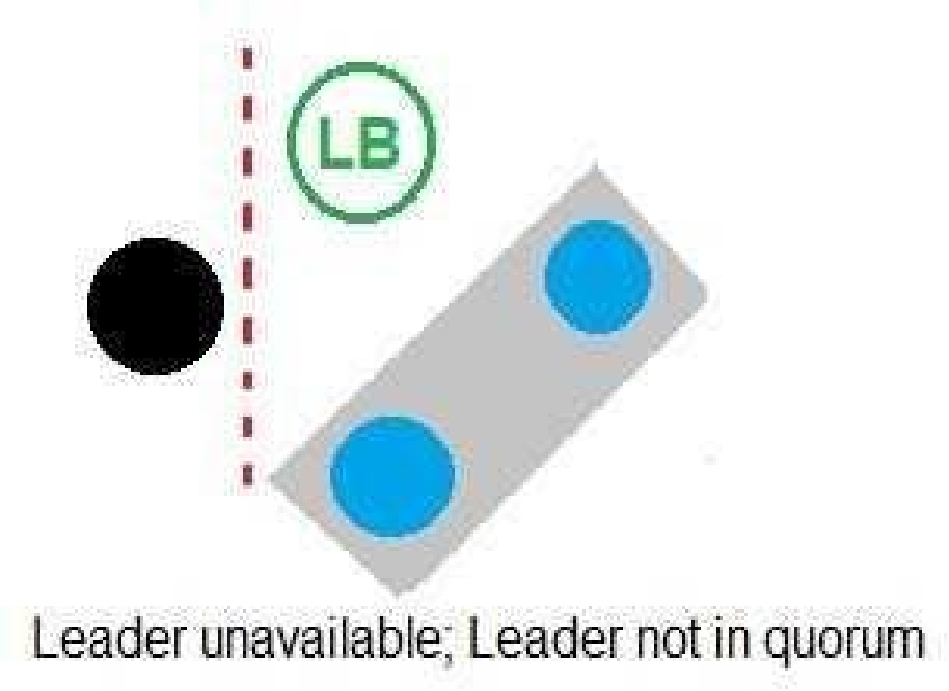
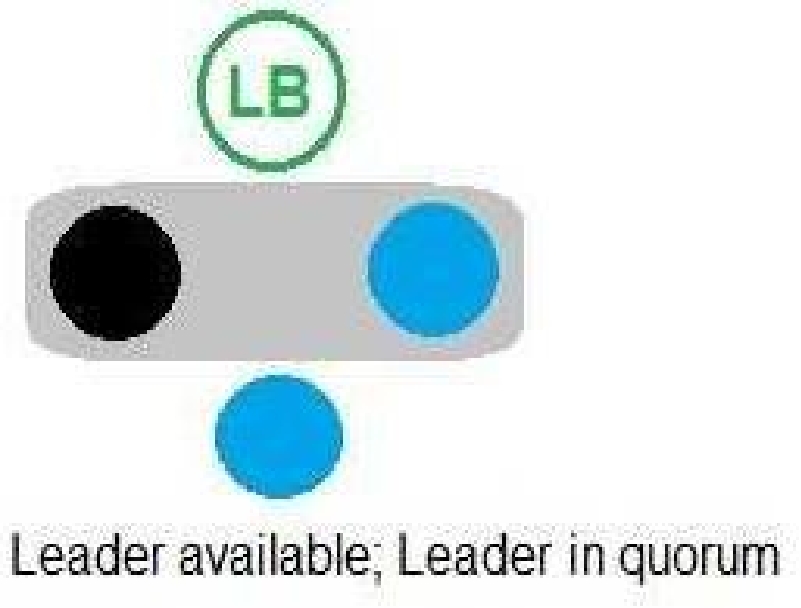
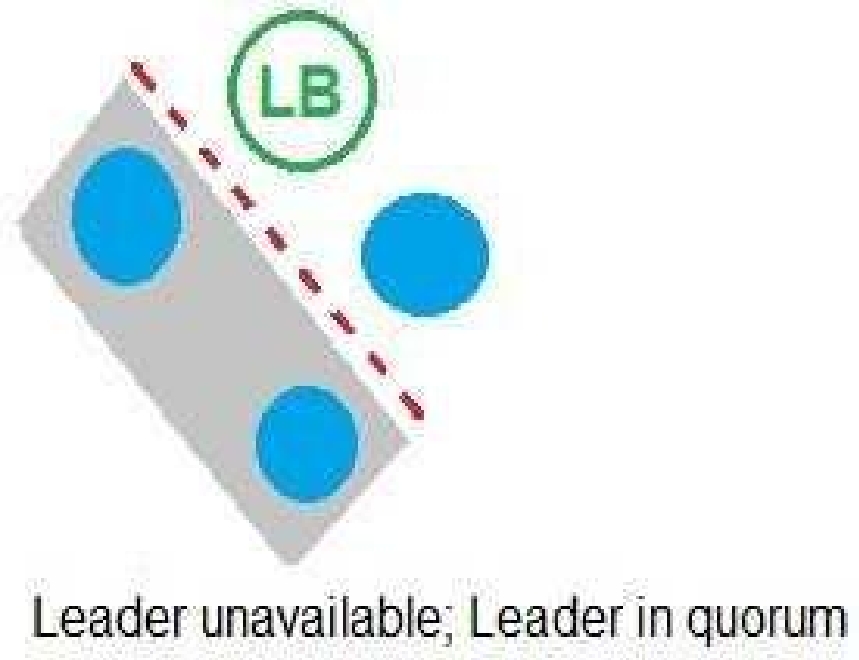
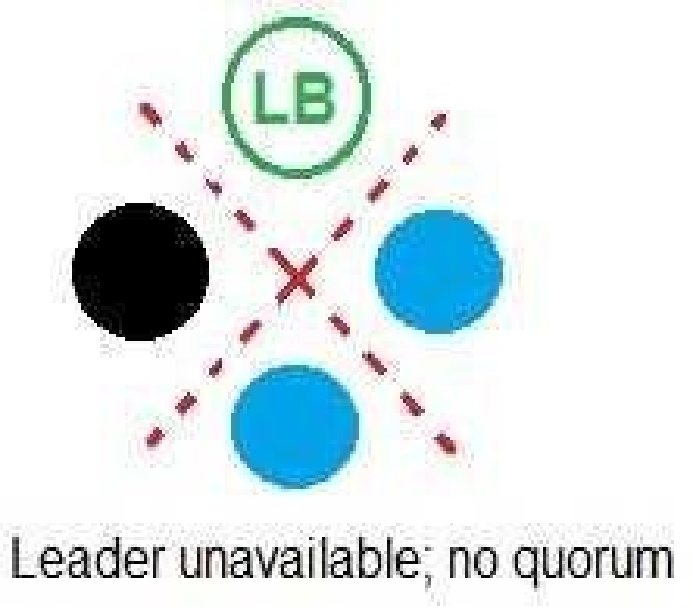
In which example will auto-failover occur?
A)
B)
C)
D)
Select the answer:Select the answer
1 correct answer
A.
Option A
B.
Option B
C.
Option C
D.
Option D
Auto-failover occurs when the active node or primary device becomes unavailable, and the system automatically switches to the standby or backup node without manual intervention. Why option B is correct: - In the exhibit for option B, the failover pair is configured in a way that supports automatic switching. - The standby unit is synchronized and ready to immediately take over if the active unit fails. - This is the kind of setup where auto-failover is expected to happen because the necessary redundancy and failover relationship are properly established. Why the other options are not correct: - Option A does not show a valid automatic failover relationship or required synchronization/state. - Option C does not meet the conditions for automatic takeover. - Option D also lacks the proper active/standby failover configuration needed for auto-failover. In short, auto-failover will occur only in the configuration shown in option B.
Right Answer: B
Quiz
Question 6/106/10
An application is having authentication issues when trying to securely retrieve credential’s from the Vault using the CCP webservices RESTAPI. CyberArk Support advised that further debugging should be enabled on the CCP server to output a trace file to review detailed logs to help isolate the problem. What best describes how to enable debug for CCP?
Select the answer:Select the answer
1 correct answer
A.
Edit web.config. change the “AIMWebServiceTrace” value, restart Windows Web Server (IIS)
B.
In the PVWA, go to the Applications tab, select the Application in question, go to Options > Logging and choose Debug.
C.
From the command line, run appprvmgr.exe update_config logging=debug.
D.
Edit the basic_appprovider.conf, change the “AIMWebServiceTrace" value, and restart the provider.
The correct answer is A. CCP stands for Central Credential Provider, and when you need more detailed troubleshooting information from the CCP web service, the debug/trace level is controlled on the CCP server itself through its web application configuration. Why A is correct: - The CCP web service is hosted in IIS. - To enable detailed tracing, you edit the web.config file for the CCP web application. - In that configuration, you change the AIMWebServiceTrace setting to enable tracing/debug output. - After making the change, you restart IIS so the updated configuration takes effect. - This causes CCP to generate a trace file that Support can use to analyze authentication or retrieval problems. Why the other options are incorrect: B. PVWA application logging - This applies to application objects managed in PVWA, not to CCP web service debugging. - It is related to application authentication settings, not enabling trace logs on the CCP server. C. appprvmgr.exe update_config logging=debug - This is not the standard method for enabling CCP web service tracing. - It does not correspond to the CCP IIS-hosted web service debug procedure described by CyberArk Support. D. Edit basic_appprovider.conf - This file is associated with other CyberArk components, not the CCP web service. - Changing AIMWebServiceTrace in this file is not the correct way to enable CCP debug tracing. In summary: To troubleshoot CCP web service authentication issues, enable tracing by editing web.config, setting AIMWebServiceTrace appropriately, and restarting IIS.
Right Answer: A
Quiz
Question 7/107/10
When working with Credential Providers in a Privileged Cloud setting, what is a special consideration?
Select the answer:Select the answer
1 correct answer
A.
If there are installation issues, troubleshooting may need to involve the Privileged Cloud support team.
B.
Credential Providers are not supported in a Privileged Cloud setting.
C.
The AWS Cloud account number must be defined in the file main appprovider.conf. <platform>.<version> found in the AppProviderConf Safe.
D.
Debug logging for Credential Providers deployed in a Privileged Cloud setting can inadvertently exhaust available disk space.
The correct answer is A. In a Privileged Cloud environment, Credential Providers are managed in a way that can involve both the customer’s environment and the cloud service provider’s support responsibilities. Because of that, if a Credential Provider installation does not work as expected, troubleshooting is not always something that can be resolved entirely on the local system or by the customer alone. It may require assistance from the Privileged Cloud support team. Why A is correct: - Privileged Cloud deployments often have additional restrictions and support boundaries compared with on-premises installations. - Installation problems may involve cloud-specific configuration, connectivity, permissions, or service-side issues. - As a result, support involvement may be necessary to diagnose and resolve the issue properly. Why the other options are incorrect: B. Credential Providers are not supported in a Privileged Cloud setting. - This is incorrect because Credential Providers can be used in Privileged Cloud environments. C. The AWS Cloud account number must be defined in the file main appprovider.conf. <platform>.<version> found in the AppProviderConf Safe. - This is too specific and does not describe the key special consideration for Privileged Cloud. - It sounds like a configuration detail, not the general support consideration being asked about. D. Debug logging for Credential Providers deployed in a Privileged Cloud setting can inadvertently exhaust available disk space. - While excessive logging can be a concern in many systems, this is not the special consideration highlighted for Privileged Cloud Credential Providers in this question. Summary: The important point is that when Credential Providers are used in Privileged Cloud, installation troubleshooting may require involvement from the Privileged Cloud support team, making A the correct choice.
Right Answer: A
Quiz
Question 8/108/10
While retrieving a secret through REST, the secret retrieval fails to find a matching secret. You know the secret onboarding process was completed, the secret is in the expected safe with the expected object name, and the CCP is able to provide secrets to other applications. What is the most likely cause for this issue?
Select the answer:Select the answer
1 correct answer
A.
The application ID or Application Provider does not have the correct permissions on the safe.
B.
The client certificate fingerprint is not trusted.
C.
The service account running the application does not have the correct permissions on the safe.
D.
The OS user does not have the correct permissions on the safe
The correct answer is A. The application ID or Application Provider does not have the correct permissions on the safe. This question is describing a secret retrieval problem through REST where the following are already confirmed: - The secret onboarding was completed successfully. - The secret exists in the expected safe. - The object name is correct. - The CCP can return secrets for other applications. Those facts tell us the issue is not with onboarding, naming, or the CCP itself. Since the CCP works for other applications, the most likely problem is specific to the application identity being used for this request. In CyberArk-style REST retrieval, access to a secret is controlled by permissions assigned to the application identity, often represented by the Application ID or Application Provider. If that identity does not have the right permissions on the safe, the request will fail to locate or retrieve the secret even if the secret is present and correctly named. Why the other options are less likely: B. The client certificate fingerprint is not trusted. This would usually prevent the application from authenticating properly at all, rather than specifically failing to find a matching secret after confirming everything else is in place. C. The service account running the application does not have the correct permissions on the safe. For REST-based retrieval, the main access control is typically tied to the application identity or application provider, not the OS service account. D. The OS user does not have the correct permissions on the safe. This is also not the most likely cause for REST retrieval. Safe permissions are usually checked against the application identity used by the REST request, not the local OS user. So the best answer is A because the application-specific permissions on the safe are the most likely missing requirement.
Right Answer: A
Quiz
Question 9/109/10
You are setting up a Kubernetes integration with Conjur. With performance as the key deciding factor, namespace and service account will be used as identity characteristics. Which authentication method should you choose?
Select the answer:Select the answer
1 correct answer
A.
JWT-based authentication
B.
Certificate-based authentication
C.
API key authentication
D.
Connect (OIDC) authentication
The correct answer is A. JWT-based authentication. When integrating Kubernetes with Conjur, the goal is usually to let workloads prove their identity securely and efficiently. If performance is the main deciding factor, JWT-based authentication is the best choice because it is lightweight and well-suited to Kubernetes-native identity patterns. Why JWT-based authentication is correct: - Kubernetes can issue and use service account tokens in JWT format. - Conjur can verify the token and use claims such as namespace and service account to identify the workload. - This avoids heavier authentication mechanisms and extra network or certificate management overhead. - It fits naturally with Kubernetes identity, where namespace and service account are common identity characteristics. Why the other options are not correct: B. Certificate-based authentication - Certificates can provide strong security, but they require more operational overhead. - Managing certificate issuance, rotation, and validation is more complex than using JWTs. - This makes it less attractive when performance and simplicity are the key concerns. C. API key authentication - API keys are generally not the preferred method for Kubernetes workload identity. - They are less dynamic and less aligned with native Kubernetes identity constructs like namespace and service account. - This makes them a weaker fit for this use case. D. Connect (OIDC) authentication - OIDC is commonly used for federated identity and external identity providers. - While secure and flexible, it is typically more involved than JWT-based service account authentication for Kubernetes workloads. - It is not the best choice when the question emphasizes performance and Kubernetes-native identity mapping. Conclusion: For a Kubernetes integration with Conjur where namespace and service account are used as identity characteristics and performance is the top priority, JWT-based authentication is the most appropriate method.
Right Answer: A
Quiz
Question 10/1010/10
When attempting to retrieve a credential, you receive an error 401 – Malformed Authorization Token. What is the cause of the issue?
Select the answer:Select the answer
1 correct answer
A.
The token is not correctly encoded.
B.
The token you are trying to retrieve does not exist.
C.
The host does not have access to the credential with the current token.
D.
The credential has not been initialized.
The correct answer is A. The token is not correctly encoded. A 401 error with the message "Malformed Authorization Token" means the system could not properly read or validate the authorization token provided in the request. This usually happens when the token is incorrectly formatted, corrupted, truncated, or not encoded in the expected way. Why the other options are incorrect: - B. The token you are trying to retrieve does not exist. This would typically produce a not found type of error, not a malformed authorization token error. - C. The host does not have access to the credential with the current token. This would indicate an authorization or permission problem, but the token itself would still be valid. The error here specifically says the token is malformed, meaning the problem is with the token format rather than access rights. - D. The credential has not been initialized. This refers to the state of the credential, not the authorization token. It would result in a different error message. In summary: The error points to a problem with the token’s encoding or structure, so the issue is that the token is not correctly encoded.
Secret-Sen: CyberArk Sentry Secrets Manager Practice test unlocks all online simulator questions
Thank you for choosing the free version of the Secret-Sen: CyberArk Sentry Secrets Manager practice test! Further deepen your knowledge on CyberArk Simulator; by unlocking the full version of our Secret-Sen: CyberArk Sentry Secrets Manager Simulator you will be able to take tests with over 60 constantly updated questions and easily pass your exam. 98% of people pass the exam in the first attempt after preparing with our 60 questions.
What to expect from our Secret-Sen: CyberArk Sentry Secrets Manager practice tests and how to prepare for any exam?
The Secret-Sen: CyberArk Sentry Secrets Manager Simulator Practice Tests are part of the CyberArk Database and are the best way to prepare for any Secret-Sen: CyberArk Sentry Secrets Manager exam. The Secret-Sen: CyberArk Sentry Secrets Manager practice tests consist of 60 questions and are written by experts to help you and prepare you to pass the exam on the first attempt. The Secret-Sen: CyberArk Sentry Secrets Manager database includes questions from previous and other exams, which means you will be able to practice simulating past and future questions. Preparation with Secret-Sen: CyberArk Sentry Secrets Manager Simulator will also give you an idea of the time it will take to complete each section of the Secret-Sen: CyberArk Sentry Secrets Manager practice test . It is important to note that the Secret-Sen: CyberArk Sentry Secrets Manager Simulator does not replace the classic Secret-Sen: CyberArk Sentry Secrets Manager study guides; however, the Simulator provides valuable insights into what to expect and how much work needs to be done to prepare for the Secret-Sen: CyberArk Sentry Secrets Manager exam.
Secret-Sen: CyberArk Sentry Secrets Manager Practice test therefore represents an excellent tool to prepare for the actual exam together with our CyberArk practice test . Our Secret-Sen: CyberArk Sentry Secrets Manager Simulator will help you assess your level of preparation and understand your strengths and weaknesses. Below you can read all the quizzes you will find in our Secret-Sen: CyberArk Sentry Secrets Manager Simulator and how our unique Secret-Sen: CyberArk Sentry Secrets Manager Database made up of real questions:
You can prepare for the Secret-Sen: CyberArk Sentry Secrets Manager exams with our mobile app. It is very easy to use and even works offline in case of network failure, with all the functions you need to study and practice with our Secret-Sen: CyberArk Sentry Secrets Manager Simulator.
Use our Mobile App, available for both Android and iOS devices, with our Secret-Sen: CyberArk Sentry Secrets Manager Simulator . You can use it anywhere and always remember that our mobile app is free and available on all stores.
Our Mobile App contains all Secret-Sen: CyberArk Sentry Secrets Manager practice tests which consist of 60 questions and also provide study material to pass the final Secret-Sen: CyberArk Sentry Secrets Manager exam with guaranteed success.
Our Secret-Sen: CyberArk Sentry Secrets Manager database contain hundreds of questions and CyberArk Tests related to Secret-Sen: CyberArk Sentry Secrets Manager Exam. This way you can practice anywhere you want, even offline without the internet.