Quiz D-PSC-MN-01: Dell EMC Dell PowerScale Maintenance Version 2
Quiz
H400 chassis during racking and stacking What is the purpose of the gap?
Quiz
directory operations on the cluster?
Quiz
existing cluster with legacy nodes.
How should the network cables be connected?
Quiz
is unresponsive.
What action must the engineer take?
Quiz
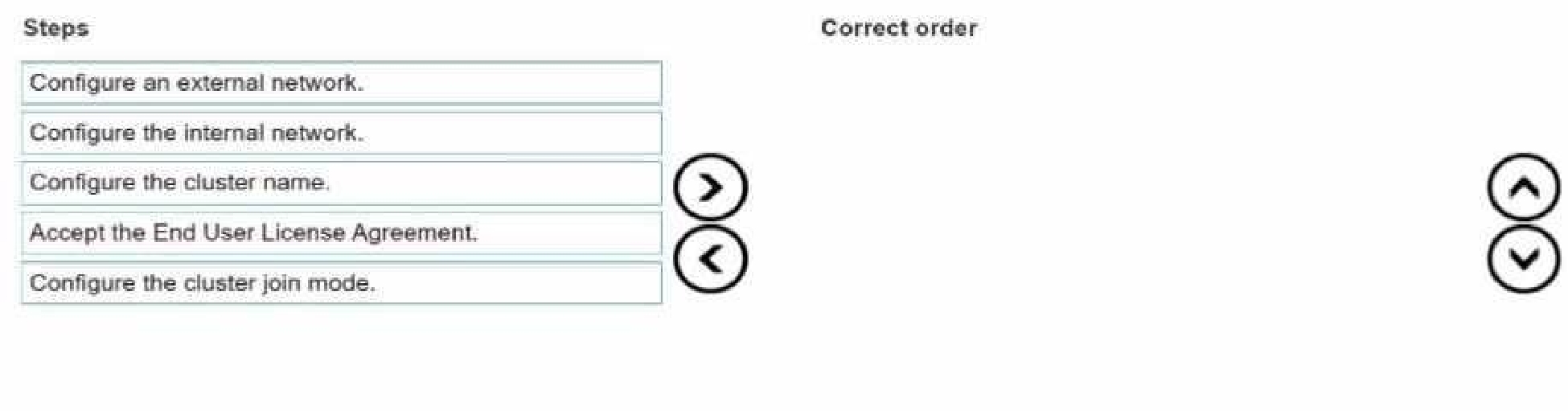
A platform engineer is creating a Dell PowerScale cluster using the Configuration Wizard. They have
selected the Create a new cluster option. What Is the correct sequence of steps to create the cluster?
Accept End User License Agreement
Configure cluster name
Configure cluster join mode
Configure internal network
Configure external network
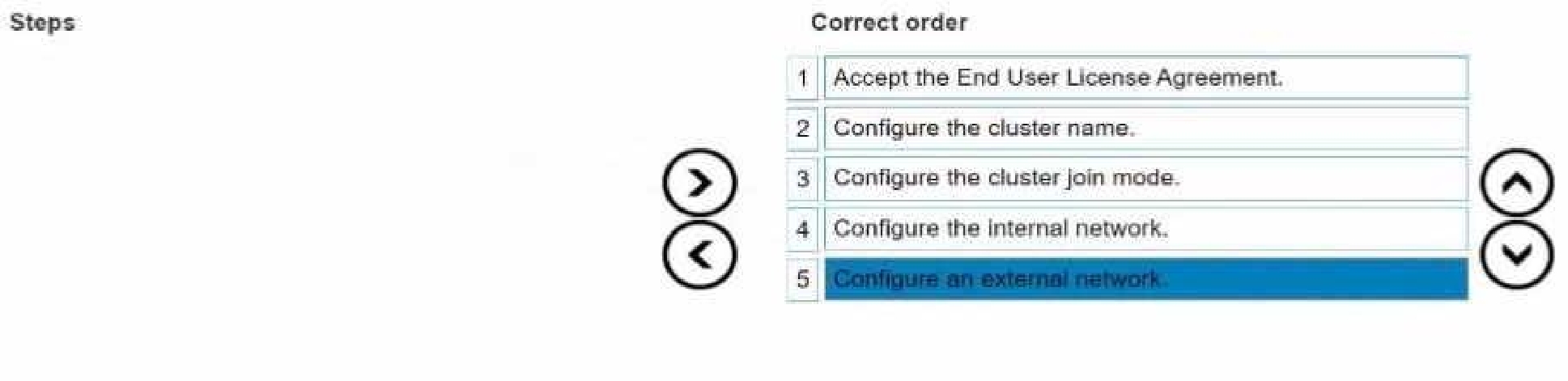
When creating a new Dell PowerScale cluster using the Configuration Wizard, the steps must be
performed in a specific sequence to ensure proper setup and functionality. Below is the detailed
order of the steps with explanations and references to Dell PowerScale documentation.
1. Accept End User License Agreement
Purpose:
Before any configuration can begin, you must accept the End User License Agreement (EULA) to
comply with legal requirements and proceed with the cluster setup.
Action:
Review the EULA presented in the Configuration Wizard.
Select the option to accept the terms and conditions.
Dell PowerScale Reference:
Dell EMC PowerScale OneFS Installation Guide
Chapter: Initial Configuration
The Configuration Wizard begins by displaying the EULA, which must be accepted to continue.
Best Practices:
Carefully read the EULA to understand your rights and obligations.
2. Configure Cluster Name
Purpose:
Assigning a cluster name is essential for identification and management purposes within your
network environment.
Action:
Enter a unique and descriptive name for the cluster when prompted.
Dell PowerScale Reference:
Dell EMC PowerScale OneFS Installation Guide
Section: Configuring Cluster Settings
After accepting the EULA, the wizard prompts for cluster-specific settings, starting with the cluster
name.
Best Practices:
Use a naming convention that aligns with your organization's standards.
Ensure the cluster name is DNS-resolvable if necessary.
3. Configure Cluster Join Mode
Purpose:
Determine whether to create a new cluster or join an existing one.
Since you are creating a new cluster, you need to select the appropriate join mode.
Action:
Choose "Create a new cluster" from the available options.
Dell PowerScale Reference:
Dell EMC PowerScale OneFS Installation Guide
Section: Cluster Creation Options
The wizard asks whether to create a new cluster or join an existing one.
Best Practices:
Verify that all nodes intended for the cluster are correctly cabled and powered on.
4. Configure Internal Network
Purpose:
Set up the internal networking (back-end network) that enables communication between nodes
within the cluster.
Critical for cluster operations, data replication, and management traffic.
Action:
Configure settings for internal interfaces int-a and int-b.
Assign IP address ranges and netmasks as required.
Dell PowerScale Reference:
Dell EMC PowerScale Networking Configuration Guide
Chapter: Configuring Internal Networks
Details on setting up the internal network interfaces during cluster creation.
Best Practices:
Use separate subnets for int-a and int-b to enhance redundancy.
Ensure that the internal network is isolated from external networks for security.
5. Configure External Network
Purpose:
Establish the external networking (front-end network) that allows clients and services to access the
cluster.
Action:
Configure settings for external network interfaces.
Assign IP addresses, netmasks, gateways, and DNS information.
Dell PowerScale Reference:
Dell EMC PowerScale Networking Configuration Guide
Chapter: Configuring External Networks
Provides guidance on setting up external interfaces after internal networking is configured.
Best Practices:
Plan IP addressing to avoid conflicts within your network.
Configure SmartConnect zones if required for load balancing and failover.
Additional Notes:
Sequence Importance:
Following this sequence ensures that foundational settings are established before dependent
configurations.
For example, internal networking must be configured before external networking to ensure proper
node communication.
Validation and Testing:
After completing the Configuration Wizard, validate the cluster setup by checking node status and
network connectivity.
Use the OneFS web administration interface or CLI commands to verify configurations.
Reference to Dell PowerScale Documentation:
Dell EMC PowerScale OneFS Installation Guide
Provides step-by-step instructions for initial cluster setup.
Dell EMC PowerScale Networking Configuration Guide
Offers detailed information on networking configurations and best practices.
Dell EMC PowerScale OneFS Administration Guide
Useful for advanced configurations and cluster management post-installation.
Conclusion:
By following the sequence outlined above, the platform engineer can successfully create a new Dell
PowerScale cluster using the Configuration Wizard. Each step builds upon the previous one, ensuring
a robust and properly configured cluster ready for operation.
Quiz
engineer do after powering off the nodes?
Quiz
Which process or document musi be completed before sending the part back?
Quiz
Quiz
of a newly created cluster. What connection test identifies the problem?
Quiz
What are they attempting to do?
D-PSC-MN-01: Dell EMC Dell PowerScale Maintenance Version 2 Practice test unlocks all online simulator questions
Thank you for choosing the free version of the D-PSC-MN-01: Dell EMC Dell PowerScale Maintenance Version 2 practice test! Further deepen your knowledge on Dell-EMC Simulator; by unlocking the full version of our D-PSC-MN-01: Dell EMC Dell PowerScale Maintenance Version 2 Simulator you will be able to take tests with over 101 constantly updated questions and easily pass your exam. 98% of people pass the exam in the first attempt after preparing with our 101 questions.
BUY NOWWhat to expect from our D-PSC-MN-01: Dell EMC Dell PowerScale Maintenance Version 2 practice tests and how to prepare for any exam?
The D-PSC-MN-01: Dell EMC Dell PowerScale Maintenance Version 2 Simulator Practice Tests are part of the Dell-EMC Database and are the best way to prepare for any D-PSC-MN-01: Dell EMC Dell PowerScale Maintenance Version 2 exam. The D-PSC-MN-01: Dell EMC Dell PowerScale Maintenance Version 2 practice tests consist of 101 questions and are written by experts to help you and prepare you to pass the exam on the first attempt. The D-PSC-MN-01: Dell EMC Dell PowerScale Maintenance Version 2 database includes questions from previous and other exams, which means you will be able to practice simulating past and future questions. Preparation with D-PSC-MN-01: Dell EMC Dell PowerScale Maintenance Version 2 Simulator will also give you an idea of the time it will take to complete each section of the D-PSC-MN-01: Dell EMC Dell PowerScale Maintenance Version 2 practice test . It is important to note that the D-PSC-MN-01: Dell EMC Dell PowerScale Maintenance Version 2 Simulator does not replace the classic D-PSC-MN-01: Dell EMC Dell PowerScale Maintenance Version 2 study guides; however, the Simulator provides valuable insights into what to expect and how much work needs to be done to prepare for the D-PSC-MN-01: Dell EMC Dell PowerScale Maintenance Version 2 exam.
BUY NOWD-PSC-MN-01: Dell EMC Dell PowerScale Maintenance Version 2 Practice test therefore represents an excellent tool to prepare for the actual exam together with our Dell-EMC practice test . Our D-PSC-MN-01: Dell EMC Dell PowerScale Maintenance Version 2 Simulator will help you assess your level of preparation and understand your strengths and weaknesses. Below you can read all the quizzes you will find in our D-PSC-MN-01: Dell EMC Dell PowerScale Maintenance Version 2 Simulator and how our unique D-PSC-MN-01: Dell EMC Dell PowerScale Maintenance Version 2 Database made up of real questions:
Info quiz:
- Quiz name:D-PSC-MN-01: Dell EMC Dell PowerScale Maintenance Version 2
- Total number of questions:101
- Number of questions for the test:50
- Pass score:80%
You can prepare for the D-PSC-MN-01: Dell EMC Dell PowerScale Maintenance Version 2 exams with our mobile app. It is very easy to use and even works offline in case of network failure, with all the functions you need to study and practice with our D-PSC-MN-01: Dell EMC Dell PowerScale Maintenance Version 2 Simulator.
Use our Mobile App, available for both Android and iOS devices, with our D-PSC-MN-01: Dell EMC Dell PowerScale Maintenance Version 2 Simulator . You can use it anywhere and always remember that our mobile app is free and available on all stores.
Our Mobile App contains all D-PSC-MN-01: Dell EMC Dell PowerScale Maintenance Version 2 practice tests which consist of 101 questions and also provide study material to pass the final D-PSC-MN-01: Dell EMC Dell PowerScale Maintenance Version 2 exam with guaranteed success. Our D-PSC-MN-01: Dell EMC Dell PowerScale Maintenance Version 2 database contain hundreds of questions and Dell-EMC Tests related to D-PSC-MN-01: Dell EMC Dell PowerScale Maintenance Version 2 Exam. This way you can practice anywhere you want, even offline without the internet.
BUY NOW