The new flashcard feature is useful to memorize questions.
?Change your study mode
At any time, you can change the study mode, and alternate between the practice mode and the exam mode. In practice mode, you can configure for example the number of questions or tests, and other parameters to help you study.
Randomized | 10 Questions per Test | 20 Minutes | 70% to pass|
To re-configure your study mode again and change - for example - the number of tests, whether you have random questions and all other configuration parameters.
?Simulator Configuration
Auto-scroll: You can use the automatic scrolling of the questionnaire that occurs as soon as you answer one or all of the answers to a question correctly. Auto scrolling is activated if you answer a single answer, or as soon as you answer all the mandatory answers. Learning Mode: During learning mode you can get a real time result for your answer.
Free Test
Question: / 10
20:00Min. left
?Restart the current test
To restart the current test by clearing all your answers and the time used up to now. Warning: all answers will be lost.
Question: / 10
5.0(138 Votes)
Quiz
Question 1/101/10
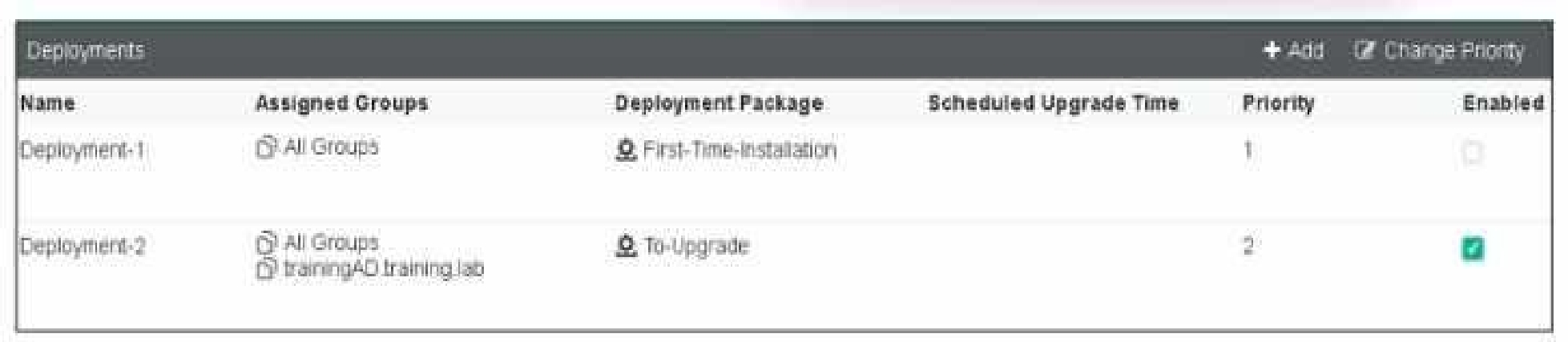
Refer to the exhibit, which shows FortiClient EMS deployment, profiles.
When an administrator creates a deployment profile on FortiClient EMS. which statement about the deployment profile is true?
Select the answer:Select the answer
1 correct answer
A.
Deployment-2 will upgrade FortiClient on both the AD group and workgroup.
B.
Deployment-1 will install FortiClient on new AO group endpoints.
C.
Deployment-2 will install FortiClient on both the AD group and workgroup.
D.
Deployment-1 will upgrade FortiClient only on the workgroup.
Deployment Profiles Analysis: Deployment-1 has the "First-Time-Installation" package and is assigned to "All Groups" with a priority of 1 but is not enabled. Deployment-2 has the "To-Upgrade" package, is assigned to both "All Groups" and "trainingAD.training.lab," with a priority of 2 and is enabled. Evaluating Deployment-2: Deployment-2 will upgrade FortiClient on both "All Groups" and "trainingAD.training.lab" since it is enabled and assigned to these groups. This includes both AD (Active Directory) groups and workgroups. Conclusion: Since Deployment-2 is set to upgrade FortiClient on all the assigned groups and workgroups, the correct answer is A. Reference: FortiClient EMS deployment and profile documentation from the study guides.
Right Answer: A
Quiz
Question 2/102/10
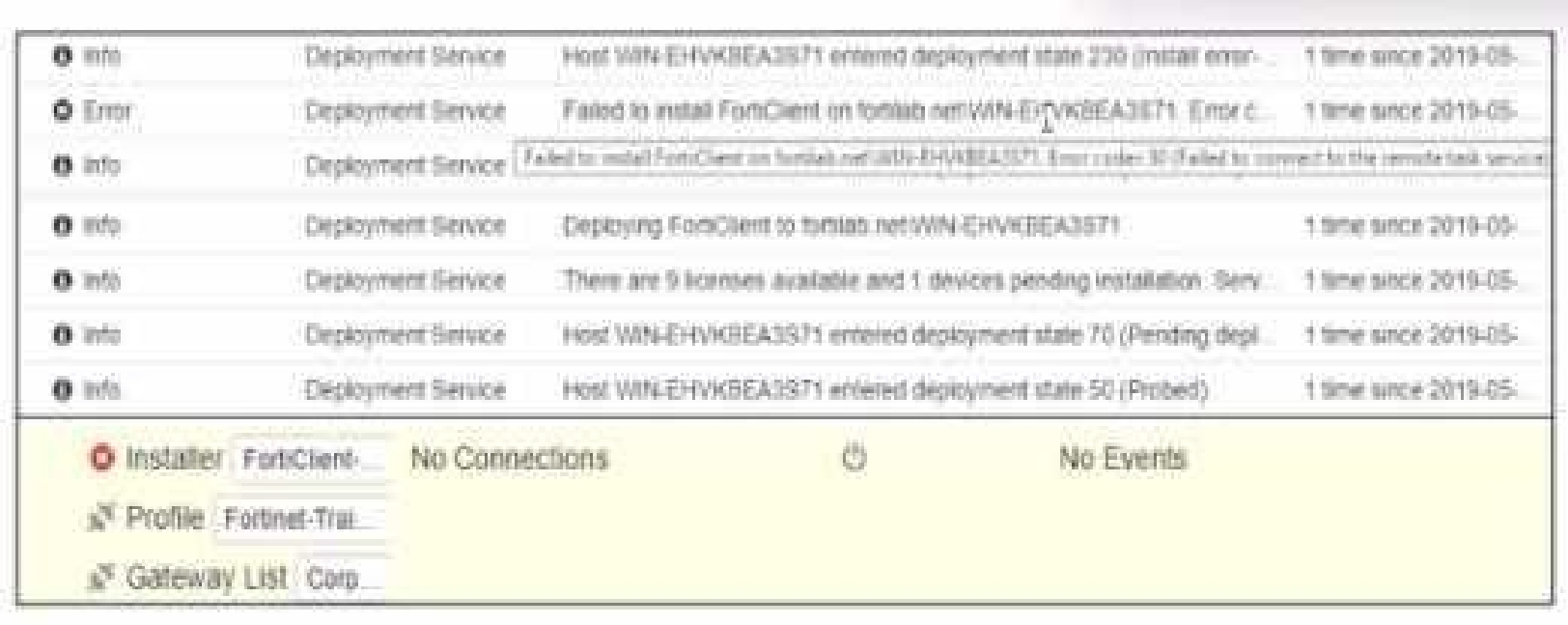
Exhibit.
Based on the logs shown in the exhibit, why did FortiClient EMS tail to install FortiClient on the endpoint?
Select the answer:Select the answer
1 correct answer
A.
The FortiClient antivirus service is not running.
B.
The Windows installer service is not running.
C.
The remote registry service is not running.
D.
The task scheduler service is not running.
Https://community.fortinet.com/t5/FortiClient/Technical-Note-FortiClient-fails-to-install-from- FortiClient-EMS/ta-p/193680 The deployment service error message may be caused by any of the following. Try eliminating them all, one at a time. 1. Wrong username or password in the EMS profile 2. Endpoint is unreachable over the network 3. Task Scheduler service is not running 4. Remote Registry service is not running 5. Windows firewall is blocking connection
Right Answer: D
Quiz
Question 3/103/10
Which two statements are true about ZTNA? {Choose two.)
Select multiple answer: (Choose 2)Select the answer
2 correct answers
A.
ZTNA manages access for remote users only.
B.
ZTNA provides role-based access.
C.
ZTNA provides a security posture check.
D.
ZTNA manages access through the client only.
ZTNA (Zero Trust Network Access) is a security architecture that is designed to provide secure access to network resources for users, devices, and applications. It is based on the principle of "never trust, always verify," which means that all access to network resources is subject to strict verification and authentication. Two functions of ZTNA are: ZTNA provides a security posture check: ZTNA checks the security posture of devices and users that are attempting to access network resources. This can include checks on the device's software and hardware configurations, security settings, and the presence of malware. ZTNA provides role-based access: ZTNA controls access to network resources based on the role of the user or device. Users and devices are granted access to only those resources that are necessary for their role, and all other access is denied. This helps to prevent unauthorized access and minimize the risk of data breaches.
Right Answer: B, C
Quiz
Question 4/104/10
When site categories are disabled in FortiClient web filter, which feature can be used to protect the endpoint from malicious web access?
Select the answer:Select the answer
1 correct answer
A.
Real-time protection list
B.
Block malicious websites on antivirus
C.
FortiSandbox URL list
D.
Web exclusion list
Web Filter Functionality: When site categories are disabled in the FortiClient web filter, the endpoint still requires protection from malicious web access. Alternative Protection Features: The web exclusion list can be used to manage and block specific URLs that are known to be malicious, providing a way to control and secure web access even without site categories being enabled. Conclusion: The correct feature that can be used to protect the endpoint in this scenario is the web exclusion list (D). Reference: FortiClient web filter configuration and features from the study guides.
Right Answer: D
Quiz
Question 5/105/10
Exhibit.
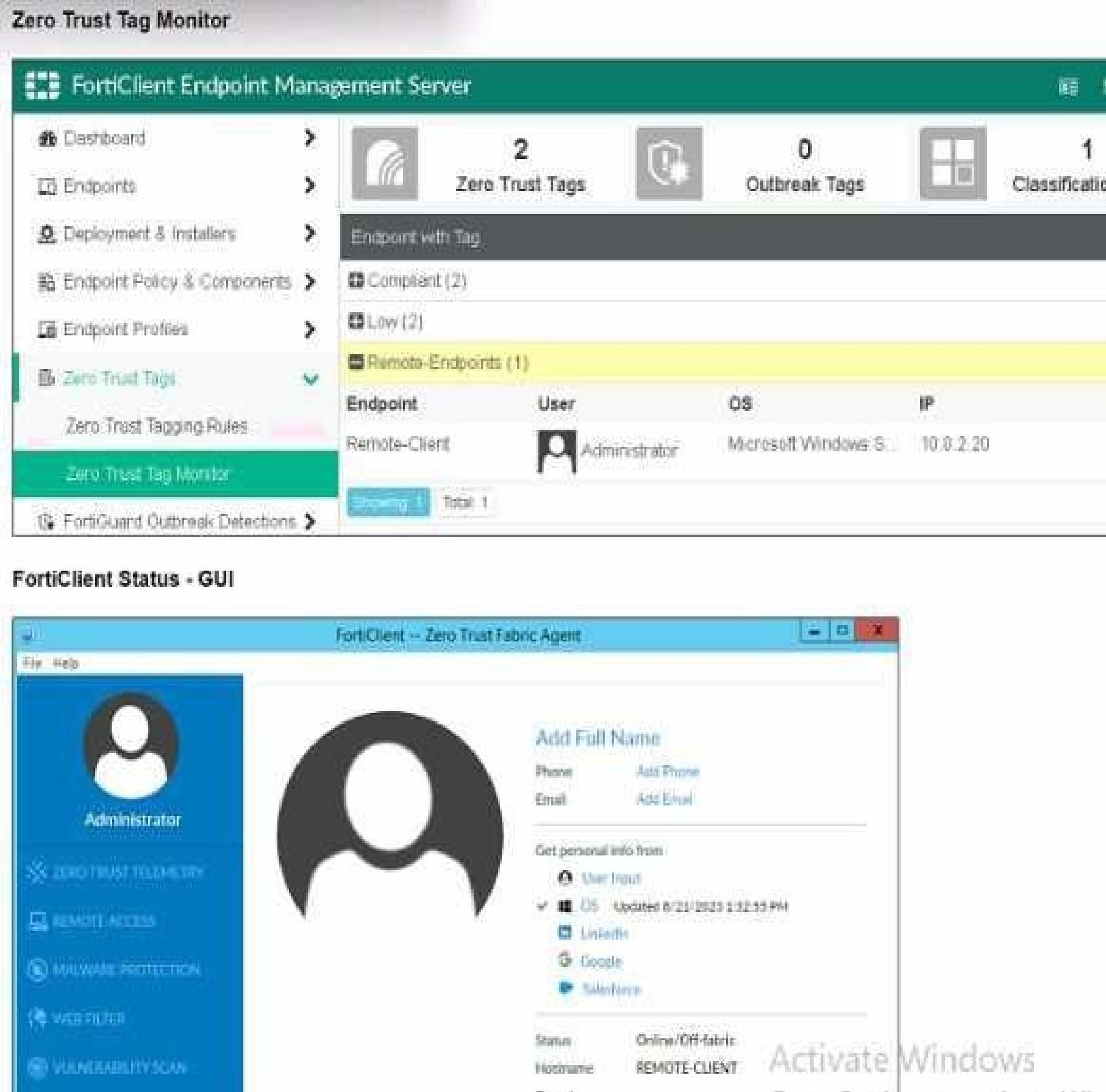
Refer to the exhibits, which show the Zero Trust Tag Monitor and the FortiClient GUI status. Remote-Client is tagged as Remote-User* on the FortiClient EMS Zero Trust Tag Monitor. What must an administrator do to show the tag on the FortiClient GUI?
Select the answer:Select the answer
1 correct answer
A.
Change the FortiClient EMS shared settings to enable tag visibility.
B.
Change the endpoint alerts configuration to enable tag visibility.
C.
Update tagging rule logic to enable tag visibility.
D.
Change the FortiClient system settings to enable lag visibility.
Observation of Exhibits: The exhibits show the Zero Trust Tag Monitor on FortiClient EMS and the FortiClient GUI status. Remote-Client is tagged as "Remote-Endpoints" on the FortiClient EMS Zero Trust Tag Monitor. Enabling Tag Visibility: To show the tag on the FortiClient GUI, the endpoint alerts configuration must be adjusted to enable tag visibility. Verification: The correct action is to change the endpoint alerts configuration to enable tag visibility, ensuring that the tag appears in the FortiClient GUI. Reference: FortiClient EMS and FortiClient configuration documentation from the study guides.
Right Answer: B
Quiz
Question 6/106/10
An administrator wants to simplify remote access without asking users to provide user credentials Which access control method provides this solution?
Select the answer:Select the answer
1 correct answer
A.
ZTNA full mode
B.
SSL VPN
C.
L2TP
D.
ZTNA IP/MAC littering mode
Simplifying Remote Access: The administrator wants to simplify remote access without asking users to provide user credentials. Evaluating Access Control Methods: ZTNA full mode can provide seamless access by leveraging device identity and posture, eliminating the need for user credentials for each access request. Other methods like SSL VPN and L2TP typically require user credentials. Conclusion: The correct access control method that provides this solution is ZTNA full mode. Reference: ZTNA section in the FortiGate Infrastructure 7.2 Study Guide.
Right Answer: A
Quiz
Question 7/107/10
A FortiClient EMS administrator has enabled the compliance rule for the sales department Which Fortinet device will enforce compliance with dynamic access control?
Select the answer:Select the answer
1 correct answer
A.
FortiClient
B.
FortiClient EMS
C.
FortiGate
D.
FortiAnalyzer
Understanding Compliance Rules: The compliance rule for the sales department needs to be enforced dynamically. Enforcing Compliance: FortiGate is responsible for enforcing compliance by integrating with FortiClient EMS to apply dynamic access control based on compliance status. Conclusion: The Fortinet device that will enforce compliance with dynamic access control is the FortiGate. Reference: Compliance and enforcement documentation from FortiGate and FortiClient EMS study guides.
Right Answer: C
Quiz
Question 8/108/10
In a ForliSandbox integration, what does the remediation option do?
Select the answer:Select the answer
1 correct answer
A.
Deny access to a tile when it sees no results
B.
Alert and notify only
C.
Exclude specified files
D.
Wait for FortiSandbox results before allowing files
Understanding FortiSandbox Integration: In a FortiSandbox integration, various remediation options are available for handling suspicious files. Evaluating Remediation Options: The remediation option for alerting and notifying without blocking access or waiting for results is essential to understand. Conclusion: The correct action for the remediation option in this context is to alert and notify only. Reference: FortiSandbox integration documentation from the study guides.
Right Answer: B
Quiz
Question 9/109/10
An administrator needs to connect FortiClient EMS as a fabric connector to FortiGate What is the prerequisite to get FortiClient EMS lo connect to FortiGate successfully?
Select the answer:Select the answer
1 correct answer
A.
Import and verify the FortiClient EMS tool CA certificate on FortiGate.
B.
Revoke and update the FortiClient client certificate on EMS.
C.
Import and verify the FortiClient client certificate on FortiGate.
D.
Revoke and update the FortiClient EMS root CA.
Connecting FortiClient EMS to FortiGate: The administrator needs to establish a connection between FortiClient EMS and FortiGate as a fabric connector. Prerequisites for Connection: A key prerequisite is the import and verification of the FortiClient EMS tool CA certificate on FortiGate to ensure a trusted connection. Conclusion: The correct prerequisite for a successful connection is to import and verify the FortiClient EMS tool CA certificate on FortiGate. Reference: FortiClient EMS and FortiGate connection and certificate management documentation from the study guides.
Right Answer: A
Quiz
Question 10/1010/10
An administrator must add an authentication server on FortiClient EMS in a different security zone that cannot allow a direct connection. Which solution can provide secure access between FortiClient EMS and the Active Directory server?
Select the answer:Select the answer
1 correct answer
A.
Configure and deploy a FortiGate device between FortiClient EMS and the Active Directory server.
B.
Configure Active Directory and install FortiClient EMS on the same VM.
C.
Configure a slave FortiClient EMS on a virtual machine.
D.
Configure an Active Directory connector between FortiClient EMS and the Active Directory server.
Requirement: The administrator needs to add an authentication server on FortiClient EMS in a different security zone that cannot allow a direct connection. Solution Analysis: The goal is to securely connect FortiClient EMS and the Active Directory server despite being in different security zones. Evaluating Options: Installing FortiClient EMS on the same VM as Active Directory (option B) is not practical due to security zone separation. Configuring a slave FortiClient EMS on a virtual machine (option C) does not address the need for secure communication. Configuring an Active Directory connector (option D) may not be sufficient without secure routing. Conclusion: Deploying a FortiGate device between FortiClient EMS and the Active Directory server ensures secure and controlled access between the two zones. Reference: FortiClient EMS and FortiGate configuration and deployment documentation from the study guides.
FCP_FCT_AD-7.4: Fortinet NSE 6 - FortiClient EMS 7.4 Administrator Practice test unlocks all online simulator questions
Thank you for choosing the free version of the FCP_FCT_AD-7.4: Fortinet NSE 6 - FortiClient EMS 7.4 Administrator practice test! Further deepen your knowledge on Fortinet Simulator; by unlocking the full version of our FCP_FCT_AD-7.4: Fortinet NSE 6 - FortiClient EMS 7.4 Administrator Simulator you will be able to take tests with over 68 constantly updated questions and easily pass your exam. 98% of people pass the exam in the first attempt after preparing with our 68 questions.
What to expect from our FCP_FCT_AD-7.4: Fortinet NSE 6 - FortiClient EMS 7.4 Administrator practice tests and how to prepare for any exam?
The FCP_FCT_AD-7.4: Fortinet NSE 6 - FortiClient EMS 7.4 Administrator Simulator Practice Tests are part of the Fortinet Database and are the best way to prepare for any FCP_FCT_AD-7.4: Fortinet NSE 6 - FortiClient EMS 7.4 Administrator exam. The FCP_FCT_AD-7.4: Fortinet NSE 6 - FortiClient EMS 7.4 Administrator practice tests consist of 68 questions and are written by experts to help you and prepare you to pass the exam on the first attempt. The FCP_FCT_AD-7.4: Fortinet NSE 6 - FortiClient EMS 7.4 Administrator database includes questions from previous and other exams, which means you will be able to practice simulating past and future questions. Preparation with FCP_FCT_AD-7.4: Fortinet NSE 6 - FortiClient EMS 7.4 Administrator Simulator will also give you an idea of the time it will take to complete each section of the FCP_FCT_AD-7.4: Fortinet NSE 6 - FortiClient EMS 7.4 Administrator practice test . It is important to note that the FCP_FCT_AD-7.4: Fortinet NSE 6 - FortiClient EMS 7.4 Administrator Simulator does not replace the classic FCP_FCT_AD-7.4: Fortinet NSE 6 - FortiClient EMS 7.4 Administrator study guides; however, the Simulator provides valuable insights into what to expect and how much work needs to be done to prepare for the FCP_FCT_AD-7.4: Fortinet NSE 6 - FortiClient EMS 7.4 Administrator exam.
FCP_FCT_AD-7.4: Fortinet NSE 6 - FortiClient EMS 7.4 Administrator Practice test therefore represents an excellent tool to prepare for the actual exam together with our Fortinet practice test . Our FCP_FCT_AD-7.4: Fortinet NSE 6 - FortiClient EMS 7.4 Administrator Simulator will help you assess your level of preparation and understand your strengths and weaknesses. Below you can read all the quizzes you will find in our FCP_FCT_AD-7.4: Fortinet NSE 6 - FortiClient EMS 7.4 Administrator Simulator and how our unique FCP_FCT_AD-7.4: Fortinet NSE 6 - FortiClient EMS 7.4 Administrator Database made up of real questions:
You can prepare for the FCP_FCT_AD-7.4: Fortinet NSE 6 - FortiClient EMS 7.4 Administrator exams with our mobile app. It is very easy to use and even works offline in case of network failure, with all the functions you need to study and practice with our FCP_FCT_AD-7.4: Fortinet NSE 6 - FortiClient EMS 7.4 Administrator Simulator.
Use our Mobile App, available for both Android and iOS devices, with our FCP_FCT_AD-7.4: Fortinet NSE 6 - FortiClient EMS 7.4 Administrator Simulator . You can use it anywhere and always remember that our mobile app is free and available on all stores.
Our Mobile App contains all FCP_FCT_AD-7.4: Fortinet NSE 6 - FortiClient EMS 7.4 Administrator practice tests which consist of 68 questions and also provide study material to pass the final FCP_FCT_AD-7.4: Fortinet NSE 6 - FortiClient EMS 7.4 Administrator exam with guaranteed success.
Our FCP_FCT_AD-7.4: Fortinet NSE 6 - FortiClient EMS 7.4 Administrator database contain hundreds of questions and Fortinet Tests related to FCP_FCT_AD-7.4: Fortinet NSE 6 - FortiClient EMS 7.4 Administrator Exam. This way you can practice anywhere you want, even offline without the internet.