The new flashcard feature is useful to memorize questions.
?Change your study mode
At any time, you can change the study mode, and alternate between the practice mode and the exam mode. In practice mode, you can configure for example the number of questions or tests, and other parameters to help you study.
Randomized | 10 Questions per Test | 20 Minutes | 70% to pass|
To re-configure your study mode again and change - for example - the number of tests, whether you have random questions and all other configuration parameters.
?Simulator Configuration
Auto-scroll: You can use the automatic scrolling of the questionnaire that occurs as soon as you answer one or all of the answers to a question correctly. Auto scrolling is activated if you answer a single answer, or as soon as you answer all the mandatory answers. Learning Mode: During learning mode you can get a real time result for your answer.
Free Test
Question: / 10
20:00Min. left
?Restart the current test
To restart the current test by clearing all your answers and the time used up to now. Warning: all answers will be lost.
Question: / 10
4.8(358 Votes)
Quiz
Question 1/101/10
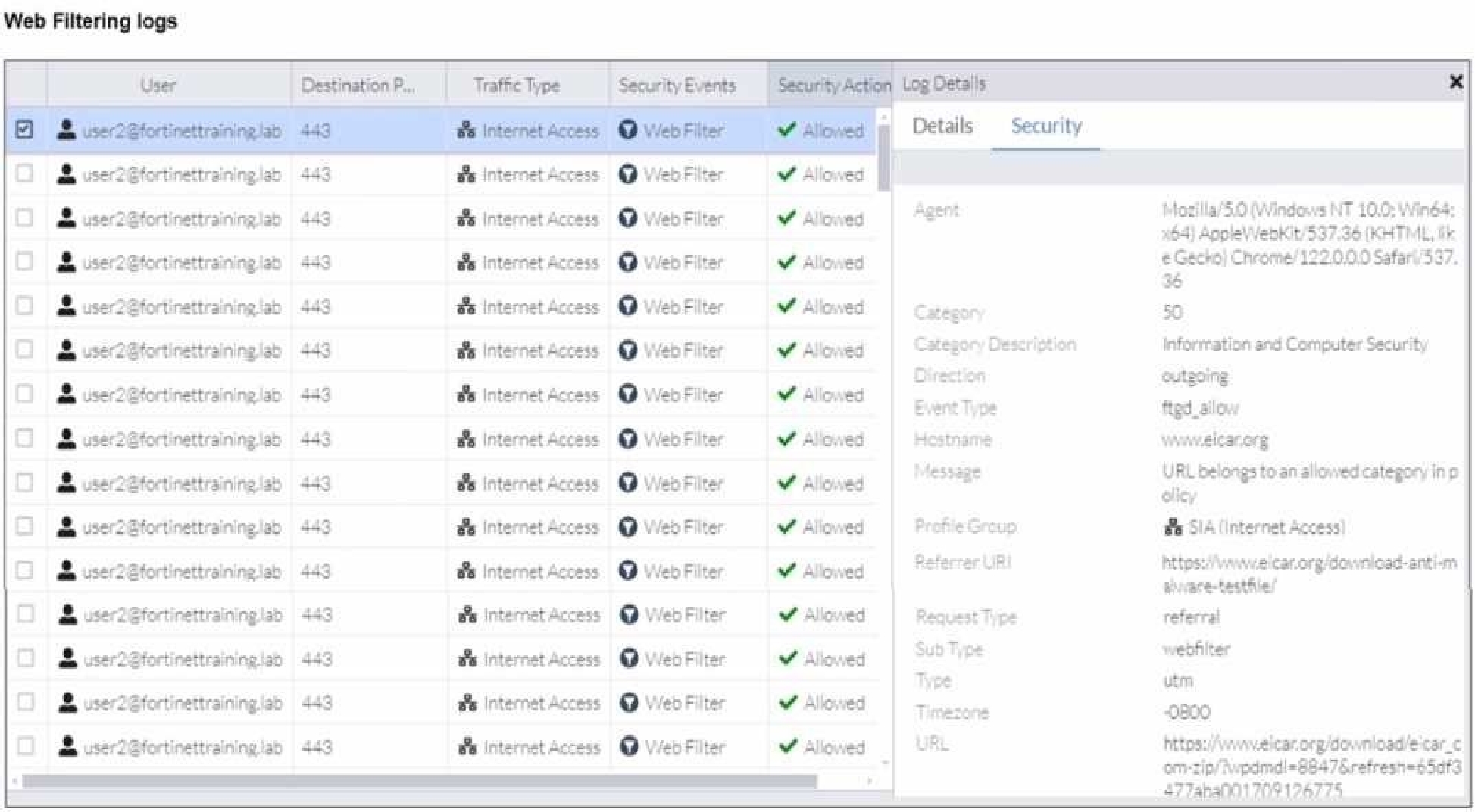
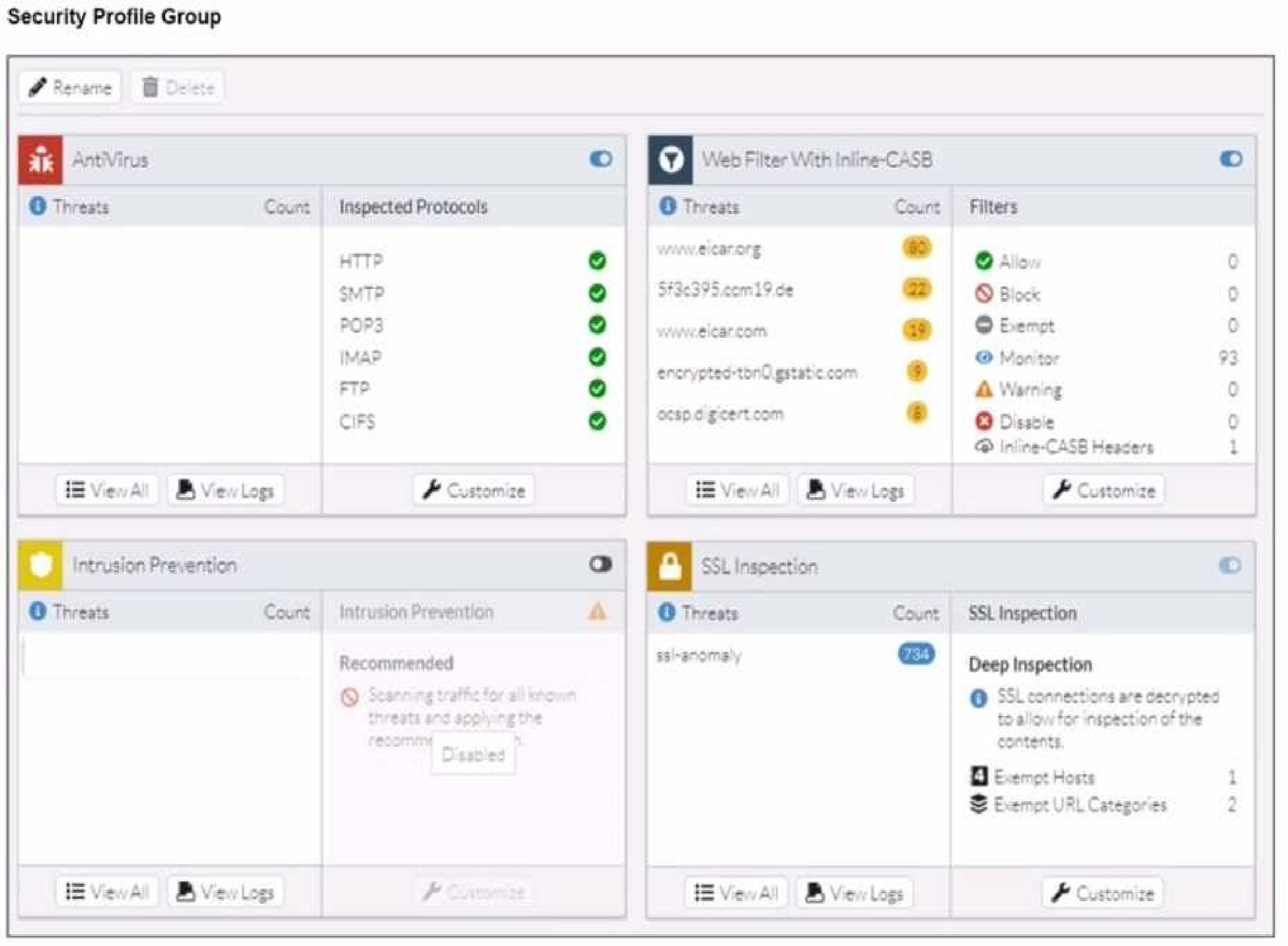
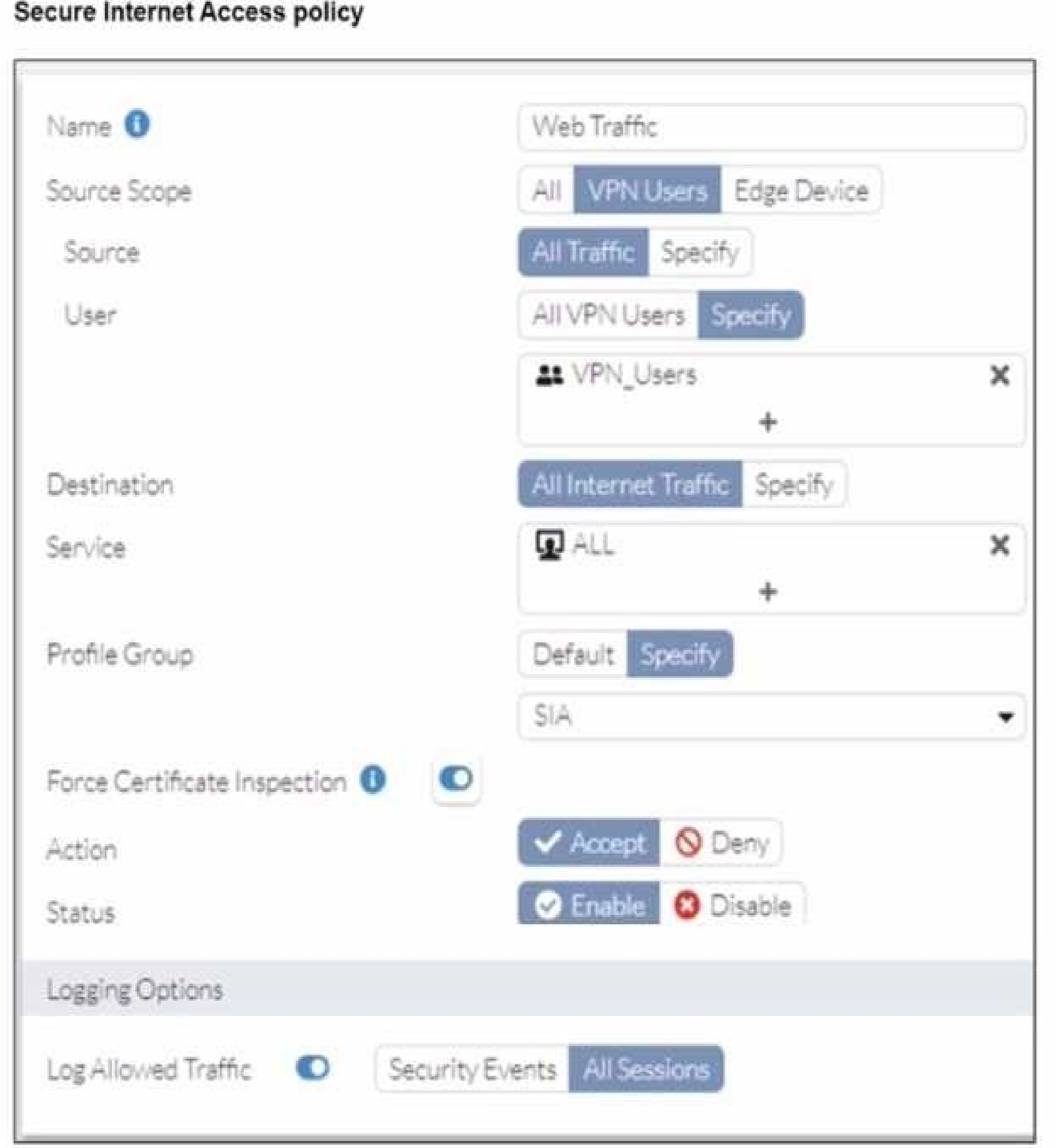
Refer to the exhibits.
A FortiSASE administrator has configured an antivirus profile in the security profile group and applied it to the internet access policy. Remote users are still able to download the eicar.com-zip file from https://eicar.org. Traffic logs show traffic is allowed by the policy. Which configuration on FortiSASE is allowing users to perform the download?
Select the answer:Select the answer
1 correct answer
A.
Web filter is allowing the traffic.
B.
IPS is disabled in the security profile group.
C.
The HTTPS protocol is not enabled in the antivirus profile.
D.
Force certificate inspection is enabled in the policy.
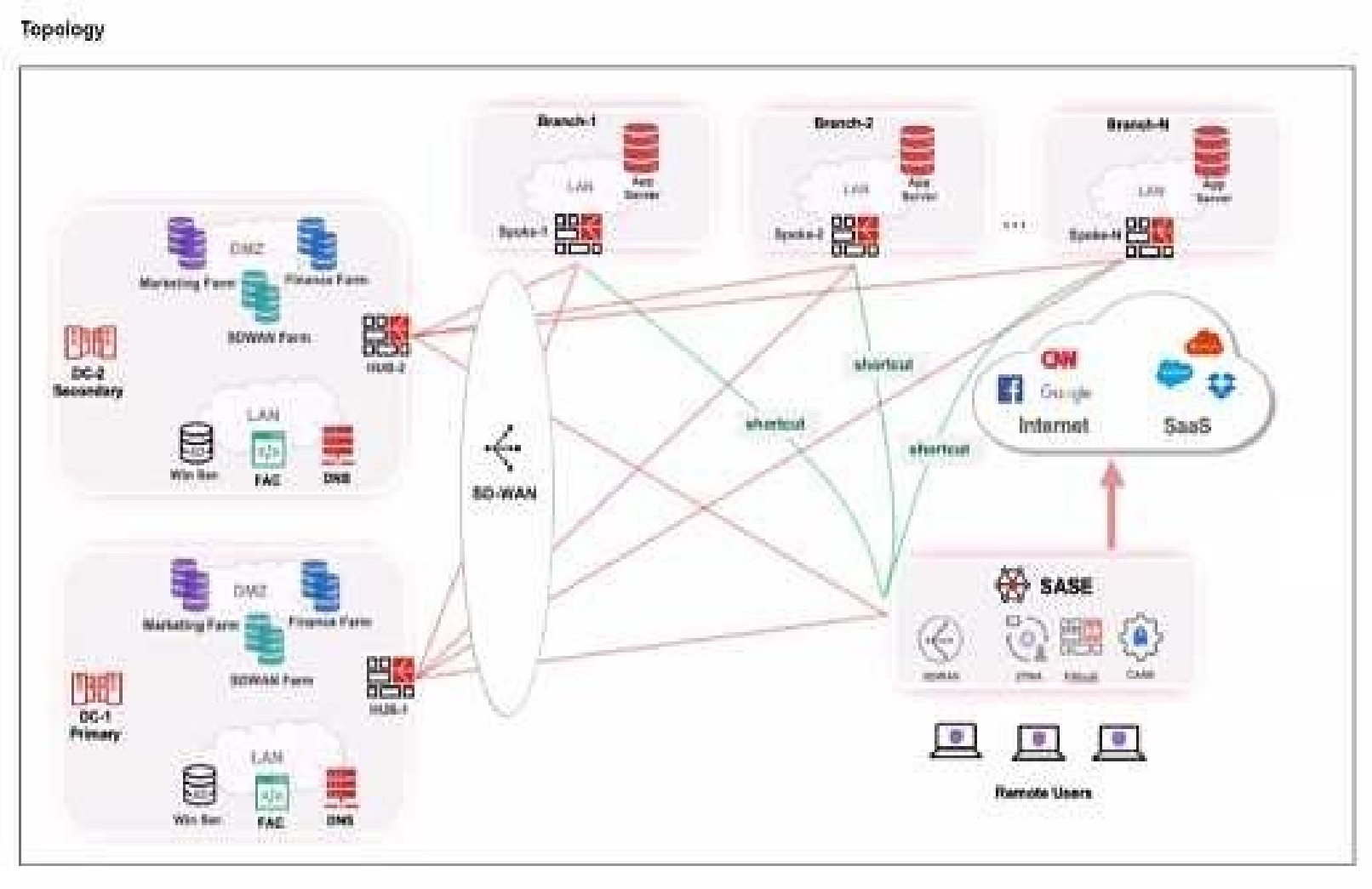
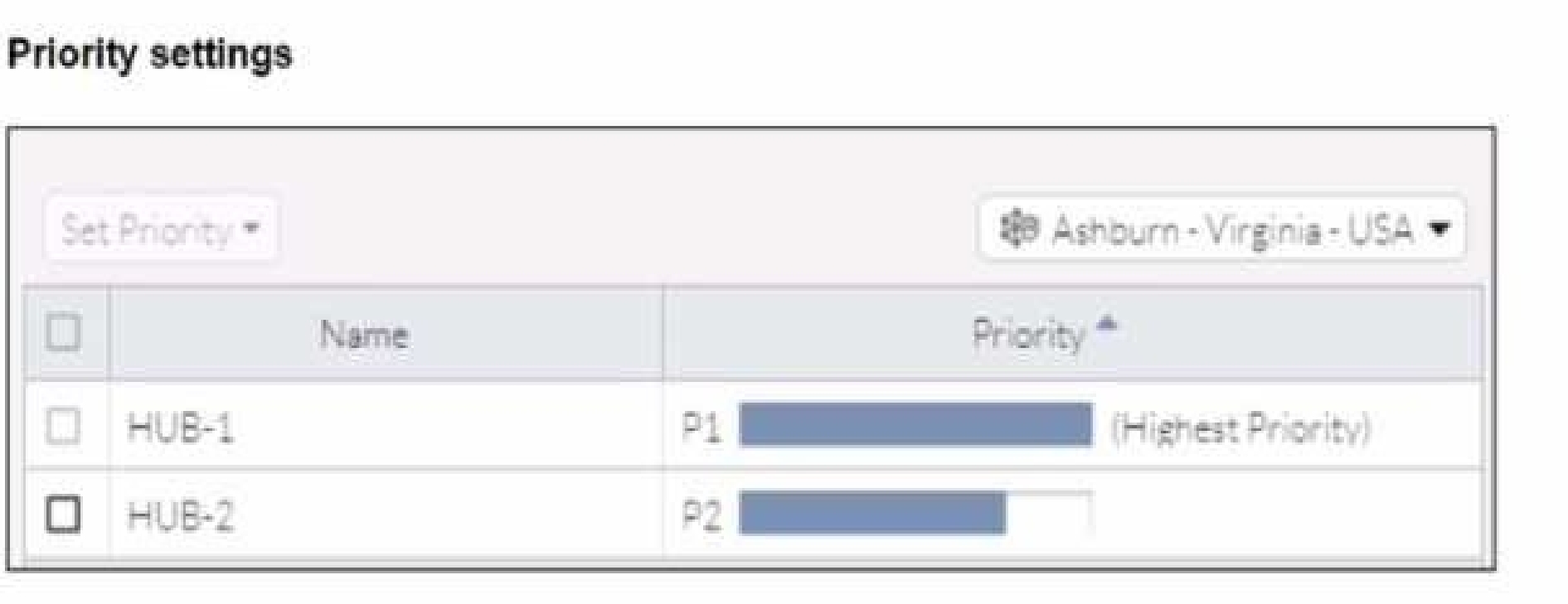
When remote users connected to FortiSASE require access to internal resources on Branch-2. how will traffic be routed?
Select the answer:Select the answer
1 correct answer
A.
FortiSASE will use the SD-WAN capability and determine that traffic will be directed to HUB-2. which will then route traffic to Branch-2.
B.
FortiSASE will use the AD VPN protocol and determine that traffic will be directed to Branch-2 directly, using a static route
C.
FortiSASE will use the SD-WAN capability and determine that traffic will be directed to HUB-1, which will then route traffic to Branch-2.
D.
FortiSASE will use the AD VPN protocol and determine that traffic will be directed to Branch-2 directly, using a dynamic route
Right Answer: D
Quiz
Question 3/103/10
What are two advantages of using zero-trust tags? (Choose two.)
Select multiple answer: (Choose 2)Select the answer
2 correct answers
A.
Zero-trust tags can be used to allow or deny access to network resources
B.
Zero-trust tags can determine the security posture of an endpoint.
C.
Zero-trust tags can be used to create multiple endpoint profiles which can be applied to different endpoints
D.
Zero-trust tags can be used to allow secure web gateway (SWG) access
Zero-trust tags are critical in implementing zero-trust network access (ZTNA) policies. Here are the two key advantages of using zero-trust tags: Access Control (Allow or Deny): Zero-trust tags can be used to define policies that either allow or deny access to specific network resources based on the tag associated with the user or device. This granular control ensures that only authorized users or devices with the appropriate tags can access sensitive resources, thereby enhancing security. Determining Security Posture: Zero-trust tags can be utilized to assess and determine the security posture of an endpoint. Based on the assigned tags, FortiSASE can evaluate the device's compliance with security policies, such as antivirus status, patch levels, and configuration settings. Devices that do not meet the required security posture can be restricted from accessing the network or given limited access. Reference: FortiOS 7.2 Administration Guide: Provides detailed information on configuring and using zero-trust tags for access control and security posture assessment. FortiSASE 23.2 Documentation: Explains how zero-trust tags are implemented and used within the FortiSASE environment for enhancing security and compliance.
Right Answer: A, B
Quiz
Question 4/104/10
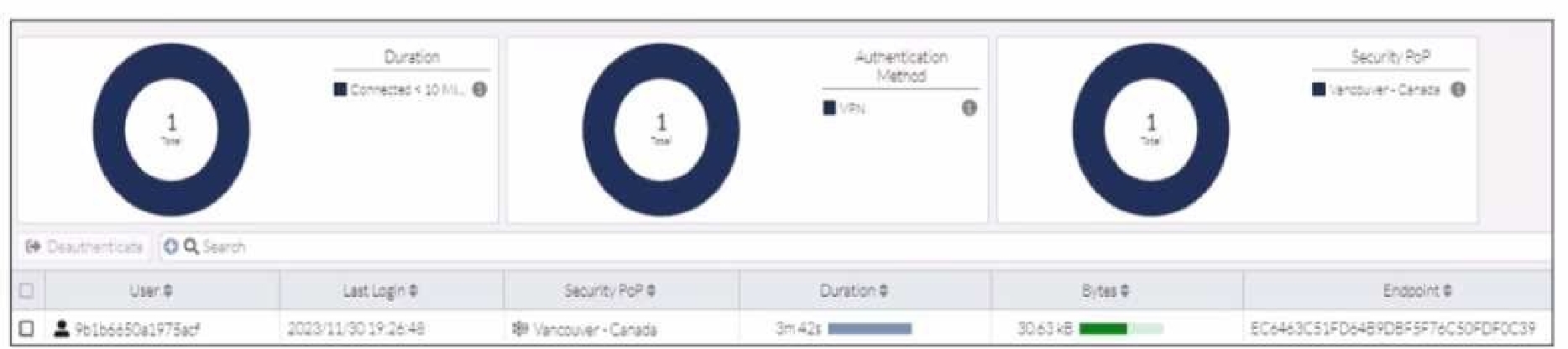
Refer to the exhibit.
In the user connection monitor, the FortiSASE administrator notices the user name is showing random characters. Which configuration change must the administrator make to get proper user information?
Select the answer:Select the answer
1 correct answer
A.
Turn off log anonymization on FortiSASE.
B.
Add more endpoint licenses on FortiSASE.
C.
Configure the username using FortiSASE naming convention.
D.
Change the deployment type from SWG to VPN.
In the user connection monitor, the random characters shown for the username indicate that log anonymization is enabled. Log anonymization is a feature that hides the actual user information in the logs for privacy and security reasons. To display proper user information, you need to disable log anonymization. Log Anonymization: When log anonymization is turned on, the actual usernames are replaced with random characters to protect user privacy. This feature can be beneficial in certain environments but can cause issues when detailed user monitoring is required. Disabling Log Anonymization: Navigate to the FortiSASE settings. Locate the log settings section. Disable the log anonymization feature to ensure that actual usernames are displayed in the logs and user connection monitors. Reference: FortiSASE 23.2 Documentation: Provides detailed steps on enabling and disabling log anonymization. Fortinet Knowledge Base: Explains the impact of log anonymization on user monitoring and logging.
Right Answer: A
Quiz
Question 5/105/10
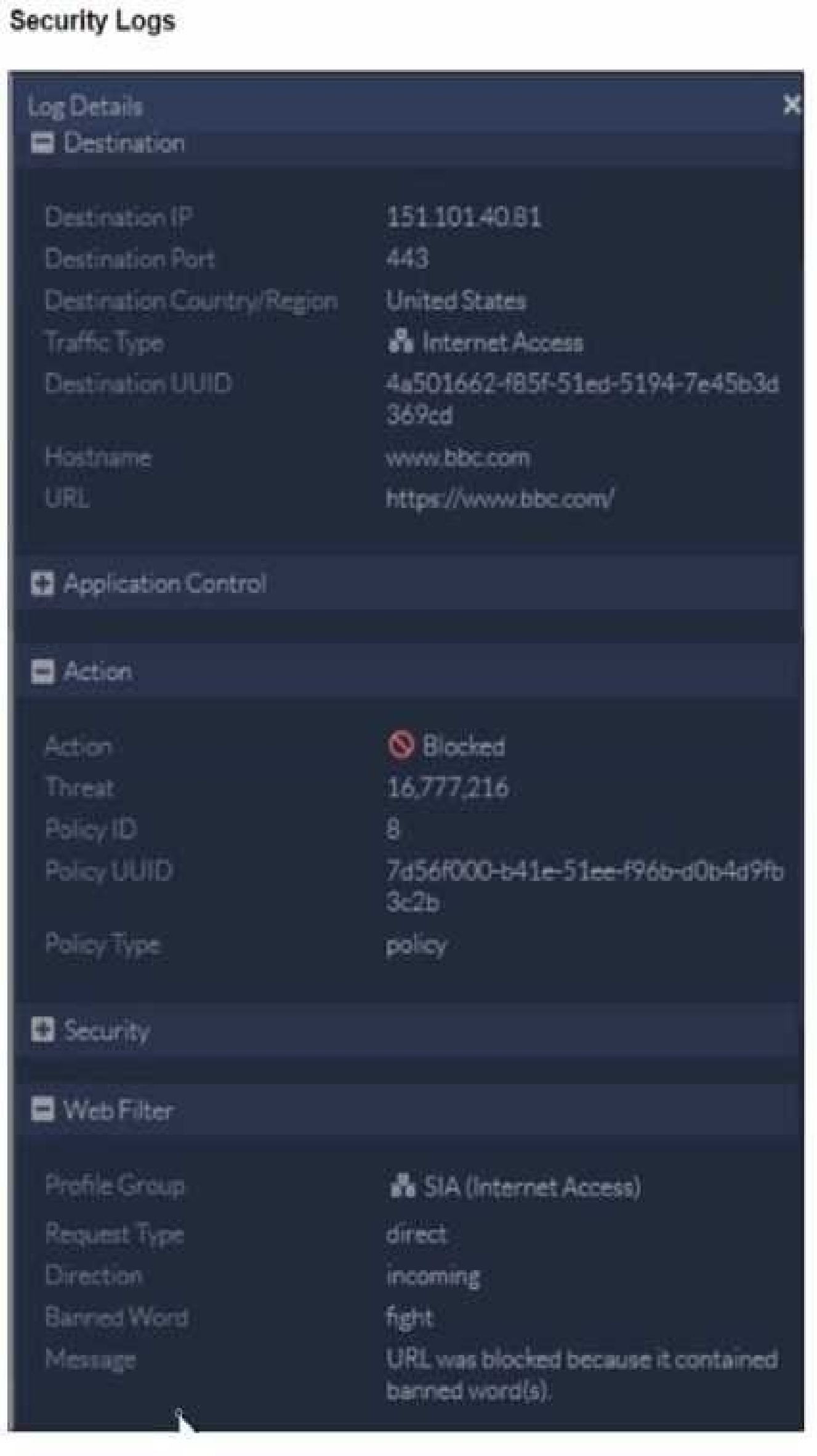
Refer to the exhibit.
To allow access, which web tiller configuration must you change on FortiSASE?
Which policy type is used to control traffic between the FortiClient endpoint to FortiSASE for secure internet access?
Select the answer:Select the answer
1 correct answer
A.
VPN policy
B.
thin edge policy
C.
private access policy
D.
secure web gateway (SWG) policy
Right Answer: A
Quiz
Question 7/107/10
Which role does FortiSASE play in supporting zero trust network access (ZTNA) principles9
Select the answer:Select the answer
1 correct answer
A.
It offers hardware-based firewalls for network segmentation.
B.
It integrates with software-defined network (SDN) solutions.
C.
It can identify attributes on the endpoint for security posture check.
D.
It enables VPN connections for remote employees.
FortiSASE supports zero trust network access (ZTNA) principles by identifying attributes on the endpoint for security posture checks. ZTNA principles require continuous verification of user and device credentials, as well as their security posture, before granting access to network resources. Security Posture Check: FortiSASE can evaluate the security posture of endpoints by checking for compliance with security policies, such as antivirus status, patch levels, and configuration settings. This ensures that only compliant and secure devices are granted access to the network. Zero Trust Network Access (ZTNA): ZTNA is based on the principle of "never trust, always verify," which requires continuous assessment of user and device trustworthiness. FortiSASE plays a crucial role in implementing ZTNA by performing these security posture checks and enforcing access control policies. Reference: FortiOS 7.2 Administration Guide: Provides information on ZTNA and endpoint security posture checks. FortiSASE 23.2 Documentation: Details on how FortiSASE implements ZTNA principles.
Right Answer: C
Quiz
Question 8/108/10
When deploying FortiSASE agent-based clients, which three features are available compared to an agentless solution? (Choose three.)
Select multiple answer: (Choose 3)Select the answer
3 correct answers
A.
Vulnerability scan
B.
SSL inspection
C.
Anti-ransomware protection
D.
Web filter
E.
ZTNA tags
Right Answer: A, C, E
Quiz
Question 9/109/10
Which FortiSASE feature ensures least-privileged user access to all applications?
Select the answer:Select the answer
1 correct answer
A.
secure web gateway (SWG)
B.
SD-WAN
C.
zero trust network access (ZTNA)
D.
thin branch SASE extension
Zero Trust Network Access (ZTNA) is the FortiSASE feature that ensures least-privileged user access to all applications. ZTNA operates on the principle of "never trust, always verify," providing secure access based on the identity of users and devices, regardless of their location. Zero Trust Network Access (ZTNA): ZTNA ensures that only authenticated and authorized users and devices can access applications. It applies the principle of least privilege by granting access only to the resources required by the user, minimizing the potential for unauthorized access. Implementation: ZTNA continuously verifies user and device trustworthiness and enforces granular access control policies. This approach enhances security by reducing the attack surface and limiting lateral movement within the network. Reference: FortiOS 7.2 Administration Guide: Provides detailed information on ZTNA and its role in ensuring least-privileged access. FortiSASE 23.2 Documentation: Explains the implementation and benefits of ZTNA within the FortiSASE environment.
Right Answer: C
Quiz
Question 10/1010/10
Which two components are part of onboarding a secure web gateway (SWG) endpoint? (Choose two)
Select multiple answer: (Choose 2)Select the answer
2 correct answers
A.
FortiSASE CA certificate
B.
proxy auto-configuration (PAC) file
C.
FortiSASE invitation code
D.
FortiClient installer
Onboarding a Secure Web Gateway (SWG) endpoint involves several components to ensure secure and effective integration with FortiSASE. Two key components are the FortiSASE CA certificate and the proxy auto-configuration (PAC) file. FortiSASE CA Certificate: The FortiSASE CA certificate is essential for establishing trust between the endpoint and the FortiSASE infrastructure. It ensures that the endpoint can securely communicate with FortiSASE services and inspect SSL/TLS traffic. Proxy Auto-Configuration (PAC) File: The PAC file is used to configure the endpoint to direct web traffic through the FortiSASE proxy. It provides instructions on how to route traffic, ensuring that all web requests are properly inspected and filtered by FortiSASE. Reference: FortiOS 7.2 Administration Guide: Details on onboarding endpoints and configuring SWG. FortiSASE 23.2 Documentation: Explains the components required for integrating endpoints with FortiSASE and the process for deploying the CA certificate and PAC file.
FCSS_SASE_AD-24: FCSS - FortiSASE 24 Administrator Practice test unlocks all online simulator questions
Thank you for choosing the free version of the FCSS_SASE_AD-24: FCSS - FortiSASE 24 Administrator practice test! Further deepen your knowledge on Fortinet Simulator; by unlocking the full version of our FCSS_SASE_AD-24: FCSS - FortiSASE 24 Administrator Simulator you will be able to take tests with over 43 constantly updated questions and easily pass your exam. 98% of people pass the exam in the first attempt after preparing with our 43 questions.
What to expect from our FCSS_SASE_AD-24: FCSS - FortiSASE 24 Administrator practice tests and how to prepare for any exam?
The FCSS_SASE_AD-24: FCSS - FortiSASE 24 Administrator Simulator Practice Tests are part of the Fortinet Database and are the best way to prepare for any FCSS_SASE_AD-24: FCSS - FortiSASE 24 Administrator exam. The FCSS_SASE_AD-24: FCSS - FortiSASE 24 Administrator practice tests consist of 43 questions and are written by experts to help you and prepare you to pass the exam on the first attempt. The FCSS_SASE_AD-24: FCSS - FortiSASE 24 Administrator database includes questions from previous and other exams, which means you will be able to practice simulating past and future questions. Preparation with FCSS_SASE_AD-24: FCSS - FortiSASE 24 Administrator Simulator will also give you an idea of the time it will take to complete each section of the FCSS_SASE_AD-24: FCSS - FortiSASE 24 Administrator practice test . It is important to note that the FCSS_SASE_AD-24: FCSS - FortiSASE 24 Administrator Simulator does not replace the classic FCSS_SASE_AD-24: FCSS - FortiSASE 24 Administrator study guides; however, the Simulator provides valuable insights into what to expect and how much work needs to be done to prepare for the FCSS_SASE_AD-24: FCSS - FortiSASE 24 Administrator exam.
FCSS_SASE_AD-24: FCSS - FortiSASE 24 Administrator Practice test therefore represents an excellent tool to prepare for the actual exam together with our Fortinet practice test . Our FCSS_SASE_AD-24: FCSS - FortiSASE 24 Administrator Simulator will help you assess your level of preparation and understand your strengths and weaknesses. Below you can read all the quizzes you will find in our FCSS_SASE_AD-24: FCSS - FortiSASE 24 Administrator Simulator and how our unique FCSS_SASE_AD-24: FCSS - FortiSASE 24 Administrator Database made up of real questions:
You can prepare for the FCSS_SASE_AD-24: FCSS - FortiSASE 24 Administrator exams with our mobile app. It is very easy to use and even works offline in case of network failure, with all the functions you need to study and practice with our FCSS_SASE_AD-24: FCSS - FortiSASE 24 Administrator Simulator.
Use our Mobile App, available for both Android and iOS devices, with our FCSS_SASE_AD-24: FCSS - FortiSASE 24 Administrator Simulator . You can use it anywhere and always remember that our mobile app is free and available on all stores.
Our Mobile App contains all FCSS_SASE_AD-24: FCSS - FortiSASE 24 Administrator practice tests which consist of 43 questions and also provide study material to pass the final FCSS_SASE_AD-24: FCSS - FortiSASE 24 Administrator exam with guaranteed success.
Our FCSS_SASE_AD-24: FCSS - FortiSASE 24 Administrator database contain hundreds of questions and Fortinet Tests related to FCSS_SASE_AD-24: FCSS - FortiSASE 24 Administrator Exam. This way you can practice anywhere you want, even offline without the internet.