The new flashcard feature is useful to memorize questions.
?Change your study mode
At any time, you can change the study mode, and alternate between the practice mode and the exam mode. In practice mode, you can configure for example the number of questions or tests, and other parameters to help you study.
Randomized | 10 Questions per Test | 20 Minutes | 70% to pass|
To re-configure your study mode again and change - for example - the number of tests, whether you have random questions and all other configuration parameters.
?Simulator Configuration
Auto-scroll: You can use the automatic scrolling of the questionnaire that occurs as soon as you answer one or all of the answers to a question correctly. Auto scrolling is activated if you answer a single answer, or as soon as you answer all the mandatory answers. Learning Mode: During learning mode you can get a real time result for your answer.
Free Test
Question: / 10
20:00Min. left
?Restart the current test
To restart the current test by clearing all your answers and the time used up to now. Warning: all answers will be lost.
Question: / 10
4.9(144 Votes)
Quiz
Question 1/101/10
Which two statements about DHCP snooping enabled on a FortiSwitch VLAN are true? (Choose two.)
Select multiple answer: (Choose 2)Select the answer
2 correct answers
A.
Enabling DHCP snooping on a FortiSwitch VLAN ensures requests and replies are seen by all DHCP servers.
B.
switch-controller-dhcp-snooping-verify-mac verifies the destination MAC address to protect against DHCP exhaustion attacks.
C.
By default, all FortiSwitch ports are set to forward client DHCP requests to untrusted ports.
D.
Settings related to DHCP option 82 are only configurable through the CLI
Switch-controller-dhcp-snooping-verify-mac verifies the destination MAC address to protect against DHCP exhaustion attacks (B): This feature of DHCP snooping helps prevent DHCP exhaustion attacks by ensuring that the destination MAC addresses in DHCP packets match the MAC addresses learned by the switch. This check helps prevent attackers from overwhelming the DHCP server with requests from spoofed MAC addresses. Settings related to DHCP option 82 are only configurable through the CLI (D): DHCP Option 82 is used for "agent information," and it's typically used in network environments where additional information between DHCP clients and servers is necessary for policy and billing purposes. Configuration of these settings in FortiSwitch is only available through the Command Line Interface (CLI), not the Graphical User Interface (GUI).
Right Answer: B, D
Quiz
Question 2/102/10
Which statement about the quarantine VLAN on FortiSwitch is true?
Select the answer:Select the answer
1 correct answer
A.
Quarantine VLAN has no DHCP server
B.
Users who fail 802.1X authentication can be placed on the quarantine VLAN.
C.
It is only used for quarantined devices if global setting is set to quarantine by VLAN.
D.
FortiSwitch can block devices without configuring quarantine VLAN to be part of the allowed VLANs.
The correct statement about the quarantine VLAN on FortiSwitch is: B . Users who fail 802.1X authentication can be placed on the quarantine VLAN.This feature allows network administrators to isolate devices that do not meet the network’s security criteria as determined through 802.1X authentication. Placing these devices in a quarantine VLAN restricts their network access, thereby protecting the network from potential security threats posed by unauthorized or compromised devices. Option A is incorrect as the presence of a DHCP server in a quarantine VLAN depends on specific network configurations. Option C is incorrect without more context regarding global settings, and option D misstates the functionality of quarantine VLANs, as their primary use is to restrict, not block, devices without additional VLAN configuration changes.
Right Answer: B
Quiz
Question 3/103/10
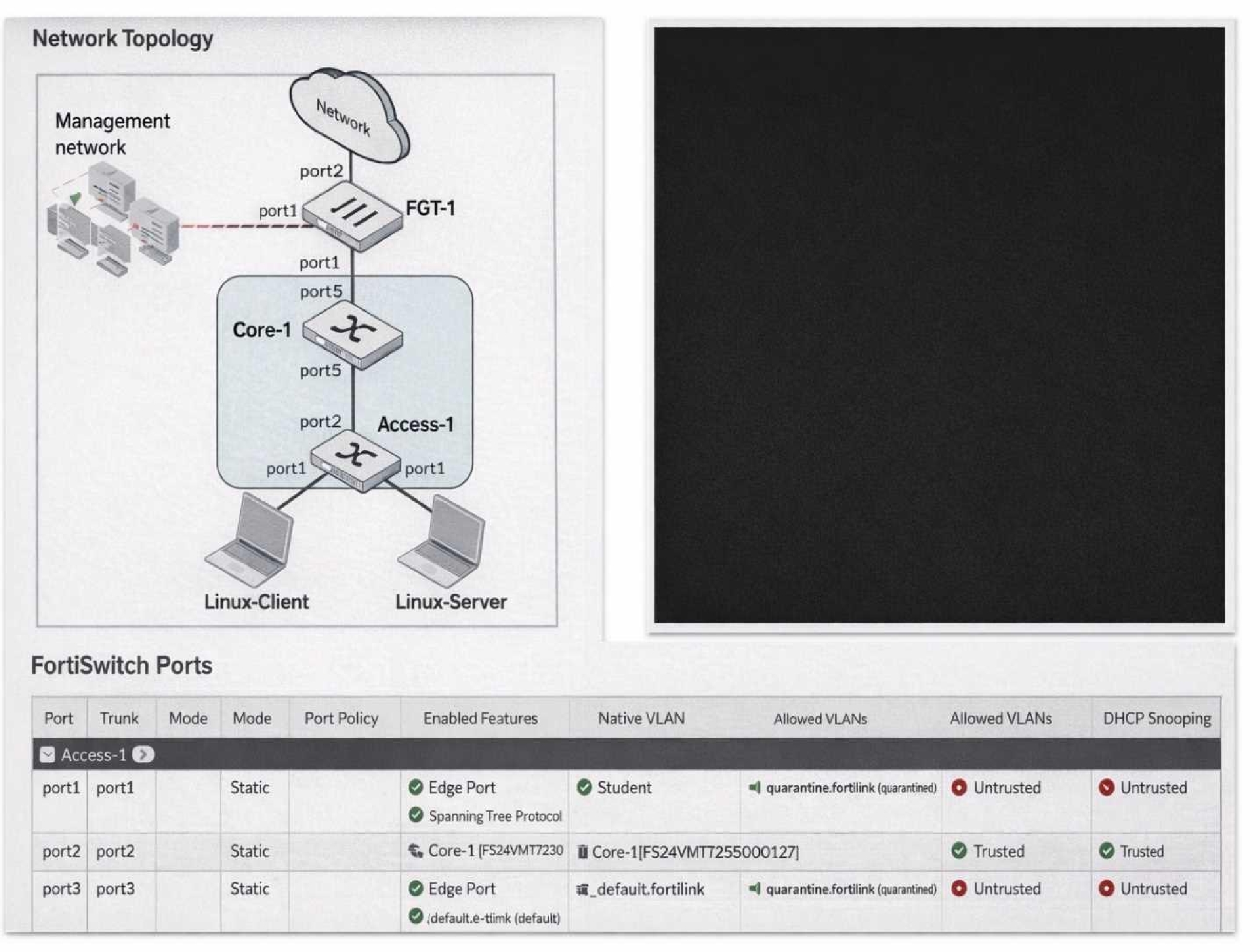
(Full question statement start from here) Refer to the exhibits.
You enable Dynamic Host Configuration Protocol (DHCP) snooping on the VLAN,Student. The Linux- Client VM sends DHCP requests, and tcpdump confirms the broadcasts. However, the Linux-Server VM, acting as a DHCP server, receives no DHCP traffic. What is the most likely cause of this intra- VLAN traffic being blocked? (Choose one answer)
Select the answer:Select the answer
1 correct answer
A.
The DHCP requests are being sent on the wrong VLAN.
B.
Port1 is configured as an untrusted port.
C.
Port4 is not configured as a trusted port.
D.
The Student VLAN must be configured as an allowed VLAN on port1.
In FortiSwitchOS 7.6,DHCP snoopingis a Layer 2 security feature that validates DHCP traffic and protects the LAN from rogue DHCP servers. The feature enforces atrust modelon switch ports: ports connected toward legitimate DHCP server infrastructure must be markedtrusted, while edge/access ports facing clients are typicallyuntrusted. When DHCP snooping is enabled on a VLAN (in this case,Student), FortiSwitch inspects DHCP messages and applies filtering rules based on port trust status. From the exhibit, bothport1(connected to the Linux-Server DHCP server) andport4(connected to the Linux-Client) showDHCP Snooping: Untrusted. In this configuration, the switch treats the DHCP server-facing port as untrusted and, by design, willblock DHCP server-originated messages(such as DHCPOFFER/DHCPACK) arriving on that interface. This prevents the DHCP handshake from completing and effectively stops DHCP from functioning across that VLAN segment. Operationally, this is commonly observed as “no DHCP traffic” at the server/application layer because the exchange cannot progress normally when the server side is not trusted. Option C is incorrect because the client-facing port is expected to be untrusted. Options A and D do not align with the exhibit: the ports are already placed in the Student VLAN as native VLAN, so the primary issue is the DHCP snooping trust role. Therefore, the most likely cause is thatport1 is configured as an untrusted port(it must be trusted for a DHCP server), makingBthe correct answer.
Right Answer: B
Quiz
Question 4/104/10
Which is a requirement to enable SNMP v2c on a managed FortiSwitch?
Select the answer:Select the answer
1 correct answer
A.
Create an SNMP user to use for authentication and encryption.
B.
Specify an SNMP host to send traps to.
C.
Enable an SNMP v3 to handle traps messages with SNMP hosts.
D.
Configure SNMP agent and communities.
To enable SNMP v2c on a managed FortiSwitch, the essential requirement involves configuring the SNMP agent and community strings: Configure SNMP Agent and Communities (D): SNMP Agent:Activating the SNMP agent on FortiSwitch allows it to respond to SNMP requests. Community Strings:SNMP v2c uses community strings for authentication. These strings function as passwords to grant read-only or read-write access to the SNMP data. Understanding Other Options: Create an SNMP user (A)is necessary for SNMP v3, not v2c, as it involves user-based authentication and encryption. Specify an SNMP host (B)is typically a part of SNMP configuration but not a requirement just to enable SNMP. Enable SNMP v3 (C)is not related to enabling SNMP v2c. Reference:For detailed instructions on configuring SNMP on FortiSwitch, you can refer to the SNMP configuration section in the FortiSwitch administration guide available on:Fortinet Product Documentation
Right Answer: D
Quiz
Question 5/105/10
Which two statements about managing a FortiSwitch stack on FortiGate are true? (Choose two.)
Select multiple answer: (Choose 2)Select the answer
2 correct answers
A.
A FortiLink interface must be enabled on FortiGate.
B.
The switch controller feature must be enabled on FortiGate.
C.
Only a hardware-based FortiGate can manage a FortiSwitch stack.
D.
FortiSwitch must be operating in standalone mode before authorization.
A FortiLink interface must be enabled on FortiGate (A): To manage a FortiSwitch stack, a dedicated FortiLink interface on the FortiGate is required. This interface is used to manage the communication between FortiGate and the FortiSwitch stack, enabling centralized control and configuration of the switches directly from the FortiGate. The switch controller feature must be enabled on FortiGate (B): Enabling the switch controller feature on FortiGate allows it to manage connected FortiSwitch units. This feature provides tools and interfaces on the FortiGate for overseeing FortiSwitch configurations, monitoring switch status, and managing network policies across the stack.
Right Answer: A, B
Quiz
Question 6/106/10
Refer to the exhibits. An IP phone is connected to port1 of FortiSwitch Access-1. The IP phone tags its traffic with VLAN ID 20. On FortiGate, VLAN IP_Phone (VLAN ID 20) has been configured, and port1 of Access-1 is set with VLAN 20 as the native VLAN. However, the IP phone cannot reach the network. The exhibit shows the partial VLAN configuration and the port1 configuration on Access-1. Which configuration change must you make on FortiSwitch to allow ingress and egress traffic for the IP phone? (Choose one answer)
Select the answer:Select the answer
1 correct answer
A.
On VLAN IP_Phone, enable vlanforward
B.
On VLAN IP_Phone, enable l2forward
C.
On port1, add VLAN 20 to the allowed_vlans list
D.
On port1, disable the edge_port
According to theFortiSwitchOS 7.6 Administration GuideandFortiOS 7.6 FortiLink Guide, the processing of Ethernet frames on a managed FortiSwitch port depends on whether the frame is tagged or untagged upon arrival (ingress) and how the port's VLAN membership is defined. In the provided exhibit,port1is configured with set vlan "IP_Phone" (VLAN 20) as itsnative VLAN. By definition, the native VLAN handles untagged traffic; any untagged frame arriving at the port is assigned to VLAN 20, and any egress traffic from VLAN 20 is sent out of the port without a tag. However, the scenario specifically states that theIP phone tags its traffic with VLAN ID 20. When a FortiSwitch receives atagged frame, it checks the VLAN ID against theallowed-vlanslist configured on that port. Although VLAN 20 is the native VLAN, the exhibit shows that the port has been explicitly configured with set allowed-vlans "quarantine". This creates a restrictive filter that permits only tagged frames belonging to the "quarantine" VLAN to enter or exit the port. Because VLAN 20 (IP_Phone) is not present in the allowed-vlans list, the switch drops the tagged frames from the IP phone during ingress processing. To resolve this, the administrator must modify theFortiSwitch port configurationby adding VLAN 20 to the allowed_vlans list (e.g., set allowed-vlans "quarantine" "IP_Phone" or set allowed-vlans-all enable). This ensures that the switch recognizes and permits tagged traffic for VLAN 20 on that physical interface. Option B is incorrect because l2forward is a Layer 3 interface setting on the FortiGate and does not address the physical port's ingress filtering logic on the switch. Disabling the edge_port (Option D) relates to Spanning Tree Protocol (STP) convergence and would not impact VLAN tag filtering.
Right Answer: C
Quiz
Question 7/107/10
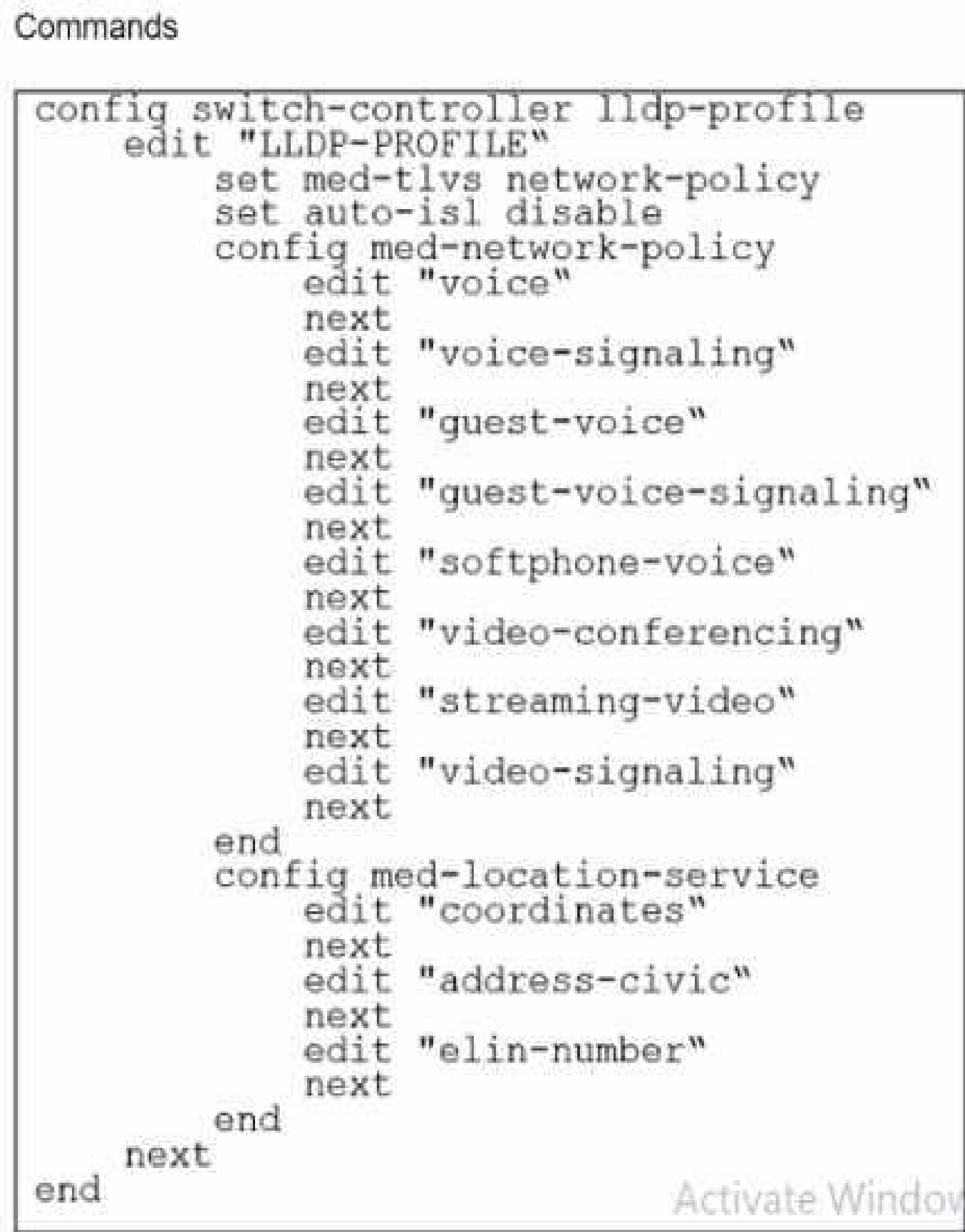
Refer to the exhibit.
The profile shown in the exhibit is assigned to a group of managed FortiSwitch ports, and these ports are connected to endpoints which are powered by PoE. Which configuration action can you perform on the LLDP profile to cause these endpoints to exchange PoE information and negotiate power with the managed FortiSwitch?
Select the answer:Select the answer
1 correct answer
A.
Create new a LLDP-MED application type to define the PoE parameters.
B.
Assign a new LLDP profile to handle different LLDP-MED TLVs.
C.
Define an LLDP-MED location ID to use standard protocols for power.
D.
Add power management as part of LLDP-MED TLVs to advertise.
To cause endpoints to exchange PoE information and negotiate power with the managed FortiSwitch via LLDP, you should configure the LLDP profile to include power management in the advertised LLDP-MED TLVs. Here are the steps: Access the LLDP Profile Configuration:Start by entering the LLDP profile configuration mode with the command: config switch-controller lldp-profile edit "LLDP-PROFILE" Enable MED-TLVs:Ensure that MED-TLVs (Media Endpoint Discovery TLVs) are enabled. These TLVs are used for extended discovery relating to network policies, including PoE, and are essential for PoE negotiation. They include power management which is crucial for the negotiation of PoE parameters between devices. The command to ensure network policies are set might look like: set med-tlvs network-policy Add Power Management TLV:Specifically add or ensure the power management TLV is part of the configuration. This will advertise the PoE capabilities and requirements, enabling dynamic power allocation between the FortiSwitch and the connected devices (like VoIP phones or wireless access points). This can typically be done within the network-policy settings: config med-network-policy edit <policy_index> set poe-capability next end Save and Apply Changes:Exit the configuration blocks properly ensuring changes are saved: End Verify Configuration:It’s always good practice to verify that your configurations have been applied correctly. Use the appropriateshoworgetcommands to review the LLDP profile settings. By adding the power management as part of LLDP-MED TLVs, the FortiSwitch will be able to communicate its power requirements and capabilities to the endpoints, thereby facilitating a dynamic power negotiation that is crucial for efficient PoE utilization. Reference:For more detailed information and additional configurations, you can refer to the FortiSwitch Managed Switches documentation available on Fortinet’s official documentation site:Fortinet Product Documentation
Right Answer: D
Quiz
Question 8/108/10
Which two are valid traffic processing actions that a FortiSwitch access control list (ACL) can apply to matching traffic? (Choose two answers)
Select multiple answer: (Choose 2)Select the answer
2 correct answers
A.
Redirect frames to another port.
B.
Assign traffic to a high-priority egress queue.
C.
Encrypt frames.
D.
Drop frames.
According to theFortiSwitchOS 7.6 Administration Guideand theNSE 5 FortiSwitch Study Guide, Access Control Lists (ACLs) are used to provide granular control over the traffic entering or leaving a switch port. ACLs function by definingclassifiers(to match specific traffic based on criteria like MAC address, IP address, or VLAN ID) and then applying specificactionsto that matched traffic. The documentation explicitly categorizes ACL actions into three distinct groups: Traffic Processing:This category includes actions that dictate the physical handling of the frame. Valid actions listed in the official documents under this header includecount(to track packet volume),drop(to block the traffic),redirect(to forward the frame to a specific physical port or interface instead of its original destination), andmirror(to send a copy to a monitoring port). Quality of Service (QoS):This category focuses on traffic prioritization and bandwidth management. It includes actions such asrate limiting,remarking CoS/DSCP values, andsetting the egress queue(e.g., assigning a packet to a specific queue number from 0 to 7). VLAN:This allows for modifications such as setting anouter VLAN tagon frames. The question specifically asks for "traffic processing actions." Based on the 7.6 documentation,Redirect frames to another port(Option A) andDrop frames(Option D) are explicitly defined under the "Traffic Processing" action header. While "Assign traffic to a high-priority egress queue" (Option B) is a valid action an ACL can perform, it is technically categorized as aQoS action, not a traffic processing action.Encrypt frames(Option C) is not a supported ACL action on FortiSwitch hardware, as encryption is typically handled at higher layers or via dedicated MACsec configurations on specific models.
Right Answer: A, D
Quiz
Question 9/109/10
Which statement about the IGMP snooping querier when enabled on a VLAN is true?
Select the answer:Select the answer
1 correct answer
A.
Active multicast receiver entries are aging on each IGMP query sent on the VLAN
B.
IGMP reports on the VLAN are forwarded to all switch ports.
C.
The setting can only be enabled using the FortiSwitch CLI.
D.
All other indirectly connected switches will be unable to get IGMP multicast traffic.
Active multicast receiver entries are aging on each IGMP query sent on the VLAN (A): When IGMP snooping querier is enabled on a VLAN, it functions to manage multicast traffic within the VLAN by keeping track of multicast group memberships. The IGMP querier sends queries to determine which ports require the multicast traffic. The multicast receiver entries, which are entries that indicate which devices have requested the multicast data, age or time out based on these IGMP queries. Each query refreshes active connections but ages out entries that no longer respond, helping to ensure that multicast traffic is only sent to ports with active receivers.
Right Answer: A
Quiz
Question 10/1010/10
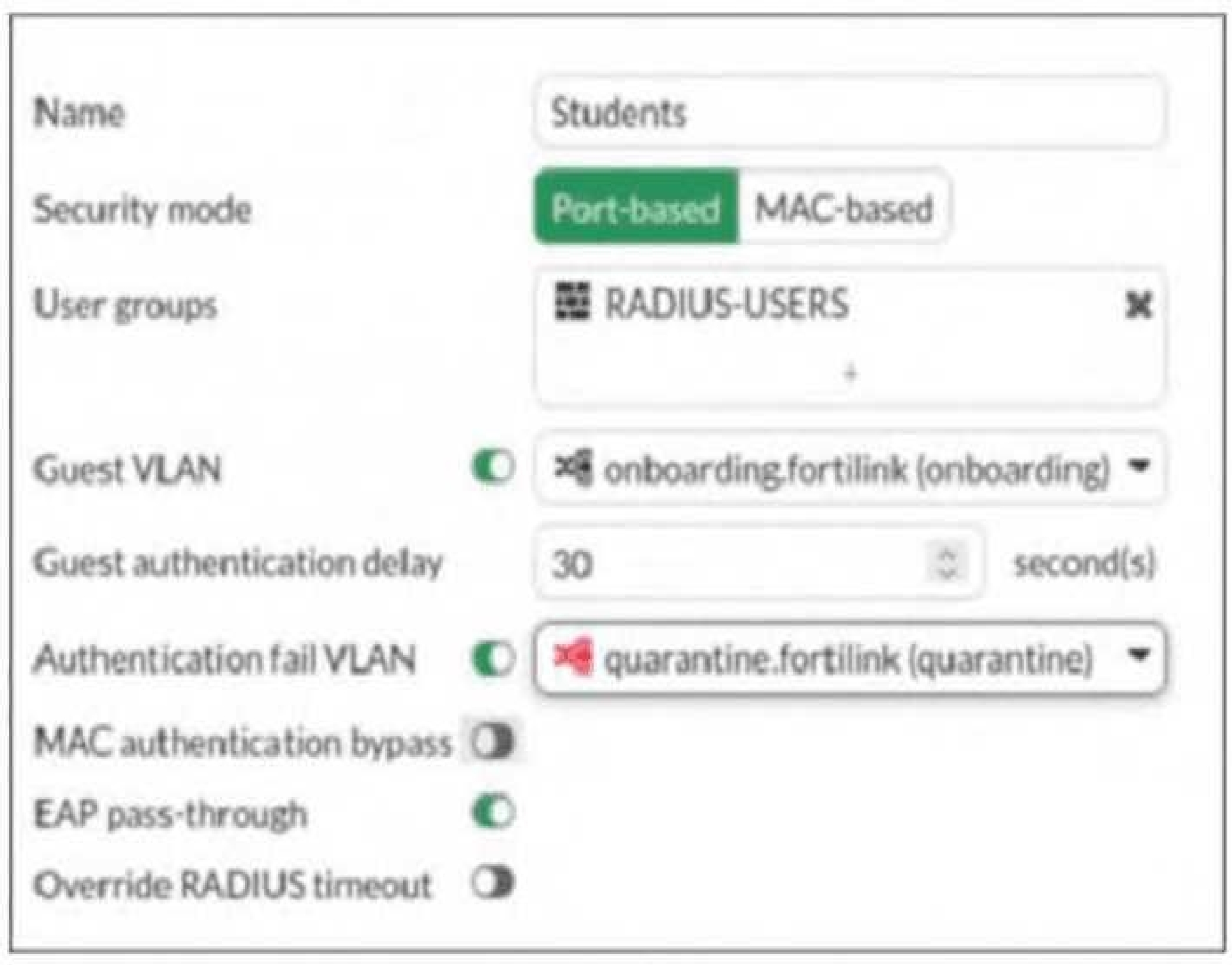
Refer to the exhibit.
The security port policy is configured as shown in the exhibit. Which behavior occurs if a device connected to the port that does not support 802.1X? (Choose one answer)
Select the answer:Select the answer
1 correct answer
A.
The device is blocked from accessing the network.
B.
The device is placed into the onboarding VLAN.
C.
The device is placed into the quarantine VLAN.
D.
The device is assigned to the default management VLAN.
According to theFortiSwitchOS 7.6 Administration Guideand theFortiSwitch 7.6 Study Guide, the interaction between a managed switch and a connected endpoint depends on whether the endpoint can participate in the 802.1X authentication process. When a security policy is applied to a port, the switch sends EAP (Extensible Authentication Protocol) requests to the device to initiate the login. The FortiSwitch handles two primary failure scenarios differently: Non-supplicant (No 802.1X Support):If a device, such as a legacy PC or a basic printer, does not have an 802.1X supplicant, it will not respond to the switch's EAP requests. In this case, the switch waits for the duration specified in theGuest authentication delayfield (30 seconds in the exhibit). Once this timer expires without a response, the switch places the device into theGuest VLAN. As shown in the exhibit, the Guest VLAN is explicitly set to"onboarding.fortilink (onboarding)". Authentication Failure:If a devicedoessupport 802.1X but the user provides incorrect credentials, the RADIUS server returns an Access-Reject message. In this scenario, the device is moved to theAuthentication fail VLAN, which the exhibit identifies as"quarantine.fortilink (quarantine)". Note:BecauseMAC authentication bypass (MAB)is disabled in the exhibit, the switch will not attempt to authenticate the device's MAC address against the RADIUS server before defaulting to the Guest VLAN. Therefore, for any device lacking an 802.1X supplicant, the result is placement into theonboardingVLAN.
NSE5_FSW_AD-7.6: Fortinet NSE 5 - FortiSwitch 7.6 Administrator Practice test unlocks all online simulator questions
Thank you for choosing the free version of the NSE5_FSW_AD-7.6: Fortinet NSE 5 - FortiSwitch 7.6 Administrator practice test! Further deepen your knowledge on Fortinet Simulator; by unlocking the full version of our NSE5_FSW_AD-7.6: Fortinet NSE 5 - FortiSwitch 7.6 Administrator Simulator you will be able to take tests with over 111 constantly updated questions and easily pass your exam. 98% of people pass the exam in the first attempt after preparing with our 111 questions.
What to expect from our NSE5_FSW_AD-7.6: Fortinet NSE 5 - FortiSwitch 7.6 Administrator practice tests and how to prepare for any exam?
The NSE5_FSW_AD-7.6: Fortinet NSE 5 - FortiSwitch 7.6 Administrator Simulator Practice Tests are part of the Fortinet Database and are the best way to prepare for any NSE5_FSW_AD-7.6: Fortinet NSE 5 - FortiSwitch 7.6 Administrator exam. The NSE5_FSW_AD-7.6: Fortinet NSE 5 - FortiSwitch 7.6 Administrator practice tests consist of 111 questions and are written by experts to help you and prepare you to pass the exam on the first attempt. The NSE5_FSW_AD-7.6: Fortinet NSE 5 - FortiSwitch 7.6 Administrator database includes questions from previous and other exams, which means you will be able to practice simulating past and future questions. Preparation with NSE5_FSW_AD-7.6: Fortinet NSE 5 - FortiSwitch 7.6 Administrator Simulator will also give you an idea of the time it will take to complete each section of the NSE5_FSW_AD-7.6: Fortinet NSE 5 - FortiSwitch 7.6 Administrator practice test . It is important to note that the NSE5_FSW_AD-7.6: Fortinet NSE 5 - FortiSwitch 7.6 Administrator Simulator does not replace the classic NSE5_FSW_AD-7.6: Fortinet NSE 5 - FortiSwitch 7.6 Administrator study guides; however, the Simulator provides valuable insights into what to expect and how much work needs to be done to prepare for the NSE5_FSW_AD-7.6: Fortinet NSE 5 - FortiSwitch 7.6 Administrator exam.
NSE5_FSW_AD-7.6: Fortinet NSE 5 - FortiSwitch 7.6 Administrator Practice test therefore represents an excellent tool to prepare for the actual exam together with our Fortinet practice test . Our NSE5_FSW_AD-7.6: Fortinet NSE 5 - FortiSwitch 7.6 Administrator Simulator will help you assess your level of preparation and understand your strengths and weaknesses. Below you can read all the quizzes you will find in our NSE5_FSW_AD-7.6: Fortinet NSE 5 - FortiSwitch 7.6 Administrator Simulator and how our unique NSE5_FSW_AD-7.6: Fortinet NSE 5 - FortiSwitch 7.6 Administrator Database made up of real questions:
You can prepare for the NSE5_FSW_AD-7.6: Fortinet NSE 5 - FortiSwitch 7.6 Administrator exams with our mobile app. It is very easy to use and even works offline in case of network failure, with all the functions you need to study and practice with our NSE5_FSW_AD-7.6: Fortinet NSE 5 - FortiSwitch 7.6 Administrator Simulator.
Use our Mobile App, available for both Android and iOS devices, with our NSE5_FSW_AD-7.6: Fortinet NSE 5 - FortiSwitch 7.6 Administrator Simulator . You can use it anywhere and always remember that our mobile app is free and available on all stores.
Our Mobile App contains all NSE5_FSW_AD-7.6: Fortinet NSE 5 - FortiSwitch 7.6 Administrator practice tests which consist of 111 questions and also provide study material to pass the final NSE5_FSW_AD-7.6: Fortinet NSE 5 - FortiSwitch 7.6 Administrator exam with guaranteed success.
Our NSE5_FSW_AD-7.6: Fortinet NSE 5 - FortiSwitch 7.6 Administrator database contain hundreds of questions and Fortinet Tests related to NSE5_FSW_AD-7.6: Fortinet NSE 5 - FortiSwitch 7.6 Administrator Exam. This way you can practice anywhere you want, even offline without the internet.