The new flashcard feature is useful to memorize questions.
?Change your study mode
At any time, you can change the study mode, and alternate between the practice mode and the exam mode. In practice mode, you can configure for example the number of questions or tests, and other parameters to help you study.
Randomized | 10 Questions per Test | 20 Minutes | 70% to pass|
To re-configure your study mode again and change - for example - the number of tests, whether you have random questions and all other configuration parameters.
?Simulator Configuration
Auto-scroll: You can use the automatic scrolling of the questionnaire that occurs as soon as you answer one or all of the answers to a question correctly. Auto scrolling is activated if you answer a single answer, or as soon as you answer all the mandatory answers. Learning Mode: During learning mode you can get a real time result for your answer.
Free Test
Question: / 10
20:00Min. left
?Restart the current test
To restart the current test by clearing all your answers and the time used up to now. Warning: all answers will be lost.
Question: / 10
0.0(0 Votes)
Quiz
Question 1/101/10
Your organization is deploying FortiNAC-F in a distributed environment with multiple remote office locations. Each office has its own FortiNAC-F instance, but you need centralized management and reporting across all locations. Which component should you deploy to enable this capability?
Select the answer:Select the answer
1 correct answer
A.
FortiNAC-F Manager
B.
FortiGate Fabric Connector
C.
FortiNAC-F Syslog Aggregator
D.
FortiNAC-F High Availability Cluster
Correct Answer: FortiNAC-F Manager FortiNAC-F Manager is the component specifically designed to integrate with and manage multiple FortiNAC-F instances in a distributed deployment environment. It provides centralized visibility, reporting, and management capabilities across all distributed FortiNAC-F units. Why other options are incorrect: l FortiGate Fabric Connector: This integrates FortiNAC-F with the Security Fabric and FortiGate devices, but does not provide management of multiple FortiNAC-F instances. l FortiNAC-F Syslog Aggregator: This is used for collecting syslog messages from third-party devices, not for managing distributed FortiNAC-F instances. l FortiNAC-F High Availability Cluster: HA is used for redundancy and failover within a single location, not for distributed management across multiple locations.
Right Answer: A
Quiz
Question 2/102/10
You are configuring device profiling rules in FortiNAC-F to automatically classify network devices. A contractor's laptop connects to the network and fails to match any existing device profiling rules. You want to ensure the device is still tracked and managed. Which approach should you use to register this unclassified device into the host inventory?
Select the answer:Select the answer
1 correct answer
A.
Wait for the device to match a future rule update; FortiNAC-F will automatically register it
B.
Manually register the host in the host inventory using the administrative interface
C.
Delete all device profiling rules so the device can register with default settings
D.
Configure the device to send a DHCP request from a known MAC address range
Correct Answer: Manually register the host in the host inventory using the administrative interface FortiNAC-F supports manual host registration through the administrative interface for devices that do not automatically match device profiling rules or when administrative registration is preferred. This allows administrators to explicitly add hosts to the database and assign group/profile information immediately. Why other options are incorrect: l Wait for the device to match a future rule update: Unclassified devices do not automatically register; they require either rule matching or manual intervention. l Delete all device profiling rules: This would break the entire device profiling infrastructure and is not a valid approach. l Configure the device to send a DHCP request from a known MAC address range: While FortiNAC-F uses endpoint fingerprinting and DHCP information, simply changing DHCP requests does not guarantee registration without matching a rule or manual entry.
Right Answer: B
Quiz
Question 3/103/10
Your FortiNAC-F deployment is integrated with multiple FortiGate firewalls using the Security Fabric connector. You have created network access policies that assign contractors to a restricted network group. To enforce these policies at the firewall level, what must be configured?
Select the answer:Select the answer
1 correct answer
A.
FortiNAC-F must create firewall tags that are passed to FortiGate for policy enforcement
B.
FortiNAC-F must send raw syslog messages to each FortiGate for manual rule creation
C.
Each FortiGate must independently discover the contractor devices using SNMP trap monitoring
D.
FortiNAC-F must configure VPN policies on each FortiGate to restrict contractor access
Correct Answer: FortiNAC-F must create firewall tags that are passed to FortiGate for policy enforcement FortiNAC-F integrates with the Security Fabric by creating firewall tags based on group and tag information derived from network access policies and host profiles. These tags are passed to FortiGate, where firewall administrators can use them in access control policies to enforce segmentation and restrict access at the network perimeter. Why other options are incorrect: l Raw syslog messages for manual rule creation: Integration with Security Fabric is automated through tag passing, not manual syslog-based rule creation. l SNMP trap monitoring on each FortiGate: SNMP traps are used for third-party device integration into FortiNAC-F, not for FortiGate integration or device discovery. l VPN policies on each FortiGate: While VPN integration exists, it is for managing FortiGate VPN sessions within FortiNAC-F, not for network access policy enforcement through tags.
Right Answer: A
Quiz
Question 4/104/10
You are setting up High Availability for FortiNAC-F using hot standby mode. A critical security event triggers an automated response from your active FortiNAC-F unit. When the active unit fails and failover occurs, what should you verify to ensure the standby unit resumes operations correctly?
Select the answer:Select the answer
1 correct answer
A.
Verify that the standby unit has promoted to active status and can accept administrative logins
B.
Verify that all device profiling rules are deleted on the new active unit to prevent conflicts
C.
Verify that the original active unit is physically powered off before the standby unit begins operations
D.
Verify that all connected FortiGate firewalls have been manually reconfigured to point to the new active unit
Correct Answer: Verify that the standby unit has promoted to active status and can accept administrative logins In FortiNAC-F hot standby HA mode, the standby unit automatically assumes the active role when the primary unit fails. Verification of successful failover includes confirming that the promoted unit is now accepting administrative connections and is operational, indicating that HA failover functions correctly and service continuity is restored. Why other options are incorrect: l Deleting device profiling rules: Device profiling rules should be synchronized between HA units and never deleted during failover; deleting them would break device classification. l Physically powering off the original active unit: The original unit may come back online; HA mode handles this automatically without requiring manual power intervention. l Manually reconfiguring FortiGate firewalls: In proper HA configuration, FortiGate devices continue communicating with the HA pair using a virtual IP or FQDN that remains the same after failover; no manual reconfiguration is required.
Right Answer: A
Quiz
Question 5/105/10
You need to integrate FortiNAC-F with a legacy network device that only supports syslog and SNMP trap output for event notifications. The device generates critical security events that should trigger automated responses in FortiNAC-F. Which components must you configure to enable this integration? (Select two.)
Select multiple answer: (Choose 2)Select the answer
2 correct answers
A.
Create a custom security event parser to interpret the legacy device's syslog and SNMP trap messages
B.
Configure an administrative group for alarm notification to receive the events
C.
Deploy a FortiGate Fabric Connector between the legacy device and FortiNAC-F
D.
Modify the device profiling rules to recognize the legacy device's MAC address
E.
Configure FortiNAC-F Manager to translate the device's proprietary event format
Correct Answer: Create a custom security event parser to interpret the legacy device's syslog and SNMP trap messages AND Configure an administrative group for alarm notification to receive the events FortiNAC-F integrates with third-party devices through syslog and SNMP trap input. A custom security event parser must be created to interpret the specific format and content of the legacy device's events. Additionally, an administrative group for alarm notification must be configured to designate which administrators or systems receive and respond to these parsed events. Why other options are incorrect: l FortiGate Fabric Connector: This is for Security Fabric integration with FortiGate devices, not for third- party syslog/SNMP device integration. l Modify device profiling rules for MAC address: Device profiling is for classifying devices on the network; it does not enable syslog/SNMP event integration from external devices. l FortiNAC-F Manager for translation: FortiNAC-F Manager is for managing distributed FortiNAC-F instances, not for parsing third-party device events.
Right Answer: A, B
Quiz
Question 6/106/10
During network troubleshooting, you suspect that a card reader device in the building's access control system is not being properly managed by FortiNAC-F. The device has already been profiled and assigned to a user group. When you search for the host in the administrative interface, you cannot locate it. What should you check to determine why the host is not appearing in the database? (Select two.)
Select multiple answer: (Choose 2)Select the answer
2 correct answers
A.
Verify the user and host aging settings to determine if the host record has expired and been removed from the database
B.
Check the enhanced visibility information using FortiGate sessions to confirm if the device is currently connected
C.
Confirm that the card reader's manufacturer OUI is listed in the vendor OUI tables for proper profiling
D.
Review all device profiling rules to ensure the card reader was classified as a rogue device
Correct Answer: Verify the user and host aging settings to determine if the host record has expired AND Check the enhanced visibility information using FortiGate sessions to confirm if the device is currently connected When a host cannot be located in the database, two important factors should be checked. First, host and user aging settings determine how long records are retained; if aging is set aggressively, the record may have been automatically removed. Second, enhanced visibility through FortiGate session information can confirm whether the device is actively connected to the network, which affects its presence in the database. Understanding logging options and views across the system helps diagnose connectivity issues. Why other options are incorrect: l Confirming OUI in vendor tables: While OUI tables are important for device profiling, they do not determine whether a host appears in the database; a device can be profiled and still appear even if OUI matching was not involved. l Device profiling rules classifying as rogue: If a device were classified as rogue, it would still appear in the database with rogue status; the question is about determining why it does not appear at all, not about rogue classification.
Right Answer: A, B
Quiz
Question 7/107/10
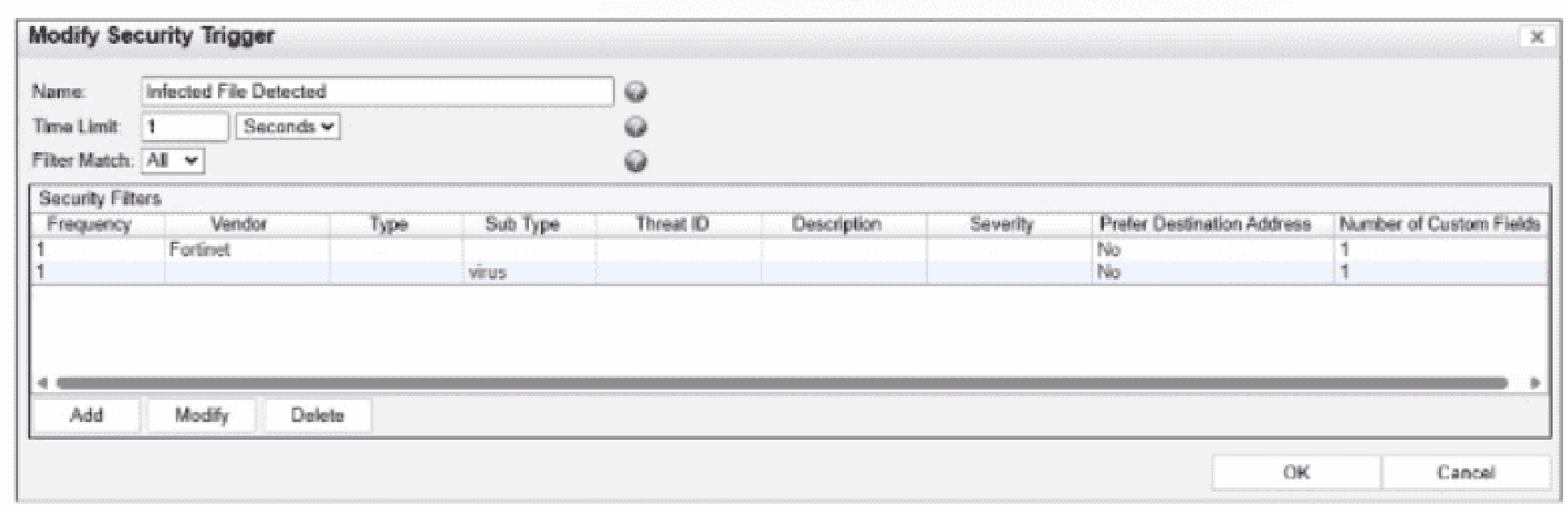
Refer to the exhibit.
What would FortiNAC-F generate if only one of the security fitters is satisfied?
Select the answer:Select the answer
1 correct answer
A.
A normal alarm
B.
A security event
C.
A security alarm
D.
A normal event
In FortiNAC-F,Security Triggersare used to identify specific security-related activities based on incoming data such as Syslog messages or SNMP traps from external security devices (like a FortiGate or an IDS). These triggers act as a filtering mechanism to determine if an incoming notification should be escalated from a standard system event to aSecurity Event. According to theFortiNAC-F Administrator Guideand relevant training materials for versions 7.2 and 7.4, theFilter Matchsetting is the critical logic gate for this process. As seen in the exhibit, the 'Filter Match' configuration is set to'All'. This means that for the Security Trigger named 'Infected File Detected' to 'fire' and generate a Security Event or a subsequent Security Alarm,every single filterlisted in the Security Filters table must be satisfied simultaneously by the incoming data. In the provided exhibit, there are two filters: one looking for the Vendor'Fortinet'and another looking for the Sub Type'virus'. If only one of these filters is satisfied (for example, a message from Fortinet that does not contain the 'virus' subtype), the logic for the Security Trigger is not met. Consequently, FortiNAC-F does not escalate the notification. Instead, it processes theincoming data as aNormal Event, which is recorded in the Event Log but does not trigger the automated security response workflows associated with security alarms. 'The Filter Match option defines the logic used when multiple filters are defined. If'All'is selected, then all filter criteria must be met in order for the trigger to fire and aSecurity Eventto be generated. If the criteria are not met, the incoming data is processed as anormal event. If'Any'is selected, the trigger fires if at least one of the filters matches.' ---FortiNAC-F Administration Guide: Security Triggers Section.
Right Answer: D
Quiz
Question 8/108/10
When configuring isolation networks in the configuration wizard, why does a layer 3 network typo allow for mora than ono DHCP scope for each isolation network typo?
Select the answer:Select the answer
1 correct answer
A.
The layer 3 network type allows for one scope for each possible host status.
B.
Configuring more than one DHCP scope allows for DHCP server redundancy
C.
There can be more than one isolation network of each type
D.
Any scopes beyond the first scope are used if the initial scope runs out of IP addresses.
In FortiNAC-F, theLayer 3 Network typeis specifically designed for deployments where the isolation networks- --such as Registration, Remediation, and Dead End---are separated from the FortiNAC appliance's service interface (port2) by one or more routers. This architecture is common in large, distributed enterprise environments where endpoints in different physical locations or branches must be isolated into subnets that are local to their respective network equipment. The reason the Configuration Wizard allows for more than one DHCP scope for a single isolation network type (state) is thatthere can be more than one isolation network of each typeacross the infrastructure. For instance, if an organization has three different sites, each site might require its own unique Layer 3 registration subnet to ensure efficient routing and to accommodate local IP address management. By allowing multiple scopes for the 'Registration' state, FortiNAC can provide the appropriate IP address, gateway, and DNS settings to a rogue host regardless of which site's registration VLAN it is placed into. When an endpoint is isolated, the network infrastructure (via DHCP Relay/IP Helper) directs the DHCP request to the FortiNAC service interface. FortiNAC then identifies which scope to use based on the incoming request's gateway information. This flexibility ensures that the system is not limited to a single flat subnet for each isolation state, supporting a scalable, multi-routed network topology. 'Multiple scopes are allowed for each isolation state (Registration, Remediation, Dead End, VPN, Authentication, Isolation, and Access Point Management). Within these scopes, multiple ranges in the lease pool are also permitted... This configWizard option is used when Isolation Networks are separated from the FortiNAC Appliance's port2 interface by a router.' ---FortiNAC-F Configuration Wizard Reference Manual: Layer 3 Network Section.
Right Answer: C
Quiz
Question 9/109/10
When FortiNAC-F is managing VPN clients connecting through FortiGate, why must the clients run a FortiNAC-F agent?
Select the answer:Select the answer
1 correct answer
A.
To transparently update The client IP address upon successful authentication
B.
To collect user authentication details
C.
To collect the client IP address and MAC address
D.
To validate the endpoint policy compliance
When FortiNAC-F manages VPN clients through a FortiGate, the agent plays a fundamental role in device identification that standard network protocols cannot provide on their own. In a standard VPN connection, the FortiGate establishes a Layer 3 tunnel and assigns a virtual IP address to the client. While the FortiGate sends a syslog message to FortiNAC-F containing the username and this assigned IP address, it typically does not provide the hardware (MAC) address of the remote endpoint's physical or virtual adapter. FortiNAC-F relies on theMAC addressas the primary unique identifier for all host records in its database. Without the MAC address, FortiNAC-F cannot correlate the incoming VPN session with an existing host record to apply specific policies or track the device's history. By running either a Persistent or Dissolvable Agent, the endpoint retrieves its own MAC address and communicates it directly to the FortiNAC-F service interface. This allows the 'IP to MAC' mapping to occur. Once FortiNAC-F has both the IP and the MAC, it can successfully identify the device, verify its status, and send the appropriateFSSO tagsor group information back to the FortiGate to lift network restrictions. Furthermore, while the agent can also perform compliance checks (Option D), the architectural requirement for the agent in a managed VPN environment is primarily driven by the need for session data correlation- --specifically the collection of the IP and MAC address pairing. 'Session Data Components: * User ID (collected via RADIUS, syslog and API from the FortiGate). * Remote IP address for the remote user connection (collected via syslog and API from the FortiGate and from the FortiNAC agent). *Device IP and MAC address (collected via FortiNAC agent).... The Agent is used to provide the MAC address of the connecting VPN user (IP to MAC).' ---FortiNAC-F FortiGate VPN Integration Guide: How it Works Section.
Right Answer: C
Quiz
Question 10/1010/10
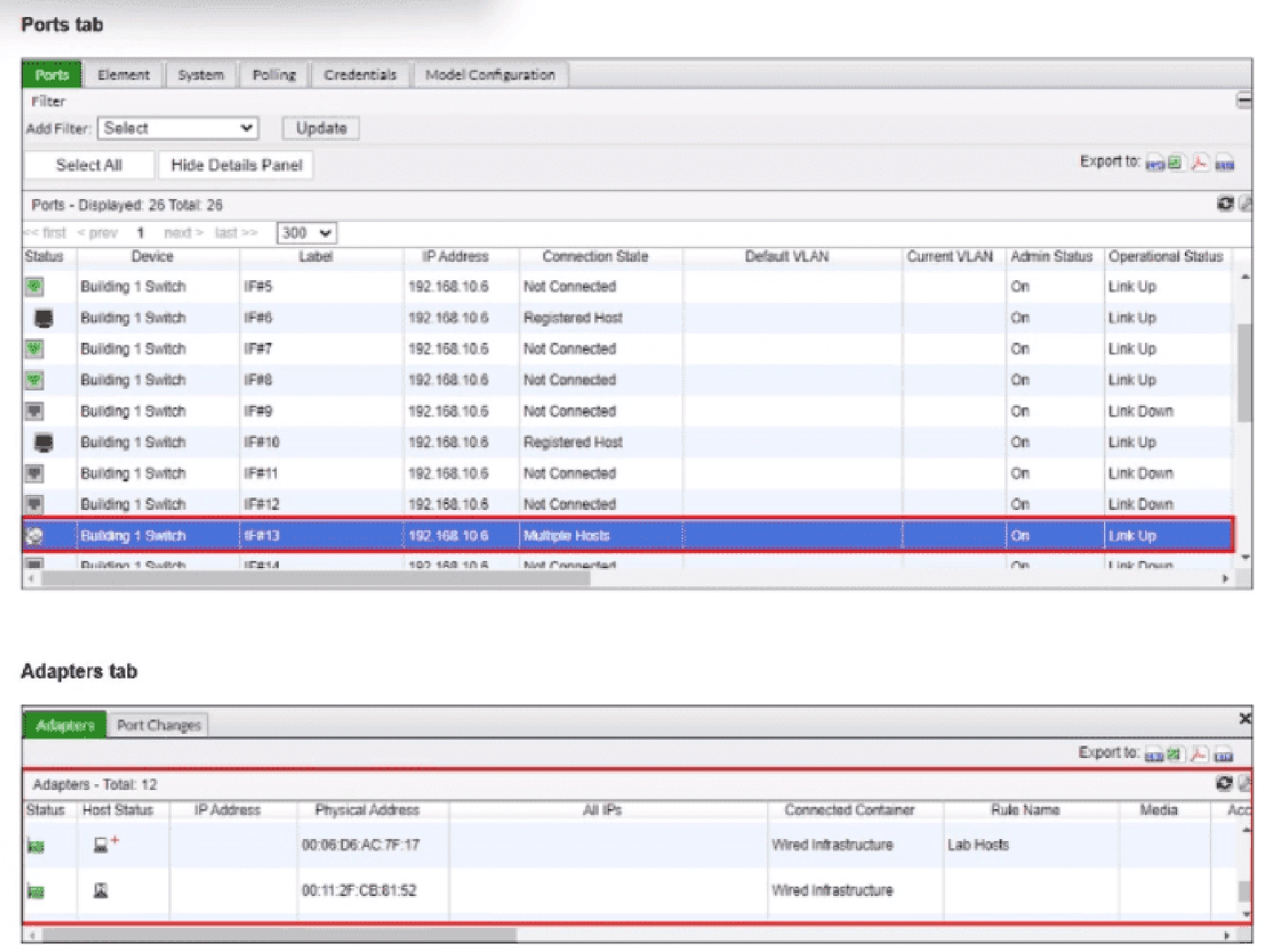
Refer to the exhibits.
What would happen if the highlighted port with connected hosts was placed in both the Forced Registration and Forced Remediation port groups?
Select the answer:Select the answer
1 correct answer
A.
Both types of enforcement would be applied
B.
Enforcement would be applied only to rogue hosts
C.
Multiple enforcement groups could not contain the same port.
D.
Only the higher ranked enforcement group would be applied.
A FortiNAC-F port can belong to both Forced Registration and Forced Remediation system groups. These enforcement groups are not mutually exclusive and are not evaluated according to a ranking between the groups. Instead, FortiNAC-F determines the applicable enforcement according to the state of each host connected through that point of connection. The Study Guide explicitly demonstrates overlapping enforcement membership: all Building 1 ports are members of Forced Registration, while second- and third-floor ports are additionally members of Forced Remediation. FortiNAC-F then applies state-specific logic: A rogue/unregistered host on the port satisfies Forced Registration and is moved to the Registration isolation network. An at-risk host on the same port satisfies Forced Remediation and is moved to the Quarantine/Remediation isolation network. The exhibit is particularly relevant because the highlighted port shows Multiple Hosts connected. Each host is evaluated independently according to its state, so different enforcement mechanisms can apply to different endpoints sharing that port. Therefore, placing the port in both groups enables both types of enforcement, depending on the state of the connected hosts. Study Guide Reference: State-Based Control System Groups; Logic to Determine Isolation; Non-Normal Status Device Evaluation, pp. 212--214. Top of Form Bottom of Form
NSE6_FNC_AD-7.6: Fortinet NSE 6 - FortiNAC-F 7.6 Administrator Practice test unlocks all online simulator questions
Thank you for choosing the free version of the NSE6_FNC_AD-7.6: Fortinet NSE 6 - FortiNAC-F 7.6 Administrator practice test! Further deepen your knowledge on Fortinet Simulator; by unlocking the full version of our NSE6_FNC_AD-7.6: Fortinet NSE 6 - FortiNAC-F 7.6 Administrator Simulator you will be able to take tests with over 82 constantly updated questions and easily pass your exam. 98% of people pass the exam in the first attempt after preparing with our 82 questions.
What to expect from our NSE6_FNC_AD-7.6: Fortinet NSE 6 - FortiNAC-F 7.6 Administrator practice tests and how to prepare for any exam?
The NSE6_FNC_AD-7.6: Fortinet NSE 6 - FortiNAC-F 7.6 Administrator Simulator Practice Tests are part of the Fortinet Database and are the best way to prepare for any NSE6_FNC_AD-7.6: Fortinet NSE 6 - FortiNAC-F 7.6 Administrator exam. The NSE6_FNC_AD-7.6: Fortinet NSE 6 - FortiNAC-F 7.6 Administrator practice tests consist of 82 questions and are written by experts to help you and prepare you to pass the exam on the first attempt. The NSE6_FNC_AD-7.6: Fortinet NSE 6 - FortiNAC-F 7.6 Administrator database includes questions from previous and other exams, which means you will be able to practice simulating past and future questions. Preparation with NSE6_FNC_AD-7.6: Fortinet NSE 6 - FortiNAC-F 7.6 Administrator Simulator will also give you an idea of the time it will take to complete each section of the NSE6_FNC_AD-7.6: Fortinet NSE 6 - FortiNAC-F 7.6 Administrator practice test . It is important to note that the NSE6_FNC_AD-7.6: Fortinet NSE 6 - FortiNAC-F 7.6 Administrator Simulator does not replace the classic NSE6_FNC_AD-7.6: Fortinet NSE 6 - FortiNAC-F 7.6 Administrator study guides; however, the Simulator provides valuable insights into what to expect and how much work needs to be done to prepare for the NSE6_FNC_AD-7.6: Fortinet NSE 6 - FortiNAC-F 7.6 Administrator exam.
NSE6_FNC_AD-7.6: Fortinet NSE 6 - FortiNAC-F 7.6 Administrator Practice test therefore represents an excellent tool to prepare for the actual exam together with our Fortinet practice test . Our NSE6_FNC_AD-7.6: Fortinet NSE 6 - FortiNAC-F 7.6 Administrator Simulator will help you assess your level of preparation and understand your strengths and weaknesses. Below you can read all the quizzes you will find in our NSE6_FNC_AD-7.6: Fortinet NSE 6 - FortiNAC-F 7.6 Administrator Simulator and how our unique NSE6_FNC_AD-7.6: Fortinet NSE 6 - FortiNAC-F 7.6 Administrator Database made up of real questions:
You can prepare for the NSE6_FNC_AD-7.6: Fortinet NSE 6 - FortiNAC-F 7.6 Administrator exams with our mobile app. It is very easy to use and even works offline in case of network failure, with all the functions you need to study and practice with our NSE6_FNC_AD-7.6: Fortinet NSE 6 - FortiNAC-F 7.6 Administrator Simulator.
Use our Mobile App, available for both Android and iOS devices, with our NSE6_FNC_AD-7.6: Fortinet NSE 6 - FortiNAC-F 7.6 Administrator Simulator . You can use it anywhere and always remember that our mobile app is free and available on all stores.
Our Mobile App contains all NSE6_FNC_AD-7.6: Fortinet NSE 6 - FortiNAC-F 7.6 Administrator practice tests which consist of 82 questions and also provide study material to pass the final NSE6_FNC_AD-7.6: Fortinet NSE 6 - FortiNAC-F 7.6 Administrator exam with guaranteed success.
Our NSE6_FNC_AD-7.6: Fortinet NSE 6 - FortiNAC-F 7.6 Administrator database contain hundreds of questions and Fortinet Tests related to NSE6_FNC_AD-7.6: Fortinet NSE 6 - FortiNAC-F 7.6 Administrator Exam. This way you can practice anywhere you want, even offline without the internet.