Quiz AI-901: Microsoft Azure AI Fundamentals (Updated Version)
Quiz
You need to ensure that Agent1 always calls an Azure function when the agent responds to
user
input.
To what should you set tool_choice for Agent1?
OPTIONS :
Quiz
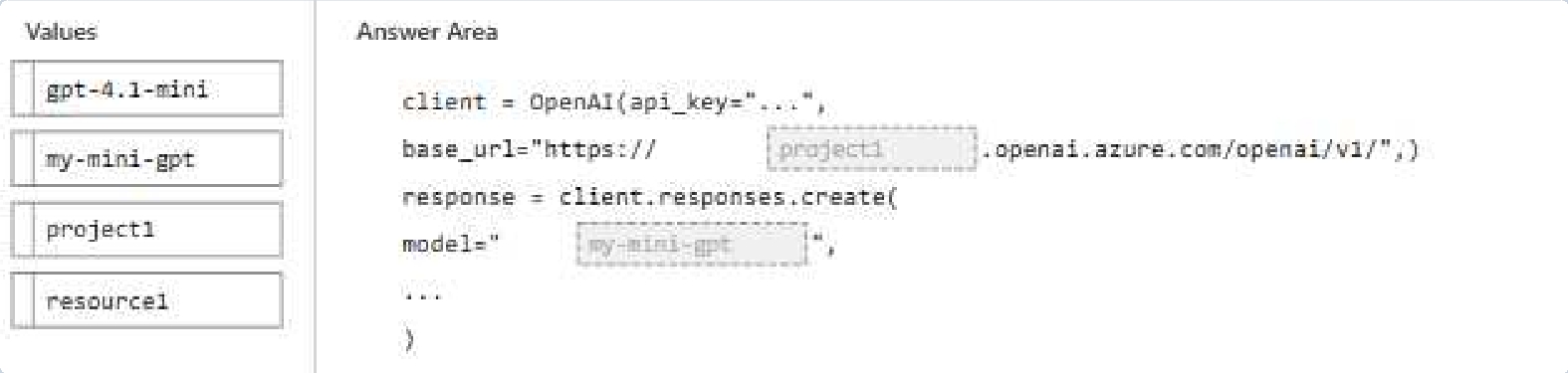
You have a Microsoft Foundry project named project1 that contains an Azure OpenAI
resource named
Resource1.
To Resource1, you deploy a gpt-4.1-mini model by using a model deployment named my-
mini-gpt.
You need to connect to my-mini-gpt from an application.
How should you complete the Python code? To answer, drag the appropriate values to the
correct
targets. Each value may be used once, more than once, or not at all.
NOTE: Each correct selection is worth one point.
OPTIONS :
Quiz
answer
presents part of the solution.
NOTE: Each correct selection is worth one point.
OPTIONS :
Quiz
Content
Understanding in Foundry Tools.
You need to extract a transcript and structured information from the recordings.
Which type of analyzer should you use?
OPTIONS :
Quiz
want to ensure
the model makes fair hiring decisions across all demographic groups. Which of the
following actions would
best help you address fairness concerns in this AI system?
OPTIONS :
Quiz
automatically
categorize them by urgency and assign them to the appropriate team. The solution uses
historical ticket data
for training. You discover that the model performs significantly worse on tickets submitted
by customers
from certain geographic regions. What principle of responsible AI is most directly addressed
by investigating
and correcting this issue?
OPTIONS :
Quiz
anomalies. The
model must operate reliably across different imaging equipment manufacturers, patient
populations, and
clinical settings. Which considerations are most critical to ensure the solution meets
reliability and safety
requirements? (Select all that apply.)
OPTIONS :
Quiz
want the model to
respond politely but concisely, prioritize resolving common billing issues, and never suggest
refunds that
exceed company policy. What are the most effective ways to enforce these behaviors?
(Select all that apply.)
OPTIONS :
Quiz
medical forms using
Azure AI Foundry's Content Understanding capabilities. The solution must handle forms in
multiple
languages, varying handwriting styles, and poor image quality from photocopies. Which
approach best
addresses these challenges?
OPTIONS :
Quiz
that allows
customers to report issues verbally. The application must: convert spoken words to text,
understand
customer sentiment, extract key details from the speech, and generate an appropriate
response. Which AI
workloads and capabilities should the solution combine to meet these requirements?
OPTIONS :
AI-901: Microsoft Azure AI Fundamentals (Updated Version) Practice test unlocks all online simulator questions
Thank you for choosing the free version of the AI-901: Microsoft Azure AI Fundamentals (Updated Version) practice test! Further deepen your knowledge on Microsoft Simulator; by unlocking the full version of our AI-901: Microsoft Azure AI Fundamentals (Updated Version) Simulator you will be able to take tests with over 110 constantly updated questions and easily pass your exam. 98% of people pass the exam in the first attempt after preparing with our 110 questions.
BUY NOWWhat to expect from our AI-901: Microsoft Azure AI Fundamentals (Updated Version) practice tests and how to prepare for any exam?
The AI-901: Microsoft Azure AI Fundamentals (Updated Version) Simulator Practice Tests are part of the Microsoft Database and are the best way to prepare for any AI-901: Microsoft Azure AI Fundamentals (Updated Version) exam. The AI-901: Microsoft Azure AI Fundamentals (Updated Version) practice tests consist of 110 questions and are written by experts to help you and prepare you to pass the exam on the first attempt. The AI-901: Microsoft Azure AI Fundamentals (Updated Version) database includes questions from previous and other exams, which means you will be able to practice simulating past and future questions. Preparation with AI-901: Microsoft Azure AI Fundamentals (Updated Version) Simulator will also give you an idea of the time it will take to complete each section of the AI-901: Microsoft Azure AI Fundamentals (Updated Version) practice test . It is important to note that the AI-901: Microsoft Azure AI Fundamentals (Updated Version) Simulator does not replace the classic AI-901: Microsoft Azure AI Fundamentals (Updated Version) study guides; however, the Simulator provides valuable insights into what to expect and how much work needs to be done to prepare for the AI-901: Microsoft Azure AI Fundamentals (Updated Version) exam.
BUY NOWAI-901: Microsoft Azure AI Fundamentals (Updated Version) Practice test therefore represents an excellent tool to prepare for the actual exam together with our Microsoft practice test . Our AI-901: Microsoft Azure AI Fundamentals (Updated Version) Simulator will help you assess your level of preparation and understand your strengths and weaknesses. Below you can read all the quizzes you will find in our AI-901: Microsoft Azure AI Fundamentals (Updated Version) Simulator and how our unique AI-901: Microsoft Azure AI Fundamentals (Updated Version) Database made up of real questions:
Info quiz:
- Quiz name:AI-901: Microsoft Azure AI Fundamentals (Updated Version)
- Total number of questions:110
- Number of questions for the test:50
- Pass score:80%
You can prepare for the AI-901: Microsoft Azure AI Fundamentals (Updated Version) exams with our mobile app. It is very easy to use and even works offline in case of network failure, with all the functions you need to study and practice with our AI-901: Microsoft Azure AI Fundamentals (Updated Version) Simulator.
Use our Mobile App, available for both Android and iOS devices, with our AI-901: Microsoft Azure AI Fundamentals (Updated Version) Simulator . You can use it anywhere and always remember that our mobile app is free and available on all stores.
Our Mobile App contains all AI-901: Microsoft Azure AI Fundamentals (Updated Version) practice tests which consist of 110 questions and also provide study material to pass the final AI-901: Microsoft Azure AI Fundamentals (Updated Version) exam with guaranteed success. Our AI-901: Microsoft Azure AI Fundamentals (Updated Version) database contain hundreds of questions and Microsoft Tests related to AI-901: Microsoft Azure AI Fundamentals (Updated Version) Exam. This way you can practice anywhere you want, even offline without the internet.
BUY NOW