Quiz MB-500: Microsoft Dynamics 365: Finance and Operations Apps Developer
Quiz
Overview
This is a case study. Case studies are not timed separately. You can use as much exam time as you
would like to complete each case. However, there may be additional case studies and sections on
this exam. You must manage your time to ensure that you are able to complete all questions included
on this exam in the time provided.
To answer the questions included in a case study, you will need to reference information that is
provided in the case study. Case studios might contain exhibits and other resources that provide
more information about the scenario that is described in the case study. Each question is
independent of the other questions in this case study.
At the end of this case study, a review screen will appear. This screen allows you to review your
answers and to make changes before you move to the next section of the exam. After you begin a
new section, you cannot return to this section.
To start the case study
To display the first question in this case study, click the Next button. Use the buttons m the left pane
to explore the content of the case study before you answer the questions. Clicking these buttons
displays information such as business requirements, existing environment, and problem statements.
When you are ready to answer a question, click the Question button to return to the question.
Background
First Up Consultants provides Commercial Cleaning services to its clients. The company purchases all
its cleaning supplies from Best For You Organics Company.
First Up Consultants is using a cloud-based Dynamics 365 Finance instance. The system has a
foundation table named CashDisc that contains one cash discount record for each cash discount type.
Best for You Organics Company invoices First Up Consultants and allows cash discounts based on how
fast an invoice is paid. First Up Consultants is entitled to a two percent discount from Best for You
Organics for any invoice that is paid within 10 days and has a minimum invoice amount of $2,500.
Business requirements
All new and extended objects must be located in an existing model named FinanceExt. The creation
of new models is not permitted.
Best For You Organics Company requires that First Up Consultants apply specific minimum invoice
amounts to each cash discount record. A cash discount may only be applied when the minimum
invoice amount requirement has been met. The new field must be added to the CashDisc form grid
with the allowable visible number of characters set to 10.
First Up Consultants must retrieve the required Cash Discount methods and corresponding minimum
invoice amounts directly from Best For You Organics Company's enterprise resource planning (ERP)
system.
The Chief Financial Officer (CFO) requires the following reports:
A report that shows all outstanding invoices, their cash discount types including the new minimum
threshold applicable, and the amount of the discount. The report must only be accessed by users
who are members of the Accounts Payable Manager role.
You must create a Microsoft Excel workbook that lists unpaid invoices to Best For You Organics
Company that have a due date earlier than 5/1/2019 and an Invoice Amount between $20,000 and
$100,000.
Cash discounts for unpaid invoices must be updated with the new minimum invoice amounts.
Technical requirements
Vendor Invoices Past Due form
You must be able to filter the grid on the Vendor Invoices Past Due form. By default, you must filter
the form based on the Due Date, Invoice Amount, and Vendor columns. Users must be able to apply
reusable user-specific filters to a page using multiple fields.
CashDisc form
You must extend the CashDisc form to add a new field named MinimumlnvoiceAmount to the form.
You must add a new Extended Data Type to the extension model for the new field. The new field
must be added above the discount method field. The field must display 10 characters.
The accounts payable manager and the accounts payable clerk have Delete access to the form. You
must alter permissions to limit accounts payable clerks to have only View access to the form.
Cash Discount Records report
You must create a report that shows a list of CashDisc records. You must include the
MinimumlnvoiceAmount field and filtered data by using the CashDisc.DiscMethod field. Applicable
security objects must be created in the existing "FinanceExt" model and configured so the report is
accessible by those users mapped to the accounts payable role.
Batch jobs
You must create a batch job that runs on the last day of each month to update the current unpaid
invoices with changes in the minimum invoice amount. The job must meet the following
requirements:
• Accept the following parameters: Vendor, DueDate.
• Be callable by an Action menu item.
• Allow users to specify vendors to include in the job.
You must create a batch job to identify modified CashDisk MinimumInvoiceAmount values and apply
these to open Purchase Lines.
Empty
Loaded
Completed
You have the following code:
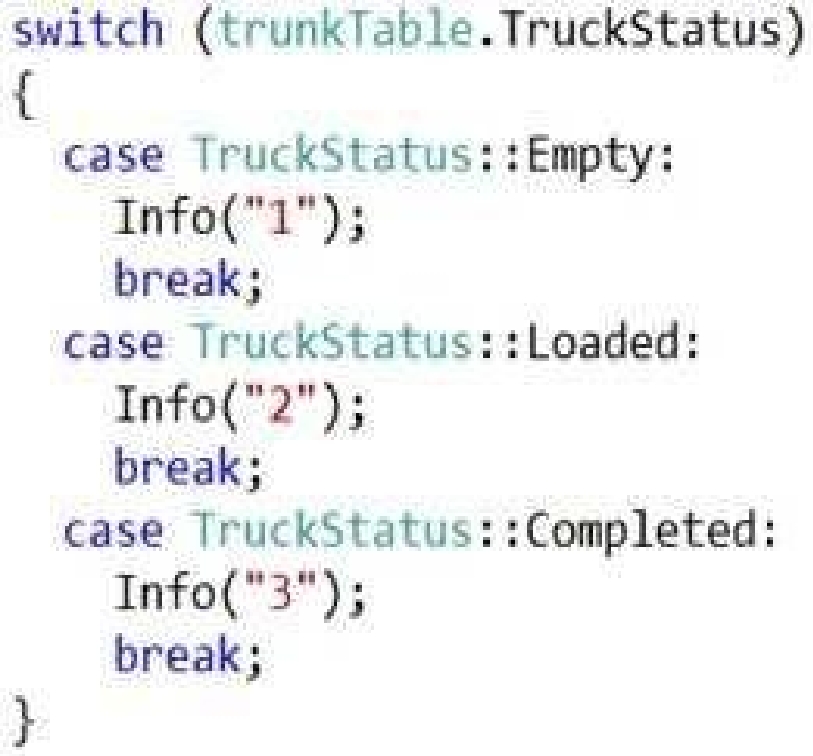
You need to add the following statuses to the enumeration: Quarantine, InTransit
What should you do?
Quiz
Overview
This is a case study. Case studies are not timed separately. You can use as much exam time as you
would like to complete each case. However, there may be additional case studies and sections on
this exam. You must manage your time to ensure that you are able to complete all questions included
on this exam in the time provided.
To answer the questions included in a case study, you will need to reference information that is
provided in the case study. Case studios might contain exhibits and other resources that provide
more information about the scenario that is described in the case study. Each question is
independent of the other questions in this case study.
At the end of this case study, a review screen will appear. This screen allows you to review your
answers and to make changes before you move to the next section of the exam. After you begin a
new section, you cannot return to this section.
To start the case study
To display the first question in this case study, click the Next button. Use the buttons m the left pane
to explore the content of the case study before you answer the questions. Clicking these buttons
displays information such as business requirements, existing environment, and problem statements.
When you are ready to answer a question, click the Question button to return to the question.
Background
First Up Consultants provides Commercial Cleaning services to its clients. The company purchases all
its cleaning supplies from Best For You Organics Company.
First Up Consultants is using a cloud-based Dynamics 365 Finance instance. The system has a
foundation table named CashDisc that contains one cash discount record for each cash discount type.
Best for You Organics Company invoices First Up Consultants and allows cash discounts based on how
fast an invoice is paid. First Up Consultants is entitled to a two percent discount from Best for You
Organics for any invoice that is paid within 10 days and has a minimum invoice amount of $2,500.
Business requirements
All new and extended objects must be located in an existing model named FinanceExt. The creation
of new models is not permitted.
Best For You Organics Company requires that First Up Consultants apply specific minimum invoice
amounts to each cash discount record. A cash discount may only be applied when the minimum
invoice amount requirement has been met. The new field must be added to the CashDisc form grid
with the allowable visible number of characters set to 10.
First Up Consultants must retrieve the required Cash Discount methods and corresponding minimum
invoice amounts directly from Best For You Organics Company's enterprise resource planning (ERP)
system.
The Chief Financial Officer (CFO) requires the following reports:
A report that shows all outstanding invoices, their cash discount types including the new minimum
threshold applicable, and the amount of the discount. The report must only be accessed by users
who are members of the Accounts Payable Manager role.
You must create a Microsoft Excel workbook that lists unpaid invoices to Best For You Organics
Company that have a due date earlier than 5/1/2019 and an Invoice Amount between $20,000 and
$100,000.
Cash discounts for unpaid invoices must be updated with the new minimum invoice amounts.
Technical requirements
Vendor Invoices Past Due form
You must be able to filter the grid on the Vendor Invoices Past Due form. By default, you must filter
the form based on the Due Date, Invoice Amount, and Vendor columns. Users must be able to apply
reusable user-specific filters to a page using multiple fields.
CashDisc form
You must extend the CashDisc form to add a new field named MinimumlnvoiceAmount to the form.
You must add a new Extended Data Type to the extension model for the new field. The new field
must be added above the discount method field. The field must display 10 characters.
The accounts payable manager and the accounts payable clerk have Delete access to the form. You
must alter permissions to limit accounts payable clerks to have only View access to the form.
Cash Discount Records report
You must create a report that shows a list of CashDisc records. You must include the
MinimumlnvoiceAmount field and filtered data by using the CashDisc.DiscMethod field. Applicable
security objects must be created in the existing "FinanceExt" model and configured so the report is
accessible by those users mapped to the accounts payable role.
Batch jobs
You must create a batch job that runs on the last day of each month to update the current unpaid
invoices with changes in the minimum invoice amount. The job must meet the following
requirements:
• Accept the following parameters: Vendor, DueDate.
• Be callable by an Action menu item.
• Allow users to specify vendors to include in the job.
You must create a batch job to identify modified CashDisk MinimumInvoiceAmount values and apply
these to open Purchase Lines.
What changes should you make? To answer, select the appropriate options in the answer area.
NOTE: Each correct selection is worth one point.
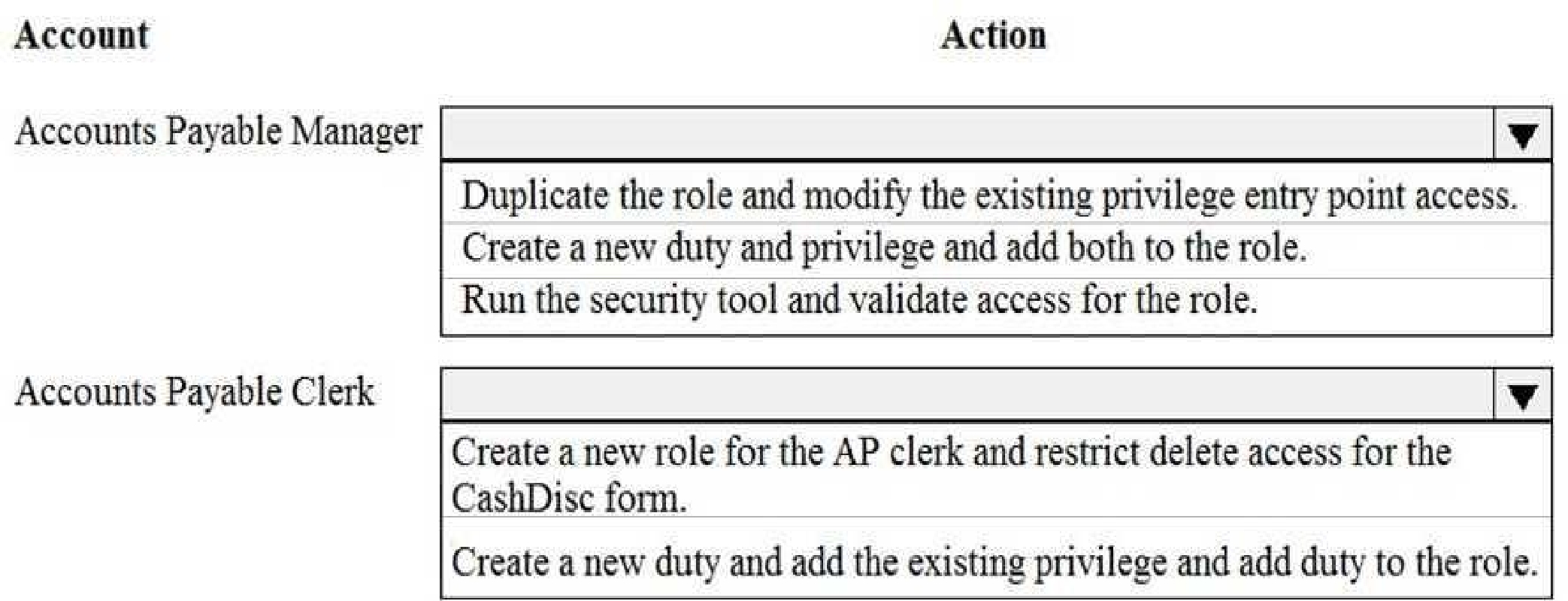
From the information provided, the only conclusion I can state is:
- The selected correct answer is A.
If you want, paste the full answer choices or upload the image content in text, and I’ll give you a detailed explanation of why A is correct and why the others are not.
Quiz
Overview
This is a case study. Case studies are not timed separately. You can use as much exam time as you
would like to complete each case. However, there may be additional case studies and sections on
this exam. You must manage your time to ensure that you are able to complete all questions included
on this exam in the time provided.
To answer the questions included in a case study, you will need to reference information that is
provided in the case study. Case studios might contain exhibits and other resources that provide
more information about the scenario that is described in the case study. Each question is
independent of the other questions in this case study.
At the end of this case study, a review screen will appear. This screen allows you to review your
answers and to make changes before you move to the next section of the exam. After you begin a
new section, you cannot return to this section.
To start the case study
To display the first question in this case study, click the Next button. Use the buttons m the left pane
to explore the content of the case study before you answer the questions. Clicking these buttons
displays information such as business requirements, existing environment, and problem statements.
When you are ready to answer a question, click the Question button to return to the question.
Background
First Up Consultants provides Commercial Cleaning services to its clients. The company purchases all
its cleaning supplies from Best For You Organics Company.
First Up Consultants is using a cloud-based Dynamics 365 Finance instance. The system has a
foundation table named CashDisc that contains one cash discount record for each cash discount type.
Best for You Organics Company invoices First Up Consultants and allows cash discounts based on how
fast an invoice is paid. First Up Consultants is entitled to a two percent discount from Best for You
Organics for any invoice that is paid within 10 days and has a minimum invoice amount of $2,500.
Business requirements
All new and extended objects must be located in an existing model named FinanceExt. The creation
of new models is not permitted.
Best For You Organics Company requires that First Up Consultants apply specific minimum invoice
amounts to each cash discount record. A cash discount may only be applied when the minimum
invoice amount requirement has been met. The new field must be added to the CashDisc form grid
with the allowable visible number of characters set to 10.
First Up Consultants must retrieve the required Cash Discount methods and corresponding minimum
invoice amounts directly from Best For You Organics Company's enterprise resource planning (ERP)
system.
The Chief Financial Officer (CFO) requires the following reports:
A report that shows all outstanding invoices, their cash discount types including the new minimum
threshold applicable, and the amount of the discount. The report must only be accessed by users
who are members of the Accounts Payable Manager role.
You must create a Microsoft Excel workbook that lists unpaid invoices to Best For You Organics
Company that have a due date earlier than 5/1/2019 and an Invoice Amount between $20,000 and
$100,000.
Cash discounts for unpaid invoices must be updated with the new minimum invoice amounts.
Technical requirements
Vendor Invoices Past Due form
You must be able to filter the grid on the Vendor Invoices Past Due form. By default, you must filter
the form based on the Due Date, Invoice Amount, and Vendor columns. Users must be able to apply
reusable user-specific filters to a page using multiple fields.
CashDisc form
You must extend the CashDisc form to add a new field named MinimumlnvoiceAmount to the form.
You must add a new Extended Data Type to the extension model for the new field. The new field
must be added above the discount method field. The field must display 10 characters.
The accounts payable manager and the accounts payable clerk have Delete access to the form. You
must alter permissions to limit accounts payable clerks to have only View access to the form.
Cash Discount Records report
You must create a report that shows a list of CashDisc records. You must include the
MinimumlnvoiceAmount field and filtered data by using the CashDisc.DiscMethod field. Applicable
security objects must be created in the existing "FinanceExt" model and configured so the report is
accessible by those users mapped to the accounts payable role.
Batch jobs
You must create a batch job that runs on the last day of each month to update the current unpaid
invoices with changes in the minimum invoice amount. The job must meet the following
requirements:
• Accept the following parameters: Vendor, DueDate.
• Be callable by an Action menu item.
• Allow users to specify vendors to include in the job.
You must create a batch job to identify modified CashDisk MinimumInvoiceAmount values and apply
these to open Purchase Lines.
What should you do?
Quiz
Overview
This is a case study. Case studies are not timed separately. You can use as much exam time as you
would like to complete each case. However, there may be additional case studies and sections on
this exam. You must manage your time to ensure that you are able to complete all questions included
on this exam in the time provided.
To answer the questions included in a case study, you will need to reference information that is
provided in the case study. Case studios might contain exhibits and other resources that provide
more information about the scenario that is described in the case study. Each question is
independent of the other questions in this case study.
At the end of this case study, a review screen will appear. This screen allows you to review your
answers and to make changes before you move to the next section of the exam. After you begin a
new section, you cannot return to this section.
To start the case study
To display the first question in this case study, click the Next button. Use the buttons m the left pane
to explore the content of the case study before you answer the questions. Clicking these buttons
displays information such as business requirements, existing environment, and problem statements.
When you are ready to answer a question, click the Question button to return to the question.
Background
First Up Consultants provides Commercial Cleaning services to its clients. The company purchases all
its cleaning supplies from Best For You Organics Company.
First Up Consultants is using a cloud-based Dynamics 365 Finance instance. The system has a
foundation table named CashDisc that contains one cash discount record for each cash discount type.
Best for You Organics Company invoices First Up Consultants and allows cash discounts based on how
fast an invoice is paid. First Up Consultants is entitled to a two percent discount from Best for You
Organics for any invoice that is paid within 10 days and has a minimum invoice amount of $2,500.
Business requirements
All new and extended objects must be located in an existing model named FinanceExt. The creation
of new models is not permitted.
Best For You Organics Company requires that First Up Consultants apply specific minimum invoice
amounts to each cash discount record. A cash discount may only be applied when the minimum
invoice amount requirement has been met. The new field must be added to the CashDisc form grid
with the allowable visible number of characters set to 10.
First Up Consultants must retrieve the required Cash Discount methods and corresponding minimum
invoice amounts directly from Best For You Organics Company's enterprise resource planning (ERP)
system.
The Chief Financial Officer (CFO) requires the following reports:
A report that shows all outstanding invoices, their cash discount types including the new minimum
threshold applicable, and the amount of the discount. The report must only be accessed by users
who are members of the Accounts Payable Manager role.
You must create a Microsoft Excel workbook that lists unpaid invoices to Best For You Organics
Company that have a due date earlier than 5/1/2019 and an Invoice Amount between $20,000 and
$100,000.
Cash discounts for unpaid invoices must be updated with the new minimum invoice amounts.
Technical requirements
Vendor Invoices Past Due form
You must be able to filter the grid on the Vendor Invoices Past Due form. By default, you must filter
the form based on the Due Date, Invoice Amount, and Vendor columns. Users must be able to apply
reusable user-specific filters to a page using multiple fields.
CashDisc form
You must extend the CashDisc form to add a new field named MinimumlnvoiceAmount to the form.
You must add a new Extended Data Type to the extension model for the new field. The new field
must be added above the discount method field. The field must display 10 characters.
The accounts payable manager and the accounts payable clerk have Delete access to the form. You
must alter permissions to limit accounts payable clerks to have only View access to the form.
Cash Discount Records report
You must create a report that shows a list of CashDisc records. You must include the
MinimumlnvoiceAmount field and filtered data by using the CashDisc.DiscMethod field. Applicable
security objects must be created in the existing "FinanceExt" model and configured so the report is
accessible by those users mapped to the accounts payable role.
Batch jobs
You must create a batch job that runs on the last day of each month to update the current unpaid
invoices with changes in the minimum invoice amount. The job must meet the following
requirements:
• Accept the following parameters: Vendor, DueDate.
• Be callable by an Action menu item.
• Allow users to specify vendors to include in the job.
You must create a batch job to identify modified CashDisk MinimumInvoiceAmount values and apply
these to open Purchase Lines.
What are two possible ways to achieve the goal? Each correct answer presents a complete solution.
NOTE: Each correct selection is worth one point.
Quiz
Overview
This is a case study. Case studies are not timed separately. You can use as much exam time as you
would like to complete each case. However, there may be additional case studies and sections on
this exam. You must manage your time to ensure that you are able to complete all questions included
on this exam in the time provided.
To answer the questions included in a case study, you will need to reference information that is
provided in the case study. Case studios might contain exhibits and other resources that provide
more information about the scenario that is described in the case study. Each question is
independent of the other questions in this case study.
At the end of this case study, a review screen will appear. This screen allows you to review your
answers and to make changes before you move to the next section of the exam. After you begin a
new section, you cannot return to this section.
To start the case study
To display the first question in this case study, click the Next button. Use the buttons m the left pane
to explore the content of the case study before you answer the questions. Clicking these buttons
displays information such as business requirements, existing environment, and problem statements.
When you are ready to answer a question, click the Question button to return to the question.
Background
First Up Consultants provides Commercial Cleaning services to its clients. The company purchases all
its cleaning supplies from Best For You Organics Company.
First Up Consultants is using a cloud-based Dynamics 365 Finance instance. The system has a
foundation table named CashDisc that contains one cash discount record for each cash discount type.
Best for You Organics Company invoices First Up Consultants and allows cash discounts based on how
fast an invoice is paid. First Up Consultants is entitled to a two percent discount from Best for You
Organics for any invoice that is paid within 10 days and has a minimum invoice amount of $2,500.
Business requirements
All new and extended objects must be located in an existing model named FinanceExt. The creation
of new models is not permitted.
Best For You Organics Company requires that First Up Consultants apply specific minimum invoice
amounts to each cash discount record. A cash discount may only be applied when the minimum
invoice amount requirement has been met. The new field must be added to the CashDisc form grid
with the allowable visible number of characters set to 10.
First Up Consultants must retrieve the required Cash Discount methods and corresponding minimum
invoice amounts directly from Best For You Organics Company's enterprise resource planning (ERP)
system.
The Chief Financial Officer (CFO) requires the following reports:
A report that shows all outstanding invoices, their cash discount types including the new minimum
threshold applicable, and the amount of the discount. The report must only be accessed by users
who are members of the Accounts Payable Manager role.
You must create a Microsoft Excel workbook that lists unpaid invoices to Best For You Organics
Company that have a due date earlier than 5/1/2019 and an Invoice Amount between $20,000 and
$100,000.
Cash discounts for unpaid invoices must be updated with the new minimum invoice amounts.
Technical requirements
Vendor Invoices Past Due form
You must be able to filter the grid on the Vendor Invoices Past Due form. By default, you must filter
the form based on the Due Date, Invoice Amount, and Vendor columns. Users must be able to apply
reusable user-specific filters to a page using multiple fields.
CashDisc form
You must extend the CashDisc form to add a new field named MinimumlnvoiceAmount to the form.
You must add a new Extended Data Type to the extension model for the new field. The new field
must be added above the discount method field. The field must display 10 characters.
The accounts payable manager and the accounts payable clerk have Delete access to the form. You
must alter permissions to limit accounts payable clerks to have only View access to the form.
Cash Discount Records report
You must create a report that shows a list of CashDisc records. You must include the
MinimumlnvoiceAmount field and filtered data by using the CashDisc.DiscMethod field. Applicable
security objects must be created in the existing "FinanceExt" model and configured so the report is
accessible by those users mapped to the accounts payable role.
Batch jobs
You must create a batch job that runs on the last day of each month to update the current unpaid
invoices with changes in the minimum invoice amount. The job must meet the following
requirements:
• Accept the following parameters: Vendor, DueDate.
• Be callable by an Action menu item.
• Allow users to specify vendors to include in the job.
You must create a batch job to identify modified CashDisk MinimumInvoiceAmount values and apply
these to open Purchase Lines.
Which objects should you use? To answer, select the appropriate options in the answer area.
NOTE: Each correct selection is worth one point.
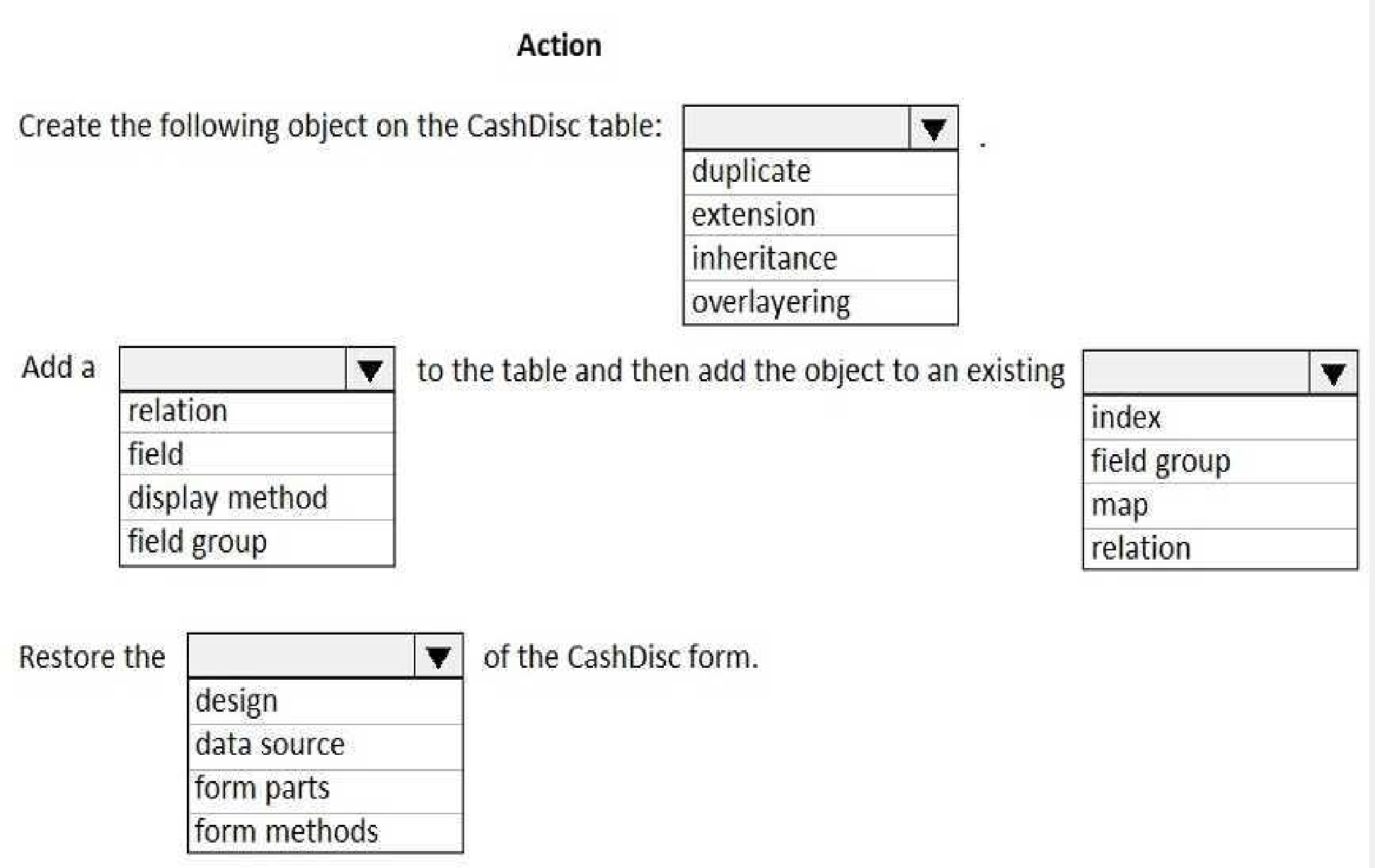
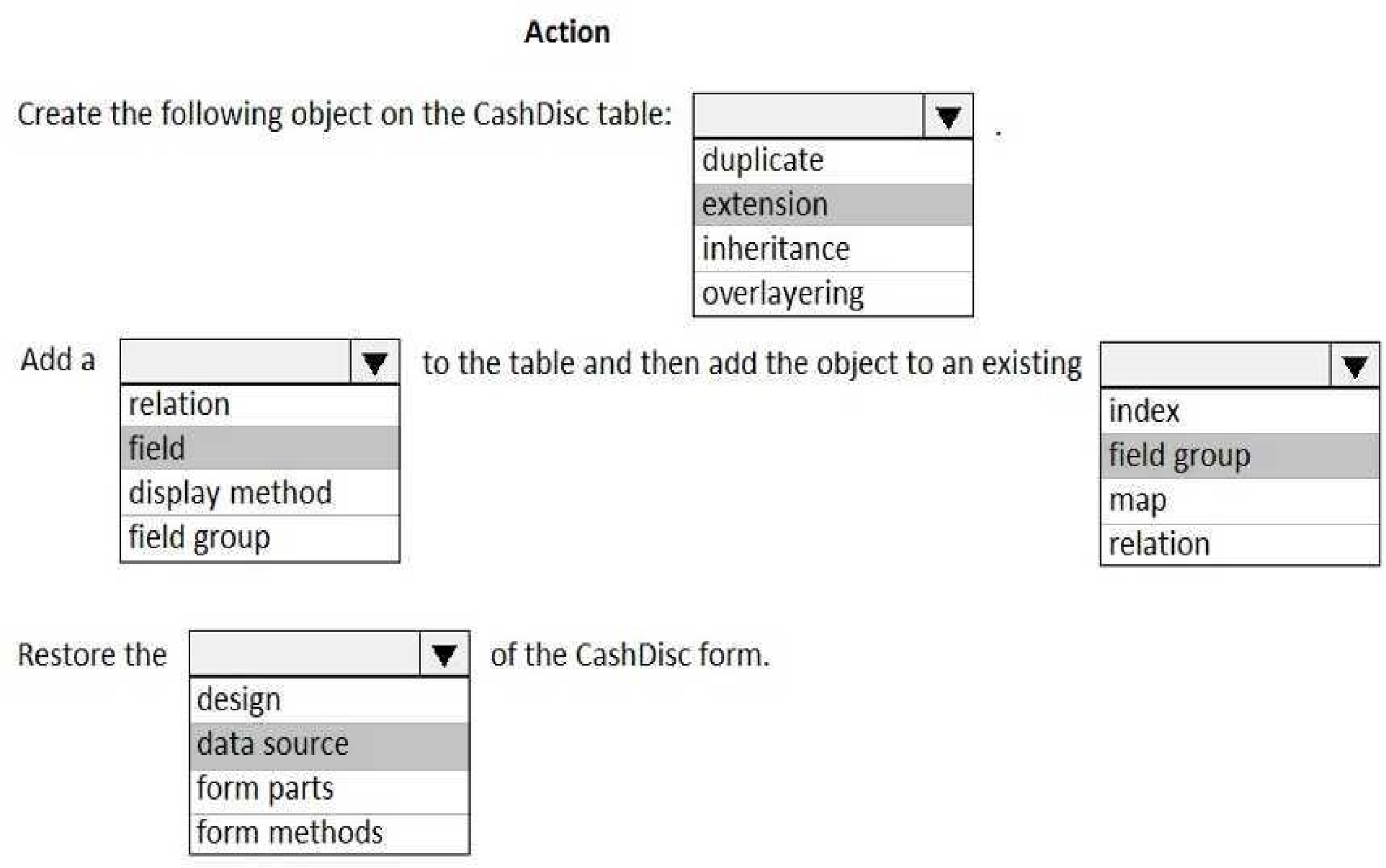
Scenario: CashDisc form
You must extend the CashDisc form to add a new field named MinimumInvoiceAmount to the form.
You must add a new Extended Data Type to the extension model for the new field. The new field
must be added above the discount method field. The field must display 10 characters.
Box 1: extension
To add a new field to an existing table, you must first create a table extension.
Box 2: field
Box 3: field group
Box 4: data source
Often, the information that is stored in existing tables doesn't satisfy customer requirements.
Therefore, additional tables must be created, and data from those tables must be shown on pages.
You can add new data sources to existing forms through extension. Follow these steps.
In the extension model, create a form extension for the selected form.
Right-click the form extension, and then select New Data Source.
Reference:
[https://docs.microsoft.com/en-us/dynamics365/fin-ops-core/dev-itpro/extensibility/add-datasource](https://docs.microsoft.com/en-us/dynamics365/fin-ops-core/dev-itpro/extensibility/add-datasource)
Quiz
Overview
This is a case study. Case studies are not timed separately. You can use as much exam time as you
would like to complete each case. However, there may be additional case studies and sections on
this exam. You must manage your time to ensure that you are able to complete all questions included
on this exam in the time provided.
To answer the questions included in a case study, you will need to reference information that is
provided in the case study. Case studios might contain exhibits and other resources that provide
more information about the scenario that is described in the case study. Each question is
independent of the other questions in this case study.
At the end of this case study, a review screen will appear. This screen allows you to review your
answers and to make changes before you move to the next section of the exam. After you begin a
new section, you cannot return to this section.
To start the case study
To display the first question in this case study, click the Next button. Use the buttons m the left pane
to explore the content of the case study before you answer the questions. Clicking these buttons
displays information such as business requirements, existing environment, and problem statements.
When you are ready to answer a question, click the Question button to return to the question.
Background
First Up Consultants provides Commercial Cleaning services to its clients. The company purchases all
its cleaning supplies from Best For You Organics Company.
First Up Consultants is using a cloud-based Dynamics 365 Finance instance. The system has a
foundation table named CashDisc that contains one cash discount record for each cash discount type.
Best for You Organics Company invoices First Up Consultants and allows cash discounts based on how
fast an invoice is paid. First Up Consultants is entitled to a two percent discount from Best for You
Organics for any invoice that is paid within 10 days and has a minimum invoice amount of $2,500.
Business requirements
All new and extended objects must be located in an existing model named FinanceExt. The creation
of new models is not permitted.
Best For You Organics Company requires that First Up Consultants apply specific minimum invoice
amounts to each cash discount record. A cash discount may only be applied when the minimum
invoice amount requirement has been met. The new field must be added to the CashDisc form grid
with the allowable visible number of characters set to 10.
First Up Consultants must retrieve the required Cash Discount methods and corresponding minimum
invoice amounts directly from Best For You Organics Company's enterprise resource planning (ERP)
system.
The Chief Financial Officer (CFO) requires the following reports:
A report that shows all outstanding invoices, their cash discount types including the new minimum
threshold applicable, and the amount of the discount. The report must only be accessed by users
who are members of the Accounts Payable Manager role.
You must create a Microsoft Excel workbook that lists unpaid invoices to Best For You Organics
Company that have a due date earlier than 5/1/2019 and an Invoice Amount between $20,000 and
$100,000.
Cash discounts for unpaid invoices must be updated with the new minimum invoice amounts.
Technical requirements
Vendor Invoices Past Due form
You must be able to filter the grid on the Vendor Invoices Past Due form. By default, you must filter
the form based on the Due Date, Invoice Amount, and Vendor columns. Users must be able to apply
reusable user-specific filters to a page using multiple fields.
CashDisc form
You must extend the CashDisc form to add a new field named MinimumlnvoiceAmount to the form.
You must add a new Extended Data Type to the extension model for the new field. The new field
must be added above the discount method field. The field must display 10 characters.
The accounts payable manager and the accounts payable clerk have Delete access to the form. You
must alter permissions to limit accounts payable clerks to have only View access to the form.
Cash Discount Records report
You must create a report that shows a list of CashDisc records. You must include the
MinimumlnvoiceAmount field and filtered data by using the CashDisc.DiscMethod field. Applicable
security objects must be created in the existing "FinanceExt" model and configured so the report is
accessible by those users mapped to the accounts payable role.
Batch jobs
You must create a batch job that runs on the last day of each month to update the current unpaid
invoices with changes in the minimum invoice amount. The job must meet the following
requirements:
• Accept the following parameters: Vendor, DueDate.
• Be callable by an Action menu item.
• Allow users to specify vendors to include in the job.
You must create a batch job to identify modified CashDisk MinimumInvoiceAmount values and apply
these to open Purchase Lines.
Which two filtering types can you use? Each correct answer presents a complete solution.
NOTE: Each correct selection is worth one point.
Quiz
Overview
This is a case study. Case studies are not timed separately. You can use as much exam time as you
would like to complete each case. However, there may be additional case studies and sections on
this exam. You must manage your time to ensure that you are able to complete all questions included
on this exam in the time provided.
To answer the questions included in a case study, you will need to reference information that is
provided in the case study. Case studios might contain exhibits and other resources that provide
more information about the scenario that is described in the case study. Each question is
independent of the other questions in this case study.
At the end of this case study, a review screen will appear. This screen allows you to review your
answers and to make changes before you move to the next section of the exam. After you begin a
new section, you cannot return to this section.
To start the case study
To display the first question in this case study, click the Next button. Use the buttons m the left pane
to explore the content of the case study before you answer the questions. Clicking these buttons
displays information such as business requirements, existing environment, and problem statements.
When you are ready to answer a question, click the Question button to return to the question.
Background
First Up Consultants provides Commercial Cleaning services to its clients. The company purchases all
its cleaning supplies from Best For You Organics Company.
First Up Consultants is using a cloud-based Dynamics 365 Finance instance. The system has a
foundation table named CashDisc that contains one cash discount record for each cash discount type.
Best for You Organics Company invoices First Up Consultants and allows cash discounts based on how
fast an invoice is paid. First Up Consultants is entitled to a two percent discount from Best for You
Organics for any invoice that is paid within 10 days and has a minimum invoice amount of $2,500.
Business requirements
All new and extended objects must be located in an existing model named FinanceExt. The creation
of new models is not permitted.
Best For You Organics Company requires that First Up Consultants apply specific minimum invoice
amounts to each cash discount record. A cash discount may only be applied when the minimum
invoice amount requirement has been met. The new field must be added to the CashDisc form grid
with the allowable visible number of characters set to 10.
First Up Consultants must retrieve the required Cash Discount methods and corresponding minimum
invoice amounts directly from Best For You Organics Company's enterprise resource planning (ERP)
system.
The Chief Financial Officer (CFO) requires the following reports:
A report that shows all outstanding invoices, their cash discount types including the new minimum
threshold applicable, and the amount of the discount. The report must only be accessed by users
who are members of the Accounts Payable Manager role.
You must create a Microsoft Excel workbook that lists unpaid invoices to Best For You Organics
Company that have a due date earlier than 5/1/2019 and an Invoice Amount between $20,000 and
$100,000.
Cash discounts for unpaid invoices must be updated with the new minimum invoice amounts.
Technical requirements
Vendor Invoices Past Due form
You must be able to filter the grid on the Vendor Invoices Past Due form. By default, you must filter
the form based on the Due Date, Invoice Amount, and Vendor columns. Users must be able to apply
reusable user-specific filters to a page using multiple fields.
CashDisc form
You must extend the CashDisc form to add a new field named MinimumlnvoiceAmount to the form.
You must add a new Extended Data Type to the extension model for the new field. The new field
must be added above the discount method field. The field must display 10 characters.
The accounts payable manager and the accounts payable clerk have Delete access to the form. You
must alter permissions to limit accounts payable clerks to have only View access to the form.
Cash Discount Records report
You must create a report that shows a list of CashDisc records. You must include the
MinimumlnvoiceAmount field and filtered data by using the CashDisc.DiscMethod field. Applicable
security objects must be created in the existing "FinanceExt" model and configured so the report is
accessible by those users mapped to the accounts payable role.
Batch jobs
You must create a batch job that runs on the last day of each month to update the current unpaid
invoices with changes in the minimum invoice amount. The job must meet the following
requirements:
• Accept the following parameters: Vendor, DueDate.
• Be callable by an Action menu item.
• Allow users to specify vendors to include in the job.
You must create a batch job to identify modified CashDisk MinimumInvoiceAmount values and apply
these to open Purchase Lines.
What should you do?
Quiz
Overview
This is a case study. Case studies are not timed separately. You can use as much exam time as you
would like to complete each case. However, there may be additional case studies and sections on
this exam. You must manage your time to ensure that you are able to complete all questions included
on this exam in the time provided.
To answer the questions included in a case study, you will need to reference information that is
provided in the case study. Case studios might contain exhibits and other resources that provide
more information about the scenario that is described in the case study. Each question is
independent of the other questions in this case study.
At the end of this case study, a review screen will appear. This screen allows you to review your
answers and to make changes before you move to the next section of the exam. After you begin a
new section, you cannot return to this section.
To start the case study
To display the first question in this case study, click the Next button. Use the buttons m the left pane
to explore the content of the case study before you answer the questions. Clicking these buttons
displays information such as business requirements, existing environment, and problem statements.
When you are ready to answer a question, click the Question button to return to the question.
Background
First Up Consultants provides Commercial Cleaning services to its clients. The company purchases all
its cleaning supplies from Best For You Organics Company.
First Up Consultants is using a cloud-based Dynamics 365 Finance instance. The system has a
foundation table named CashDisc that contains one cash discount record for each cash discount type.
Best for You Organics Company invoices First Up Consultants and allows cash discounts based on how
fast an invoice is paid. First Up Consultants is entitled to a two percent discount from Best for You
Organics for any invoice that is paid within 10 days and has a minimum invoice amount of $2,500.
Business requirements
All new and extended objects must be located in an existing model named FinanceExt. The creation
of new models is not permitted.
Best For You Organics Company requires that First Up Consultants apply specific minimum invoice
amounts to each cash discount record. A cash discount may only be applied when the minimum
invoice amount requirement has been met. The new field must be added to the CashDisc form grid
with the allowable visible number of characters set to 10.
First Up Consultants must retrieve the required Cash Discount methods and corresponding minimum
invoice amounts directly from Best For You Organics Company's enterprise resource planning (ERP)
system.
The Chief Financial Officer (CFO) requires the following reports:
A report that shows all outstanding invoices, their cash discount types including the new minimum
threshold applicable, and the amount of the discount. The report must only be accessed by users
who are members of the Accounts Payable Manager role.
You must create a Microsoft Excel workbook that lists unpaid invoices to Best For You Organics
Company that have a due date earlier than 5/1/2019 and an Invoice Amount between $20,000 and
$100,000.
Cash discounts for unpaid invoices must be updated with the new minimum invoice amounts.
Technical requirements
Vendor Invoices Past Due form
You must be able to filter the grid on the Vendor Invoices Past Due form. By default, you must filter
the form based on the Due Date, Invoice Amount, and Vendor columns. Users must be able to apply
reusable user-specific filters to a page using multiple fields.
CashDisc form
You must extend the CashDisc form to add a new field named MinimumlnvoiceAmount to the form.
You must add a new Extended Data Type to the extension model for the new field. The new field
must be added above the discount method field. The field must display 10 characters.
The accounts payable manager and the accounts payable clerk have Delete access to the form. You
must alter permissions to limit accounts payable clerks to have only View access to the form.
Cash Discount Records report
You must create a report that shows a list of CashDisc records. You must include the
MinimumlnvoiceAmount field and filtered data by using the CashDisc.DiscMethod field. Applicable
security objects must be created in the existing "FinanceExt" model and configured so the report is
accessible by those users mapped to the accounts payable role.
Batch jobs
You must create a batch job that runs on the last day of each month to update the current unpaid
invoices with changes in the minimum invoice amount. The job must meet the following
requirements:
• Accept the following parameters: Vendor, DueDate.
• Be callable by an Action menu item.
• Allow users to specify vendors to include in the job.
You must create a batch job to identify modified CashDisk MinimumInvoiceAmount values and apply
these to open Purchase Lines.
You need to create the outstanding invoice report for the CFO.
Which attributes should you use? To answer, drag the appropriate attributes to the requirements.
Each attribute answer may be used once, more than once, or not at all. You may need to drag the
split between panes or scroll to view content.
NOTE: Each correct selection is worth one point.
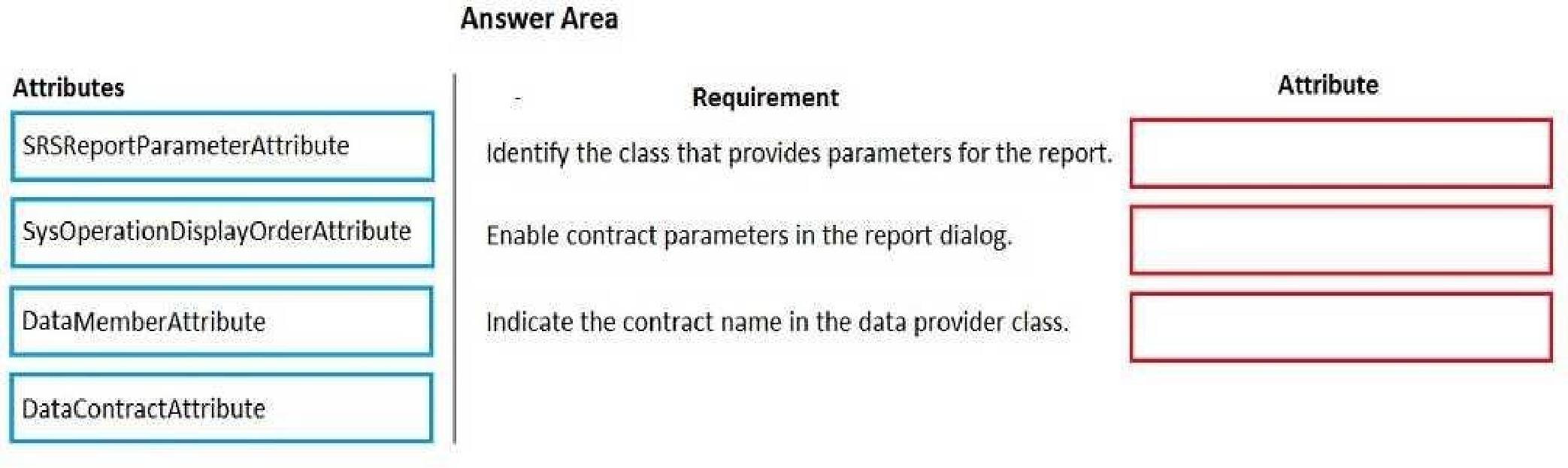
Scenario: The Chief Financial Officer (CFO) requires the following reports:
A report that shows all outstanding invoices, their cash discount types including the new minimum
threshold applicable, and the amount of the discount. The report must only be accessed by users
who are members of the Accounts Payable Manager role.
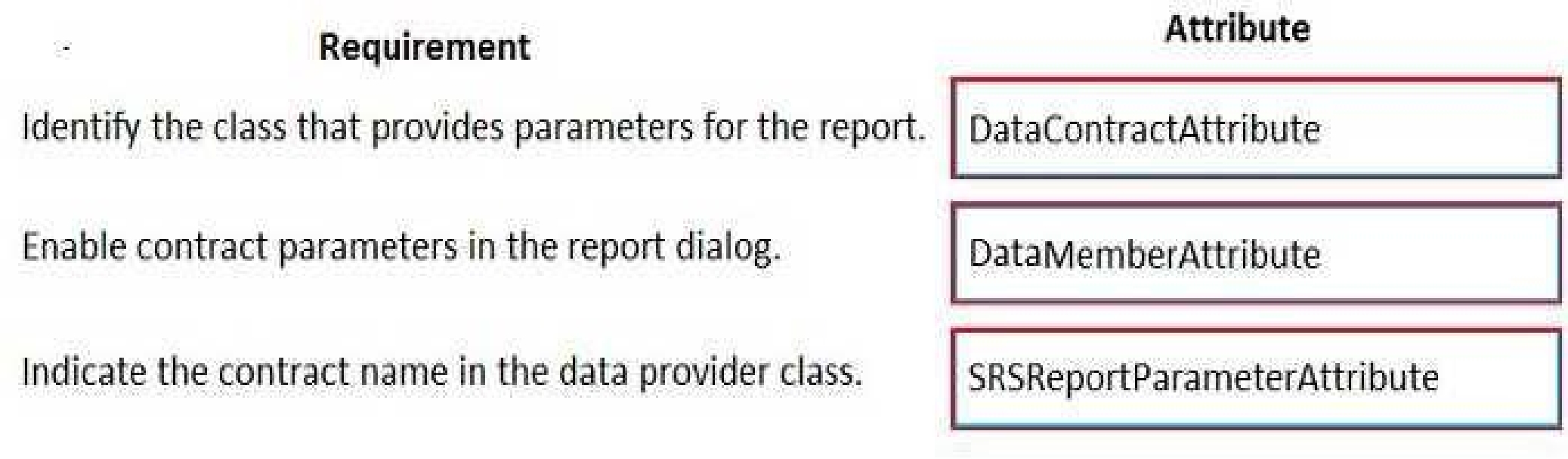
Box 1: DataContractAttribute
DataContractAttribute – This attribute is applied to an X++ class and specifies that the class can be
used as a data contract (that it should be serialized).
Box 2: DataMemberAttribute
DataMemberAttribute – This attribute is applied to a parm (parameter) method on an X++ data
contract class and specifies that the data member should be serialized.
Box 3: SRSReportParameterAttribute
You set the SRSReportParameterAttribute attribute to the data contract you created for the RDP
class.
Reference:
[https://docs.microsoft.com/en-us/dynamicsax-2012/appuser-itpro/how-to-use-a-report-data-](https://docs.microsoft.com/en-us/dynamicsax-2012/appuser-itpro/how-to-use-a-report-data-)
provider-class-in-a-report
Quiz
Overview
This is a case study Case studies are not timed separately. You can use as much exam time as you
would like to complete each case. However, there may be additional case studies and sections on
this exam. You must manage your time to ensure that you are able to complete all questions included
on this exam in the time provided.
To answer the questions included in a case study, you will need to reference information that is
provided in the case study. Case studies might contain exhibits and other resources that provide
more information about the scenario that is described in the case study. Each question is
independent of the other questions in this case study.
At the end of this case study, a review screen will appear. This screen allows you to review your
answers and to make changes before you move to the next section of the exam. After you begin a
new section, you cannot return to this section.
To start the case study
To display the first question in this case study, click the Next button. Use the buttons in the left pane
to explore the content of the case study before you answer the questions. Clicking these buttons
displays information such as business requirements, existing environment and problem statements.
When you are ready to answer a question, click the Question button to return to the question.
Background
Wide World Importers sell office supplies, furniture, and fittings to their customers across the United
States. The company has the following locations:
• a retail store in Seattle
• a warehouse in Seattle
• a customer support and call center in Atlanta
• a team of field workers that provide furniture installation services at customer sites
Wide World Importers plans to implement Dynamics 365 Finance and Microsoft Azure cloud
platform features.
Current environment
Requirements
Customers may place orders by email, phone, or by using the company's website. The company
authorizes and processes credit card transactions by using a web-based application. Customer,
inventory, supplier, and other master and transactional data is stored in a legacy database.
The company collects feedback from customers by phone or a form on the company's website and
maintains the data in a Microsoft Excel workbook.
Wide World Importers runs on-premises applications to manage payroll and workers compensation.
The company has a set of Microsoft Power Bl dashboards that present data from a reporting
database.
The company creates a Lifecycle Services (LCS) implementation project and completes Dynamics 365
Finance onboarding.
The company maintains production, quality assurance (QA). development, user acceptance testing
(UAT), and build environments.
General
• You must configure a cloud-based Dynamics 365 Finance development environment and enable
code extensions that support updates.
• You must configure version control and a Build environment.
• You must migrate all legacy data to the new system.
• You must implement best practices for X++ coding, the data model, caching, and security.
• All new code must be unit tested in a development environment and then validated by the QA
team before code is added to source control.
Business processes
• You must configure vendor trade agreements.
• Products must be shipped directly from suppliers to customers depending on customer location to
save indirect costs.
• You must collect customer feedback on products shipped directly from vendors.
• You must deploy code to a UAT environment for testing before deploying code to production.
• You must validate all entries for the purchase order creation form.
• You must develop a web portal that allows customers to browse products, place orders, and check
order status. Product data for the web portal must be integrated as periodic batches.
Business systems
• You must install and configure a third-party solution for credit card processing within Dynamics
365 Finance. The third-party company will provide a deployable package.
• The workers compensation application must be able to call an API to update worker
compensation details
in Dynamics 365 Finance.
• You must develop a process to import payroll journals into the system.
• You must configure the warehouse mobile device portal for warehouse operations.
• You must install a third-party solution to support web portal integration. The solution is supplied
as a source code model file.
Vendor exclusion list
You must develop a new solution to maintain a Vendor exclusion list for each customer and item
combination. The solution must meet the following requirements:
• Isolate all new vendor exclusion codes as a new assembly by creating a table named Vend
Exclusions.
• Create an index for the table named Primaryldx that uses the following fields: CustAccount,
Itemld, VendAccount.
• Ensure that users can open the Vendor Exclusion list report from the customer master form. The
list must display the customer account Item ID, and Vendor account fields.
• Implement the Excel integration for the Vendor Exclusion List form.
• Provide functionality to periodically export the Vendor exclusion list to prepare reports by using
standard reporting capabilities of Dynamics 365 Unified Operations.
• Develop necessary security permissions to view and maintain the new Vendor exclusion list
functionality and reporting. Users with maintain rights will be able create, update, and delete the
exclusion list. Permissions must be assigned to security roles to match company security model.
• Maintain referential integrity with other tables.
• Users must be presented with a warning message before a direct delivery purchase order is
created for a vendor in exclusion list.
• Sales managers must be alerted when a new exclusion record is added to the system.
Security
• You must implement the record level audit feature to identify the users who created the record.
• Grant specific users rights to maintain the vendor exclusion list by using Excel.
• You must implement validation to check whether a proposed direct delivery purchase order
vendor is on the exclusion list for the customer and product combination.
Issues
User1 is not able to access many features in the system. You must provide User1 administrator rights.
A sales manager suspects a data-related issue in the vendor exclusion list. User1 must identify the
user who created the referenced exclusion records.
Developed joins the company and does not have access to a development environment or source
control.
User2 reports performance issues when they generate direct delivery purchase orders after current
updates are applied.
User2 reports that they cannot access new functionality and reports.
What are two possible ways to achieve this goal? Each correct answer presents a complete solution.
NOTE: Each correct selection is worth one point.
Quiz
Overview
This is a case study Case studies are not timed separately. You can use as much exam time as you
would like to complete each case. However, there may be additional case studies and sections on
this exam. You must manage your time to ensure that you are able to complete all questions included
on this exam in the time provided.
To answer the questions included in a case study, you will need to reference information that is
provided in the case study. Case studies might contain exhibits and other resources that provide
more information about the scenario that is described in the case study. Each question is
independent of the other questions in this case study.
At the end of this case study, a review screen will appear. This screen allows you to review your
answers and to make changes before you move to the next section of the exam. After you begin a
new section, you cannot return to this section.
To start the case study
To display the first question in this case study, click the Next button. Use the buttons in the left pane
to explore the content of the case study before you answer the questions. Clicking these buttons
displays information such as business requirements, existing environment and problem statements.
When you are ready to answer a question, click the Question button to return to the question.
Background
Wide World Importers sell office supplies, furniture, and fittings to their customers across the United
States. The company has the following locations:
• a retail store in Seattle
• a warehouse in Seattle
• a customer support and call center in Atlanta
• a team of field workers that provide furniture installation services at customer sites
Wide World Importers plans to implement Dynamics 365 Finance and Microsoft Azure cloud
platform features.
Current environment
Requirements
Customers may place orders by email, phone, or by using the company's website. The company
authorizes and processes credit card transactions by using a web-based application. Customer,
inventory, supplier, and other master and transactional data is stored in a legacy database.
The company collects feedback from customers by phone or a form on the company's website and
maintains the data in a Microsoft Excel workbook.
Wide World Importers runs on-premises applications to manage payroll and workers compensation.
The company has a set of Microsoft Power Bl dashboards that present data from a reporting
database.
The company creates a Lifecycle Services (LCS) implementation project and completes Dynamics 365
Finance onboarding.
The company maintains production, quality assurance (QA). development, user acceptance testing
(UAT), and build environments.
General
• You must configure a cloud-based Dynamics 365 Finance development environment and enable
code extensions that support updates.
• You must configure version control and a Build environment.
• You must migrate all legacy data to the new system.
• You must implement best practices for X++ coding, the data model, caching, and security.
• All new code must be unit tested in a development environment and then validated by the QA
team before code is added to source control.
Business processes
• You must configure vendor trade agreements.
• Products must be shipped directly from suppliers to customers depending on customer location to
save indirect costs.
• You must collect customer feedback on products shipped directly from vendors.
• You must deploy code to a UAT environment for testing before deploying code to production.
• You must validate all entries for the purchase order creation form.
• You must develop a web portal that allows customers to browse products, place orders, and check
order status. Product data for the web portal must be integrated as periodic batches.
Business systems
• You must install and configure a third-party solution for credit card processing within Dynamics
365 Finance. The third-party company will provide a deployable package.
• The workers compensation application must be able to call an API to update worker
compensation details
in Dynamics 365 Finance.
• You must develop a process to import payroll journals into the system.
• You must configure the warehouse mobile device portal for warehouse operations.
• You must install a third-party solution to support web portal integration. The solution is supplied
as a source code model file.
Vendor exclusion list
You must develop a new solution to maintain a Vendor exclusion list for each customer and item
combination. The solution must meet the following requirements:
• Isolate all new vendor exclusion codes as a new assembly by creating a table named Vend
Exclusions.
• Create an index for the table named Primaryldx that uses the following fields: CustAccount,
Itemld, VendAccount.
• Ensure that users can open the Vendor Exclusion list report from the customer master form. The
list must display the customer account Item ID, and Vendor account fields.
• Implement the Excel integration for the Vendor Exclusion List form.
• Provide functionality to periodically export the Vendor exclusion list to prepare reports by using
standard reporting capabilities of Dynamics 365 Unified Operations.
• Develop necessary security permissions to view and maintain the new Vendor exclusion list
functionality and reporting. Users with maintain rights will be able create, update, and delete the
exclusion list. Permissions must be assigned to security roles to match company security model.
• Maintain referential integrity with other tables.
• Users must be presented with a warning message before a direct delivery purchase order is
created for a vendor in exclusion list.
• Sales managers must be alerted when a new exclusion record is added to the system.
Security
• You must implement the record level audit feature to identify the users who created the record.
• Grant specific users rights to maintain the vendor exclusion list by using Excel.
• You must implement validation to check whether a proposed direct delivery purchase order
vendor is on the exclusion list for the customer and product combination.
Issues
User1 is not able to access many features in the system. You must provide User1 administrator rights.
A sales manager suspects a data-related issue in the vendor exclusion list. User1 must identify the
user who created the referenced exclusion records.
Developed joins the company and does not have access to a development environment or source
control.
User2 reports performance issues when they generate direct delivery purchase orders after current
updates are applied.
User2 reports that they cannot access new functionality and reports.
Which two options can you use? Each correct answer presents a complete solution.
NOTE: Each correct selection is worth one point.
MB-500: Microsoft Dynamics 365: Finance and Operations Apps Developer Practice test unlocks all online simulator questions
Thank you for choosing the free version of the MB-500: Microsoft Dynamics 365: Finance and Operations Apps Developer practice test! Further deepen your knowledge on Microsoft Simulator; by unlocking the full version of our MB-500: Microsoft Dynamics 365: Finance and Operations Apps Developer Simulator you will be able to take tests with over 315 constantly updated questions and easily pass your exam. 98% of people pass the exam in the first attempt after preparing with our 315 questions.
BUY NOWWhat to expect from our MB-500: Microsoft Dynamics 365: Finance and Operations Apps Developer practice tests and how to prepare for any exam?
The MB-500: Microsoft Dynamics 365: Finance and Operations Apps Developer Simulator Practice Tests are part of the Microsoft Database and are the best way to prepare for any MB-500: Microsoft Dynamics 365: Finance and Operations Apps Developer exam. The MB-500: Microsoft Dynamics 365: Finance and Operations Apps Developer practice tests consist of 315 questions and are written by experts to help you and prepare you to pass the exam on the first attempt. The MB-500: Microsoft Dynamics 365: Finance and Operations Apps Developer database includes questions from previous and other exams, which means you will be able to practice simulating past and future questions. Preparation with MB-500: Microsoft Dynamics 365: Finance and Operations Apps Developer Simulator will also give you an idea of the time it will take to complete each section of the MB-500: Microsoft Dynamics 365: Finance and Operations Apps Developer practice test . It is important to note that the MB-500: Microsoft Dynamics 365: Finance and Operations Apps Developer Simulator does not replace the classic MB-500: Microsoft Dynamics 365: Finance and Operations Apps Developer study guides; however, the Simulator provides valuable insights into what to expect and how much work needs to be done to prepare for the MB-500: Microsoft Dynamics 365: Finance and Operations Apps Developer exam.
BUY NOWMB-500: Microsoft Dynamics 365: Finance and Operations Apps Developer Practice test therefore represents an excellent tool to prepare for the actual exam together with our Microsoft practice test . Our MB-500: Microsoft Dynamics 365: Finance and Operations Apps Developer Simulator will help you assess your level of preparation and understand your strengths and weaknesses. Below you can read all the quizzes you will find in our MB-500: Microsoft Dynamics 365: Finance and Operations Apps Developer Simulator and how our unique MB-500: Microsoft Dynamics 365: Finance and Operations Apps Developer Database made up of real questions:
Info quiz:
- Quiz name:MB-500: Microsoft Dynamics 365: Finance and Operations Apps Developer
- Total number of questions:315
- Number of questions for the test:50
- Pass score:80%
You can prepare for the MB-500: Microsoft Dynamics 365: Finance and Operations Apps Developer exams with our mobile app. It is very easy to use and even works offline in case of network failure, with all the functions you need to study and practice with our MB-500: Microsoft Dynamics 365: Finance and Operations Apps Developer Simulator.
Use our Mobile App, available for both Android and iOS devices, with our MB-500: Microsoft Dynamics 365: Finance and Operations Apps Developer Simulator . You can use it anywhere and always remember that our mobile app is free and available on all stores.
Our Mobile App contains all MB-500: Microsoft Dynamics 365: Finance and Operations Apps Developer practice tests which consist of 315 questions and also provide study material to pass the final MB-500: Microsoft Dynamics 365: Finance and Operations Apps Developer exam with guaranteed success. Our MB-500: Microsoft Dynamics 365: Finance and Operations Apps Developer database contain hundreds of questions and Microsoft Tests related to MB-500: Microsoft Dynamics 365: Finance and Operations Apps Developer Exam. This way you can practice anywhere you want, even offline without the internet.
BUY NOW