Quiz MS-102: Microsoft 365 Administrator
Quiz
Overview
Contoso, Ltd. is a consulting company that has a main office in Montreal and two branch
offices in Seattle and New York.
The company has the employees and devices shown in the following table.

Contoso recently purchased a Microsoft 365 ES subscription.
Existing Environment
Requirement
The network contains an on-premises Active Directory forest named contoso.com. The forest
contains the servers shown in the following table.
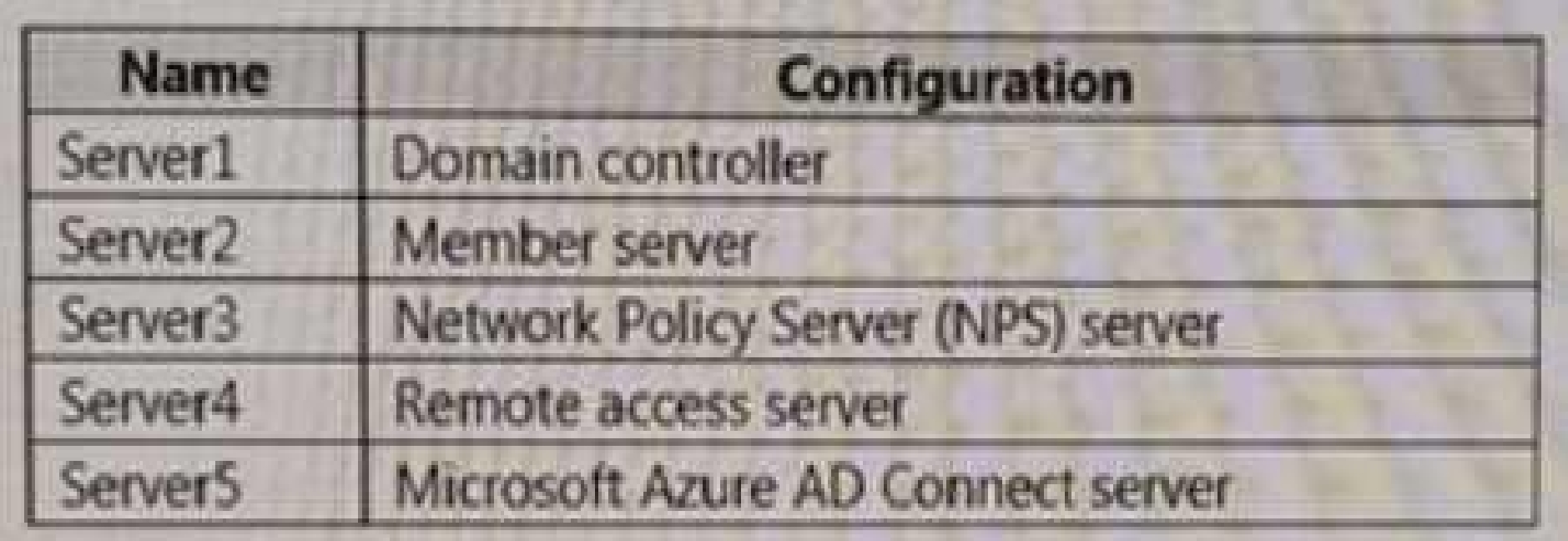
All servers run Windows Server 2016. All desktops and laptops are Windows 10 Enterprise
and are joined to the domain.
The mobile devices of the users in the Montreal and Seattle offices run Android. The mobile
devices of the users in the New York office run iOS.
The domain is synced to Azure Active Directory (Azure AD) and includes the users shown in
the following table.
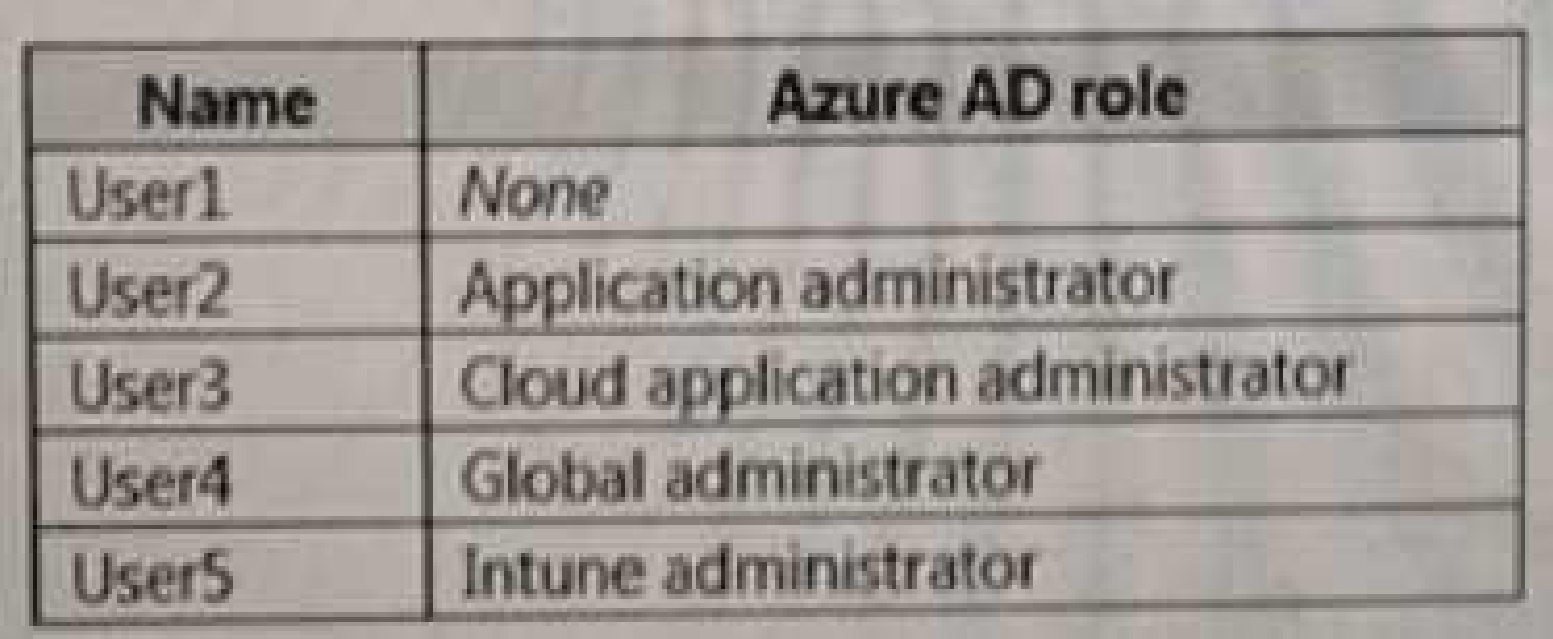
The domain also includes a group named Group1.
Planned Changes
Contoso plans to implement the following changes:
• Implement Microsoft 365.
• Manage devices by using Microsoft Intune.
• Implement Azure Advanced Threat Protection (ATP).
• Every September, apply the latest feature updates to all Windows computers. Every March,
apply the latest feature updates to the computers in the New York office only.
Technical Requirements
Contoso identifies the following technical requirements:
• When a Windows 10 device is joined to Azure AD, the device must enroll in Intune
automaticity.
• Dedicated support technicians must enroll all the Montreal office mobile devices in Intune.
• User1 must be able to enroll all the New York office mobile devices in Intune.
• Azure ATP sensors must be installed and must NOT use port mirroring.
• Whenever possible, the principle of least privilege must be used.
• A Microsoft Store for Business must be created.
Compliance Requirements
Contoso identifies the following compliance requirements:
• Ensure that the users in Group1 can only access Microsoft Exchange Online from devices
that are enrolled in Intune and configured in accordance with the corporate policy.
• Configure Windows Information Protection (W1P) for the Windows 10 devices.
Quiz
Overview
Contoso, Ltd. is a consulting company that has a main office in Montreal and two branch
offices in Seattle and New York.
The company has the employees and devices shown in the following table.
Contoso recently purchased a Microsoft 365 ES subscription.
Existing Environment
Requirement
The network contains an on-premises Active Directory forest named contoso.com. The forest
contains the servers shown in the following table.
All servers run Windows Server 2016. All desktops and laptops are Windows 10 Enterprise
and are joined to the domain.
The mobile devices of the users in the Montreal and Seattle offices run Android. The mobile
devices of the users in the New York office run iOS.
The domain is synced to Azure Active Directory (Azure AD) and includes the users shown in
the following table.
The domain also includes a group named Group1.
Planned Changes
Contoso plans to implement the following changes:
• Implement Microsoft 365.
• Manage devices by using Microsoft Intune.
• Implement Azure Advanced Threat Protection (ATP).
• Every September, apply the latest feature updates to all Windows computers. Every March,
apply the latest feature updates to the computers in the New York office only.
Technical Requirements
Contoso identifies the following technical requirements:
• When a Windows 10 device is joined to Azure AD, the device must enroll in Intune
automaticity.
• Dedicated support technicians must enroll all the Montreal office mobile devices in Intune.
• User1 must be able to enroll all the New York office mobile devices in Intune.
• Azure ATP sensors must be installed and must NOT use port mirroring.
• Whenever possible, the principle of least privilege must be used.
• A Microsoft Store for Business must be created.
Compliance Requirements
Contoso identifies the following compliance requirements:
• Ensure that the users in Group1 can only access Microsoft Exchange Online from devices
that are enrolled in Intune and configured in accordance with the corporate policy.
• Configure Windows Information Protection (W1P) for the Windows 10 devices.
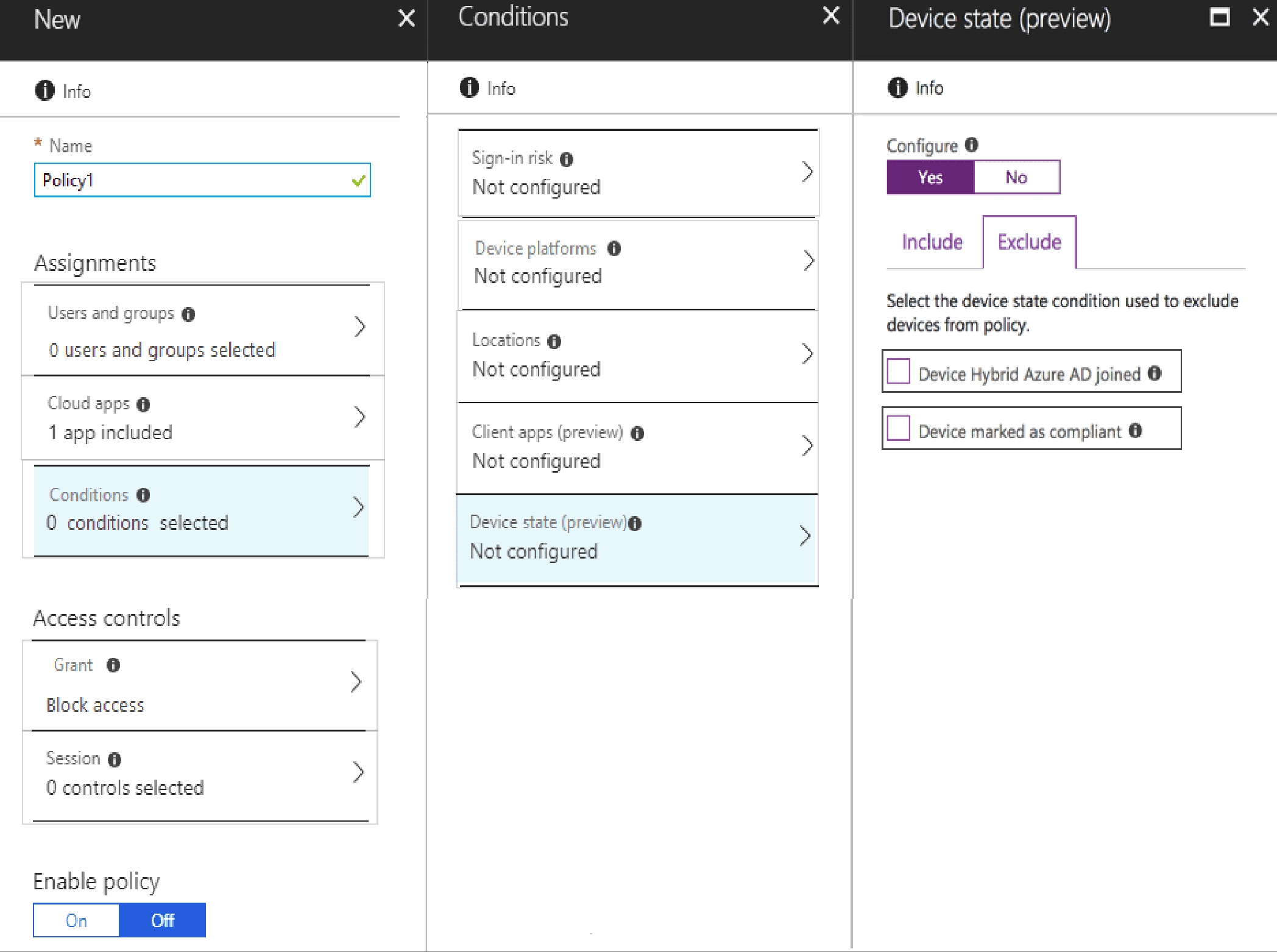
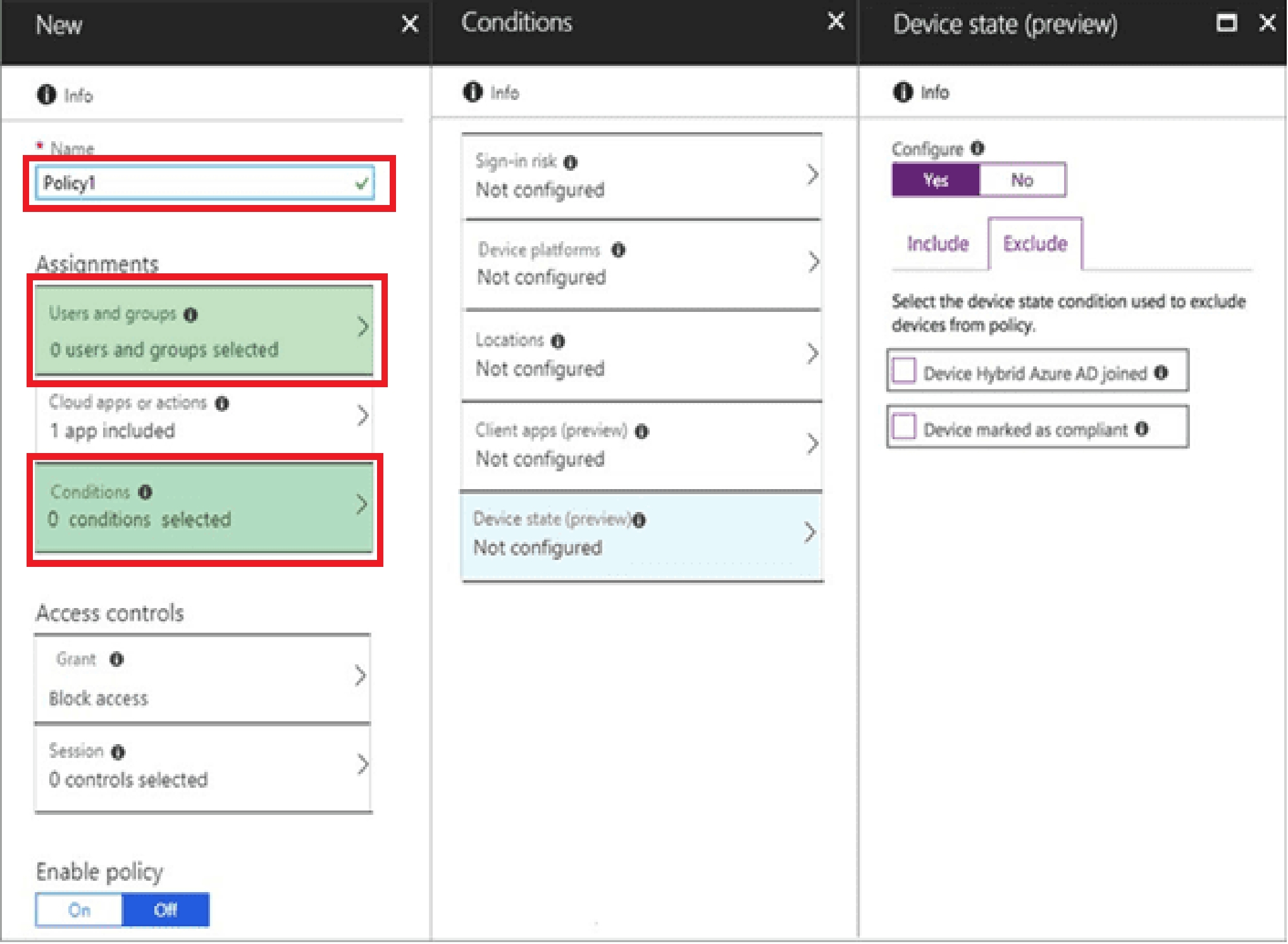
You add Exchange Online as a cloud app.
Which two additional settings should you configure in Policy1? To answer, select the
appropriate options in the answer area.
NOTE: Each correct selection is worth one point.
Quiz
Overview
Contoso, Ltd. is a consulting company that has a main office in Montreal and two branch
offices in Seattle and New York.
The company has the employees and devices shown in the following table.
Contoso recently purchased a Microsoft 365 ES subscription.
Existing Environment
Requirement
The network contains an on-premises Active Directory forest named contoso.com. The forest
contains the servers shown in the following table.
All servers run Windows Server 2016. All desktops and laptops are Windows 10 Enterprise
and are joined to the domain.
The mobile devices of the users in the Montreal and Seattle offices run Android. The mobile
devices of the users in the New York office run iOS.
The domain is synced to Azure Active Directory (Azure AD) and includes the users shown in
the following table.
The domain also includes a group named Group1.
Planned Changes
Contoso plans to implement the following changes:
• Implement Microsoft 365.
• Manage devices by using Microsoft Intune.
• Implement Azure Advanced Threat Protection (ATP).
• Every September, apply the latest feature updates to all Windows computers. Every March,
apply the latest feature updates to the computers in the New York office only.
Technical Requirements
Contoso identifies the following technical requirements:
• When a Windows 10 device is joined to Azure AD, the device must enroll in Intune
automaticity.
• Dedicated support technicians must enroll all the Montreal office mobile devices in Intune.
• User1 must be able to enroll all the New York office mobile devices in Intune.
• Azure ATP sensors must be installed and must NOT use port mirroring.
• Whenever possible, the principle of least privilege must be used.
• A Microsoft Store for Business must be created.
Compliance Requirements
Contoso identifies the following compliance requirements:
• Ensure that the users in Group1 can only access Microsoft Exchange Online from devices
that are enrolled in Intune and configured in accordance with the corporate policy.
• Configure Windows Information Protection (W1P) for the Windows 10 devices.
What should you create from the Intune admin center?
Quiz
Overview
Contoso, Ltd. is a consulting company that has a main office in Montreal and two branch
offices in Seattle and New York.
The company has the employees and devices shown in the following table.
Contoso recently purchased a Microsoft 365 ES subscription.
Existing Environment
Requirement
The network contains an on-premises Active Directory forest named contoso.com. The forest
contains the servers shown in the following table.
All servers run Windows Server 2016. All desktops and laptops are Windows 10 Enterprise
and are joined to the domain.
The mobile devices of the users in the Montreal and Seattle offices run Android. The mobile
devices of the users in the New York office run iOS.
The domain is synced to Azure Active Directory (Azure AD) and includes the users shown in
the following table.
The domain also includes a group named Group1.
Planned Changes
Contoso plans to implement the following changes:
• Implement Microsoft 365.
• Manage devices by using Microsoft Intune.
• Implement Azure Advanced Threat Protection (ATP).
• Every September, apply the latest feature updates to all Windows computers. Every March,
apply the latest feature updates to the computers in the New York office only.
Technical Requirements
Contoso identifies the following technical requirements:
• When a Windows 10 device is joined to Azure AD, the device must enroll in Intune
automaticity.
• Dedicated support technicians must enroll all the Montreal office mobile devices in Intune.
• User1 must be able to enroll all the New York office mobile devices in Intune.
• Azure ATP sensors must be installed and must NOT use port mirroring.
• Whenever possible, the principle of least privilege must be used.
• A Microsoft Store for Business must be created.
Compliance Requirements
Contoso identifies the following compliance requirements:
• Ensure that the users in Group1 can only access Microsoft Exchange Online from devices
that are enrolled in Intune and configured in accordance with the corporate policy.
• Configure Windows Information Protection (W1P) for the Windows 10 devices.
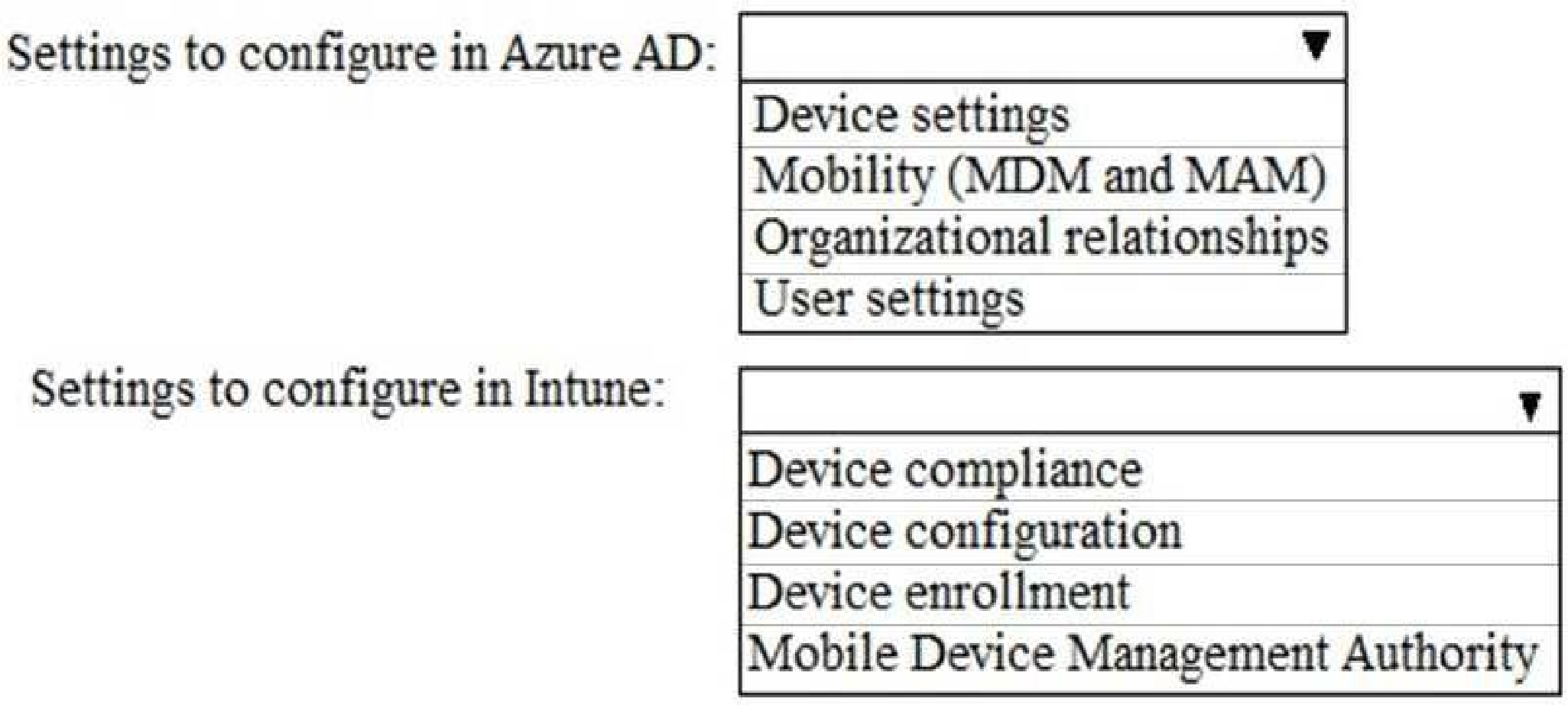
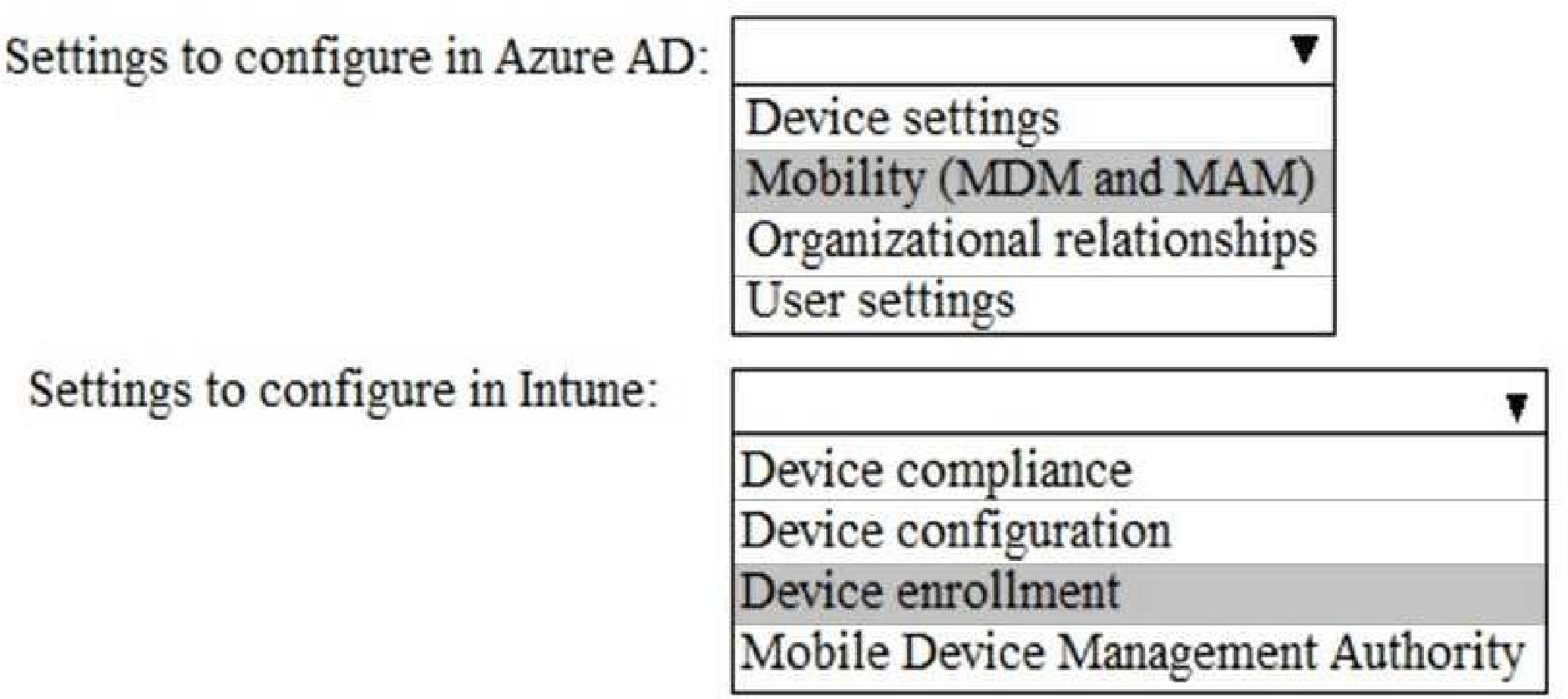
What should you do? To answer, select the appropriate options in the answer area.
NOTE: Each correct selection is worth one point.
Quiz
Overview
Contoso, Ltd. is a consulting company that has a main office in Montreal and two branch
offices in Seattle and New York.
The company has the employees and devices shown in the following table.
Contoso recently purchased a Microsoft 365 ES subscription.
Existing Environment
Requirement
The network contains an on-premises Active Directory forest named contoso.com. The forest
contains the servers shown in the following table.
All servers run Windows Server 2016. All desktops and laptops are Windows 10 Enterprise
and are joined to the domain.
The mobile devices of the users in the Montreal and Seattle offices run Android. The mobile
devices of the users in the New York office run iOS.
The domain is synced to Azure Active Directory (Azure AD) and includes the users shown in
the following table.
The domain also includes a group named Group1.
Planned Changes
Contoso plans to implement the following changes:
• Implement Microsoft 365.
• Manage devices by using Microsoft Intune.
• Implement Azure Advanced Threat Protection (ATP).
• Every September, apply the latest feature updates to all Windows computers. Every March,
apply the latest feature updates to the computers in the New York office only.
Technical Requirements
Contoso identifies the following technical requirements:
• When a Windows 10 device is joined to Azure AD, the device must enroll in Intune
automaticity.
• Dedicated support technicians must enroll all the Montreal office mobile devices in Intune.
• User1 must be able to enroll all the New York office mobile devices in Intune.
• Azure ATP sensors must be installed and must NOT use port mirroring.
• Whenever possible, the principle of least privilege must be used.
• A Microsoft Store for Business must be created.
Compliance Requirements
Contoso identifies the following compliance requirements:
• Ensure that the users in Group1 can only access Microsoft Exchange Online from devices
that are enrolled in Intune and configured in accordance with the corporate policy.
• Configure Windows Information Protection (W1P) for the Windows 10 devices.
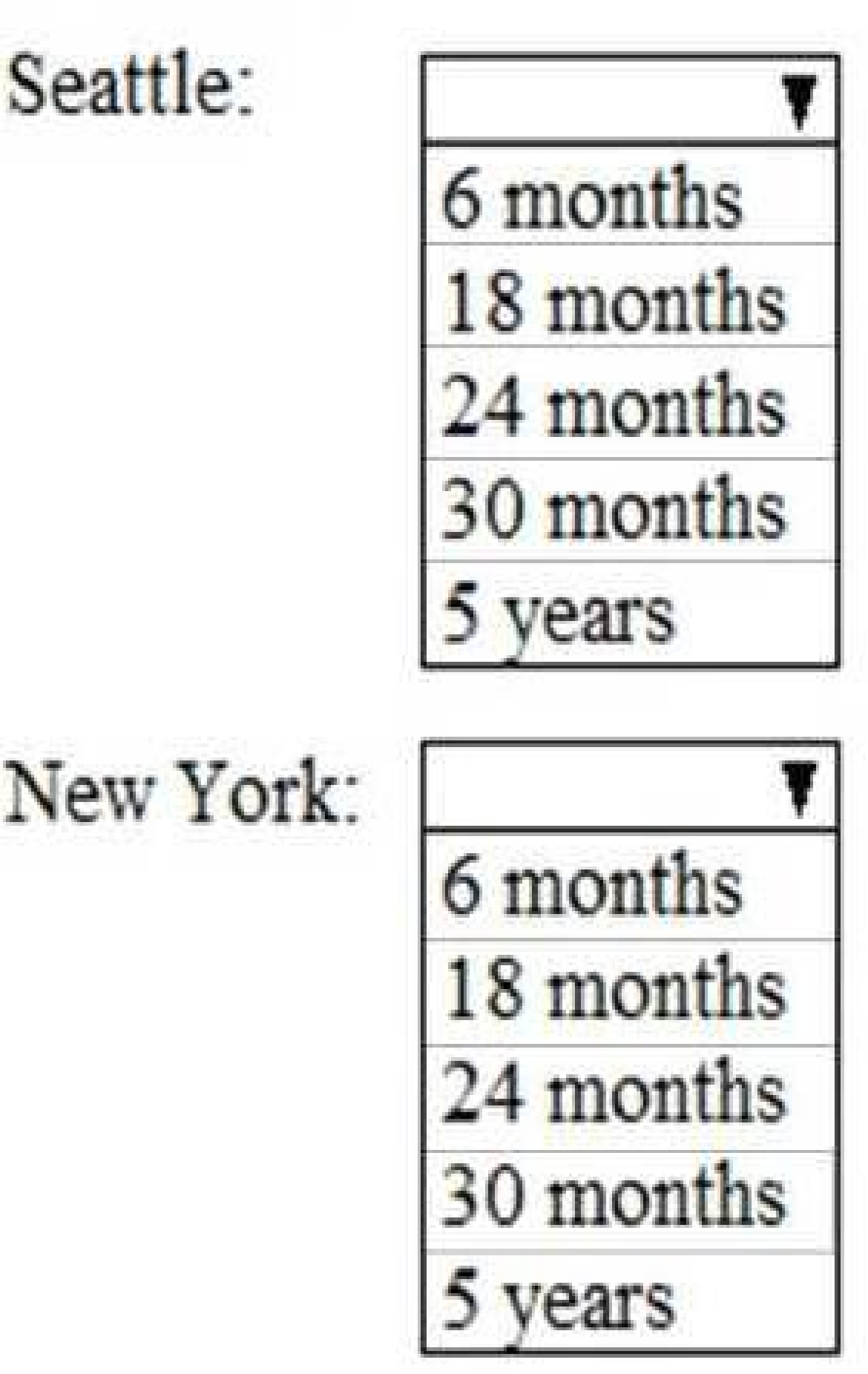
answer, select the appropriate options in the answer area.
NOTE: Each correct selection is worth one point.
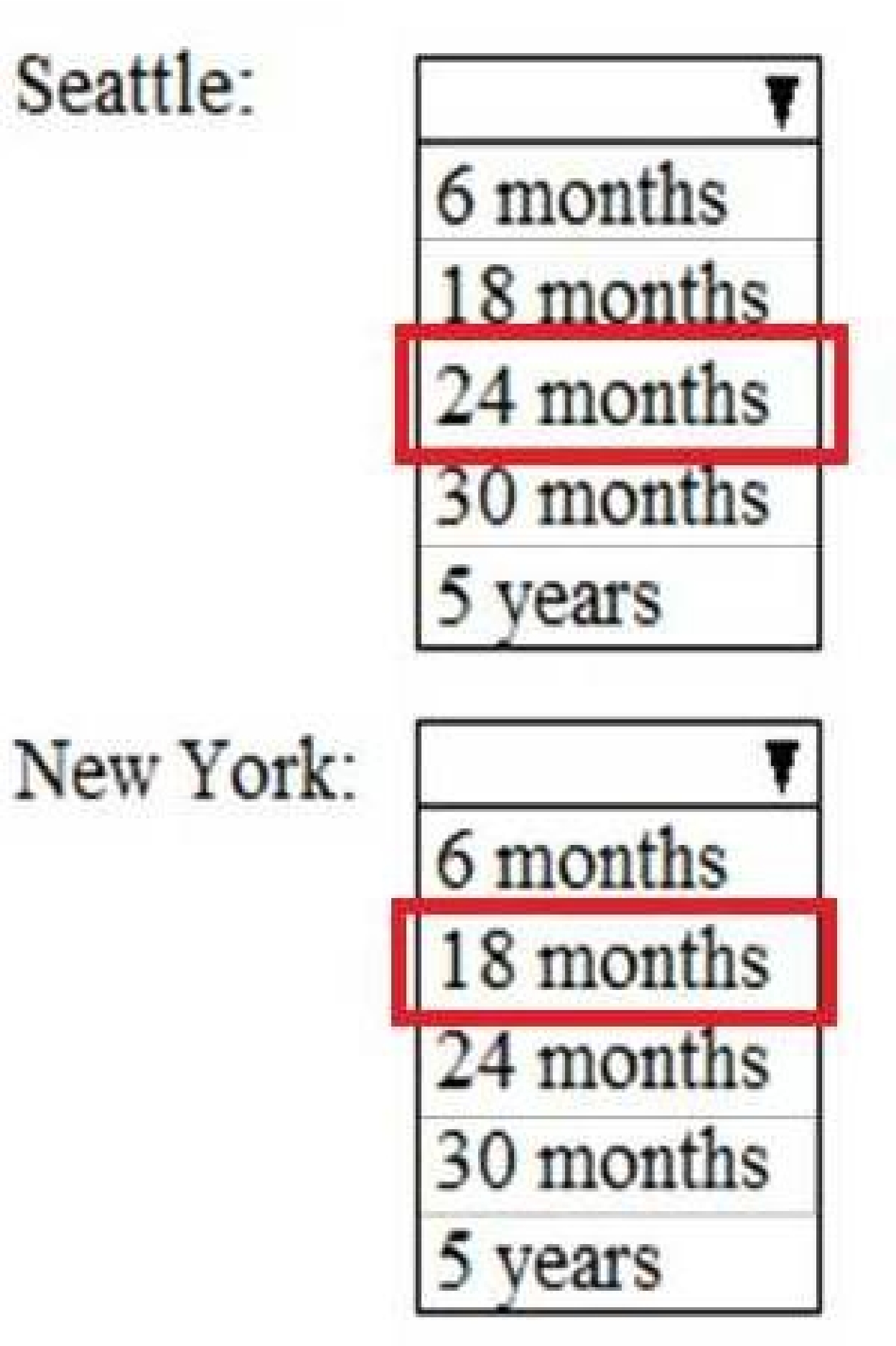
[https://support.microsoft.com/en-gb/help/13853/windows-lifecycle-fact-sheet](https://support.microsoft.com/en-gb/help/13853/windows-lifecycle-fact-sheet) March Feature
Updates: Serviced for 18 months from release date September Feature Updates: Serviced for
30 months from release date
Reference:
[https://www.windowscentral.com/whats-difference-between-quality-updates-and-feature-](https://www.windowscentral.com/whats-difference-between-quality-updates-and-feature-)
updates-windows-10
Quiz
Overview
Contoso, Ltd. is a consulting company that has a main office in Montreal and two branch
offices in Seattle and New York.
The company has the employees and devices shown in the following table.
Contoso recently purchased a Microsoft 365 ES subscription.
Existing Environment
Requirement
The network contains an on-premises Active Directory forest named contoso.com. The forest
contains the servers shown in the following table.
All servers run Windows Server 2016. All desktops and laptops are Windows 10 Enterprise
and are joined to the domain.
The mobile devices of the users in the Montreal and Seattle offices run Android. The mobile
devices of the users in the New York office run iOS.
The domain is synced to Azure Active Directory (Azure AD) and includes the users shown in
the following table.
The domain also includes a group named Group1.
Planned Changes
Contoso plans to implement the following changes:
• Implement Microsoft 365.
• Manage devices by using Microsoft Intune.
• Implement Azure Advanced Threat Protection (ATP).
• Every September, apply the latest feature updates to all Windows computers. Every March,
apply the latest feature updates to the computers in the New York office only.
Technical Requirements
Contoso identifies the following technical requirements:
• When a Windows 10 device is joined to Azure AD, the device must enroll in Intune
automaticity.
• Dedicated support technicians must enroll all the Montreal office mobile devices in Intune.
• User1 must be able to enroll all the New York office mobile devices in Intune.
• Azure ATP sensors must be installed and must NOT use port mirroring.
• Whenever possible, the principle of least privilege must be used.
• A Microsoft Store for Business must be created.
Compliance Requirements
Contoso identifies the following compliance requirements:
• Ensure that the users in Group1 can only access Microsoft Exchange Online from devices
that are enrolled in Intune and configured in accordance with the corporate policy.
• Configure Windows Information Protection (W1P) for the Windows 10 devices.
should you do?
Quiz
Overview
Contoso, Ltd. is a consulting company that has a main office in Montreal and two branch
offices in Seattle and New York.
The company has the employees and devices shown in the following table.
Contoso recently purchased a Microsoft 365 ES subscription.
Existing Environment
Requirement
The network contains an on-premises Active Directory forest named contoso.com. The forest
contains the servers shown in the following table.
All servers run Windows Server 2016. All desktops and laptops are Windows 10 Enterprise
and are joined to the domain.
The mobile devices of the users in the Montreal and Seattle offices run Android. The mobile
devices of the users in the New York office run iOS.
The domain is synced to Azure Active Directory (Azure AD) and includes the users shown in
the following table.
The domain also includes a group named Group1.
Planned Changes
Contoso plans to implement the following changes:
• Implement Microsoft 365.
• Manage devices by using Microsoft Intune.
• Implement Azure Advanced Threat Protection (ATP).
• Every September, apply the latest feature updates to all Windows computers. Every March,
apply the latest feature updates to the computers in the New York office only.
Technical Requirements
Contoso identifies the following technical requirements:
• When a Windows 10 device is joined to Azure AD, the device must enroll in Intune
automaticity.
• Dedicated support technicians must enroll all the Montreal office mobile devices in Intune.
• User1 must be able to enroll all the New York office mobile devices in Intune.
• Azure ATP sensors must be installed and must NOT use port mirroring.
• Whenever possible, the principle of least privilege must be used.
• A Microsoft Store for Business must be created.
Compliance Requirements
Contoso identifies the following compliance requirements:
• Ensure that the users in Group1 can only access Microsoft Exchange Online from devices
that are enrolled in Intune and configured in accordance with the corporate policy.
• Configure Windows Information Protection (W1P) for the Windows 10 devices.
Montreal office mobile devices.
What is the minimum of dedicated support technicians required?
Quiz
Overview
Contoso, Ltd. is a consulting company that has a main office in Montreal and two branch
offices in Seattle and New York.
The company has the employees and devices shown in the following table.
Contoso recently purchased a Microsoft 365 ES subscription.
Existing Environment
Requirement
The network contains an on-premises Active Directory forest named contoso.com. The forest
contains the servers shown in the following table.
All servers run Windows Server 2016. All desktops and laptops are Windows 10 Enterprise
and are joined to the domain.
The mobile devices of the users in the Montreal and Seattle offices run Android. The mobile
devices of the users in the New York office run iOS.
The domain is synced to Azure Active Directory (Azure AD) and includes the users shown in
the following table.
The domain also includes a group named Group1.
Planned Changes
Contoso plans to implement the following changes:
• Implement Microsoft 365.
• Manage devices by using Microsoft Intune.
• Implement Azure Advanced Threat Protection (ATP).
• Every September, apply the latest feature updates to all Windows computers. Every March,
apply the latest feature updates to the computers in the New York office only.
Technical Requirements
Contoso identifies the following technical requirements:
• When a Windows 10 device is joined to Azure AD, the device must enroll in Intune
automaticity.
• Dedicated support technicians must enroll all the Montreal office mobile devices in Intune.
• User1 must be able to enroll all the New York office mobile devices in Intune.
• Azure ATP sensors must be installed and must NOT use port mirroring.
• Whenever possible, the principle of least privilege must be used.
• A Microsoft Store for Business must be created.
Compliance Requirements
Contoso identifies the following compliance requirements:
• Ensure that the users in Group1 can only access Microsoft Exchange Online from devices
that are enrolled in Intune and configured in accordance with the corporate policy.
• Configure Windows Information Protection (W1P) for the Windows 10 devices.
Quiz
Overview
Contoso, Ltd. is a consulting company that has a main office in Montreal and two branch
offices in Seattle and New York.
The company has the employees and devices shown in the following table.
Contoso recently purchased a Microsoft 365 ES subscription.
Existing Environment
Requirement
The network contains an on-premises Active Directory forest named contoso.com. The forest
contains the servers shown in the following table.
All servers run Windows Server 2016. All desktops and laptops are Windows 10 Enterprise
and are joined to the domain.
The mobile devices of the users in the Montreal and Seattle offices run Android. The mobile
devices of the users in the New York office run iOS.
The domain is synced to Azure Active Directory (Azure AD) and includes the users shown in
the following table.
The domain also includes a group named Group1.
Planned Changes
Contoso plans to implement the following changes:
• Implement Microsoft 365.
• Manage devices by using Microsoft Intune.
• Implement Azure Advanced Threat Protection (ATP).
• Every September, apply the latest feature updates to all Windows computers. Every March,
apply the latest feature updates to the computers in the New York office only.
Technical Requirements
Contoso identifies the following technical requirements:
• When a Windows 10 device is joined to Azure AD, the device must enroll in Intune
automaticity.
• Dedicated support technicians must enroll all the Montreal office mobile devices in Intune.
• User1 must be able to enroll all the New York office mobile devices in Intune.
• Azure ATP sensors must be installed and must NOT use port mirroring.
• Whenever possible, the principle of least privilege must be used.
• A Microsoft Store for Business must be created.
Compliance Requirements
Contoso identifies the following compliance requirements:
• Ensure that the users in Group1 can only access Microsoft Exchange Online from devices
that are enrolled in Intune and configured in accordance with the corporate policy.
• Configure Windows Information Protection (W1P) for the Windows 10 devices.
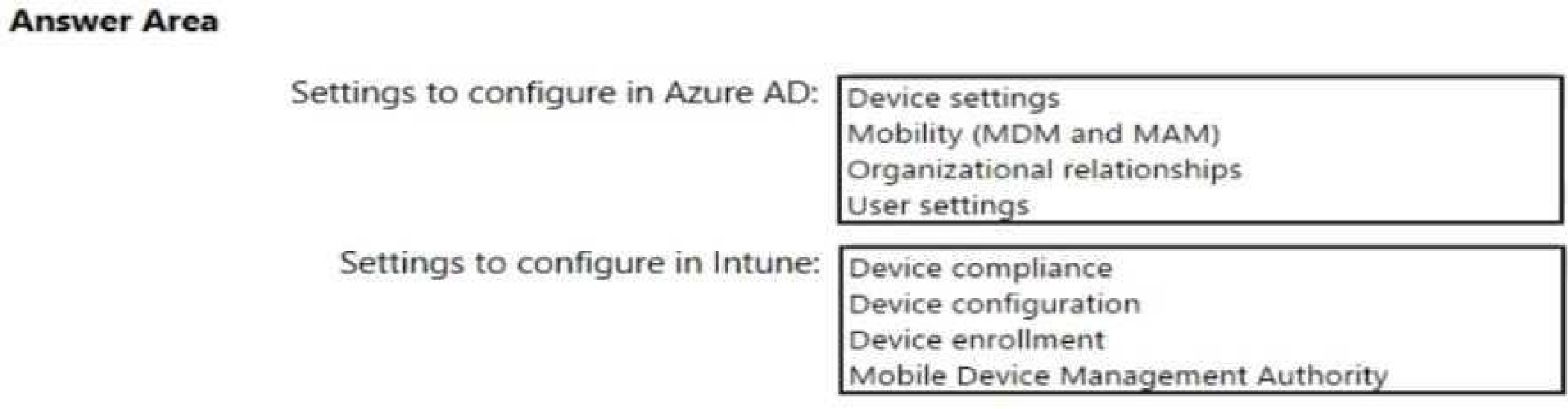
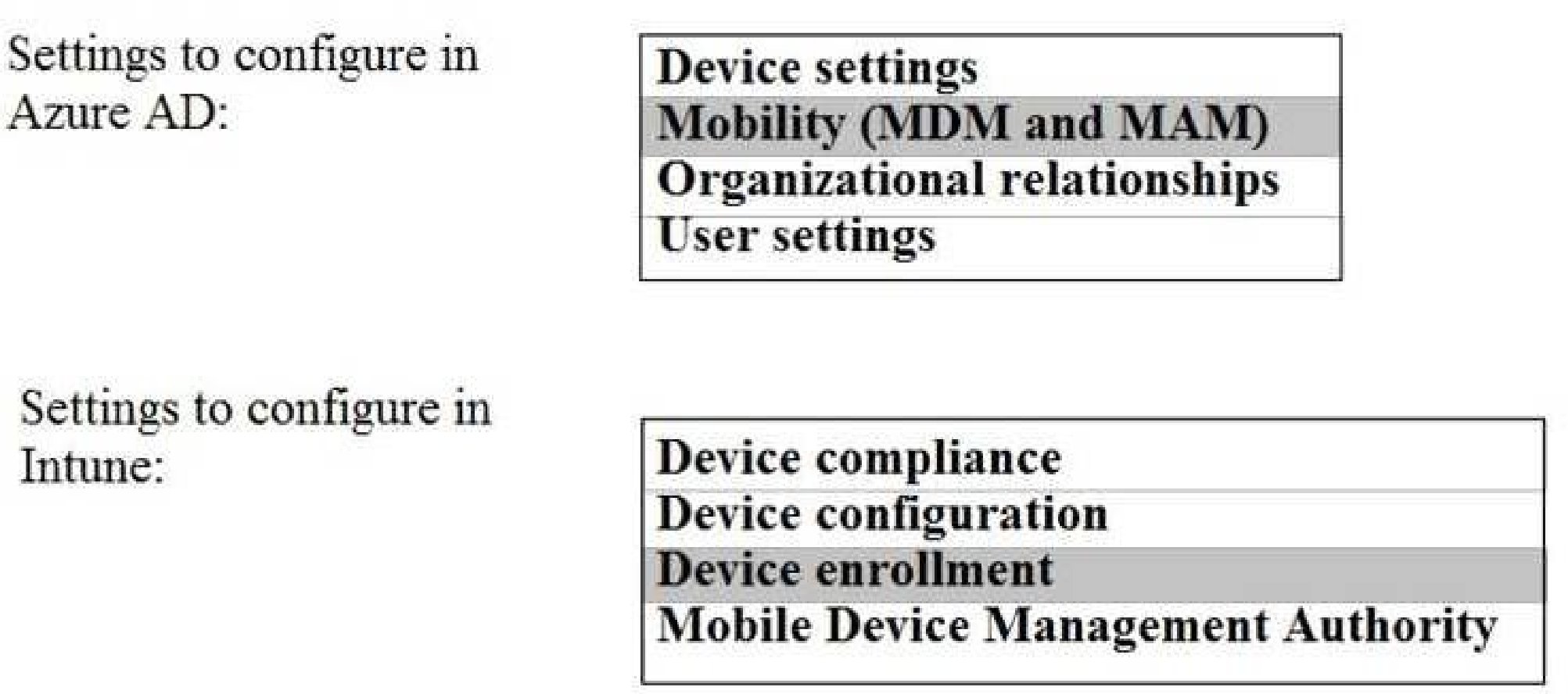
What should you do? To answer, select the appropriate options in the answer area.
NOTE: Each correct selection is worth one point.
Quiz
Overview
Contoso, Ltd. is a consulting company that has a main office in Montreal and two branch
offices in Seattle and New York.
The company has the employees and devices shown in the following table.
Contoso recently purchased a Microsoft 365 ES subscription.
Existing Environment
Requirement
The network contains an on-premises Active Directory forest named contoso.com. The forest
contains the servers shown in the following table.
All servers run Windows Server 2016. All desktops and laptops are Windows 10 Enterprise
and are joined to the domain.
The mobile devices of the users in the Montreal and Seattle offices run Android. The mobile
devices of the users in the New York office run iOS.
The domain is synced to Azure Active Directory (Azure AD) and includes the users shown in
the following table.
The domain also includes a group named Group1.
Planned Changes
Contoso plans to implement the following changes:
• Implement Microsoft 365.
• Manage devices by using Microsoft Intune.
• Implement Azure Advanced Threat Protection (ATP).
• Every September, apply the latest feature updates to all Windows computers. Every March,
apply the latest feature updates to the computers in the New York office only.
Technical Requirements
Contoso identifies the following technical requirements:
• When a Windows 10 device is joined to Azure AD, the device must enroll in Intune
automaticity.
• Dedicated support technicians must enroll all the Montreal office mobile devices in Intune.
• User1 must be able to enroll all the New York office mobile devices in Intune.
• Azure ATP sensors must be installed and must NOT use port mirroring.
• Whenever possible, the principle of least privilege must be used.
• A Microsoft Store for Business must be created.
Compliance Requirements
Contoso identifies the following compliance requirements:
• Ensure that the users in Group1 can only access Microsoft Exchange Online from devices
that are enrolled in Intune and configured in accordance with the corporate policy.
• Configure Windows Information Protection (W1P) for the Windows 10 devices.
question in the series contains a unique solution that might meet the stated goals. Some
question sets might have more than one correct solution, while others might not have a
correct solution.
After you answer a question in this section, you will NOT be able to return to it. As a result,
these questions will not appear in the review screen.
Your network contains an Active Directory domain named contoso.com that is synced to
Microsoft Azure Active Directory (Azure AD).
You manage Windows 10 devices by using Microsoft System Center Configuration Manager
(Current Branch).
You configure a pilot for co-management.
You add a new device named Device1 to the domain. You install the Configuration Manager
client on Device1.
You need to ensure that you can manage Device1 by using Microsoft Intune and
Configuration Manager.
Solution: Define a Configuration Manager device collection as the pilot collection. Add
Device1 to the collection.
Does this meet the goal?
MS-102: Microsoft 365 Administrator Practice test unlocks all online simulator questions
Thank you for choosing the free version of the MS-102: Microsoft 365 Administrator practice test! Further deepen your knowledge on Microsoft Simulator; by unlocking the full version of our MS-102: Microsoft 365 Administrator Simulator you will be able to take tests with over 537 constantly updated questions and easily pass your exam. 98% of people pass the exam in the first attempt after preparing with our 537 questions.
BUY NOWWhat to expect from our MS-102: Microsoft 365 Administrator practice tests and how to prepare for any exam?
The MS-102: Microsoft 365 Administrator Simulator Practice Tests are part of the Microsoft Database and are the best way to prepare for any MS-102: Microsoft 365 Administrator exam. The MS-102: Microsoft 365 Administrator practice tests consist of 537 questions and are written by experts to help you and prepare you to pass the exam on the first attempt. The MS-102: Microsoft 365 Administrator database includes questions from previous and other exams, which means you will be able to practice simulating past and future questions. Preparation with MS-102: Microsoft 365 Administrator Simulator will also give you an idea of the time it will take to complete each section of the MS-102: Microsoft 365 Administrator practice test . It is important to note that the MS-102: Microsoft 365 Administrator Simulator does not replace the classic MS-102: Microsoft 365 Administrator study guides; however, the Simulator provides valuable insights into what to expect and how much work needs to be done to prepare for the MS-102: Microsoft 365 Administrator exam.
BUY NOWMS-102: Microsoft 365 Administrator Practice test therefore represents an excellent tool to prepare for the actual exam together with our Microsoft practice test . Our MS-102: Microsoft 365 Administrator Simulator will help you assess your level of preparation and understand your strengths and weaknesses. Below you can read all the quizzes you will find in our MS-102: Microsoft 365 Administrator Simulator and how our unique MS-102: Microsoft 365 Administrator Database made up of real questions:
Info quiz:
- Quiz name:MS-102: Microsoft 365 Administrator
- Total number of questions:537
- Number of questions for the test:50
- Pass score:80%
You can prepare for the MS-102: Microsoft 365 Administrator exams with our mobile app. It is very easy to use and even works offline in case of network failure, with all the functions you need to study and practice with our MS-102: Microsoft 365 Administrator Simulator.
Use our Mobile App, available for both Android and iOS devices, with our MS-102: Microsoft 365 Administrator Simulator . You can use it anywhere and always remember that our mobile app is free and available on all stores.
Our Mobile App contains all MS-102: Microsoft 365 Administrator practice tests which consist of 537 questions and also provide study material to pass the final MS-102: Microsoft 365 Administrator exam with guaranteed success. Our MS-102: Microsoft 365 Administrator database contain hundreds of questions and Microsoft Tests related to MS-102: Microsoft 365 Administrator Exam. This way you can practice anywhere you want, even offline without the internet.
BUY NOW