Quiz MS-700: Microsoft Managing Microsoft Teams
Quiz
Case study
Overview
This is a case study. Case studies are not timed separately. You can use as much exam time as you
would like to complete each case. However, there may be additional case studies and sections on
this exam. You must manage your time to ensure that you are able to complete all questions included
on this exam in the time provided.
To answer the questions included in a case study, you will need to reference information that is
provided in the case study. Case studies might contain exhibits and other resources that provide
more information about the scenario that is described in the case study. Each question is
independent of the other questions in this case study.
At the end of this case study, a review screen will appear. This screen allows you to review your
answers and to make changes before you move to the next section of the exam. After you begin a
new section, you cannot return to this section.
To start the case study
To display the first question in this case study, click the Next button. Use the buttons in the left pane
to explore the content of the case study before you answer the questions. Clicking these buttons
displays information such as business requirement, existing environment, and problem statements. If
the case study has an All Information tab, note that the information displayed is identical to the
information displayed on the subsequent tabs. When you are ready to answer a question, click the
Question button to return to the question.
Overview
Contoso, Ltd. is a pharmaceutical company that has 3,000 users in offices across North America.
Existing Environment
Active Directory
The network contains an on-premises Active Directory domain. All user accounts are in departmental
organizational units (OUs).
Microsoft Office 365
All users are assigned a Microsoft Office 365 E5 license and are enabled for the following services:
Microsoft Yammer
Microsoft Exchange Online
Microsoft SharePoint Online
Microsoft OneDrive for Business
Azure Active Directory (Azure AD)
Azure AD
dynamic group membership
Microsoft Skype for Business
Contoso has an on-premises deployment of Microsoft Skype for Business Server 2015. All the latest
cumulative updates are installed on all the servers. The following services are used in Skype for
Business Server 2015:
Meetings
PSTN calling
Instant messaging (IM)
Federation to external companies
Departments
Contoso has the following departments:
IT
Sales
Human resources (HR)
Research and deployment (R&D)
All groups are created by using dynamic group membership that use the department attribute.
Requirements
Business goals
Contoso identifies the following business goals:
Migrate the maximum number of users to Microsoft Teams.
Minimize administrative effort.
Device requirements
Contoso identifies the following device requirements:
Replace Skype for Business IP phones with Microsoft Teams phones.
All Microsoft Teams phones must be set to lock automatically after 60 seconds.
Meeting and Live Event Requirements
Contoso identifies the following meeting and live event requirements:
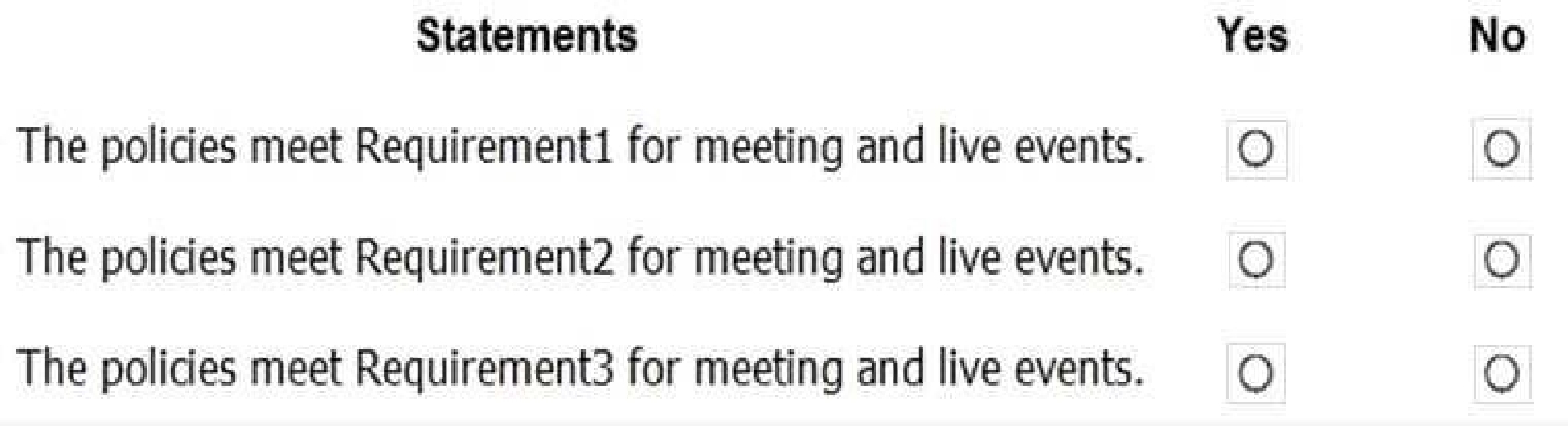
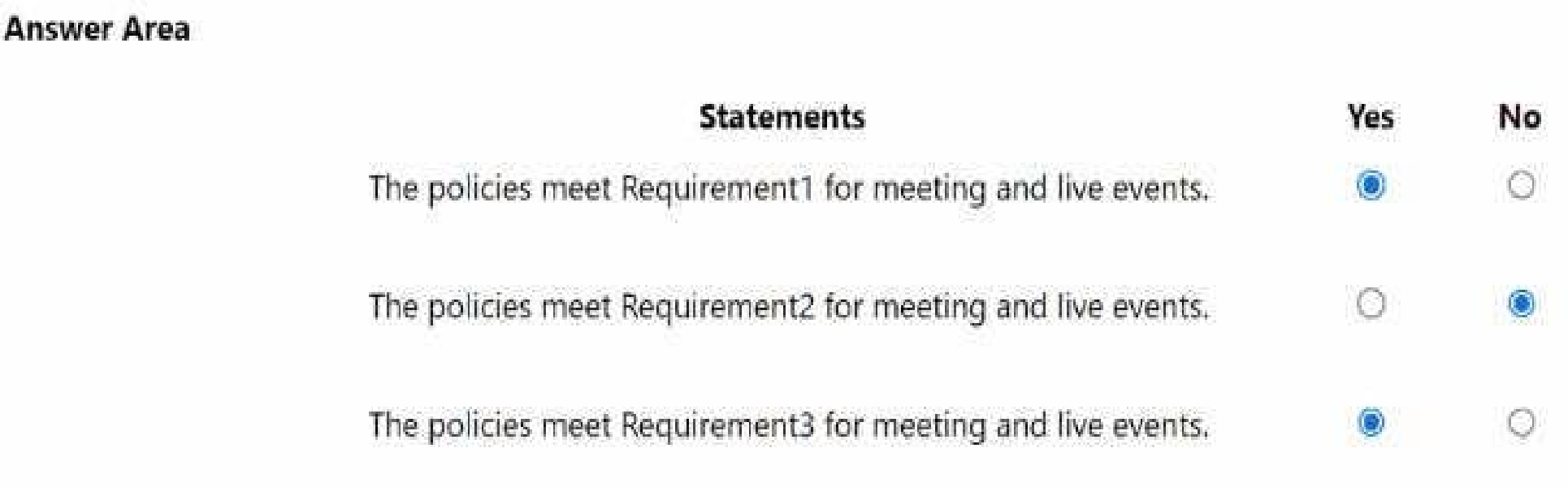
Requirement1: Guest users must be able to join live events.
Requirement2: Guest users must always wait in a meeting lobby.
Requirement3: Contoso users must always bypass the meeting lobby when they join by using the
Microsoft Teams client.
Requirement4: After the upgrade to Microsoft Teams, all meetings must be scheduled by using
Microsoft Teams.
Calling Requirements
Contoso identifies the following calling requirements:
Migrate all existing auto attendants and response groups to Office 365.
Minimize the on-premises PSTN infrastructure.
Technical Requirements
Guest users must be prevented from making private calls.
Security Requirements
Contoso has the following security requirements for the Microsoft Teams deployment:
The number of ports allowed on the company’s firewall must be limited.
Team names must be prevented from containing the name of any products produced by Contoso.
Users in the R&D group must be prevented from sending chat messages to users in other
departments.
To meet the company’s compliance policy, users in the sales department must continue to use on-
premises Skype for Business for IM and calling only.
Pilot Project
Contoso begins a pilot project for the upgrade to Microsoft Teams.
You identify the following issues during the pilot project:
Microsoft Teams users report that they often receive continuous notifications from the Microsoft
Teams client for 20 minutes.
Two pilot users in the HR department report that they are not members of the HR team.
What should you do first?
Quiz
Case study
Overview
This is a case study. Case studies are not timed separately. You can use as much exam time as you
would like to complete each case. However, there may be additional case studies and sections on
this exam. You must manage your time to ensure that you are able to complete all questions included
on this exam in the time provided.
To answer the questions included in a case study, you will need to reference information that is
provided in the case study. Case studies might contain exhibits and other resources that provide
more information about the scenario that is described in the case study. Each question is
independent of the other questions in this case study.
At the end of this case study, a review screen will appear. This screen allows you to review your
answers and to make changes before you move to the next section of the exam. After you begin a
new section, you cannot return to this section.
To start the case study
To display the first question in this case study, click the Next button. Use the buttons in the left pane
to explore the content of the case study before you answer the questions. Clicking these buttons
displays information such as business requirement, existing environment, and problem statements. If
the case study has an All Information tab, note that the information displayed is identical to the
information displayed on the subsequent tabs. When you are ready to answer a question, click the
Question button to return to the question.
Overview
Contoso, Ltd. is a pharmaceutical company that has 3,000 users in offices across North America.
Existing Environment
Active Directory
The network contains an on-premises Active Directory domain. All user accounts are in departmental
organizational units (OUs).
Microsoft Office 365
All users are assigned a Microsoft Office 365 E5 license and are enabled for the following services:
Microsoft Yammer
Microsoft Exchange Online
Microsoft SharePoint Online
Microsoft OneDrive for Business
Azure Active Directory (Azure AD)
Azure AD
dynamic group membership
Microsoft Skype for Business
Contoso has an on-premises deployment of Microsoft Skype for Business Server 2015. All the latest
cumulative updates are installed on all the servers. The following services are used in Skype for
Business Server 2015:
Meetings
PSTN calling
Instant messaging (IM)
Federation to external companies
Departments
Contoso has the following departments:
IT
Sales
Human resources (HR)
Research and deployment (R&D)
All groups are created by using dynamic group membership that use the department attribute.
Requirements
Business goals
Contoso identifies the following business goals:
Migrate the maximum number of users to Microsoft Teams.
Minimize administrative effort.
Device requirements
Contoso identifies the following device requirements:
Replace Skype for Business IP phones with Microsoft Teams phones.
All Microsoft Teams phones must be set to lock automatically after 60 seconds.
Meeting and Live Event Requirements
Contoso identifies the following meeting and live event requirements:
Requirement1: Guest users must be able to join live events.
Requirement2: Guest users must always wait in a meeting lobby.
Requirement3: Contoso users must always bypass the meeting lobby when they join by using the
Microsoft Teams client.
Requirement4: After the upgrade to Microsoft Teams, all meetings must be scheduled by using
Microsoft Teams.
Calling Requirements
Contoso identifies the following calling requirements:
Migrate all existing auto attendants and response groups to Office 365.
Minimize the on-premises PSTN infrastructure.
Technical Requirements
Guest users must be prevented from making private calls.
Security Requirements
Contoso has the following security requirements for the Microsoft Teams deployment:
The number of ports allowed on the company’s firewall must be limited.
Team names must be prevented from containing the name of any products produced by Contoso.
Users in the R&D group must be prevented from sending chat messages to users in other
departments.
To meet the company’s compliance policy, users in the sales department must continue to use on-
premises Skype for Business for IM and calling only.
Pilot Project
Contoso begins a pilot project for the upgrade to Microsoft Teams.
You identify the following issues during the pilot project:
Microsoft Teams users report that they often receive continuous notifications from the Microsoft
Teams client for 20 minutes.
Two pilot users in the HR department report that they are not members of the HR team.
requirements.
What should you do for each user?
Quiz
Case study
Overview
This is a case study. Case studies are not timed separately. You can use as much exam time as you
would like to complete each case. However, there may be additional case studies and sections on
this exam. You must manage your time to ensure that you are able to complete all questions included
on this exam in the time provided.
To answer the questions included in a case study, you will need to reference information that is
provided in the case study. Case studies might contain exhibits and other resources that provide
more information about the scenario that is described in the case study. Each question is
independent of the other questions in this case study.
At the end of this case study, a review screen will appear. This screen allows you to review your
answers and to make changes before you move to the next section of the exam. After you begin a
new section, you cannot return to this section.
To start the case study
To display the first question in this case study, click the Next button. Use the buttons in the left pane
to explore the content of the case study before you answer the questions. Clicking these buttons
displays information such as business requirement, existing environment, and problem statements. If
the case study has an All Information tab, note that the information displayed is identical to the
information displayed on the subsequent tabs. When you are ready to answer a question, click the
Question button to return to the question.
Overview
Contoso, Ltd. is a pharmaceutical company that has 3,000 users in offices across North America.
Existing Environment
Active Directory
The network contains an on-premises Active Directory domain. All user accounts are in departmental
organizational units (OUs).
Microsoft Office 365
All users are assigned a Microsoft Office 365 E5 license and are enabled for the following services:
Microsoft Yammer
Microsoft Exchange Online
Microsoft SharePoint Online
Microsoft OneDrive for Business
Azure Active Directory (Azure AD)
Azure AD
dynamic group membership
Microsoft Skype for Business
Contoso has an on-premises deployment of Microsoft Skype for Business Server 2015. All the latest
cumulative updates are installed on all the servers. The following services are used in Skype for
Business Server 2015:
Meetings
PSTN calling
Instant messaging (IM)
Federation to external companies
Departments
Contoso has the following departments:
IT
Sales
Human resources (HR)
Research and deployment (R&D)
All groups are created by using dynamic group membership that use the department attribute.
Requirements
Business goals
Contoso identifies the following business goals:
Migrate the maximum number of users to Microsoft Teams.
Minimize administrative effort.
Device requirements
Contoso identifies the following device requirements:
Replace Skype for Business IP phones with Microsoft Teams phones.
All Microsoft Teams phones must be set to lock automatically after 60 seconds.
Meeting and Live Event Requirements
Contoso identifies the following meeting and live event requirements:
Requirement1: Guest users must be able to join live events.
Requirement2: Guest users must always wait in a meeting lobby.
Requirement3: Contoso users must always bypass the meeting lobby when they join by using the
Microsoft Teams client.
Requirement4: After the upgrade to Microsoft Teams, all meetings must be scheduled by using
Microsoft Teams.
Calling Requirements
Contoso identifies the following calling requirements:
Migrate all existing auto attendants and response groups to Office 365.
Minimize the on-premises PSTN infrastructure.
Technical Requirements
Guest users must be prevented from making private calls.
Security Requirements
Contoso has the following security requirements for the Microsoft Teams deployment:
The number of ports allowed on the company’s firewall must be limited.
Team names must be prevented from containing the name of any products produced by Contoso.
Users in the R&D group must be prevented from sending chat messages to users in other
departments.
To meet the company’s compliance policy, users in the sales department must continue to use on-
premises Skype for Business for IM and calling only.
Pilot Project
Contoso begins a pilot project for the upgrade to Microsoft Teams.
You identify the following issues during the pilot project:
Microsoft Teams users report that they often receive continuous notifications from the Microsoft
Teams client for 20 minutes.
Two pilot users in the HR department report that they are not members of the HR team.
What should you modify?
Quiz
Case study
Overview
This is a case study. Case studies are not timed separately. You can use as much exam time as you
would like to complete each case. However, there may be additional case studies and sections on
this exam. You must manage your time to ensure that you are able to complete all questions included
on this exam in the time provided.
To answer the questions included in a case study, you will need to reference information that is
provided in the case study. Case studies might contain exhibits and other resources that provide
more information about the scenario that is described in the case study. Each question is
independent of the other questions in this case study.
At the end of this case study, a review screen will appear. This screen allows you to review your
answers and to make changes before you move to the next section of the exam. After you begin a
new section, you cannot return to this section.
To start the case study
To display the first question in this case study, click the Next button. Use the buttons in the left pane
to explore the content of the case study before you answer the questions. Clicking these buttons
displays information such as business requirement, existing environment, and problem statements. If
the case study has an All Information tab, note that the information displayed is identical to the
information displayed on the subsequent tabs. When you are ready to answer a question, click the
Question button to return to the question.
Overview
Contoso, Ltd. is a pharmaceutical company that has 3,000 users in offices across North America.
Existing Environment
Active Directory
The network contains an on-premises Active Directory domain. All user accounts are in departmental
organizational units (OUs).
Microsoft Office 365
All users are assigned a Microsoft Office 365 E5 license and are enabled for the following services:
Microsoft Yammer
Microsoft Exchange Online
Microsoft SharePoint Online
Microsoft OneDrive for Business
Azure Active Directory (Azure AD)
Azure AD
dynamic group membership
Microsoft Skype for Business
Contoso has an on-premises deployment of Microsoft Skype for Business Server 2015. All the latest
cumulative updates are installed on all the servers. The following services are used in Skype for
Business Server 2015:
Meetings
PSTN calling
Instant messaging (IM)
Federation to external companies
Departments
Contoso has the following departments:
IT
Sales
Human resources (HR)
Research and deployment (R&D)
All groups are created by using dynamic group membership that use the department attribute.
Requirements
Business goals
Contoso identifies the following business goals:
Migrate the maximum number of users to Microsoft Teams.
Minimize administrative effort.
Device requirements
Contoso identifies the following device requirements:
Replace Skype for Business IP phones with Microsoft Teams phones.
All Microsoft Teams phones must be set to lock automatically after 60 seconds.
Meeting and Live Event Requirements
Contoso identifies the following meeting and live event requirements:
Requirement1: Guest users must be able to join live events.
Requirement2: Guest users must always wait in a meeting lobby.
Requirement3: Contoso users must always bypass the meeting lobby when they join by using the
Microsoft Teams client.
Requirement4: After the upgrade to Microsoft Teams, all meetings must be scheduled by using
Microsoft Teams.
Calling Requirements
Contoso identifies the following calling requirements:
Migrate all existing auto attendants and response groups to Office 365.
Minimize the on-premises PSTN infrastructure.
Technical Requirements
Guest users must be prevented from making private calls.
Security Requirements
Contoso has the following security requirements for the Microsoft Teams deployment:
The number of ports allowed on the company’s firewall must be limited.
Team names must be prevented from containing the name of any products produced by Contoso.
Users in the R&D group must be prevented from sending chat messages to users in other
departments.
To meet the company’s compliance policy, users in the sales department must continue to use on-
premises Skype for Business for IM and calling only.
Pilot Project
Contoso begins a pilot project for the upgrade to Microsoft Teams.
You identify the following issues during the pilot project:
Microsoft Teams users report that they often receive continuous notifications from the Microsoft
Teams client for 20 minutes.
Two pilot users in the HR department report that they are not members of the HR team.
What should you modify from the Microsoft Teams admin center?
Quiz
Case study
Overview
This is a case study. Case studies are not timed separately. You can use as much exam time as you
would like to complete each case. However, there may be additional case studies and sections on
this exam. You must manage your time to ensure that you are able to complete all questions included
on this exam in the time provided.
To answer the questions included in a case study, you will need to reference information that is
provided in the case study. Case studies might contain exhibits and other resources that provide
more information about the scenario that is described in the case study. Each question is
independent of the other questions in this case study.
At the end of this case study, a review screen will appear. This screen allows you to review your
answers and to make changes before you move to the next section of the exam. After you begin a
new section, you cannot return to this section.
To start the case study
To display the first question in this case study, click the Next button. Use the buttons in the left pane
to explore the content of the case study before you answer the questions. Clicking these buttons
displays information such as business requirement, existing environment, and problem statements. If
the case study has an All Information tab, note that the information displayed is identical to the
information displayed on the subsequent tabs. When you are ready to answer a question, click the
Question button to return to the question.
Overview
Contoso, Ltd. is a pharmaceutical company that has 3,000 users in offices across North America.
Existing Environment
Active Directory
The network contains an on-premises Active Directory domain. All user accounts are in departmental
organizational units (OUs).
Microsoft Office 365
All users are assigned a Microsoft Office 365 E5 license and are enabled for the following services:
Microsoft Yammer
Microsoft Exchange Online
Microsoft SharePoint Online
Microsoft OneDrive for Business
Azure Active Directory (Azure AD)
Azure AD
dynamic group membership
Microsoft Skype for Business
Contoso has an on-premises deployment of Microsoft Skype for Business Server 2015. All the latest
cumulative updates are installed on all the servers. The following services are used in Skype for
Business Server 2015:
Meetings
PSTN calling
Instant messaging (IM)
Federation to external companies
Departments
Contoso has the following departments:
IT
Sales
Human resources (HR)
Research and deployment (R&D)
All groups are created by using dynamic group membership that use the department attribute.
Requirements
Business goals
Contoso identifies the following business goals:
Migrate the maximum number of users to Microsoft Teams.
Minimize administrative effort.
Device requirements
Contoso identifies the following device requirements:
Replace Skype for Business IP phones with Microsoft Teams phones.
All Microsoft Teams phones must be set to lock automatically after 60 seconds.
Meeting and Live Event Requirements
Contoso identifies the following meeting and live event requirements:
Requirement1: Guest users must be able to join live events.
Requirement2: Guest users must always wait in a meeting lobby.
Requirement3: Contoso users must always bypass the meeting lobby when they join by using the
Microsoft Teams client.
Requirement4: After the upgrade to Microsoft Teams, all meetings must be scheduled by using
Microsoft Teams.
Calling Requirements
Contoso identifies the following calling requirements:
Migrate all existing auto attendants and response groups to Office 365.
Minimize the on-premises PSTN infrastructure.
Technical Requirements
Guest users must be prevented from making private calls.
Security Requirements
Contoso has the following security requirements for the Microsoft Teams deployment:
The number of ports allowed on the company’s firewall must be limited.
Team names must be prevented from containing the name of any products produced by Contoso.
Users in the R&D group must be prevented from sending chat messages to users in other
departments.
To meet the company’s compliance policy, users in the sales department must continue to use on-
premises Skype for Business for IM and calling only.
Pilot Project
Contoso begins a pilot project for the upgrade to Microsoft Teams.
You identify the following issues during the pilot project:
Microsoft Teams users report that they often receive continuous notifications from the Microsoft
Teams client for 20 minutes.
Two pilot users in the HR department report that they are not members of the HR team.
What should you do?
Quiz
Case study
Overview
This is a case study. Case studies are not timed separately. You can use as much exam time as you
would like to complete each case. However, there may be additional case studies and sections on
this exam. You must manage your time to ensure that you are able to complete all questions included
on this exam in the time provided.
To answer the questions included in a case study, you will need to reference information that is
provided in the case study. Case studies might contain exhibits and other resources that provide
more information about the scenario that is described in the case study. Each question is
independent of the other questions in this case study.
At the end of this case study, a review screen will appear. This screen allows you to review your
answers and to make changes before you move to the next section of the exam. After you begin a
new section, you cannot return to this section.
To start the case study
To display the first question in this case study, click the Next button. Use the buttons in the left pane
to explore the content of the case study before you answer the questions. Clicking these buttons
displays information such as business requirement, existing environment, and problem statements. If
the case study has an All Information tab, note that the information displayed is identical to the
information displayed on the subsequent tabs. When you are ready to answer a question, click the
Question button to return to the question.
Overview
Contoso, Ltd. is a pharmaceutical company that has 3,000 users in offices across North America.
Existing Environment
Active Directory
The network contains an on-premises Active Directory domain. All user accounts are in departmental
organizational units (OUs).
Microsoft Office 365
All users are assigned a Microsoft Office 365 E5 license and are enabled for the following services:
Microsoft Yammer
Microsoft Exchange Online
Microsoft SharePoint Online
Microsoft OneDrive for Business
Azure Active Directory (Azure AD)
Azure AD
dynamic group membership
Microsoft Skype for Business
Contoso has an on-premises deployment of Microsoft Skype for Business Server 2015. All the latest
cumulative updates are installed on all the servers. The following services are used in Skype for
Business Server 2015:
Meetings
PSTN calling
Instant messaging (IM)
Federation to external companies
Departments
Contoso has the following departments:
IT
Sales
Human resources (HR)
Research and deployment (R&D)
All groups are created by using dynamic group membership that use the department attribute.
Requirements
Business goals
Contoso identifies the following business goals:
Migrate the maximum number of users to Microsoft Teams.
Minimize administrative effort.
Device requirements
Contoso identifies the following device requirements:
Replace Skype for Business IP phones with Microsoft Teams phones.
All Microsoft Teams phones must be set to lock automatically after 60 seconds.
Meeting and Live Event Requirements
Contoso identifies the following meeting and live event requirements:
Requirement1: Guest users must be able to join live events.
Requirement2: Guest users must always wait in a meeting lobby.
Requirement3: Contoso users must always bypass the meeting lobby when they join by using the
Microsoft Teams client.
Requirement4: After the upgrade to Microsoft Teams, all meetings must be scheduled by using
Microsoft Teams.
Calling Requirements
Contoso identifies the following calling requirements:
Migrate all existing auto attendants and response groups to Office 365.
Minimize the on-premises PSTN infrastructure.
Technical Requirements
Guest users must be prevented from making private calls.
Security Requirements
Contoso has the following security requirements for the Microsoft Teams deployment:
The number of ports allowed on the company’s firewall must be limited.
Team names must be prevented from containing the name of any products produced by Contoso.
Users in the R&D group must be prevented from sending chat messages to users in other
departments.
To meet the company’s compliance policy, users in the sales department must continue to use on-
premises Skype for Business for IM and calling only.
Pilot Project
Contoso begins a pilot project for the upgrade to Microsoft Teams.
You identify the following issues during the pilot project:
Microsoft Teams users report that they often receive continuous notifications from the Microsoft
Teams client for 20 minutes.
Two pilot users in the HR department report that they are not members of the HR team.
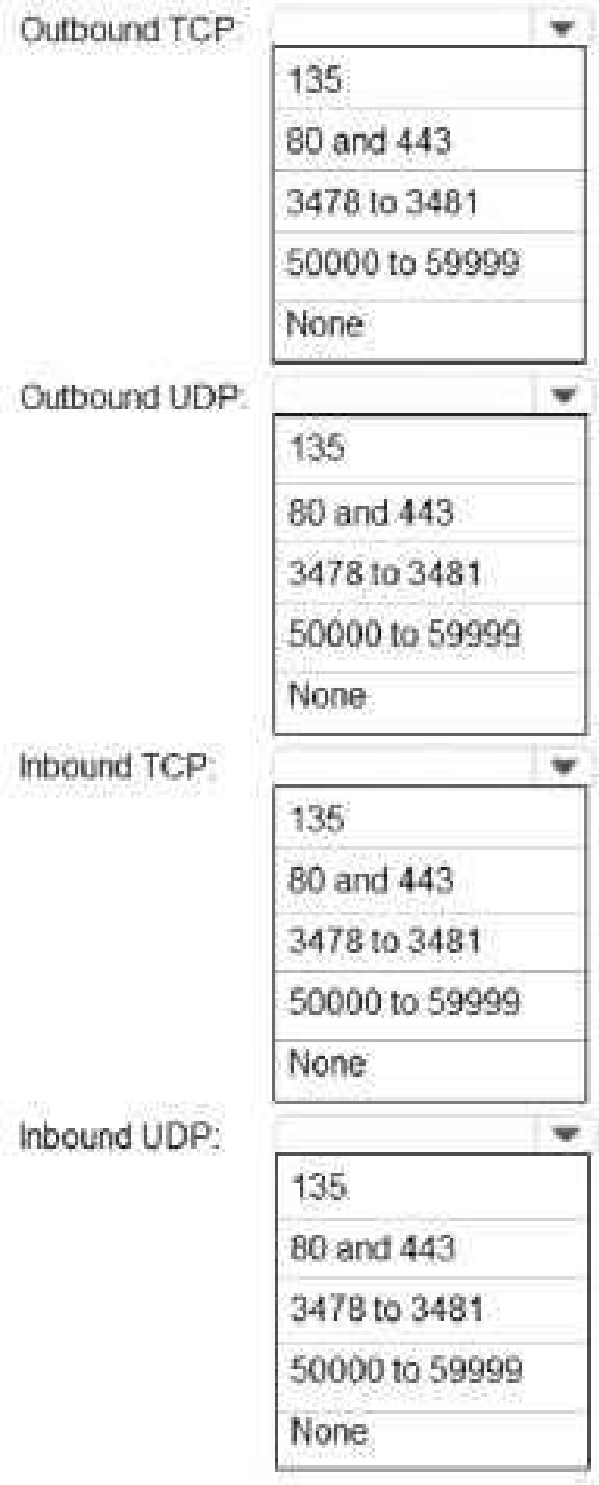
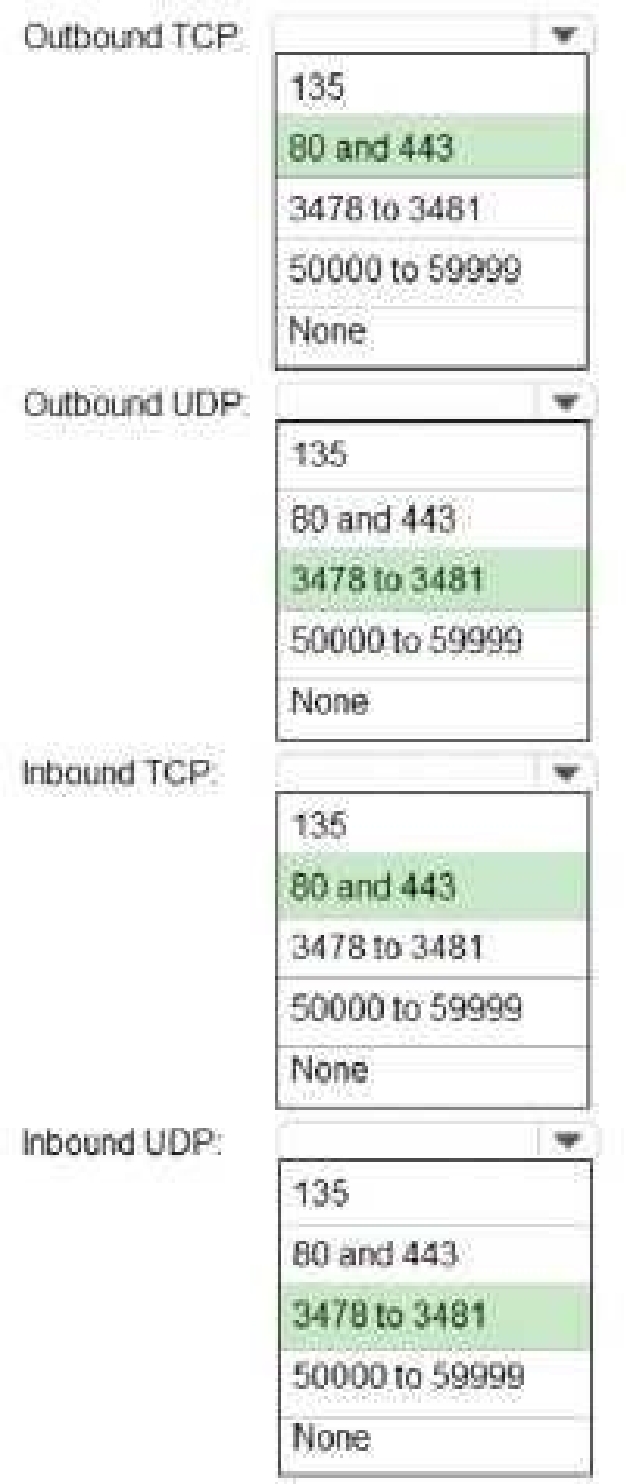
be allowed on the company’s firewall after the planned upgrade. The solution must meet the
security requirements.
Which inbound and outbound ports should you recommend? To answer, select the appropriate
options in the answer area.
NOTE: Each correct selection is worth one point.
Quiz
Case study
Overview
This is a case study. Case studies are not timed separately. You can use as much exam time as you
would like to complete each case. However, there may be additional case studies and sections on
this exam. You must manage your time to ensure that you are able to complete all questions included
on this exam in the time provided.
To answer the questions included in a case study, you will need to reference information that is
provided in the case study. Case studies might contain exhibits and other resources that provide
more information about the scenario that is described in the case study. Each question is
independent of the other questions in this case study.
At the end of this case study, a review screen will appear. This screen allows you to review your
answers and to make changes before you move to the next section of the exam. After you begin a
new section, you cannot return to this section.
To start the case study
To display the first question in this case study, click the Next button. Use the buttons in the left pane
to explore the content of the case study before you answer the questions. Clicking these buttons
displays information such as business requirement, existing environment, and problem statements. If
the case study has an All Information tab, note that the information displayed is identical to the
information displayed on the subsequent tabs. When you are ready to answer a question, click the
Question button to return to the question.
Overview
Contoso, Ltd. is a pharmaceutical company that has 3,000 users in offices across North America.
Existing Environment
Active Directory
The network contains an on-premises Active Directory domain. All user accounts are in departmental
organizational units (OUs).
Microsoft Office 365
All users are assigned a Microsoft Office 365 E5 license and are enabled for the following services:
Microsoft Yammer
Microsoft Exchange Online
Microsoft SharePoint Online
Microsoft OneDrive for Business
Azure Active Directory (Azure AD)
Azure AD
dynamic group membership
Microsoft Skype for Business
Contoso has an on-premises deployment of Microsoft Skype for Business Server 2015. All the latest
cumulative updates are installed on all the servers. The following services are used in Skype for
Business Server 2015:
Meetings
PSTN calling
Instant messaging (IM)
Federation to external companies
Departments
Contoso has the following departments:
IT
Sales
Human resources (HR)
Research and deployment (R&D)
All groups are created by using dynamic group membership that use the department attribute.
Requirements
Business goals
Contoso identifies the following business goals:
Migrate the maximum number of users to Microsoft Teams.
Minimize administrative effort.
Device requirements
Contoso identifies the following device requirements:
Replace Skype for Business IP phones with Microsoft Teams phones.
All Microsoft Teams phones must be set to lock automatically after 60 seconds.
Meeting and Live Event Requirements
Contoso identifies the following meeting and live event requirements:
Requirement1: Guest users must be able to join live events.
Requirement2: Guest users must always wait in a meeting lobby.
Requirement3: Contoso users must always bypass the meeting lobby when they join by using the
Microsoft Teams client.
Requirement4: After the upgrade to Microsoft Teams, all meetings must be scheduled by using
Microsoft Teams.
Calling Requirements
Contoso identifies the following calling requirements:
Migrate all existing auto attendants and response groups to Office 365.
Minimize the on-premises PSTN infrastructure.
Technical Requirements
Guest users must be prevented from making private calls.
Security Requirements
Contoso has the following security requirements for the Microsoft Teams deployment:
The number of ports allowed on the company’s firewall must be limited.
Team names must be prevented from containing the name of any products produced by Contoso.
Users in the R&D group must be prevented from sending chat messages to users in other
departments.
To meet the company’s compliance policy, users in the sales department must continue to use on-
premises Skype for Business for IM and calling only.
Pilot Project
Contoso begins a pilot project for the upgrade to Microsoft Teams.
You identify the following issues during the pilot project:
Microsoft Teams users report that they often receive continuous notifications from the Microsoft
Teams client for 20 minutes.
Two pilot users in the HR department report that they are not members of the HR team.
requirements.
What should you do for each user?
Quiz
Case study
Overview
This is a case study. Case studies are not timed separately. You can use as much exam time as you
would like to complete each case. However, there may be additional case studies and sections on
this exam. You must manage your time to ensure that you are able to complete all questions included
on this exam in the time provided.
To answer the questions included in a case study, you will need to reference information that is
provided in the case study. Case studies might contain exhibits and other resources that provide
more information about the scenario that is described in the case study. Each question is
independent of the other questions in this case study.
At the end of this case study, a review screen will appear. This screen allows you to review your
answers and to make changes before you move to the next section of the exam. After you begin a
new section, you cannot return to this section.
To start the case study
To display the first question in this case study, click the Next button. Use the buttons in the left pane
to explore the content of the case study before you answer the questions. Clicking these buttons
displays information such as business requirement, existing environment, and problem statements. If
the case study has an All Information tab, note that the information displayed is identical to the
information displayed on the subsequent tabs. When you are ready to answer a question, click the
Question button to return to the question.
Overview
Contoso, Ltd. is a pharmaceutical company that has 3,000 users in offices across North America.
Existing Environment
Active Directory
The network contains an on-premises Active Directory domain. All user accounts are in departmental
organizational units (OUs).
Microsoft Office 365
All users are assigned a Microsoft Office 365 E5 license and are enabled for the following services:
Microsoft Yammer
Microsoft Exchange Online
Microsoft SharePoint Online
Microsoft OneDrive for Business
Azure Active Directory (Azure AD)
Azure AD
dynamic group membership
Microsoft Skype for Business
Contoso has an on-premises deployment of Microsoft Skype for Business Server 2015. All the latest
cumulative updates are installed on all the servers. The following services are used in Skype for
Business Server 2015:
Meetings
PSTN calling
Instant messaging (IM)
Federation to external companies
Departments
Contoso has the following departments:
IT
Sales
Human resources (HR)
Research and deployment (R&D)
All groups are created by using dynamic group membership that use the department attribute.
Requirements
Business goals
Contoso identifies the following business goals:
Migrate the maximum number of users to Microsoft Teams.
Minimize administrative effort.
Device requirements
Contoso identifies the following device requirements:
Replace Skype for Business IP phones with Microsoft Teams phones.
All Microsoft Teams phones must be set to lock automatically after 60 seconds.
Meeting and Live Event Requirements
Contoso identifies the following meeting and live event requirements:
Requirement1: Guest users must be able to join live events.
Requirement2: Guest users must always wait in a meeting lobby.
Requirement3: Contoso users must always bypass the meeting lobby when they join by using the
Microsoft Teams client.
Requirement4: After the upgrade to Microsoft Teams, all meetings must be scheduled by using
Microsoft Teams.
Calling Requirements
Contoso identifies the following calling requirements:
Migrate all existing auto attendants and response groups to Office 365.
Minimize the on-premises PSTN infrastructure.
Technical Requirements
Guest users must be prevented from making private calls.
Security Requirements
Contoso has the following security requirements for the Microsoft Teams deployment:
The number of ports allowed on the company’s firewall must be limited.
Team names must be prevented from containing the name of any products produced by Contoso.
Users in the R&D group must be prevented from sending chat messages to users in other
departments.
To meet the company’s compliance policy, users in the sales department must continue to use on-
premises Skype for Business for IM and calling only.
Pilot Project
Contoso begins a pilot project for the upgrade to Microsoft Teams.
You identify the following issues during the pilot project:
Microsoft Teams users report that they often receive continuous notifications from the Microsoft
Teams client for 20 minutes.
Two pilot users in the HR department report that they are not members of the HR team.
What should you do?
Quiz
Case study
Overview
This is a case study. Case studies are not timed separately. You can use as much exam time as you
would like to complete each case. However, there may be additional case studies and sections on
this exam. You must manage your time to ensure that you are able to complete all questions included
on this exam in the time provided.
To answer the questions included in a case study, you will need to reference information that is
provided in the case study. Case studies might contain exhibits and other resources that provide
more information about the scenario that is described in the case study. Each question is
independent of the other questions in this case study.
At the end of this case study, a review screen will appear. This screen allows you to review your
answers and to make changes before you move to the next section of the exam. After you begin a
new section, you cannot return to this section.
To start the case study
To display the first question in this case study, click the Next button. Use the buttons in the left pane
to explore the content of the case study before you answer the questions. Clicking these buttons
displays information such as business requirement, existing environment, and problem statements. If
the case study has an All Information tab, note that the information displayed is identical to the
information displayed on the subsequent tabs. When you are ready to answer a question, click the
Question button to return to the question.
Overview
Contoso, Ltd. is a pharmaceutical company that has 3,000 users in offices across North America.
Existing Environment
Active Directory
The network contains an on-premises Active Directory domain. All user accounts are in departmental
organizational units (OUs).
Microsoft Office 365
All users are assigned a Microsoft Office 365 E5 license and are enabled for the following services:
Microsoft Yammer
Microsoft Exchange Online
Microsoft SharePoint Online
Microsoft OneDrive for Business
Azure Active Directory (Azure AD)
Azure AD
dynamic group membership
Microsoft Skype for Business
Contoso has an on-premises deployment of Microsoft Skype for Business Server 2015. All the latest
cumulative updates are installed on all the servers. The following services are used in Skype for
Business Server 2015:
Meetings
PSTN calling
Instant messaging (IM)
Federation to external companies
Departments
Contoso has the following departments:
IT
Sales
Human resources (HR)
Research and deployment (R&D)
All groups are created by using dynamic group membership that use the department attribute.
Requirements
Business goals
Contoso identifies the following business goals:
Migrate the maximum number of users to Microsoft Teams.
Minimize administrative effort.
Device requirements
Contoso identifies the following device requirements:
Replace Skype for Business IP phones with Microsoft Teams phones.
All Microsoft Teams phones must be set to lock automatically after 60 seconds.
Meeting and Live Event Requirements
Contoso identifies the following meeting and live event requirements:
Requirement1: Guest users must be able to join live events.
Requirement2: Guest users must always wait in a meeting lobby.
Requirement3: Contoso users must always bypass the meeting lobby when they join by using the
Microsoft Teams client.
Requirement4: After the upgrade to Microsoft Teams, all meetings must be scheduled by using
Microsoft Teams.
Calling Requirements
Contoso identifies the following calling requirements:
Migrate all existing auto attendants and response groups to Office 365.
Minimize the on-premises PSTN infrastructure.
Technical Requirements
Guest users must be prevented from making private calls.
Security Requirements
Contoso has the following security requirements for the Microsoft Teams deployment:
The number of ports allowed on the company’s firewall must be limited.
Team names must be prevented from containing the name of any products produced by Contoso.
Users in the R&D group must be prevented from sending chat messages to users in other
departments.
To meet the company’s compliance policy, users in the sales department must continue to use on-
premises Skype for Business for IM and calling only.
Pilot Project
Contoso begins a pilot project for the upgrade to Microsoft Teams.
You identify the following issues during the pilot project:
Microsoft Teams users report that they often receive continuous notifications from the Microsoft
Teams client for 20 minutes.
Two pilot users in the HR department report that they are not members of the HR team.
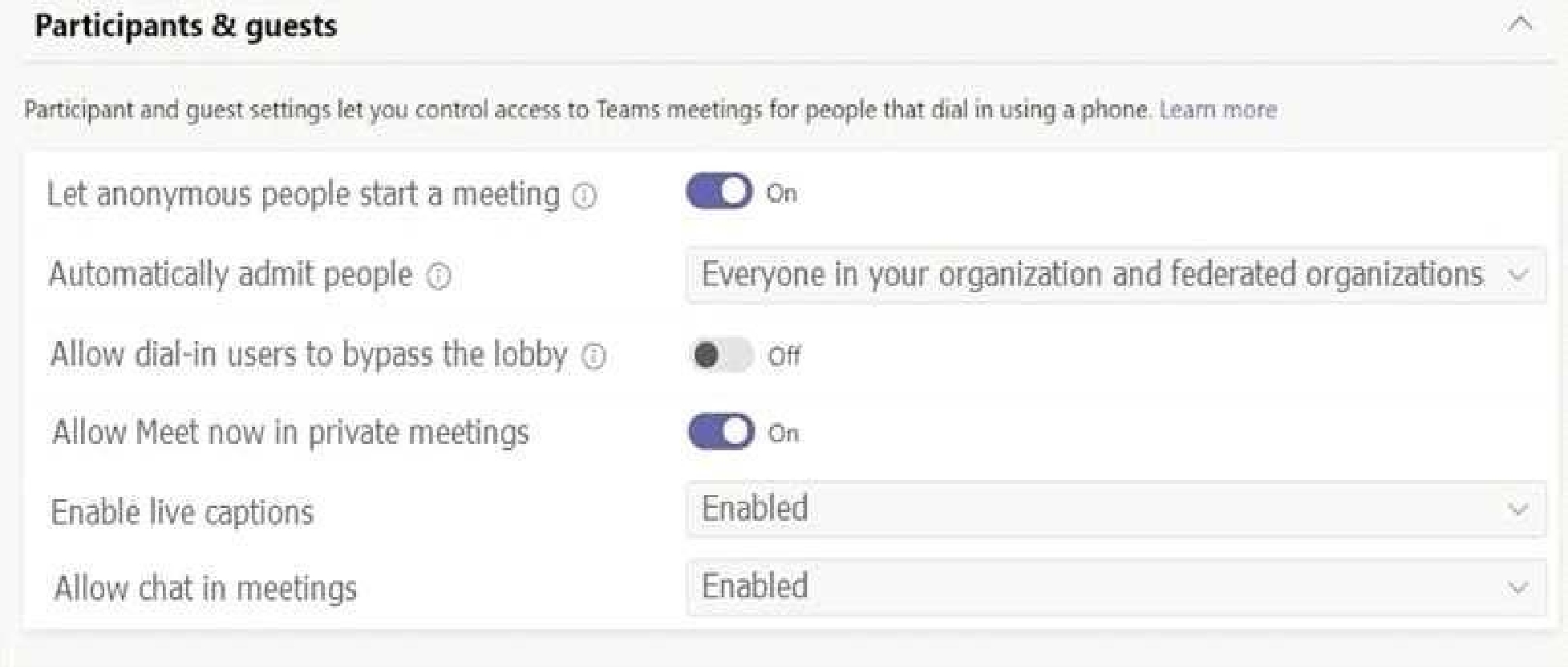
Contoso has a global meeting policy configured as shown in the following exhibit.
Contoso has a global live events policy configured as shown in the following exhibit.
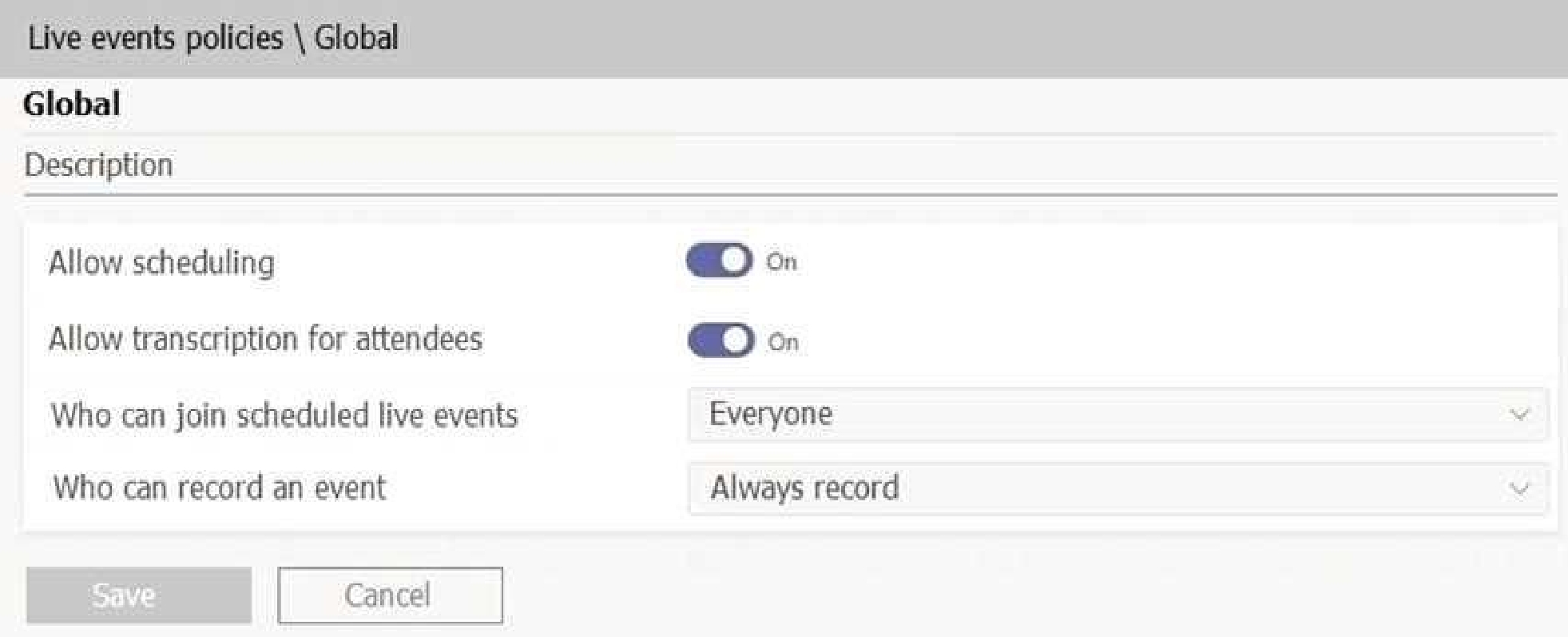
For each of the following statements, select Yes if the statement is true. Otherwise, select No.
NOTE: Each correct selection is worth one point.
Quiz
Case study
Overview
This is a case study. Case studies are not timed separately. You can use as much exam time as you
would like to complete each case. However, there may be additional case studies and sections on
this exam. You must manage your time to ensure that you are able to complete all questions included
on this exam in the time provided.
To answer the questions included in a case study, you will need to reference information that is
provided in the case study. Case studies might contain exhibits and other resources that provide
more information about the scenario that is described in the case study. Each question is
independent of the other questions in this case study.
At the end of this case study, a review screen will appear. This screen allows you to review your
answers and to make changes before you move to the next section of the exam. After you begin a
new section, you cannot return to this section.
To start the case study
To display the first question in this case study, click the Next button. Use the buttons in the left pane
to explore the content of the case study before you answer the questions. Clicking these buttons
displays information such as business requirement, existing environment, and problem statements. If
the case study has an All Information tab, note that the information displayed is identical to the
information displayed on the subsequent tabs. When you are ready to answer a question, click the
Question button to return to the question.
Overview
Contoso, Ltd. is a pharmaceutical company that has 3,000 users in offices across North America.
Existing Environment
Active Directory
The network contains an on-premises Active Directory domain. All user accounts are in departmental
organizational units (OUs).
Microsoft Office 365
All users are assigned a Microsoft Office 365 E5 license and are enabled for the following services:
Microsoft Yammer
Microsoft Exchange Online
Microsoft SharePoint Online
Microsoft OneDrive for Business
Azure Active Directory (Azure AD)
Azure AD
dynamic group membership
Microsoft Skype for Business
Contoso has an on-premises deployment of Microsoft Skype for Business Server 2015. All the latest
cumulative updates are installed on all the servers. The following services are used in Skype for
Business Server 2015:
Meetings
PSTN calling
Instant messaging (IM)
Federation to external companies
Departments
Contoso has the following departments:
IT
Sales
Human resources (HR)
Research and deployment (R&D)
All groups are created by using dynamic group membership that use the department attribute.
Requirements
Business goals
Contoso identifies the following business goals:
Migrate the maximum number of users to Microsoft Teams.
Minimize administrative effort.
Device requirements
Contoso identifies the following device requirements:
Replace Skype for Business IP phones with Microsoft Teams phones.
All Microsoft Teams phones must be set to lock automatically after 60 seconds.
Meeting and Live Event Requirements
Contoso identifies the following meeting and live event requirements:
Requirement1: Guest users must be able to join live events.
Requirement2: Guest users must always wait in a meeting lobby.
Requirement3: Contoso users must always bypass the meeting lobby when they join by using the
Microsoft Teams client.
Requirement4: After the upgrade to Microsoft Teams, all meetings must be scheduled by using
Microsoft Teams.
Calling Requirements
Contoso identifies the following calling requirements:
Migrate all existing auto attendants and response groups to Office 365.
Minimize the on-premises PSTN infrastructure.
Technical Requirements
Guest users must be prevented from making private calls.
Security Requirements
Contoso has the following security requirements for the Microsoft Teams deployment:
The number of ports allowed on the company’s firewall must be limited.
Team names must be prevented from containing the name of any products produced by Contoso.
Users in the R&D group must be prevented from sending chat messages to users in other
departments.
To meet the company’s compliance policy, users in the sales department must continue to use on-
premises Skype for Business for IM and calling only.
Pilot Project
Contoso begins a pilot project for the upgrade to Microsoft Teams.
You identify the following issues during the pilot project:
Microsoft Teams users report that they often receive continuous notifications from the Microsoft
Teams client for 20 minutes.
Two pilot users in the HR department report that they are not members of the HR team.
phones.
What should you do from the Microsoft Teams admin center?
MS-700: Microsoft Managing Microsoft Teams Practice test unlocks all online simulator questions
Thank you for choosing the free version of the MS-700: Microsoft Managing Microsoft Teams practice test! Further deepen your knowledge on Microsoft Simulator; by unlocking the full version of our MS-700: Microsoft Managing Microsoft Teams Simulator you will be able to take tests with over 399 constantly updated questions and easily pass your exam. 98% of people pass the exam in the first attempt after preparing with our 399 questions.
BUY NOWWhat to expect from our MS-700: Microsoft Managing Microsoft Teams practice tests and how to prepare for any exam?
The MS-700: Microsoft Managing Microsoft Teams Simulator Practice Tests are part of the Microsoft Database and are the best way to prepare for any MS-700: Microsoft Managing Microsoft Teams exam. The MS-700: Microsoft Managing Microsoft Teams practice tests consist of 399 questions and are written by experts to help you and prepare you to pass the exam on the first attempt. The MS-700: Microsoft Managing Microsoft Teams database includes questions from previous and other exams, which means you will be able to practice simulating past and future questions. Preparation with MS-700: Microsoft Managing Microsoft Teams Simulator will also give you an idea of the time it will take to complete each section of the MS-700: Microsoft Managing Microsoft Teams practice test . It is important to note that the MS-700: Microsoft Managing Microsoft Teams Simulator does not replace the classic MS-700: Microsoft Managing Microsoft Teams study guides; however, the Simulator provides valuable insights into what to expect and how much work needs to be done to prepare for the MS-700: Microsoft Managing Microsoft Teams exam.
BUY NOWMS-700: Microsoft Managing Microsoft Teams Practice test therefore represents an excellent tool to prepare for the actual exam together with our Microsoft practice test . Our MS-700: Microsoft Managing Microsoft Teams Simulator will help you assess your level of preparation and understand your strengths and weaknesses. Below you can read all the quizzes you will find in our MS-700: Microsoft Managing Microsoft Teams Simulator and how our unique MS-700: Microsoft Managing Microsoft Teams Database made up of real questions:
Info quiz:
- Quiz name:MS-700: Microsoft Managing Microsoft Teams
- Total number of questions:399
- Number of questions for the test:50
- Pass score:80%
You can prepare for the MS-700: Microsoft Managing Microsoft Teams exams with our mobile app. It is very easy to use and even works offline in case of network failure, with all the functions you need to study and practice with our MS-700: Microsoft Managing Microsoft Teams Simulator.
Use our Mobile App, available for both Android and iOS devices, with our MS-700: Microsoft Managing Microsoft Teams Simulator . You can use it anywhere and always remember that our mobile app is free and available on all stores.
Our Mobile App contains all MS-700: Microsoft Managing Microsoft Teams practice tests which consist of 399 questions and also provide study material to pass the final MS-700: Microsoft Managing Microsoft Teams exam with guaranteed success. Our MS-700: Microsoft Managing Microsoft Teams database contain hundreds of questions and Microsoft Tests related to MS-700: Microsoft Managing Microsoft Teams Exam. This way you can practice anywhere you want, even offline without the internet.
BUY NOW