Quiz PL-500: Microsoft Power Automate RPA Developer
Quiz
Background
Contoso Pharmaceuticals distributes specialty pharmaceuticals, ingredients, and raw materials
throughout North Americ
a. The company has 33 offices and 12 warehouses across the US, Mexico, and Canada. As their
customers' needs grow in sophistication, Contoso wants to delight customers with breakthrough
products, exceptional service, and on-time delivery of materials. They want to automate time
consuming and manual processes that are prone to error. Contoso wants to consolidate and
automate ordering and fulfillment processes.
• The company has a fleet of 500 delivery trucks. The company has 150 drivers and uses third-party
contractors to deliver goods.
• The company has 400 warehouse workers and 30 finance clerks.
• Contoso has 85 sales representatives and 50 customer service representatives. Sales
representatives spend most of their time on the road visiting customers or prospects.
• The IT department consists of four system administrators and six system analysts.
Current environment
Overview
Contoso Pharmaceuticals has a custom enterprise resource management (ERP) system. It is difficult
to integrate other applications and services with the system. Office staff manually key in purchase
orders, customer orders, and invoices after they receive a scan or hard copy of an agreement.
Applications
• The company uses a custom supplier management system named SMSApps that runs on each
user's workstation. The system is costly to run and maintain. SMSApp does not have an API.
• Sales representatives manage customer requests by using Dynamics 365 Sales.
• Contoso has Microsoft Power Platform development, user acceptance testing (UAT), and
production environments.
• Administrators create one Accounts Payable (AP) mailbox for each environment to support testing.
• The use of a DLP policy and Desktop Flow development is specified as part of the automation
requirements.
Business process
1. Sales representatives create quotes by using a Microsoft Word document template. The template
allows representatives to include product quantity, and cost estimation details that will be needed to
fulfil an order. The representative converts quotes to a PDF file and emails the file to the customer for
approval.
2. The sales representative alerts the finance team about the new order and emails the finance team
a copy of the quote for processing.
3. The finance team prints the quote and manually creates a purchase order (PO) into SMSApp to
request materials from a known and trusted vendor.
4. The SMSApp distributes the PO to stakeholders. The system sends a copy to a shared finance team
mailbox.
5. Once a PO is fulfilled by a vendor, the system sends an email to the finance mailbox. The finance
team releases an order to the warehouse.
6. Materials are shipped from the vendor to one of Contoso's warehouses. Warehouse workers
enter key information from the waybill into SMSApp. The materials are unloaded and racked in the
warehouse until they are shipped to customers.
7. Upon checking for new daily orders in SMSApp, they see an open order is pending that is awaiting
the newly received materials
8. The Warehouse worker loads an order onto a truck for delivery and marks the order as complete
in SMSApp.
9. Sales representatives provide fulfillment status and tracking information for orders.
10. A finance clerk prepares an invoice and sends the invoice to the customer by email. The clerk
sends a copy of the email to the shared AP mailbox.
11. The AP team monitors the shared mailbox to confirm that the customer has paid the invoice.
Requirements
Functional requirements
• Large volume orders must be processed before other orders.
• Invoices must be cross-checked with received items against packing slip for shipments.
• The finance team must be able to analyze patterns in transactional data to conduct fraud
prevention activities.
• You must automate the process of entering data about incoming orders into SMSApp.
• The solution must follow the principle of least privilege.
Purchase Order Quantity flow
• You must create an unmanaged solution to update purchase order details in SMSApp. The flow
must use a manual trigger.
• Members of Accounts Payable team will be testers for the solution. They must be able to access the
Purchase Order Quantity flow.
Flow for processing invoice data
• You must create a flow to monitor the AP mailbox. When an invoice arrives as an attachment in the
inbox, the flow must automatically process the invoice data by using a form processing model. The
flow must cross-check the received items against the packing slip.
• You must use different Accounts Payable email addresses for development user acceptance testing
(UAT), and production environments.
• You must use an environment variable to represent the Accounts Payable mailbox for the
environment in use.
• You must be able to use the environment variable across multiple cloud flows, a custom connector,
and a canvas app.
Technical requirements
• Users must only be allowed to connect to and access systems that are required for the employee
to perform required job tasks.
• All automation flows must be either co-owned or shared between staff.
• All employees must be able to access the new environment to build personal productivity
automations.
• You must distribute the workload for desktop flows to optimize productivity.
Monitor flows
• All data extracted from Invoices should be stored in a custom Dataverse entity. Only employees
who are part of Finance role should be able to edit all Invoice data but must be prevented from
creating or deleting one.
Issues
Invoice data
All users report that they can see and modify invoice data.
New environment
• The IT department creates a new environment. A user creates a cloud flow named FlowA in the
environment that triggers a desktop flow. A user reports that the cloud flow does not trigger the
desktop flow to run.
• Microsoft Dataverse is not provisioned in the new environment. You attempt to create a Desktop
flow in the default environment but receive a Dataverse error message and cannot proceed.
Data entry automation flow
An administrator runs a new desktop flow in the development environment to automate data entry
into SMSApp. The flow automatically reverts to a
suspended state.
Order fulfillment flow
You must automate the customer communication process by using an unattended desktop flow. The
flow must check the fulfillment status of each active order in SMSApp. If an order is fulfilled, the flow
must send the customer an email that includes tracking information for their order.
Quiz
Background
Contoso Pharmaceuticals distributes specialty pharmaceuticals, ingredients, and raw materials
throughout North Americ
a. The company has 33 offices and 12 warehouses across the US, Mexico, and Canada. As their
customers' needs grow in sophistication, Contoso wants to delight customers with breakthrough
products, exceptional service, and on-time delivery of materials. They want to automate time
consuming and manual processes that are prone to error. Contoso wants to consolidate and
automate ordering and fulfillment processes.
• The company has a fleet of 500 delivery trucks. The company has 150 drivers and uses third-party
contractors to deliver goods.
• The company has 400 warehouse workers and 30 finance clerks.
• Contoso has 85 sales representatives and 50 customer service representatives. Sales
representatives spend most of their time on the road visiting customers or prospects.
• The IT department consists of four system administrators and six system analysts.
Current environment
Overview
Contoso Pharmaceuticals has a custom enterprise resource management (ERP) system. It is difficult
to integrate other applications and services with the system. Office staff manually key in purchase
orders, customer orders, and invoices after they receive a scan or hard copy of an agreement.
Applications
• The company uses a custom supplier management system named SMSApps that runs on each
user's workstation. The system is costly to run and maintain. SMSApp does not have an API.
• Sales representatives manage customer requests by using Dynamics 365 Sales.
• Contoso has Microsoft Power Platform development, user acceptance testing (UAT), and
production environments.
• Administrators create one Accounts Payable (AP) mailbox for each environment to support testing.
• The use of a DLP policy and Desktop Flow development is specified as part of the automation
requirements.
Business process
1. Sales representatives create quotes by using a Microsoft Word document template. The template
allows representatives to include product quantity, and cost estimation details that will be needed to
fulfil an order. The representative converts quotes to a PDF file and emails the file to the customer for
approval.
2. The sales representative alerts the finance team about the new order and emails the finance team
a copy of the quote for processing.
3. The finance team prints the quote and manually creates a purchase order (PO) into SMSApp to
request materials from a known and trusted vendor.
4. The SMSApp distributes the PO to stakeholders. The system sends a copy to a shared finance team
mailbox.
5. Once a PO is fulfilled by a vendor, the system sends an email to the finance mailbox. The finance
team releases an order to the warehouse.
6. Materials are shipped from the vendor to one of Contoso's warehouses. Warehouse workers
enter key information from the waybill into SMSApp. The materials are unloaded and racked in the
warehouse until they are shipped to customers.
7. Upon checking for new daily orders in SMSApp, they see an open order is pending that is awaiting
the newly received materials
8. The Warehouse worker loads an order onto a truck for delivery and marks the order as complete
in SMSApp.
9. Sales representatives provide fulfillment status and tracking information for orders.
10. A finance clerk prepares an invoice and sends the invoice to the customer by email. The clerk
sends a copy of the email to the shared AP mailbox.
11. The AP team monitors the shared mailbox to confirm that the customer has paid the invoice.
Requirements
Functional requirements
• Large volume orders must be processed before other orders.
• Invoices must be cross-checked with received items against packing slip for shipments.
• The finance team must be able to analyze patterns in transactional data to conduct fraud
prevention activities.
• You must automate the process of entering data about incoming orders into SMSApp.
• The solution must follow the principle of least privilege.
Purchase Order Quantity flow
• You must create an unmanaged solution to update purchase order details in SMSApp. The flow
must use a manual trigger.
• Members of Accounts Payable team will be testers for the solution. They must be able to access the
Purchase Order Quantity flow.
Flow for processing invoice data
• You must create a flow to monitor the AP mailbox. When an invoice arrives as an attachment in the
inbox, the flow must automatically process the invoice data by using a form processing model. The
flow must cross-check the received items against the packing slip.
• You must use different Accounts Payable email addresses for development user acceptance testing
(UAT), and production environments.
• You must use an environment variable to represent the Accounts Payable mailbox for the
environment in use.
• You must be able to use the environment variable across multiple cloud flows, a custom connector,
and a canvas app.
Technical requirements
• Users must only be allowed to connect to and access systems that are required for the employee
to perform required job tasks.
• All automation flows must be either co-owned or shared between staff.
• All employees must be able to access the new environment to build personal productivity
automations.
• You must distribute the workload for desktop flows to optimize productivity.
Monitor flows
• All data extracted from Invoices should be stored in a custom Dataverse entity. Only employees
who are part of Finance role should be able to edit all Invoice data but must be prevented from
creating or deleting one.
Issues
Invoice data
All users report that they can see and modify invoice data.
New environment
• The IT department creates a new environment. A user creates a cloud flow named FlowA in the
environment that triggers a desktop flow. A user reports that the cloud flow does not trigger the
desktop flow to run.
• Microsoft Dataverse is not provisioned in the new environment. You attempt to create a Desktop
flow in the default environment but receive a Dataverse error message and cannot proceed.
Data entry automation flow
An administrator runs a new desktop flow in the development environment to automate data entry
into SMSApp. The flow automatically reverts to a
suspended state.
Order fulfillment flow
You must automate the customer communication process by using an unattended desktop flow. The
flow must check the fulfillment status of each active order in SMSApp. If an order is fulfilled, the flow
must send the customer an email that includes tracking information for their order.
elements should you use? Each correct answer presents part of the solution. NOTE: Each correct
selection is worth one point.
Quiz
Background
Contoso Pharmaceuticals distributes specialty pharmaceuticals, ingredients, and raw materials
throughout North Americ
a. The company has 33 offices and 12 warehouses across the US, Mexico, and Canada. As their
customers' needs grow in sophistication, Contoso wants to delight customers with breakthrough
products, exceptional service, and on-time delivery of materials. They want to automate time
consuming and manual processes that are prone to error. Contoso wants to consolidate and
automate ordering and fulfillment processes.
• The company has a fleet of 500 delivery trucks. The company has 150 drivers and uses third-party
contractors to deliver goods.
• The company has 400 warehouse workers and 30 finance clerks.
• Contoso has 85 sales representatives and 50 customer service representatives. Sales
representatives spend most of their time on the road visiting customers or prospects.
• The IT department consists of four system administrators and six system analysts.
Current environment
Overview
Contoso Pharmaceuticals has a custom enterprise resource management (ERP) system. It is difficult
to integrate other applications and services with the system. Office staff manually key in purchase
orders, customer orders, and invoices after they receive a scan or hard copy of an agreement.
Applications
• The company uses a custom supplier management system named SMSApps that runs on each
user's workstation. The system is costly to run and maintain. SMSApp does not have an API.
• Sales representatives manage customer requests by using Dynamics 365 Sales.
• Contoso has Microsoft Power Platform development, user acceptance testing (UAT), and
production environments.
• Administrators create one Accounts Payable (AP) mailbox for each environment to support testing.
• The use of a DLP policy and Desktop Flow development is specified as part of the automation
requirements.
Business process
1. Sales representatives create quotes by using a Microsoft Word document template. The template
allows representatives to include product quantity, and cost estimation details that will be needed to
fulfil an order. The representative converts quotes to a PDF file and emails the file to the customer for
approval.
2. The sales representative alerts the finance team about the new order and emails the finance team
a copy of the quote for processing.
3. The finance team prints the quote and manually creates a purchase order (PO) into SMSApp to
request materials from a known and trusted vendor.
4. The SMSApp distributes the PO to stakeholders. The system sends a copy to a shared finance team
mailbox.
5. Once a PO is fulfilled by a vendor, the system sends an email to the finance mailbox. The finance
team releases an order to the warehouse.
6. Materials are shipped from the vendor to one of Contoso's warehouses. Warehouse workers
enter key information from the waybill into SMSApp. The materials are unloaded and racked in the
warehouse until they are shipped to customers.
7. Upon checking for new daily orders in SMSApp, they see an open order is pending that is awaiting
the newly received materials
8. The Warehouse worker loads an order onto a truck for delivery and marks the order as complete
in SMSApp.
9. Sales representatives provide fulfillment status and tracking information for orders.
10. A finance clerk prepares an invoice and sends the invoice to the customer by email. The clerk
sends a copy of the email to the shared AP mailbox.
11. The AP team monitors the shared mailbox to confirm that the customer has paid the invoice.
Requirements
Functional requirements
• Large volume orders must be processed before other orders.
• Invoices must be cross-checked with received items against packing slip for shipments.
• The finance team must be able to analyze patterns in transactional data to conduct fraud
prevention activities.
• You must automate the process of entering data about incoming orders into SMSApp.
• The solution must follow the principle of least privilege.
Purchase Order Quantity flow
• You must create an unmanaged solution to update purchase order details in SMSApp. The flow
must use a manual trigger.
• Members of Accounts Payable team will be testers for the solution. They must be able to access the
Purchase Order Quantity flow.
Flow for processing invoice data
• You must create a flow to monitor the AP mailbox. When an invoice arrives as an attachment in the
inbox, the flow must automatically process the invoice data by using a form processing model. The
flow must cross-check the received items against the packing slip.
• You must use different Accounts Payable email addresses for development user acceptance testing
(UAT), and production environments.
• You must use an environment variable to represent the Accounts Payable mailbox for the
environment in use.
• You must be able to use the environment variable across multiple cloud flows, a custom connector,
and a canvas app.
Technical requirements
• Users must only be allowed to connect to and access systems that are required for the employee
to perform required job tasks.
• All automation flows must be either co-owned or shared between staff.
• All employees must be able to access the new environment to build personal productivity
automations.
• You must distribute the workload for desktop flows to optimize productivity.
Monitor flows
• All data extracted from Invoices should be stored in a custom Dataverse entity. Only employees
who are part of Finance role should be able to edit all Invoice data but must be prevented from
creating or deleting one.
Issues
Invoice data
All users report that they can see and modify invoice data.
New environment
• The IT department creates a new environment. A user creates a cloud flow named FlowA in the
environment that triggers a desktop flow. A user reports that the cloud flow does not trigger the
desktop flow to run.
• Microsoft Dataverse is not provisioned in the new environment. You attempt to create a Desktop
flow in the default environment but receive a Dataverse error message and cannot proceed.
Data entry automation flow
An administrator runs a new desktop flow in the development environment to automate data entry
into SMSApp. The flow automatically reverts to a
suspended state.
Order fulfillment flow
You must automate the customer communication process by using an unattended desktop flow. The
flow must check the fulfillment status of each active order in SMSApp. If an order is fulfilled, the flow
must send the customer an email that includes tracking information for their order.
Which three actions should you perform? Each correct answer presents part of the solution.
NOTE: Each correct selection is worth one point.
Quiz
Background
Contoso Pharmaceuticals distributes specialty pharmaceuticals, ingredients, and raw materials
throughout North Americ
a. The company has 33 offices and 12 warehouses across the US, Mexico, and Canada. As their
customers' needs grow in sophistication, Contoso wants to delight customers with breakthrough
products, exceptional service, and on-time delivery of materials. They want to automate time
consuming and manual processes that are prone to error. Contoso wants to consolidate and
automate ordering and fulfillment processes.
• The company has a fleet of 500 delivery trucks. The company has 150 drivers and uses third-party
contractors to deliver goods.
• The company has 400 warehouse workers and 30 finance clerks.
• Contoso has 85 sales representatives and 50 customer service representatives. Sales
representatives spend most of their time on the road visiting customers or prospects.
• The IT department consists of four system administrators and six system analysts.
Current environment
Overview
Contoso Pharmaceuticals has a custom enterprise resource management (ERP) system. It is difficult
to integrate other applications and services with the system. Office staff manually key in purchase
orders, customer orders, and invoices after they receive a scan or hard copy of an agreement.
Applications
• The company uses a custom supplier management system named SMSApps that runs on each
user's workstation. The system is costly to run and maintain. SMSApp does not have an API.
• Sales representatives manage customer requests by using Dynamics 365 Sales.
• Contoso has Microsoft Power Platform development, user acceptance testing (UAT), and
production environments.
• Administrators create one Accounts Payable (AP) mailbox for each environment to support testing.
• The use of a DLP policy and Desktop Flow development is specified as part of the automation
requirements.
Business process
1. Sales representatives create quotes by using a Microsoft Word document template. The template
allows representatives to include product quantity, and cost estimation details that will be needed to
fulfil an order. The representative converts quotes to a PDF file and emails the file to the customer for
approval.
2. The sales representative alerts the finance team about the new order and emails the finance team
a copy of the quote for processing.
3. The finance team prints the quote and manually creates a purchase order (PO) into SMSApp to
request materials from a known and trusted vendor.
4. The SMSApp distributes the PO to stakeholders. The system sends a copy to a shared finance team
mailbox.
5. Once a PO is fulfilled by a vendor, the system sends an email to the finance mailbox. The finance
team releases an order to the warehouse.
6. Materials are shipped from the vendor to one of Contoso's warehouses. Warehouse workers
enter key information from the waybill into SMSApp. The materials are unloaded and racked in the
warehouse until they are shipped to customers.
7. Upon checking for new daily orders in SMSApp, they see an open order is pending that is awaiting
the newly received materials
8. The Warehouse worker loads an order onto a truck for delivery and marks the order as complete
in SMSApp.
9. Sales representatives provide fulfillment status and tracking information for orders.
10. A finance clerk prepares an invoice and sends the invoice to the customer by email. The clerk
sends a copy of the email to the shared AP mailbox.
11. The AP team monitors the shared mailbox to confirm that the customer has paid the invoice.
Requirements
Functional requirements
• Large volume orders must be processed before other orders.
• Invoices must be cross-checked with received items against packing slip for shipments.
• The finance team must be able to analyze patterns in transactional data to conduct fraud
prevention activities.
• You must automate the process of entering data about incoming orders into SMSApp.
• The solution must follow the principle of least privilege.
Purchase Order Quantity flow
• You must create an unmanaged solution to update purchase order details in SMSApp. The flow
must use a manual trigger.
• Members of Accounts Payable team will be testers for the solution. They must be able to access the
Purchase Order Quantity flow.
Flow for processing invoice data
• You must create a flow to monitor the AP mailbox. When an invoice arrives as an attachment in the
inbox, the flow must automatically process the invoice data by using a form processing model. The
flow must cross-check the received items against the packing slip.
• You must use different Accounts Payable email addresses for development user acceptance testing
(UAT), and production environments.
• You must use an environment variable to represent the Accounts Payable mailbox for the
environment in use.
• You must be able to use the environment variable across multiple cloud flows, a custom connector,
and a canvas app.
Technical requirements
• Users must only be allowed to connect to and access systems that are required for the employee
to perform required job tasks.
• All automation flows must be either co-owned or shared between staff.
• All employees must be able to access the new environment to build personal productivity
automations.
• You must distribute the workload for desktop flows to optimize productivity.
Monitor flows
• All data extracted from Invoices should be stored in a custom Dataverse entity. Only employees
who are part of Finance role should be able to edit all Invoice data but must be prevented from
creating or deleting one.
Issues
Invoice data
All users report that they can see and modify invoice data.
New environment
• The IT department creates a new environment. A user creates a cloud flow named FlowA in the
environment that triggers a desktop flow. A user reports that the cloud flow does not trigger the
desktop flow to run.
• Microsoft Dataverse is not provisioned in the new environment. You attempt to create a Desktop
flow in the default environment but receive a Dataverse error message and cannot proceed.
Data entry automation flow
An administrator runs a new desktop flow in the development environment to automate data entry
into SMSApp. The flow automatically reverts to a
suspended state.
Order fulfillment flow
You must automate the customer communication process by using an unattended desktop flow. The
flow must check the fulfillment status of each active order in SMSApp. If an order is fulfilled, the flow
must send the customer an email that includes tracking information for their order.
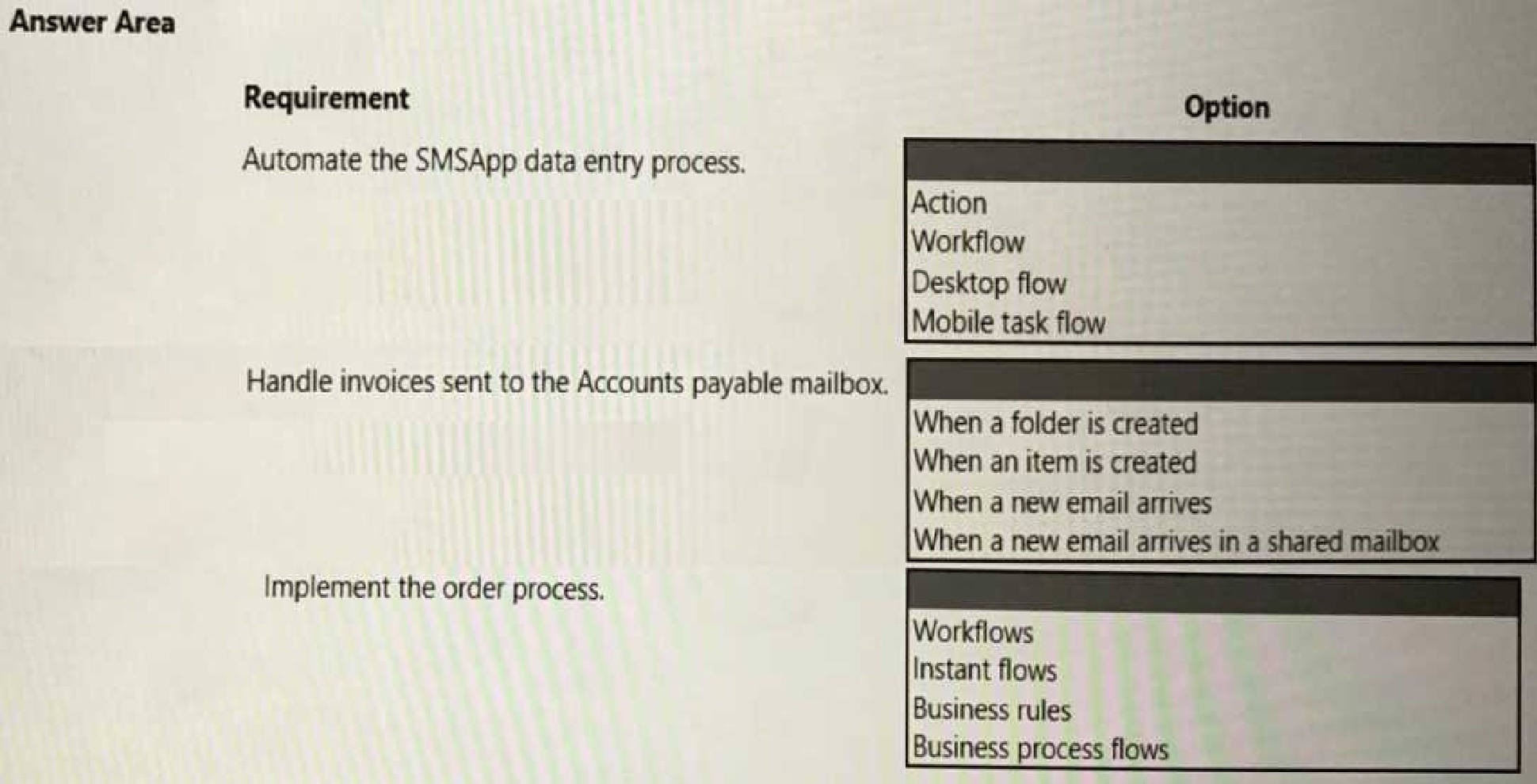
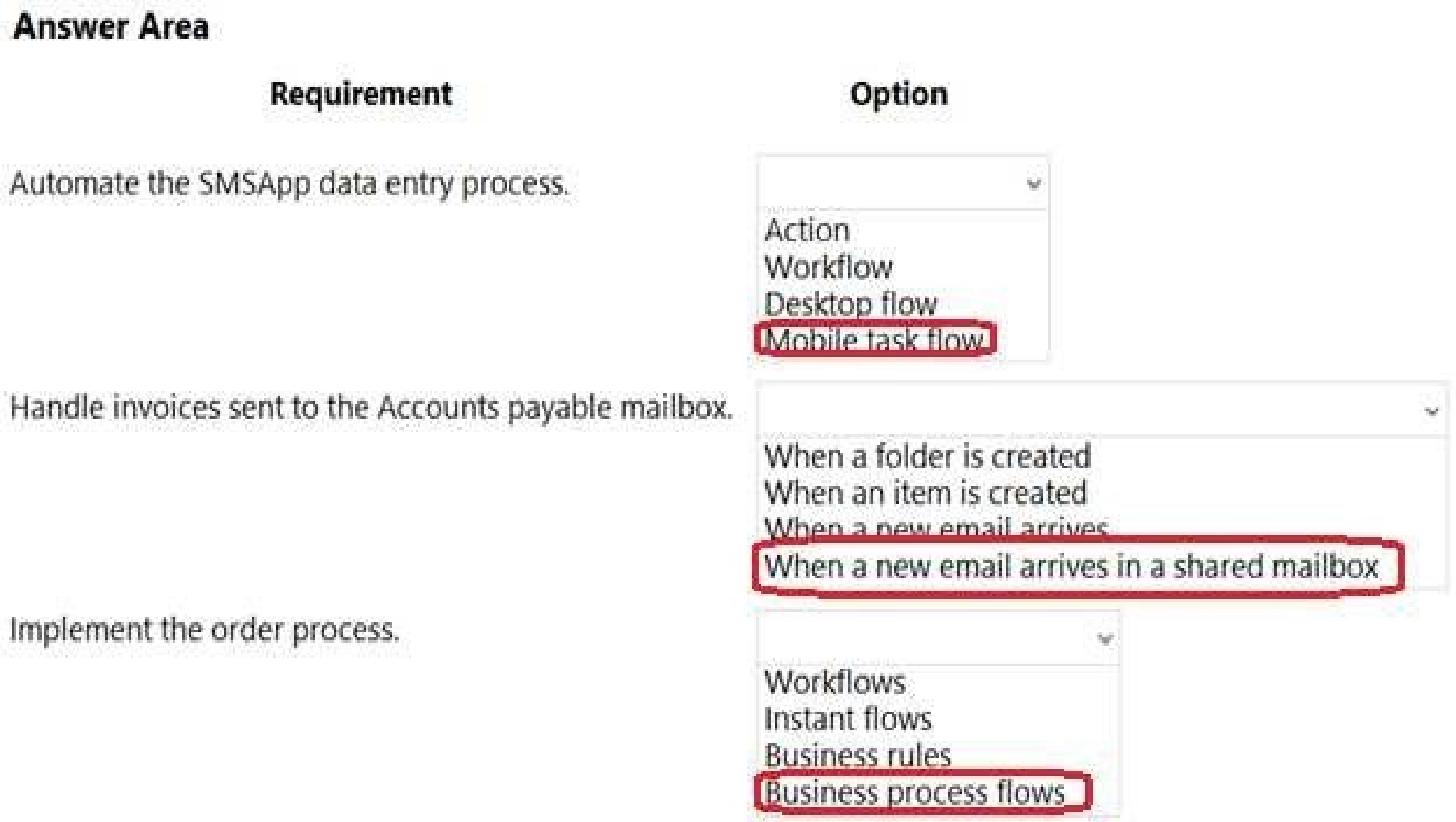
What should you use? To answer, select the appropriate options in the answer area.
NOTE: Each correct selection is worth one point.
Quiz
Background
Contoso Pharmaceuticals distributes specialty pharmaceuticals, ingredients, and raw materials
throughout North Americ
a. The company has 33 offices and 12 warehouses across the US, Mexico, and Canada. As their
customers' needs grow in sophistication, Contoso wants to delight customers with breakthrough
products, exceptional service, and on-time delivery of materials. They want to automate time
consuming and manual processes that are prone to error. Contoso wants to consolidate and
automate ordering and fulfillment processes.
• The company has a fleet of 500 delivery trucks. The company has 150 drivers and uses third-party
contractors to deliver goods.
• The company has 400 warehouse workers and 30 finance clerks.
• Contoso has 85 sales representatives and 50 customer service representatives. Sales
representatives spend most of their time on the road visiting customers or prospects.
• The IT department consists of four system administrators and six system analysts.
Current environment
Overview
Contoso Pharmaceuticals has a custom enterprise resource management (ERP) system. It is difficult
to integrate other applications and services with the system. Office staff manually key in purchase
orders, customer orders, and invoices after they receive a scan or hard copy of an agreement.
Applications
• The company uses a custom supplier management system named SMSApps that runs on each
user's workstation. The system is costly to run and maintain. SMSApp does not have an API.
• Sales representatives manage customer requests by using Dynamics 365 Sales.
• Contoso has Microsoft Power Platform development, user acceptance testing (UAT), and
production environments.
• Administrators create one Accounts Payable (AP) mailbox for each environment to support testing.
• The use of a DLP policy and Desktop Flow development is specified as part of the automation
requirements.
Business process
1. Sales representatives create quotes by using a Microsoft Word document template. The template
allows representatives to include product quantity, and cost estimation details that will be needed to
fulfil an order. The representative converts quotes to a PDF file and emails the file to the customer for
approval.
2. The sales representative alerts the finance team about the new order and emails the finance team
a copy of the quote for processing.
3. The finance team prints the quote and manually creates a purchase order (PO) into SMSApp to
request materials from a known and trusted vendor.
4. The SMSApp distributes the PO to stakeholders. The system sends a copy to a shared finance team
mailbox.
5. Once a PO is fulfilled by a vendor, the system sends an email to the finance mailbox. The finance
team releases an order to the warehouse.
6. Materials are shipped from the vendor to one of Contoso's warehouses. Warehouse workers
enter key information from the waybill into SMSApp. The materials are unloaded and racked in the
warehouse until they are shipped to customers.
7. Upon checking for new daily orders in SMSApp, they see an open order is pending that is awaiting
the newly received materials
8. The Warehouse worker loads an order onto a truck for delivery and marks the order as complete
in SMSApp.
9. Sales representatives provide fulfillment status and tracking information for orders.
10. A finance clerk prepares an invoice and sends the invoice to the customer by email. The clerk
sends a copy of the email to the shared AP mailbox.
11. The AP team monitors the shared mailbox to confirm that the customer has paid the invoice.
Requirements
Functional requirements
• Large volume orders must be processed before other orders.
• Invoices must be cross-checked with received items against packing slip for shipments.
• The finance team must be able to analyze patterns in transactional data to conduct fraud
prevention activities.
• You must automate the process of entering data about incoming orders into SMSApp.
• The solution must follow the principle of least privilege.
Purchase Order Quantity flow
• You must create an unmanaged solution to update purchase order details in SMSApp. The flow
must use a manual trigger.
• Members of Accounts Payable team will be testers for the solution. They must be able to access the
Purchase Order Quantity flow.
Flow for processing invoice data
• You must create a flow to monitor the AP mailbox. When an invoice arrives as an attachment in the
inbox, the flow must automatically process the invoice data by using a form processing model. The
flow must cross-check the received items against the packing slip.
• You must use different Accounts Payable email addresses for development user acceptance testing
(UAT), and production environments.
• You must use an environment variable to represent the Accounts Payable mailbox for the
environment in use.
• You must be able to use the environment variable across multiple cloud flows, a custom connector,
and a canvas app.
Technical requirements
• Users must only be allowed to connect to and access systems that are required for the employee
to perform required job tasks.
• All automation flows must be either co-owned or shared between staff.
• All employees must be able to access the new environment to build personal productivity
automations.
• You must distribute the workload for desktop flows to optimize productivity.
Monitor flows
• All data extracted from Invoices should be stored in a custom Dataverse entity. Only employees
who are part of Finance role should be able to edit all Invoice data but must be prevented from
creating or deleting one.
Issues
Invoice data
All users report that they can see and modify invoice data.
New environment
• The IT department creates a new environment. A user creates a cloud flow named FlowA in the
environment that triggers a desktop flow. A user reports that the cloud flow does not trigger the
desktop flow to run.
• Microsoft Dataverse is not provisioned in the new environment. You attempt to create a Desktop
flow in the default environment but receive a Dataverse error message and cannot proceed.
Data entry automation flow
An administrator runs a new desktop flow in the development environment to automate data entry
into SMSApp. The flow automatically reverts to a
suspended state.
Order fulfillment flow
You must automate the customer communication process by using an unattended desktop flow. The
flow must check the fulfillment status of each active order in SMSApp. If an order is fulfilled, the flow
must send the customer an email that includes tracking information for their order.
Which three actions should you perform? Each correct answer presents part of the solution.
NOTE: Each correct selection is worth one point.
Quiz
Background
Contoso Pharmaceuticals distributes specialty pharmaceuticals, ingredients, and raw materials
throughout North Americ
a. The company has 33 offices and 12 warehouses across the US, Mexico, and Canada. As their
customers' needs grow in sophistication, Contoso wants to delight customers with breakthrough
products, exceptional service, and on-time delivery of materials. They want to automate time
consuming and manual processes that are prone to error. Contoso wants to consolidate and
automate ordering and fulfillment processes.
• The company has a fleet of 500 delivery trucks. The company has 150 drivers and uses third-party
contractors to deliver goods.
• The company has 400 warehouse workers and 30 finance clerks.
• Contoso has 85 sales representatives and 50 customer service representatives. Sales
representatives spend most of their time on the road visiting customers or prospects.
• The IT department consists of four system administrators and six system analysts.
Current environment
Overview
Contoso Pharmaceuticals has a custom enterprise resource management (ERP) system. It is difficult
to integrate other applications and services with the system. Office staff manually key in purchase
orders, customer orders, and invoices after they receive a scan or hard copy of an agreement.
Applications
• The company uses a custom supplier management system named SMSApps that runs on each
user's workstation. The system is costly to run and maintain. SMSApp does not have an API.
• Sales representatives manage customer requests by using Dynamics 365 Sales.
• Contoso has Microsoft Power Platform development, user acceptance testing (UAT), and
production environments.
• Administrators create one Accounts Payable (AP) mailbox for each environment to support testing.
• The use of a DLP policy and Desktop Flow development is specified as part of the automation
requirements.
Business process
1. Sales representatives create quotes by using a Microsoft Word document template. The template
allows representatives to include product quantity, and cost estimation details that will be needed to
fulfil an order. The representative converts quotes to a PDF file and emails the file to the customer for
approval.
2. The sales representative alerts the finance team about the new order and emails the finance team
a copy of the quote for processing.
3. The finance team prints the quote and manually creates a purchase order (PO) into SMSApp to
request materials from a known and trusted vendor.
4. The SMSApp distributes the PO to stakeholders. The system sends a copy to a shared finance team
mailbox.
5. Once a PO is fulfilled by a vendor, the system sends an email to the finance mailbox. The finance
team releases an order to the warehouse.
6. Materials are shipped from the vendor to one of Contoso's warehouses. Warehouse workers
enter key information from the waybill into SMSApp. The materials are unloaded and racked in the
warehouse until they are shipped to customers.
7. Upon checking for new daily orders in SMSApp, they see an open order is pending that is awaiting
the newly received materials
8. The Warehouse worker loads an order onto a truck for delivery and marks the order as complete
in SMSApp.
9. Sales representatives provide fulfillment status and tracking information for orders.
10. A finance clerk prepares an invoice and sends the invoice to the customer by email. The clerk
sends a copy of the email to the shared AP mailbox.
11. The AP team monitors the shared mailbox to confirm that the customer has paid the invoice.
Requirements
Functional requirements
• Large volume orders must be processed before other orders.
• Invoices must be cross-checked with received items against packing slip for shipments.
• The finance team must be able to analyze patterns in transactional data to conduct fraud
prevention activities.
• You must automate the process of entering data about incoming orders into SMSApp.
• The solution must follow the principle of least privilege.
Purchase Order Quantity flow
• You must create an unmanaged solution to update purchase order details in SMSApp. The flow
must use a manual trigger.
• Members of Accounts Payable team will be testers for the solution. They must be able to access the
Purchase Order Quantity flow.
Flow for processing invoice data
• You must create a flow to monitor the AP mailbox. When an invoice arrives as an attachment in the
inbox, the flow must automatically process the invoice data by using a form processing model. The
flow must cross-check the received items against the packing slip.
• You must use different Accounts Payable email addresses for development user acceptance testing
(UAT), and production environments.
• You must use an environment variable to represent the Accounts Payable mailbox for the
environment in use.
• You must be able to use the environment variable across multiple cloud flows, a custom connector,
and a canvas app.
Technical requirements
• Users must only be allowed to connect to and access systems that are required for the employee
to perform required job tasks.
• All automation flows must be either co-owned or shared between staff.
• All employees must be able to access the new environment to build personal productivity
automations.
• You must distribute the workload for desktop flows to optimize productivity.
Monitor flows
• All data extracted from Invoices should be stored in a custom Dataverse entity. Only employees
who are part of Finance role should be able to edit all Invoice data but must be prevented from
creating or deleting one.
Issues
Invoice data
All users report that they can see and modify invoice data.
New environment
• The IT department creates a new environment. A user creates a cloud flow named FlowA in the
environment that triggers a desktop flow. A user reports that the cloud flow does not trigger the
desktop flow to run.
• Microsoft Dataverse is not provisioned in the new environment. You attempt to create a Desktop
flow in the default environment but receive a Dataverse error message and cannot proceed.
Data entry automation flow
An administrator runs a new desktop flow in the development environment to automate data entry
into SMSApp. The flow automatically reverts to a
suspended state.
Order fulfillment flow
You must automate the customer communication process by using an unattended desktop flow. The
flow must check the fulfillment status of each active order in SMSApp. If an order is fulfilled, the flow
must send the customer an email that includes tracking information for their order.
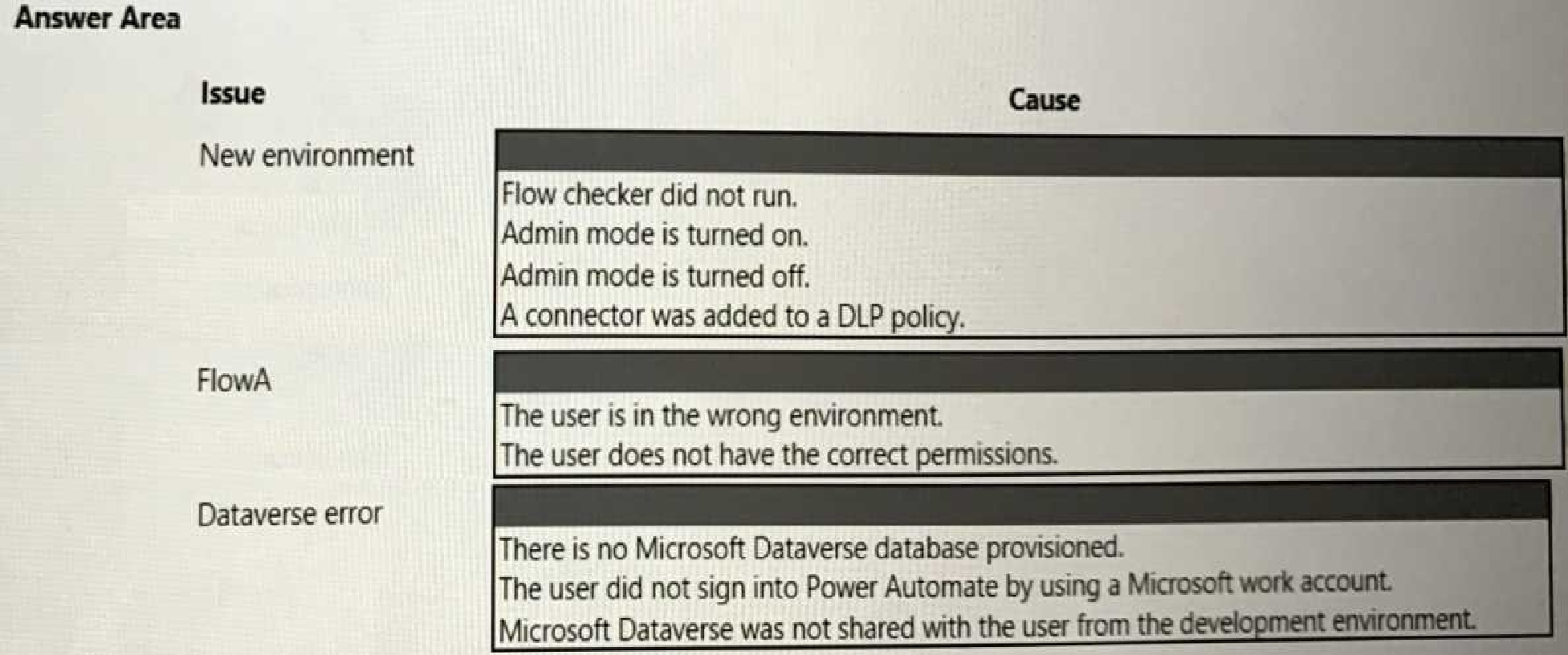
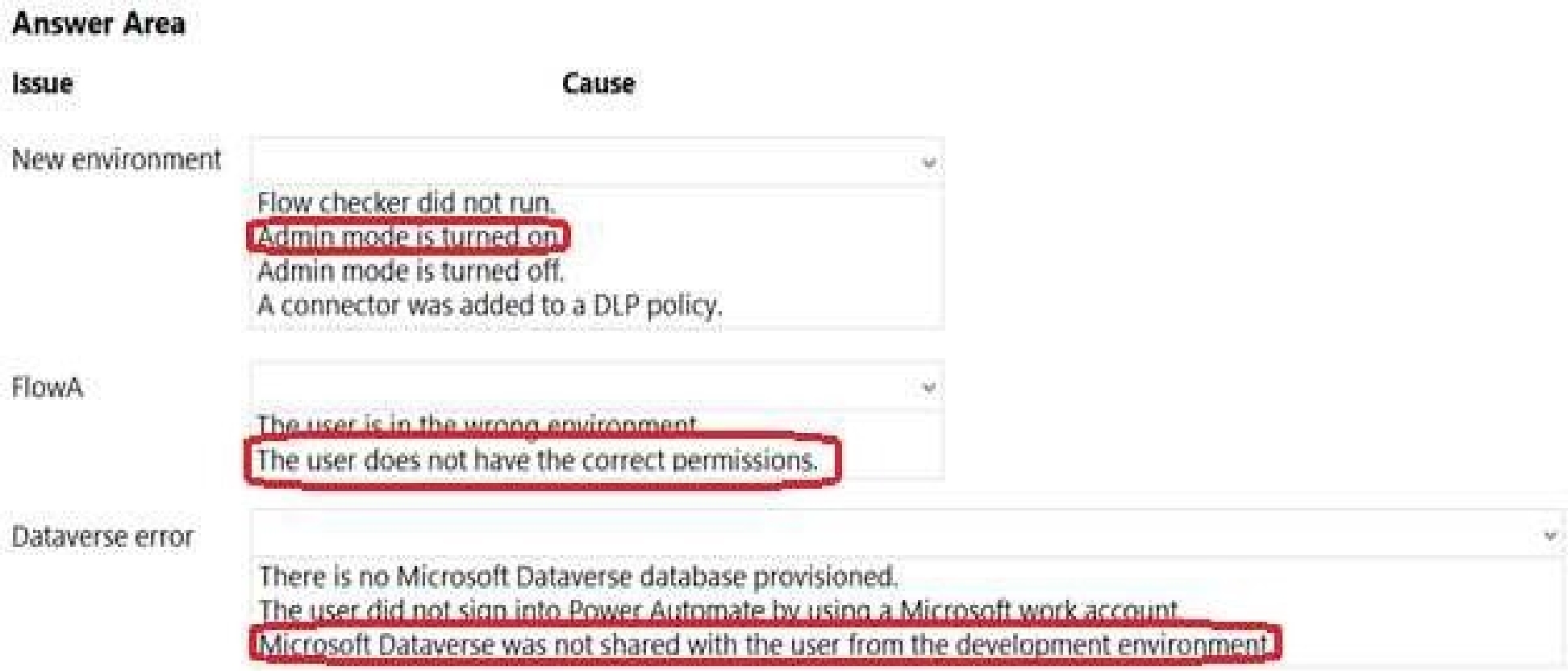
What are the causes? To answer, select the appropriate options in the answer area.
NOTE: Each correct selection is worth one point.
Quiz
Background
Contoso Pharmaceuticals distributes specialty pharmaceuticals, ingredients, and raw materials
throughout North Americ
a. The company has 33 offices and 12 warehouses across the US, Mexico, and Canada. As their
customers' needs grow in sophistication, Contoso wants to delight customers with breakthrough
products, exceptional service, and on-time delivery of materials. They want to automate time
consuming and manual processes that are prone to error. Contoso wants to consolidate and
automate ordering and fulfillment processes.
• The company has a fleet of 500 delivery trucks. The company has 150 drivers and uses third-party
contractors to deliver goods.
• The company has 400 warehouse workers and 30 finance clerks.
• Contoso has 85 sales representatives and 50 customer service representatives. Sales
representatives spend most of their time on the road visiting customers or prospects.
• The IT department consists of four system administrators and six system analysts.
Current environment
Overview
Contoso Pharmaceuticals has a custom enterprise resource management (ERP) system. It is difficult
to integrate other applications and services with the system. Office staff manually key in purchase
orders, customer orders, and invoices after they receive a scan or hard copy of an agreement.
Applications
• The company uses a custom supplier management system named SMSApps that runs on each
user's workstation. The system is costly to run and maintain. SMSApp does not have an API.
• Sales representatives manage customer requests by using Dynamics 365 Sales.
• Contoso has Microsoft Power Platform development, user acceptance testing (UAT), and
production environments.
• Administrators create one Accounts Payable (AP) mailbox for each environment to support testing.
• The use of a DLP policy and Desktop Flow development is specified as part of the automation
requirements.
Business process
1. Sales representatives create quotes by using a Microsoft Word document template. The template
allows representatives to include product quantity, and cost estimation details that will be needed to
fulfil an order. The representative converts quotes to a PDF file and emails the file to the customer for
approval.
2. The sales representative alerts the finance team about the new order and emails the finance team
a copy of the quote for processing.
3. The finance team prints the quote and manually creates a purchase order (PO) into SMSApp to
request materials from a known and trusted vendor.
4. The SMSApp distributes the PO to stakeholders. The system sends a copy to a shared finance team
mailbox.
5. Once a PO is fulfilled by a vendor, the system sends an email to the finance mailbox. The finance
team releases an order to the warehouse.
6. Materials are shipped from the vendor to one of Contoso's warehouses. Warehouse workers
enter key information from the waybill into SMSApp. The materials are unloaded and racked in the
warehouse until they are shipped to customers.
7. Upon checking for new daily orders in SMSApp, they see an open order is pending that is awaiting
the newly received materials
8. The Warehouse worker loads an order onto a truck for delivery and marks the order as complete
in SMSApp.
9. Sales representatives provide fulfillment status and tracking information for orders.
10. A finance clerk prepares an invoice and sends the invoice to the customer by email. The clerk
sends a copy of the email to the shared AP mailbox.
11. The AP team monitors the shared mailbox to confirm that the customer has paid the invoice.
Requirements
Functional requirements
• Large volume orders must be processed before other orders.
• Invoices must be cross-checked with received items against packing slip for shipments.
• The finance team must be able to analyze patterns in transactional data to conduct fraud
prevention activities.
• You must automate the process of entering data about incoming orders into SMSApp.
• The solution must follow the principle of least privilege.
Purchase Order Quantity flow
• You must create an unmanaged solution to update purchase order details in SMSApp. The flow
must use a manual trigger.
• Members of Accounts Payable team will be testers for the solution. They must be able to access the
Purchase Order Quantity flow.
Flow for processing invoice data
• You must create a flow to monitor the AP mailbox. When an invoice arrives as an attachment in the
inbox, the flow must automatically process the invoice data by using a form processing model. The
flow must cross-check the received items against the packing slip.
• You must use different Accounts Payable email addresses for development user acceptance testing
(UAT), and production environments.
• You must use an environment variable to represent the Accounts Payable mailbox for the
environment in use.
• You must be able to use the environment variable across multiple cloud flows, a custom connector,
and a canvas app.
Technical requirements
• Users must only be allowed to connect to and access systems that are required for the employee
to perform required job tasks.
• All automation flows must be either co-owned or shared between staff.
• All employees must be able to access the new environment to build personal productivity
automations.
• You must distribute the workload for desktop flows to optimize productivity.
Monitor flows
• All data extracted from Invoices should be stored in a custom Dataverse entity. Only employees
who are part of Finance role should be able to edit all Invoice data but must be prevented from
creating or deleting one.
Issues
Invoice data
All users report that they can see and modify invoice data.
New environment
• The IT department creates a new environment. A user creates a cloud flow named FlowA in the
environment that triggers a desktop flow. A user reports that the cloud flow does not trigger the
desktop flow to run.
• Microsoft Dataverse is not provisioned in the new environment. You attempt to create a Desktop
flow in the default environment but receive a Dataverse error message and cannot proceed.
Data entry automation flow
An administrator runs a new desktop flow in the development environment to automate data entry
into SMSApp. The flow automatically reverts to a
suspended state.
Order fulfillment flow
You must automate the customer communication process by using an unattended desktop flow. The
flow must check the fulfillment status of each active order in SMSApp. If an order is fulfilled, the flow
must send the customer an email that includes tracking information for their order.
you assign?
Quiz
Background
Contoso Pharmaceuticals distributes specialty pharmaceuticals, ingredients, and raw materials
throughout North Americ
a. The company has 33 offices and 12 warehouses across the US, Mexico, and Canada. As their
customers' needs grow in sophistication, Contoso wants to delight customers with breakthrough
products, exceptional service, and on-time delivery of materials. They want to automate time
consuming and manual processes that are prone to error. Contoso wants to consolidate and
automate ordering and fulfillment processes.
• The company has a fleet of 500 delivery trucks. The company has 150 drivers and uses third-party
contractors to deliver goods.
• The company has 400 warehouse workers and 30 finance clerks.
• Contoso has 85 sales representatives and 50 customer service representatives. Sales
representatives spend most of their time on the road visiting customers or prospects.
• The IT department consists of four system administrators and six system analysts.
Current environment
Overview
Contoso Pharmaceuticals has a custom enterprise resource management (ERP) system. It is difficult
to integrate other applications and services with the system. Office staff manually key in purchase
orders, customer orders, and invoices after they receive a scan or hard copy of an agreement.
Applications
• The company uses a custom supplier management system named SMSApps that runs on each
user's workstation. The system is costly to run and maintain. SMSApp does not have an API.
• Sales representatives manage customer requests by using Dynamics 365 Sales.
• Contoso has Microsoft Power Platform development, user acceptance testing (UAT), and
production environments.
• Administrators create one Accounts Payable (AP) mailbox for each environment to support testing.
• The use of a DLP policy and Desktop Flow development is specified as part of the automation
requirements.
Business process
1. Sales representatives create quotes by using a Microsoft Word document template. The template
allows representatives to include product quantity, and cost estimation details that will be needed to
fulfil an order. The representative converts quotes to a PDF file and emails the file to the customer for
approval.
2. The sales representative alerts the finance team about the new order and emails the finance team
a copy of the quote for processing.
3. The finance team prints the quote and manually creates a purchase order (PO) into SMSApp to
request materials from a known and trusted vendor.
4. The SMSApp distributes the PO to stakeholders. The system sends a copy to a shared finance team
mailbox.
5. Once a PO is fulfilled by a vendor, the system sends an email to the finance mailbox. The finance
team releases an order to the warehouse.
6. Materials are shipped from the vendor to one of Contoso's warehouses. Warehouse workers
enter key information from the waybill into SMSApp. The materials are unloaded and racked in the
warehouse until they are shipped to customers.
7. Upon checking for new daily orders in SMSApp, they see an open order is pending that is awaiting
the newly received materials
8. The Warehouse worker loads an order onto a truck for delivery and marks the order as complete
in SMSApp.
9. Sales representatives provide fulfillment status and tracking information for orders.
10. A finance clerk prepares an invoice and sends the invoice to the customer by email. The clerk
sends a copy of the email to the shared AP mailbox.
11. The AP team monitors the shared mailbox to confirm that the customer has paid the invoice.
Requirements
Functional requirements
• Large volume orders must be processed before other orders.
• Invoices must be cross-checked with received items against packing slip for shipments.
• The finance team must be able to analyze patterns in transactional data to conduct fraud
prevention activities.
• You must automate the process of entering data about incoming orders into SMSApp.
• The solution must follow the principle of least privilege.
Purchase Order Quantity flow
• You must create an unmanaged solution to update purchase order details in SMSApp. The flow
must use a manual trigger.
• Members of Accounts Payable team will be testers for the solution. They must be able to access the
Purchase Order Quantity flow.
Flow for processing invoice data
• You must create a flow to monitor the AP mailbox. When an invoice arrives as an attachment in the
inbox, the flow must automatically process the invoice data by using a form processing model. The
flow must cross-check the received items against the packing slip.
• You must use different Accounts Payable email addresses for development user acceptance testing
(UAT), and production environments.
• You must use an environment variable to represent the Accounts Payable mailbox for the
environment in use.
• You must be able to use the environment variable across multiple cloud flows, a custom connector,
and a canvas app.
Technical requirements
• Users must only be allowed to connect to and access systems that are required for the employee
to perform required job tasks.
• All automation flows must be either co-owned or shared between staff.
• All employees must be able to access the new environment to build personal productivity
automations.
• You must distribute the workload for desktop flows to optimize productivity.
Monitor flows
• All data extracted from Invoices should be stored in a custom Dataverse entity. Only employees
who are part of Finance role should be able to edit all Invoice data but must be prevented from
creating or deleting one.
Issues
Invoice data
All users report that they can see and modify invoice data.
New environment
• The IT department creates a new environment. A user creates a cloud flow named FlowA in the
environment that triggers a desktop flow. A user reports that the cloud flow does not trigger the
desktop flow to run.
• Microsoft Dataverse is not provisioned in the new environment. You attempt to create a Desktop
flow in the default environment but receive a Dataverse error message and cannot proceed.
Data entry automation flow
An administrator runs a new desktop flow in the development environment to automate data entry
into SMSApp. The flow automatically reverts to a
suspended state.
Order fulfillment flow
You must automate the customer communication process by using an unattended desktop flow. The
flow must check the fulfillment status of each active order in SMSApp. If an order is fulfilled, the flow
must send the customer an email that includes tracking information for their order.
should you perform? Each correct answer part of the solution, NOTE: Each correct selection is worth
one point.
Quiz
Background
Contoso Pharmaceuticals distributes specialty pharmaceuticals, ingredients, and raw materials
throughout North Americ
a. The company has 33 offices and 12 warehouses across the US, Mexico, and Canada. As their
customers' needs grow in sophistication, Contoso wants to delight customers with breakthrough
products, exceptional service, and on-time delivery of materials. They want to automate time
consuming and manual processes that are prone to error. Contoso wants to consolidate and
automate ordering and fulfillment processes.
• The company has a fleet of 500 delivery trucks. The company has 150 drivers and uses third-party
contractors to deliver goods.
• The company has 400 warehouse workers and 30 finance clerks.
• Contoso has 85 sales representatives and 50 customer service representatives. Sales
representatives spend most of their time on the road visiting customers or prospects.
• The IT department consists of four system administrators and six system analysts.
Current environment
Overview
Contoso Pharmaceuticals has a custom enterprise resource management (ERP) system. It is difficult
to integrate other applications and services with the system. Office staff manually key in purchase
orders, customer orders, and invoices after they receive a scan or hard copy of an agreement.
Applications
• The company uses a custom supplier management system named SMSApps that runs on each
user's workstation. The system is costly to run and maintain. SMSApp does not have an API.
• Sales representatives manage customer requests by using Dynamics 365 Sales.
• Contoso has Microsoft Power Platform development, user acceptance testing (UAT), and
production environments.
• Administrators create one Accounts Payable (AP) mailbox for each environment to support testing.
• The use of a DLP policy and Desktop Flow development is specified as part of the automation
requirements.
Business process
1. Sales representatives create quotes by using a Microsoft Word document template. The template
allows representatives to include product quantity, and cost estimation details that will be needed to
fulfil an order. The representative converts quotes to a PDF file and emails the file to the customer for
approval.
2. The sales representative alerts the finance team about the new order and emails the finance team
a copy of the quote for processing.
3. The finance team prints the quote and manually creates a purchase order (PO) into SMSApp to
request materials from a known and trusted vendor.
4. The SMSApp distributes the PO to stakeholders. The system sends a copy to a shared finance team
mailbox.
5. Once a PO is fulfilled by a vendor, the system sends an email to the finance mailbox. The finance
team releases an order to the warehouse.
6. Materials are shipped from the vendor to one of Contoso's warehouses. Warehouse workers
enter key information from the waybill into SMSApp. The materials are unloaded and racked in the
warehouse until they are shipped to customers.
7. Upon checking for new daily orders in SMSApp, they see an open order is pending that is awaiting
the newly received materials
8. The Warehouse worker loads an order onto a truck for delivery and marks the order as complete
in SMSApp.
9. Sales representatives provide fulfillment status and tracking information for orders.
10. A finance clerk prepares an invoice and sends the invoice to the customer by email. The clerk
sends a copy of the email to the shared AP mailbox.
11. The AP team monitors the shared mailbox to confirm that the customer has paid the invoice.
Requirements
Functional requirements
• Large volume orders must be processed before other orders.
• Invoices must be cross-checked with received items against packing slip for shipments.
• The finance team must be able to analyze patterns in transactional data to conduct fraud
prevention activities.
• You must automate the process of entering data about incoming orders into SMSApp.
• The solution must follow the principle of least privilege.
Purchase Order Quantity flow
• You must create an unmanaged solution to update purchase order details in SMSApp. The flow
must use a manual trigger.
• Members of Accounts Payable team will be testers for the solution. They must be able to access the
Purchase Order Quantity flow.
Flow for processing invoice data
• You must create a flow to monitor the AP mailbox. When an invoice arrives as an attachment in the
inbox, the flow must automatically process the invoice data by using a form processing model. The
flow must cross-check the received items against the packing slip.
• You must use different Accounts Payable email addresses for development user acceptance testing
(UAT), and production environments.
• You must use an environment variable to represent the Accounts Payable mailbox for the
environment in use.
• You must be able to use the environment variable across multiple cloud flows, a custom connector,
and a canvas app.
Technical requirements
• Users must only be allowed to connect to and access systems that are required for the employee
to perform required job tasks.
• All automation flows must be either co-owned or shared between staff.
• All employees must be able to access the new environment to build personal productivity
automations.
• You must distribute the workload for desktop flows to optimize productivity.
Monitor flows
• All data extracted from Invoices should be stored in a custom Dataverse entity. Only employees
who are part of Finance role should be able to edit all Invoice data but must be prevented from
creating or deleting one.
Issues
Invoice data
All users report that they can see and modify invoice data.
New environment
• The IT department creates a new environment. A user creates a cloud flow named FlowA in the
environment that triggers a desktop flow. A user reports that the cloud flow does not trigger the
desktop flow to run.
• Microsoft Dataverse is not provisioned in the new environment. You attempt to create a Desktop
flow in the default environment but receive a Dataverse error message and cannot proceed.
Data entry automation flow
An administrator runs a new desktop flow in the development environment to automate data entry
into SMSApp. The flow automatically reverts to a
suspended state.
Order fulfillment flow
You must automate the customer communication process by using an unattended desktop flow. The
flow must check the fulfillment status of each active order in SMSApp. If an order is fulfilled, the flow
must send the customer an email that includes tracking information for their order.
You need to implement a solution to manage the priority of incoming orders.
Which three actions should you perform in sequence? To answer, move the appropriate actions from
the list of actions to the answer area and arrange them in the correct order.
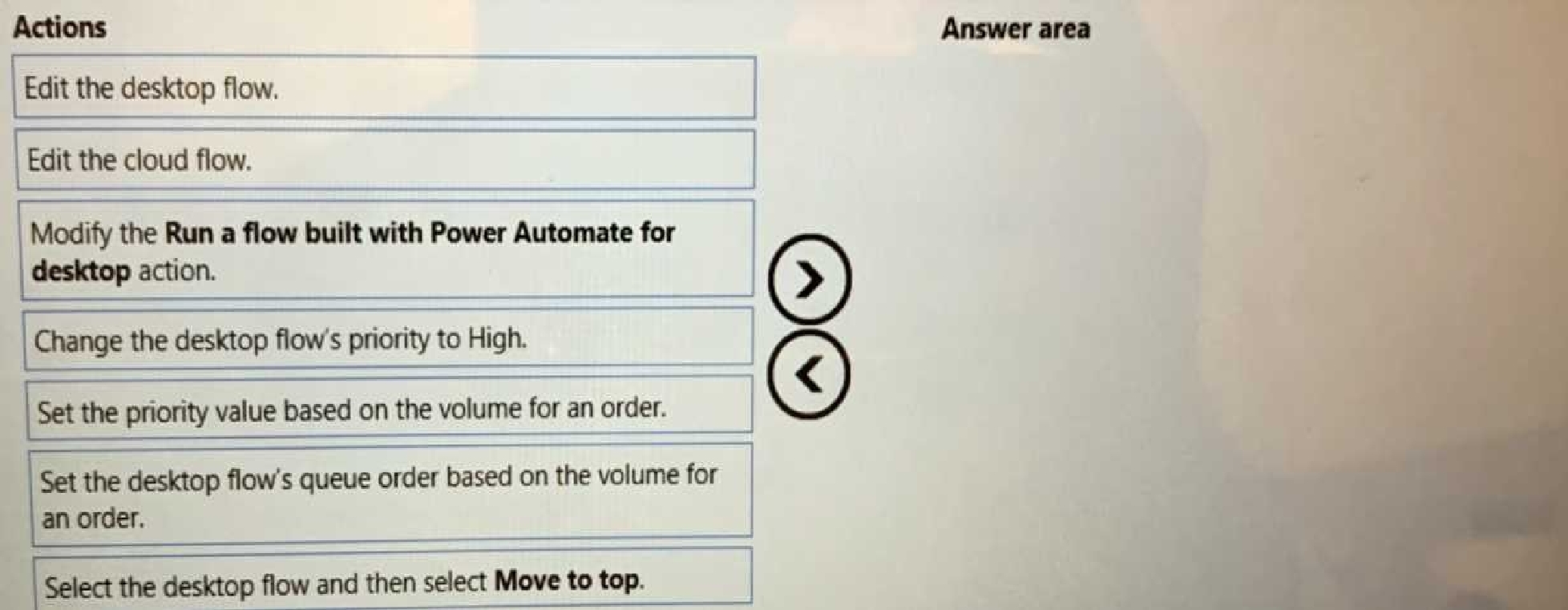
Modify the Run a flow built with Power Automate for desktop action.
Set the priority value based on the volume for an order.
To implement a solution to manage the priority of incoming orders, you need to perform three
actions in sequence:
Edit the cloud flow that triggers the desktop flow. This is where you can define the logic for setting
the priority value based on the volume for an order1.
Modify the Run a flow built with Power Automate for desktop action in the cloud flow. This is where
you can pass the priority value as a parameter to the desktop flow1.
Set the priority value based on the volume for an order in the desktop flow. This is where you can use
the priority value as a dynamic content to determine how the desktop flow will run on the target
machine1.
Quiz
Background
City Power and Light is one of the biggest energy companies in North Americ
a. They extract, produce and transport oil. The company has more than 50 offices and 100 oil
extraction facilities throughout the United States, Canada, and Mexico. They use railways, trucks, and
pipelines to move oil and gas from their facilities.
The company provides the following services:
• Produce oil from oil sands safely, responsibly, and reliably
• Refine crude oil into high-quality products
• Develop and manage wind power facilities.
• Transport oil to different countries/regions.
City Power and Light uses various Microsoft software products to manage its daily activities and run
its machine-critical applications.
Requirements
ManagePipelineMaintenanceTasks
A user named Admin1 creates a cloud flow named ManagePipelineMaintenanceTasks. Admin1
applies a data loss prevention (DLP) policy to the flow. Adminlshares the flow with a user named
PipelineManager1 as co-owner. You must determine the actions that PipelineManager can perform.
MaintenanceScheduler
You create a cloud flow that uses a desktop flow. The desktop flow connects to third-party services to
fetch information. You must not permit the desktop flow to run for more than 20 minutes.
You must configure sharing for MatinenanceScheduler to meet the following requirements:
• User1 must be able to work with you to modify the desktop flow.
• User2 must be able to access and review the run history for the flow.
• You must grant User3 permissions to run but not modify the desktop flow.
ERPDataOperations flow
City Power and light uses an enterprise resource planning (ERP) system. The ERP system does not
have an API.
Each day the company receives an email that contains an attachment. The attachment lists orders
from the company's rail transportation partners. You must create an automation solution that reads
the contents of the email and writes records to the ERP system. The solution must pass credentials
from a cloud flow to a desktop flow.
RailStatusUpdater
City Power and Light actively monitors all products in transit. You must create a flow named
RailStatusUpdater that manages communications with railways that transport the company's
products. RailStatusUpdater includes five desktop flow actions.
You must run the desktop flows in attended mode during testing. You must run the desktop flows in
unattended mode after you deploy the solution. You must minimize administrative efforts.
Packaging
You must package the automations in a solution. All required components must be included in the
solution.
Issues
ProductionMonitor flow
You create a cloud flow named ProductionMonitor which uses the Manually trigger a flow trigger.
You plan to trigger ProductionMonitor from a cloud flow named ProdManager.
You add a Run a Child flow action in ProdManager to trigger ProductionMonitor. When you attempt
to save ProdManager the following error messaqe displays:

CapacityPlanning flow
Developers within the company use cloud flows to access data from an on-premises capacity
planning system.
You observe significant increases to the volume of traffic that the on-premises data gateway
processes each day. You must minimize gateway failures.
DataCollector flow
You have a desktop flow that interacts with a web form. The flow must write data to several fields on
the form.
You are testing the flow. The flow fails when attempting to write data to any field on the web form.
RailStatusUpdater flow
The RailStatusUpdater flow occasionally fails due to machine connection errors. You can usually get
the desktop flow to complete by resubmitting the cloud flow run. You must automate the retry
process to ensure that you do not need to manually resubmit the cloud flow when machine
connection errors occur.
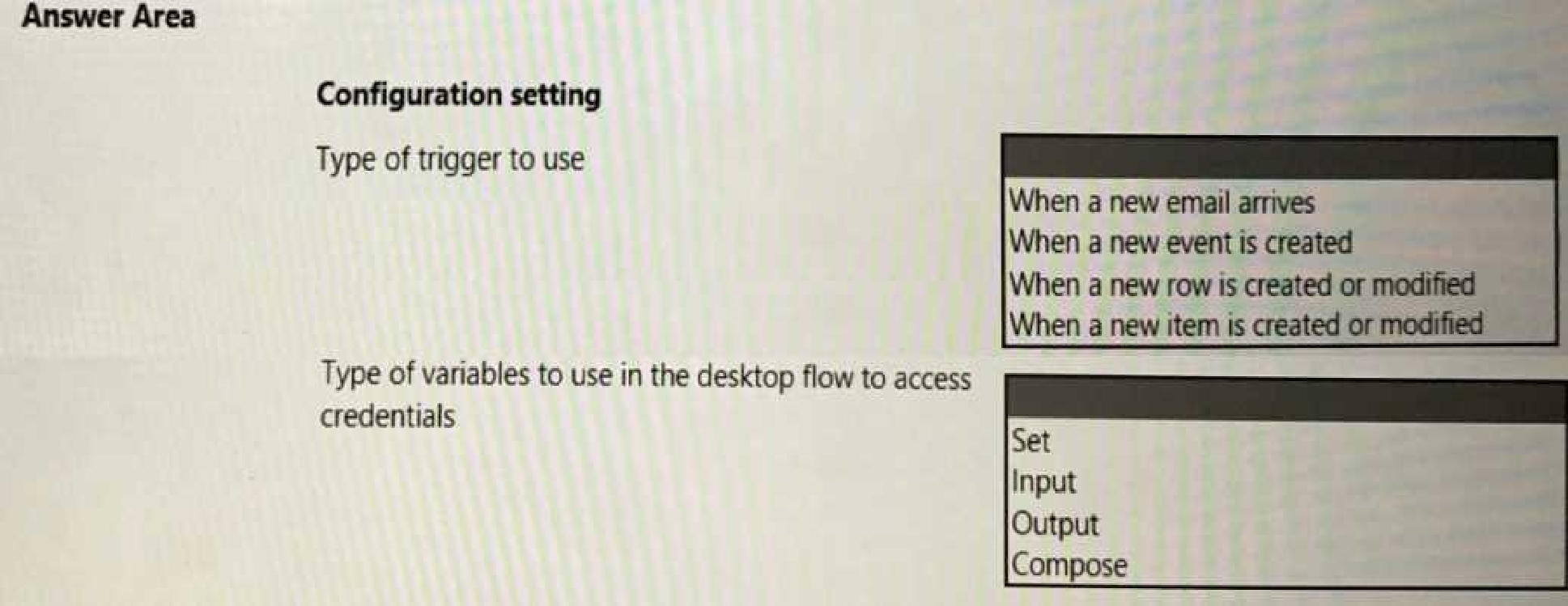
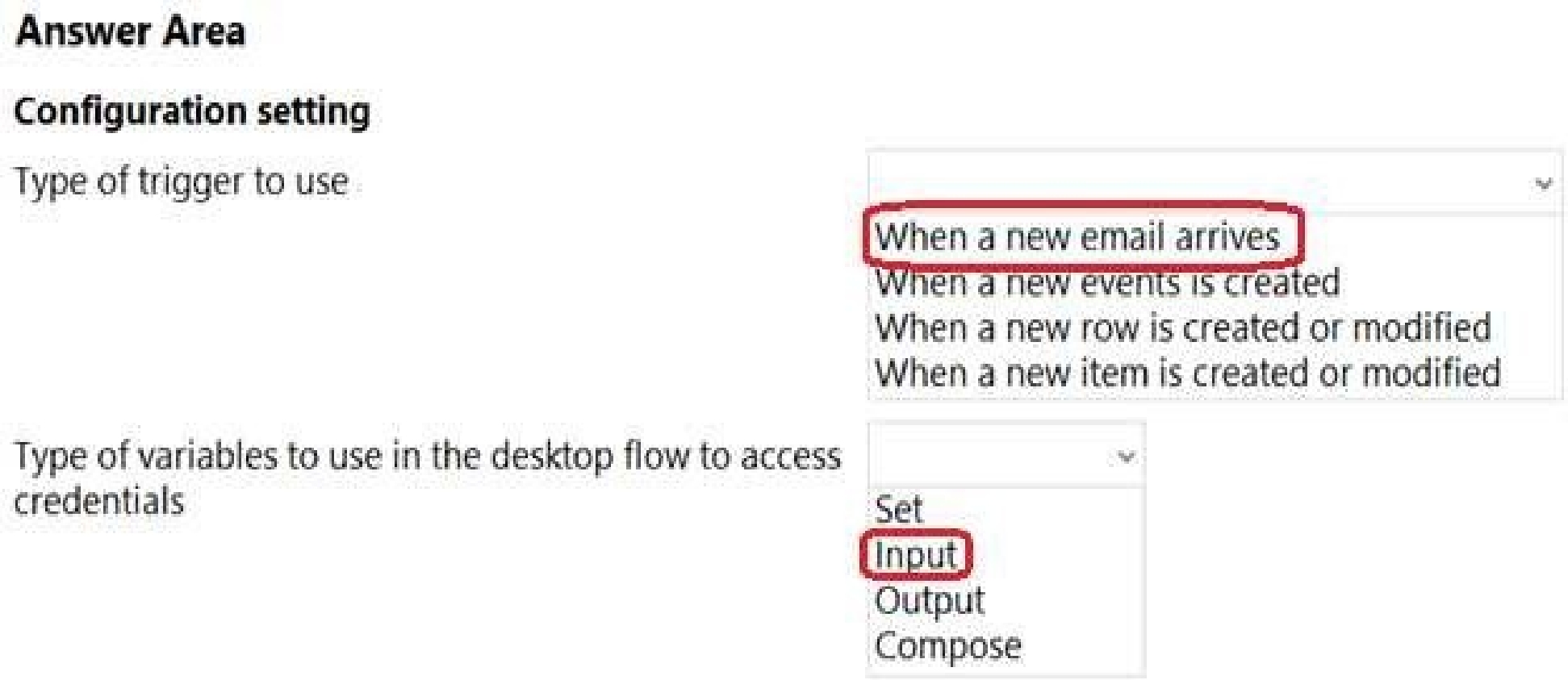
Which configuration values should you use? To answer, select the appropriate options in the answer
area,
NOTE: Each correct selection is worth one point.
PL-500: Microsoft Power Automate RPA Developer Practice test unlocks all online simulator questions
Thank you for choosing the free version of the PL-500: Microsoft Power Automate RPA Developer practice test! Further deepen your knowledge on Microsoft Simulator; by unlocking the full version of our PL-500: Microsoft Power Automate RPA Developer Simulator you will be able to take tests with over 173 constantly updated questions and easily pass your exam. 98% of people pass the exam in the first attempt after preparing with our 173 questions.
BUY NOWWhat to expect from our PL-500: Microsoft Power Automate RPA Developer practice tests and how to prepare for any exam?
The PL-500: Microsoft Power Automate RPA Developer Simulator Practice Tests are part of the Microsoft Database and are the best way to prepare for any PL-500: Microsoft Power Automate RPA Developer exam. The PL-500: Microsoft Power Automate RPA Developer practice tests consist of 173 questions and are written by experts to help you and prepare you to pass the exam on the first attempt. The PL-500: Microsoft Power Automate RPA Developer database includes questions from previous and other exams, which means you will be able to practice simulating past and future questions. Preparation with PL-500: Microsoft Power Automate RPA Developer Simulator will also give you an idea of the time it will take to complete each section of the PL-500: Microsoft Power Automate RPA Developer practice test . It is important to note that the PL-500: Microsoft Power Automate RPA Developer Simulator does not replace the classic PL-500: Microsoft Power Automate RPA Developer study guides; however, the Simulator provides valuable insights into what to expect and how much work needs to be done to prepare for the PL-500: Microsoft Power Automate RPA Developer exam.
BUY NOWPL-500: Microsoft Power Automate RPA Developer Practice test therefore represents an excellent tool to prepare for the actual exam together with our Microsoft practice test . Our PL-500: Microsoft Power Automate RPA Developer Simulator will help you assess your level of preparation and understand your strengths and weaknesses. Below you can read all the quizzes you will find in our PL-500: Microsoft Power Automate RPA Developer Simulator and how our unique PL-500: Microsoft Power Automate RPA Developer Database made up of real questions:
Info quiz:
- Quiz name:PL-500: Microsoft Power Automate RPA Developer
- Total number of questions:173
- Number of questions for the test:50
- Pass score:80%
You can prepare for the PL-500: Microsoft Power Automate RPA Developer exams with our mobile app. It is very easy to use and even works offline in case of network failure, with all the functions you need to study and practice with our PL-500: Microsoft Power Automate RPA Developer Simulator.
Use our Mobile App, available for both Android and iOS devices, with our PL-500: Microsoft Power Automate RPA Developer Simulator . You can use it anywhere and always remember that our mobile app is free and available on all stores.
Our Mobile App contains all PL-500: Microsoft Power Automate RPA Developer practice tests which consist of 173 questions and also provide study material to pass the final PL-500: Microsoft Power Automate RPA Developer exam with guaranteed success. Our PL-500: Microsoft Power Automate RPA Developer database contain hundreds of questions and Microsoft Tests related to PL-500: Microsoft Power Automate RPA Developer Exam. This way you can practice anywhere you want, even offline without the internet.
BUY NOW