Quiz PL-600: Microsoft Power Platform Solution Architect
Quiz
Case study
This is a case study. Case studies are not timed separately. You can use as much exam time as you
would like to complete each case. However, there may be additional case studies and sections on
this exam. You must manage your time to ensure that you are able to complete all questions included
on this exam in the time provided.
To answer the questions included in a case study, you will need to reference information that is
provided in the case study. Case studies might contain exhibits and other resources that provide
more information about the scenario that is described in the case study. Each question is
independent of the other questions in this case study.
At the end of this case study, a review screen will appear. This screen allows you to review your
answers and to make changes before you move to the next section of the exam. After you begin a
new section, you cannot return to this section.
To start the case study
To display the first question in this case study, click the Next button. Use the buttons in the left pane
to explore the content of the case study before you answer the questions. Clicking these buttons
displays information such as business requirements, existing environment, and problem statements.
If the case study has an All Information tab, note that the information displayed is identical to the
information displayed on the subsequent tabs. When you are ready to answer a question, click the
Question button to return to the question.
Background
First Up Consulting recruits information technology (IT) workers for temporary or permanent
positions at client companies. The company operates offices in multiple countries/regions.
First Up has both full-time and part-time employees. The company has a team or worker support
agents that respond to inquiries from current and prospective workers. Some of the worker support
agents are multilingual.
The company does not have a standardized tool used for reporting purposes. The organization
engages you to implement a new Power Platform solution. Workers are managed by a dedicated
team that includes one primary recruiter and a contract assistant. Many client companies live in
areas that do not allow for mobile data connections.
Current environment
Existing systems and processes
First Up uses an on-premises system to manage current and historical patient data including
medications and medical visits.
The company plans to reference historical data in the existing system. The records held in these
systems will not be migrated to the new solution except for medication information.
Employee authentication with the existing system is provided by an on-premises Active Directory
instance that is linked to Azure Active Directory.
An appointment record is created for each visit with a worker. The record includes worker contact
information, preferred language, the date and time of the appointment, and other relevant data.
This information is reviewed by the worker’s primary recruiter.
First Up has no current capabilities for forecasting future worker needs based on the data held.
Client company visits
Before First Up signs a contract to place workers at a client company, a member of the audit team
visits the company and interviews company management. Audit members use different types of
devices including Android and iOS devices. First Up has no plans to require the use of a single type of
device. Audit team members currently record information about workers on paper forms. Team
members enter information from paper forms into the system when they return to the office.
First Up audits client companies at least once each year but may schedule additional visits based on
feedback from workers that they place at a client company.
Requirements
General
There is no standardized communication tool across the company, and this causes communication
issues between different teams.
First up employees must be able to contact each other by using a secure system to ask and answer
questions about medical cases.
Workers must be able to communicate in near real-time with worker support agents.
Client company visits
Audit team records must be locked after they have been reviewed by a First Up manager. No further
edits to the record can be carried out. This must be implemented using standard available system
functionality.
Audit teams must be able to enter records of their visits to the companies where they have or may
place workers. Audit teams must be able to update any necessary records with the latest
information.
The solution must support tracking of security clearance information for a worker including the date,
status, and certifying agency.
When a worker makes an appointment, the appointments must appear in the timeline for the
worker’s contact record.
Job history information
The solution must provide a worker appointment booking system that can access worker historical
job placement data.
The solution must allow employees to associate a primary recruiter with each worker. The solution
must also allow multiple secondary recruiters to be associated with each worker.
Every worker assessment performed must be validated and countersigned by the primary recruiter
for a worker.
Job posting data from previous work engagements must be accessible by the Power Platform
solution to ensure that new job postings are accurate.
First Up staff members must be able to view and update worker records. They must be able to see
current and historical job placement data on the same form in the new solution.
Worker access
The solution must support workers that speak different languages. The solution must provide
automatic translation capabilities.
The solution must support near real-time communications between workers and recruiters.
Workers must be able to view their records online. Workers must be able to enter any additional
information that is required by or may be helpful to recruiters.
The solution must provide workers a way to search for general information about available positions.
Workers must be able to request copies of their records by using a chatbot. Workers must be able to
provide information to a recruiter as needed.
Data platform
Audit teams must have the ability to view worker information on their mobile devices.
Audit teams must be able to record data during visits to locations where workers are placed.
The solution must support the ability for a corporate governance auditing team to periodically audit
the organization’s records, policies, and procedures.
Reporting and analytics
The reporting and analytics team must be able to create reports that include data from all facilities
and all workers.
Management reports must present an overview of the entire organization. Other reports may be
limited to specific offices.
You must create dashboards that show the status across all groups of workers. The dashboards must
be embedded into the Power Platform apps. Updates to data must be displayed in near real time.
Security
Authentication for all user types must be managed by a single platform. IT teams must use
PowerShell to apply security permissions for users.
Worker records must only be viewed by the recruiting office that the worker visits.
Worker still records must be archived after ten years and are then removed from the main system.
Worker information must not be deleted from the system while skill and job placement history
records for the worker exist in the system.
User security roles must be customized to ensure that users are able to interact only with the specific
data in which they need access.
Workers must be able to sign into a portal by using their own email address. Workers must be
required to use a secure method of authentication to be able to view their data.
Alerts regarding the number of recruited and placed at client companies must be updated as
background processes.
Issues
The organization reports the following issues:
Recruiters report that they cannot see historical job placement data for workers.
API usage reports show that the number of API calls made exceeds limits. This causes delays saving
data.
Users cannot view Power BI reports within the Power Platform apps.
Some security clearance information for workers not visible from within the Power Platform solution.
Audit teams report that they cannot view or edit worker data when the device on which they access
the solution does not have network connectivity.
The testing ream reports that one of the canvas apps is not working as expected. An error message
displays as specific pages load.
Which two options should you recommend? Each correct answer presents a complete solution.
NOTE: Each correct selection is worth one point.
Quiz
Case study
This is a case study. Case studies are not timed separately. You can use as much exam time as you
would like to complete each case. However, there may be additional case studies and sections on
this exam. You must manage your time to ensure that you are able to complete all questions included
on this exam in the time provided.
To answer the questions included in a case study, you will need to reference information that is
provided in the case study. Case studies might contain exhibits and other resources that provide
more information about the scenario that is described in the case study. Each question is
independent of the other questions in this case study.
At the end of this case study, a review screen will appear. This screen allows you to review your
answers and to make changes before you move to the next section of the exam. After you begin a
new section, you cannot return to this section.
To start the case study
To display the first question in this case study, click the Next button. Use the buttons in the left pane
to explore the content of the case study before you answer the questions. Clicking these buttons
displays information such as business requirements, existing environment, and problem statements.
If the case study has an All Information tab, note that the information displayed is identical to the
information displayed on the subsequent tabs. When you are ready to answer a question, click the
Question button to return to the question.
Background
First Up Consulting recruits information technology (IT) workers for temporary or permanent
positions at client companies. The company operates offices in multiple countries/regions.
First Up has both full-time and part-time employees. The company has a team or worker support
agents that respond to inquiries from current and prospective workers. Some of the worker support
agents are multilingual.
The company does not have a standardized tool used for reporting purposes. The organization
engages you to implement a new Power Platform solution. Workers are managed by a dedicated
team that includes one primary recruiter and a contract assistant. Many client companies live in
areas that do not allow for mobile data connections.
Current environment
Existing systems and processes
First Up uses an on-premises system to manage current and historical patient data including
medications and medical visits.
The company plans to reference historical data in the existing system. The records held in these
systems will not be migrated to the new solution except for medication information.
Employee authentication with the existing system is provided by an on-premises Active Directory
instance that is linked to Azure Active Directory.
An appointment record is created for each visit with a worker. The record includes worker contact
information, preferred language, the date and time of the appointment, and other relevant data.
This information is reviewed by the worker’s primary recruiter.
First Up has no current capabilities for forecasting future worker needs based on the data held.
Client company visits
Before First Up signs a contract to place workers at a client company, a member of the audit team
visits the company and interviews company management. Audit members use different types of
devices including Android and iOS devices. First Up has no plans to require the use of a single type of
device. Audit team members currently record information about workers on paper forms. Team
members enter information from paper forms into the system when they return to the office.
First Up audits client companies at least once each year but may schedule additional visits based on
feedback from workers that they place at a client company.
Requirements
General
There is no standardized communication tool across the company, and this causes communication
issues between different teams.
First up employees must be able to contact each other by using a secure system to ask and answer
questions about medical cases.
Workers must be able to communicate in near real-time with worker support agents.
Client company visits
Audit team records must be locked after they have been reviewed by a First Up manager. No further
edits to the record can be carried out. This must be implemented using standard available system
functionality.
Audit teams must be able to enter records of their visits to the companies where they have or may
place workers. Audit teams must be able to update any necessary records with the latest
information.
The solution must support tracking of security clearance information for a worker including the date,
status, and certifying agency.
When a worker makes an appointment, the appointments must appear in the timeline for the
worker’s contact record.
Job history information
The solution must provide a worker appointment booking system that can access worker historical
job placement data.
The solution must allow employees to associate a primary recruiter with each worker. The solution
must also allow multiple secondary recruiters to be associated with each worker.
Every worker assessment performed must be validated and countersigned by the primary recruiter
for a worker.
Job posting data from previous work engagements must be accessible by the Power Platform
solution to ensure that new job postings are accurate.
First Up staff members must be able to view and update worker records. They must be able to see
current and historical job placement data on the same form in the new solution.
Worker access
The solution must support workers that speak different languages. The solution must provide
automatic translation capabilities.
The solution must support near real-time communications between workers and recruiters.
Workers must be able to view their records online. Workers must be able to enter any additional
information that is required by or may be helpful to recruiters.
The solution must provide workers a way to search for general information about available positions.
Workers must be able to request copies of their records by using a chatbot. Workers must be able to
provide information to a recruiter as needed.
Data platform
Audit teams must have the ability to view worker information on their mobile devices.
Audit teams must be able to record data during visits to locations where workers are placed.
The solution must support the ability for a corporate governance auditing team to periodically audit
the organization’s records, policies, and procedures.
Reporting and analytics
The reporting and analytics team must be able to create reports that include data from all facilities
and all workers.
Management reports must present an overview of the entire organization. Other reports may be
limited to specific offices.
You must create dashboards that show the status across all groups of workers. The dashboards must
be embedded into the Power Platform apps. Updates to data must be displayed in near real time.
Security
Authentication for all user types must be managed by a single platform. IT teams must use
PowerShell to apply security permissions for users.
Worker records must only be viewed by the recruiting office that the worker visits.
Worker still records must be archived after ten years and are then removed from the main system.
Worker information must not be deleted from the system while skill and job placement history
records for the worker exist in the system.
User security roles must be customized to ensure that users are able to interact only with the specific
data in which they need access.
Workers must be able to sign into a portal by using their own email address. Workers must be
required to use a secure method of authentication to be able to view their data.
Alerts regarding the number of recruited and placed at client companies must be updated as
background processes.
Issues
The organization reports the following issues:
Recruiters report that they cannot see historical job placement data for workers.
API usage reports show that the number of API calls made exceeds limits. This causes delays saving
data.
Users cannot view Power BI reports within the Power Platform apps.
Some security clearance information for workers not visible from within the Power Platform solution.
Audit teams report that they cannot view or edit worker data when the device on which they access
the solution does not have network connectivity.
The testing ream reports that one of the canvas apps is not working as expected. An error message
displays as specific pages load.
You need to recommend the appropriate messaging channel solutions for the organization.
What should you recommend? To answer, drag the appropriate messaging options to the correct
user types. Each messaging option may be used once, more than once, or not at all. You may need to
drag the split bar between panes or scroll to view content.
NOTE: Each correct selection is worth one point.
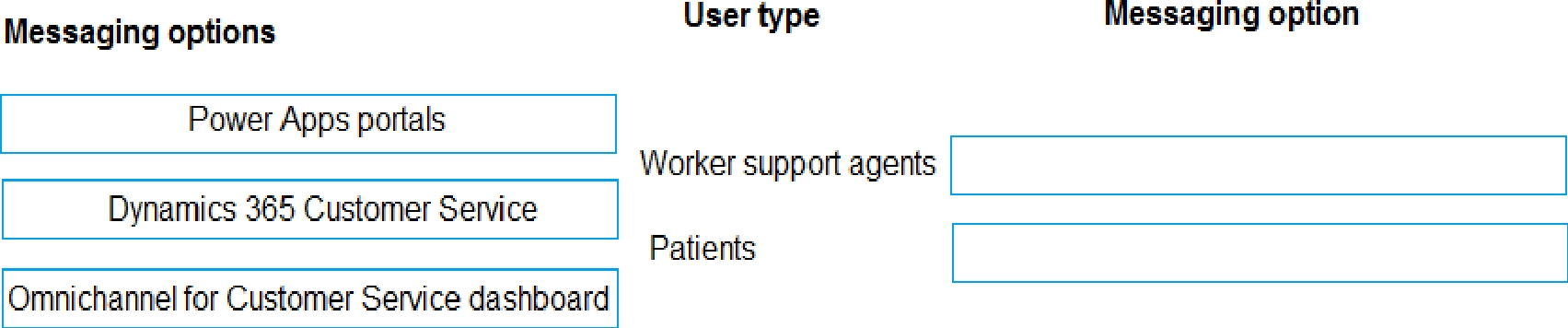
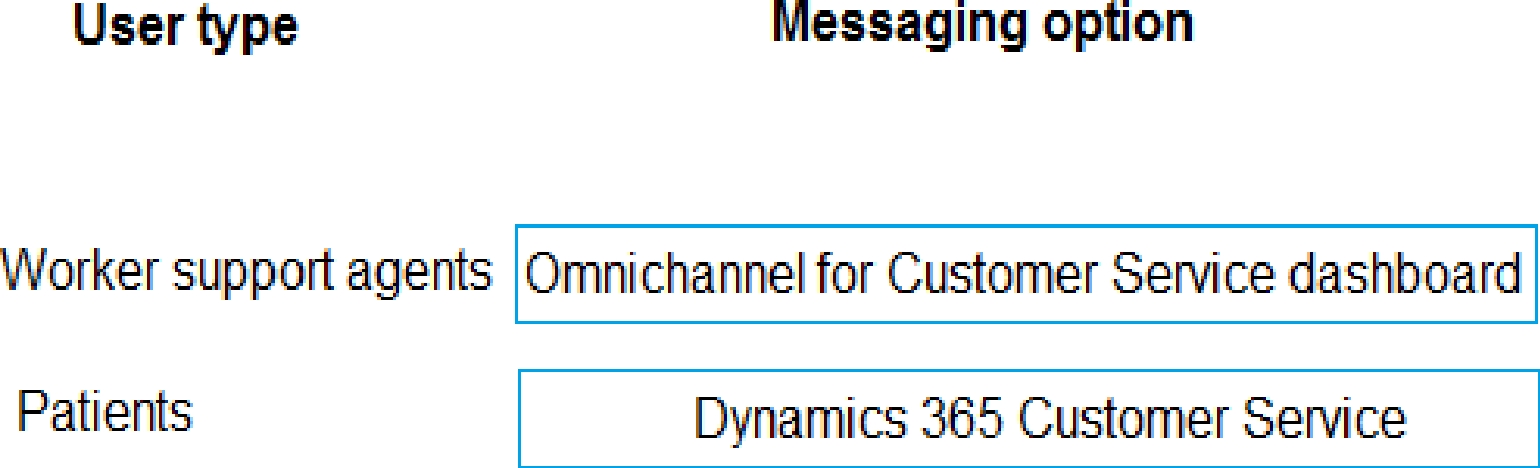
Box 1: Omnichannel for Customer Service dashboard
Scenario: Workers must be able to communicate in near real-time with worker support agents.
The company has a team or worker support agents that respond to inquiries from current and
prospective workers. Some of the worker support agents are multilingual.
If you choose to expand your customer service offering to provide chat and channels, the Customer
Service workspace seamlessly adjusts to support managing conversations as well.
Note: As an agent with the Customer Service Representative security role, when you open Customer
Service workspace, you start on the Customer Service Agent Dashboard unless your administrator
has changed the default view. This dashboard shows you your active cases, cases you can work in
queues you are assigned to, and your open activities. You can open existing cases and activities or
begin working new cases from the queues you are assigned to and create activities.
Box 2: Dynamics 365 Customer Service
Scenario: First Up uses an on-premises system to manage current and historical patient data
including medications and medical visits.
Reference:
[https://docs.microsoft.com/en-us/dynamics365/customer-service/csw-overview](https://docs.microsoft.com/en-us/dynamics365/customer-service/csw-overview)
Quiz
Case study
This is a case study. Case studies are not timed separately. You can use as much exam time as you
would like to complete each case. However, there may be additional case studies and sections on
this exam. You must manage your time to ensure that you are able to complete all questions included
on this exam in the time provided.
To answer the questions included in a case study, you will need to reference information that is
provided in the case study. Case studies might contain exhibits and other resources that provide
more information about the scenario that is described in the case study. Each question is
independent of the other questions in this case study.
At the end of this case study, a review screen will appear. This screen allows you to review your
answers and to make changes before you move to the next section of the exam. After you begin a
new section, you cannot return to this section.
To start the case study
To display the first question in this case study, click the Next button. Use the buttons in the left pane
to explore the content of the case study before you answer the questions. Clicking these buttons
displays information such as business requirements, existing environment, and problem statements.
If the case study has an All Information tab, note that the information displayed is identical to the
information displayed on the subsequent tabs. When you are ready to answer a question, click the
Question button to return to the question.
Background
First Up Consulting recruits information technology (IT) workers for temporary or permanent
positions at client companies. The company operates offices in multiple countries/regions.
First Up has both full-time and part-time employees. The company has a team or worker support
agents that respond to inquiries from current and prospective workers. Some of the worker support
agents are multilingual.
The company does not have a standardized tool used for reporting purposes. The organization
engages you to implement a new Power Platform solution. Workers are managed by a dedicated
team that includes one primary recruiter and a contract assistant. Many client companies live in
areas that do not allow for mobile data connections.
Current environment
Existing systems and processes
First Up uses an on-premises system to manage current and historical patient data including
medications and medical visits.
The company plans to reference historical data in the existing system. The records held in these
systems will not be migrated to the new solution except for medication information.
Employee authentication with the existing system is provided by an on-premises Active Directory
instance that is linked to Azure Active Directory.
An appointment record is created for each visit with a worker. The record includes worker contact
information, preferred language, the date and time of the appointment, and other relevant data.
This information is reviewed by the worker’s primary recruiter.
First Up has no current capabilities for forecasting future worker needs based on the data held.
Client company visits
Before First Up signs a contract to place workers at a client company, a member of the audit team
visits the company and interviews company management. Audit members use different types of
devices including Android and iOS devices. First Up has no plans to require the use of a single type of
device. Audit team members currently record information about workers on paper forms. Team
members enter information from paper forms into the system when they return to the office.
First Up audits client companies at least once each year but may schedule additional visits based on
feedback from workers that they place at a client company.
Requirements
General
There is no standardized communication tool across the company, and this causes communication
issues between different teams.
First up employees must be able to contact each other by using a secure system to ask and answer
questions about medical cases.
Workers must be able to communicate in near real-time with worker support agents.
Client company visits
Audit team records must be locked after they have been reviewed by a First Up manager. No further
edits to the record can be carried out. This must be implemented using standard available system
functionality.
Audit teams must be able to enter records of their visits to the companies where they have or may
place workers. Audit teams must be able to update any necessary records with the latest
information.
The solution must support tracking of security clearance information for a worker including the date,
status, and certifying agency.
When a worker makes an appointment, the appointments must appear in the timeline for the
worker’s contact record.
Job history information
The solution must provide a worker appointment booking system that can access worker historical
job placement data.
The solution must allow employees to associate a primary recruiter with each worker. The solution
must also allow multiple secondary recruiters to be associated with each worker.
Every worker assessment performed must be validated and countersigned by the primary recruiter
for a worker.
Job posting data from previous work engagements must be accessible by the Power Platform
solution to ensure that new job postings are accurate.
First Up staff members must be able to view and update worker records. They must be able to see
current and historical job placement data on the same form in the new solution.
Worker access
The solution must support workers that speak different languages. The solution must provide
automatic translation capabilities.
The solution must support near real-time communications between workers and recruiters.
Workers must be able to view their records online. Workers must be able to enter any additional
information that is required by or may be helpful to recruiters.
The solution must provide workers a way to search for general information about available positions.
Workers must be able to request copies of their records by using a chatbot. Workers must be able to
provide information to a recruiter as needed.
Data platform
Audit teams must have the ability to view worker information on their mobile devices.
Audit teams must be able to record data during visits to locations where workers are placed.
The solution must support the ability for a corporate governance auditing team to periodically audit
the organization’s records, policies, and procedures.
Reporting and analytics
The reporting and analytics team must be able to create reports that include data from all facilities
and all workers.
Management reports must present an overview of the entire organization. Other reports may be
limited to specific offices.
You must create dashboards that show the status across all groups of workers. The dashboards must
be embedded into the Power Platform apps. Updates to data must be displayed in near real time.
Security
Authentication for all user types must be managed by a single platform. IT teams must use
PowerShell to apply security permissions for users.
Worker records must only be viewed by the recruiting office that the worker visits.
Worker still records must be archived after ten years and are then removed from the main system.
Worker information must not be deleted from the system while skill and job placement history
records for the worker exist in the system.
User security roles must be customized to ensure that users are able to interact only with the specific
data in which they need access.
Workers must be able to sign into a portal by using their own email address. Workers must be
required to use a secure method of authentication to be able to view their data.
Alerts regarding the number of recruited and placed at client companies must be updated as
background processes.
Issues
The organization reports the following issues:
Recruiters report that they cannot see historical job placement data for workers.
API usage reports show that the number of API calls made exceeds limits. This causes delays saving
data.
Users cannot view Power BI reports within the Power Platform apps.
Some security clearance information for workers not visible from within the Power Platform solution.
Audit teams report that they cannot view or edit worker data when the device on which they access
the solution does not have network connectivity.
The testing ream reports that one of the canvas apps is not working as expected. An error message
displays as specific pages load.
What are two possible ways to achieve the goal? Each correct answer presents a complete solution.
NOTE: Each correct selection is worth one point.
Quiz
Case study
This is a case study. Case studies are not timed separately. You can use as much exam time as you
would like to complete each case. However, there may be additional case studies and sections on
this exam. You must manage your time to ensure that you are able to complete all questions included
on this exam in the time provided.
To answer the questions included in a case study, you will need to reference information that is
provided in the case study. Case studies might contain exhibits and other resources that provide
more information about the scenario that is described in the case study. Each question is
independent of the other questions in this case study.
At the end of this case study, a review screen will appear. This screen allows you to review your
answers and to make changes before you move to the next section of the exam. After you begin a
new section, you cannot return to this section.
To start the case study
To display the first question in this case study, click the Next button. Use the buttons in the left pane
to explore the content of the case study before you answer the questions. Clicking these buttons
displays information such as business requirements, existing environment, and problem statements.
If the case study has an All Information tab, note that the information displayed is identical to the
information displayed on the subsequent tabs. When you are ready to answer a question, click the
Question button to return to the question.
Background
First Up Consulting recruits information technology (IT) workers for temporary or permanent
positions at client companies. The company operates offices in multiple countries/regions.
First Up has both full-time and part-time employees. The company has a team or worker support
agents that respond to inquiries from current and prospective workers. Some of the worker support
agents are multilingual.
The company does not have a standardized tool used for reporting purposes. The organization
engages you to implement a new Power Platform solution. Workers are managed by a dedicated
team that includes one primary recruiter and a contract assistant. Many client companies live in
areas that do not allow for mobile data connections.
Current environment
Existing systems and processes
First Up uses an on-premises system to manage current and historical patient data including
medications and medical visits.
The company plans to reference historical data in the existing system. The records held in these
systems will not be migrated to the new solution except for medication information.
Employee authentication with the existing system is provided by an on-premises Active Directory
instance that is linked to Azure Active Directory.
An appointment record is created for each visit with a worker. The record includes worker contact
information, preferred language, the date and time of the appointment, and other relevant data.
This information is reviewed by the worker’s primary recruiter.
First Up has no current capabilities for forecasting future worker needs based on the data held.
Client company visits
Before First Up signs a contract to place workers at a client company, a member of the audit team
visits the company and interviews company management. Audit members use different types of
devices including Android and iOS devices. First Up has no plans to require the use of a single type of
device. Audit team members currently record information about workers on paper forms. Team
members enter information from paper forms into the system when they return to the office.
First Up audits client companies at least once each year but may schedule additional visits based on
feedback from workers that they place at a client company.
Requirements
General
There is no standardized communication tool across the company, and this causes communication
issues between different teams.
First up employees must be able to contact each other by using a secure system to ask and answer
questions about medical cases.
Workers must be able to communicate in near real-time with worker support agents.
Client company visits
Audit team records must be locked after they have been reviewed by a First Up manager. No further
edits to the record can be carried out. This must be implemented using standard available system
functionality.
Audit teams must be able to enter records of their visits to the companies where they have or may
place workers. Audit teams must be able to update any necessary records with the latest
information.
The solution must support tracking of security clearance information for a worker including the date,
status, and certifying agency.
When a worker makes an appointment, the appointments must appear in the timeline for the
worker’s contact record.
Job history information
The solution must provide a worker appointment booking system that can access worker historical
job placement data.
The solution must allow employees to associate a primary recruiter with each worker. The solution
must also allow multiple secondary recruiters to be associated with each worker.
Every worker assessment performed must be validated and countersigned by the primary recruiter
for a worker.
Job posting data from previous work engagements must be accessible by the Power Platform
solution to ensure that new job postings are accurate.
First Up staff members must be able to view and update worker records. They must be able to see
current and historical job placement data on the same form in the new solution.
Worker access
The solution must support workers that speak different languages. The solution must provide
automatic translation capabilities.
The solution must support near real-time communications between workers and recruiters.
Workers must be able to view their records online. Workers must be able to enter any additional
information that is required by or may be helpful to recruiters.
The solution must provide workers a way to search for general information about available positions.
Workers must be able to request copies of their records by using a chatbot. Workers must be able to
provide information to a recruiter as needed.
Data platform
Audit teams must have the ability to view worker information on their mobile devices.
Audit teams must be able to record data during visits to locations where workers are placed.
The solution must support the ability for a corporate governance auditing team to periodically audit
the organization’s records, policies, and procedures.
Reporting and analytics
The reporting and analytics team must be able to create reports that include data from all facilities
and all workers.
Management reports must present an overview of the entire organization. Other reports may be
limited to specific offices.
You must create dashboards that show the status across all groups of workers. The dashboards must
be embedded into the Power Platform apps. Updates to data must be displayed in near real time.
Security
Authentication for all user types must be managed by a single platform. IT teams must use
PowerShell to apply security permissions for users.
Worker records must only be viewed by the recruiting office that the worker visits.
Worker still records must be archived after ten years and are then removed from the main system.
Worker information must not be deleted from the system while skill and job placement history
records for the worker exist in the system.
User security roles must be customized to ensure that users are able to interact only with the specific
data in which they need access.
Workers must be able to sign into a portal by using their own email address. Workers must be
required to use a secure method of authentication to be able to view their data.
Alerts regarding the number of recruited and placed at client companies must be updated as
background processes.
Issues
The organization reports the following issues:
Recruiters report that they cannot see historical job placement data for workers.
API usage reports show that the number of API calls made exceeds limits. This causes delays saving
data.
Users cannot view Power BI reports within the Power Platform apps.
Some security clearance information for workers not visible from within the Power Platform solution.
Audit teams report that they cannot view or edit worker data when the device on which they access
the solution does not have network connectivity.
The testing ream reports that one of the canvas apps is not working as expected. An error message
displays as specific pages load.
You need to recommend solutions to meet the organization’s communication needs.
What should you recommend? To answer, drag the appropriate technologies to the correct groups of
users. Each technology may be used once, more than once, or not at all. You may need to drag the
split bar between panes or scroll to view content.
NOTE: Each correct selection is worth one point.
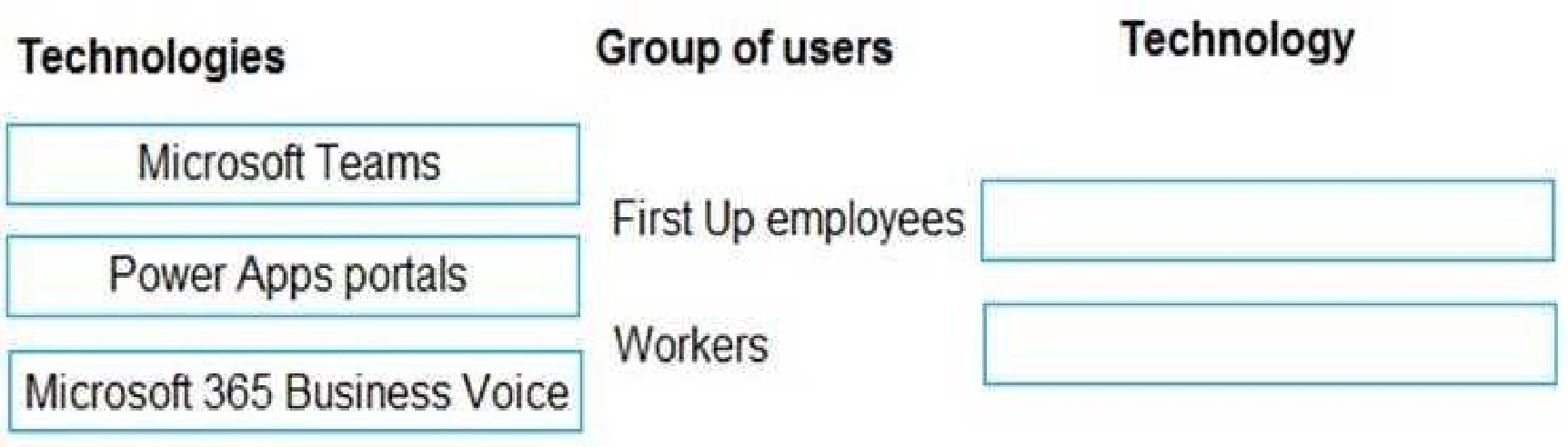
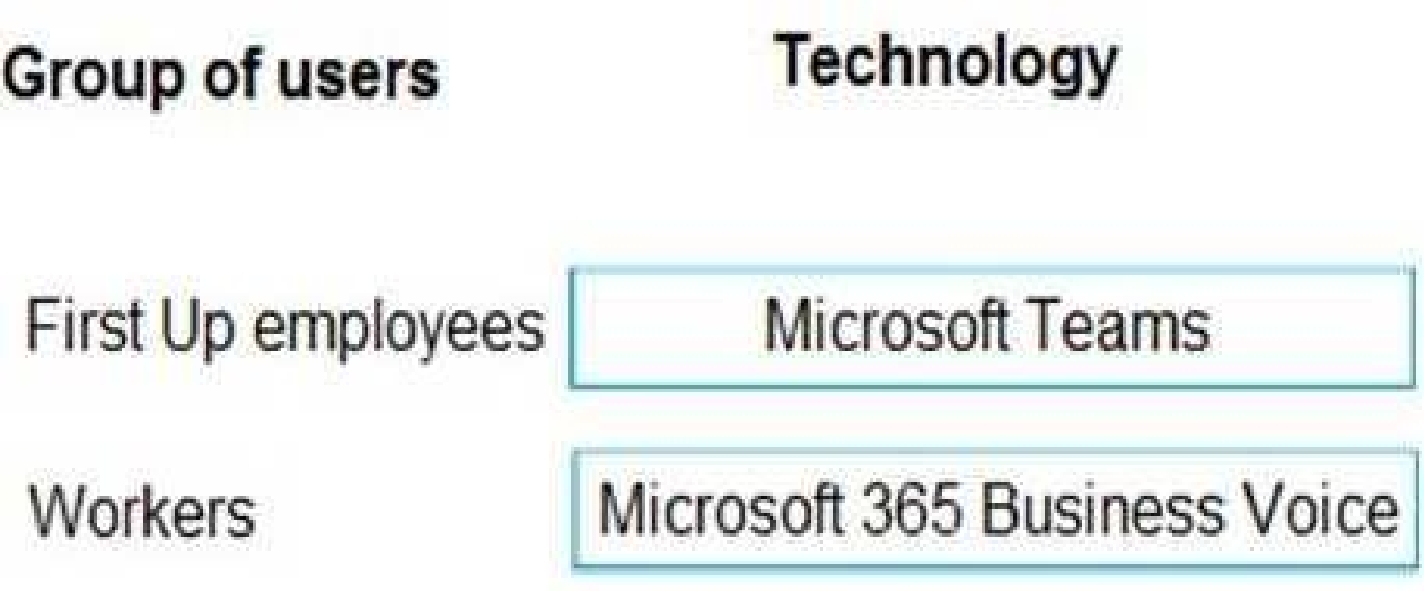
Box 1: Microsoft Teams
First up employees must be able to contact each other by using a secure system to ask and answer
questions about medical cases.
Microsoft Teams key capabilities:
Connected
Secure
Managed
Collaborative and productive
Box 2: Microsoft 365 Business Voice
Workers must be able to communicate in near real-time with worker support agents.
Microsoft 365 Business Voice makes it easy for small and medium organizations to turn Microsoft
Teams into a powerful and flexible telephone system. It's a replacement for traditional telephony
providers and in-house phone systems that can be difficult and costly to manage.
Reference:
[https://docs.microsoft.com/en-us/microsoft-365/solutions/empower-people-to-work-remotely](https://docs.microsoft.com/en-us/microsoft-365/solutions/empower-people-to-work-remotely)
[https://docs.microsoft.com/en-us/microsoftteams/business-voice/whats-business-voice](https://docs.microsoft.com/en-us/microsoftteams/business-voice/whats-business-voice)
Quiz
Case study
This is a case study. Case studies are not timed separately. You can use as much exam time as you
would like to complete each case. However, there may be additional case studies and sections on
this exam. You must manage your time to ensure that you are able to complete all questions included
on this exam in the time provided.
To answer the questions included in a case study, you will need to reference information that is
provided in the case study. Case studies might contain exhibits and other resources that provide
more information about the scenario that is described in the case study. Each question is
independent of the other questions in this case study.
At the end of this case study, a review screen will appear. This screen allows you to review your
answers and to make changes before you move to the next section of the exam. After you begin a
new section, you cannot return to this section.
To start the case study
To display the first question in this case study, click the Next button. Use the buttons in the left pane
to explore the content of the case study before you answer the questions. Clicking these buttons
displays information such as business requirements, existing environment, and problem statements.
If the case study has an All Information tab, note that the information displayed is identical to the
information displayed on the subsequent tabs. When you are ready to answer a question, click the
Question button to return to the question.
Background
First Up Consulting recruits information technology (IT) workers for temporary or permanent
positions at client companies. The company operates offices in multiple countries/regions.
First Up has both full-time and part-time employees. The company has a team or worker support
agents that respond to inquiries from current and prospective workers. Some of the worker support
agents are multilingual.
The company does not have a standardized tool used for reporting purposes. The organization
engages you to implement a new Power Platform solution. Workers are managed by a dedicated
team that includes one primary recruiter and a contract assistant. Many client companies live in
areas that do not allow for mobile data connections.
Current environment
Existing systems and processes
First Up uses an on-premises system to manage current and historical patient data including
medications and medical visits.
The company plans to reference historical data in the existing system. The records held in these
systems will not be migrated to the new solution except for medication information.
Employee authentication with the existing system is provided by an on-premises Active Directory
instance that is linked to Azure Active Directory.
An appointment record is created for each visit with a worker. The record includes worker contact
information, preferred language, the date and time of the appointment, and other relevant data.
This information is reviewed by the worker’s primary recruiter.
First Up has no current capabilities for forecasting future worker needs based on the data held.
Client company visits
Before First Up signs a contract to place workers at a client company, a member of the audit team
visits the company and interviews company management. Audit members use different types of
devices including Android and iOS devices. First Up has no plans to require the use of a single type of
device. Audit team members currently record information about workers on paper forms. Team
members enter information from paper forms into the system when they return to the office.
First Up audits client companies at least once each year but may schedule additional visits based on
feedback from workers that they place at a client company.
Requirements
General
There is no standardized communication tool across the company, and this causes communication
issues between different teams.
First up employees must be able to contact each other by using a secure system to ask and answer
questions about medical cases.
Workers must be able to communicate in near real-time with worker support agents.
Client company visits
Audit team records must be locked after they have been reviewed by a First Up manager. No further
edits to the record can be carried out. This must be implemented using standard available system
functionality.
Audit teams must be able to enter records of their visits to the companies where they have or may
place workers. Audit teams must be able to update any necessary records with the latest
information.
The solution must support tracking of security clearance information for a worker including the date,
status, and certifying agency.
When a worker makes an appointment, the appointments must appear in the timeline for the
worker’s contact record.
Job history information
The solution must provide a worker appointment booking system that can access worker historical
job placement data.
The solution must allow employees to associate a primary recruiter with each worker. The solution
must also allow multiple secondary recruiters to be associated with each worker.
Every worker assessment performed must be validated and countersigned by the primary recruiter
for a worker.
Job posting data from previous work engagements must be accessible by the Power Platform
solution to ensure that new job postings are accurate.
First Up staff members must be able to view and update worker records. They must be able to see
current and historical job placement data on the same form in the new solution.
Worker access
The solution must support workers that speak different languages. The solution must provide
automatic translation capabilities.
The solution must support near real-time communications between workers and recruiters.
Workers must be able to view their records online. Workers must be able to enter any additional
information that is required by or may be helpful to recruiters.
The solution must provide workers a way to search for general information about available positions.
Workers must be able to request copies of their records by using a chatbot. Workers must be able to
provide information to a recruiter as needed.
Data platform
Audit teams must have the ability to view worker information on their mobile devices.
Audit teams must be able to record data during visits to locations where workers are placed.
The solution must support the ability for a corporate governance auditing team to periodically audit
the organization’s records, policies, and procedures.
Reporting and analytics
The reporting and analytics team must be able to create reports that include data from all facilities
and all workers.
Management reports must present an overview of the entire organization. Other reports may be
limited to specific offices.
You must create dashboards that show the status across all groups of workers. The dashboards must
be embedded into the Power Platform apps. Updates to data must be displayed in near real time.
Security
Authentication for all user types must be managed by a single platform. IT teams must use
PowerShell to apply security permissions for users.
Worker records must only be viewed by the recruiting office that the worker visits.
Worker still records must be archived after ten years and are then removed from the main system.
Worker information must not be deleted from the system while skill and job placement history
records for the worker exist in the system.
User security roles must be customized to ensure that users are able to interact only with the specific
data in which they need access.
Workers must be able to sign into a portal by using their own email address. Workers must be
required to use a secure method of authentication to be able to view their data.
Alerts regarding the number of recruited and placed at client companies must be updated as
background processes.
Issues
The organization reports the following issues:
Recruiters report that they cannot see historical job placement data for workers.
API usage reports show that the number of API calls made exceeds limits. This causes delays saving
data.
Users cannot view Power BI reports within the Power Platform apps.
Some security clearance information for workers not visible from within the Power Platform solution.
Audit teams report that they cannot view or edit worker data when the device on which they access
the solution does not have network connectivity.
The testing ream reports that one of the canvas apps is not working as expected. An error message
displays as specific pages load.
What should you recommend? To answer, select the appropriate options in the answer area.
NOTE: Each correct selection is worth one point.
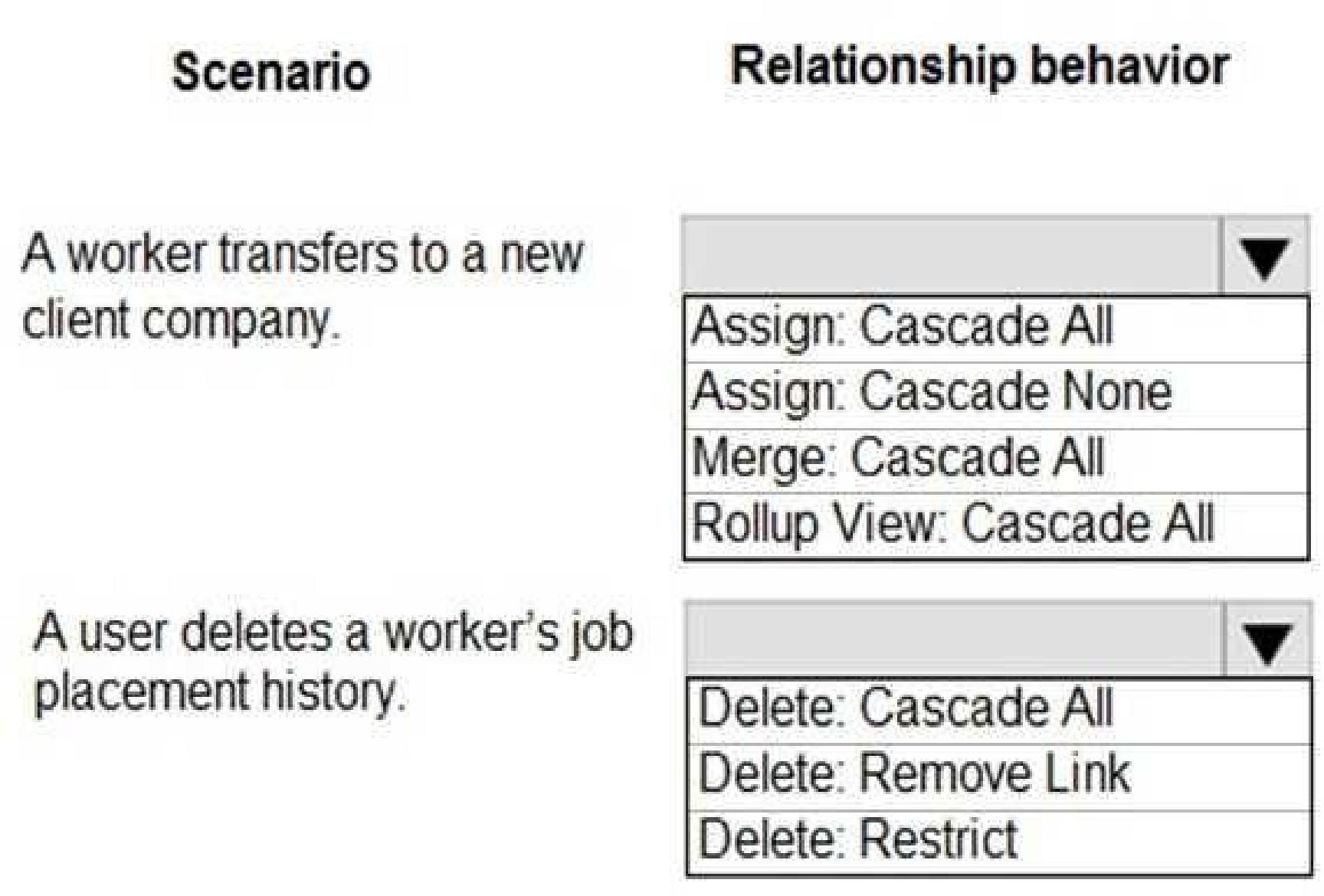
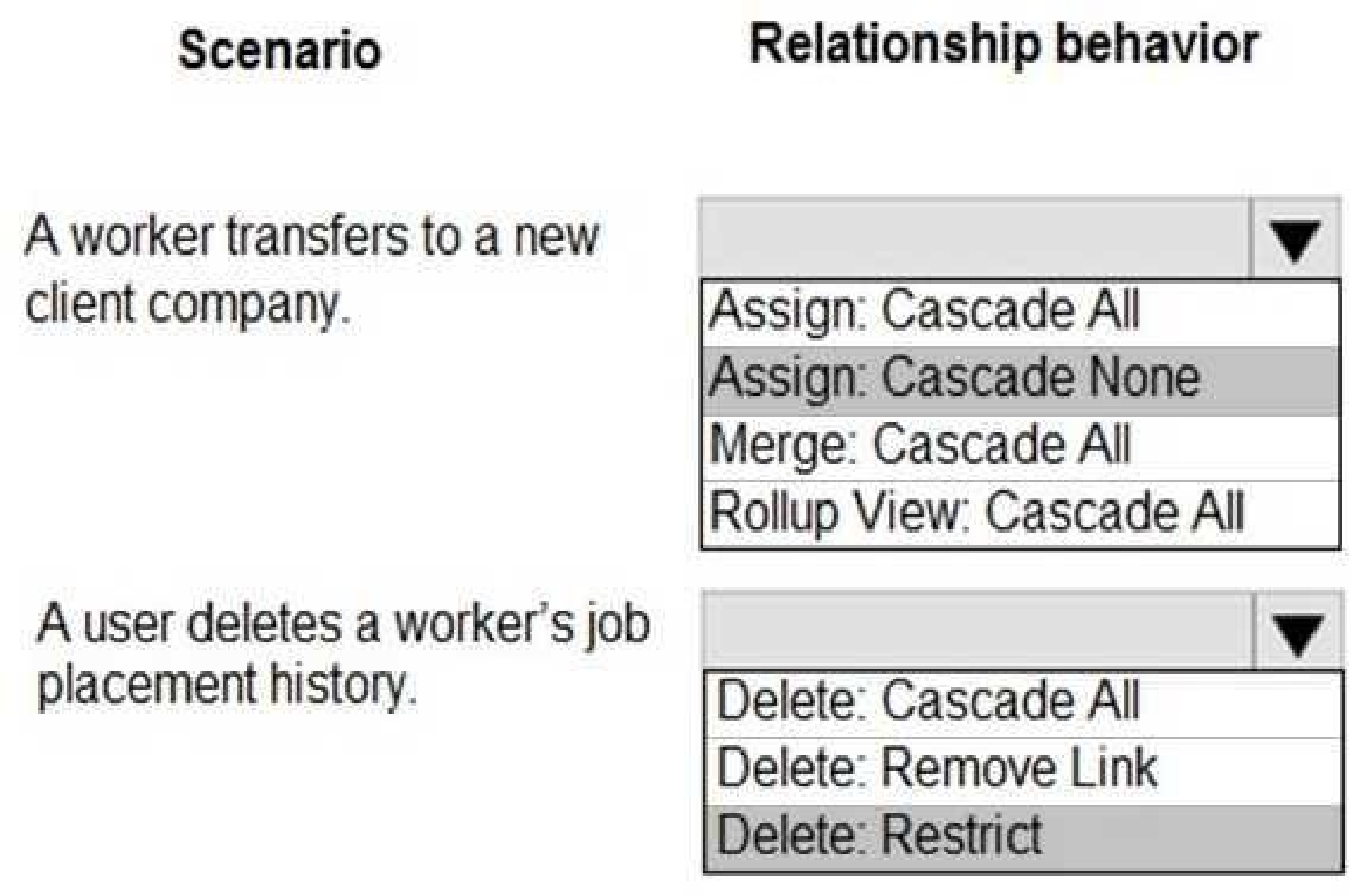
Box 1: Assign: Cascade None
Scenario: Worker still records must be archived after ten years and are then removed from the main
system.
Assign: The referenced table record owner is changed.
Cascade None: Do nothing.
Incorrect Answers:
Cascade All: Perform the action on all referencing table records associated with the referenced table
record.
Box 2: Delete: Restrict
Scenario: Worker information must not be deleted from the system while skill and job placement
history records for the worker exist in the system.
Referential, Restrict Delete: In a referential, restrict delete relationship between two tables, you can
navigate to any related rows. Actions taken on the parent row will not be applied to the child row,
but the parent row cannot be deleted while the child row exists. This is useful if you do not want
child rows to become orphaned. This forces the user to delete all of the children before deleting the
parent.
Reference:
[https://docs.microsoft.com/en-us/powerapps/maker/data-platform/data-platform-entity-lookup](https://docs.microsoft.com/en-us/powerapps/maker/data-platform/data-platform-entity-lookup)
Quiz
Case study
This is a case study. Case studies are not timed separately. You can use as much exam time as you
would like to complete each case. However, there may be additional case studies and sections on
this exam. You must manage your time to ensure that you are able to complete all questions included
on this exam in the time provided.
To answer the questions included in a case study, you will need to reference information that is
provided in the case study. Case studies might contain exhibits and other resources that provide
more information about the scenario that is described in the case study. Each question is
independent of the other questions in this case study.
At the end of this case study, a review screen will appear. This screen allows you to review your
answers and to make changes before you move to the next section of the exam. After you begin a
new section, you cannot return to this section.
To start the case study
To display the first question in this case study, click the Next button. Use the buttons in the left pane
to explore the content of the case study before you answer the questions. Clicking these buttons
displays information such as business requirements, existing environment, and problem statements.
If the case study has an All Information tab, note that the information displayed is identical to the
information displayed on the subsequent tabs. When you are ready to answer a question, click the
Question button to return to the question.
Background
First Up Consulting recruits information technology (IT) workers for temporary or permanent
positions at client companies. The company operates offices in multiple countries/regions.
First Up has both full-time and part-time employees. The company has a team or worker support
agents that respond to inquiries from current and prospective workers. Some of the worker support
agents are multilingual.
The company does not have a standardized tool used for reporting purposes. The organization
engages you to implement a new Power Platform solution. Workers are managed by a dedicated
team that includes one primary recruiter and a contract assistant. Many client companies live in
areas that do not allow for mobile data connections.
Current environment
Existing systems and processes
First Up uses an on-premises system to manage current and historical patient data including
medications and medical visits.
The company plans to reference historical data in the existing system. The records held in these
systems will not be migrated to the new solution except for medication information.
Employee authentication with the existing system is provided by an on-premises Active Directory
instance that is linked to Azure Active Directory.
An appointment record is created for each visit with a worker. The record includes worker contact
information, preferred language, the date and time of the appointment, and other relevant data.
This information is reviewed by the worker’s primary recruiter.
First Up has no current capabilities for forecasting future worker needs based on the data held.
Client company visits
Before First Up signs a contract to place workers at a client company, a member of the audit team
visits the company and interviews company management. Audit members use different types of
devices including Android and iOS devices. First Up has no plans to require the use of a single type of
device. Audit team members currently record information about workers on paper forms. Team
members enter information from paper forms into the system when they return to the office.
First Up audits client companies at least once each year but may schedule additional visits based on
feedback from workers that they place at a client company.
Requirements
General
There is no standardized communication tool across the company, and this causes communication
issues between different teams.
First up employees must be able to contact each other by using a secure system to ask and answer
questions about medical cases.
Workers must be able to communicate in near real-time with worker support agents.
Client company visits
Audit team records must be locked after they have been reviewed by a First Up manager. No further
edits to the record can be carried out. This must be implemented using standard available system
functionality.
Audit teams must be able to enter records of their visits to the companies where they have or may
place workers. Audit teams must be able to update any necessary records with the latest
information.
The solution must support tracking of security clearance information for a worker including the date,
status, and certifying agency.
When a worker makes an appointment, the appointments must appear in the timeline for the
worker’s contact record.
Job history information
The solution must provide a worker appointment booking system that can access worker historical
job placement data.
The solution must allow employees to associate a primary recruiter with each worker. The solution
must also allow multiple secondary recruiters to be associated with each worker.
Every worker assessment performed must be validated and countersigned by the primary recruiter
for a worker.
Job posting data from previous work engagements must be accessible by the Power Platform
solution to ensure that new job postings are accurate.
First Up staff members must be able to view and update worker records. They must be able to see
current and historical job placement data on the same form in the new solution.
Worker access
The solution must support workers that speak different languages. The solution must provide
automatic translation capabilities.
The solution must support near real-time communications between workers and recruiters.
Workers must be able to view their records online. Workers must be able to enter any additional
information that is required by or may be helpful to recruiters.
The solution must provide workers a way to search for general information about available positions.
Workers must be able to request copies of their records by using a chatbot. Workers must be able to
provide information to a recruiter as needed.
Data platform
Audit teams must have the ability to view worker information on their mobile devices.
Audit teams must be able to record data during visits to locations where workers are placed.
The solution must support the ability for a corporate governance auditing team to periodically audit
the organization’s records, policies, and procedures.
Reporting and analytics
The reporting and analytics team must be able to create reports that include data from all facilities
and all workers.
Management reports must present an overview of the entire organization. Other reports may be
limited to specific offices.
You must create dashboards that show the status across all groups of workers. The dashboards must
be embedded into the Power Platform apps. Updates to data must be displayed in near real time.
Security
Authentication for all user types must be managed by a single platform. IT teams must use
PowerShell to apply security permissions for users.
Worker records must only be viewed by the recruiting office that the worker visits.
Worker still records must be archived after ten years and are then removed from the main system.
Worker information must not be deleted from the system while skill and job placement history
records for the worker exist in the system.
User security roles must be customized to ensure that users are able to interact only with the specific
data in which they need access.
Workers must be able to sign into a portal by using their own email address. Workers must be
required to use a secure method of authentication to be able to view their data.
Alerts regarding the number of recruited and placed at client companies must be updated as
background processes.
Issues
The organization reports the following issues:
Recruiters report that they cannot see historical job placement data for workers.
API usage reports show that the number of API calls made exceeds limits. This causes delays saving
data.
Users cannot view Power BI reports within the Power Platform apps.
Some security clearance information for workers not visible from within the Power Platform solution.
Audit teams report that they cannot view or edit worker data when the device on which they access
the solution does not have network connectivity.
The testing ream reports that one of the canvas apps is not working as expected. An error message
displays as specific pages load.
What should you recommend?
Quiz
Case study
This is a case study. Case studies are not timed separately. You can use as much exam time as you
would like to complete each case. However, there may be additional case studies and sections on
this exam. You must manage your time to ensure that you are able to complete all questions included
on this exam in the time provided.
To answer the questions included in a case study, you will need to reference information that is
provided in the case study. Case studies might contain exhibits and other resources that provide
more information about the scenario that is described in the case study. Each question is
independent of the other questions in this case study.
At the end of this case study, a review screen will appear. This screen allows you to review your
answers and to make changes before you move to the next section of the exam. After you begin a
new section, you cannot return to this section.
To start the case study
To display the first question in this case study, click the Next button. Use the buttons in the left pane
to explore the content of the case study before you answer the questions. Clicking these buttons
displays information such as business requirements, existing environment, and problem statements.
If the case study has an All Information tab, note that the information displayed is identical to the
information displayed on the subsequent tabs. When you are ready to answer a question, click the
Question button to return to the question.
Background
First Up Consulting recruits information technology (IT) workers for temporary or permanent
positions at client companies. The company operates offices in multiple countries/regions.
First Up has both full-time and part-time employees. The company has a team or worker support
agents that respond to inquiries from current and prospective workers. Some of the worker support
agents are multilingual.
The company does not have a standardized tool used for reporting purposes. The organization
engages you to implement a new Power Platform solution. Workers are managed by a dedicated
team that includes one primary recruiter and a contract assistant. Many client companies live in
areas that do not allow for mobile data connections.
Current environment
Existing systems and processes
First Up uses an on-premises system to manage current and historical patient data including
medications and medical visits.
The company plans to reference historical data in the existing system. The records held in these
systems will not be migrated to the new solution except for medication information.
Employee authentication with the existing system is provided by an on-premises Active Directory
instance that is linked to Azure Active Directory.
An appointment record is created for each visit with a worker. The record includes worker contact
information, preferred language, the date and time of the appointment, and other relevant data.
This information is reviewed by the worker’s primary recruiter.
First Up has no current capabilities for forecasting future worker needs based on the data held.
Client company visits
Before First Up signs a contract to place workers at a client company, a member of the audit team
visits the company and interviews company management. Audit members use different types of
devices including Android and iOS devices. First Up has no plans to require the use of a single type of
device. Audit team members currently record information about workers on paper forms. Team
members enter information from paper forms into the system when they return to the office.
First Up audits client companies at least once each year but may schedule additional visits based on
feedback from workers that they place at a client company.
Requirements
General
There is no standardized communication tool across the company, and this causes communication
issues between different teams.
First up employees must be able to contact each other by using a secure system to ask and answer
questions about medical cases.
Workers must be able to communicate in near real-time with worker support agents.
Client company visits
Audit team records must be locked after they have been reviewed by a First Up manager. No further
edits to the record can be carried out. This must be implemented using standard available system
functionality.
Audit teams must be able to enter records of their visits to the companies where they have or may
place workers. Audit teams must be able to update any necessary records with the latest
information.
The solution must support tracking of security clearance information for a worker including the date,
status, and certifying agency.
When a worker makes an appointment, the appointments must appear in the timeline for the
worker’s contact record.
Job history information
The solution must provide a worker appointment booking system that can access worker historical
job placement data.
The solution must allow employees to associate a primary recruiter with each worker. The solution
must also allow multiple secondary recruiters to be associated with each worker.
Every worker assessment performed must be validated and countersigned by the primary recruiter
for a worker.
Job posting data from previous work engagements must be accessible by the Power Platform
solution to ensure that new job postings are accurate.
First Up staff members must be able to view and update worker records. They must be able to see
current and historical job placement data on the same form in the new solution.
Worker access
The solution must support workers that speak different languages. The solution must provide
automatic translation capabilities.
The solution must support near real-time communications between workers and recruiters.
Workers must be able to view their records online. Workers must be able to enter any additional
information that is required by or may be helpful to recruiters.
The solution must provide workers a way to search for general information about available positions.
Workers must be able to request copies of their records by using a chatbot. Workers must be able to
provide information to a recruiter as needed.
Data platform
Audit teams must have the ability to view worker information on their mobile devices.
Audit teams must be able to record data during visits to locations where workers are placed.
The solution must support the ability for a corporate governance auditing team to periodically audit
the organization’s records, policies, and procedures.
Reporting and analytics
The reporting and analytics team must be able to create reports that include data from all facilities
and all workers.
Management reports must present an overview of the entire organization. Other reports may be
limited to specific offices.
You must create dashboards that show the status across all groups of workers. The dashboards must
be embedded into the Power Platform apps. Updates to data must be displayed in near real time.
Security
Authentication for all user types must be managed by a single platform. IT teams must use
PowerShell to apply security permissions for users.
Worker records must only be viewed by the recruiting office that the worker visits.
Worker still records must be archived after ten years and are then removed from the main system.
Worker information must not be deleted from the system while skill and job placement history
records for the worker exist in the system.
User security roles must be customized to ensure that users are able to interact only with the specific
data in which they need access.
Workers must be able to sign into a portal by using their own email address. Workers must be
required to use a secure method of authentication to be able to view their data.
Alerts regarding the number of recruited and placed at client companies must be updated as
background processes.
Issues
The organization reports the following issues:
Recruiters report that they cannot see historical job placement data for workers.
API usage reports show that the number of API calls made exceeds limits. This causes delays saving
data.
Users cannot view Power BI reports within the Power Platform apps.
Some security clearance information for workers not visible from within the Power Platform solution.
Audit teams report that they cannot view or edit worker data when the device on which they access
the solution does not have network connectivity.
The testing ream reports that one of the canvas apps is not working as expected. An error message
displays as specific pages load.
What should you recommend? To answer, select the appropriate options in the answer area.
NOTE: Each correct selection is worth one point.
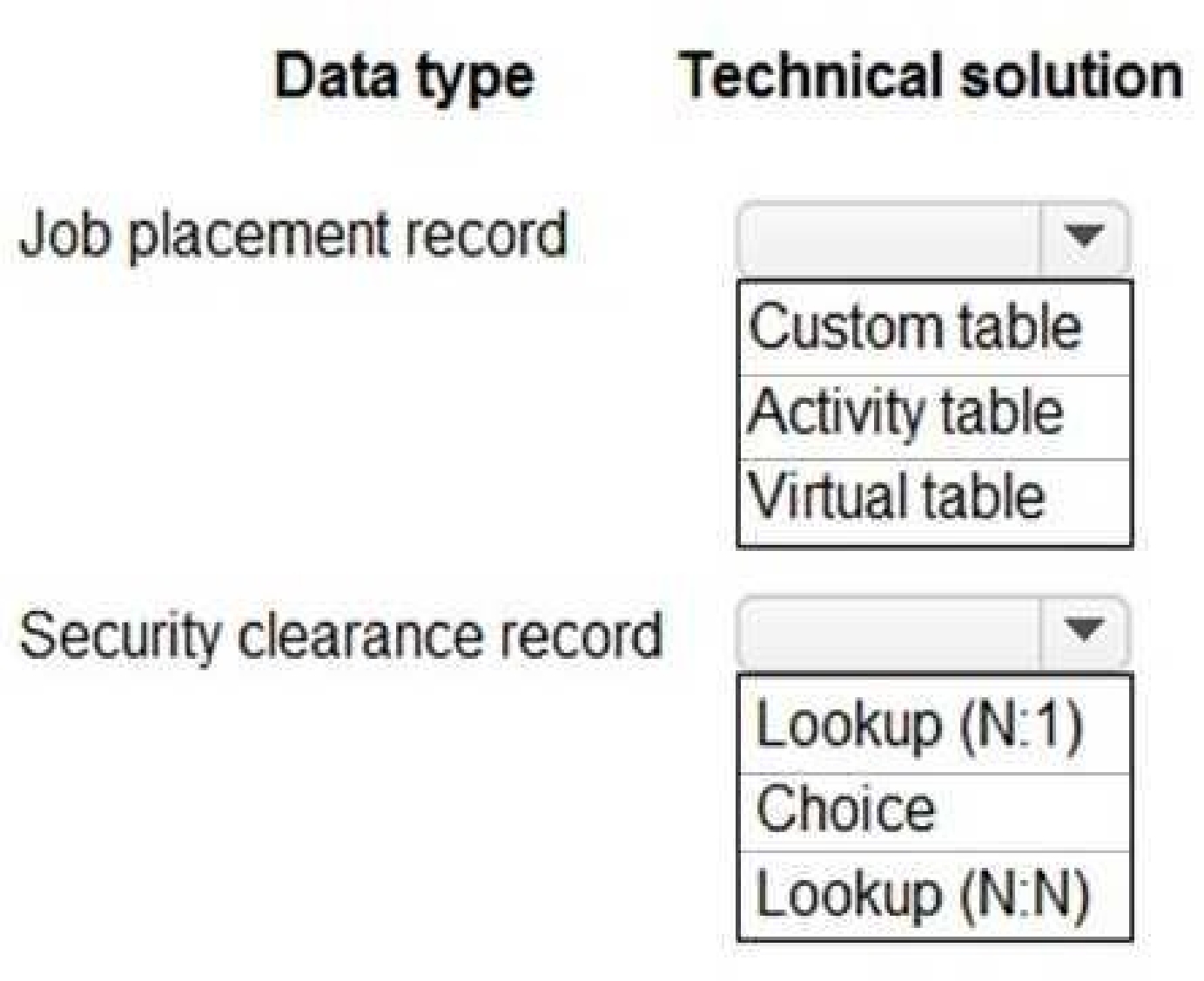
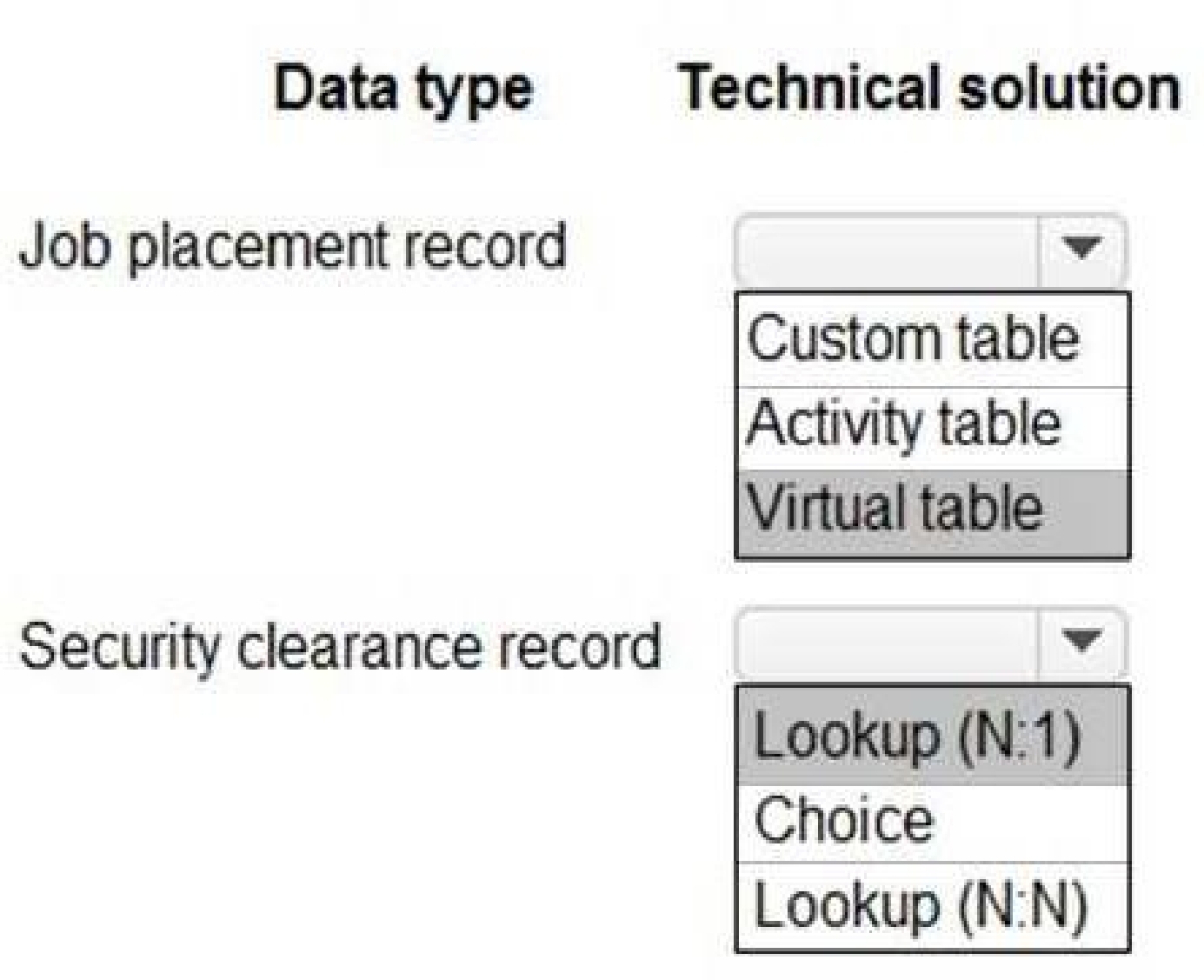
Box 1: Virtual Table
A virtual table is a custom table in Microsoft Dataverse that has columns containing data from an
external data source. Virtual tables appear in your app to users as regular table rows, but contain
data that is sourced from an external database, such as an Azure SQL Database. Rows based on
virtual tables are available in all clients including custom clients developed using the Dataverse web
services.
Scenario:
First Up uses an on-premises system to manage current and historical patient data including
medications and medical visits.
The company plans to reference historical data in the existing system. The records held in these
systems will not be migrated to the new solution except for medication information.
The solution must provide a worker appointment booking system that can access worker historical
job placement data.
First Up staff members must be able to view and update worker records. They must be able to see
current and historical job placement data on the same form in the new solution.
Box 2: Lookup (N:1)
Each worker can have many security clearances, so need a 1:N relationship.
Scenario: The solution must support tracking of security clearance information for a worker including
the date, status, and certifying agency.
Reference:
[https://docs.microsoft.com/en-us/powerapps/maker/data-platform/create-edit-virtual-entities](https://docs.microsoft.com/en-us/powerapps/maker/data-platform/create-edit-virtual-entities)
[https://docs.microsoft.com/en-us/powerapps/maker/data-platform/create-edit-entity-relationships](https://docs.microsoft.com/en-us/powerapps/maker/data-platform/create-edit-entity-relationships)
Quiz
Case study
This is a case study. Case studies are not timed separately. You can use as much exam time as you
would like to complete each case. However, there may be additional case studies and sections on
this exam. You must manage your time to ensure that you are able to complete all questions included
on this exam in the time provided.
To answer the questions included in a case study, you will need to reference information that is
provided in the case study. Case studies might contain exhibits and other resources that provide
more information about the scenario that is described in the case study. Each question is
independent of the other questions in this case study.
At the end of this case study, a review screen will appear. This screen allows you to review your
answers and to make changes before you move to the next section of the exam. After you begin a
new section, you cannot return to this section.
To start the case study
To display the first question in this case study, click the Next button. Use the buttons in the left pane
to explore the content of the case study before you answer the questions. Clicking these buttons
displays information such as business requirements, existing environment, and problem statements.
If the case study has an All Information tab, note that the information displayed is identical to the
information displayed on the subsequent tabs. When you are ready to answer a question, click the
Question button to return to the question.
Background
First Up Consulting recruits information technology (IT) workers for temporary or permanent
positions at client companies. The company operates offices in multiple countries/regions.
First Up has both full-time and part-time employees. The company has a team or worker support
agents that respond to inquiries from current and prospective workers. Some of the worker support
agents are multilingual.
The company does not have a standardized tool used for reporting purposes. The organization
engages you to implement a new Power Platform solution. Workers are managed by a dedicated
team that includes one primary recruiter and a contract assistant. Many client companies live in
areas that do not allow for mobile data connections.
Current environment
Existing systems and processes
First Up uses an on-premises system to manage current and historical patient data including
medications and medical visits.
The company plans to reference historical data in the existing system. The records held in these
systems will not be migrated to the new solution except for medication information.
Employee authentication with the existing system is provided by an on-premises Active Directory
instance that is linked to Azure Active Directory.
An appointment record is created for each visit with a worker. The record includes worker contact
information, preferred language, the date and time of the appointment, and other relevant data.
This information is reviewed by the worker’s primary recruiter.
First Up has no current capabilities for forecasting future worker needs based on the data held.
Client company visits
Before First Up signs a contract to place workers at a client company, a member of the audit team
visits the company and interviews company management. Audit members use different types of
devices including Android and iOS devices. First Up has no plans to require the use of a single type of
device. Audit team members currently record information about workers on paper forms. Team
members enter information from paper forms into the system when they return to the office.
First Up audits client companies at least once each year but may schedule additional visits based on
feedback from workers that they place at a client company.
Requirements
General
There is no standardized communication tool across the company, and this causes communication
issues between different teams.
First up employees must be able to contact each other by using a secure system to ask and answer
questions about medical cases.
Workers must be able to communicate in near real-time with worker support agents.
Client company visits
Audit team records must be locked after they have been reviewed by a First Up manager. No further
edits to the record can be carried out. This must be implemented using standard available system
functionality.
Audit teams must be able to enter records of their visits to the companies where they have or may
place workers. Audit teams must be able to update any necessary records with the latest
information.
The solution must support tracking of security clearance information for a worker including the date,
status, and certifying agency.
When a worker makes an appointment, the appointments must appear in the timeline for the
worker’s contact record.
Job history information
The solution must provide a worker appointment booking system that can access worker historical
job placement data.
The solution must allow employees to associate a primary recruiter with each worker. The solution
must also allow multiple secondary recruiters to be associated with each worker.
Every worker assessment performed must be validated and countersigned by the primary recruiter
for a worker.
Job posting data from previous work engagements must be accessible by the Power Platform
solution to ensure that new job postings are accurate.
First Up staff members must be able to view and update worker records. They must be able to see
current and historical job placement data on the same form in the new solution.
Worker access
The solution must support workers that speak different languages. The solution must provide
automatic translation capabilities.
The solution must support near real-time communications between workers and recruiters.
Workers must be able to view their records online. Workers must be able to enter any additional
information that is required by or may be helpful to recruiters.
The solution must provide workers a way to search for general information about available positions.
Workers must be able to request copies of their records by using a chatbot. Workers must be able to
provide information to a recruiter as needed.
Data platform
Audit teams must have the ability to view worker information on their mobile devices.
Audit teams must be able to record data during visits to locations where workers are placed.
The solution must support the ability for a corporate governance auditing team to periodically audit
the organization’s records, policies, and procedures.
Reporting and analytics
The reporting and analytics team must be able to create reports that include data from all facilities
and all workers.
Management reports must present an overview of the entire organization. Other reports may be
limited to specific offices.
You must create dashboards that show the status across all groups of workers. The dashboards must
be embedded into the Power Platform apps. Updates to data must be displayed in near real time.
Security
Authentication for all user types must be managed by a single platform. IT teams must use
PowerShell to apply security permissions for users.
Worker records must only be viewed by the recruiting office that the worker visits.
Worker still records must be archived after ten years and are then removed from the main system.
Worker information must not be deleted from the system while skill and job placement history
records for the worker exist in the system.
User security roles must be customized to ensure that users are able to interact only with the specific
data in which they need access.
Workers must be able to sign into a portal by using their own email address. Workers must be
required to use a secure method of authentication to be able to view their data.
Alerts regarding the number of recruited and placed at client companies must be updated as
background processes.
Issues
The organization reports the following issues:
Recruiters report that they cannot see historical job placement data for workers.
API usage reports show that the number of API calls made exceeds limits. This causes delays saving
data.
Users cannot view Power BI reports within the Power Platform apps.
Some security clearance information for workers not visible from within the Power Platform solution.
Audit teams report that they cannot view or edit worker data when the device on which they access
the solution does not have network connectivity.
The testing ream reports that one of the canvas apps is not working as expected. An error message
displays as specific pages load.
What should you recommend? To answer, select the appropriate options in the answer area.
NOTE: Each correct selection is worth one point.
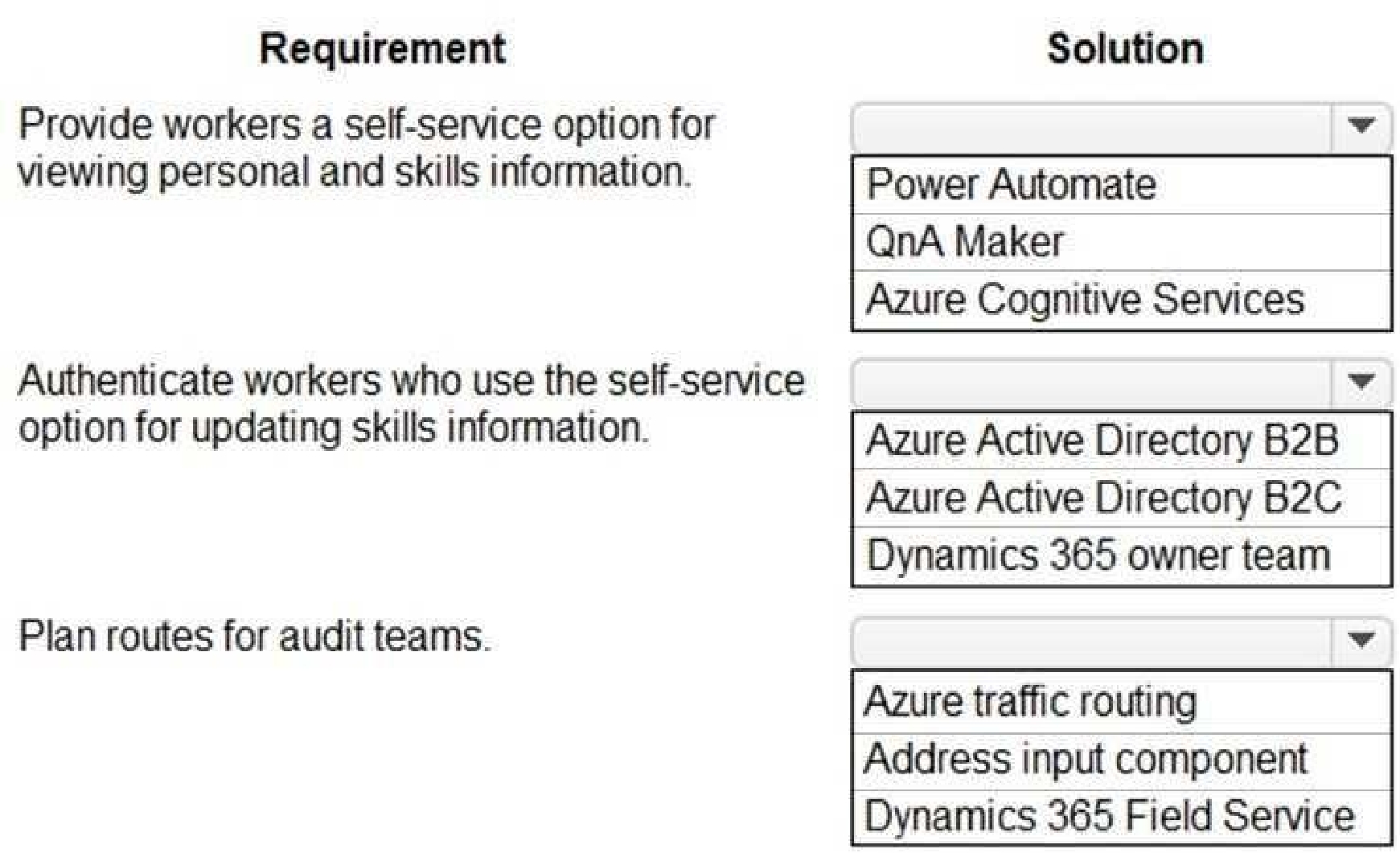
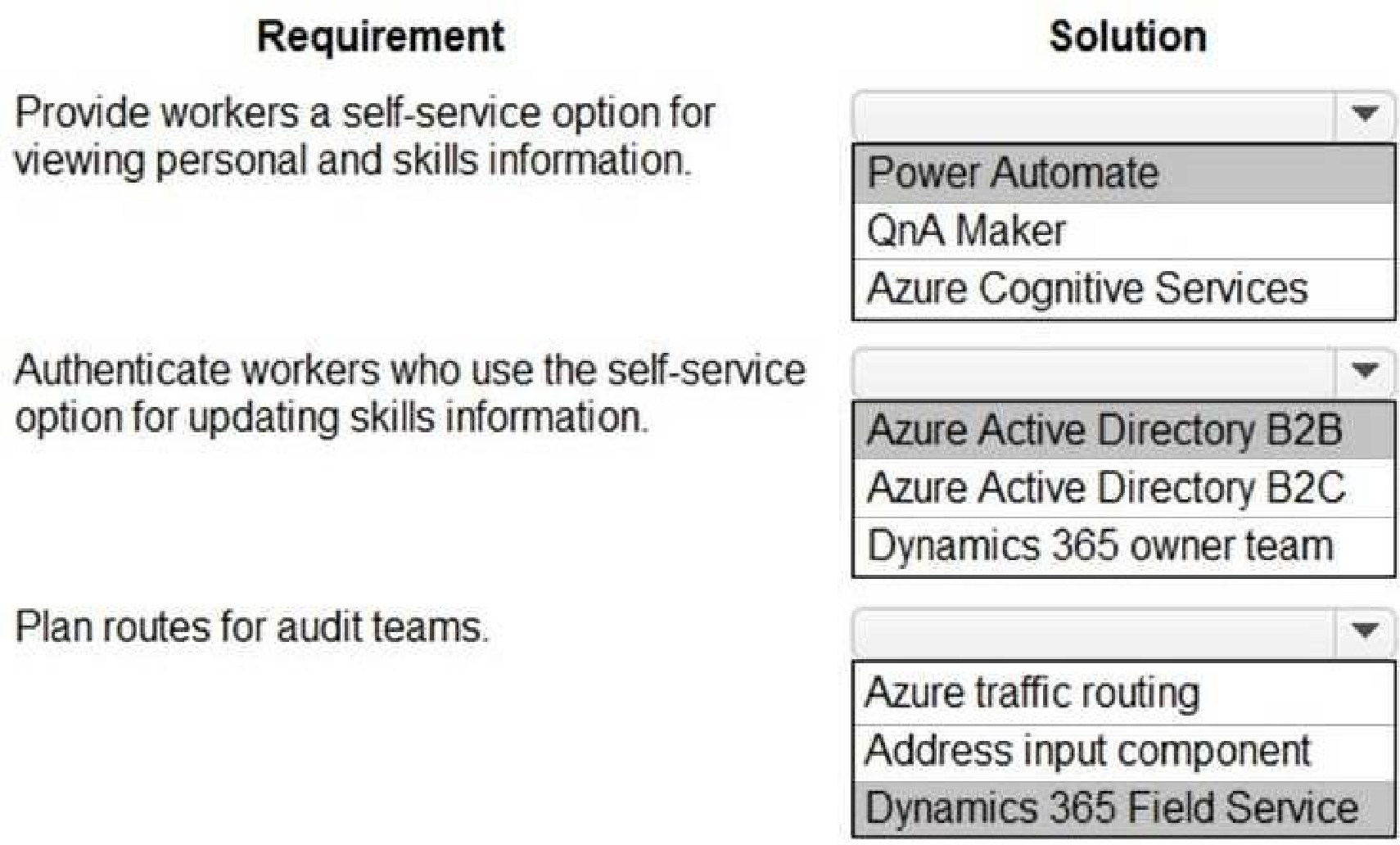
Box 1: Power Automate
Self-service purchase is available for Power Platform (Power BI, Power Apps, and Power Automate),
Project, and Visio.
Box 2: Azure Active Directory B2B
Scenario: First Up Consulting recruits information technology (IT) workers for temporary or
permanent positions at client companies.
Azure Active Directory (Azure AD) business-to-business (B2B) collaboration is a feature within
External Identities that lets you invite guest users to collaborate with your organization. With B2B
collaboration, you can securely share your company's applications and services with guest users from
any other organization, while maintaining control over your own corporate dat
a. Work safely and securely with external partners, large or small, even if they don't have Azure AD
or an IT department. A simple invitation and redemption process lets partners use their own
credentials to access your company's resources.
Note, Scenario:
Workers must be able to sign into a portal by using their own email address. Workers must be
required to use a secure method of authentication to be able to view their data.
User security roles must be customized to ensure that users are able to interact only with the specific
data in which they need access.
Box 3: Dynamics 365 Field Service
Dynamics 365 Field Service functionality include:
An interactive schedule board helps dispatchers assign work orders to the best resources based on
location, availability, skill set, priority, and more. This is done via a manual drag-and-drop method, a
semi-automated scheduling assistant, or fully automated with Resource Scheduling Optimization.
The schedule board displays each resource--whether an employee, contractor, or equipment--and
their scheduled work orders. Resources and their assigned jobs are also displayed on a map along
with routes and traffic patterns in real time.
Reference:
[https://docs.microsoft.com/en-us/microsoft-365/commerce/subscriptions/self-service-purchase-faq](https://docs.microsoft.com/en-us/microsoft-365/commerce/subscriptions/self-service-purchase-faq)
[https://docs.microsoft.com/en-us/azure/active-directory/external-identities/what-is-b2b](https://docs.microsoft.com/en-us/azure/active-directory/external-identities/what-is-b2b)
[https://docs.microsoft.com/en-us/dynamics365/field-service/overview](https://docs.microsoft.com/en-us/dynamics365/field-service/overview)
Quiz
Case study
This is a case study. Case studies are not timed separately. You can use as much exam time as you
would like to complete each case. However, there may be additional case studies and sections on
this exam. You must manage your time to ensure that you are able to complete all questions included
on this exam in the time provided.
To answer the questions included in a case study, you will need to reference information that is
provided in the case study. Case studies might contain exhibits and other resources that provide
more information about the scenario that is described in the case study. Each question is
independent of the other questions in this case study.
At the end of this case study, a review screen will appear. This screen allows you to review your
answers and to make changes before you move to the next section of the exam. After you begin a
new section, you cannot return to this section.
To start the case study
To display the first question in this case study, click the Next button. Use the buttons in the left pane
to explore the content of the case study before you answer the questions. Clicking these buttons
displays information such as business requirements, existing environment, and problem statements.
If the case study has an All Information tab, note that the information displayed is identical to the
information displayed on the subsequent tabs. When you are ready to answer a question, click the
Question button to return to the question.
Background
First Up Consulting recruits information technology (IT) workers for temporary or permanent
positions at client companies. The company operates offices in multiple countries/regions.
First Up has both full-time and part-time employees. The company has a team or worker support
agents that respond to inquiries from current and prospective workers. Some of the worker support
agents are multilingual.
The company does not have a standardized tool used for reporting purposes. The organization
engages you to implement a new Power Platform solution. Workers are managed by a dedicated
team that includes one primary recruiter and a contract assistant. Many client companies live in
areas that do not allow for mobile data connections.
Current environment
Existing systems and processes
First Up uses an on-premises system to manage current and historical patient data including
medications and medical visits.
The company plans to reference historical data in the existing system. The records held in these
systems will not be migrated to the new solution except for medication information.
Employee authentication with the existing system is provided by an on-premises Active Directory
instance that is linked to Azure Active Directory.
An appointment record is created for each visit with a worker. The record includes worker contact
information, preferred language, the date and time of the appointment, and other relevant data.
This information is reviewed by the worker’s primary recruiter.
First Up has no current capabilities for forecasting future worker needs based on the data held.
Client company visits
Before First Up signs a contract to place workers at a client company, a member of the audit team
visits the company and interviews company management. Audit members use different types of
devices including Android and iOS devices. First Up has no plans to require the use of a single type of
device. Audit team members currently record information about workers on paper forms. Team
members enter information from paper forms into the system when they return to the office.
First Up audits client companies at least once each year but may schedule additional visits based on
feedback from workers that they place at a client company.
Requirements
General
There is no standardized communication tool across the company, and this causes communication
issues between different teams.
First up employees must be able to contact each other by using a secure system to ask and answer
questions about medical cases.
Workers must be able to communicate in near real-time with worker support agents.
Client company visits
Audit team records must be locked after they have been reviewed by a First Up manager. No further
edits to the record can be carried out. This must be implemented using standard available system
functionality.
Audit teams must be able to enter records of their visits to the companies where they have or may
place workers. Audit teams must be able to update any necessary records with the latest
information.
The solution must support tracking of security clearance information for a worker including the date,
status, and certifying agency.
When a worker makes an appointment, the appointments must appear in the timeline for the
worker’s contact record.
Job history information
The solution must provide a worker appointment booking system that can access worker historical
job placement data.
The solution must allow employees to associate a primary recruiter with each worker. The solution
must also allow multiple secondary recruiters to be associated with each worker.
Every worker assessment performed must be validated and countersigned by the primary recruiter
for a worker.
Job posting data from previous work engagements must be accessible by the Power Platform
solution to ensure that new job postings are accurate.
First Up staff members must be able to view and update worker records. They must be able to see
current and historical job placement data on the same form in the new solution.
Worker access
The solution must support workers that speak different languages. The solution must provide
automatic translation capabilities.
The solution must support near real-time communications between workers and recruiters.
Workers must be able to view their records online. Workers must be able to enter any additional
information that is required by or may be helpful to recruiters.
The solution must provide workers a way to search for general information about available positions.
Workers must be able to request copies of their records by using a chatbot. Workers must be able to
provide information to a recruiter as needed.
Data platform
Audit teams must have the ability to view worker information on their mobile devices.
Audit teams must be able to record data during visits to locations where workers are placed.
The solution must support the ability for a corporate governance auditing team to periodically audit
the organization’s records, policies, and procedures.
Reporting and analytics
The reporting and analytics team must be able to create reports that include data from all facilities
and all workers.
Management reports must present an overview of the entire organization. Other reports may be
limited to specific offices.
You must create dashboards that show the status across all groups of workers. The dashboards must
be embedded into the Power Platform apps. Updates to data must be displayed in near real time.
Security
Authentication for all user types must be managed by a single platform. IT teams must use
PowerShell to apply security permissions for users.
Worker records must only be viewed by the recruiting office that the worker visits.
Worker still records must be archived after ten years and are then removed from the main system.
Worker information must not be deleted from the system while skill and job placement history
records for the worker exist in the system.
User security roles must be customized to ensure that users are able to interact only with the specific
data in which they need access.
Workers must be able to sign into a portal by using their own email address. Workers must be
required to use a secure method of authentication to be able to view their data.
Alerts regarding the number of recruited and placed at client companies must be updated as
background processes.
Issues
The organization reports the following issues:
Recruiters report that they cannot see historical job placement data for workers.
API usage reports show that the number of API calls made exceeds limits. This causes delays saving
data.
Users cannot view Power BI reports within the Power Platform apps.
Some security clearance information for workers not visible from within the Power Platform solution.
Audit teams report that they cannot view or edit worker data when the device on which they access
the solution does not have network connectivity.
The testing ream reports that one of the canvas apps is not working as expected. An error message
displays as specific pages load.
What should you recommend? To answer, select the appropriate options in the answer area.
NOTE: Each correct selection is worth one point.
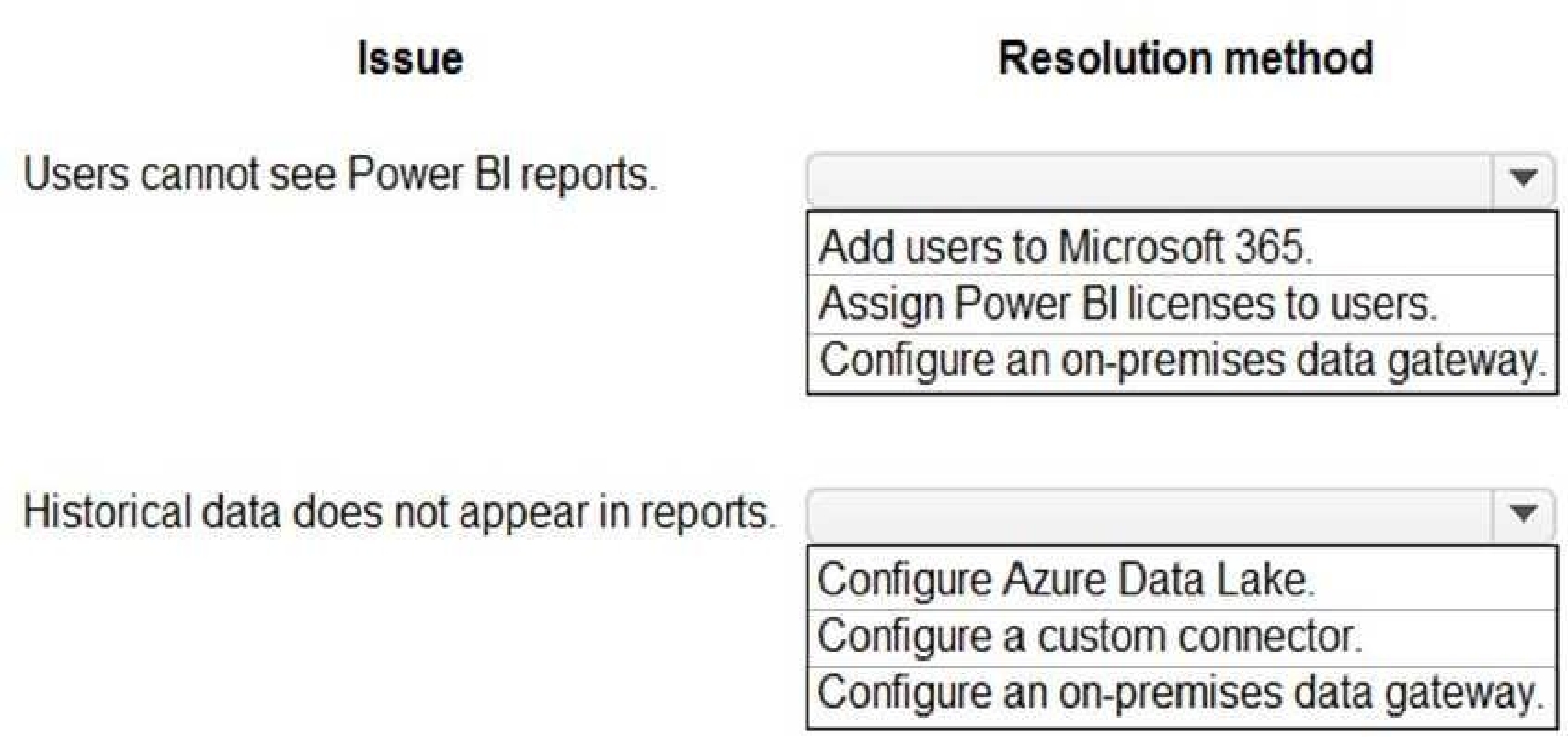
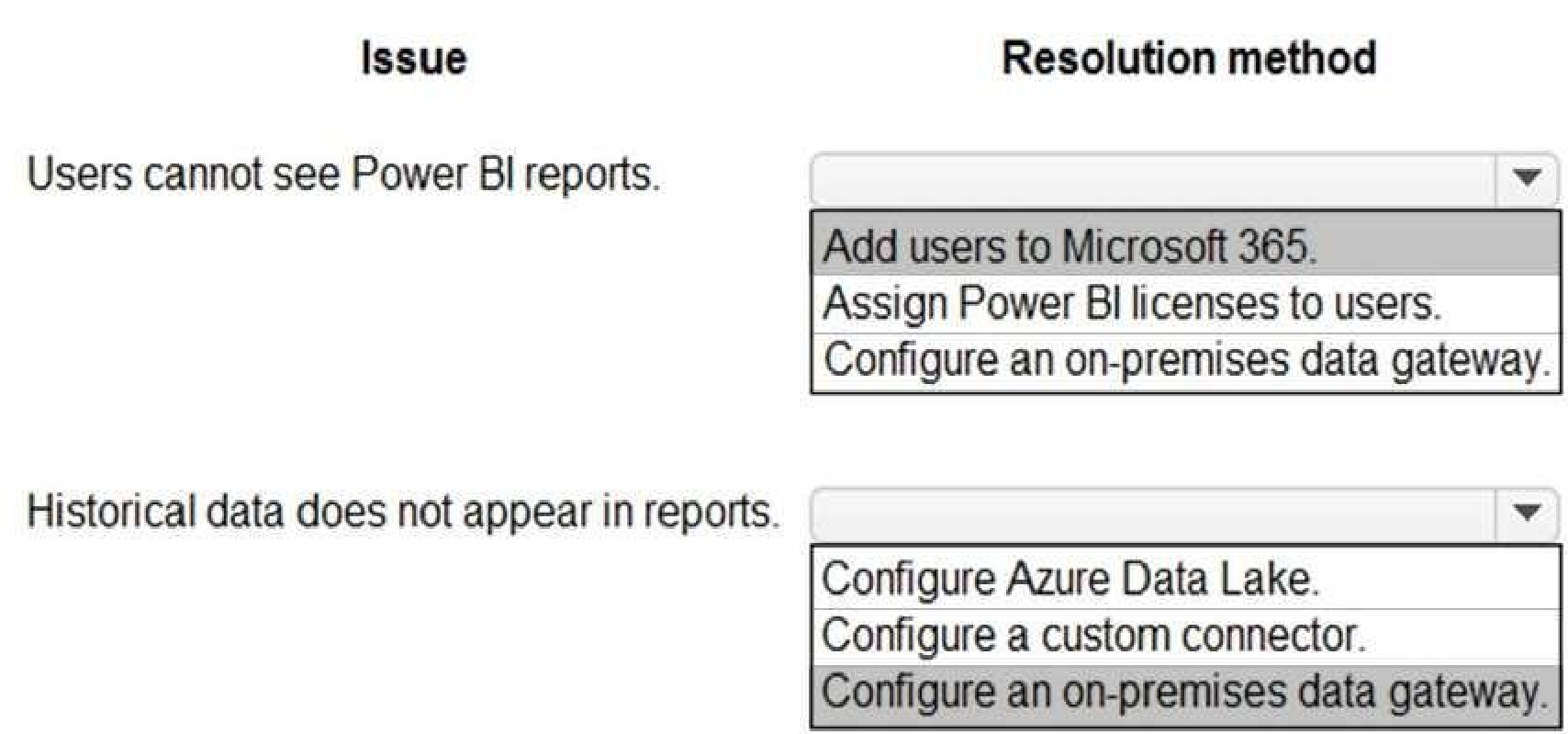
Box 1: Add users to Microsoft 365.
Scenario: Users cannot view Power BI reports within the Power Platform apps.
Issue: The people you share with may see a locked tile in a dashboard, or a "Permission required"
message when they try to view a report.
Solution: You need to grant them permission to the underlying dataset.
Go to the All or the Datasets + dataflows tab in your content list.
Select More options (...) next to a dataset, then select Manage permissions.
Select Add user.
Enter the full email addresses for individuals, distribution groups, or security groups.
Select Grant access.
Box 2: Configure an on-premises data gateway.
Scenario: The company plans to reference historical data in the [on-premises] existing system. The
records held in these systems will not be migrated to the new solution except for medication
information.
The on-premises data gateway acts as a bridge to provide quick and secure data transfer between on-
premises data (data that isn't in the cloud) and several Microsoft cloud services. These cloud services
include Power BI, PowerApps, Power Automate, Azure Analysis Services, and Azure Logic Apps. By
using a gateway, organizations can keep databases and other data sources on their on-premises
networks, yet securely use that on-premises data in cloud services.
Reference:
[https://docs.microsoft.com/en-us/power-bi/collaborate-share/service-troubleshoot-sharing](https://docs.microsoft.com/en-us/power-bi/collaborate-share/service-troubleshoot-sharing)
[https://docs.microsoft.com/en-us/power-bi/connect-data/service-gateway-onprem](https://docs.microsoft.com/en-us/power-bi/connect-data/service-gateway-onprem)
[https://docs.microsoft.com/en-us/powerapps/maker/data-platform/use-powerapps-checker](https://docs.microsoft.com/en-us/powerapps/maker/data-platform/use-powerapps-checker)
Quiz
Case study
This is a case study. Case studies are not timed separately. You can use as much exam time as you
would like to complete each case. However, there may be additional case studies and sections on
this exam. You must manage your time to ensure that you are able to complete all questions included
on this exam in the time provided.
To answer the questions included in a case study, you will need to reference information that is
provided in the case study. Case studies might contain exhibits and other resources that provide
more information about the scenario that is described in the case study. Each question is
independent of the other questions in this case study.
At the end of this case study, a review screen will appear. This screen allows you to review your
answers and to make changes before you move to the next section of the exam. After you begin a
new section, you cannot return to this section.
To start the case study
To display the first question in this case study, click the Next button. Use the buttons in the left pane
to explore the content of the case study before you answer the questions. Clicking these buttons
displays information such as business requirements, existing environment, and problem statements.
If the case study has an All Information tab, note that the information displayed is identical to the
information displayed on the subsequent tabs. When you are ready to answer a question, click the
Question button to return to the question.
Background
First Up Consulting recruits information technology (IT) workers for temporary or permanent
positions at client companies. The company operates offices in multiple countries/regions.
First Up has both full-time and part-time employees. The company has a team or worker support
agents that respond to inquiries from current and prospective workers. Some of the worker support
agents are multilingual.
The company does not have a standardized tool used for reporting purposes. The organization
engages you to implement a new Power Platform solution. Workers are managed by a dedicated
team that includes one primary recruiter and a contract assistant. Many client companies live in
areas that do not allow for mobile data connections.
Current environment
Existing systems and processes
First Up uses an on-premises system to manage current and historical patient data including
medications and medical visits.
The company plans to reference historical data in the existing system. The records held in these
systems will not be migrated to the new solution except for medication information.
Employee authentication with the existing system is provided by an on-premises Active Directory
instance that is linked to Azure Active Directory.
An appointment record is created for each visit with a worker. The record includes worker contact
information, preferred language, the date and time of the appointment, and other relevant data.
This information is reviewed by the worker’s primary recruiter.
First Up has no current capabilities for forecasting future worker needs based on the data held.
Client company visits
Before First Up signs a contract to place workers at a client company, a member of the audit team
visits the company and interviews company management. Audit members use different types of
devices including Android and iOS devices. First Up has no plans to require the use of a single type of
device. Audit team members currently record information about workers on paper forms. Team
members enter information from paper forms into the system when they return to the office.
First Up audits client companies at least once each year but may schedule additional visits based on
feedback from workers that they place at a client company.
Requirements
General
There is no standardized communication tool across the company, and this causes communication
issues between different teams.
First up employees must be able to contact each other by using a secure system to ask and answer
questions about medical cases.
Workers must be able to communicate in near real-time with worker support agents.
Client company visits
Audit team records must be locked after they have been reviewed by a First Up manager. No further
edits to the record can be carried out. This must be implemented using standard available system
functionality.
Audit teams must be able to enter records of their visits to the companies where they have or may
place workers. Audit teams must be able to update any necessary records with the latest
information.
The solution must support tracking of security clearance information for a worker including the date,
status, and certifying agency.
When a worker makes an appointment, the appointments must appear in the timeline for the
worker’s contact record.
Job history information
The solution must provide a worker appointment booking system that can access worker historical
job placement data.
The solution must allow employees to associate a primary recruiter with each worker. The solution
must also allow multiple secondary recruiters to be associated with each worker.
Every worker assessment performed must be validated and countersigned by the primary recruiter
for a worker.
Job posting data from previous work engagements must be accessible by the Power Platform
solution to ensure that new job postings are accurate.
First Up staff members must be able to view and update worker records. They must be able to see
current and historical job placement data on the same form in the new solution.
Worker access
The solution must support workers that speak different languages. The solution must provide
automatic translation capabilities.
The solution must support near real-time communications between workers and recruiters.
Workers must be able to view their records online. Workers must be able to enter any additional
information that is required by or may be helpful to recruiters.
The solution must provide workers a way to search for general information about available positions.
Workers must be able to request copies of their records by using a chatbot. Workers must be able to
provide information to a recruiter as needed.
Data platform
Audit teams must have the ability to view worker information on their mobile devices.
Audit teams must be able to record data during visits to locations where workers are placed.
The solution must support the ability for a corporate governance auditing team to periodically audit
the organization’s records, policies, and procedures.
Reporting and analytics
The reporting and analytics team must be able to create reports that include data from all facilities
and all workers.
Management reports must present an overview of the entire organization. Other reports may be
limited to specific offices.
You must create dashboards that show the status across all groups of workers. The dashboards must
be embedded into the Power Platform apps. Updates to data must be displayed in near real time.
Security
Authentication for all user types must be managed by a single platform. IT teams must use
PowerShell to apply security permissions for users.
Worker records must only be viewed by the recruiting office that the worker visits.
Worker still records must be archived after ten years and are then removed from the main system.
Worker information must not be deleted from the system while skill and job placement history
records for the worker exist in the system.
User security roles must be customized to ensure that users are able to interact only with the specific
data in which they need access.
Workers must be able to sign into a portal by using their own email address. Workers must be
required to use a secure method of authentication to be able to view their data.
Alerts regarding the number of recruited and placed at client companies must be updated as
background processes.
Issues
The organization reports the following issues:
Recruiters report that they cannot see historical job placement data for workers.
API usage reports show that the number of API calls made exceeds limits. This causes delays saving
data.
Users cannot view Power BI reports within the Power Platform apps.
Some security clearance information for workers not visible from within the Power Platform solution.
Audit teams report that they cannot view or edit worker data when the device on which they access
the solution does not have network connectivity.
The testing ream reports that one of the canvas apps is not working as expected. An error message
displays as specific pages load.
You need to recommend methods for assigning security to each group of users.
What should you recommend? To answer, drag the appropriate methods to the correct groups of
users. Each method may be used once, more than once, or not at all. You may need to drag the split
bar between panes or scroll to view content.
NOTE: Each correct selection is worth one point.
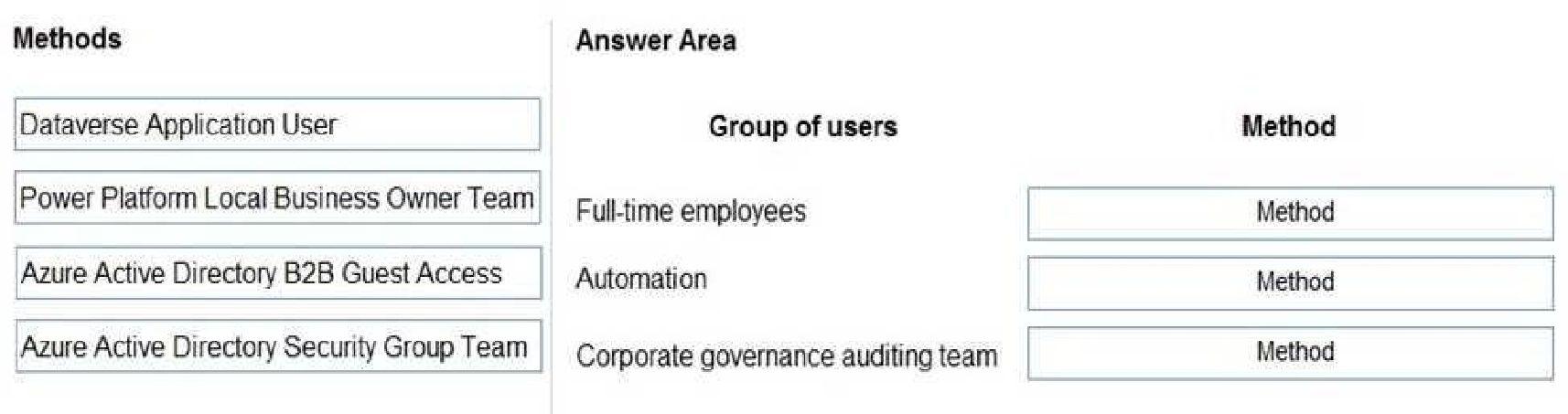
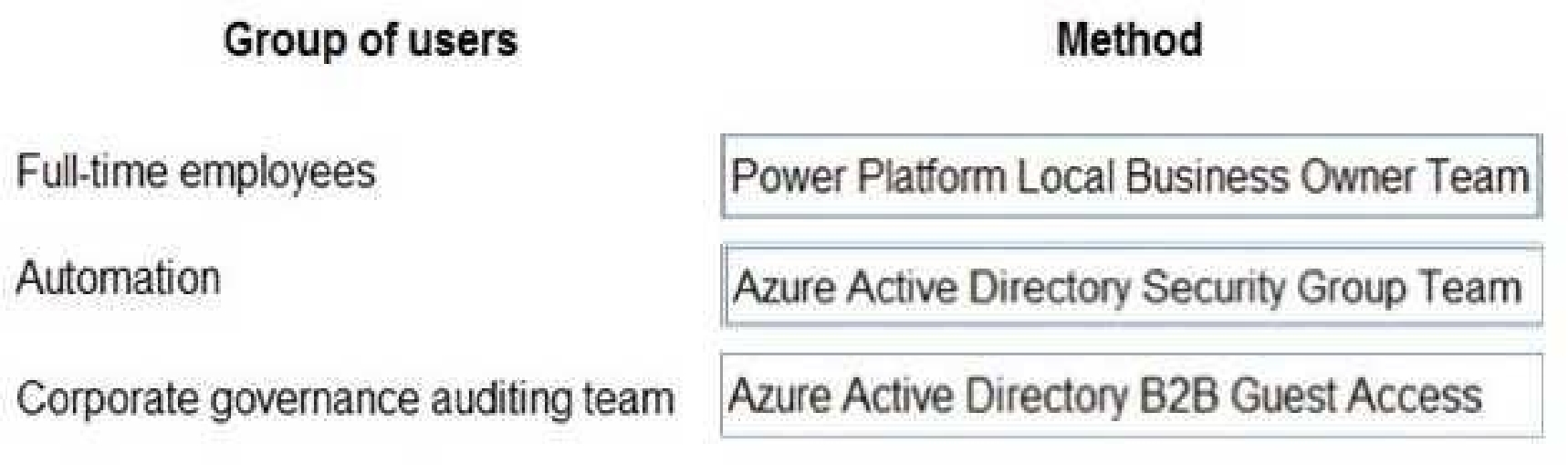
Box 1: Power Platform Local Business Owner Team
Owner team: An owner team owns records and has security roles assigned to the team. A user's
privileges can come from their individual security roles, those of the teams that they're part of or the
ones they inherit. A team has full access rights on the records that the team owns. Team members
are added manually to the owner team.
Scenario: Employee authentication with the existing system is provided by an on-premises Active
Directory instance that is linked to Azure Active Directory.
Box 2: Azure Active Directory Security Group Team
An Azure Active Directory (Azure AD) group team. Similar to owner team, an Azure AD group team
can own records and can have security roles assigned to the team.
Note: The administration of app and data access for Microsoft Dataverse has been extended to allow
administrators to use their organization's Azure Active Directory (Azure AD) groups to manage access
rights for licensed Dataverse users.
Box 3: Azure Active Directory B2B Guest Access
An Azure AD B2B collaboration user is an external user, typically from a partner organization, that
you invite to sign into your Azure AD organization using their own credentials. This B2B collaboration
user (also generally referred to as a guest user) can then access the apps and resources you want to
share with them. A user object is created for the B2B collaboration user in the same directory as your
employees. B2B collaboration user objects have limited privileges in your directory by default, and
they can be managed like employees, added to groups, and so on.
Scenario: Before First Up signs a contract to place workers at a client company, a member of the
audit team visits the company and interviews company management. Audit members use different
types of devices including Android and iOS devices. First Up has no plans to require the use of a
single type of device.
Reference:
[https://docs.microsoft.com/en-us/power-platform/admin/manage-group-teams](https://docs.microsoft.com/en-us/power-platform/admin/manage-group-teams)
[https://docs.microsoft.com/en-us/azure/active-directory/external-identities/user-properties](https://docs.microsoft.com/en-us/azure/active-directory/external-identities/user-properties)
PL-600: Microsoft Power Platform Solution Architect Practice test unlocks all online simulator questions
Thank you for choosing the free version of the PL-600: Microsoft Power Platform Solution Architect practice test! Further deepen your knowledge on Microsoft Simulator; by unlocking the full version of our PL-600: Microsoft Power Platform Solution Architect Simulator you will be able to take tests with over 255 constantly updated questions and easily pass your exam. 98% of people pass the exam in the first attempt after preparing with our 255 questions.
BUY NOWWhat to expect from our PL-600: Microsoft Power Platform Solution Architect practice tests and how to prepare for any exam?
The PL-600: Microsoft Power Platform Solution Architect Simulator Practice Tests are part of the Microsoft Database and are the best way to prepare for any PL-600: Microsoft Power Platform Solution Architect exam. The PL-600: Microsoft Power Platform Solution Architect practice tests consist of 255 questions and are written by experts to help you and prepare you to pass the exam on the first attempt. The PL-600: Microsoft Power Platform Solution Architect database includes questions from previous and other exams, which means you will be able to practice simulating past and future questions. Preparation with PL-600: Microsoft Power Platform Solution Architect Simulator will also give you an idea of the time it will take to complete each section of the PL-600: Microsoft Power Platform Solution Architect practice test . It is important to note that the PL-600: Microsoft Power Platform Solution Architect Simulator does not replace the classic PL-600: Microsoft Power Platform Solution Architect study guides; however, the Simulator provides valuable insights into what to expect and how much work needs to be done to prepare for the PL-600: Microsoft Power Platform Solution Architect exam.
BUY NOWPL-600: Microsoft Power Platform Solution Architect Practice test therefore represents an excellent tool to prepare for the actual exam together with our Microsoft practice test . Our PL-600: Microsoft Power Platform Solution Architect Simulator will help you assess your level of preparation and understand your strengths and weaknesses. Below you can read all the quizzes you will find in our PL-600: Microsoft Power Platform Solution Architect Simulator and how our unique PL-600: Microsoft Power Platform Solution Architect Database made up of real questions:
Info quiz:
- Quiz name:PL-600: Microsoft Power Platform Solution Architect
- Total number of questions:255
- Number of questions for the test:50
- Pass score:80%
You can prepare for the PL-600: Microsoft Power Platform Solution Architect exams with our mobile app. It is very easy to use and even works offline in case of network failure, with all the functions you need to study and practice with our PL-600: Microsoft Power Platform Solution Architect Simulator.
Use our Mobile App, available for both Android and iOS devices, with our PL-600: Microsoft Power Platform Solution Architect Simulator . You can use it anywhere and always remember that our mobile app is free and available on all stores.
Our Mobile App contains all PL-600: Microsoft Power Platform Solution Architect practice tests which consist of 255 questions and also provide study material to pass the final PL-600: Microsoft Power Platform Solution Architect exam with guaranteed success. Our PL-600: Microsoft Power Platform Solution Architect database contain hundreds of questions and Microsoft Tests related to PL-600: Microsoft Power Platform Solution Architect Exam. This way you can practice anywhere you want, even offline without the internet.
BUY NOW