Quiz SC-200: Microsoft Security Operations Analyst
Quiz
Case study
Overview
This is a case study. Case studies are not timed separately. You can use as much exam time as you
would like to complete each case. However, there may be additional case studies and sections on
this exam. You must manage your time to ensure that you are able to complete all questions included
on this exam in the time provided.
To answer the questions included in a case study, you will need to reference information that is
provided in the case study. Case studies might contain exhibits and other resources that provide
more information about the scenario that is described in the case study. Each question is
independent of the other questions in this case study.
At the end of this case study, a review screen will appear. This screen allows you to review your
answers and to make changes before you move to the next section of the exam. After you begin a
new section, you cannot return to this section.
To start the case study
To display the first question in this case study, click the Next button. Use the buttons in the left pane
to explore the content of the case study before you answer the questions. Clicking these buttons
displays information such as business requirements, existing environment, and problem statements.
If the case study has an All Information tab, note that the information displayed is identical to the
information displayed on the subsequent tabs. When you are ready to answer a question, click the
Question button to return to the question.
Overview
A company named Contoso Ltd. has a main office and five branch offices located throughout North
America. The main office is in Seattle. The branch offices are in Toronto, Miami, Houston, Los
Angeles, and Vancouver.
Contoso has a subsidiary named Fabrikam, Ltd. that has offices in New York and San Francisco.
Existing Environment
End-User Environment
All users at Contoso use Windows 10 devices. Each user is licensed for Microsoft 365. In addition, iOS
devices are distributed to the members of the sales team at Contoso.
Cloud and Hybrid Infrastructure
All Contoso applications are deployed to Azure.
You enable Microsoft Cloud App Security.
Contoso and Fabrikam have different Azure Active Directory (Azure AD) tenants. Fabrikam recently
purchased an Azure subscription and enabled Azure Defender for all supported resource types.
Current Problems
The security team at Contoso receives a large number of cybersecurity alerts. The security team
spends too much time identifying which cybersecurity alerts are legitimate threats, and which are
not.
The Contoso sales team uses only iOS devices. The sales team members exchange files with
customers by using a variety of third-party tools. In the past, the sales team experienced various
attacks on their devices.
The marketing team at Contoso has several Microsoft SharePoint Online sites for collaborating with
external vendors. The marketing team has had several incidents in which vendors uploaded files that
contain malware.
The executive team at Contoso suspects a security breach. The executive team requests that you
identify which files had more than five activities during the past 48 hours, including data access,
download, or deletion for Microsoft Cloud App Security-protected applications.
Requirements
Planned Changes
Contoso plans to integrate the security operations of both companies and manage all security
operations centrally.
Technical Requirements
Contoso identifies the following technical requirements:
Receive alerts if an Azure virtual machine is under brute force attack.
Use Azure Sentinel to reduce organizational risk by rapidly remediating active attacks on the
environment.
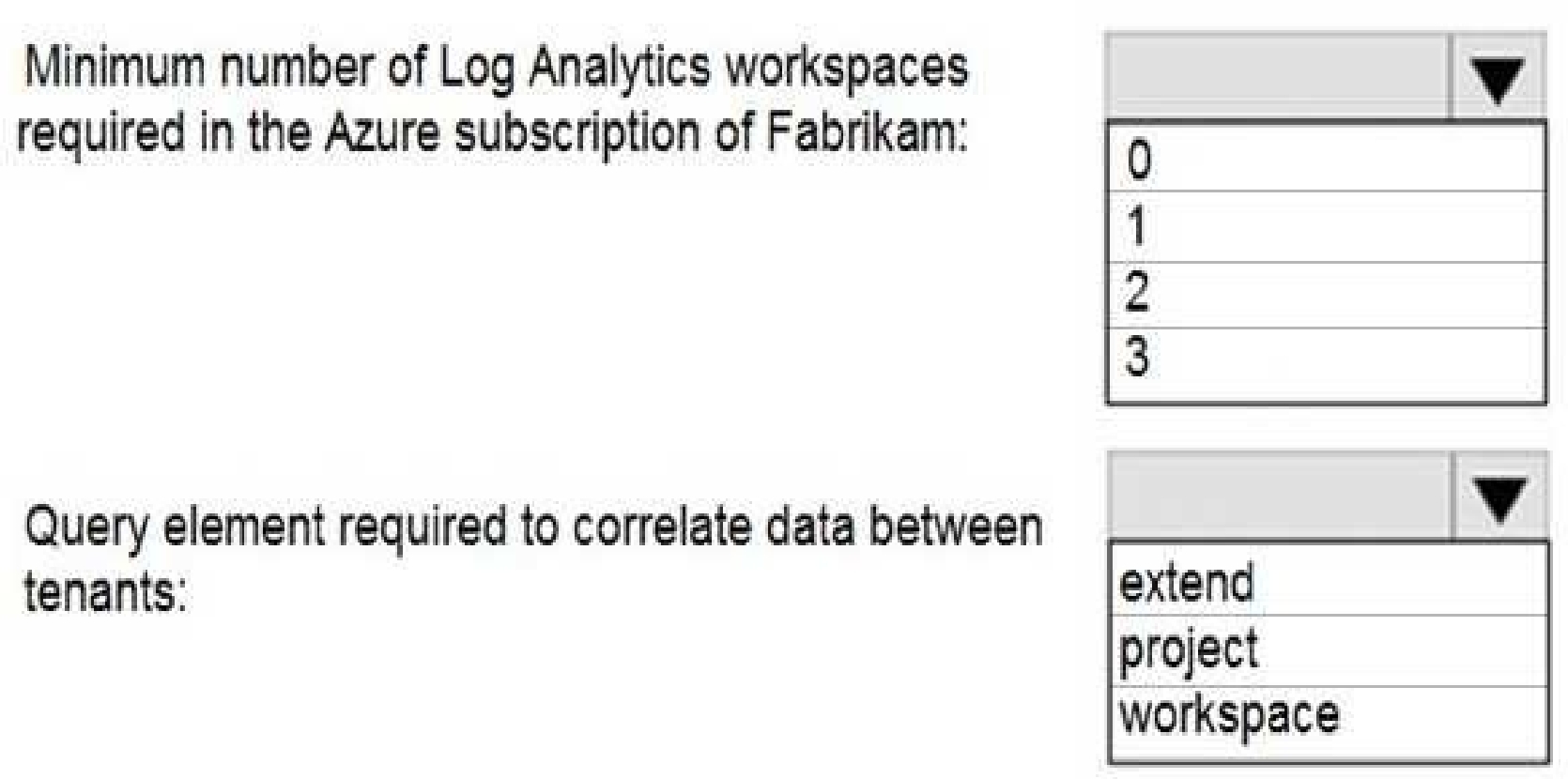
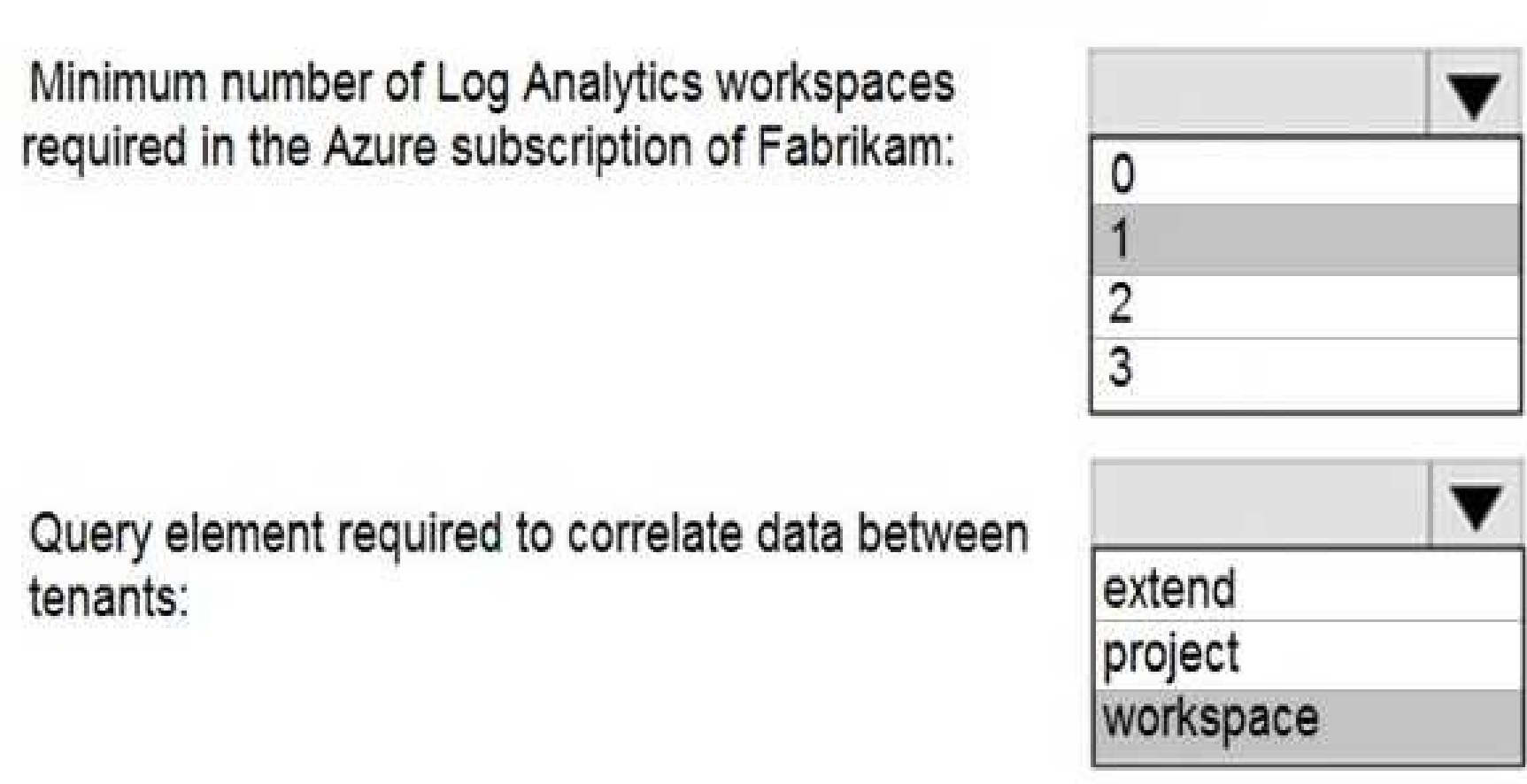
Implement Azure Sentinel queries that correlate data across the Azure AD tenants of Contoso and
Fabrikam.
Develop a procedure to remediate Azure Defender for Key Vault alerts for Fabrikam in case of
external attackers and a potential compromise of its own Azure AD applications.
Identify all cases of users who failed to sign in to an Azure resource for the first time from a given
country. A junior security administrator provides you with the following incomplete query.
BehaviorAnalytics
| where ActivityType == "FailedLogOn"
| where == True
Quiz
Case study
Overview
This is a case study. Case studies are not timed separately. You can use as much exam time as you
would like to complete each case. However, there may be additional case studies and sections on
this exam. You must manage your time to ensure that you are able to complete all questions included
on this exam in the time provided.
To answer the questions included in a case study, you will need to reference information that is
provided in the case study. Case studies might contain exhibits and other resources that provide
more information about the scenario that is described in the case study. Each question is
independent of the other questions in this case study.
At the end of this case study, a review screen will appear. This screen allows you to review your
answers and to make changes before you move to the next section of the exam. After you begin a
new section, you cannot return to this section.
To start the case study
To display the first question in this case study, click the Next button. Use the buttons in the left pane
to explore the content of the case study before you answer the questions. Clicking these buttons
displays information such as business requirements, existing environment, and problem statements.
If the case study has an All Information tab, note that the information displayed is identical to the
information displayed on the subsequent tabs. When you are ready to answer a question, click the
Question button to return to the question.
Overview
A company named Contoso Ltd. has a main office and five branch offices located throughout North
America. The main office is in Seattle. The branch offices are in Toronto, Miami, Houston, Los
Angeles, and Vancouver.
Contoso has a subsidiary named Fabrikam, Ltd. that has offices in New York and San Francisco.
Existing Environment
End-User Environment
All users at Contoso use Windows 10 devices. Each user is licensed for Microsoft 365. In addition, iOS
devices are distributed to the members of the sales team at Contoso.
Cloud and Hybrid Infrastructure
All Contoso applications are deployed to Azure.
You enable Microsoft Cloud App Security.
Contoso and Fabrikam have different Azure Active Directory (Azure AD) tenants. Fabrikam recently
purchased an Azure subscription and enabled Azure Defender for all supported resource types.
Current Problems
The security team at Contoso receives a large number of cybersecurity alerts. The security team
spends too much time identifying which cybersecurity alerts are legitimate threats, and which are
not.
The Contoso sales team uses only iOS devices. The sales team members exchange files with
customers by using a variety of third-party tools. In the past, the sales team experienced various
attacks on their devices.
The marketing team at Contoso has several Microsoft SharePoint Online sites for collaborating with
external vendors. The marketing team has had several incidents in which vendors uploaded files that
contain malware.
The executive team at Contoso suspects a security breach. The executive team requests that you
identify which files had more than five activities during the past 48 hours, including data access,
download, or deletion for Microsoft Cloud App Security-protected applications.
Requirements
Planned Changes
Contoso plans to integrate the security operations of both companies and manage all security
operations centrally.
Technical Requirements
Contoso identifies the following technical requirements:
Receive alerts if an Azure virtual machine is under brute force attack.
Use Azure Sentinel to reduce organizational risk by rapidly remediating active attacks on the
environment.
Implement Azure Sentinel queries that correlate data across the Azure AD tenants of Contoso and
Fabrikam.
Develop a procedure to remediate Azure Defender for Key Vault alerts for Fabrikam in case of
external attackers and a potential compromise of its own Azure AD applications.
Identify all cases of users who failed to sign in to an Azure resource for the first time from a given
country. A junior security administrator provides you with the following incomplete query.
BehaviorAnalytics
| where ActivityType == "FailedLogOn"
| where == True
Quiz
Case study
Overview
This is a case study. Case studies are not timed separately. You can use as much exam time as you
would like to complete each case. However, there may be additional case studies and sections on
this exam. You must manage your time to ensure that you are able to complete all questions included
on this exam in the time provided.
To answer the questions included in a case study, you will need to reference information that is
provided in the case study. Case studies might contain exhibits and other resources that provide
more information about the scenario that is described in the case study. Each question is
independent of the other questions in this case study.
At the end of this case study, a review screen will appear. This screen allows you to review your
answers and to make changes before you move to the next section of the exam. After you begin a
new section, you cannot return to this section.
To start the case study
To display the first question in this case study, click the Next button. Use the buttons in the left pane
to explore the content of the case study before you answer the questions. Clicking these buttons
displays information such as business requirements, existing environment, and problem statements.
If the case study has an All Information tab, note that the information displayed is identical to the
information displayed on the subsequent tabs. When you are ready to answer a question, click the
Question button to return to the question.
Overview
A company named Contoso Ltd. has a main office and five branch offices located throughout North
America. The main office is in Seattle. The branch offices are in Toronto, Miami, Houston, Los
Angeles, and Vancouver.
Contoso has a subsidiary named Fabrikam, Ltd. that has offices in New York and San Francisco.
Existing Environment
End-User Environment
All users at Contoso use Windows 10 devices. Each user is licensed for Microsoft 365. In addition, iOS
devices are distributed to the members of the sales team at Contoso.
Cloud and Hybrid Infrastructure
All Contoso applications are deployed to Azure.
You enable Microsoft Cloud App Security.
Contoso and Fabrikam have different Azure Active Directory (Azure AD) tenants. Fabrikam recently
purchased an Azure subscription and enabled Azure Defender for all supported resource types.
Current Problems
The security team at Contoso receives a large number of cybersecurity alerts. The security team
spends too much time identifying which cybersecurity alerts are legitimate threats, and which are
not.
The Contoso sales team uses only iOS devices. The sales team members exchange files with
customers by using a variety of third-party tools. In the past, the sales team experienced various
attacks on their devices.
The marketing team at Contoso has several Microsoft SharePoint Online sites for collaborating with
external vendors. The marketing team has had several incidents in which vendors uploaded files that
contain malware.
The executive team at Contoso suspects a security breach. The executive team requests that you
identify which files had more than five activities during the past 48 hours, including data access,
download, or deletion for Microsoft Cloud App Security-protected applications.
Requirements
Planned Changes
Contoso plans to integrate the security operations of both companies and manage all security
operations centrally.
Technical Requirements
Contoso identifies the following technical requirements:
Receive alerts if an Azure virtual machine is under brute force attack.
Use Azure Sentinel to reduce organizational risk by rapidly remediating active attacks on the
environment.
Implement Azure Sentinel queries that correlate data across the Azure AD tenants of Contoso and
Fabrikam.
Develop a procedure to remediate Azure Defender for Key Vault alerts for Fabrikam in case of
external attackers and a potential compromise of its own Azure AD applications.
Identify all cases of users who failed to sign in to an Azure resource for the first time from a given
country. A junior security administrator provides you with the following incomplete query.
BehaviorAnalytics
| where ActivityType == "FailedLogOn"
| where == True
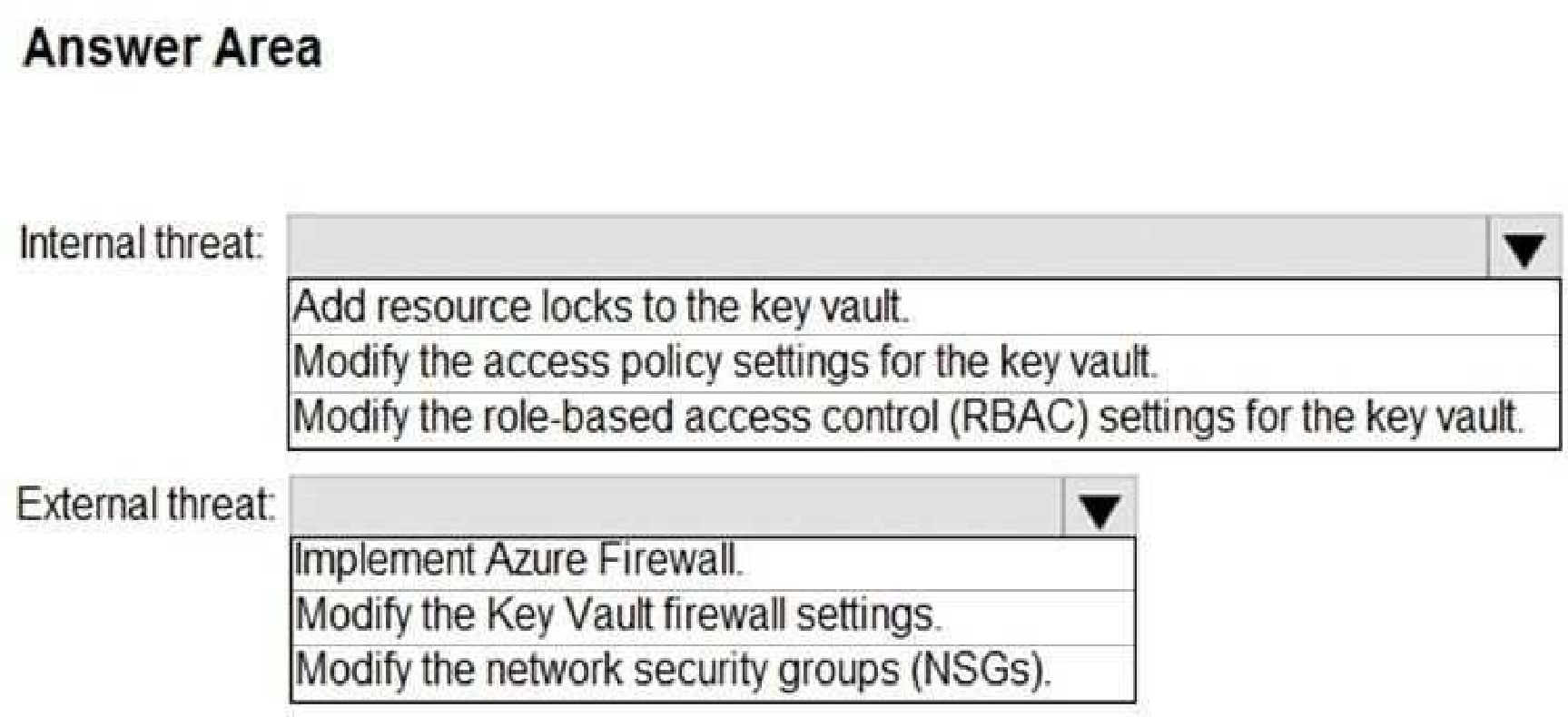
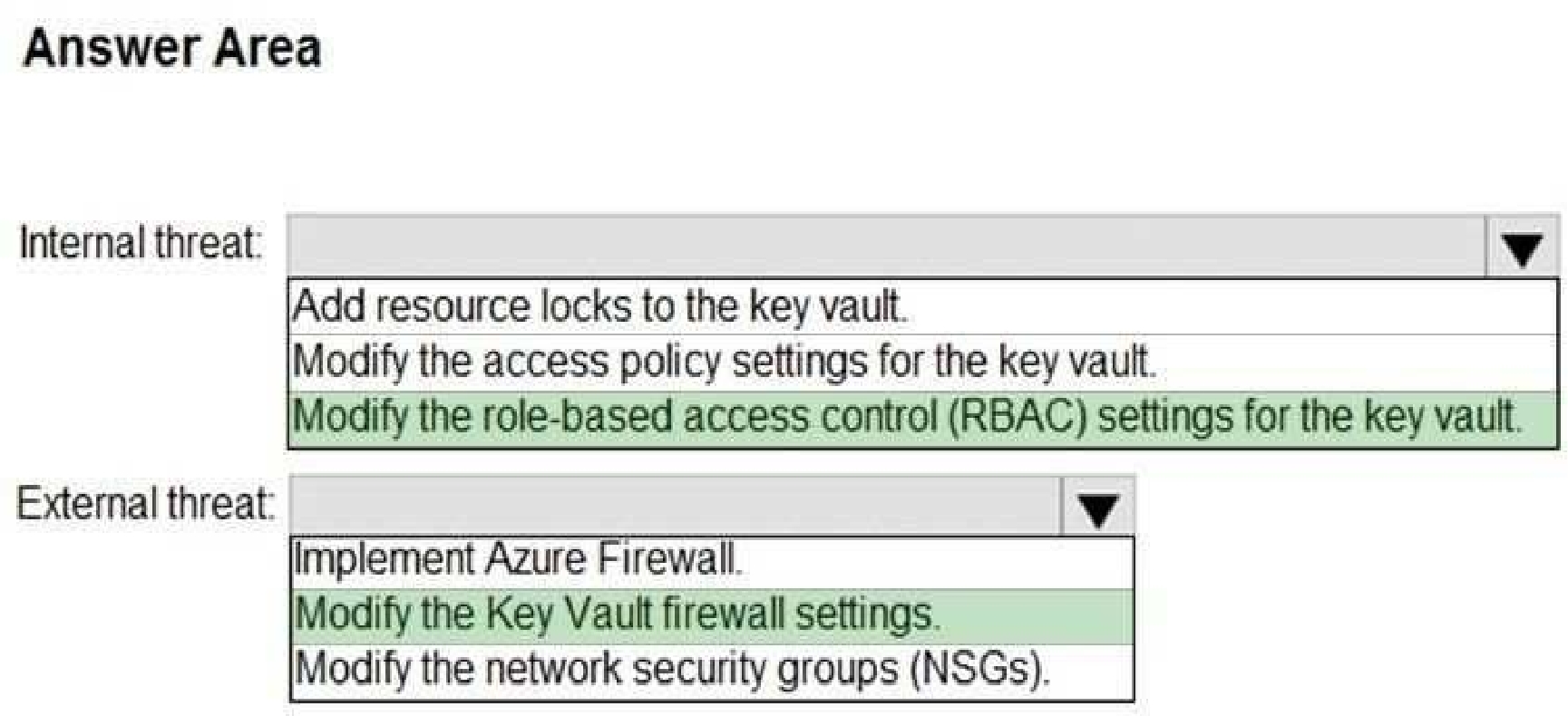
You need to recommend remediation actions for the Azure Defender alerts for Fabrikam.
What should you recommend for each threat? To answer, select the appropriate options in the
answer area.
NOTE: Each correct selection is worth one point.
Quiz
Case study
Overview
This is a case study. Case studies are not timed separately. You can use as much exam time as you
would like to complete each case. However, there may be additional case studies and sections on
this exam. You must manage your time to ensure that you are able to complete all questions included
on this exam in the time provided.
To answer the questions included in a case study, you will need to reference information that is
provided in the case study. Case studies might contain exhibits and other resources that provide
more information about the scenario that is described in the case study. Each question is
independent of the other questions in this case study.
At the end of this case study, a review screen will appear. This screen allows you to review your
answers and to make changes before you move to the next section of the exam. After you begin a
new section, you cannot return to this section.
To start the case study
To display the first question in this case study, click the Next button. Use the buttons in the left pane
to explore the content of the case study before you answer the questions. Clicking these buttons
displays information such as business requirements, existing environment, and problem statements.
If the case study has an All Information tab, note that the information displayed is identical to the
information displayed on the subsequent tabs. When you are ready to answer a question, click the
Question button to return to the question.
Overview
A company named Contoso Ltd. has a main office and five branch offices located throughout North
America. The main office is in Seattle. The branch offices are in Toronto, Miami, Houston, Los
Angeles, and Vancouver.
Contoso has a subsidiary named Fabrikam, Ltd. that has offices in New York and San Francisco.
Existing Environment
End-User Environment
All users at Contoso use Windows 10 devices. Each user is licensed for Microsoft 365. In addition, iOS
devices are distributed to the members of the sales team at Contoso.
Cloud and Hybrid Infrastructure
All Contoso applications are deployed to Azure.
You enable Microsoft Cloud App Security.
Contoso and Fabrikam have different Azure Active Directory (Azure AD) tenants. Fabrikam recently
purchased an Azure subscription and enabled Azure Defender for all supported resource types.
Current Problems
The security team at Contoso receives a large number of cybersecurity alerts. The security team
spends too much time identifying which cybersecurity alerts are legitimate threats, and which are
not.
The Contoso sales team uses only iOS devices. The sales team members exchange files with
customers by using a variety of third-party tools. In the past, the sales team experienced various
attacks on their devices.
The marketing team at Contoso has several Microsoft SharePoint Online sites for collaborating with
external vendors. The marketing team has had several incidents in which vendors uploaded files that
contain malware.
The executive team at Contoso suspects a security breach. The executive team requests that you
identify which files had more than five activities during the past 48 hours, including data access,
download, or deletion for Microsoft Cloud App Security-protected applications.
Requirements
Planned Changes
Contoso plans to integrate the security operations of both companies and manage all security
operations centrally.
Technical Requirements
Contoso identifies the following technical requirements:
Receive alerts if an Azure virtual machine is under brute force attack.
Use Azure Sentinel to reduce organizational risk by rapidly remediating active attacks on the
environment.
Implement Azure Sentinel queries that correlate data across the Azure AD tenants of Contoso and
Fabrikam.
Develop a procedure to remediate Azure Defender for Key Vault alerts for Fabrikam in case of
external attackers and a potential compromise of its own Azure AD applications.
Identify all cases of users who failed to sign in to an Azure resource for the first time from a given
country. A junior security administrator provides you with the following incomplete query.
BehaviorAnalytics
| where ActivityType == "FailedLogOn"
| where == True
machines. What should you include in the recommendation?
Quiz
Case study
Overview
This is a case study. Case studies are not timed separately. You can use as much exam time as you
would like to complete each case. However, there may be additional case studies and sections on
this exam. You must manage your time to ensure that you are able to complete all questions included
on this exam in the time provided.
To answer the questions included in a case study, you will need to reference information that is
provided in the case study. Case studies might contain exhibits and other resources that provide
more information about the scenario that is described in the case study. Each question is
independent of the other questions in this case study.
At the end of this case study, a review screen will appear. This screen allows you to review your
answers and to make changes before you move to the next section of the exam. After you begin a
new section, you cannot return to this section.
To start the case study
To display the first question in this case study, click the Next button. Use the buttons in the left pane
to explore the content of the case study before you answer the questions. Clicking these buttons
displays information such as business requirements, existing environment, and problem statements.
If the case study has an All Information tab, note that the information displayed is identical to the
information displayed on the subsequent tabs. When you are ready to answer a question, click the
Question button to return to the question.
Overview
A company named Contoso Ltd. has a main office and five branch offices located throughout North
America. The main office is in Seattle. The branch offices are in Toronto, Miami, Houston, Los
Angeles, and Vancouver.
Contoso has a subsidiary named Fabrikam, Ltd. that has offices in New York and San Francisco.
Existing Environment
End-User Environment
All users at Contoso use Windows 10 devices. Each user is licensed for Microsoft 365. In addition, iOS
devices are distributed to the members of the sales team at Contoso.
Cloud and Hybrid Infrastructure
All Contoso applications are deployed to Azure.
You enable Microsoft Cloud App Security.
Contoso and Fabrikam have different Azure Active Directory (Azure AD) tenants. Fabrikam recently
purchased an Azure subscription and enabled Azure Defender for all supported resource types.
Current Problems
The security team at Contoso receives a large number of cybersecurity alerts. The security team
spends too much time identifying which cybersecurity alerts are legitimate threats, and which are
not.
The Contoso sales team uses only iOS devices. The sales team members exchange files with
customers by using a variety of third-party tools. In the past, the sales team experienced various
attacks on their devices.
The marketing team at Contoso has several Microsoft SharePoint Online sites for collaborating with
external vendors. The marketing team has had several incidents in which vendors uploaded files that
contain malware.
The executive team at Contoso suspects a security breach. The executive team requests that you
identify which files had more than five activities during the past 48 hours, including data access,
download, or deletion for Microsoft Cloud App Security-protected applications.
Requirements
Planned Changes
Contoso plans to integrate the security operations of both companies and manage all security
operations centrally.
Technical Requirements
Contoso identifies the following technical requirements:
Receive alerts if an Azure virtual machine is under brute force attack.
Use Azure Sentinel to reduce organizational risk by rapidly remediating active attacks on the
environment.
Implement Azure Sentinel queries that correlate data across the Azure AD tenants of Contoso and
Fabrikam.
Develop a procedure to remediate Azure Defender for Key Vault alerts for Fabrikam in case of
external attackers and a potential compromise of its own Azure AD applications.
Identify all cases of users who failed to sign in to an Azure resource for the first time from a given
country. A junior security administrator provides you with the following incomplete query.
BehaviorAnalytics
| where ActivityType == "FailedLogOn"
| where == True
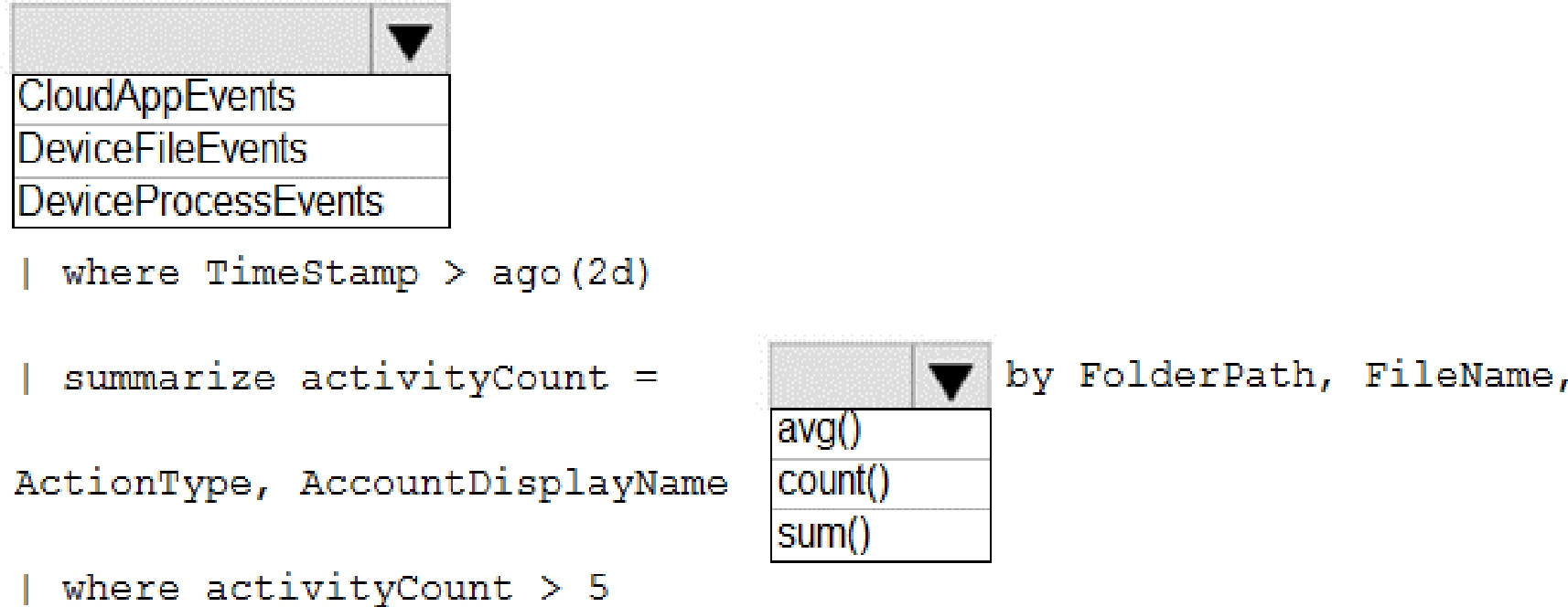
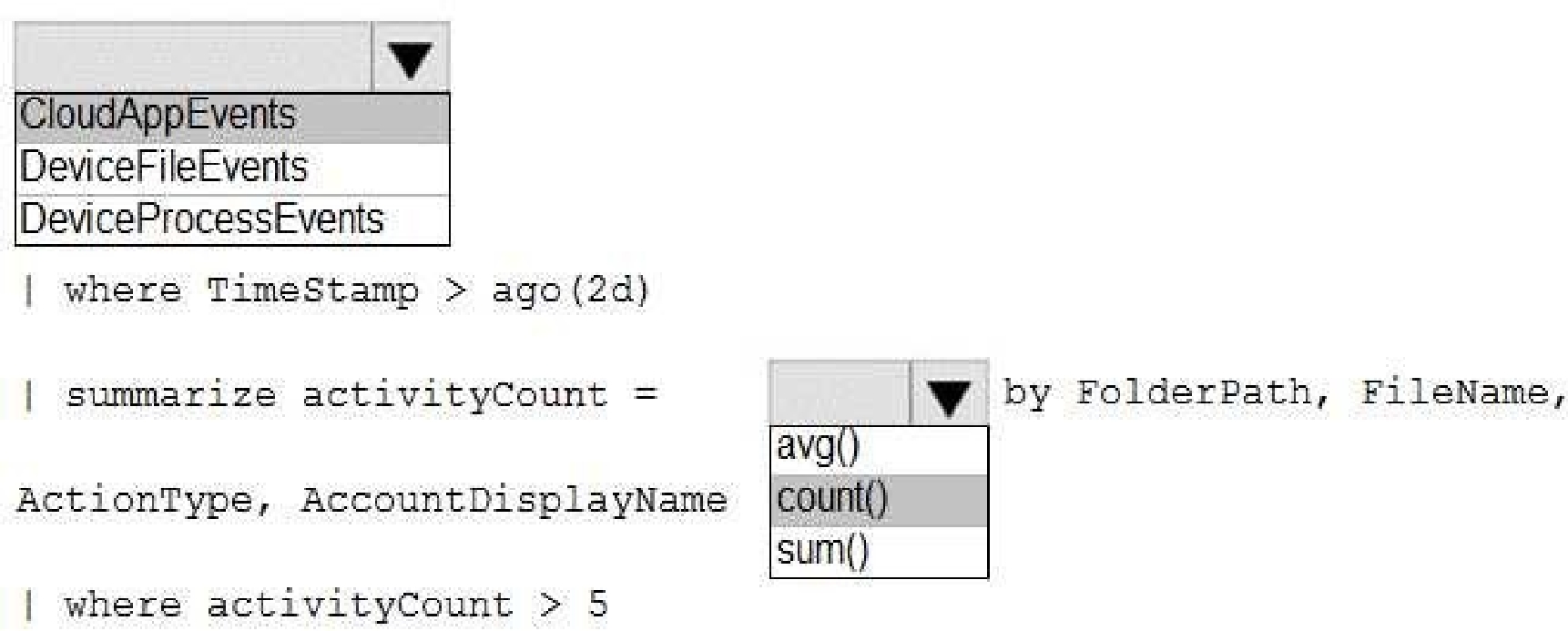
How should you complete the query? To answer, select the appropriate options in the answer area.
NOTE: Each correct selection is worth one point.
Quiz
Case study
Overview
This is a case study. Case studies are not timed separately. You can use as much exam time as you
would like to complete each case. However, there may be additional case studies and sections on
this exam. You must manage your time to ensure that you are able to complete all questions included
on this exam in the time provided.
To answer the questions included in a case study, you will need to reference information that is
provided in the case study. Case studies might contain exhibits and other resources that provide
more information about the scenario that is described in the case study. Each question is
independent of the other questions in this case study.
At the end of this case study, a review screen will appear. This screen allows you to review your
answers and to make changes before you move to the next section of the exam. After you begin a
new section, you cannot return to this section.
To start the case study
To display the first question in this case study, click the Next button. Use the buttons in the left pane
to explore the content of the case study before you answer the questions. Clicking these buttons
displays information such as business requirements, existing environment, and problem statements.
If the case study has an All Information tab, note that the information displayed is identical to the
information displayed on the subsequent tabs. When you are ready to answer a question, click the
Question button to return to the question.
Overview
A company named Contoso Ltd. has a main office and five branch offices located throughout North
America. The main office is in Seattle. The branch offices are in Toronto, Miami, Houston, Los
Angeles, and Vancouver.
Contoso has a subsidiary named Fabrikam, Ltd. that has offices in New York and San Francisco.
Existing Environment
End-User Environment
All users at Contoso use Windows 10 devices. Each user is licensed for Microsoft 365. In addition, iOS
devices are distributed to the members of the sales team at Contoso.
Cloud and Hybrid Infrastructure
All Contoso applications are deployed to Azure.
You enable Microsoft Cloud App Security.
Contoso and Fabrikam have different Azure Active Directory (Azure AD) tenants. Fabrikam recently
purchased an Azure subscription and enabled Azure Defender for all supported resource types.
Current Problems
The security team at Contoso receives a large number of cybersecurity alerts. The security team
spends too much time identifying which cybersecurity alerts are legitimate threats, and which are
not.
The Contoso sales team uses only iOS devices. The sales team members exchange files with
customers by using a variety of third-party tools. In the past, the sales team experienced various
attacks on their devices.
The marketing team at Contoso has several Microsoft SharePoint Online sites for collaborating with
external vendors. The marketing team has had several incidents in which vendors uploaded files that
contain malware.
The executive team at Contoso suspects a security breach. The executive team requests that you
identify which files had more than five activities during the past 48 hours, including data access,
download, or deletion for Microsoft Cloud App Security-protected applications.
Requirements
Planned Changes
Contoso plans to integrate the security operations of both companies and manage all security
operations centrally.
Technical Requirements
Contoso identifies the following technical requirements:
Receive alerts if an Azure virtual machine is under brute force attack.
Use Azure Sentinel to reduce organizational risk by rapidly remediating active attacks on the
environment.
Implement Azure Sentinel queries that correlate data across the Azure AD tenants of Contoso and
Fabrikam.
Develop a procedure to remediate Azure Defender for Key Vault alerts for Fabrikam in case of
external attackers and a potential compromise of its own Azure AD applications.
Identify all cases of users who failed to sign in to an Azure resource for the first time from a given
country. A junior security administrator provides you with the following incomplete query.
BehaviorAnalytics
| where ActivityType == "FailedLogOn"
| where == True
What should you include in the solution?
Quiz
Case study
Overview
This is a case study. Case studies are not timed separately. You can use as much exam time as you
would like to complete each case. However, there may be additional case studies and sections on
this exam. You must manage your time to ensure that you are able to complete all questions included
on this exam in the time provided.
To answer the questions included in a case study, you will need to reference information that is
provided in the case study. Case studies might contain exhibits and other resources that provide
more information about the scenario that is described in the case study. Each question is
independent of the other questions in this case study.
At the end of this case study, a review screen will appear. This screen allows you to review your
answers and to make changes before you move to the next section of the exam. After you begin a
new section, you cannot return to this section.
To start the case study
To display the first question in this case study, click the Next button. Use the buttons in the left pane
to explore the content of the case study before you answer the questions. Clicking these buttons
displays information such as business requirements, existing environment, and problem statements.
If the case study has an All Information tab, note that the information displayed is identical to the
information displayed on the subsequent tabs. When you are ready to answer a question, click the
Question button to return to the question.
Overview
A company named Contoso Ltd. has a main office and five branch offices located throughout North
America. The main office is in Seattle. The branch offices are in Toronto, Miami, Houston, Los
Angeles, and Vancouver.
Contoso has a subsidiary named Fabrikam, Ltd. that has offices in New York and San Francisco.
Existing Environment
End-User Environment
All users at Contoso use Windows 10 devices. Each user is licensed for Microsoft 365. In addition, iOS
devices are distributed to the members of the sales team at Contoso.
Cloud and Hybrid Infrastructure
All Contoso applications are deployed to Azure.
You enable Microsoft Cloud App Security.
Contoso and Fabrikam have different Azure Active Directory (Azure AD) tenants. Fabrikam recently
purchased an Azure subscription and enabled Azure Defender for all supported resource types.
Current Problems
The security team at Contoso receives a large number of cybersecurity alerts. The security team
spends too much time identifying which cybersecurity alerts are legitimate threats, and which are
not.
The Contoso sales team uses only iOS devices. The sales team members exchange files with
customers by using a variety of third-party tools. In the past, the sales team experienced various
attacks on their devices.
The marketing team at Contoso has several Microsoft SharePoint Online sites for collaborating with
external vendors. The marketing team has had several incidents in which vendors uploaded files that
contain malware.
The executive team at Contoso suspects a security breach. The executive team requests that you
identify which files had more than five activities during the past 48 hours, including data access,
download, or deletion for Microsoft Cloud App Security-protected applications.
Requirements
Planned Changes
Contoso plans to integrate the security operations of both companies and manage all security
operations centrally.
Technical Requirements
Contoso identifies the following technical requirements:
Receive alerts if an Azure virtual machine is under brute force attack.
Use Azure Sentinel to reduce organizational risk by rapidly remediating active attacks on the
environment.
Implement Azure Sentinel queries that correlate data across the Azure AD tenants of Contoso and
Fabrikam.
Develop a procedure to remediate Azure Defender for Key Vault alerts for Fabrikam in case of
external attackers and a potential compromise of its own Azure AD applications.
Identify all cases of users who failed to sign in to an Azure resource for the first time from a given
country. A junior security administrator provides you with the following incomplete query.
BehaviorAnalytics
| where ActivityType == "FailedLogOn"
| where == True
requirements.
What should you include in the solution? To answer, select the appropriate options in the answer
area.
NOTE: Each correct selection is worth one point.
Quiz
Case study
Overview
This is a case study. Case studies are not timed separately. You can use as much exam time as you
would like to complete each case. However, there may be additional case studies and sections on
this exam. You must manage your time to ensure that you are able to complete all questions included
on this exam in the time provided.
To answer the questions included in a case study, you will need to reference information that is
provided in the case study. Case studies might contain exhibits and other resources that provide
more information about the scenario that is described in the case study. Each question is
independent of the other questions in this case study.
At the end of this case study, a review screen will appear. This screen allows you to review your
answers and to make changes before you move to the next section of the exam. After you begin a
new section, you cannot return to this section.
To start the case study
To display the first question in this case study, click the Next button. Use the buttons in the left pane
to explore the content of the case study before you answer the questions. Clicking these buttons
displays information such as business requirements, existing environment, and problem statements.
If the case study has an All Information tab, note that the information displayed is identical to the
information displayed on the subsequent tabs. When you are ready to answer a question, click the
Question button to return to the question.
Overview
A company named Contoso Ltd. has a main office and five branch offices located throughout North
America. The main office is in Seattle. The branch offices are in Toronto, Miami, Houston, Los
Angeles, and Vancouver.
Contoso has a subsidiary named Fabrikam, Ltd. that has offices in New York and San Francisco.
Existing Environment
End-User Environment
All users at Contoso use Windows 10 devices. Each user is licensed for Microsoft 365. In addition, iOS
devices are distributed to the members of the sales team at Contoso.
Cloud and Hybrid Infrastructure
All Contoso applications are deployed to Azure.
You enable Microsoft Cloud App Security.
Contoso and Fabrikam have different Azure Active Directory (Azure AD) tenants. Fabrikam recently
purchased an Azure subscription and enabled Azure Defender for all supported resource types.
Current Problems
The security team at Contoso receives a large number of cybersecurity alerts. The security team
spends too much time identifying which cybersecurity alerts are legitimate threats, and which are
not.
The Contoso sales team uses only iOS devices. The sales team members exchange files with
customers by using a variety of third-party tools. In the past, the sales team experienced various
attacks on their devices.
The marketing team at Contoso has several Microsoft SharePoint Online sites for collaborating with
external vendors. The marketing team has had several incidents in which vendors uploaded files that
contain malware.
The executive team at Contoso suspects a security breach. The executive team requests that you
identify which files had more than five activities during the past 48 hours, including data access,
download, or deletion for Microsoft Cloud App Security-protected applications.
Requirements
Planned Changes
Contoso plans to integrate the security operations of both companies and manage all security
operations centrally.
Technical Requirements
Contoso identifies the following technical requirements:
Receive alerts if an Azure virtual machine is under brute force attack.
Use Azure Sentinel to reduce organizational risk by rapidly remediating active attacks on the
environment.
Implement Azure Sentinel queries that correlate data across the Azure AD tenants of Contoso and
Fabrikam.
Develop a procedure to remediate Azure Defender for Key Vault alerts for Fabrikam in case of
external attackers and a potential compromise of its own Azure AD applications.
Identify all cases of users who failed to sign in to an Azure resource for the first time from a given
country. A junior security administrator provides you with the following incomplete query.
BehaviorAnalytics
| where ActivityType == "FailedLogOn"
| where == True
Where can you find the column name to complete the where clause?
Quiz
Case study
Overview
This is a case study. Case studies are not timed separately. You can use as much exam time as you
would like to complete each case. However, there may be additional case studies and sections on
this exam. You must manage your time to ensure that you are able to complete all questions included
on this exam in the time provided.
To answer the questions included in a case study, you will need to reference information that is
provided in the case study. Case studies might contain exhibits and other resources that provide
more information about the scenario that is described in the case study. Each question is
independent of the other questions in this case study.
At the end of this case study, a review screen will appear. This screen allows you to review your
answers and to make changes before you move to the next section of the exam. After you begin a
new section, you cannot return to this section.
To start the case study
To display the first question in this case study, click the Next button. Use the buttons in the left pane
to explore the content of the case study before you answer the questions. Clicking these buttons
displays information such as business requirements, existing environment, and problem statements.
If the case study has an All Information tab, note that the information displayed is identical to the
information displayed on the subsequent tabs. When you are ready to answer a question, click the
Question button to return to the question.
Overview
Litware Inc. is a renewable company.
Litware has offices in Boston and Seattle. Litware also has remote users located across the United
States. To access Litware resources, including cloud resources, the remote users establish a VPN
connection to either office.
Existing Environment
Identity Environment
The network contains an Active Directory forest named litware.com that syncs to an Azure Active
Directory (Azure AD) tenant named litware.com.
Microsoft 365 Environment
Litware has a Microsoft 365 E5 subscription linked to the litware.com Azure AD tenant. Microsoft
Defender for Endpoint is deployed to all computers that run Windows 10. All Microsoft Cloud App
Security built-in anomaly detection policies are enabled.
Azure Environment
Litware has an Azure subscription linked to the litware.com Azure AD tenant. The subscription
contains resources in the East US Azure region as shown in the following table.

Network Environment
Each Litware office connects directly to the internet and has a site-to-site VPN connection to the
virtual networks in the Azure subscription.
On-premises Environment
The on-premises network contains the computers shown in the following table.

Current problems
Cloud App Security frequently generates false positive alerts when users connect to both offices
simultaneously.
Planned Changes
Litware plans to implement the following changes:
Create and configure Azure Sentinel in the Azure subscription.
Validate Azure Sentinel functionality by using Azure AD test user accounts.
Business Requirements
Litware identifies the following business requirements:
The principle of least privilege must be used whenever possible.

Costs must be minimized, as long as all other requirements are met.

Logs collected by Log Analytics must provide a full audit trail of user activities.

All domain controllers must be protected by using Microsoft Defender for Identity.

Azure Information Protection Requirements
All files that have security labels and are stored on the Windows 10 computers must be available
from the Azure Information Protection – Data discovery dashboard.
Microsoft Defender for Endpoint requirements
All Cloud App Security unsanctioned apps must be blocked on the Windows 10 computers by using
Microsoft Defender for Endpoint.
Microsoft Cloud App Security requirements
Cloud App Security must identify whether a user connection is anomalous based on tenant-level
data.
Azure Defender Requirements
All servers must send logs to the same Log Analytics workspace.
Azure Sentinel Requirements
Litware must meet the following Azure Sentinel requirements:
Integrate Azure Sentinel and Cloud App Security.
Ensure that a user named admin1 can configure Azure Sentinel playbooks.
Create an Azure Sentinel analytics rule based on a custom query. The rule must automatically initiate
the execution of a playbook.
Add notes to events that represent data access from a specific IP address to provide the ability to
reference the IP address when navigating through an investigation graph while hunting.
Create a test rule that generates alerts when inbound access to Microsoft Office 365 by the Azure AD
test user accounts is detected. Alerts generated by the rule must be grouped into individual
incidents, with one incident per test user account.
first?
Quiz
Case study
Overview
This is a case study. Case studies are not timed separately. You can use as much exam time as you
would like to complete each case. However, there may be additional case studies and sections on
this exam. You must manage your time to ensure that you are able to complete all questions included
on this exam in the time provided.
To answer the questions included in a case study, you will need to reference information that is
provided in the case study. Case studies might contain exhibits and other resources that provide
more information about the scenario that is described in the case study. Each question is
independent of the other questions in this case study.
At the end of this case study, a review screen will appear. This screen allows you to review your
answers and to make changes before you move to the next section of the exam. After you begin a
new section, you cannot return to this section.
To start the case study
To display the first question in this case study, click the Next button. Use the buttons in the left pane
to explore the content of the case study before you answer the questions. Clicking these buttons
displays information such as business requirements, existing environment, and problem statements.
If the case study has an All Information tab, note that the information displayed is identical to the
information displayed on the subsequent tabs. When you are ready to answer a question, click the
Question button to return to the question.
Overview
Litware Inc. is a renewable company.
Litware has offices in Boston and Seattle. Litware also has remote users located across the United
States. To access Litware resources, including cloud resources, the remote users establish a VPN
connection to either office.
Existing Environment
Identity Environment
The network contains an Active Directory forest named litware.com that syncs to an Azure Active
Directory (Azure AD) tenant named litware.com.
Microsoft 365 Environment
Litware has a Microsoft 365 E5 subscription linked to the litware.com Azure AD tenant. Microsoft
Defender for Endpoint is deployed to all computers that run Windows 10. All Microsoft Cloud App
Security built-in anomaly detection policies are enabled.
Azure Environment
Litware has an Azure subscription linked to the litware.com Azure AD tenant. The subscription
contains resources in the East US Azure region as shown in the following table.
Network Environment
Each Litware office connects directly to the internet and has a site-to-site VPN connection to the
virtual networks in the Azure subscription.
On-premises Environment
The on-premises network contains the computers shown in the following table.
Current problems
Cloud App Security frequently generates false positive alerts when users connect to both offices
simultaneously.
Planned Changes
Litware plans to implement the following changes:
Create and configure Azure Sentinel in the Azure subscription.
Validate Azure Sentinel functionality by using Azure AD test user accounts.
Business Requirements
Litware identifies the following business requirements:
The principle of least privilege must be used whenever possible.
Costs must be minimized, as long as all other requirements are met.
Logs collected by Log Analytics must provide a full audit trail of user activities.
All domain controllers must be protected by using Microsoft Defender for Identity.
Azure Information Protection Requirements
All files that have security labels and are stored on the Windows 10 computers must be available
from the Azure Information Protection – Data discovery dashboard.
Microsoft Defender for Endpoint requirements
All Cloud App Security unsanctioned apps must be blocked on the Windows 10 computers by using
Microsoft Defender for Endpoint.
Microsoft Cloud App Security requirements
Cloud App Security must identify whether a user connection is anomalous based on tenant-level
data.
Azure Defender Requirements
All servers must send logs to the same Log Analytics workspace.
Azure Sentinel Requirements
Litware must meet the following Azure Sentinel requirements:
Integrate Azure Sentinel and Cloud App Security.
Ensure that a user named admin1 can configure Azure Sentinel playbooks.
Create an Azure Sentinel analytics rule based on a custom query. The rule must automatically initiate
the execution of a playbook.
Add notes to events that represent data access from a specific IP address to provide the ability to
reference the IP address when navigating through an investigation graph while hunting.
Create a test rule that generates alerts when inbound access to Microsoft Office 365 by the Azure AD
test user accounts is detected. Alerts generated by the rule must be grouped into individual
incidents, with one incident per test user account.
requirements. Which policy should you modify?
SC-200: Microsoft Security Operations Analyst Practice test unlocks all online simulator questions
Thank you for choosing the free version of the SC-200: Microsoft Security Operations Analyst practice test! Further deepen your knowledge on Microsoft Simulator; by unlocking the full version of our SC-200: Microsoft Security Operations Analyst Simulator you will be able to take tests with over 370 constantly updated questions and easily pass your exam. 98% of people pass the exam in the first attempt after preparing with our 370 questions.
BUY NOWWhat to expect from our SC-200: Microsoft Security Operations Analyst practice tests and how to prepare for any exam?
The SC-200: Microsoft Security Operations Analyst Simulator Practice Tests are part of the Microsoft Database and are the best way to prepare for any SC-200: Microsoft Security Operations Analyst exam. The SC-200: Microsoft Security Operations Analyst practice tests consist of 370 questions and are written by experts to help you and prepare you to pass the exam on the first attempt. The SC-200: Microsoft Security Operations Analyst database includes questions from previous and other exams, which means you will be able to practice simulating past and future questions. Preparation with SC-200: Microsoft Security Operations Analyst Simulator will also give you an idea of the time it will take to complete each section of the SC-200: Microsoft Security Operations Analyst practice test . It is important to note that the SC-200: Microsoft Security Operations Analyst Simulator does not replace the classic SC-200: Microsoft Security Operations Analyst study guides; however, the Simulator provides valuable insights into what to expect and how much work needs to be done to prepare for the SC-200: Microsoft Security Operations Analyst exam.
BUY NOWSC-200: Microsoft Security Operations Analyst Practice test therefore represents an excellent tool to prepare for the actual exam together with our Microsoft practice test . Our SC-200: Microsoft Security Operations Analyst Simulator will help you assess your level of preparation and understand your strengths and weaknesses. Below you can read all the quizzes you will find in our SC-200: Microsoft Security Operations Analyst Simulator and how our unique SC-200: Microsoft Security Operations Analyst Database made up of real questions:
Info quiz:
- Quiz name:SC-200: Microsoft Security Operations Analyst
- Total number of questions:370
- Number of questions for the test:50
- Pass score:80%
You can prepare for the SC-200: Microsoft Security Operations Analyst exams with our mobile app. It is very easy to use and even works offline in case of network failure, with all the functions you need to study and practice with our SC-200: Microsoft Security Operations Analyst Simulator.
Use our Mobile App, available for both Android and iOS devices, with our SC-200: Microsoft Security Operations Analyst Simulator . You can use it anywhere and always remember that our mobile app is free and available on all stores.
Our Mobile App contains all SC-200: Microsoft Security Operations Analyst practice tests which consist of 370 questions and also provide study material to pass the final SC-200: Microsoft Security Operations Analyst exam with guaranteed success. Our SC-200: Microsoft Security Operations Analyst database contain hundreds of questions and Microsoft Tests related to SC-200: Microsoft Security Operations Analyst Exam. This way you can practice anywhere you want, even offline without the internet.
BUY NOW