The new flashcard feature is useful to memorize questions.
?Change your study mode
At any time, you can change the study mode, and alternate between the practice mode and the exam mode. In practice mode, you can configure for example the number of questions or tests, and other parameters to help you study.
Randomized | 10 Questions per Test | 20 Minutes | 70% to pass|
To re-configure your study mode again and change - for example - the number of tests, whether you have random questions and all other configuration parameters.
?Simulator Configuration
Auto-scroll: You can use the automatic scrolling of the questionnaire that occurs as soon as you answer one or all of the answers to a question correctly. Auto scrolling is activated if you answer a single answer, or as soon as you answer all the mandatory answers. Learning Mode: During learning mode you can get a real time result for your answer.
Free Test
Question: / 10
20:00Min. left
?Restart the current test
To restart the current test by clearing all your answers and the time used up to now. Warning: all answers will be lost.
Question: / 10
4.7(995 Votes)
Quiz
Question 1/101/10
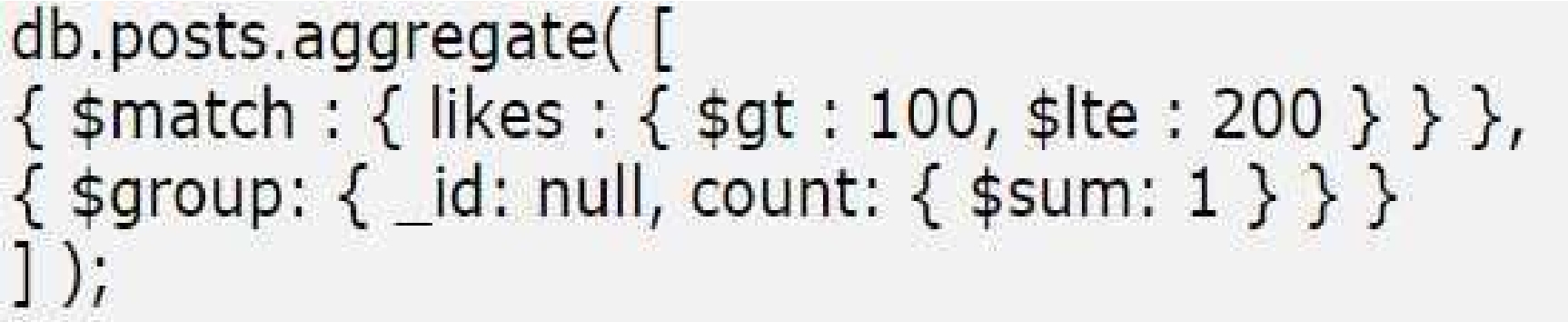
What does the following aggregate query perform?
Select the answer:Select the answer
1 correct answer
A.
Fetches the posts with likes between 100 and 200 and sets their _id as null
B.
Groups the posts by number of likes (101, 102, 103.) by adding 1 every time
C.
Calculates the number of posts with likes between 100 and 200
D.
Fetches the posts with likes between 100 and 200, sets the _id of the first document as null and then increments it 1 every time
The correct answer is C. Calculates the number of posts with likes between 100 and 200. This kind of MongoDB aggregation query typically uses two stages: 1. A match stage This filters the documents to include only posts whose likes are within a certain range, such as between 100 and 200. 2. A group stage This groups the matching documents together and usually applies an accumulator like count: - Using _id: null means all matching documents are placed into one single group. - Using something like $sum: 1 counts each document in that group. So the query is not grouping by the number of likes, and it is not changing any document _id values. Instead, it is counting how many posts fall within the likes range of 100 to 200. Why the other options are incorrect: A. Fetches the posts with likes between 100 and 200 and sets their _id as null This is incorrect because _id: null in a $group stage does not set document _id fields to null. It only means “group everything into one group.” B. Groups the posts by number of likes (101, 102, 103.) by adding 1 every time This is incorrect because the query is not grouping by each like value. If it did, the _id in $group would usually be something like "$likes". D. Fetches the posts with likes between 100 and 200, sets the _id of the first document as null and then increments it 1 every time This is incorrect because aggregation does not work by modifying the first document’s _id and incrementing it. Again, _id: null in $group means one overall group, not document modification. In short, the query filters posts with likes between 100 and 200 and counts them.
Right Answer: C
Quiz
Question 2/102/10
Which of the following commands finds all the documents in the posts collection with post timestamp field as null?
The correct answer is C. In MongoDB, the BSON type code for null is 10. To find documents where a field has the null type, you use the $type operator with the numeric type code 10. So the correct query is: db.posts.find( { post_timestamp: { $type: 10 } } ) Why the other options are incorrect: A. db.posts.find( { post_timestamp: { $fieldtype: null } } ) - $fieldtype is not a valid MongoDB query operator. B. db.posts.find( { post_timestamp: { $type: null } } ) - $type expects either a BSON type name or type code, not null. D. db.posts.find( { post_timestamp: { $fieldtype: 10 } } ) - Again, $fieldtype is not a valid operator. Important note: In MongoDB, querying for null with { post_timestamp: null } can match both documents where the field is explicitly null and documents where the field does not exist. If you specifically want fields whose type is null, $type: 10 is the right choice.
Right Answer: C
Quiz
Question 3/103/10
What is the first task that a secondary would perform on being prompted by another secondary for an election?
Select the answer:Select the answer
1 correct answer
A.
Start the election process for primary
B.
Vote for the first secondary so that it would become the next primary
C.
Vote for itself and then call for election
D.
Connect to primary to confirm its availability
The correct answer is D. Connect to primary to confirm its availability. In a primary-secondary system, the secondary does not immediately start an election just because another secondary asks for one. The first step is typically to check whether the current primary is still alive and reachable. Why this is the first task: - The secondary must verify the status of the primary before taking any election action. - If the primary is still available, there is no need for a new election. - Only if the primary is unavailable or unresponsive should the election process continue. Why the other options are incorrect: - A. Start the election process for primary - This is too aggressive and not the first step. A check of the current primary comes first. - B. Vote for the first secondary so that it would become the next primary - Voting is part of an election protocol, but it happens after confirming that an election is necessary. - C. Vote for itself and then call for election - A secondary does not simply vote for itself as the first action in response to another secondary’s prompt. - D. Connect to primary to confirm its availability - This is correct because availability of the primary must be checked before proceeding with any election. In short, the initial action is validation, not election. The secondary first contacts the primary to see whether it is still available.
Right Answer: D
Quiz
Question 4/104/10
Aggregation Pipelines have a limit of:
Select the answer:Select the answer
1 correct answer
A.
No limit on document and 100 MB RAM
B.
2 MB document and 100 MB RAM
C.
16 MB document and 100 MB RAM
The correct answer is D. 16 MB document and 100 MB RAM. In MongoDB, aggregation pipelines are subject to two important limits: 1. Document size limit: 16 MB - MongoDB documents cannot exceed 16 megabytes in size. - This applies to the output of aggregation stages as well, since aggregation results are still MongoDB documents. 2. Memory limit: 100 MB - By default, aggregation stages that require in-memory processing are limited to 100 megabytes of RAM. - If a stage needs more than this and disk use is not enabled, the operation may fail. - In some cases, MongoDB can spill to disk if allowDiskUse is enabled. Why the other options are incorrect: - A. No limit on document and 100 MB RAM - Incorrect because MongoDB does have a 16 MB document size limit. - C. 2 MB document and 100 MB RAM - Incorrect because the document limit is not 2 MB; it is 16 MB. - D. 16 MB document and 100 MB RAM - Correct because it matches MongoDB’s actual limits. Summary: MongoDB aggregation pipelines must produce documents within the 16 MB document limit, and pipeline stages are limited to 100 MB of RAM unless disk spilling is allowed.
Right Answer: D
Quiz
Question 5/105/10
Which option should be used to update all the documents with the specified condition in the MongoDB query?
Select the answer:Select the answer
1 correct answer
A.
specify {all: true} as the third parameter of update command
B.
updateAII instead of update
C.
specify {updateAII: true} as the third parameter of update command
D.
specify {multi : true} as the third parameter of update command
The correct answer is D. specify {multi: true} as the third parameter of update command. In MongoDB, the update command can be used to modify documents that match a given filter. By default, the basic update operation updates only the first document that matches the condition. If you want to update all matching documents, you need to set the multi option to true. Why D is correct: - multi: true tells MongoDB to apply the update to all documents matching the query condition. - This is the standard way to perform a multi-document update in MongoDB's update syntax. Why the other options are incorrect: - A. specify {all: true} as the third parameter of update command - MongoDB does not use all: true for this purpose. - B. updateAII instead of update - updateAll is not the standard MongoDB command for updating multiple documents. - C. specify {updateAII: true} as the third parameter of update command - This is not a valid MongoDB update option. Example: If you want to update all users with status "inactive" to "active", you would use a multi update so every matching document is modified, not just the first one. In summary: - Use multi: true to update all matching documents. - Therefore, the correct answer is D.
Right Answer: D
Quiz
Question 6/106/10
Which mongodb tools allow us to work with our data in a human readable format?
Select multiple answer: (Choose 2)Select the answer
2 correct answers
A.
mongodump
B.
mongostat
C.
mongoimport
D.
mongoexport
The correct answer is C and D: mongoimport and mongoexport. MongoDB tools can be used for different purposes, and only some of them work with data in a human-readable format such as JSON or CSV. A. mongodump - This tool creates a binary backup of a MongoDB database. - The output is not human-readable. - It is meant for backup and restore, not for viewing or editing data directly. B. mongostat - This tool provides real-time performance statistics for MongoDB. - It shows server metrics, not the actual database data in a human-readable data file format. - So it is not the correct answer for working with data in a readable export/import format. C. mongoimport - This tool imports data from files in human-readable formats such as JSON, CSV, or TSV into MongoDB. - Because it works with readable data files, it is part of the correct answer. D. mongoexport - This tool exports data from MongoDB into human-readable formats such as JSON or CSV. - The exported output can be easily read and edited by humans. - This is also part of the correct answer. Summary: - mongoimport and mongoexport are the MongoDB tools that allow us to work with data in a human-readable format. - Therefore, the correct options are C and D.
Right Answer: C, D
Quiz
Question 7/107/10
In which of the following scenarios is sharding not the correct option. Select all that apply.
Select multiple answer: (Choose 2)Select the answer
2 correct answers
A.
The write operations on the collection are low
B.
The write operations on the collection are very high
C.
The working set in the collection is expected to grow very large in size
D.
The collection is a read intensive collection with less working set
Sharding is a strategy used to distribute data across multiple servers. It is mainly helpful when a single server can no longer comfortably handle the workload, storage size, or both. The question asks when sharding is not the correct option. The correct choices are A and D. Why A is correct: A. The write operations on the collection are low If write volume is low, there is usually no need to add the complexity of sharding. Sharding introduces operational overhead, such as managing shard keys, balancing data, and maintaining distributed queries. When writes are not a bottleneck, a single server or replica set is often sufficient. Why D is correct: D. The collection is a read intensive collection with less working set If the collection is mostly read-intensive and the working set is small, sharding is generally not necessary. A smaller working set means the frequently accessed data can fit well in memory, which improves performance without distributing the data across shards. In such cases, scaling reads can often be handled more simply through indexes, caching, or read replicas rather than sharding. Why B is not correct: B. The write operations on the collection are very high Very high write volume is one of the situations where sharding can be beneficial. Sharding can distribute writes across multiple servers, reducing the load on any single machine. Why C is not correct: C. The working set in the collection is expected to grow very large in size A very large working set can be a reason to consider sharding, especially if the data or active portion of the data no longer fits comfortably on one server. Sharding helps distribute storage and access load across multiple machines. Summary: Sharding is not the right choice when the workload is small enough that a single database server can handle it efficiently. That is why A and D are the correct answers.
Right Answer: A, D
Quiz
Question 8/108/10
In a sharded cluster, from which node does one stop the balancer process before initiating backup?
Select the answer:Select the answer
1 correct answer
A.
Any node
B.
replicaset primary node
C.
config server node
D.
mongos node
The correct answer is D. mongos node. In a sharded MongoDB cluster, the balancer is managed through the mongos router interface, not directly from a shard or config server node. Before taking a backup, you typically stop or disable the balancer to prevent chunk migrations from occurring during the backup process. This helps ensure the backup is consistent across the cluster. Why D is correct: - mongos is the entry point used to interact with the sharded cluster. - Balancer operations, such as turning it off, are commonly performed through the mongos shell or through commands issued via mongos. - Stopping the balancer through mongos prevents data movement during backup. Why the other options are incorrect: - A. Any node: Balancer control is not performed from just any node. - B. replicaset primary node: A replica set primary manages a replica set, not the cluster balancer. - C. config server node: Config servers store cluster metadata, but balancer control is not normally initiated directly from them. In short, before initiating a backup in a sharded cluster, you stop the balancer from the mongos node.
Right Answer: D
Quiz
Question 9/109/10
Which command is used to determine storage capacity of specific database?
Select the answer:Select the answer
1 correct answer
A.
mongotop
B.
dbstats
C.
mongostat
D.
constats
The correct answer is B. dbstats In MongoDB, the dbstats command is used to return storage statistics for a specific database. It provides details such as: - total storage size - number of collections - number of objects/documents - index size - data size - file size and storage-related metrics This makes dbstats the right command when you want to determine the storage capacity or storage usage of a particular database. Why the other options are incorrect: A. mongotop - Used to monitor read/write activity by collection over time. - It shows where MongoDB is spending time, not database storage capacity. C. mongostat - Provides a real-time overview of MongoDB server performance. - It reports metrics like inserts, queries, updates, and network activity, but not detailed storage capacity for a database. D. constats - This is not a standard MongoDB command. - It is not used for database storage statistics. So, if the question asks for the command used to determine the storage capacity of a specific database, dbstats is the correct choice.
Right Answer: B
Quiz
Question 10/1010/10
What is the maximum size of a MongoDB document
Select the answer:Select the answer
1 correct answer
A.
16 MB
B.
12 MB
C.
2 MB
D.
There is no maximum size. It depends on the RAM.
The correct answer is A. 16 MB. MongoDB has a maximum document size of 16 megabytes. This limit applies to a single BSON document stored in MongoDB. BSON is the binary format MongoDB uses to represent documents, and the 16 MB limit helps keep documents manageable and performant. Why the other options are incorrect: B. 12 MB is not MongoDB’s document size limit. C. 2 MB is far too small; MongoDB supports much larger documents than that. D. This is incorrect because MongoDB does have a fixed maximum document size, and it does not depend on available RAM. Important note: If you need to store data larger than 16 MB, MongoDB recommends using GridFS, which is designed for storing large files by splitting them into chunks. So, the maximum size of a MongoDB document is 16 MB.
C100DBA: MongoDB Certified DBA Associate Exam (Based on MongoDB 4.4) Practice test unlocks all online simulator questions
Thank you for choosing the free version of the C100DBA: MongoDB Certified DBA Associate Exam (Based on MongoDB 4.4) practice test! Further deepen your knowledge on MongoDB Simulator; by unlocking the full version of our C100DBA: MongoDB Certified DBA Associate Exam (Based on MongoDB 4.4) Simulator you will be able to take tests with over 132 constantly updated questions and easily pass your exam. 98% of people pass the exam in the first attempt after preparing with our 132 questions.
What to expect from our C100DBA: MongoDB Certified DBA Associate Exam (Based on MongoDB 4.4) practice tests and how to prepare for any exam?
The C100DBA: MongoDB Certified DBA Associate Exam (Based on MongoDB 4.4) Simulator Practice Tests are part of the MongoDB Database and are the best way to prepare for any C100DBA: MongoDB Certified DBA Associate Exam (Based on MongoDB 4.4) exam. The C100DBA: MongoDB Certified DBA Associate Exam (Based on MongoDB 4.4) practice tests consist of 132 questions and are written by experts to help you and prepare you to pass the exam on the first attempt. The C100DBA: MongoDB Certified DBA Associate Exam (Based on MongoDB 4.4) database includes questions from previous and other exams, which means you will be able to practice simulating past and future questions. Preparation with C100DBA: MongoDB Certified DBA Associate Exam (Based on MongoDB 4.4) Simulator will also give you an idea of the time it will take to complete each section of the C100DBA: MongoDB Certified DBA Associate Exam (Based on MongoDB 4.4) practice test . It is important to note that the C100DBA: MongoDB Certified DBA Associate Exam (Based on MongoDB 4.4) Simulator does not replace the classic C100DBA: MongoDB Certified DBA Associate Exam (Based on MongoDB 4.4) study guides; however, the Simulator provides valuable insights into what to expect and how much work needs to be done to prepare for the C100DBA: MongoDB Certified DBA Associate Exam (Based on MongoDB 4.4) exam.
C100DBA: MongoDB Certified DBA Associate Exam (Based on MongoDB 4.4) Practice test therefore represents an excellent tool to prepare for the actual exam together with our MongoDB practice test . Our C100DBA: MongoDB Certified DBA Associate Exam (Based on MongoDB 4.4) Simulator will help you assess your level of preparation and understand your strengths and weaknesses. Below you can read all the quizzes you will find in our C100DBA: MongoDB Certified DBA Associate Exam (Based on MongoDB 4.4) Simulator and how our unique C100DBA: MongoDB Certified DBA Associate Exam (Based on MongoDB 4.4) Database made up of real questions:
You can prepare for the C100DBA: MongoDB Certified DBA Associate Exam (Based on MongoDB 4.4) exams with our mobile app. It is very easy to use and even works offline in case of network failure, with all the functions you need to study and practice with our C100DBA: MongoDB Certified DBA Associate Exam (Based on MongoDB 4.4) Simulator.
Use our Mobile App, available for both Android and iOS devices, with our C100DBA: MongoDB Certified DBA Associate Exam (Based on MongoDB 4.4) Simulator . You can use it anywhere and always remember that our mobile app is free and available on all stores.
Our Mobile App contains all C100DBA: MongoDB Certified DBA Associate Exam (Based on MongoDB 4.4) practice tests which consist of 132 questions and also provide study material to pass the final C100DBA: MongoDB Certified DBA Associate Exam (Based on MongoDB 4.4) exam with guaranteed success.
Our C100DBA: MongoDB Certified DBA Associate Exam (Based on MongoDB 4.4) database contain hundreds of questions and MongoDB Tests related to C100DBA: MongoDB Certified DBA Associate Exam (Based on MongoDB 4.4) Exam. This way you can practice anywhere you want, even offline without the internet.