The new flashcard feature is useful to memorize questions.
?Change your study mode
At any time, you can change the study mode, and alternate between the practice mode and the exam mode. In practice mode, you can configure for example the number of questions or tests, and other parameters to help you study.
Randomized | 10 Questions per Test | 20 Minutes | 70% to pass|
To re-configure your study mode again and change - for example - the number of tests, whether you have random questions and all other configuration parameters.
?Simulator Configuration
Auto-scroll: You can use the automatic scrolling of the questionnaire that occurs as soon as you answer one or all of the answers to a question correctly. Auto scrolling is activated if you answer a single answer, or as soon as you answer all the mandatory answers. Learning Mode: During learning mode you can get a real time result for your answer.
Free Test
Question: / 10
20:00Min. left
?Restart the current test
To restart the current test by clearing all your answers and the time used up to now. Warning: all answers will be lost.
Question: / 10
4.8(878 Votes)
Quiz
Question 1/101/10
An Admin creates a Search Filter for Product Code that has a predefined Filter Value of Green and an operator of “starts with”. If the Search Filter is visible, how can sales reps interact with the filter on the Product Selection screen?
Select the answer:Select the answer
1 correct answer
A.
Sales reps can replace the text, but are unable to leave the required field blank.
B.
Sales reps can change the operator from “starts with” to “contains”.
C.
Sales reps can see the filter, but are unable to alter the filter text.
D.
Sales reps can delete the text to ignore the filter.
In Salesforce CPQ, when search filters are configured with predefined values and visible to sales reps, their interaction with the filter is determined by the filter’s configuration and available operators. The behavior described here is tied to Search Filters in the Product Selection screen, which allow users to refine the list of displayed products based on specific criteria. Search Filter Configuration: Predefined Filter Value: Here, the filter is set with a value ("Green"). Operator: The operator “starts with” limits the search to product codes beginning with the text "Green." Sales Rep Interaction with the Filter: The visibility of the search filter enables sales reps to view and interact with the criteria during product selection. Specifically, sales reps have the ability to delete the predefined text to ignore the filter and retrieve a broader or unrestricted product list. Documentation Alignment:According to Salesforce CPQ guidelines (as referenced in the Salesforce CPQ package settings and user behaviors), if filters are not marked as "required," users can remove or modify the filter values dynamically. This is designed to offer flexibility during quoting while maintaining filter defaults for ease of use. The interaction described above aligns with Salesforce CPQ's behavior regarding visible search filters, emphasizing that sales reps can clear the filter text unless restricted by additional customization. Use Case Reference: When a sales rep begins a quote and searches for products, the filter defaults to "Green." If the rep does not want to limit the product search to codes starting with "Green," they can simply remove the text and refresh the results. Relevant Salesforce CPQ Reference: Search Filters in the Quote Line Editor section of CPQ documentation . Guidelines for Search Filter Configuration and behaviors when visible filters are not required .
Right Answer: D
Quiz
Question 2/102/10
Users at Universal Containers have reported when amending a contract, the net pricing of some products is incorrect. The Admin has done a preliminary investigation and found that the issue only happens on existing products when their quantity is adjusted. What is the likely cause?
Select the answer:Select the answer
1 correct answer
A.
The Revised Quantity has been set on the Subscription record.
B.
The Products have a Discount Schedule and Cross Order is not selected.
C.
A Price Rule is firing Before Calculate and changing the Regular Unit Price.
D.
A Price Rule is firing On Calculate and changing the Effective Quantity.
Background Context:When amending a contract in Salesforce CPQ, issues with net pricing arise if the amendment impacts existing subscription products. Subscription products often rely on Discount Schedules for calculating discounts, especially when quantity changes. The "Cross Order" field on Discount Schedules ensures discounts account for cumulative quantities across multiple orders or contracts. Problem Analysis: The reported issue involves incorrect net pricing specifically when the quantity of existing products is adjusted during contract amendments. This aligns with the functionality of Discount Schedules, where the total quantity determines the discount applied. Without "Cross Order" enabled, Salesforce CPQ considers only the current order's quantities rather than aggregating across orders. Root Cause Identification: Discount Schedule and Cross Order:If the Discount Schedule associated with these products does not have "Cross Order" enabled, any amendments won't consider cumulative quantities. Instead, the system recalculates based on only the new or adjusted quantities, leading to incorrect net pricing. Supporting Evidence: Salesforce documentation highlights that Cross Order must be selected in the Discount Schedule for accurate discount calculations across multiple orders or contracts. Otherwise, amendments operate in isolation. The feature ensures that ongoing contracts retain accurate pricing based on total historical quantities. Recommended Resolution: Navigate to the Discount Schedule associated with the affected products. Verify and enable the Cross Order checkbox: Go to Setup > Discount Schedules. Locate the relevant Discount Schedule. Edit the schedule and enable Cross Order. Test the functionality by amending the contract and verifying the net pricing calculations. Preventative Actions: For all subscription-based products relying on Discount Schedules, ensure Cross Order is enabled during initial configuration. Provide training to Salesforce CPQ admins to understand the implications of Discount Schedule settings on pricing. By following these steps and verifying the Discount Schedule configuration, the issue can be resolved, ensuring consistent and accurate net pricing during contract amendments.
Right Answer: B
Quiz
Question 3/103/10
Subscription Product A has a Subscription Term of 6, a List Price of $100, and a Ranged Discount Schedule. A user has added this Product a Quote with a Term of 12. A u The Ranged Discount Schedule is automatically applying a Discount of 25%. What is the Regular Pnce m this scenario?
Select the answer:Select the answer
1 correct answer
A.
Regular Pnce of $150
B.
Regular Price of $75
C.
Regular Price of $200
D.
Regular Price of $100
Subscription Term and List Price: Subscription Product A has a Subscription Term of 6 months with a List Price of $100. When added to a Quote with a Term of 12 months, the List Price is prorated to account for the longer term. Proration and Ranged Discount Schedule: A Ranged Discount Schedule applies discounts based on quantity, volume, or term thresholds. For the 12-month term, the price is prorated to $200 (2 times the List Price for 6 months). The Discount Schedule applies a 25% discount to the prorated price, reducing it to $150. Regular Price Calculation: The Regular Price reflects the discounted value after applying the Discount Schedule:Regular Price=200×(1−0.25)=150×0.5=75\text{Regular Price} = 200 \times (1 - 0.25) = 150 \times 0.5 = 75Regular Price=200×(1−0.25)=150×0.5=75. Key Salesforce CPQ Reference Points: Ranged Discount Schedules modify the List Price based on configured thresholds . Subscription Pricing Logic ensures correct proration for products with terms different from the Quote Term .
Right Answer: B
Quiz
Question 4/104/10
In what way does Smart Approvals expedite the approval process?
Select the answer:Select the answer
1 correct answer
A.
Approving a quote will auto-approve any lesser-discount quotes related to the same opportunity.
B.
Quotes within defined thresholds will be automatically approved.
C.
Quotes with multiple steps in the approval chain go directly to the highest approver required.
D.
Rejected quotes that are resubmitted within previously approved values go directly to the person who rejected.
Smart Approvals Overview: Salesforce CPQ's Smart Approvals streamline the approval process by re-evaluating previously approved records to avoid redundant approvals. Rejected Quotes Resubmission: If a quote is rejected, and the user resubmits it without exceeding previously approved values, it bypasses the full approval chain and is sent directly to the person who rejected it. This functionality minimizes unnecessary delays and ensures efficient quote handling. Documentation Alignment: Smart Approvals Configuration and behavior as outlined in CPQ guidelines ensure approval efficiency .
Right Answer: D
Quiz
Question 5/105/10
A user is unable to see a particular Product on the Product Selection screen when clicking Add Products. What are two potential reasons the Product is unavailable Choose 2 answers
Select multiple answer: (Choose 2)Select the answer
2 correct answers
A.
The Hidden checkbox on the Product record is set to TRUE.
B.
The Add Products button has a Custom Action Condition associated to it.
C.
The Component checkbox on the Product record is set to TRUE.
D.
The Add Products button has a Search Filter associated to it.
Potential Causes: Component Checkbox: Products marked as Components are typically excluded from being directly selectable in the Product Selection screen unless part of a bundle . Search Filter: Custom Search Filters on the Add Products button limit the display of products based on criteria such as product attributes or field values. Excluded Reasons: Hidden Checkbox: This is generally used to hide products from the Quote Line Editor, not the Product Selection screen. Custom Action Condition: While these can limit the Add Products button's visibility, they do not directly affect individual product visibility. Salesforce CPQ Reference Points: Documentation on Product Selection Behavior and Search Filters confirms these behaviors .
Right Answer: C, D
Quiz
Question 6/106/10
Universal Containers wants to have quantity requirements for certain Product options in a bundle. The Product Option’s quantity must be multiplied by the quantity of the bundle product. How should the Admin set this up in the bundle to meet the requirement?
Select the answer:Select the answer
1 correct answer
A.
Select the Multiplier checkbox on the Bundle.
B.
Select the Bundled checkbox on the Product Option.
C.
Select Component as the Type field on the Product Option.
D.
Select the Quantity Editable checkbox on the Product Option.
Requirement Overview:Universal Containers needs the quantity of product options in a bundle to automatically scale based on the quantity of the parent bundle product. Salesforce CPQ Mechanism: The Type field on the Product Option allows for specific configuration behaviors. When the Type is set to Component, Salesforce CPQ automatically multiplies the option's quantity by the bundle product's quantity. This ensures that the dependent options align with the parent bundle quantity. Implementation Steps: Navigate to the Product Option record associated with the bundle. Set the Type field to Component. Ensure that other configuration settings, such as quantity constraints, align with the desired outcome. Test the functionality by adding the bundle to a quote and adjusting the quantity. The option quantities should scale proportionally. Relevant Salesforce CPQ Documentation:This behavior is a standard feature in Salesforce CPQ and is documented under Product Bundles and Options Configuration.
Right Answer: C
Quiz
Question 7/107/10
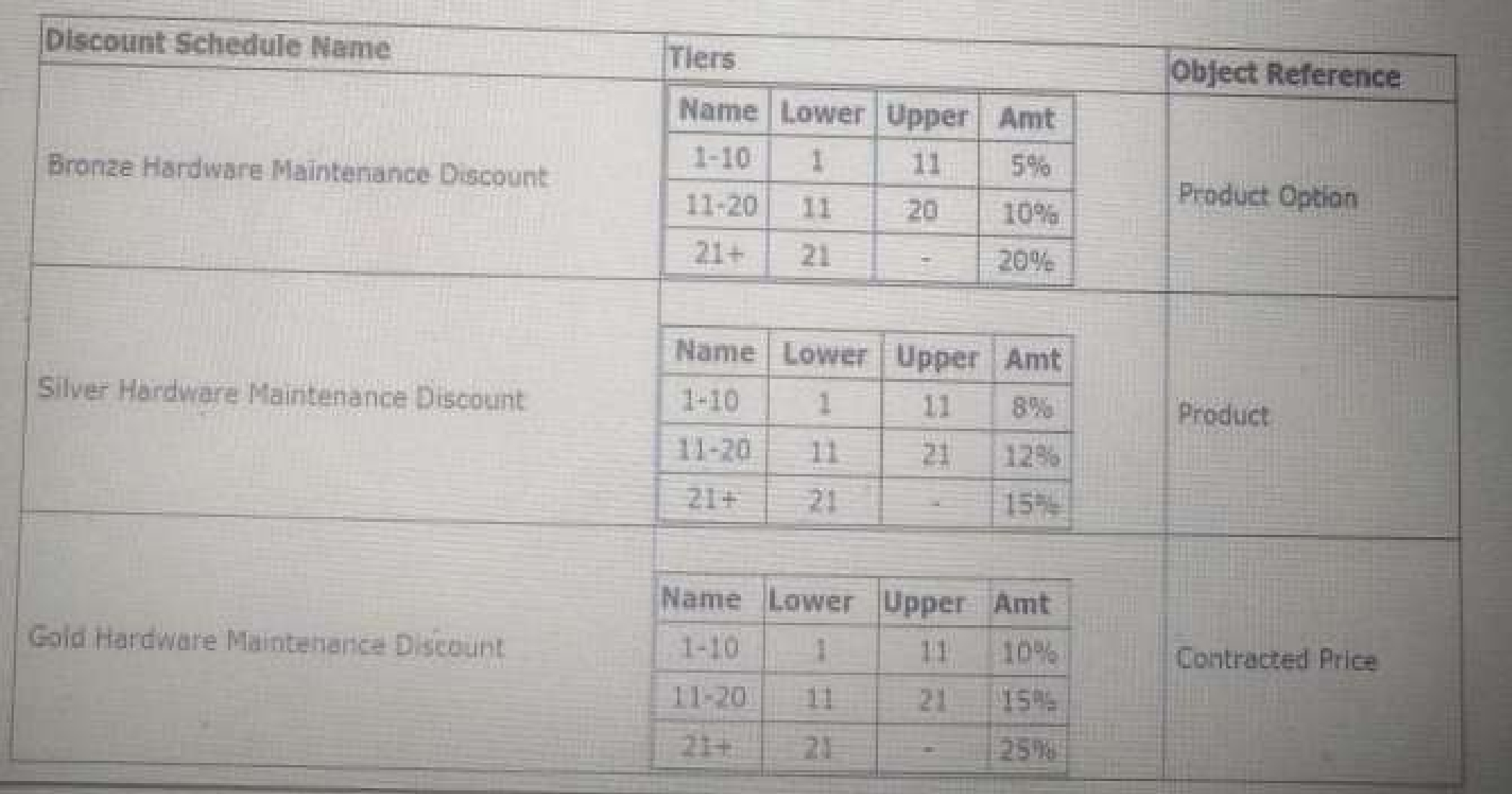
Universal Containers has three different range discount schedules. All three have a reference to Product A through the objects shown below. Product A is an option in a bundle and has a list price of
$100.
Given this scenario, what should the Net Total Price of Product A be if the user enters a Quantity of 15 on a quote where contracted pricing is applicable?
Select the answer:Select the answer
1 correct answer
A.
$1,125.00
B.
$1,275.00
C.
$1,350.00
D.
$1,320.00
Scenario Breakdown: Product A has a base list price of $100. A quantity of 15 is entered on the quote. Gold Hardware Maintenance Discount applies because contracted pricing is enabled. Discount for the quantity range (11–20) is 15% (as shown in the table). Net Price Calculation: List Price = $100 Discount = 15% Quantity = 15 Net Total Price = $100 × 15 × (1 - 0.15) = $1,275. Justification for Selected Discount:According to Salesforce CPQ guidelines, when contracted pricing applies, it takes precedence over other Discount Schedules. The Gold Discount Schedule is therefore applied. Testing and Validation:Test the configuration using a sample quote to ensure the correct schedule is applied and the net total price matches the expected value.
Right Answer: B
Quiz
Question 8/108/10
An admin has created a text field Configuration Attribute for Bundle
Select the answer:Select the answer
1 correct answer
A.
The admin wants the attribute to start with a dynamic value the moment the configuration page loads. Which steps should the admin take to meet this requirement? A. Create a formula text field on the Quote, constructing the formula to return the desired default value. Update the Configuration Attribute Default Field to identify the Quote formula field.
B.
Create a Process Builder to update the Product Option field that is used for the ConfigurationAttribute value. Set the process to trigger upon new record creation.
C.
Create a text field on the Quote Line object with the same API name as the Configuration Attribute field. Create a Price Rule to target the Quote Line field to give it a value.
D.
Create a Price Rule to target the Product Option field that is used for Configuration Attribute to give it a value. Ensure the end user selects Apply Rules in the Configurator.
Requirement:Populate a Configuration Attribute with a dynamic value when the configurator page loads. Solution Mechanics: Process Builder can be used to dynamically set values on records based on predefined logic. By targeting the Product Option field, which maps to the Configuration Attribute, Process Builder ensures that the value is set upon record creation. Steps to Implement: Create a new Process Builder. Trigger on the creation of the Quote Line record (or related record based on Configuration Attribute setup). Define criteria to determine the dynamic value. Use the Update Records action to populate the Product Option field with the default value. Advantages of Process Builder: Allows for dynamic and conditional logic. Automates the default value population without user intervention. Testing and Validation: Create a test bundle with the Configuration Attribute. Load the configurator and verify that the attribute is pre-populated.
Right Answer: B
Quiz
Question 9/109/10
Universal Containers must be able to create Quotes that contain Quote Lines with different Start Dates. Order Products must be separated into Orders after generation based in the Start Dates. How can a CPQ Specialist meet this business requirement?
Select the answer:Select the answer
1 correct answer
A.
Separate Quotes must be created for each unique Start Date.
B.
Set both the Order by Quote Line Group and Ordered checkboxes to True.
C.
Change Default Order Start Date in CPQ Package settings to Quote Start Date.
D.
Set the Order By picklist on the Quote to SBQQ StartDate c, and the Ordered checkbox to True.
Business Requirement Context: Universal Containers needs the ability to split Orders by the Start Dates of the Quote Lines. Each Order generated will correspond to a unique Start Date. Key Salesforce CPQ Features: Order By Field: This field on the Quote allows CPQ specialists to specify the criteria for splitting orders. By selecting the SBQQ StartDate c field, orders will be created based on the Start Dates of Quote Lines. Ordered Checkbox: Setting this to True ensures that the Quote Lines are converted into Orders during the ordering process. Step-by-Step Configuration: Navigate to the Quote in Salesforce CPQ. Locate the Order By picklist field and set its value to SBQQ StartDate c. This ensures Quote Lines are grouped by their Start Dates for Order generation. Check the Ordered checkbox on the Quote to mark it ready for Order generation. Expected Outcome: When the Orders are generated, CPQ will create separate Order records for each unique Start Date present in the Quote Lines. Validation and Testing: Create a Quote with multiple Quote Lines having different Start Dates. Process the Quote through the Ordering process to verify separate Orders are created for each Start Date. Reference: This approach is aligned with Salesforce CPQ’s guidelines for managing multi-start date Orders and can be verified under "Guidelines for Splitting Orders" in the official Salesforce CPQ documentation.
Right Answer: D
Quiz
Question 10/1010/10
"UC wants to show a custom text field on their Quote Document. This field with API name Additional_Text c already exists and is located on the Quote object. What is the correct syntax to insert this into an HTML Template Content?
Select the answer:Select the answer
1 correct answer
A.
{!quote.Additional_Text c}
B.
{Iquote r.Additional_Text c}
C.
{ISBQQ Quote r.Additional_Text c}"
D.
{ISBQQ Quote c.Additional_Text c}
Field Location and API Name: The custom text field Additional_Text c resides on the Quote object. In Salesforce CPQ, the correct syntax to reference fields in HTML templates is to use the merge field syntax appropriate to the object. Syntax {!quote.Additional_Text c} directly references the field from the Quote object in a format recognized by the CPQ document generation engine. Alternative options such as {ISBQQ Quote r.Additional_Text c} reference lookup relationships and do not apply here. Salesforce CPQ Reference: As per the Quote Template Content documentation, use the merge fields directly associated with the object being utilized in the template .
CPQ-301: Salesforce Configure and Administer a Salesforce CPQ Solution Practice test unlocks all online simulator questions
Thank you for choosing the free version of the CPQ-301: Salesforce Configure and Administer a Salesforce CPQ Solution practice test! Further deepen your knowledge on Salesforce Simulator; by unlocking the full version of our CPQ-301: Salesforce Configure and Administer a Salesforce CPQ Solution Simulator you will be able to take tests with over 213 constantly updated questions and easily pass your exam. 98% of people pass the exam in the first attempt after preparing with our 213 questions.
What to expect from our CPQ-301: Salesforce Configure and Administer a Salesforce CPQ Solution practice tests and how to prepare for any exam?
The CPQ-301: Salesforce Configure and Administer a Salesforce CPQ Solution Simulator Practice Tests are part of the Salesforce Database and are the best way to prepare for any CPQ-301: Salesforce Configure and Administer a Salesforce CPQ Solution exam. The CPQ-301: Salesforce Configure and Administer a Salesforce CPQ Solution practice tests consist of 213 questions and are written by experts to help you and prepare you to pass the exam on the first attempt. The CPQ-301: Salesforce Configure and Administer a Salesforce CPQ Solution database includes questions from previous and other exams, which means you will be able to practice simulating past and future questions. Preparation with CPQ-301: Salesforce Configure and Administer a Salesforce CPQ Solution Simulator will also give you an idea of the time it will take to complete each section of the CPQ-301: Salesforce Configure and Administer a Salesforce CPQ Solution practice test . It is important to note that the CPQ-301: Salesforce Configure and Administer a Salesforce CPQ Solution Simulator does not replace the classic CPQ-301: Salesforce Configure and Administer a Salesforce CPQ Solution study guides; however, the Simulator provides valuable insights into what to expect and how much work needs to be done to prepare for the CPQ-301: Salesforce Configure and Administer a Salesforce CPQ Solution exam.
CPQ-301: Salesforce Configure and Administer a Salesforce CPQ Solution Practice test therefore represents an excellent tool to prepare for the actual exam together with our Salesforce practice test . Our CPQ-301: Salesforce Configure and Administer a Salesforce CPQ Solution Simulator will help you assess your level of preparation and understand your strengths and weaknesses. Below you can read all the quizzes you will find in our CPQ-301: Salesforce Configure and Administer a Salesforce CPQ Solution Simulator and how our unique CPQ-301: Salesforce Configure and Administer a Salesforce CPQ Solution Database made up of real questions:
Info quiz:
Quiz name:CPQ-301: Salesforce Configure and Administer a Salesforce CPQ Solution
Total number of questions:213
Number of questions for the test:50
Pass score:80%
You can prepare for the CPQ-301: Salesforce Configure and Administer a Salesforce CPQ Solution exams with our mobile app. It is very easy to use and even works offline in case of network failure, with all the functions you need to study and practice with our CPQ-301: Salesforce Configure and Administer a Salesforce CPQ Solution Simulator.
Use our Mobile App, available for both Android and iOS devices, with our CPQ-301: Salesforce Configure and Administer a Salesforce CPQ Solution Simulator . You can use it anywhere and always remember that our mobile app is free and available on all stores.
Our Mobile App contains all CPQ-301: Salesforce Configure and Administer a Salesforce CPQ Solution practice tests which consist of 213 questions and also provide study material to pass the final CPQ-301: Salesforce Configure and Administer a Salesforce CPQ Solution exam with guaranteed success.
Our CPQ-301: Salesforce Configure and Administer a Salesforce CPQ Solution database contain hundreds of questions and Salesforce Tests related to CPQ-301: Salesforce Configure and Administer a Salesforce CPQ Solution Exam. This way you can practice anywhere you want, even offline without the internet.