The new flashcard feature is useful to memorize questions.
?Change your study mode
At any time, you can change the study mode, and alternate between the practice mode and the exam mode. In practice mode, you can configure for example the number of questions or tests, and other parameters to help you study.
Randomized | 10 Questions per Test | 20 Minutes | 70% to pass|
To re-configure your study mode again and change - for example - the number of tests, whether you have random questions and all other configuration parameters.
?Simulator Configuration
Auto-scroll: You can use the automatic scrolling of the questionnaire that occurs as soon as you answer one or all of the answers to a question correctly. Auto scrolling is activated if you answer a single answer, or as soon as you answer all the mandatory answers. Learning Mode: During learning mode you can get a real time result for your answer.
Free Test
Question: / 10
20:00Min. left
?Restart the current test
To restart the current test by clearing all your answers and the time used up to now. Warning: all answers will be lost.
Question: / 10
4.6(109 Votes)
Quiz
Question 1/101/10
What can you do with shared hierarchies? Note:There are 2 correct answers to this question.
Select multiple answer: (Choose 2)Select the answer
2 correct answers
A.
Access hierarchies created in external schemas
B.
Enable SQL SELECT statements to access hierarchies
C.
Provide reusable hierarchies for drilldown in a CUBE with star join
D.
Provide reusable hierarchies for drilldown in a CUBE without star join
Shared hierarchies are reusable hierarchy definitions that can be used by multiple objects. In the context of this question, they are mainly meant to make hierarchies available for SQL and for analytical use in cube models. Why B is correct: Shared hierarchies can enable SQL SELECT statements to access hierarchies. This means the hierarchy structure is available for querying, so SQL-based tools or applications can work with the hierarchy data directly. Why D is correct: Shared hierarchies can provide reusable hierarchies for drilldown in a CUBE without star join. This allows the same hierarchy definition to be reused in cube scenarios where the model does not use a star join. Why A is incorrect: Accessing hierarchies created in external schemas is not the main purpose of shared hierarchies in this context. Shared hierarchies are about reuse within the modeling environment, not simply reading hierarchies from external schemas. Why C is incorrect: Providing reusable hierarchies for drilldown in a CUBE with star join is not the correct option here. The question specifically points to the cube without star join scenario, not with star join. Correct answers: B and D
Right Answer: B, D
Quiz
Question 2/102/10
Why would you create SQL in calculation views?
Select the answer:Select the answer
1 correct answer
A.
To implement custom logic
B.
To provide an alternative to graphical modeling
C.
To fine-tune performance
D.
To enable write capabilities
The correct answer is A. To implement custom logic. In calculation views, SQL is used when the built-in graphical modeling tools are not enough to express the required logic. Some business requirements are too complex for standard drag-and-drop modeling, so SQL lets you define custom transformations, calculations, filters, joins, aggregations, or other specialized logic more precisely. Why A is correct: - SQL allows you to write logic that may be difficult or impossible to model graphically. - It gives you more flexibility for advanced calculations and data handling. - It is especially useful when you need specific behavior that standard nodes do not provide. Why the other options are not the best answer: - B. To provide an alternative to graphical modeling - This is partly true, but it is not the main reason. The key purpose is not just to replace graphical modeling, but to implement custom logic. - C. To fine-tune performance - SQL can sometimes help in performance tuning, but performance optimization is not the primary reason for creating SQL in calculation views. - D. To enable write capabilities - Calculation views are typically used for analytical, read-only scenarios, not for writing data. In short, SQL in calculation views is mainly created to support custom logic that cannot be easily represented in graphical form.
Right Answer: A
Quiz
Question 3/103/10
Which type of join supports a temporal condition in a calculation view?
Select the answer:Select the answer
1 correct answer
A.
Referential join
B.
Inner join
C.
Text join
D.
Left outer join
The correct answer is B. Inner join. In a calculation view, an inner join is the join type that can support a temporal condition, meaning a condition based on time validity or date ranges. This is commonly used when you want to match records only if they are valid within a specific time period. Why the other options are incorrect: A. Referential join A referential join is optimized for performance and assumes matching records exist in the joined tables, but it does not support temporal conditions in the same way an inner join does. C. Text join A text join is specifically used to attach language-dependent texts to key values, such as descriptions, and is not meant for temporal conditions. D. Left outer join A left outer join returns all records from the left table and matching records from the right table, but it does not support temporal conditions in calculation views the way an inner join does. Summary: If the requirement is to use a temporal condition in a calculation view, the correct choice is the inner join.
Right Answer: B
Quiz
Question 4/104/10
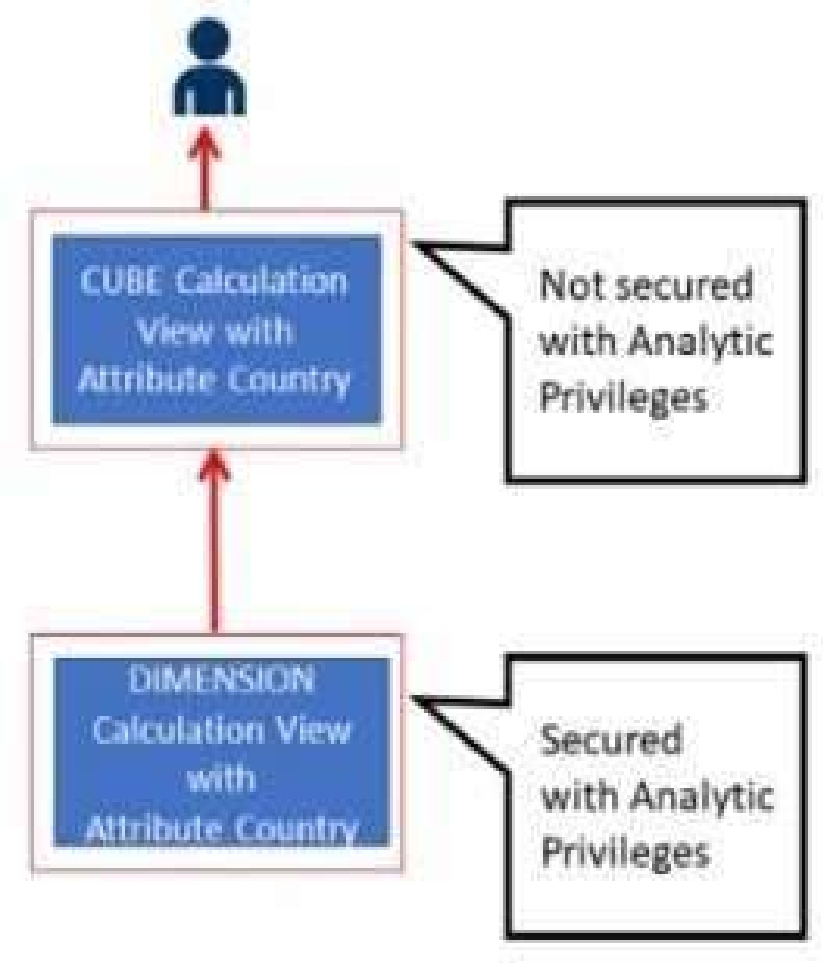
Referring to the diagram,
which privileges would a user require to view United States data when querying the CUBE calculation view?
Select the answer:Select the answer
1 correct answer
A.
A SELECT privilege on the CUBE calculation view and an Analytic Privilege (Country = United States) on the DIMENSION calculation view
B.
A SELECT privilege and an Analytic Privilege (Country = United States) on the DIMENSION calculation view
C.
A SELECT privilege and an Analytic Privilege (Country = United States) on the CUBE calculation view
D.
SELECT privileges and Analytic Privileges (Country = United States) on both views
The correct answer is A. In SAP HANA, when a user queries a CUBE calculation view, access is controlled by two main things: 1. Object privilege The user needs a SELECT privilege on the calculation view they are querying. In this case, that means the CUBE calculation view itself. 2. Analytic privilege Analytic privileges restrict the data a user can see, typically based on dimension values such as country, region, or product. If the CUBE calculation view includes a DIMENSION calculation view that contains the Country field, then the restriction for “United States” is enforced through the DIMENSION calculation view. Why A is correct: - The user must have SELECT on the CUBE calculation view to query it. - The country-based data restriction is defined in the DIMENSION calculation view, so the analytic privilege for Country = United States must be assigned there. Why the other options are wrong: B. A SELECT privilege and an Analytic Privilege on the DIMENSION calculation view - This is incomplete because it does not clearly specify the SELECT privilege on the CUBE calculation view. - The user needs SELECT on the actual object being queried. C. A SELECT privilege and an Analytic Privilege on the CUBE calculation view - This is incorrect because the country restriction is applied on the DIMENSION calculation view, not on the CUBE calculation view. D. SELECT privileges and Analytic Privileges on both views - This is more than necessary. - The restriction only needs to be applied where the Country field exists, which is the DIMENSION calculation view. Summary: To view United States data through the CUBE calculation view, the user needs: - SELECT privilege on the CUBE calculation view - Analytic Privilege for Country = United States on the DIMENSION calculation view So the correct answer is A.
Right Answer: A
Quiz
Question 5/105/10
What options do you have to handle orphan nodes in your hierarchy?Note: There are 2 correct answers to this question.
Select multiple answer: (Choose 2)Select the answer
2 correct answers
A.
Define an expression to determine a parent.
B.
Generate additional root nodes.
C.
Assign them to a level below the root.
D.
Assign them to a node at the root level.
The correct answers are B and C. Orphan nodes are nodes in a hierarchy that do not have a valid parent. To handle them, you typically have two common options: B. Generate additional root nodes. This means creating extra root-level nodes so that orphan nodes can still be placed into the hierarchy under a newly created root. This keeps the hierarchy connected and allows orphan nodes to be represented properly. C. Assign them to a level below the root. This means placing orphan nodes in a lower level of the hierarchy even though they do not have a direct valid parent. In practice, this is another way to make them part of the hierarchy structure without requiring a real parent node. Why the other options are not correct: A. Define an expression to determine a parent. This is not a standard method for handling orphan nodes. It describes a way to calculate relationships, but it does not directly resolve orphan nodes in the hierarchy. D. Assign them to a node at the root level. This is close in idea to handling orphans, but the specific accepted option here is to generate additional root nodes, not simply assign them to an existing root node. So the correct choices are: B. Generate additional root nodes. C. Assign them to a level below the root.
Right Answer: B, C
Quiz
Question 6/106/10
What do you use in the definition of a dynamic SQL analytic privilege?
Select the answer:Select the answer
1 correct answer
A.
A table function that returns a list of allowed values.
B.
A scalar function that returns a list of the allowed values for each attribute.
C.
A procedure that returns the data access condition as an SQL expression.
D.
An organization hierarchy that provides role-based access to data.
The correct answer is C. A procedure that returns the data access condition as an SQL expression. A dynamic SQL analytic privilege is used in SAP HANA to determine data access at runtime based on logic rather than fixed values. Instead of hardcoding the allowed members or filters, you define a procedure that generates an SQL expression representing the access condition. Why C is correct: - Dynamic analytic privileges are evaluated dynamically. - The procedure returns the data access restriction as an SQL condition. - This allows flexible, context-dependent security rules. Why the other options are not correct: - A. A table function that returns a list of allowed values. - This sounds like a way to supply data, but dynamic SQL analytic privileges specifically rely on a procedure that produces a filter expression, not a table function returning values. - B. A scalar function that returns a list of the allowed values for each attribute. - A scalar function returns only a single value, not a list or complete access condition. - D. An organization hierarchy that provides role-based access to data. - Hierarchies can be used in authorization scenarios, but they are not what defines a dynamic SQL analytic privilege. In short, dynamic SQL analytic privileges use a procedure to generate the SQL access condition at runtime, which makes C the best answer.
Right Answer: C
Quiz
Question 7/107/10
Which tool generates and executes the SQL for a specific node of your calculation view?
Select the answer:Select the answer
1 correct answer
A.
Debug Query mode
B.
Explain plan
C.
SQL analyzer
D.
Database explorer
The correct answer is A. Debug Query mode. In calculation views, Debug Query mode is the tool used to generate and execute the SQL for a specific node in the view. This lets you inspect how data is processed step by step at an individual node level, which is especially useful for troubleshooting and understanding the behavior of complex calculation views. Why the other options are incorrect: B. Explain plan This shows the execution plan of a SQL statement, helping you analyze how the database intends to run the query. It does not generate and execute SQL for a specific node in a calculation view. C. SQL analyzer This is typically used to analyze SQL performance and execution characteristics. It is not the feature used to run SQL for an individual node in a calculation view. D. Database explorer This is a general tool for browsing database objects, running SQL, and inspecting data. It does not specifically generate and execute SQL for a node within a calculation view. So, Debug Query mode is the correct choice because it directly supports node-level debugging by generating and executing SQL for the selected node.
Right Answer: A
Quiz
Question 8/108/10
You are managing your source files using Git. In which sequence does your file progress towards a COMMIT?
Select the answer:Select the answer
1 correct answer
A.
Staging area -> Working directory -> Local Git repository
B.
Working directory -> Staging area -> Local Git repository
C.
Working directory -> Local Git repository -> Staging area
D.
Local Git repository -> Staging area -> Working directory
The correct answer is B. Working directory -> Staging area -> Local Git repository Here is why: In Git, a file typically moves through three main states before it is committed: 1. Working directory This is where you make changes to your files on your computer. For example, you edit a file in your text editor. At this point, Git sees the file as modified, but the changes are not yet prepared for commit. 2. Staging area Also called the index, this is a preparation area. When you use git add, you place your changes into the staging area. This tells Git, "I want to include these changes in the next commit." 3. Local Git repository When you run git commit, the staged changes are saved into your local Git repository as a new commit. This becomes part of your project’s version history. Why the other options are incorrect: A. Staging area -> Working directory -> Local Git repository This is the reverse of the normal flow. Changes do not move from staging back to the working directory as the usual path toward commit. C. Working directory -> Local Git repository -> Staging area This is incorrect because changes must be staged before they are committed. The repository comes after staging, not before it. D. Local Git repository -> Staging area -> Working directory This is also reversed. A file does not normally begin in the repository and move backward to staging and working directory in the process of committing. Simple workflow example: - Edit a file in the working directory - Run git add to move it to the staging area - Run git commit to save it in the local repository So the correct progression toward a commit is: Working directory -> Staging area -> Local Git repository
Right Answer: B
Quiz
Question 9/109/10
You want to create a star schema using a calculation view. The measures are based on columns from two transaction tables. DIMENSION calculation views provide the attributes.What is the correct approach?
Select the answer:Select the answer
1 correct answer
A.
Combine the transaction tables using a star join node in a calculation view of type CUBE with star join./Use a join node to join the DIMENSIONS to the fact table.
B.
Combine the transaction tables using an aggregation node in a calculation view of type CUBE with star join./Use a star join node to join the DIMENSIONS to the fact table.
C.
Combine the transaction tables using a join node in a calculation view of type CUBE with star join.Use a star join node to join the DIMENSIONS to the fact table.
D.
Combine the transaction tables using a star join node in a calculation view of type CUBE with star join.Use the same star join node to connect the DIMENSIONS to the fact table.
The correct answer is C. A star schema in a calculation view is typically modeled using a fact table in the center and dimension views around it. In SAP HANA calculation views of type CUBE with star join, the correct way to handle this depends on whether you are combining fact data or joining dimensions. Here, the measures come from two transaction tables. Transaction tables are fact-like tables, so they contain the numeric measures that need to be combined before the star join is applied. Since the measures are based on columns from two transaction tables, these tables must first be combined in a join node. Why C is correct: - Use a join node to combine the two transaction tables into one fact structure. - Then use a star join node to connect the DIMENSION calculation views to that fact structure. - This is the standard modeling approach when you have multiple transactional sources contributing measures. Why the other options are incorrect: A. Combine the transaction tables using a star join node... - Star join is used to connect fact data to dimensions, not to merge transaction tables together. - So using star join to combine the two transaction tables is not appropriate. B. Combine the transaction tables using an aggregation node... - Aggregation nodes are used to summarize data, not to merge multiple fact sources. - The transaction tables need to be joined, not aggregated at this stage. D. Use the same star join node to connect the DIMENSIONS to the fact table. - In a star join model, dimensions are connected through the star join node, but the transaction tables are not combined there. - The star join node is not the correct node for combining the two transaction tables. In short: - Join node = combine the two transaction tables - Star join node = connect the dimension calculation views to the fact data Therefore, C is the correct approach.
Right Answer: C
Quiz
Question 10/1010/10
What are some best practices when developing calculation views? Note: There are 2 correct answers to this question.
Select multiple answer: (Choose 2)Select the answer
2 correct answers
A.
Model star schemas using a sequence of join nodes.
B.
Aggregate at the lowest possible node.
C.
Include all data flow logic within one calculation view.
D.
Avoid defining joins on calculated columns.
The correct answers are C and D. C. Include all data flow logic within one calculation view. This is considered a best practice because keeping the full data flow in a single calculation view can improve readability, maintenance, and overall model consistency. It helps centralize logic so that the view is easier to understand and reuse, especially when the transformation logic is closely related. In many modeling scenarios, minimizing unnecessary chaining of multiple views can also reduce complexity. D. Avoid defining joins on calculated columns. This is a best practice because joins on calculated columns can hurt performance and may lead to inefficient execution plans. Calculated columns may need to be evaluated before the join can happen, which can make the model slower and more complex. Whenever possible, joins should be defined on base columns or stable key fields that are better suited for relational matching. Why the other options are not correct: A. Model star schemas using a sequence of join nodes. This is not generally recommended as a best practice in this form. While join nodes are used in modeling, star schemas are typically modeled with a fact table joined to dimension tables in a controlled and optimized way. A sequence of join nodes is not the defining best practice. B. Aggregate at the lowest possible node. This is not always a best practice. Aggregating too early can reduce flexibility and may prevent correct results if additional joins or filtering are needed later. In calculation views, aggregation should be placed thoughtfully based on the model design and performance considerations, not simply at the lowest possible node in every case. Final answer: C and D
C_HCMOD_03: SAP Certified Application Associate - SAP HANA Cloud Modeling Practice test unlocks all online simulator questions
Thank you for choosing the free version of the C_HCMOD_03: SAP Certified Application Associate - SAP HANA Cloud Modeling practice test! Further deepen your knowledge on SAP Simulator; by unlocking the full version of our C_HCMOD_03: SAP Certified Application Associate - SAP HANA Cloud Modeling Simulator you will be able to take tests with over 80 constantly updated questions and easily pass your exam. 98% of people pass the exam in the first attempt after preparing with our 80 questions.
What to expect from our C_HCMOD_03: SAP Certified Application Associate - SAP HANA Cloud Modeling practice tests and how to prepare for any exam?
The C_HCMOD_03: SAP Certified Application Associate - SAP HANA Cloud Modeling Simulator Practice Tests are part of the SAP Database and are the best way to prepare for any C_HCMOD_03: SAP Certified Application Associate - SAP HANA Cloud Modeling exam. The C_HCMOD_03: SAP Certified Application Associate - SAP HANA Cloud Modeling practice tests consist of 80 questions and are written by experts to help you and prepare you to pass the exam on the first attempt. The C_HCMOD_03: SAP Certified Application Associate - SAP HANA Cloud Modeling database includes questions from previous and other exams, which means you will be able to practice simulating past and future questions. Preparation with C_HCMOD_03: SAP Certified Application Associate - SAP HANA Cloud Modeling Simulator will also give you an idea of the time it will take to complete each section of the C_HCMOD_03: SAP Certified Application Associate - SAP HANA Cloud Modeling practice test . It is important to note that the C_HCMOD_03: SAP Certified Application Associate - SAP HANA Cloud Modeling Simulator does not replace the classic C_HCMOD_03: SAP Certified Application Associate - SAP HANA Cloud Modeling study guides; however, the Simulator provides valuable insights into what to expect and how much work needs to be done to prepare for the C_HCMOD_03: SAP Certified Application Associate - SAP HANA Cloud Modeling exam.
C_HCMOD_03: SAP Certified Application Associate - SAP HANA Cloud Modeling Practice test therefore represents an excellent tool to prepare for the actual exam together with our SAP practice test . Our C_HCMOD_03: SAP Certified Application Associate - SAP HANA Cloud Modeling Simulator will help you assess your level of preparation and understand your strengths and weaknesses. Below you can read all the quizzes you will find in our C_HCMOD_03: SAP Certified Application Associate - SAP HANA Cloud Modeling Simulator and how our unique C_HCMOD_03: SAP Certified Application Associate - SAP HANA Cloud Modeling Database made up of real questions:
Info quiz:
Quiz name:C_HCMOD_03: SAP Certified Application Associate - SAP HANA Cloud Modeling
Total number of questions:80
Number of questions for the test:50
Pass score:80%
You can prepare for the C_HCMOD_03: SAP Certified Application Associate - SAP HANA Cloud Modeling exams with our mobile app. It is very easy to use and even works offline in case of network failure, with all the functions you need to study and practice with our C_HCMOD_03: SAP Certified Application Associate - SAP HANA Cloud Modeling Simulator.
Use our Mobile App, available for both Android and iOS devices, with our C_HCMOD_03: SAP Certified Application Associate - SAP HANA Cloud Modeling Simulator . You can use it anywhere and always remember that our mobile app is free and available on all stores.
Our Mobile App contains all C_HCMOD_03: SAP Certified Application Associate - SAP HANA Cloud Modeling practice tests which consist of 80 questions and also provide study material to pass the final C_HCMOD_03: SAP Certified Application Associate - SAP HANA Cloud Modeling exam with guaranteed success.
Our C_HCMOD_03: SAP Certified Application Associate - SAP HANA Cloud Modeling database contain hundreds of questions and SAP Tests related to C_HCMOD_03: SAP Certified Application Associate - SAP HANA Cloud Modeling Exam. This way you can practice anywhere you want, even offline without the internet.