The new flashcard feature is useful to memorize questions.
?Change your study mode
At any time, you can change the study mode, and alternate between the practice mode and the exam mode. In practice mode, you can configure for example the number of questions or tests, and other parameters to help you study.
Randomized | 10 Questions per Test | 20 Minutes | 70% to pass|
To re-configure your study mode again and change - for example - the number of tests, whether you have random questions and all other configuration parameters.
?Simulator Configuration
Auto-scroll: You can use the automatic scrolling of the questionnaire that occurs as soon as you answer one or all of the answers to a question correctly. Auto scrolling is activated if you answer a single answer, or as soon as you answer all the mandatory answers. Learning Mode: During learning mode you can get a real time result for your answer.
Free Test
Question: / 10
20:00Min. left
?Restart the current test
To restart the current test by clearing all your answers and the time used up to now. Warning: all answers will be lost.
Question: / 10
4.8(124 Votes)
Quiz
Question 1/101/10
In SAS Data Integration Studio, the SCD Type 2 Loader transformation will do which of the following?
Select the answer:Select the answer
1 correct answer
A.
find row matches using the business key
B.
find row matches using generated cluster numbers
C.
find non-standard values using a generated key
D.
find non-standard values using a business key
The correct answer is A. find row matches using the business key. In SAS Data Integration Studio, the SCD Type 2 Loader transformation is used to manage slowly changing dimensions where historical changes must be preserved. When a new source row arrives, the transformation determines whether it matches an existing dimension row or represents a new version of a row. It does this by comparing the business key, which is the natural key from the source system that identifies the real-world entity, such as Customer_ID or Product_Code. If a matching business key is found, the loader can decide whether any tracked attributes have changed and, if so, create a new row version while preserving history. Why the other options are incorrect: B. find row matches using generated cluster numbers - Cluster numbers are not used for identifying dimension row matches in SCD Type 2 processing. C. find non-standard values using a generated key - The SCD Type 2 Loader is not designed to detect "non-standard values" in this way, and a generated key is not what it uses for matching. D. find non-standard values using a business key - Again, the loader uses the business key to find row matches, not to find "non-standard values." Summary: The key idea in SCD Type 2 processing is that row matching is based on the business key, allowing the system to detect changes and maintain historical versions of the data.
Right Answer: A
Quiz
Question 2/102/10
Assume that a SAS Data Integration Studio job is populating a table, and the table has metadata definitions for two simple indexes. Which of the following is NOT a valid location for viewing which columns are indexed?
Select the answer:Select the answer
1 correct answer
A.
the Load Technique tab in the Table Loader transformation properties window
B.
the Indexes tab in the table properties window
C.
the Columns tab in the table properties window
D.
the Columns tab in the Details panel of the open job, with the table selected in the job flow
The correct answer is A. In SAS Data Integration Studio, information about table indexes can be viewed in several places tied to the table metadata, but not in the Load Technique tab of the Table Loader transformation. Here is why each option is or is not valid: A. the Load Technique tab in the Table Loader transformation properties window This is not a valid place to view which columns are indexed. The Load Technique tab is used to control how data is loaded into the target table, such as whether to truncate, replace, or append data, and related loading behavior. It does not display index definitions or indicate which columns are indexed. B. the Indexes tab in the table properties window This is a valid location. The Indexes tab is specifically designed to show index definitions for the table, including the indexed columns and index properties. C. the Columns tab in the table properties window This is also valid. In SAS metadata, the Columns tab can show column-level details, and indexed columns may be indicated there depending on how the table metadata is displayed. D. the Columns tab in the Details panel of the open job, with the table selected in the job flow This is valid as well. In the job flow, selecting a table and viewing the Details panel can provide metadata details about the table, including column information that can help identify indexed columns. Why A is the best answer: The question asks for the location that is NOT valid for viewing which columns are indexed. The Load Technique tab is about loading behavior, not index metadata. The other options are associated with table or column metadata and can be used to inspect index-related information. Therefore, A is the correct choice.
Right Answer: A
Quiz
Question 3/103/10
Consider the job flow diagram in the display. Assume the inner job has a parameter defined
specifying a table name. Which statement is FALSE?
Select the answer:Select the answer
1 correct answer
A.
The Inner Job can be successfully executed by itself, but only if the defined parameter has been assigned a valid default value.
B.
The Inner Job cannot be successfully executed by itself unless it is disassociated from the loop job.
C.
The Control Table column is mapped to the parameter defined for the Inner Job using the Loop transformation properties window.
D.
If the server that executes the job has multiple CPUs, parallel processing can be enabled in the Loop transformation properties window.
The false statement is B. This question is about a job flow where an outer job contains a loop and calls an inner job. The inner job has a parameter that expects a table name. Let’s examine each option: A. The Inner Job can be successfully executed by itself, but only if the defined parameter has been assigned a valid default value. This is true. If the inner job has a parameter and you want to run it independently, it needs a valid default value or some other way to supply the parameter at runtime. Otherwise, the job would not know what table name to use. B. The Inner Job cannot be successfully executed by itself unless it is disassociated from the loop job. This is false. The inner job can usually be executed on its own as long as its parameter is properly defined and given a valid default or runtime value. It does not have to be disassociated from the loop job just to run independently. C. The Control Table column is mapped to the parameter defined for the Inner Job using the Loop transformation properties window. This is true. In a loop job setup, the control table’s column values are typically mapped to the parameters of the inner job through the loop transformation properties. D. If the server that executes the job has multiple CPUs, parallel processing can be enabled in the Loop transformation properties window. This is true. Loop-based processing can often be configured to run in parallel when the server supports multiple CPUs, improving performance. Why B is false: Being part of a loop job does not inherently prevent the inner job from being run by itself. The key requirement is that the parameter be properly assigned. The statement wrongly suggests that disassociation from the loop is necessary. Final answer: B
Right Answer: B
Quiz
Question 4/104/10
In SAS Data Integration Studio, source table records and dimension table records are combined for output using which transformation?
Select the answer:Select the answer
1 correct answer
A.
Data Validation
B.
Lookup
C.
DataFlux lS Job
D.
Table Loader
The correct answer is B. Lookup. In SAS Data Integration Studio, the Lookup transformation is used to combine records from a source table with matching records from a dimension table or reference table. It is designed to enrich the incoming data by finding related values based on a key field, such as a customer ID, product code, or location code. Why Lookup is correct: - It takes rows from a source table. - It matches them against rows in a lookup or dimension table. - It returns selected columns from the matched dimension table. - This is commonly used to add descriptive or reference information to transactional data. Why the other options are not correct: - A. Data Validation: Used to check data quality or verify that data meets certain rules, not to combine source and dimension records. - C. DataFlux lS Job: This is not the standard transformation used for joining source and dimension tables in this context. - D. Table Loader: Used to load data into a target table, not to perform record matching between source and dimension tables. In short, when the goal is to combine source table records with dimension table records for output, the Lookup transformation is the appropriate choice.
Right Answer: B
Quiz
Question 5/105/10
The SAS Data Integration Studio SCD Type 2 Loader transformation performs which of the following?
Select the answer:Select the answer
1 correct answer
A.
Loads source table records into a standardization table.
B.
Loads dimension table records into a fact table.
C.
Loads source table records into a dimension table.
D.
Loads fact table records into a multi-threaded table.
The correct answer is C. Loads source table records into a dimension table. In SAS Data Integration Studio, the SCD Type 2 Loader transformation is used to manage slowly changing dimensions, specifically Type 2 changes. A Type 2 slowly changing dimension keeps historical versions of dimension records when data changes over time. What it does: - Takes incoming source records - Compares them to existing rows in a dimension table - Inserts new rows when a tracked attribute has changed - Preserves the old row to maintain history - Often updates effective dates and current-indicator fields Why C is correct: - The transformation is designed to load data into a dimension table, not a fact table or standardization table. - Its purpose is to maintain historical dimension data from a source table. Why the other options are incorrect: - A. Loads source table records into a standardization table. This is not the purpose of SCD Type 2 Loader. Standardization tables are not involved here. - B. Loads dimension table records into a fact table. Fact tables store measurements or transactional data, while SCD Type 2 Loader works with dimensions. - D. Loads fact table records into a multi-threaded table. This is unrelated to slowly changing dimensions and not what the transformation does. Summary: The SCD Type 2 Loader is used to load source data into a dimension table while preserving historical changes, which makes option C the correct answer.
Right Answer: C
Quiz
Question 6/106/10
Select the valid reasons for using SAS Data Integration Studio’s Table Loader transformation. (Choose two.)
Select multiple answer: (Choose 2)Select the answer
2 correct answers
A.
Create and replace permanent tables.
B.
Maintain access privileges to permanent tables.
C.
Apply and maintain constraints on permanent tables.
D.
Delete and remove permanent tables.
The correct answers are C and D. SAS Data Integration Studio’s Table Loader transformation is used to manage physical table loading operations, especially when working with permanent tables in a SAS environment. It is often chosen when you need to rebuild or replace a table and preserve certain table characteristics, or when you want to handle table definitions and related metadata carefully during loading. Why C is correct: Apply and maintain constraints on permanent tables. The Table Loader transformation can be used in situations where constraints on permanent tables need to be applied or preserved as part of the load process. This is important when the table must enforce rules such as uniqueness or referential integrity. Why D is correct: Delete and remove permanent tables. Table Loader can be used to delete or replace permanent tables during the loading process. This makes it useful when a table needs to be refreshed completely rather than updated row by row. Why A is not correct: Create and replace permanent tables. Although Table Loader may be involved in loading or replacing data, the question asks for valid reasons for using the transformation. The more specific and correct reasons here relate to maintaining constraints and handling deletion/removal of permanent tables. Why B is not correct: Maintain access privileges to permanent tables. Access privileges are handled at the security or metadata level, not as a primary purpose of the Table Loader transformation. This is not a valid reason for using Table Loader. In summary, Table Loader is appropriate when you need to manage table structure and loading behavior such as constraints and replacement/removal of permanent tables, which is why C and D are the correct choices.
Right Answer: C, D
Quiz
Question 7/107/10
After creating a stored process from a SAS Data Integration Studio job, how can you test the stored process to make sure it runs correctly?
Select the answer:Select the answer
1 correct answer
A.
Execute the stored process in SAS Data Integration Studio.
B.
Execute the stored process in SAS Management Console.
C.
Execute the stored process using the SAS Add-In for Microsoft Office or SAS Enterprise Guide.
D.
Execute the stored process using SAS Display Manager’s Stored Process Test window.
The correct answer is C. Execute the stored process using the SAS Add-In for Microsoft Office or SAS Enterprise Guide. A stored process is a SAS program that is designed to be run from a client application or web environment, rather than directly inside SAS Data Integration Studio. After you create a stored process from a SAS DI Studio job, you typically test it by running it from a tool that supports stored process execution, such as SAS Enterprise Guide or the SAS Add-In for Microsoft Office. Why C is correct: - SAS Enterprise Guide and SAS Add-In for Microsoft Office are client applications that can call and run stored processes. - Testing the stored process in one of these tools helps confirm that it runs correctly in the environment where it is intended to be used. - This is a common way to validate that the stored process returns expected results and behaves properly. Why the other options are not correct: - A. Execute the stored process in SAS Data Integration Studio. - SAS DI Studio is used to build jobs and generate stored processes, but it is not the typical place to test the stored process as a stored process. - B. Execute the stored process in SAS Management Console. - SAS Management Console is used to manage metadata, users, and server components, not to execute stored processes for testing. - D. Execute the stored process using SAS Display Manager’s Stored Process Test window. - This is not the standard or expected testing method for a stored process created from a DI Studio job in this context. In summary: To verify that a stored process created from a SAS Data Integration Studio job works properly, you test it through a client that supports stored process execution, such as SAS Enterprise Guide or SAS Add-In for Microsoft Office.
Right Answer: C
Quiz
Question 8/108/10
Within SAS Data Integration Studio, which one of the following is NOT an option available from the File-> New menu choice under External File grouping?
Select the answer:Select the answer
1 correct answer
A.
Delimited
B.
Fixed Width
C.
User Written
D.
COBOL Copybook
The correct answer is D. COBOL Copybook In SAS Data Integration Studio, the File -> New menu under the External File grouping provides options for creating metadata definitions for common external file types. These are file formats that SAS DI Studio can read from or write to as standard external data sources. The available options include: - Delimited: for files such as CSV or other delimiter-separated text files - Fixed Width: for files where each field occupies a specific number of characters - User Written: for custom file definitions created by the user COBOL Copybook is not one of the standard options in this menu grouping. A COBOL copybook is used to describe the layout of mainframe data files, but it is not listed as a direct choice under External File in the File -> New menu. Therefore, the option that is NOT available is D. COBOL Copybook.
Right Answer: D
Quiz
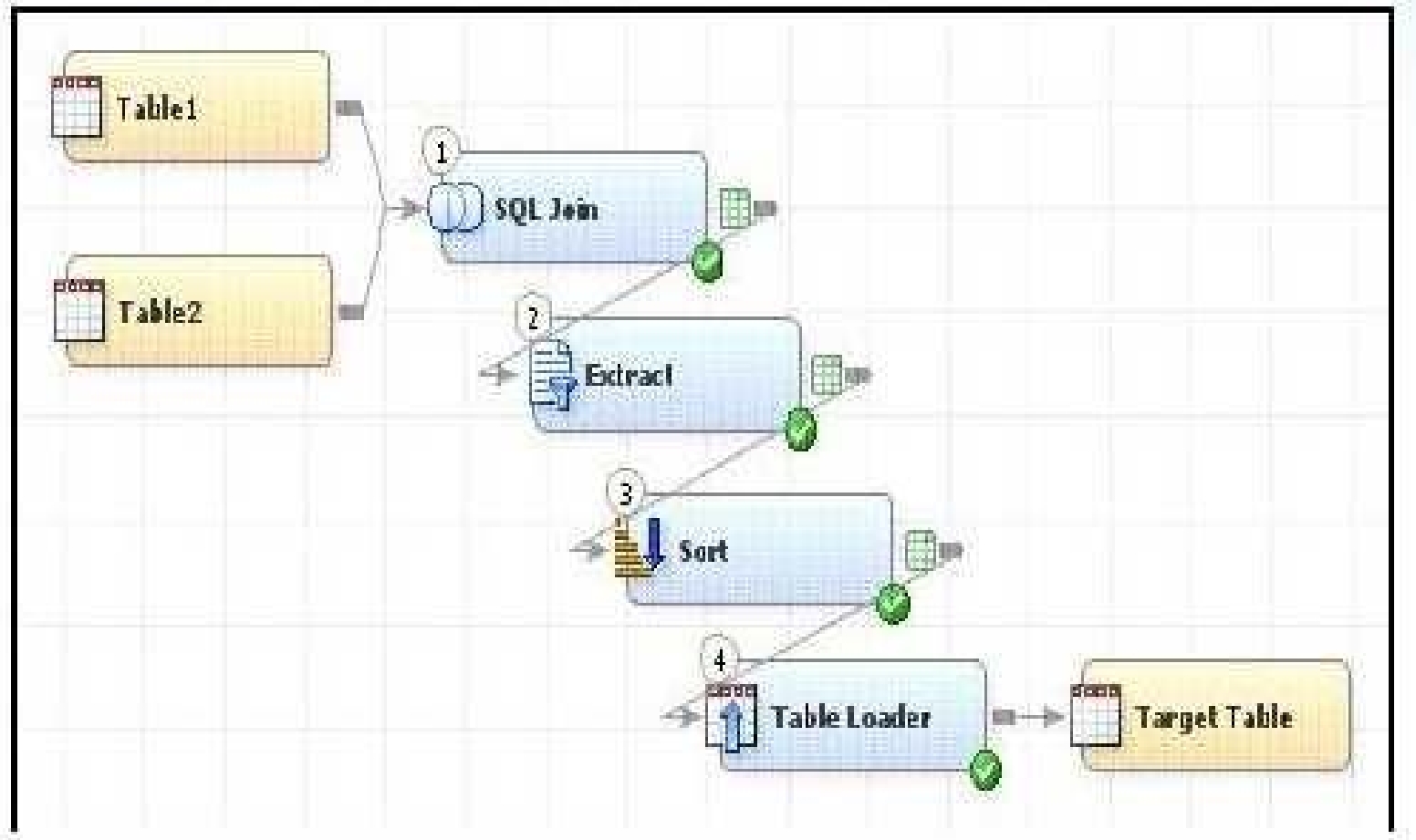
Question 9/109/10
In the following display, can status handling be enabled for the Extract transformation?
Select the answer:Select the answer
1 correct answer
A.
No. The Extract transformation does not have a status handling tab in its Properties window, and the Return Code Check transformation can only provide status handling at the job level.
B.
Yes. The Return Code Check transformation can be added to the END of the job flow - the Status Handling tab in the Return Code Check transformation properties can then establish the desired status handling.
C.
No. The Extract transformation does not have a Status Handling tab in its Properties window, therefore it is not possible to establish status handling for this transformation.
D.
Yes. The Return Code Check transformation can be added to the job flow immediately following the Extract - the Status Handling tab in the Return Code Check transformation properties can then establish the desired status handling.
The correct answer is B. Status handling for the Extract transformation cannot be configured directly in the Extract transformation itself. Instead, status handling can be implemented through a Return Code Check transformation. Why B is correct: - A Return Code Check transformation can be placed at the end of the job flow. - Its Status Handling tab allows you to define how the job should react based on the return code. - This means you can effectively control the status for the Extract transformation indirectly, even though the Extract does not have its own Status Handling tab. Why the other options are incorrect: - A is incorrect because the Return Code Check transformation is not limited to job-level status handling only in the way described; the correct approach is to place it at the end of the flow and use its Status Handling settings. - C is incorrect because it claims status handling is impossible, which is not true. - D is incorrect because the Return Code Check transformation does not need to be placed immediately after the Extract specifically; it can be added at the end of the job flow to manage the overall status. In short: - Extract transformation: no direct Status Handling tab. - Return Code Check transformation: used to define status handling for the job flow, typically at the end.
Right Answer: B
Quiz
Question 10/1010/10
Assume that SAS Data Integration Studio Table Loader is being used in a job. The load style selected is Append to Existing. Which statement is true regardingAssume that SAS Data Integration Studio? Table Loader is being used in a job. The load style selected is Append to Existing. Which statement is true regarding this load style?
Select the answer:Select the answer
1 correct answer
A.
It generates PROC APPEND code.
B.
It generates PROC SQL code.
C.
It generates either PROC SQL code or PROC APPEND code depending on further option choices.
D.
It generates DATA STEP APPEND code.
The correct answer is C. It generates either PROC SQL code or PROC APPEND code depending on further option choices. In SAS Data Integration Studio, the Table Loader transformation is used to move data from a source table into a target table. When the load style is set to Append to Existing, the goal is to add incoming rows to a table that already exists. However, this does not always translate into one single type of SAS code. The exact code generated depends on additional settings and conditions, such as: - the structure of the source and target tables - whether the metadata and physical table definitions match - whether indexes or constraints are involved - other transformation options selected in the job Because of these factors, SAS may generate: - PROC APPEND, which is the most common method for appending rows to an existing table - or PROC SQL, in certain cases where SQL-based logic is needed Why the other options are incorrect: A. It generates PROC APPEND code. This is too specific. PROC APPEND is often used, but not always. B. It generates PROC SQL code. This is also too specific. SQL may be used in some cases, but not always. D. It generates DATA STEP APPEND code. This is not the standard method used by Table Loader for this load style. So the best answer is C because the generated code can vary based on further option choices.
A00-260: SAS Certified Data Integration Developer for SAS Practice test unlocks all online simulator questions
Thank you for choosing the free version of the A00-260: SAS Certified Data Integration Developer for SAS practice test! Further deepen your knowledge on SAS Simulator; by unlocking the full version of our A00-260: SAS Certified Data Integration Developer for SAS Simulator you will be able to take tests with over 70 constantly updated questions and easily pass your exam. 98% of people pass the exam in the first attempt after preparing with our 70 questions.
What to expect from our A00-260: SAS Certified Data Integration Developer for SAS practice tests and how to prepare for any exam?
The A00-260: SAS Certified Data Integration Developer for SAS Simulator Practice Tests are part of the SAS Database and are the best way to prepare for any A00-260: SAS Certified Data Integration Developer for SAS exam. The A00-260: SAS Certified Data Integration Developer for SAS practice tests consist of 70 questions and are written by experts to help you and prepare you to pass the exam on the first attempt. The A00-260: SAS Certified Data Integration Developer for SAS database includes questions from previous and other exams, which means you will be able to practice simulating past and future questions. Preparation with A00-260: SAS Certified Data Integration Developer for SAS Simulator will also give you an idea of the time it will take to complete each section of the A00-260: SAS Certified Data Integration Developer for SAS practice test . It is important to note that the A00-260: SAS Certified Data Integration Developer for SAS Simulator does not replace the classic A00-260: SAS Certified Data Integration Developer for SAS study guides; however, the Simulator provides valuable insights into what to expect and how much work needs to be done to prepare for the A00-260: SAS Certified Data Integration Developer for SAS exam.
A00-260: SAS Certified Data Integration Developer for SAS Practice test therefore represents an excellent tool to prepare for the actual exam together with our SAS practice test . Our A00-260: SAS Certified Data Integration Developer for SAS Simulator will help you assess your level of preparation and understand your strengths and weaknesses. Below you can read all the quizzes you will find in our A00-260: SAS Certified Data Integration Developer for SAS Simulator and how our unique A00-260: SAS Certified Data Integration Developer for SAS Database made up of real questions:
Info quiz:
Quiz name:A00-260: SAS Certified Data Integration Developer for SAS
Total number of questions:70
Number of questions for the test:50
Pass score:80%
You can prepare for the A00-260: SAS Certified Data Integration Developer for SAS exams with our mobile app. It is very easy to use and even works offline in case of network failure, with all the functions you need to study and practice with our A00-260: SAS Certified Data Integration Developer for SAS Simulator.
Use our Mobile App, available for both Android and iOS devices, with our A00-260: SAS Certified Data Integration Developer for SAS Simulator . You can use it anywhere and always remember that our mobile app is free and available on all stores.
Our Mobile App contains all A00-260: SAS Certified Data Integration Developer for SAS practice tests which consist of 70 questions and also provide study material to pass the final A00-260: SAS Certified Data Integration Developer for SAS exam with guaranteed success.
Our A00-260: SAS Certified Data Integration Developer for SAS database contain hundreds of questions and SAS Tests related to A00-260: SAS Certified Data Integration Developer for SAS Exam. This way you can practice anywhere you want, even offline without the internet.