The new flashcard feature is useful to memorize questions.
?Change your study mode
At any time, you can change the study mode, and alternate between the practice mode and the exam mode. In practice mode, you can configure for example the number of questions or tests, and other parameters to help you study.
Randomized | 10 Questions per Test | 20 Minutes | 70% to pass|
To re-configure your study mode again and change - for example - the number of tests, whether you have random questions and all other configuration parameters.
?Simulator Configuration
Auto-scroll: You can use the automatic scrolling of the questionnaire that occurs as soon as you answer one or all of the answers to a question correctly. Auto scrolling is activated if you answer a single answer, or as soon as you answer all the mandatory answers. Learning Mode: During learning mode you can get a real time result for your answer.
Free Test
Question: / 10
20:00Min. left
?Restart the current test
To restart the current test by clearing all your answers and the time used up to now. Warning: all answers will be lost.
Question: / 10
4.7(396 Votes)
Quiz
Question 1/101/10
Select the answer:Select the answer
1 correct answer
A.
At indication time, the Strict Selector has the following functionalities available:
B.
Open in UiExplorer, Copy to clipboard, Show all matches.
C.
Refresh, Open in UiExplorer, Copy to clipboard.
D.
Accuracy, Open in UiExplorer, Copy to clipboard, Show all matches.
E.
Ignore text, Copy to clipboard, Show all matches.
The question is incomplete because it does not contain an actual question text to be answered. It only lists answer options without any corresponding query or context, which makes it impossible to evaluate the options properly for the UiPath Automation Developer Associate exam. -
Right Answer: C
Quiz
Question 2/102/10
A developer has created a string array variable as shown below: UserNames = {"Jane", "Jack", "Jill", "John"} Which expression should the developer use in a Log Message activity to print the elements of the array separated by the string ","?
Select the answer:Select the answer
1 correct answer
A.
String.Concat(UserNames,",")
B.
String.Join(UserNames, ", ")
C.
String.Join(", ", UserNames)
D.
String.Concat(",", UserNames)
To print the elements of a string array separated by a specific string, the String.Join method is used in C#. This method takes two parameters: the first is the separator string and the second is the array to join into a single string. Given the options and the requirement to separate array elements with a comma and a space (", "), the correct expression to use in a Log Message activity would be: C. String.Join(", ", UserNames) This will produce a single string with each element of the UserNames array separated by ", " (a comma followed by a space).
Right Answer: C
Quiz
Question 3/103/10
What is the default URL of the OCR server that runs the Computer Vision service?
The default URL of the OCR server that runs the Computer Vision service is https://cv.uipath.com/. This is the endpoint of the UiPath Computer Vision Cloud service, which provides OCR capabilities for document understanding and UI automation1. The other options are not valid URLs for the OCR server. Reference: Document Understanding - UiPath.DocumentUnderstanding.OCR.LocalServer Activities documentation, Introduction section
Right Answer: C
Quiz
Question 4/104/10
What advantages do pre-built connectors in UiPath Integration Service offer?
Select the answer:Select the answer
1 correct answer
A.
Reducing the need for Ul and API automation, allowing developers to work exclusively B. with connectors.
B.
Simplified integration with popular applications, faster deployment, and integration across all UiPath Platform product solutions.
C.
Providing a fully customizable catalog of connectors for developing proprietary applications.
D.
Replacing all types of authorization and authentication protocols with a single, standardized method.
Pre-built connectors in UiPath Integration Service offer the advantage of simplifying the integration process for any automation that uses common applications such as Salesforce, Slack, Microsoft Office 365, SAP®, ServiceNow, and Google G Suite1. They also enable faster deployment and integration across all product solutions within the UiPath Platform2. Reference: New UiPath Integration Service blog post, Pre-built connectors deliver speed and time-to-value section Integration Service - Connectors documentation, Introduction section Question Answering Results from web search results, New UiPath Integration Service snippet
Right Answer: B
Quiz
Question 5/105/10
Which LINQ method is used to filter data in a List or DataTable based on a condition?
Select the answer:Select the answer
1 correct answer
A.
Select
B.
GroupBy
C.
OrderBy
D.
Where
LINQ (Language Integrated Query) is a feature of .NET that allows you to write queries to manipulate data from various sources, such as arrays, collections, databases, or XML files. LINQ provides a set of methods that can be used to perform different operations on the data, such as filtering, sorting, grouping, aggregating, or transforming. The LINQ method that is used to filter data in a List or DataTable based on a condition is Where. The Where method returns a new collection that contains only the elements that satisfy the specified condition. The condition is usually a lambda expression or a delegate that takes an element as a parameter and returns a Boolean value. For example, if you have a List of integers called numbers, you can write: var evenNumbers = numbers.Where (x => x % 2 == 0); This expression returns a new List that contains only the even numbers from the original List. Similarly, if you have a DataTable called employees, you can write: var highSalary = employees.AsEnumerable ().Where (row => row.Field<decimal> (\"Salary\") > 100000); This expression returns a new DataTable that contains only the rows where the Salary column is greater than 100000. The AsEnumerable () method is used to convert the DataTable into an IEnumerable<DataRow>, which is required for using LINQ methods. The other options are not LINQ methods that are used to filter data in a List or DataTable based on a condition. Option A, Select, is a LINQ method that is used to project or transform data from one form to another. It returns a new collection that contains the result of applying a function to each element of the source collection. Option B, GroupBy, is a LINQ method that is used to group data by a common key or attribute. It returns a new collection that contains groups of elements that share the same key value. Option C, OrderBy, is a LINQ method that is used to sort data in ascending order by a specified criterion. It returns a new collection that contains the elements of the source collection in sorted order. Reference: LINQ - Introduction - Microsoft Docs, Enumerable.Where Method (System.Linq) - Microsoft Docs, LINQ query to filter datatable - Studio - UiPath Community Forum, LINQ Tutorial - Learn - UiPath Community Forum
Right Answer: D
Quiz
Question 6/106/10
Which activity can be used to transition a Background Process to Foreground?
Select the answer:Select the answer
1 correct answer
A.
Use Foreground
B.
Activate
C.
Maximize Window
D.
Set Focus
The Use Foreground activity can be used to transition a Background Process to Foreground. It allows you to perform UI automation tasks that require user interaction or visibility1. The other activities are not suitable for this purpose. Reference: Background Process Automation documentation, Transitioning a Background Process to Foreground section
Right Answer: A
Quiz
Question 7/107/10
When configuring the Max # of retries for the queue in Orchestrator to "1" for your process, and the queue has 5 transaction items. At runtime, the first transaction item throws a Business Rule Exception. How does the process proceed?
Select the answer:Select the answer
1 correct answer
A.
Transaction is retried multiple times until processed successfully.
B.
Transaction is not retried but remaining transactions continue processing.
C.
Transaction is retried only one time.
D.
Transaction is not retried and the process stops.
A Business Rule Exception is a type of exception that indicates that the data or the input required for the automation process is incomplete or invalid1. For example, a Business Rule Exception can occur when a phone number is missing a digit, or when a mandatory field is left blank1. A Business Rule Exception is usually thrown by the developer using the Throw activity, and it is handled by the Set Transaction Status activity, which sets the status of the transaction item to Failed and adds the exception details to the queue item2. By default, Orchestrator does not retry transactions that are failed due to Business Rule Exceptions, regardless of the Max # of retries setting for the queue3. This is because retrying the transaction does not solve the issue, and there are other better courses of action, such as notifying the human user of the error1. Therefore, if the first transaction item throws a Business Rule Exception, the transaction is not retried, but the remaining transactions continue processing, as long as they do not encounter any other exceptions.
Right Answer: B
Quiz
Question 8/108/10
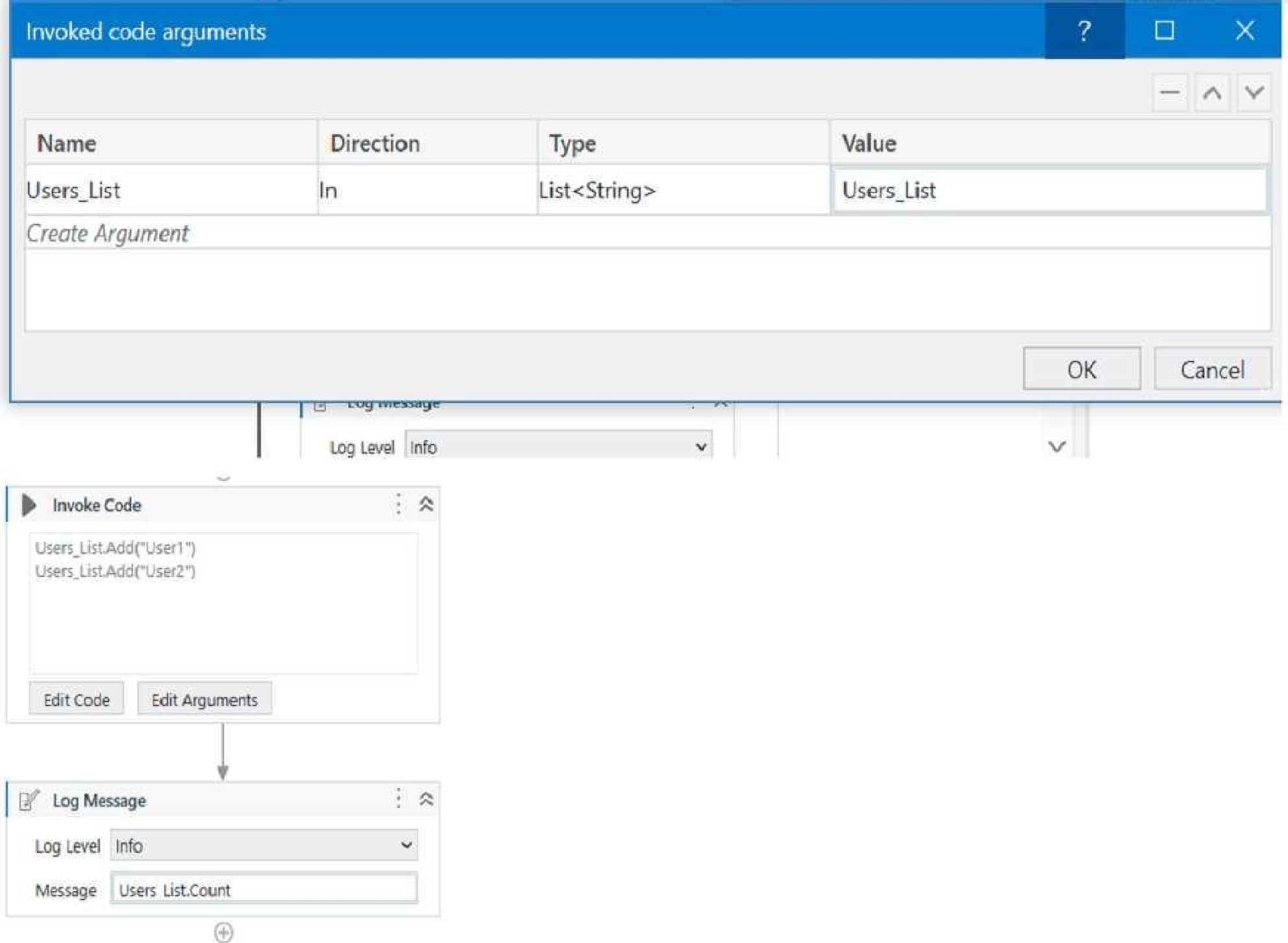
A developer has created a variable of type List of Strings named "UsersList", and initialized it with an empty list: "UsersList = new List(Of String)".
What is printed in the log message after the following Invoke Code is executed?
Select the answer:Select the answer
1 correct answer
A.
0
B.
2
C.
Object reference not set to an instance exception is thrown
D.
System Argument Exception is thrown
The code is adding two items to the list, but since the list is initialized as an empty list, the count will be 0. Reference: Data Manipulation with Lists and Dictionaries in Studio course, Lesson 2: Lists, Topic: Creating Lists How to initiate List<String[]>? forum post, Answer by @VishalS
Right Answer: A
Quiz
Question 9/109/10
What are the components that define a state within a State Machine in UiPath Studio?
Select the answer:Select the answer
1 correct answer
A.
Input Arguments, Output Arguments, and Variables.
B.
Entry, Exit, and Transition Actions with Trigger Conditions.
C.
Sequence, Flowchart, and Transactional Business Process.
D.
Activities, Connectors, and Annotations.
A state machine is a type of automation that uses a finite number of states in its execution. It can go into a state when it is triggered by an activity, and it exits that state when another activity is triggered1. A state machine consists of states, transitions, and actions1. The components that define a state within a state machine in UiPath Studio are: • Entry Actions: These are the activities that are executed when the state is entered1. For example, an entry action can be used to initialize a variable, display a message, or log some information1. • Exit Actions: These are the activities that are executed when the state is exited1. For example, an exit action can be used to clean up some resources, close an application, or update a status1. • Transition Actions: These are the activities that are executed when a transition from one state to another occurs1. For example, a transition action can be used to assign a value, send an email, or invoke a workflow1. • Trigger Conditions: These are the conditions that determine when a transition from one state to another should happen1. For example, a trigger condition can be based on a variable value, a user input, or a timer1.
Right Answer: B
Quiz
Question 10/1010/10
Starting with UiPath Studio version 2022.10, what happens to dependencies that lack Windows compatibility when they are converted in a project?
Select the answer:Select the answer
1 correct answer
A.
They are removed from the project.
B.
They are automatically resolved.
C.
They are replaced with compatible alternatives.
D.
They are marked as unresolved.
Starting with UiPath Studio version 2022.10, dependencies that lack Windows compatibility are marked as unresolved when they are converted in a project. This means that the project cannot be executed until the unresolved dependencies are manually resolved by the developer. This is done to ensure that the project can run on both Windows and Linux platforms without compatibility issues. Reference: [UiPath Studio Guide - Converting Projects to Linux Compatibility]
UiPath-ADAv1: UiPath Automation Developer Associate v1 Practice test unlocks all online simulator questions
Thank you for choosing the free version of the UiPath-ADAv1: UiPath Automation Developer Associate v1 practice test! Further deepen your knowledge on UiPath Simulator; by unlocking the full version of our UiPath-ADAv1: UiPath Automation Developer Associate v1 Simulator you will be able to take tests with over 254 constantly updated questions and easily pass your exam. 98% of people pass the exam in the first attempt after preparing with our 254 questions.
What to expect from our UiPath-ADAv1: UiPath Automation Developer Associate v1 practice tests and how to prepare for any exam?
The UiPath-ADAv1: UiPath Automation Developer Associate v1 Simulator Practice Tests are part of the UiPath Database and are the best way to prepare for any UiPath-ADAv1: UiPath Automation Developer Associate v1 exam. The UiPath-ADAv1: UiPath Automation Developer Associate v1 practice tests consist of 254 questions and are written by experts to help you and prepare you to pass the exam on the first attempt. The UiPath-ADAv1: UiPath Automation Developer Associate v1 database includes questions from previous and other exams, which means you will be able to practice simulating past and future questions. Preparation with UiPath-ADAv1: UiPath Automation Developer Associate v1 Simulator will also give you an idea of the time it will take to complete each section of the UiPath-ADAv1: UiPath Automation Developer Associate v1 practice test . It is important to note that the UiPath-ADAv1: UiPath Automation Developer Associate v1 Simulator does not replace the classic UiPath-ADAv1: UiPath Automation Developer Associate v1 study guides; however, the Simulator provides valuable insights into what to expect and how much work needs to be done to prepare for the UiPath-ADAv1: UiPath Automation Developer Associate v1 exam.
UiPath-ADAv1: UiPath Automation Developer Associate v1 Practice test therefore represents an excellent tool to prepare for the actual exam together with our UiPath practice test . Our UiPath-ADAv1: UiPath Automation Developer Associate v1 Simulator will help you assess your level of preparation and understand your strengths and weaknesses. Below you can read all the quizzes you will find in our UiPath-ADAv1: UiPath Automation Developer Associate v1 Simulator and how our unique UiPath-ADAv1: UiPath Automation Developer Associate v1 Database made up of real questions:
You can prepare for the UiPath-ADAv1: UiPath Automation Developer Associate v1 exams with our mobile app. It is very easy to use and even works offline in case of network failure, with all the functions you need to study and practice with our UiPath-ADAv1: UiPath Automation Developer Associate v1 Simulator.
Use our Mobile App, available for both Android and iOS devices, with our UiPath-ADAv1: UiPath Automation Developer Associate v1 Simulator . You can use it anywhere and always remember that our mobile app is free and available on all stores.
Our Mobile App contains all UiPath-ADAv1: UiPath Automation Developer Associate v1 practice tests which consist of 254 questions and also provide study material to pass the final UiPath-ADAv1: UiPath Automation Developer Associate v1 exam with guaranteed success.
Our UiPath-ADAv1: UiPath Automation Developer Associate v1 database contain hundreds of questions and UiPath Tests related to UiPath-ADAv1: UiPath Automation Developer Associate v1 Exam. This way you can practice anywhere you want, even offline without the internet.