The new flashcard feature is useful to memorize questions.
?Change your study mode
At any time, you can change the study mode, and alternate between the practice mode and the exam mode. In practice mode, you can configure for example the number of questions or tests, and other parameters to help you study.
Randomized | 10 Questions per Test | 20 Minutes | 70% to pass|
To re-configure your study mode again and change - for example - the number of tests, whether you have random questions and all other configuration parameters.
?Simulator Configuration
Auto-scroll: You can use the automatic scrolling of the questionnaire that occurs as soon as you answer one or all of the answers to a question correctly. Auto scrolling is activated if you answer a single answer, or as soon as you answer all the mandatory answers. Learning Mode: During learning mode you can get a real time result for your answer.
Free Test
Question: / 10
20:00Min. left
?Restart the current test
To restart the current test by clearing all your answers and the time used up to now. Warning: all answers will be lost.
Question: / 10
4.6(682 Votes)
Quiz
Question 1/101/10
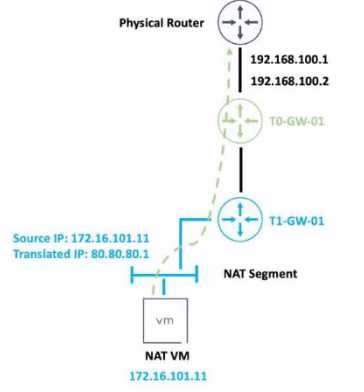
Refer to the exhibit.
An administrator would like to change the private IP address of the NAT VM I72.l6.101.il to a public address of 80.80.80.1 as the packets leave the NAT-Segment network. Which type of NAT solution should be implemented to achieve this?
Select the answer:Select the answer
1 correct answer
A.
DNAT
B.
SNAT
C.
Reflexive NAT
D.
NAT64
SNAT stands for Source Network Address Translation. It is a type of NAT that translates the source IP address of outgoing packets from a private address to a public address. SNAT is used to allow hosts in a private network to access the internet or other public networks1 In the exhibit, the administrator wants to change the private IP address of the NAT VM 172.16.101.11 to a public address of 80.80.80.1 as the packets leave the NAT-Segment network. This is an example of SNAT, as the source IP address is modified before the packets are sent to an external network. According to the VMware NSX 4.x Professional Exam Guide, SNAT is one of the topics covered in the exam objectives2 To learn more about SNAT and how to configure it in VMware NSX, you can refer to the following resources: VMware NSX Documentation: NAT 3 VMware NSX 4.x Professional: NAT Configuration 4 VMware NSX 4.x Professional: NAT Troubleshooting 5
Right Answer: B
Quiz
Question 2/102/10
Which two choices are solutions offered by the VMware NSX portfolio? (Choose two.)
Select multiple answer: (Choose 2)Select the answer
2 correct answers
A.
VMware Tanzu Kubernetes Grid
B.
VMware Tanzu Kubernetes Cluster
C.
VMware NSX Advanced Load Balancer
D.
VMware NSX Distributed IDS/IPS
E.
VMware Aria Automation
The answer is C and D. VMware NSX is a portfolio of networking and security solutions that enables consistent policy, operations, and automation across multiple cloud environments1 The VMware NSX portfolio includes the following solutions: VMware NSX Data Center: A platform for data center network virtualization and security that delivers a complete L2-L7 networking stack and overlay services for any workload1 VMware NSX Cloud: A service that extends consistent networking and security to public clouds such as AWS and Azure1 VMware NSX Advanced Load Balancer: A solution that provides load balancing, web application firewall, analytics, and monitoring for applications across any cloud12 VMware NSX Distributed IDS/IPS: A feature that provides distributed intrusion detection and prevention for workloads across any cloud12 VMware NSX Intelligence: A service that provides planning, observability, and intelligence for network and micro-segmentation1 VMware NSX Federation: A capability that enables multi-site networking and security management with consistent policy and operational state synchronization1 VMware NSX Service Mesh: A service that connects, secures, and monitors microservices across multiple clusters and clouds1 VMware NSX for Horizon: A solution that delivers secure desktops and applications across any device, location, or network1 VMware NSX for vSphere: A solution that provides network agility and security for vSphere environments with a built-in console in vCenter1 VMware NSX-T Data Center: A platform for cloud-native applications that supports containers, Kubernetes, bare metal hosts, and multi-hypervisor environments1 VMware Tanzu Kubernetes Grid and VMware Tanzu Kubernetes Cluster are not part of the VMware NSX portfolio. They are solutions for running Kubernetes clusters on any cloud3 VMware Aria Automation is not a real product name. It is a fictional name that does not exist in the VMware portfolio.
Right Answer: C, D
Quiz
Question 3/103/10
When a stateful service is enabled for the first lime on a Tier-0 Gateway, what happens on the NSX Edge node'
Select the answer:Select the answer
1 correct answer
A.
SR is instantiated and automatically connected with DR.
B.
DR Is instantiated and automatically connected with SR.
C.
SR and DR Is instantiated but requites manual connection.
D.
SR and DR doesn't need to be connected to provide any stateful services.
The answer is A. SR is instantiated and automatically connected with DR. SR stands for Service Router and DR stands for Distributed Router. They are components of the NSX Edge node that provide different functions1 The SR is responsible for providing stateful services such as NAT, firewall, load balancing, VPN, and DHCP. The DR is responsible for providing distributed routing and switching between logical segments and the physical network1 When a stateful service is enabled for the first time on a Tier-0 Gateway, the NSX Edge node automatically creates an SR instance and connects it with the existing DR instance. This allows the stateful service to be applied to the traffic that passes through the SR before reaching the DR2 According to the VMware NSX 4.x Professional Exam Guide, understanding the SR and DR components and their functions is one of the exam objectives3 To learn more about the SR and DR components and how they work on the NSX Edge node, you can refer to the following resources: VMware NSX Documentation: NSX Edge Components 1 VMware NSX 4.x Professional: NSX Edge Architecture VMware NSX 4.x Professional: NSX Edge Routing
Right Answer: A
Quiz
Question 4/104/10
A company Is deploying NSX micro-segmentation in their vSphere environment to secure a simple application composed of web. app, and database tiers. The naming convention will be:
• WKS-WEB-SRV-XXX
• WKY-APP-SRR-XXX
• WKI-DB-SRR-XXX
What is the optimal way to group them to enforce security policies from NSX?
Select the answer:Select the answer
1 correct answer
A.
Use Edge as a firewall between tiers.
B.
Do a service insertion to accomplish the task.
C.
Group all by means of tags membership.
D.
Create an Ethernet based security policy.
The answer is C. Group all by means of tags membership. Tags are metadata that can be applied to physical servers, virtual machines, logical ports, and logical segments in NSX. Tags can be used for dynamic security group membership, which allows for granular and flexible enforcement of security policies based on various criteria1 In the scenario, the company is deploying NSX micro-segmentation to secure a simple application composed of web, app, and database tiers. The naming convention will be: WKS-WEB-SRV-XXX WKY-APP-SRR-XXX WKI-DB-SRR-XXX The optimal way to group them to enforce security policies from NSX is to use tags membership. For example, the company can create three tags: Web, App, and DB, and assign them to the corresponding VMs based on their names. Then, the company can create three security groups: Web- SG, App-SG, and DB-SG, and use the tags as the membership criteria. Finally, the company can create and apply security policies to the security groups based on the desired rules and actions2 Using tags membership has several advantages over the other options: It is more scalable and dynamic than using Edge as a firewall between tiers. Edge firewall is a centralized solution that can create bottlenecks and performance issues when handling large amounts of traffic3 It is more simple and efficient than doing a service insertion to accomplish the task. Service insertion is a feature that allows for integrating third-party services with NSX, such as antivirus or intrusion prevention systems. Service insertion is not necessary for basic micro-segmentation and can introduce additional complexity and overhead. It is more flexible and granular than creating an Ethernet based security policy. Ethernet based security policy is a type of policy that uses MAC addresses as the source or destination criteria. Ethernet based security policy is limited by the scope of layer 2 domains and does not support logical constructs such as segments or groups. To learn more about tags membership and how to use it for micro-segmentation in NSX, you can refer to the following resources: VMware NSX Documentation: Security Tag 1 VMware NSX Micro-segmentation Day 1: Chapter 4 - Security Policy Design 2 VMware NSX 4.x Professional: Security Groups VMware NSX 4.x Professional: Security Policies
Right Answer: C
Quiz
Question 5/105/10
When collecting support bundles through NSX Manager, which files should be excluded for potentially containing sensitive information?
Select multiple answer: (Choose 2)Select the answer
2 correct answers
A.
Controller Files
B.
Management Files
C.
Core Files
D.
Audit Files
According to the VMware NSX Documentation1, core files and audit logs can contain sensitive information and should be excluded from the support bundle unless requested by VMware technical support. Controller files and management files are not mentioned as containing sensitive information. Reference: 1: Support Bundle Collection Tool - VMware Docs
Right Answer: C, D
Quiz
Question 6/106/10
Which three of the following describe the Border Gateway Routing Protocol (BGP) configuration on a Tier-0 Gateway? (Choose three.)
Select multiple answer: (Choose 3)Select the answer
3 correct answers
A.
Can be used as an Exterior Gateway Protocol.
B.
It supports a 4-byte autonomous system number.
C.
The network is divided into areas that are logical groups.
D.
FIGRP Is disabled by default.
E.
BGP is enabled by default.
The answer is A, B, and D. A. Can be used as an Exterior Gateway Protocol. This is correct. BGP is a protocol that can be used to exchange routing information between different autonomous systems (AS). An AS is a network or a group of networks under a single administrative control. BGP can be used as an Exterior Gateway Protocol (EGP) to connect an AS to other ASes on the internet or other external networks1 B. It supports a 4-byte autonomous system number. This is correct. BGP supports both 2-byte and 4- byte AS numbers. A 2-byte AS number can range from 1 to 65535, while a 4-byte AS number can range from 65536 to 4294967295. NSX supports both 2-byte and 4-byte AS numbers for BGP configuration on a Tier-0 Gateway2 C. The network is divided into areas that are logical groups. This is incorrect. This statement describes OSPF, not BGP. OSPF is another routing protocol that operates within a single AS and divides the network into areas to reduce routing overhead and improve scalability. BGP does not use the concept of areas, but rather uses attributes, policies, and filters to control the routing decisions and traffic flow3 D. FIGRP Is disabled by default. This is correct. FIGRP stands for Fast Interior Gateway Routing Protocol, which is an enhanced version of IGRP, an obsolete routing protocol developed by Cisco. FIGRP is not supported by NSX and is disabled by default on a Tier-0 Gateway. E. BGP is enabled by default. This is incorrect. BGP is not enabled by default on a Tier-0 Gateway. To enable BGP, you need to configure the local AS number and the BGP neighbors on the Tier-0 Gateway using the NSX Manager UI or API. To learn more about BGP configuration on a Tier-0 Gateway in NSX, you can refer to the following resources: VMware NSX Documentation: Configure BGP 1 VMware NSX 4.x Professional: BGP Configuration VMware NSX 4.x Professional: BGP Troubleshooting
Right Answer: A, B, D
Quiz
Question 7/107/10
Which three NSX Edge components are used for North-South Malware Prevention? (Choose three.)
Select multiple answer: (Choose 3)Select the answer
3 correct answers
A.
Thin Agent
B.
RAPID
C.
Security Hub
D.
IDS/IPS
E.
Security Analyzer
F.
Reputation Service
The answer is B, D, and F. B. RAPID. This is correct. RAPID stands for Real-time Anti-malware Protection with Intelligent Detection. It is a component of the NSX Edge node that provides malware prevention for the north- south traffic. RAPID extracts files from the network traffic and analyzes them for malicious behavior using hash-based detection, local analysis, and cloud analysis techniques1 D. IDS/IPS. This is correct. IDS/IPS stands for Intrusion Detection and Prevention System. It is a component of the NSX Edge node that provides intrusion detection and prevention for the north- south traffic. IDS/IPS monitors the network traffic and compares it against a known set of signatures that specify patterns for different types of network intrusions. IDS/IPS can generate alerts or block the traffic based on the matching signatures and the configured actions2 F. Reputation Service. This is correct. Reputation Service is a component of the NSX Edge node that provides reputation-based filtering for the north-south traffic. Reputation Service uses a cloud-based database of known malicious IP addresses and domains to block or allow the traffic based on the reputation score of the source or destination. Reputation Service can also integrate with third-party reputation providers to enhance the security coverage3 A. Thin Agent. This is incorrect. Thin Agent is not a component of the NSX Edge node, but rather a component of the NSX Guest Introspection platform that runs on the virtual machine endpoints in the distributed east-west traffic. Thin Agent enables communication between the virtual machines and the NSX Manager, and facilitates malware prevention and intrusion detection on the host level. C. Security Hub. This is incorrect. Security Hub is not a component of the NSX Edge node, but rather a component of the VMware Cloud Services platform that provides a unified view of security posture across multiple cloud environments. Security Hub integrates with NSX Advanced Threat Prevention to collect and display security events, alerts, and recommendations from NSX IDS/IPS and NSX Malware Prevention features. E. Security Analyzer. This is incorrect. Security Analyzer is not a real product name or component name related to NSX Edge or NSX Advanced Threat Prevention. It is a fictional name that does not exist in the VMware portfolio. To learn more about NSX Edge components for North-South Malware Prevention, you can refer to the following resources: VMware NSX Documentation: Overview of NSX IDS/IPS and NSX Malware Prevention 2 VMware NSX Documentation: Configure North-South Malware Prevention 1 VMware NSX Documentation: Configure North-South Intrusion Detection and Prevention VMware NSX Documentation: Configure North-South Reputation-Based Filtering 3
Right Answer: B, D, F
Quiz
Question 8/108/10
Which two statements are true about IDS Signatures? (Choose two.)
Select multiple answer: (Choose 2)Select the answer
2 correct answers
A.
Users can upload their own IDS signature definitions.
B.
An IDS signature contains data used to identify known exploits and vulnerabilities.
C.
An IDS signature contains data used to identify the creator of known exploits and vulnerabilities.
D.
IDS signatures can be High Risk, Suspicious, Low Risk and Trustworthy.
E.
An IDS signature contains a set of instructions that determine which traffic is analyzed.
According to the Network Bachelor article1, an IDS signature contains data used to identify an attacker’s attempt to exploit a known vulnerability in both the operating system and applications. This implies that statement B is true. According to the VMware NSX Documentation2, IDS/IPS Profiles are used to group signatures, which can then be applied to select applications and traffic. This implies that statement E is true. Statement A is false because users cannot upload their own IDS signature definitions, they have to use the ones provided by VMware or Trustwave3. Statement C is false because an IDS signature does not contain data used to identify the creator of known exploits and vulnerabilities, only the exploits and vulnerabilities themselves. Statement D is false because IDS signatures are classified into one of the following severity categories: Critical, High, Medium, Low, or Informational1. Reference: 3: Distributed IDS/IPS Settings and Signatures - VMware Docs 2: Distributed IDS/IPS - VMware Docs 1: NSX-T: Exploring Distributed IDS - Network Bachelor
Right Answer: B, E
Quiz
Question 9/109/10
Which NSX CLI command is used to change the authentication policy for local users?
Which statement is true about an alarm in a Suppressed state?
Select the answer:Select the answer
1 correct answer
A.
An alarm can be suppressed for a specific duration in seconds.
B.
An alarm can be suppressed for a specific duration in days.
C.
An alarm can be suppressed for a specific duration in minutes.
D.
An alarm can be suppressed for a specific duration in hours.
The answer is D. An alarm can be suppressed for a specific duration in hours. According to the VMware NSX documentation, an alarm can be in one of the following states: Open, Acknowledged, Suppressed, or Resolved12 An alarm in a Suppressed state means that the status reporting for this alarm has been disabled by the user for a user-specified duration12 When a user moves an alarm into a Suppressed state, they are prompted to specify the duration in hours. After the specified duration passes, the alarm state reverts to Open. However, if the system determines the condition has been corrected, the alarm state changes to Resolved13 To learn more about how to manage alarm states in NSX, you can refer to the following resources: VMware NSX Documentation: Managing Alarm States 1 VMware NSX Documentation: View Alarm Information 2 VMware NSX Intelligence Documentation: Manage NSX Intelligence Alarm States 3
2V0-41.23: VMware NSX 4.x Professional Practice test unlocks all online simulator questions
Thank you for choosing the free version of the 2V0-41.23: VMware NSX 4.x Professional practice test! Further deepen your knowledge on VMware Simulator; by unlocking the full version of our 2V0-41.23: VMware NSX 4.x Professional Simulator you will be able to take tests with over 70 constantly updated questions and easily pass your exam. 98% of people pass the exam in the first attempt after preparing with our 70 questions.
What to expect from our 2V0-41.23: VMware NSX 4.x Professional practice tests and how to prepare for any exam?
The 2V0-41.23: VMware NSX 4.x Professional Simulator Practice Tests are part of the VMware Database and are the best way to prepare for any 2V0-41.23: VMware NSX 4.x Professional exam. The 2V0-41.23: VMware NSX 4.x Professional practice tests consist of 70 questions and are written by experts to help you and prepare you to pass the exam on the first attempt. The 2V0-41.23: VMware NSX 4.x Professional database includes questions from previous and other exams, which means you will be able to practice simulating past and future questions. Preparation with 2V0-41.23: VMware NSX 4.x Professional Simulator will also give you an idea of the time it will take to complete each section of the 2V0-41.23: VMware NSX 4.x Professional practice test . It is important to note that the 2V0-41.23: VMware NSX 4.x Professional Simulator does not replace the classic 2V0-41.23: VMware NSX 4.x Professional study guides; however, the Simulator provides valuable insights into what to expect and how much work needs to be done to prepare for the 2V0-41.23: VMware NSX 4.x Professional exam.
2V0-41.23: VMware NSX 4.x Professional Practice test therefore represents an excellent tool to prepare for the actual exam together with our VMware practice test . Our 2V0-41.23: VMware NSX 4.x Professional Simulator will help you assess your level of preparation and understand your strengths and weaknesses. Below you can read all the quizzes you will find in our 2V0-41.23: VMware NSX 4.x Professional Simulator and how our unique 2V0-41.23: VMware NSX 4.x Professional Database made up of real questions:
Info quiz:
Quiz name:2V0-41.23: VMware NSX 4.x Professional
Total number of questions:70
Number of questions for the test:50
Pass score:80%
You can prepare for the 2V0-41.23: VMware NSX 4.x Professional exams with our mobile app. It is very easy to use and even works offline in case of network failure, with all the functions you need to study and practice with our 2V0-41.23: VMware NSX 4.x Professional Simulator.
Use our Mobile App, available for both Android and iOS devices, with our 2V0-41.23: VMware NSX 4.x Professional Simulator . You can use it anywhere and always remember that our mobile app is free and available on all stores.
Our Mobile App contains all 2V0-41.23: VMware NSX 4.x Professional practice tests which consist of 70 questions and also provide study material to pass the final 2V0-41.23: VMware NSX 4.x Professional exam with guaranteed success.
Our 2V0-41.23: VMware NSX 4.x Professional database contain hundreds of questions and VMware Tests related to 2V0-41.23: VMware NSX 4.x Professional Exam. This way you can practice anywhere you want, even offline without the internet.