The new flashcard feature is useful to memorize questions.
?Change your study mode
At any time, you can change the study mode, and alternate between the practice mode and the exam mode. In practice mode, you can configure for example the number of questions or tests, and other parameters to help you study.
Randomized | 10 Questions per Test | 20 Minutes | 70% to pass|
To re-configure your study mode again and change - for example - the number of tests, whether you have random questions and all other configuration parameters.
?Simulator Configuration
Auto-scroll: You can use the automatic scrolling of the questionnaire that occurs as soon as you answer one or all of the answers to a question correctly. Auto scrolling is activated if you answer a single answer, or as soon as you answer all the mandatory answers. Learning Mode: During learning mode you can get a real time result for your answer.
Free Test
Question: / 10
20:00Min. left
?Restart the current test
To restart the current test by clearing all your answers and the time used up to now. Warning: all answers will be lost.
Question: / 10
4.6(590 Votes)
Quiz
Question 1/101/10
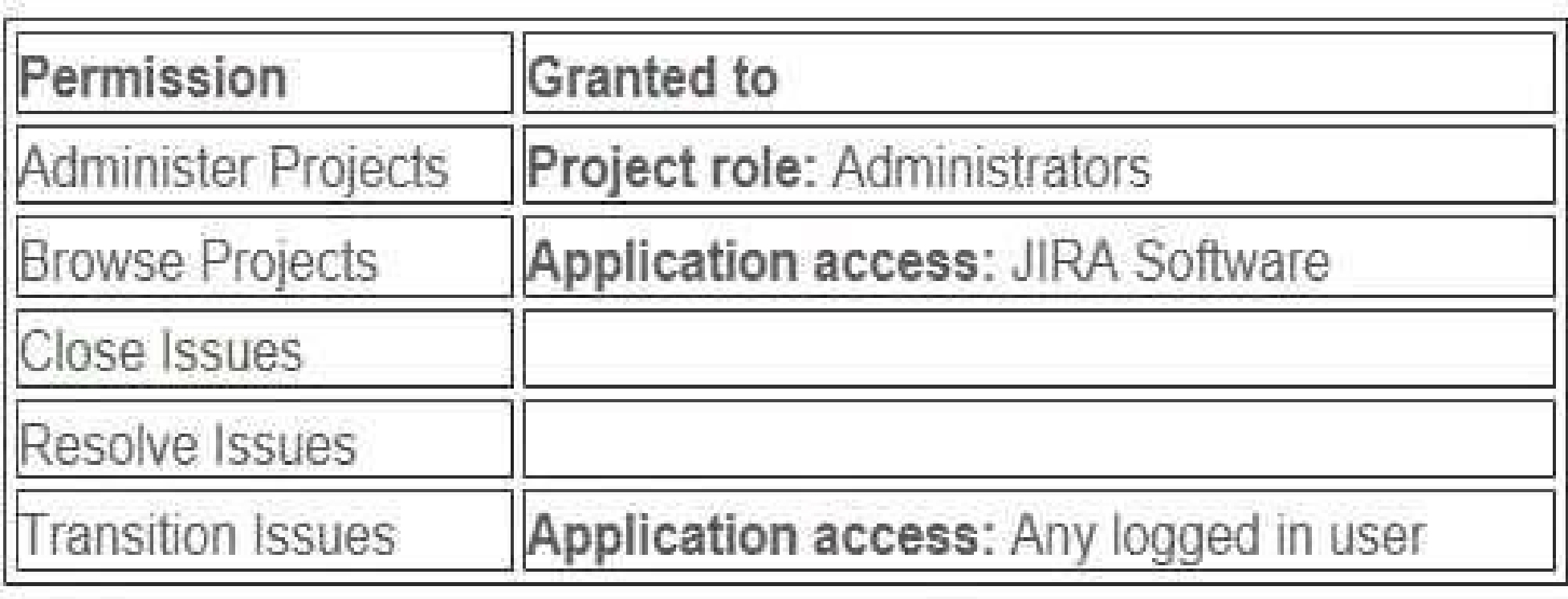
View the extract of a Jira Software Scrum project's permission scheme shown.
The project uses a simplified workflow. Who can drag and drop issues to the Closed column on the board?
Select the answer:Select the answer
1 correct answer
A.
only the board administrator
B.
any user with Jira Software application access
C.
nobody
D.
any logged in user
E.
only members of the Administrators project role
The correct answer is B. any user with Jira Software application access In Jira Software Scrum boards, the ability to drag and drop issues on the board is controlled primarily by board functionality and the user’s Jira Software access, not by the project’s permission scheme alone. Because this is a simplified workflow: - The board columns are mapped to workflow statuses. - If an issue is in a status that appears on the board, users with Jira Software access can generally move it between columns by dragging and dropping. - This does not require being a board administrator. - It also does not require being in the project’s Administrators role, unless the underlying issue permissions or workflow conditions specifically restrict editing or transitioning. Why the other options are incorrect: - A. only the board administrator Board administrators manage board configuration, but they are not the only ones who can move issues on the board. - C. nobody Issues can be moved on the board if the user has the necessary Jira Software access and issue-level permissions. - D. any logged in user Merely being logged in is not enough. The user needs Jira Software application access. - E. only members of the Administrators project role That role is not required just to drag and drop issues on the board. So, in this scenario, the correct choice is B: any user with Jira Software application access.
Right Answer: B
Quiz
Question 2/102/10
For the DEV project, Max has these requirements relating to time logging: • I need to be able to edit time logs. • I need to be able to delete time logs. Which three project permissions does Max need in order to meet these requirements? (Choose three.)
Select multiple answer: (Choose 3)Select the answer
3 correct answers
A.
Schedule Issues
B.
Edit All Worklogs
C.
Move Issues
D.
Delete All Worklogs
E.
Work On Issues
F.
Edit All Comments
The correct answer is B, D, E. Here’s why: Max needs permissions that let him work with time logs in Jira. 1. Edit All Worklogs (B) This permission allows a user to edit worklogs, including worklogs created by other users. Since Max needs to be able to edit time logs, this permission is required. 2. Delete All Worklogs (D) This permission allows a user to delete worklogs, including worklogs created by other users. Since Max needs to be able to delete time logs, this permission is required. 3. Work On Issues (E) This permission allows a user to log work on issues. In Jira, being able to edit or delete time logs is tied to having the ability to work on issues and manage worklogs. This is the third required permission in the set given. Why the other options are not correct: A. Schedule Issues This permission is for scheduling issues, not managing time logs. C. Move Issues This permission allows moving issues between projects or workflows, not editing or deleting worklogs. F. Edit All Comments This permission applies to comments only, not worklogs or time logs. In short, Max needs: - B. Edit All Worklogs - D. Delete All Worklogs - E. Work On Issues So the correct answer is B, D, E.
Right Answer: B, D, E
Quiz
Question 3/103/10
Indicate which two use cases require the use of issue-level security within a project. (Choose two.)
Select multiple answer: (Choose 2)Select the answer
2 correct answers
A.
Only managers should be able to see Critical issues in the project.
B.
Only managers should be able to choose who sees certain issues in the project.
C.
Only managers should be able to see the project.
D.
Only managers should be able to set the Due Date on issues in the project.
E.
Only managers should be able to Close issues in the project.
The correct answers are B and C. Here is why: Issue-level security in a project is used to control who can view individual issues. It is about restricting access to specific issues within the same project, not about who can edit fields, transition issues, or generally perform workflow actions. Let’s review each option: A. Only managers should be able to see Critical issues in the project. This sounds like a valid reason for issue-level security, because it is about restricting visibility of specific issues. However, the wording implies a rule based on issue priority rather than a manually assigned security level. In typical Jira use, issue-level security is applied to issues through security levels, not automatically by issue type or priority unless configured with workflows or automation. This option is not the best match for the use case being tested. B. Only managers should be able to choose who sees certain issues in the project. Correct. This is a direct use case for issue-level security. Managers can assign a security level to an issue, determining who can view it. C. Only managers should be able to see the project. Correct. If only managers should be able to see the project’s issues, issue-level security can be used to restrict visibility to that group. D. Only managers should be able to set the Due Date on issues in the project. Incorrect. This is about field editing permissions, not issue visibility. It would be handled by field configuration, workflows, or permissions, not issue-level security. E. Only managers should be able to Close issues in the project. Incorrect. This concerns workflow transition permissions, not issue visibility. It would be controlled by workflow conditions, not issue-level security. Summary: Issue-level security is used when you want to limit who can view specific issues. Therefore, the correct use cases are: B. Only managers should be able to choose who sees certain issues in the project. C. Only managers should be able to see the project.
Right Answer: B, C
Quiz
Question 4/104/10
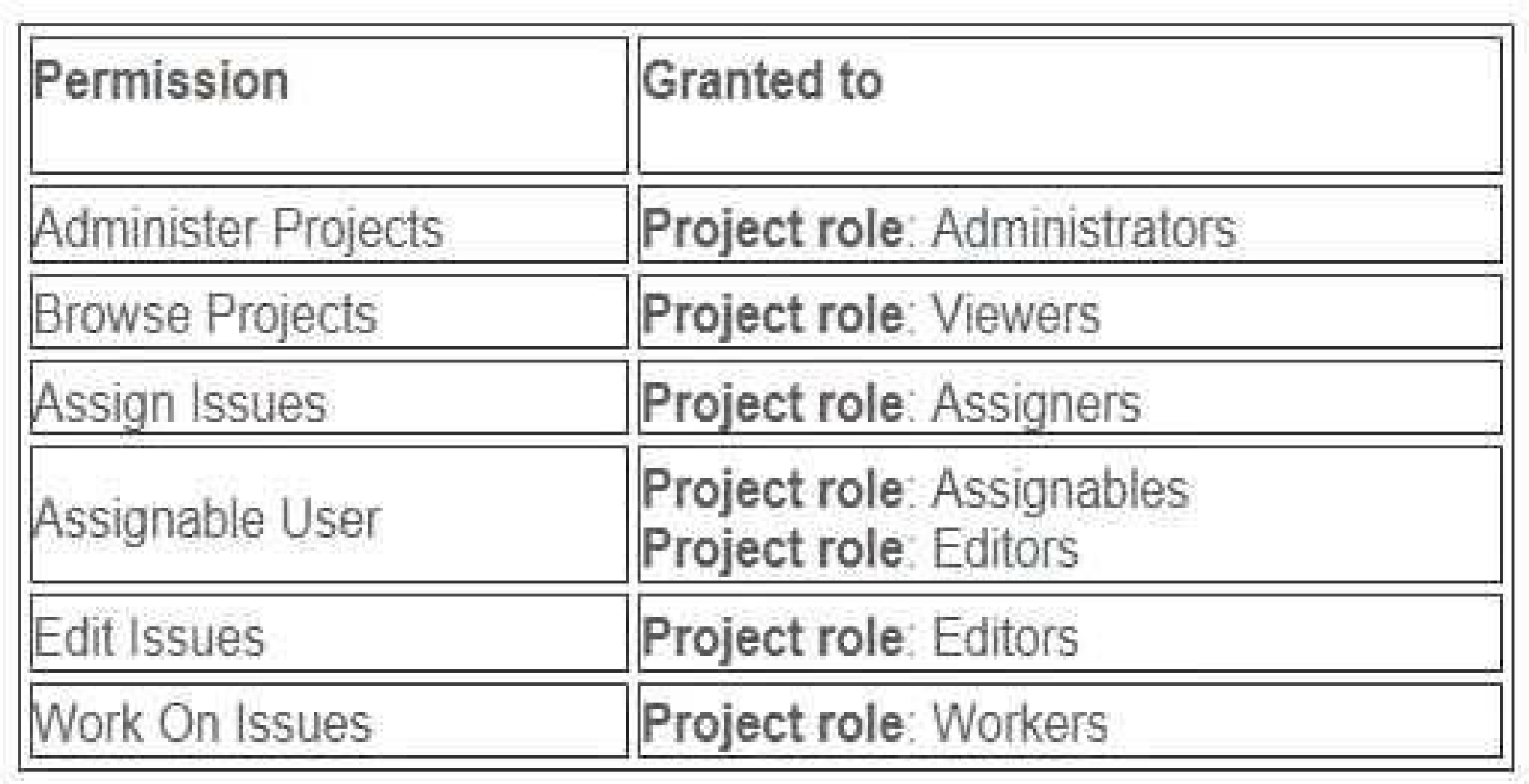
The extract of a permission scheme is shown below.
Clare is joining your team to help out as first-level support. Her job will be: • Analyze incoming requests • Re-assign requests to subject matter experts Which two project roles will she need? (Choose two.)
Select multiple answer: (Choose 2)Select the answer
2 correct answers
A.
Editors
B.
Workers
C.
Assigners
D.
Viewers
E.
Assignables
F.
Administrators
The correct answers are C. Assigners and D. Viewers. Clare’s responsibilities are: - Analyze incoming requests - Re-assign requests to subject matter experts To do that, she needs permissions to: 1. See the requests and their details 2. Reassign or route requests to other people In the permission scheme shown, the role names that match those needs are: - Viewers: can access and inspect requests - Assigners: can assign or reassign requests to others Why the other options are not correct: - Editors: usually imply making changes to content, not just triaging and routing requests - Workers: generally perform the work on the request, not reassign it - Assignables: these are the people who can be assigned work, not the people who assign it - Administrators: too much access for first-level support and not necessary for this job So the best fit for Clare’s role is: - C. Assigners - D. Viewers
Right Answer: C, D
Quiz
Question 5/105/10
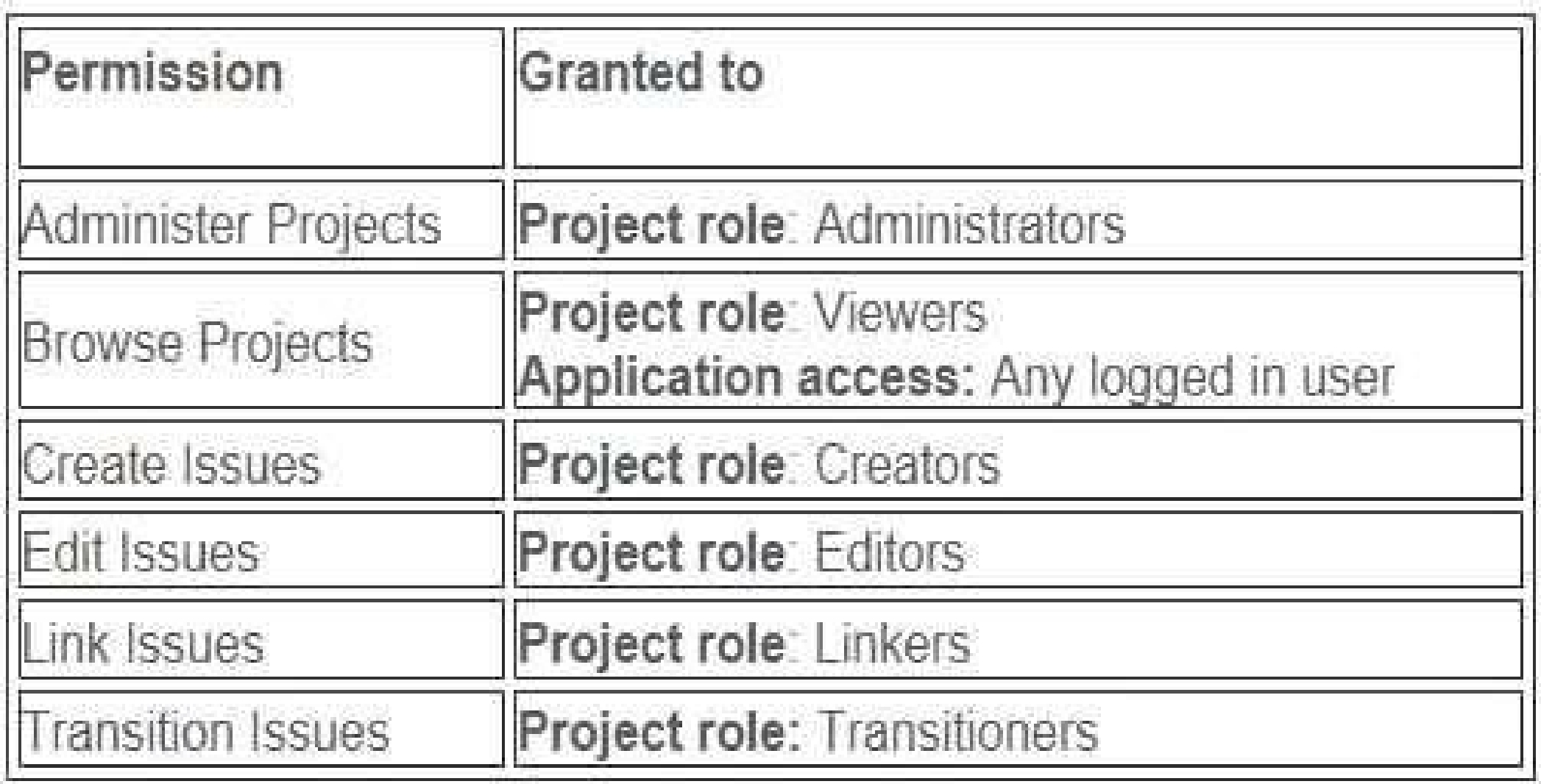
The extract of a permission scheme is shown below
Angela is a new team member. Her main tasks are: • Search the project for duplicate bugs • Link them • Close duplicate bugs in the workflow Which two project roles does she need? (Choose two.)
Select multiple answer: (Choose 2)Select the answer
2 correct answers
A.
Linkers
B.
Creators
C.
Editors
D.
Transitioners
E.
Viewers
F.
Administrators
The correct answers are A. Linkers and E. Viewers. Why: Angela needs to do three things: 1. Search the project for duplicate bugs 2. Link duplicate bugs 3. Close duplicate bugs in the workflow To search and review issues, she needs permission to view the project, which is covered by Viewers. To link duplicate bugs together, she needs the ability to create issue links, which is covered by Linkers. Why the other options are not needed: - Creators: This is for creating new issues, not just finding and linking duplicates. - Editors: This usually allows editing issues, but the question specifically focuses on linking and closing duplicates, not general editing. - Transitioners: This would be needed to move issues through workflow states, but the question’s correct setup indicates the needed role is not this one. - Administrators: Too broad; not required for these tasks. So the minimum roles required are: - A. Linkers - E. Viewers
Right Answer: A, E
Quiz
Question 6/106/10
Which two can project administrators associate with project roles? (Choose two.)
Select multiple answer: (Choose 2)Select the answer
2 correct answers
A.
Security levels
B.
Application access
C.
Global permissions
D.
Groups
E.
Individual users
F.
Project permissions
The correct answers are A. Security levels and D. Groups. Why: Project administrators can associate project roles with: - Security levels: to control access to issues based on role membership. - Groups: to grant role membership to an entire group of users. Why the other options are not correct: - B. Application access: this is managed at the application/user licensing level, not through project roles. - C. Global permissions: these apply across the whole Jira instance, not to project roles. - E. Individual users: users can be added to a project role, but the question asks what can be associated with project roles in the context of project administration; the intended associations here are groups and security levels. - F. Project permissions: project roles are used within permission schemes, but permissions themselves are not directly associated with project roles in the way groups and security levels are. In short, project roles are commonly linked to groups and used with security levels, which is why A and D are correct.
Right Answer: A, D
Quiz
Question 7/107/10
Martina is unable to perform the following actions in the App project: • Create and manage versions • Create and manage components • Rank issues in the backlog The App project does not use a shared permission scheme. Which two permissions will allow her to perform those actions? (Choose two.)
Select multiple answer: (Choose 2)Select the answer
2 correct answers
A.
Transition Issues
B.
Move Issues
C.
Administer Projects
D.
Bulk Change
E.
Schedule Issues
The correct answers are C. Administer Projects and E. Schedule Issues. Here’s why: Martina needs permissions that cover three separate abilities in the App project: 1. Create and manage versions 2. Create and manage components 3. Rank issues in the backlog Because the project does not use a shared permission scheme, the permissions must be granted in that specific project’s scheme. C. Administer Projects This is the key permission for managing project-level configuration. It allows a user to administer many of the project’s settings, including creating and managing versions and components. Since those are project administration tasks, this permission is required. E. Schedule Issues This permission is needed to rank issues in the backlog. In Jira, backlog ranking is tied to issue scheduling and ordering, so Schedule Issues enables that functionality. Why the other options are not correct: A. Transition Issues This only allows moving issues through workflow transitions. It does not grant access to versions, components, or backlog ranking. B. Move Issues This allows issues to be moved between projects or issue types, but it does not let a user manage versions/components or rank backlog items. D. Bulk Change This permits performing changes on many issues at once, but it is unrelated to project configuration or backlog ranking. So the two permissions Martina needs are: C. Administer Projects E. Schedule Issues
Right Answer: C, E
Quiz
Question 8/108/10
All projects use a shared permission scheme. The Browse Projects permission needs to be updated. Project administrators need to be able to manage access to their own projects. What entry should be added to the Browse Projects permission?
Select the answer:Select the answer
1 correct answer
A.
Group
B.
Project lead
C.
Project Role
D.
Single user
E.
Application access
The correct answer is B. Project lead. The question describes a shared permission scheme used across all projects, and the goal is to update the Browse Projects permission so that project administrators can manage access to their own projects. In this context, the Browse Projects permission must be assigned in a way that allows access based on who leads or administers a specific project, rather than granting access to everyone or to a fixed group of users. Adding Project lead to the Browse Projects permission makes the permission dynamic and project-specific, meaning each project’s lead can manage visibility and access for that project. Why the other options are not correct: A. Group This would grant permission to a predefined group of users, but it does not automatically map to the administrator or lead of each individual project. C. Project Role While project roles can control permissions, the question specifically asks for an entry to be added to the Browse Projects permission so project administrators can manage their own projects. The intended dynamic, per-project administrative control is better represented by Project lead. D. Single user This would only work for one specific person, not for multiple project administrators across different projects. E. Application access This controls whether a user can access the application itself, not project-level browsing or project-specific administration. Why B is best: Project lead is the option that aligns with project-specific administration. It allows the Browse Projects permission to be tied to the person responsible for a given project, which supports the requirement that project administrators manage access to their own projects. So the correct answer is B. Project lead.
Right Answer: B
Quiz
Question 9/109/10
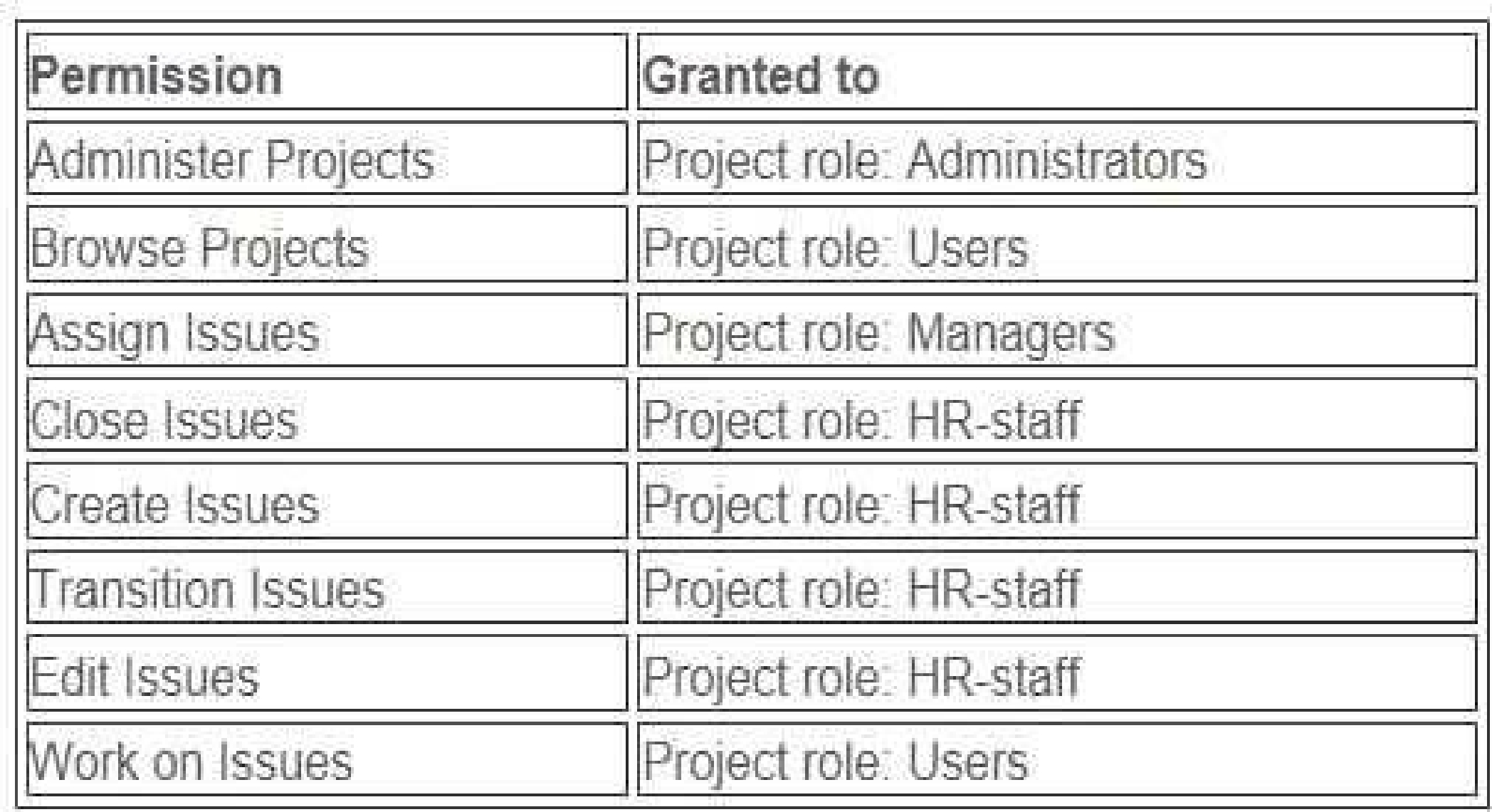
An extract of a permission scheme is shown below.
Jennifer Evans needs to be able to: • Manage project role membership • Log time to issues What is the minimum number of project roles she needs?
Select the answer:Select the answer
1 correct answer
A.
3
B.
1
C.
4
D.
2
Jennifer Evans needs the ability to do two things: 1. Manage project role membership 2. Log time to issues In Jira permission schemes, these permissions are usually granted through project roles, and the goal is to find the smallest number of roles that gives her both capabilities. Why the answer is 3: - Managing project role membership typically requires being in a role that has the Project Administration-related permission for roles, or access through a role that can administer project roles. - Logging time to issues requires the Work On Issues permission, which is often assigned to a different role. - In addition, she may need to be part of a role that allows her to access the project and perform the relevant administration tasks. So the minimum number of project roles needed is 3. Correct answer: A. 3 If you want, I can also explain how to read the permission scheme image step by step.
Right Answer: A
Quiz
Question 10/1010/10
Teresa is able to see the Start Progress transition but not the Approve transition on an issue. Her co- worker is able to see both. Identify two possible causes why Teresa can NOT see the Approve transition. (Choose two.)
Select multiple answer: (Choose 2)Select the answer
2 correct answers
A.
Teresa is not listed in the correct security level for the issue.
B.
Teresa does not have the Transition Issues permission.
C.
Teresa is not in the correct group or project role.
D.
Teresa does not meet the condition on the Approve transition.
E.
Teresa does not have the correct global permission.
F.
Teresa does not have the correct Application access.
The correct answers are B and C. Why B is correct: To perform a workflow transition in Jira, a user must have the Transition Issues permission. If Teresa does not have this permission, she may be unable to see or use certain transitions, including Approve. Her co-worker could still see both transitions if they do have the permission. Why C is correct: Workflow transitions can be restricted by project roles or groups through conditions or permissions. If Teresa is not in the required group or project role, she would not be able to see the Approve transition. Her co-worker likely belongs to the required role or group, which is why they can see it. Why the other options are not correct: A. Security level affects issue visibility, not workflow transitions directly. D. If Teresa did not meet the condition on the Approve transition, that is a possible cause in general, but the question asks for two causes and the intended Jira permission-based answers are B and C. E. Global permissions usually do not control visibility of individual workflow transitions. F. Application access determines whether a user can access Jira at all, not whether a specific transition is shown. In short, Teresa likely lacks the Transition Issues permission and is not in the required project role or group for the Approve transition.
ACP-600: Atlassian Project Administration in Jira Server Practice test unlocks all online simulator questions
Thank you for choosing the free version of the ACP-600: Atlassian Project Administration in Jira Server practice test! Further deepen your knowledge on Atlassian Simulator; by unlocking the full version of our ACP-600: Atlassian Project Administration in Jira Server Simulator you will be able to take tests with over 65 constantly updated questions and easily pass your exam. 98% of people pass the exam in the first attempt after preparing with our 65 questions.
What to expect from our ACP-600: Atlassian Project Administration in Jira Server practice tests and how to prepare for any exam?
The ACP-600: Atlassian Project Administration in Jira Server Simulator Practice Tests are part of the Atlassian Database and are the best way to prepare for any ACP-600: Atlassian Project Administration in Jira Server exam. The ACP-600: Atlassian Project Administration in Jira Server practice tests consist of 65 questions and are written by experts to help you and prepare you to pass the exam on the first attempt. The ACP-600: Atlassian Project Administration in Jira Server database includes questions from previous and other exams, which means you will be able to practice simulating past and future questions. Preparation with ACP-600: Atlassian Project Administration in Jira Server Simulator will also give you an idea of the time it will take to complete each section of the ACP-600: Atlassian Project Administration in Jira Server practice test . It is important to note that the ACP-600: Atlassian Project Administration in Jira Server Simulator does not replace the classic ACP-600: Atlassian Project Administration in Jira Server study guides; however, the Simulator provides valuable insights into what to expect and how much work needs to be done to prepare for the ACP-600: Atlassian Project Administration in Jira Server exam.
ACP-600: Atlassian Project Administration in Jira Server Practice test therefore represents an excellent tool to prepare for the actual exam together with our Atlassian practice test . Our ACP-600: Atlassian Project Administration in Jira Server Simulator will help you assess your level of preparation and understand your strengths and weaknesses. Below you can read all the quizzes you will find in our ACP-600: Atlassian Project Administration in Jira Server Simulator and how our unique ACP-600: Atlassian Project Administration in Jira Server Database made up of real questions:
Info quiz:
Quiz name:ACP-600: Atlassian Project Administration in Jira Server
Total number of questions:65
Number of questions for the test:50
Pass score:80%
You can prepare for the ACP-600: Atlassian Project Administration in Jira Server exams with our mobile app. It is very easy to use and even works offline in case of network failure, with all the functions you need to study and practice with our ACP-600: Atlassian Project Administration in Jira Server Simulator.
Use our Mobile App, available for both Android and iOS devices, with our ACP-600: Atlassian Project Administration in Jira Server Simulator . You can use it anywhere and always remember that our mobile app is free and available on all stores.
Our Mobile App contains all ACP-600: Atlassian Project Administration in Jira Server practice tests which consist of 65 questions and also provide study material to pass the final ACP-600: Atlassian Project Administration in Jira Server exam with guaranteed success.
Our ACP-600: Atlassian Project Administration in Jira Server database contain hundreds of questions and Atlassian Tests related to ACP-600: Atlassian Project Administration in Jira Server Exam. This way you can practice anywhere you want, even offline without the internet.