The new flashcard feature is useful to memorize questions.
?Change your study mode
At any time, you can change the study mode, and alternate between the practice mode and the exam mode. In practice mode, you can configure for example the number of questions or tests, and other parameters to help you study.
Randomized | 10 Questions per Test | 20 Minutes | 70% to pass|
To re-configure your study mode again and change - for example - the number of tests, whether you have random questions and all other configuration parameters.
?Simulator Configuration
Auto-scroll: You can use the automatic scrolling of the questionnaire that occurs as soon as you answer one or all of the answers to a question correctly. Auto scrolling is activated if you answer a single answer, or as soon as you answer all the mandatory answers. Learning Mode: During learning mode you can get a real time result for your answer.
Free Test
Question: / 10
20:00Min. left
?Restart the current test
To restart the current test by clearing all your answers and the time used up to now. Warning: all answers will be lost.
Question: / 10
4.6(895 Votes)
Quiz
Question 1/101/10
Which of the following are suitable use-cases to use issue-level security? (Choose two.)
Select multiple answer: (Choose 2)Select the answer
2 correct answers
A.
Only managers can view certain projects.
B.
Only managers can view and edit high-priority issues.
C.
Only managers can view the development panel.
D.
Only managers can view issues created by the manager level.
E.
Only managers can move issues to other projects.
Explanation Users can create issue security levels within issue security schemes to let users and their team control who can see particular issues. When users associate an issue security scheme with a project, they can apply its security levels to issues in that project. Subtasks inherit the security level of their parent issue. Note: Users need to be a Jira administrator to configure issue security levels. If users need to move issues, they need Move Issues permission. Browse Projects is the permission to control who can view the project. Users need to use View Development Tools permission to control who can view the development panel.
Right Answer: B, D
Quiz
Question 2/102/10
__________ shows user how their team is progressing against the work for an epic.
Cumulative flow diagram
Select the answer:Select the answer
1 correct answer
A.
Epic burndown report
B.
Burndown chart
C.
Velocity chart
D.
Control chart
Explanation The Epic Burndown report shows you how your team is progressing against the work for an epic. An epic is a large user story that can be broken down into a number of smaller stories. The report will show data based on the estimation statistic that your board is using. www.dumpsplanet.com
Right Answer: A
Quiz
Question 3/103/10
Nash can view all issues but he is unable to rank the backlog in the Jira Software board.
Which permissions does Nash need to request to get the proper access? (Choose two.)
Select multiple answer: (Choose 2)Select the answer
2 correct answers
A.
Edit issues
B.
View Development Tools
C.
Manage sprints
D.
Schedule issues
E.
Browse Projects
F.
Move Issues
Explanation Since Nash can view the issues in the Jira project, he does not need to request the Browse Projects permission anymore. To rank issues in the backlog section, Nash needs to have both the schedule and edit issues permission. Ranking backlog here means changing the issue's Due Date. You need both permissions to change the issues' Due Date. Schedule issues grant the ability to view or edit an issue's due date. Edit issues grant the ability to edit issues. Manage sprints, Move Issues, and View Development Tools are not required. View Development Tools to grant users in a software project to view development-related information on the issue, such as commits, reviews, and build information.
Right Answer: A, D
Quiz
Question 4/104/10
Which of the following is not the default team-managed project role?
Note: - Company-managed projects are formerly known as classic projects. - Team-managed projects are formerly known as next-gen projects
Select the answer:Select the answer
1 correct answer
A.
User
B.
Viewer
C.
Member
D.
Administrator
Explanation Team-managed software projects come with three roles by default: - Administrator - Member - Viewer Administrator - Admins can do most things, such as: update settings, add other admins to the project, manage features, customize issue types, and add rules on the board. Admins need product access to Jira Software to get the full benefit of this role. Member - Members are a part of the team. They can create issues, edit them, comment on them, move them into different statuses, and generally collaborate on the project's work. Members need product access to Jira Software to get the full benefit of this role. Viewer - Viewers can search through and view issues in the project, but not much else. You can give any registered user on your Jira site this role without extra product access.
Right Answer: A
Quiz
Question 5/105/10
Which of the following are true about epic? (Choose two.)
Select multiple answer: (Choose 2)Select the answer
2 correct answers
A.
An epic can have another epic. (Epic Link)
B.
An epic cannot have its own issue screen.
C.
An epic cannot convert to a sub-task.
D.
Users need to enable Kanban Backlog to use Epic in the Kanban Board.
E.
Users can customize Epic's colour in both Kanban and Scrum projects.
F.
An epic can have issues that belong to more than one project.
Right Answer: E, F
Quiz
Question 6/106/10
In the current sprint, users have 10 issues but their team is only able to complete 5 issues.
What will happen to the other 5 issues if they wish to complete the current sprint? (Choose two.)
Select multiple answer: (Choose 2)Select the answer
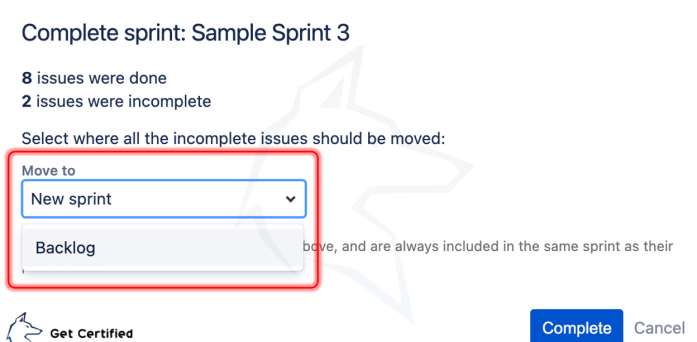
2 correct answers
A.
Unresolved issues will be removed.
B.
Users can move them to the next sprint.
C.
Users can move them to the other active sprints.
D.
Unresolved issues will be archived. www.dumpsplanet.com
E.
Users can move them to their backlog.
Explanation After users click the 'Complete sprint' button, they have 2 options; either move the incomplete issues to a new sprint or move them to the backlog.
Right Answer: A, D
Quiz
Question 7/107/10
Which of the following are true about team-managed projects? (Choose three.)
Note: - Company-managed projects are formerly known as classic projects. - Team-managed projects are formerly known as next-gen projects.
Select multiple answer: (Choose 3)Select the answer
3 correct answers
A.
Team-managed projects only have standard board filters.
B.
By default, any licensed users can create and maintain team-managed projects.
C.
Users can create multiple team-managed projects and run a parallel sprint.
D.
Users can share team-managed projects' settings with other Jira projects.
E.
Users can allow anonymous access to a team-managed project.
F.
Users can create a new project role.
Explanation www.dumpsplanet.com A team-managed project is suitable for teams that want to control their own working processes and practices in a self-contained space. You can mix and match agile features to support your team as you grow in size and complexity. Team-managed projects configurations do not impact other projects. Team-managed projects only have a standard board filter. Users cannot customize the board filter. Sub- filter and quick filter do not exist in team-managed projects. However, there is a feature request here (JSWCLOUD-17446) and Atlassian already starts working on this feature. (Updated on 13 Sept 2021) Users can create a new project role in a team-managed project. All licensed users can create a team-managed project, even non-admins. If you are a Jira admin and want to restrict this, you need to update the 'Create team-managed projects' global permission. Users cannot allow anonymous access to a team-managed project. If users want to allow anonymous access, Jira administrators need to create a company-managed project for them.
Right Answer: A, B, F
Quiz
Question 8/108/10
As a project manager, Dom is responsible in monitoring all issues that have been assigned to his team are on track and the Time Estimation for each issue is correctly measured.
Which of the following is the best report that he can use to ensure Time Estimation and Time Spent by his team on issues are on track?
Select the answer:Select the answer
1 correct answer
A.
Single Level Group By Report
B.
Pie Chart Report
C.
Resolution Time Report
D.
Time Tracking Report
E.
Average Age Report
F.
Time Since Issues Report
Explanation Time Tracking Report shows the original and current time estimates for issues in the current project. This can help users determine whether work is on track for those issues. - Identify which issues have exceeded the original estimation. - Identify which issues are still on track. - Identify which issues are correctly measured. - Identify accuracy of the overall time estimation. - Identify the current team's progression on issues that they are currently working on.
Right Answer: D
Quiz
Question 9/109/10
Nash is working on a Finance Jira project. The next week, while still working on the Finance project, he also worked on HR projects. Both projects are using their own unique statuses in their project workflow. www.dumpsplanet.com
Nash has updated the default board filter to the JQL below: project in (HR, Finance) ORDER BY Rank ASC
A few issues are missing from the Jira board. What are the best solutions for this issue? (Choose two.)
Select multiple answer: (Choose 2)Select the answer
2 correct answers
A.
Update the quick filter.
B.
Update the Jira workflow.
C.
Update the board column.
D.
Update the board filter.
Explanation Jira board filter only returns a single project by default. Example: project = Finance ORDER BY Rank ASC If users added more than one project in the JQL, some issues might be missing if each Jira project has different statuses in their project workflow. Therefore, Nash has 2 options: - Standardize all project workflow to use the same statuses. - Update the board column to include the missing issues. Updating the filter is not the solution here because the issues from the unmapped status will still be hidden.
Right Answer: B, C
Quiz
Question 10/1010/10
Which of the following are false about the roadmap? (Choose three.)
Select multiple answer: (Choose 3)Select the answer
3 correct answers
A.
Users can choose which epics they want to display on the dashboard. Either Complete or Incomplete.
B.
Users can change the view setting to customize their roadmap's view. The changes will apply to all users that have access to that project.
C.
Schedule bars for child issues are currently available for scrum teams only.
D.
Users can customize epic's color directly from the roadmap.
E.
Users can change the epic bar timeline to weeks, months, quarters, or yearly.
Explanation View Settings is a collection of settings that allow users to adjust their personal view of the roadmap. The settings only apply to individual users. Users can change their view at any time. www.dumpsplanet.com Schedule Bars for child issues are currently available for scrum teams only. Epic Display Options allow users to use the dropdown to select which epics to display. The current options are All, Incomplete, or Complete. Users can adjust the color of an epic directly on the roadmap. Simply right-click the epic and choose a fresh color. The epic bar has a default duration according to how users view their timeline. The default durations are weeks, months, or quarters.
ACP-620: Managing Jira Cloud Projects Practice test unlocks all online simulator questions
Thank you for choosing the free version of the ACP-620: Managing Jira Cloud Projects practice test! Further deepen your knowledge on Atlassian Simulator; by unlocking the full version of our ACP-620: Managing Jira Cloud Projects Simulator you will be able to take tests with over 138 constantly updated questions and easily pass your exam. 98% of people pass the exam in the first attempt after preparing with our 138 questions.
What to expect from our ACP-620: Managing Jira Cloud Projects practice tests and how to prepare for any exam?
The ACP-620: Managing Jira Cloud Projects Simulator Practice Tests are part of the Atlassian Database and are the best way to prepare for any ACP-620: Managing Jira Cloud Projects exam. The ACP-620: Managing Jira Cloud Projects practice tests consist of 138 questions and are written by experts to help you and prepare you to pass the exam on the first attempt. The ACP-620: Managing Jira Cloud Projects database includes questions from previous and other exams, which means you will be able to practice simulating past and future questions. Preparation with ACP-620: Managing Jira Cloud Projects Simulator will also give you an idea of the time it will take to complete each section of the ACP-620: Managing Jira Cloud Projects practice test . It is important to note that the ACP-620: Managing Jira Cloud Projects Simulator does not replace the classic ACP-620: Managing Jira Cloud Projects study guides; however, the Simulator provides valuable insights into what to expect and how much work needs to be done to prepare for the ACP-620: Managing Jira Cloud Projects exam.
ACP-620: Managing Jira Cloud Projects Practice test therefore represents an excellent tool to prepare for the actual exam together with our Atlassian practice test . Our ACP-620: Managing Jira Cloud Projects Simulator will help you assess your level of preparation and understand your strengths and weaknesses. Below you can read all the quizzes you will find in our ACP-620: Managing Jira Cloud Projects Simulator and how our unique ACP-620: Managing Jira Cloud Projects Database made up of real questions:
Info quiz:
Quiz name:ACP-620: Managing Jira Cloud Projects
Total number of questions:138
Number of questions for the test:50
Pass score:80%
You can prepare for the ACP-620: Managing Jira Cloud Projects exams with our mobile app. It is very easy to use and even works offline in case of network failure, with all the functions you need to study and practice with our ACP-620: Managing Jira Cloud Projects Simulator.
Use our Mobile App, available for both Android and iOS devices, with our ACP-620: Managing Jira Cloud Projects Simulator . You can use it anywhere and always remember that our mobile app is free and available on all stores.
Our Mobile App contains all ACP-620: Managing Jira Cloud Projects practice tests which consist of 138 questions and also provide study material to pass the final ACP-620: Managing Jira Cloud Projects exam with guaranteed success.
Our ACP-620: Managing Jira Cloud Projects database contain hundreds of questions and Atlassian Tests related to ACP-620: Managing Jira Cloud Projects Exam. This way you can practice anywhere you want, even offline without the internet.