Quiz DEE-1111: Dell EMC Expert - PowerMax and VMAX All Flash Solutions
Quiz
site and two PowerMax arrays at the target site. An SRDF/A MSC trip event has occurred.
What happens if the Receive Delta Set on one of the target arrays is incomplete?
Quiz
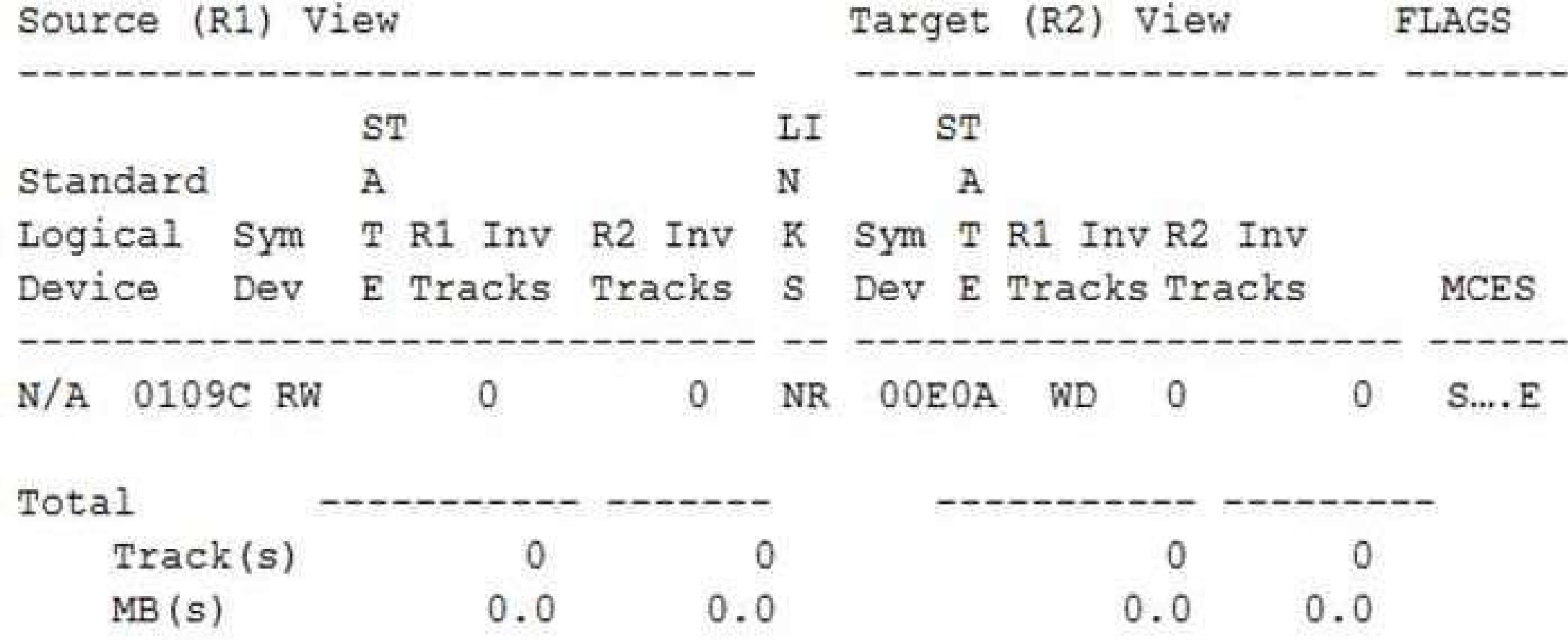
Refer to the exhibit.
SRDF device pairs are suspended by the administrator.
Which symrdf command was issued next?
Quiz
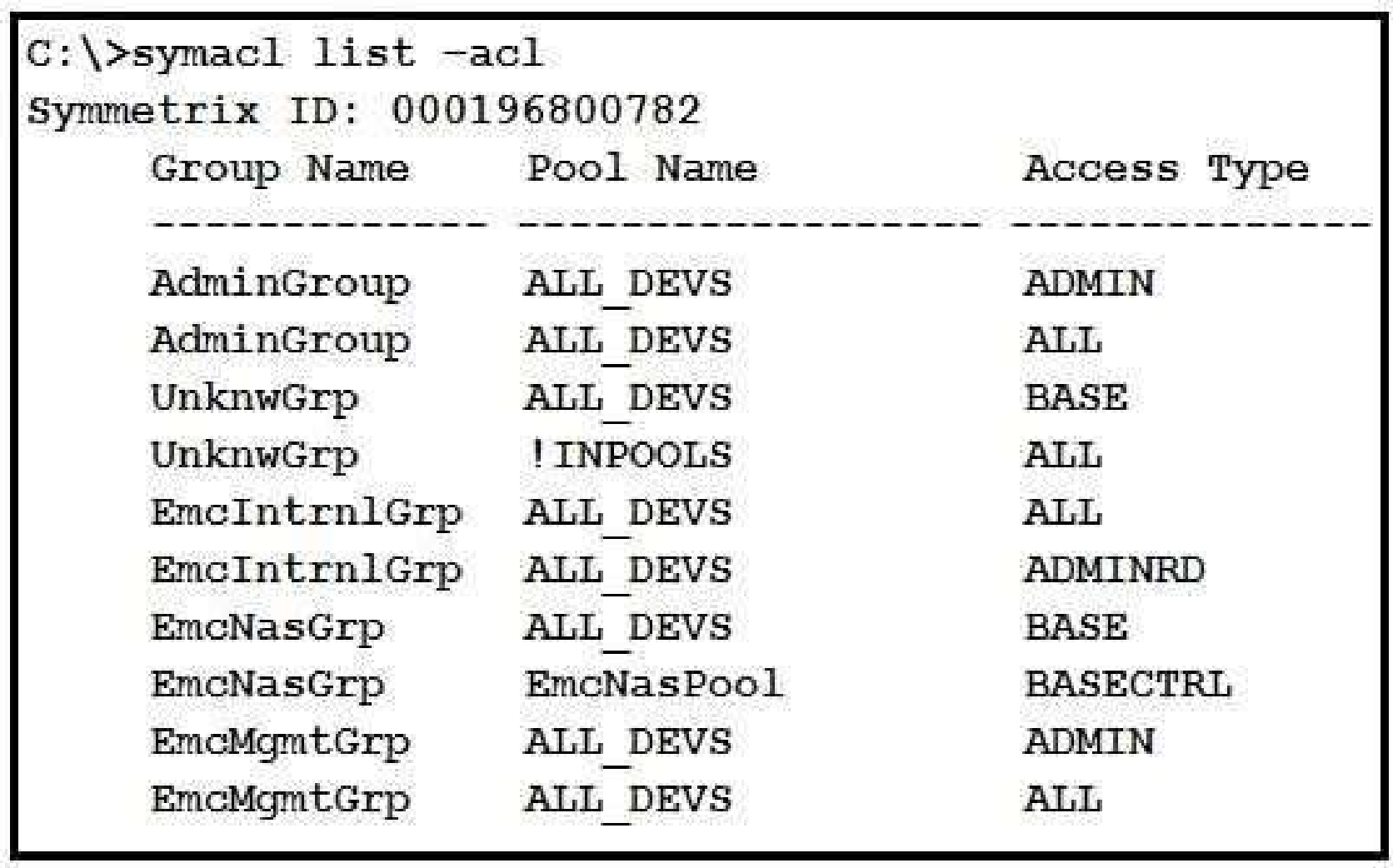
Refer to the exhibit.
Which correctly describes a possible configuration created by SYMACL?
Quiz
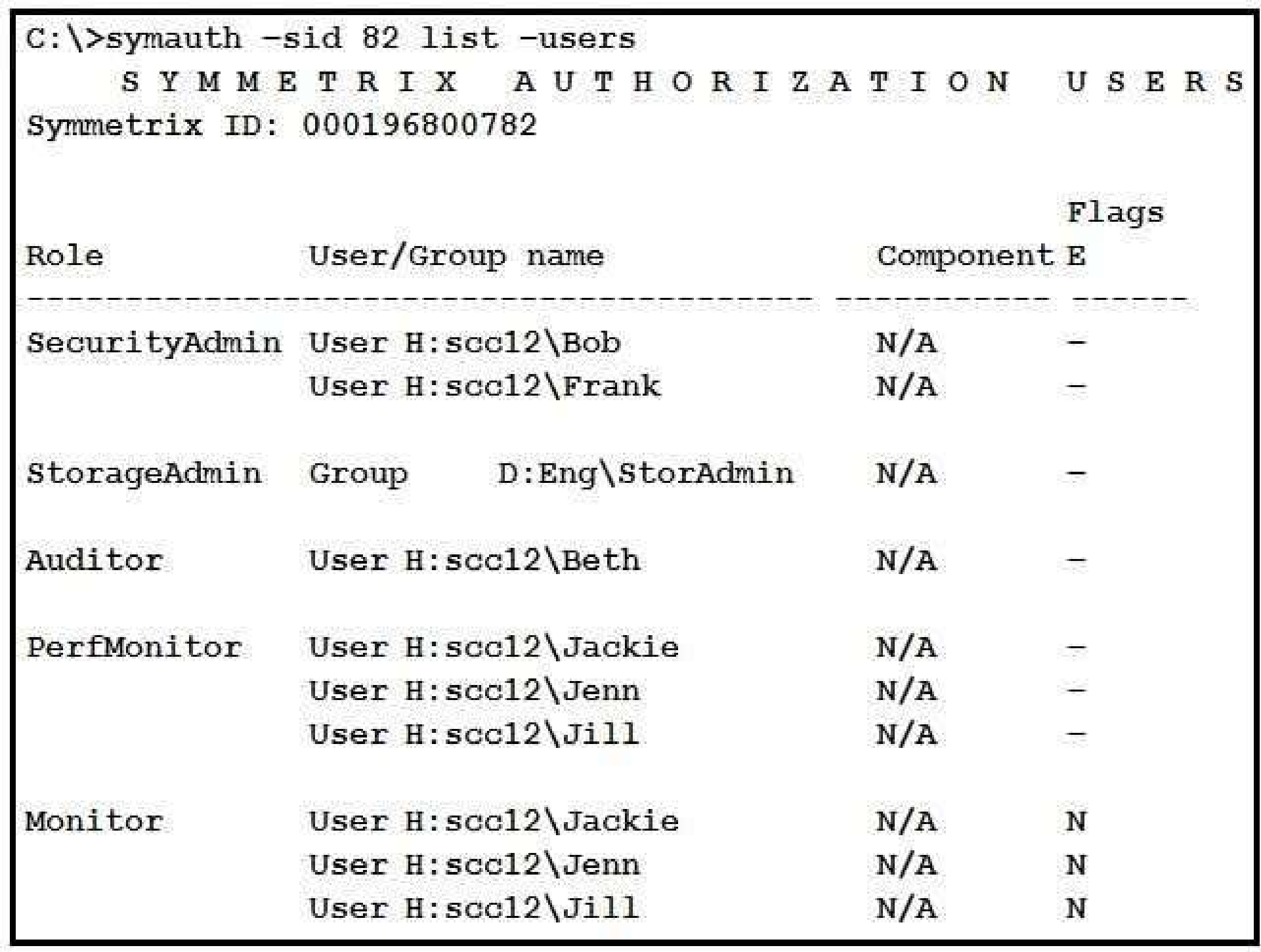
Refer to the exhibit.
Who has access to run the symaudit –list commands based on the symauth output shown in the
exhibit?
Quiz
move the workload to the Synchronous site (Site B).
What symstar command should be used before the workload switch?
Quiz
occurred.
Which factor is most likely responsible for the SL compliance impact?
Quiz
What happens if the cache space fills up?
Quiz
Quiz
information, masking objects, device information, and the defined RBAC rules. However, they are
unable to create and delete SRDF groups.
Which RBAC profile has been assigned to the user’s profile?
Quiz
Match Dual Personally SRDF device to its usage SRDF role.
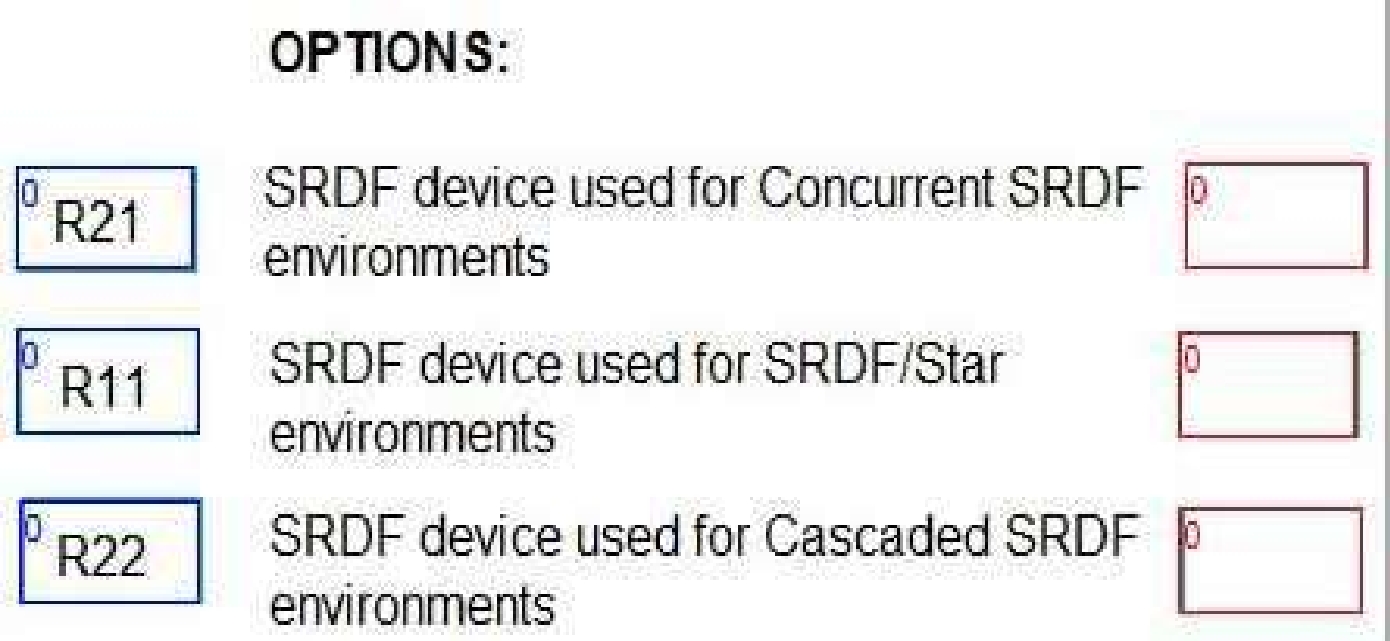
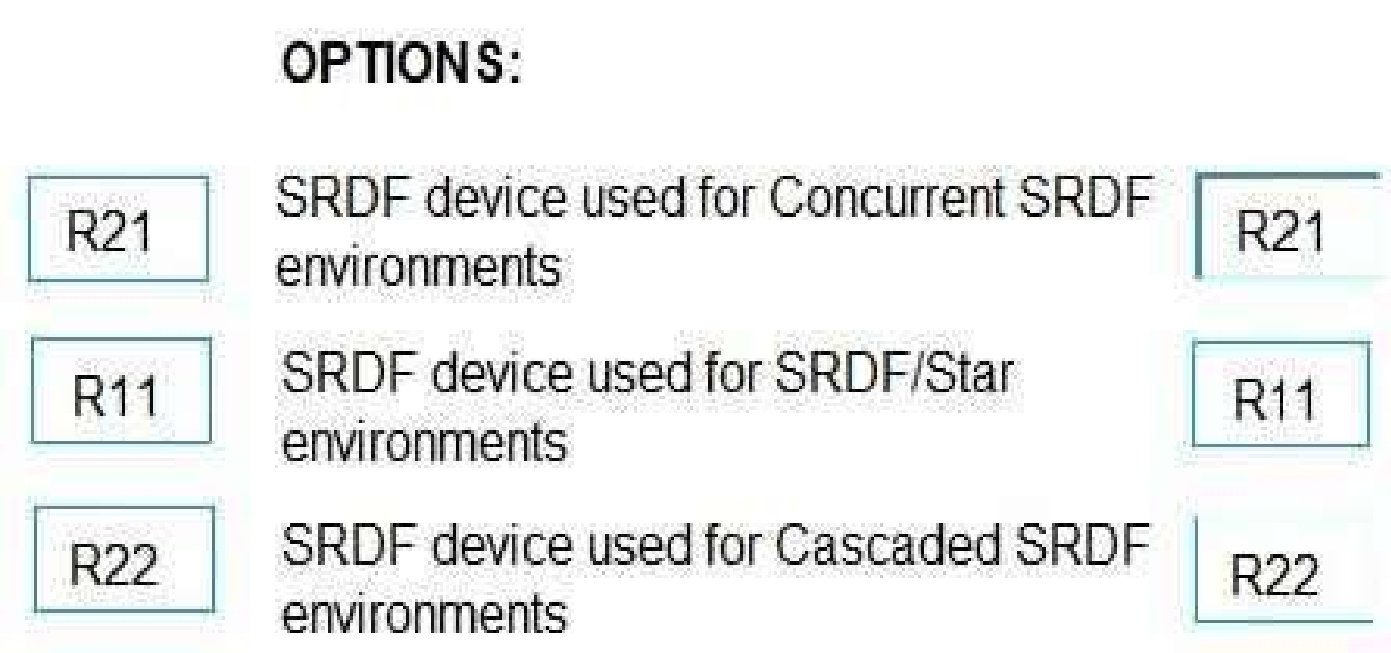
SRDF device used for Concurrent SRDF environments = R21
SRDF device used for SRDF/Star environments = R11
SRDF device used for Cascaded SRDF environments = R22
A dual personality SRDF device is a device that can act as both an R1 and an R2 device in different
SRDF configurations. There are three types of dual personality SRDF devices: R21, R11, and R22.
An R21 device is an R2 device that is paired with another R1 device in a different SRDF group. This
allows the R21 device to receive updates from the primary site and send updates to the secondary
site. An R21 device is used for Concurrent SRDF environments, which provide simultaneous disaster
recovery and data migration capabilities. For example, an R21 device can be used to migrate data
from one array to another while maintaining a synchronous copy of the data on a third array.1
An R11 device is an R1 device that is paired with another R1 device in a different SRDF group. This
allows the R11 device to receive updates from the primary site and send updates to the tertiary site.
An R11 device is used for SRDF/Star environments, which provide three-site disaster recovery
capabilities with a single hop between any two sites. For example, an R11 device can be used to
create a synchronous copy of the data on a secondary site and an asynchronous copy of the data on a
tertiary site.2
An R22 device is an R2 device that is paired with another R2 device in a different SRDF group. This
allows the R22 device to receive updates from the secondary site and send updates to the tertiary
site. An R22 device is used for Cascaded SRDF environments, which provide three-site disaster
recovery capabilities with two hops between the primary and tertiary sites. For example, an R22
device can be used to create an asynchronous copy of the data on a secondary site and another
asynchronous copy of the data on a tertiary site.3
Reference:
Dell EMC SRDF Introduction - Dell Technologies Partner Portal
Dell EMC PowerMax and VMAX All Flash: SRDF Product Guide
Dell EMC PowerMaxOS Performance Guide
DEE-1111: Dell EMC Expert - PowerMax and VMAX All Flash Solutions Practice test unlocks all online simulator questions
Thank you for choosing the free version of the DEE-1111: Dell EMC Expert - PowerMax and VMAX All Flash Solutions practice test! Further deepen your knowledge on Dell-EMC Simulator; by unlocking the full version of our DEE-1111: Dell EMC Expert - PowerMax and VMAX All Flash Solutions Simulator you will be able to take tests with over 54 constantly updated questions and easily pass your exam. 98% of people pass the exam in the first attempt after preparing with our 54 questions.
BUY NOWWhat to expect from our DEE-1111: Dell EMC Expert - PowerMax and VMAX All Flash Solutions practice tests and how to prepare for any exam?
The DEE-1111: Dell EMC Expert - PowerMax and VMAX All Flash Solutions Simulator Practice Tests are part of the Dell-EMC Database and are the best way to prepare for any DEE-1111: Dell EMC Expert - PowerMax and VMAX All Flash Solutions exam. The DEE-1111: Dell EMC Expert - PowerMax and VMAX All Flash Solutions practice tests consist of 54 questions and are written by experts to help you and prepare you to pass the exam on the first attempt. The DEE-1111: Dell EMC Expert - PowerMax and VMAX All Flash Solutions database includes questions from previous and other exams, which means you will be able to practice simulating past and future questions. Preparation with DEE-1111: Dell EMC Expert - PowerMax and VMAX All Flash Solutions Simulator will also give you an idea of the time it will take to complete each section of the DEE-1111: Dell EMC Expert - PowerMax and VMAX All Flash Solutions practice test . It is important to note that the DEE-1111: Dell EMC Expert - PowerMax and VMAX All Flash Solutions Simulator does not replace the classic DEE-1111: Dell EMC Expert - PowerMax and VMAX All Flash Solutions study guides; however, the Simulator provides valuable insights into what to expect and how much work needs to be done to prepare for the DEE-1111: Dell EMC Expert - PowerMax and VMAX All Flash Solutions exam.
BUY NOWDEE-1111: Dell EMC Expert - PowerMax and VMAX All Flash Solutions Practice test therefore represents an excellent tool to prepare for the actual exam together with our Dell-EMC practice test . Our DEE-1111: Dell EMC Expert - PowerMax and VMAX All Flash Solutions Simulator will help you assess your level of preparation and understand your strengths and weaknesses. Below you can read all the quizzes you will find in our DEE-1111: Dell EMC Expert - PowerMax and VMAX All Flash Solutions Simulator and how our unique DEE-1111: Dell EMC Expert - PowerMax and VMAX All Flash Solutions Database made up of real questions:
Info quiz:
- Quiz name:DEE-1111: Dell EMC Expert - PowerMax and VMAX All Flash Solutions
- Total number of questions:54
- Number of questions for the test:50
- Pass score:80%
You can prepare for the DEE-1111: Dell EMC Expert - PowerMax and VMAX All Flash Solutions exams with our mobile app. It is very easy to use and even works offline in case of network failure, with all the functions you need to study and practice with our DEE-1111: Dell EMC Expert - PowerMax and VMAX All Flash Solutions Simulator.
Use our Mobile App, available for both Android and iOS devices, with our DEE-1111: Dell EMC Expert - PowerMax and VMAX All Flash Solutions Simulator . You can use it anywhere and always remember that our mobile app is free and available on all stores.
Our Mobile App contains all DEE-1111: Dell EMC Expert - PowerMax and VMAX All Flash Solutions practice tests which consist of 54 questions and also provide study material to pass the final DEE-1111: Dell EMC Expert - PowerMax and VMAX All Flash Solutions exam with guaranteed success. Our DEE-1111: Dell EMC Expert - PowerMax and VMAX All Flash Solutions database contain hundreds of questions and Dell-EMC Tests related to DEE-1111: Dell EMC Expert - PowerMax and VMAX All Flash Solutions Exam. This way you can practice anywhere you want, even offline without the internet.
BUY NOW