The new flashcard feature is useful to memorize questions.
?Change your study mode
At any time, you can change the study mode, and alternate between the practice mode and the exam mode. In practice mode, you can configure for example the number of questions or tests, and other parameters to help you study.
Randomized | 10 Questions per Test | 20 Minutes | 70% to pass|
To re-configure your study mode again and change - for example - the number of tests, whether you have random questions and all other configuration parameters.
?Simulator Configuration
Auto-scroll: You can use the automatic scrolling of the questionnaire that occurs as soon as you answer one or all of the answers to a question correctly. Auto scrolling is activated if you answer a single answer, or as soon as you answer all the mandatory answers. Learning Mode: During learning mode you can get a real time result for your answer.
Free Test
Question: / 10
20:00Min. left
?Restart the current test
To restart the current test by clearing all your answers and the time used up to now. Warning: all answers will be lost.
Question: / 10
5.0(122 Votes)
Quiz
Question 1/101/10
Several users have informed you that the FortiSOAR GUI Is not reachable. When troubleshooting, which step should you take first?
Select the answer:Select the answer
1 correct answer
A.
Enter the csadm license --show-details command to check if there is a duplicate license.
B.
Enter the csadm services --restart ngiax command to restart only the Nginx process.
C.
Enter the systemct1 status nginx command to gather more information.
D.
Review the connecters.log file to see what is happening to the HTTPS connections.
When troubleshooting the issue of the FortiSOAR GUI not being reachable, the first step should be to check the status of the nginx service, which is responsible for managing web requests. Using the command systemctl status nginx will provide information on whether the service is running and any potential issues or errors related to it. This approach is more efficient as it directly addresses the service responsible for the web interface, making it possible to diagnose and resolve common issues such as service failure, configuration errors, or connectivity problems.
Right Answer: C
Quiz
Question 2/102/10
What are two system-level logs that can be purged using application configuration? (Choose two.)
Select multiple answer: (Choose 2)Select the answer
2 correct answers
A.
Connector logs
B.
Reporting logs
C.
Audit togs
D.
Executed Playbook logs
In FortiSOAR, system-level logs that can be purged include both "Audit logs" and "Executed Playbook logs." These types of logs can be configured to be purged periodically to free up storage space and ensure that unnecessary logs do not impact system performance. The application configuration allows administrators to schedule automatic purges, which can be especially useful in high-activity environments where log data accumulates quickly. Purging these logs helps maintain a cleaner and more efficient system.
Right Answer: C, D
Quiz
Question 3/103/10
The Create Record and Update Record steps are categorized under which playbook step'
Select the answer:Select the answer
1 correct answer
A.
Evaluate
B.
Execute
C.
Core
D.
Reference
In FortiSOAR playbooks, the "Create Record" and "Update Record" steps are categorized under the "Core" category of playbook steps. Core steps are essential actions that are frequently used in playbooks to interact with records in the FortiSOAR database. They include fundamental operations such as creating, reading, updating, or deleting records within modules. These steps are crucial for the automation of tasks such as data management, where playbooks need to create new entries or update existing data as part of incident response workflows.
Right Answer: C
Quiz
Question 4/104/10
When configuring the system proxy on FortiSOAR. which two URLs should be accessible from the proxy server? (Choose two.)
Select multiple answer: (Choose 2)Select the answer
When configuring an HA cluster with an externalized PostgreSQL database, which two tiles on the database server need to be configured to trust all FortiSOAR nodes' incoming connections? (Choose two.)
Select multiple answer: (Choose 2)Select the answer
2 correct answers
A.
pg_hba.conf
B.
db_external_config.yml.
C.
postgreaq1.conf
D.
db_config.yml
In a FortiSOAR High Availability (HA) cluster setup with an externalized PostgreSQL database, it is necessary to configure the database server to allow incoming connections from all FortiSOAR nodes. This configuration involves modifying the pg_hba.conf file to set up host-based authentication and control which IP addresses can connect. The postgresql.conf file must also be adjusted to enable listening on all necessary IP addresses, which is critical for FortiSOAR nodes to connect to the database server securely and reliably. Together, these configurations ensure that all FortiSOAR nodes can access the database, facilitating effective HA functionality.
Right Answer: A, C
Quiz
Question 6/106/10
For which two modules on FortiSOAR can you create SLA templates7 (Choose two.)
Select multiple answer: (Choose 2)Select the answer
2 correct answers
A.
Alerts
B.
Indicators
C.
Incidents
D.
Tasks
In FortiSOAR, SLA (Service Level Agreement) templates can be created for specific modules, including Alerts and Indicators. These templates are essential for tracking response and resolution times, ensuring compliance with defined service levels. By configuring SLAs on the Alerts and Indicators modules, organizations can monitor the time taken to address these items, which is critical in maintaining efficient incident response and management practices. The SLA templates can be customized according to specific business requirements and are applied to records within these modules to enforce timely actions.
Right Answer: A, B
Quiz
Question 7/107/10
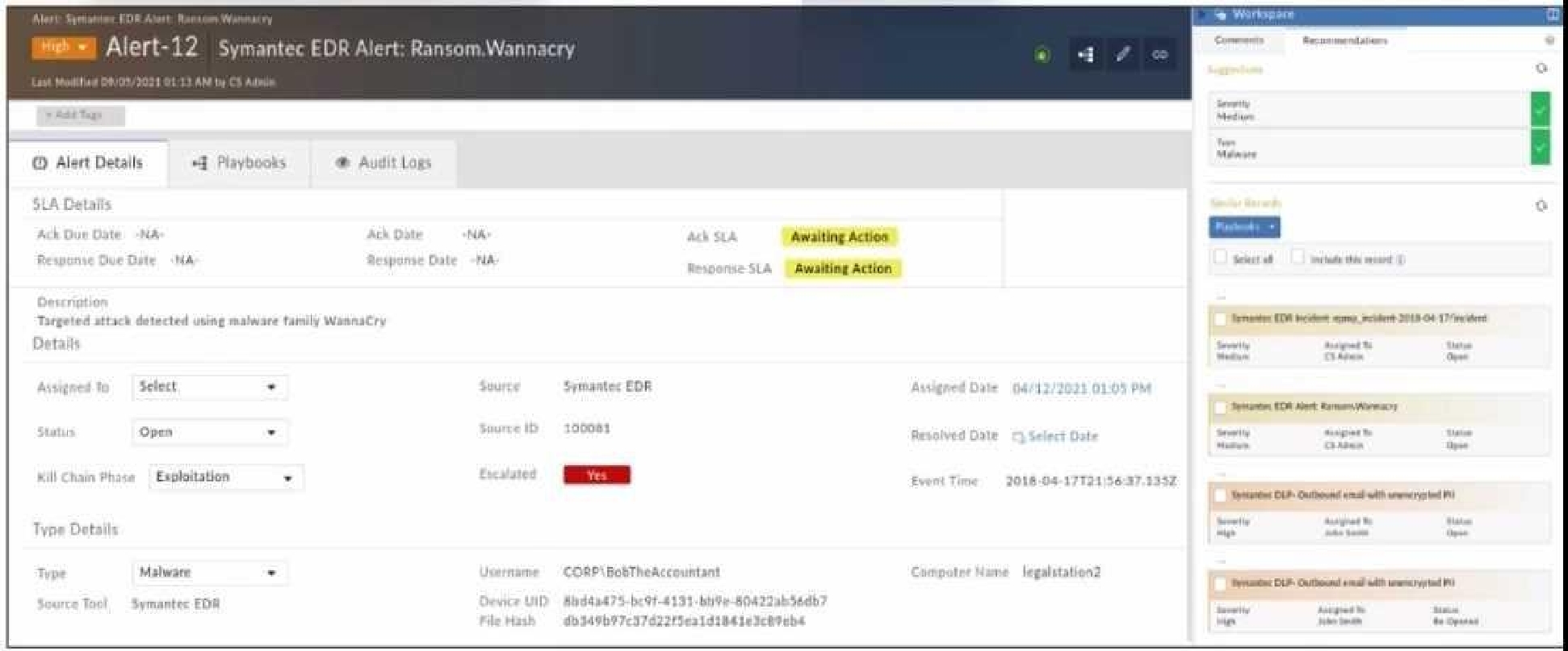
Refer to the exhibit.
Which two statements about the recommendation engine are true? (Choose two.)
Select multiple answer: (Choose 2)Select the answer
2 correct answers
A.
There are no playbooks that can be run on the recommended alerts using the recommendation panel
B.
The dataset is trained to predict the Severity and Type fields.
C.
The recommendation engine is set to automatically accept suggestions.
D.
The alert severity is High, but the recommendation is for it to be set to Medium
The Recommendation Engine in FortiSOAR is designed to assist in alert triage by suggesting values for certain fields based on historical data and machine learning models. In this case, the engine is trained to predict both the Severity and Type fields, suggesting values that align with past incidents and threat intelligence. Although the current alert severity is High, the recommendation engine has suggested adjusting it to Medium based on the pattern of similar past alerts, indicating a less critical threat level than initially perceived. This functionality helps analysts by providing data-driven insights, which can optimize alert handling and resource allocation.
Right Answer: B, D
Quiz
Question 8/108/10
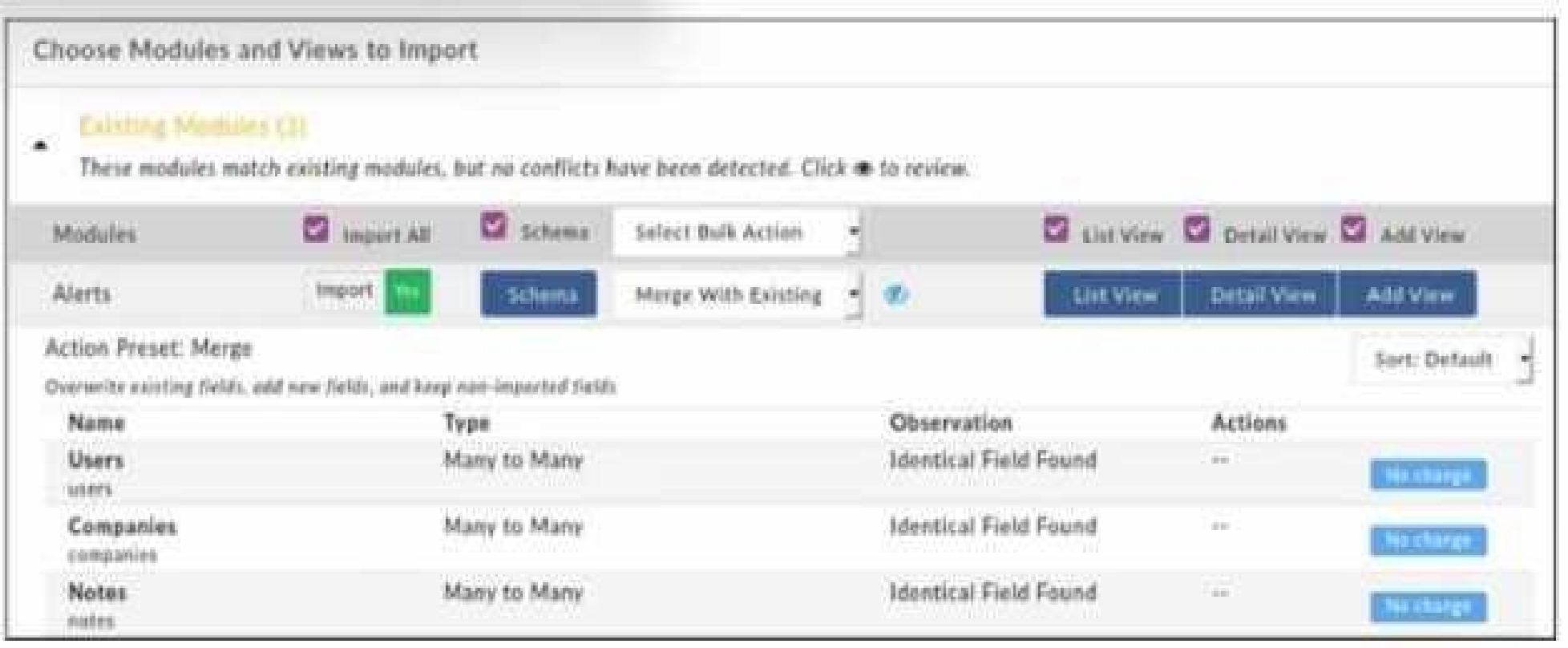
Refer to the exhibit.
When importing modules to FortiSOAR using the configuration wizard, what actions are applied to fields it you select Merge with Existing as the Bulk action?
Select the answer:Select the answer
1 correct answer
A.
Existing fields are kept, new fields are added, and non-imported fields are deleted.
B.
Existing Holds are overwritten, now fields are added, and non-imported fields are deleted.
C.
Existing fields are kept, new fields are added, and non-imported fields are kept.
D.
Existing fields are overwritten, new fields are added, and non-Imported fields are kept.
When importing modules into FortiSOAR using the configuration wizard and selecting "Merge with Existing" as the bulk action, the behavior for field handling is as follows: any fields that already exist in the system are overwritten with the imported values. New fields from the imported module are added to the system, while fields that are not part of the imported module remain unaffected and are retained in the system. This option ensures that existing data structures are updated with new information without losing existing, but non-imported, fields.
Right Answer: D
Quiz
Question 9/109/10
Which service on FortiSOAR is the playbook scheduler?
Select the answer:Select the answer
1 correct answer
A.
cyops-torccat
B.
colcrybeatd
C.
celeryd
D.
uwsgi
In FortiSOAR, the service responsible for the playbook scheduling functionality is colcrybeatd. This service manages the timing and execution of scheduled playbooks, allowing for the automation of various tasks at specified intervals. It ensures that playbooks execute according to their configured schedules, which can include tasks such as data ingestion, threat detection, or incident response actions. Proper functioning of this service is essential for the reliable automation of time-dependent processes within FortiSOAR.
Right Answer: B
Quiz
Question 10/1010/10
A security analyst has reported unauthorized access to System Configuration. You must review the user's current level of access, and then restrict their access according to your organization's requirements. As part of your auditing process, which two actions should you perform? (Choose two.)
Select multiple answer: (Choose 2)Select the answer
2 correct answers
A.
Remove the create, read, update, and delete (CRUD) permissions or roles that the user does not require.
B.
View the user's effective role permissions, and then investigate which role is providing that access.
C.
Remove all record ownership that is assigned to the user.
D.
Review the user's learn hierarchy to ensure that the appropriate relationships are configured.
To audit and restrict a user’s access within FortiSOAR, particularly in response to unauthorized access reports, it's necessary to review the user’s effective role permissions. This involves checking which roles grant the user access to the System Configuration module and adjusting as needed. Additionally, reviewing the user's team hierarchy ensures that the user’s access aligns with the organization’s policies. Misconfigurations in team relationships can sometimes inadvertently provide elevated access; hence, confirming that the team setup is correct is a critical part of the auditing process.
NSE6_FSR-7.3: Fortinet NSE 6 - FortiSOAR 7.3 Administrator Practice test unlocks all online simulator questions
Thank you for choosing the free version of the NSE6_FSR-7.3: Fortinet NSE 6 - FortiSOAR 7.3 Administrator practice test! Further deepen your knowledge on Fortinet Simulator; by unlocking the full version of our NSE6_FSR-7.3: Fortinet NSE 6 - FortiSOAR 7.3 Administrator Simulator you will be able to take tests with over 44 constantly updated questions and easily pass your exam. 98% of people pass the exam in the first attempt after preparing with our 44 questions.
What to expect from our NSE6_FSR-7.3: Fortinet NSE 6 - FortiSOAR 7.3 Administrator practice tests and how to prepare for any exam?
The NSE6_FSR-7.3: Fortinet NSE 6 - FortiSOAR 7.3 Administrator Simulator Practice Tests are part of the Fortinet Database and are the best way to prepare for any NSE6_FSR-7.3: Fortinet NSE 6 - FortiSOAR 7.3 Administrator exam. The NSE6_FSR-7.3: Fortinet NSE 6 - FortiSOAR 7.3 Administrator practice tests consist of 44 questions and are written by experts to help you and prepare you to pass the exam on the first attempt. The NSE6_FSR-7.3: Fortinet NSE 6 - FortiSOAR 7.3 Administrator database includes questions from previous and other exams, which means you will be able to practice simulating past and future questions. Preparation with NSE6_FSR-7.3: Fortinet NSE 6 - FortiSOAR 7.3 Administrator Simulator will also give you an idea of the time it will take to complete each section of the NSE6_FSR-7.3: Fortinet NSE 6 - FortiSOAR 7.3 Administrator practice test . It is important to note that the NSE6_FSR-7.3: Fortinet NSE 6 - FortiSOAR 7.3 Administrator Simulator does not replace the classic NSE6_FSR-7.3: Fortinet NSE 6 - FortiSOAR 7.3 Administrator study guides; however, the Simulator provides valuable insights into what to expect and how much work needs to be done to prepare for the NSE6_FSR-7.3: Fortinet NSE 6 - FortiSOAR 7.3 Administrator exam.
NSE6_FSR-7.3: Fortinet NSE 6 - FortiSOAR 7.3 Administrator Practice test therefore represents an excellent tool to prepare for the actual exam together with our Fortinet practice test . Our NSE6_FSR-7.3: Fortinet NSE 6 - FortiSOAR 7.3 Administrator Simulator will help you assess your level of preparation and understand your strengths and weaknesses. Below you can read all the quizzes you will find in our NSE6_FSR-7.3: Fortinet NSE 6 - FortiSOAR 7.3 Administrator Simulator and how our unique NSE6_FSR-7.3: Fortinet NSE 6 - FortiSOAR 7.3 Administrator Database made up of real questions:
You can prepare for the NSE6_FSR-7.3: Fortinet NSE 6 - FortiSOAR 7.3 Administrator exams with our mobile app. It is very easy to use and even works offline in case of network failure, with all the functions you need to study and practice with our NSE6_FSR-7.3: Fortinet NSE 6 - FortiSOAR 7.3 Administrator Simulator.
Use our Mobile App, available for both Android and iOS devices, with our NSE6_FSR-7.3: Fortinet NSE 6 - FortiSOAR 7.3 Administrator Simulator . You can use it anywhere and always remember that our mobile app is free and available on all stores.
Our Mobile App contains all NSE6_FSR-7.3: Fortinet NSE 6 - FortiSOAR 7.3 Administrator practice tests which consist of 44 questions and also provide study material to pass the final NSE6_FSR-7.3: Fortinet NSE 6 - FortiSOAR 7.3 Administrator exam with guaranteed success.
Our NSE6_FSR-7.3: Fortinet NSE 6 - FortiSOAR 7.3 Administrator database contain hundreds of questions and Fortinet Tests related to NSE6_FSR-7.3: Fortinet NSE 6 - FortiSOAR 7.3 Administrator Exam. This way you can practice anywhere you want, even offline without the internet.