The new flashcard feature is useful to memorize questions.
?Change your study mode
At any time, you can change the study mode, and alternate between the practice mode and the exam mode. In practice mode, you can configure for example the number of questions or tests, and other parameters to help you study.
Randomized | 10 Questions per Test | 20 Minutes | 70% to pass|
To re-configure your study mode again and change - for example - the number of tests, whether you have random questions and all other configuration parameters.
?Simulator Configuration
Auto-scroll: You can use the automatic scrolling of the questionnaire that occurs as soon as you answer one or all of the answers to a question correctly. Auto scrolling is activated if you answer a single answer, or as soon as you answer all the mandatory answers. Learning Mode: During learning mode you can get a real time result for your answer.
Free Test
Question: / 10
20:00Min. left
?Restart the current test
To restart the current test by clearing all your answers and the time used up to now. Warning: all answers will be lost.
Question: / 10
4.9(137 Votes)
Quiz
Question 1/101/10
Exhibit.
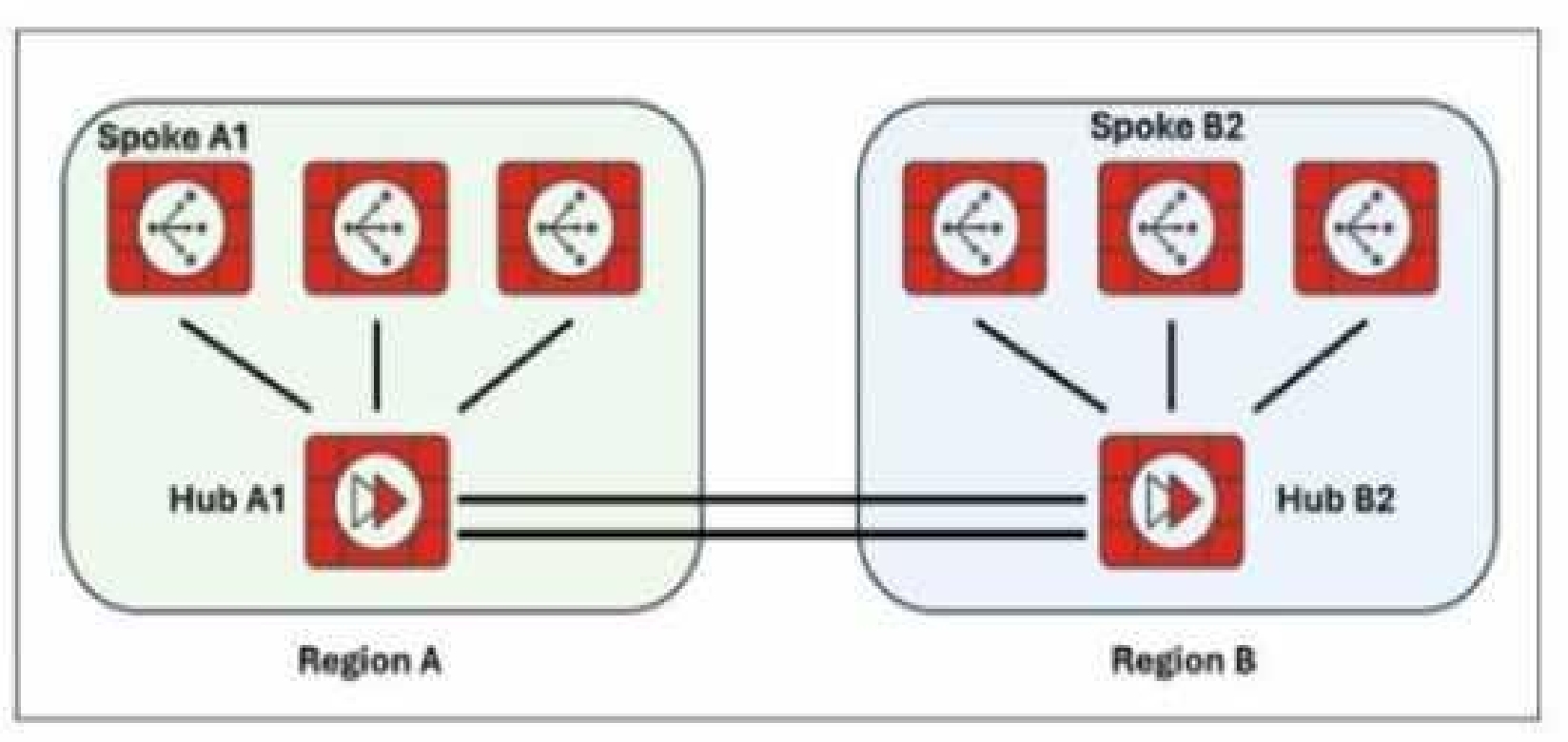
Two hub-and-spoke groups are connected through redundant site-to-site IPsec VPNs between Hub 1 and Hub 2 Which two configuration settings are required for the spoke A1 to establish an ADVPN shortcut with the spoke B2? (Choose two.)
Select multiple answer: (Choose 2)Select the answer
2 correct answers
A.
On hubs, auto-discovery-forwarder must be enabled on the IPsec VPNs to hubs.
B.
On hubs, auto-discovery-receiver must be enabled on the IPsec VPNs to spokes.
C.
On hubs, auto-discovery-forwarder must be enabled on the IPsec VPNs to spokes.
D.
On hubs, auto-diacovery-sender must be enabled on the IPsec VPNs to spokes
To allow spokes in different hub-and-spoke groups to establish ADVPN shortcuts, the hubs must be configured to forward and send ADVPN shortcut offers. The key required settings on the hub are auto-discovery-forwarder (for VPNs to hubs) and auto-discovery-sender (for VPNs to spokes). This ensures the hub can facilitate and advertise ADVPN shortcut offers between spokes. Reference: [FCSS_SDW_AR-7.4 1-0.docx Q1] Fortinet SD-WAN 7.4 ADVPN Guide (Auto-discovery settings for hub-and-spoke topologies)
Right Answer: A, D
Quiz
Question 2/102/10
Refer to the exhibit.
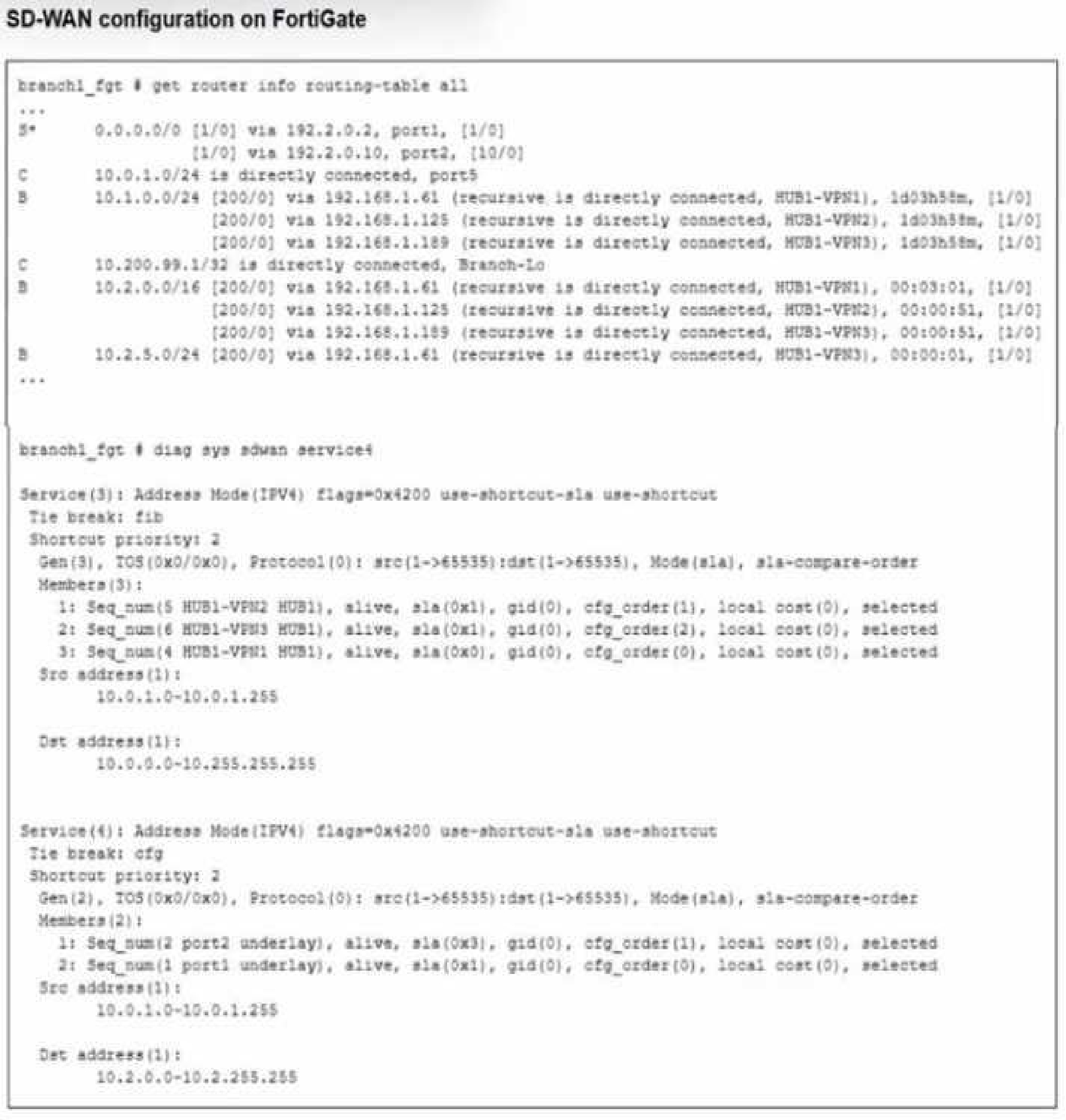
Which SD-WAN rule and interface uses FortiGate to steer the traffic from the LAN subnet 10.0.1.0/24 to the corporate server 10.2.5.254?
Select the answer:Select the answer
1 correct answer
A.
SD-WAN service rule 3 and interface HUB1-VPN2.
B.
SD-WAN service rule 3 and interface HUB1-VPN3.
C.
SD-WAN service rule 4 and port1 or port2.
D.
SD-WAN service rule 4 and interface port2.
Traffic steering in Fortinet SD-WAN is based on defined rules and the corresponding outgoing interfaces. The exhibit (not shown here) would indicate that the traffic from the LAN subnet 10.0.1.0/24 to the server 10.2.5.254 is matched by SD-WAN rule 3 and sent out via the HUB1-VPN3 interface. Reference: [FCSS_SDW_AR-7.4 1-0.docx Q2] FortiOS 7.4 SD-WAN Concept Guide – Rule Matching
Right Answer: D
Quiz
Question 3/103/10
Refer to the exhibit.
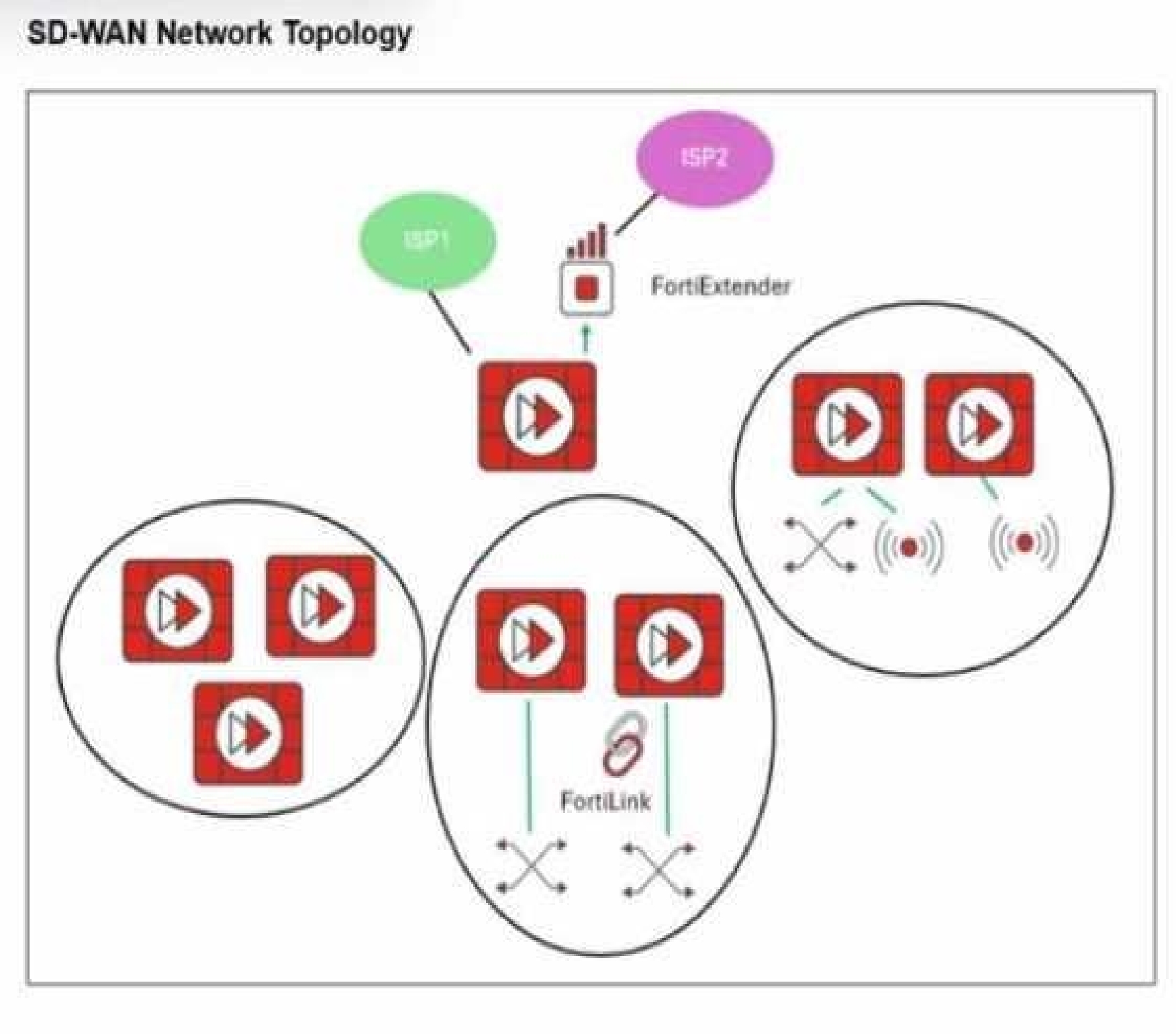
Refer to the exhibit. You want to configure SD-WAN on a network as shown in the exhibit. The network contains many FortiGate devices. Some are used as NGFW, and some are installed with extensions such as FortiSwitch. FortiAP. or Forti Ex tender. What should you consider when planning your deployment?
Select the answer:Select the answer
1 correct answer
A.
You can build an SD-WAN topology that includes all devices. The hubs can be FortiGate devices with Forti Extender.
B.
You can build an SD-WAN topology that includes all devices. The hubs must be devices without extensions.
C.
You must use FortiManager to manage your SD-WAN topology.
D.
You must build multiple SD-WAN topologies. Each topology must contain only one type of extension.
In Fortinet SD-WAN, hubs should not have extensions like FortiSwitch, FortiAP, or FortiExtender installed, as these can affect hub functionality and scalability. While all device types can be included in the topology, the hubs must be "clean" FortiGate devices without such extensions to ensure proper ADVPN and overlay management. Reference: [FCSS_SDW_AR-7.4 1-0.docx Q3] Fortinet SD-WAN Reference Architecture Guide 7.4 – Hub requirements
Right Answer: B
Quiz
Question 4/104/10
Refer to the exhibit.
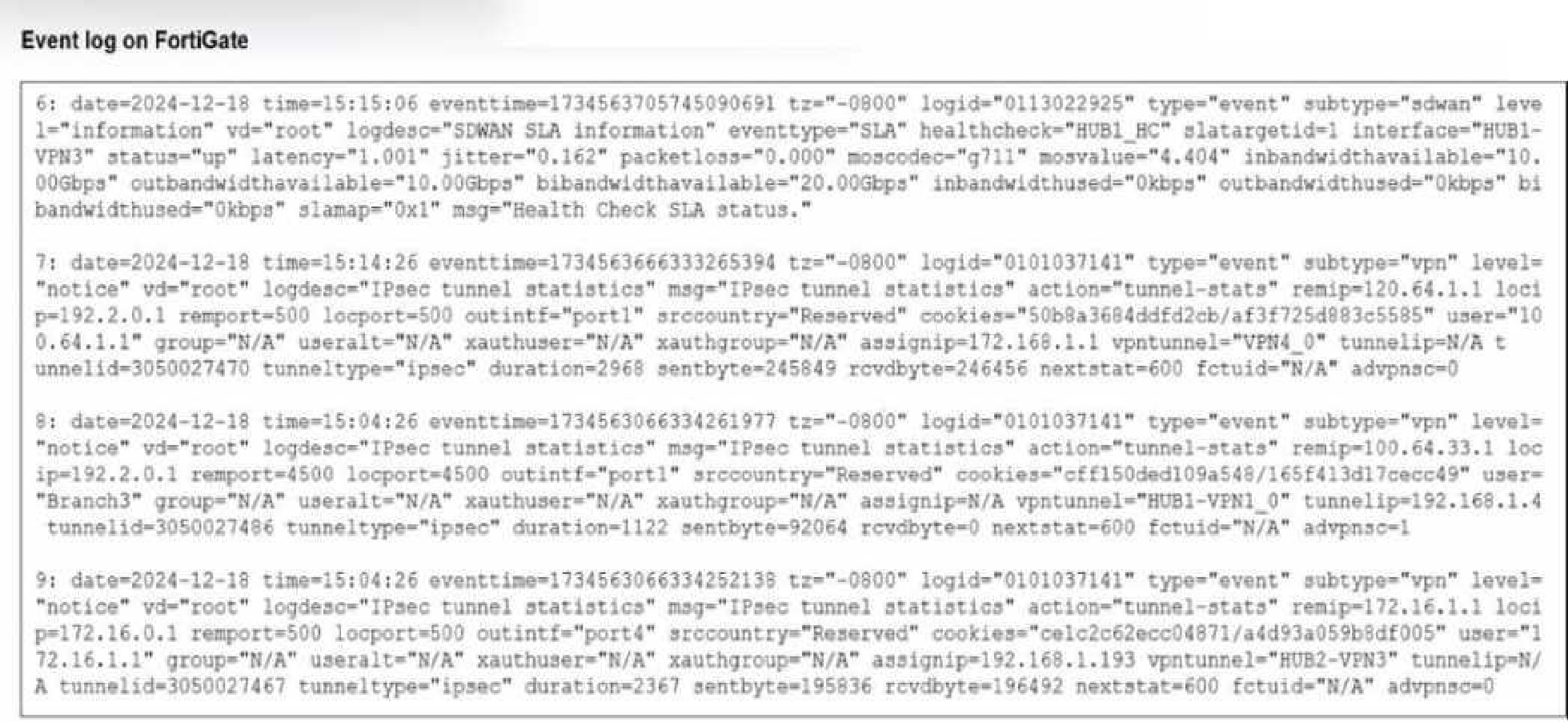
Refer to the exhibit that shows event logs on FortiGate. Based on the output shown in the exhibit, what can you say about the tunnels on this device?
Select the answer:Select the answer
1 correct answer
A.
The master tunnel HU82-VPN3 cannot accept ADVPN shortcuts.
B.
The device steers voice traffic through the VPN tunnel HUB1-VPN3.
C.
The VPN tunnel HUB1-VPN1_0 is a shortcut tunnel.
D.
There is one shortcut tunnel built from master tunnel VPN4.
Event logs (from the exhibit) show how traffic is matched to SD-WAN rules and routed. The log output indicates that voice traffic is being routed through the HUB1-VPN3 tunnel. This matches SD- WAN's application-aware steering, which uses dynamic performance metrics to select the optimal path. Reference: [FCSS_SDW_AR-7.4 1-0.docx Q4] FortiOS 7.4 SD-WAN Application-Aware Routing Documentation
Right Answer: C
Quiz
Question 5/105/10
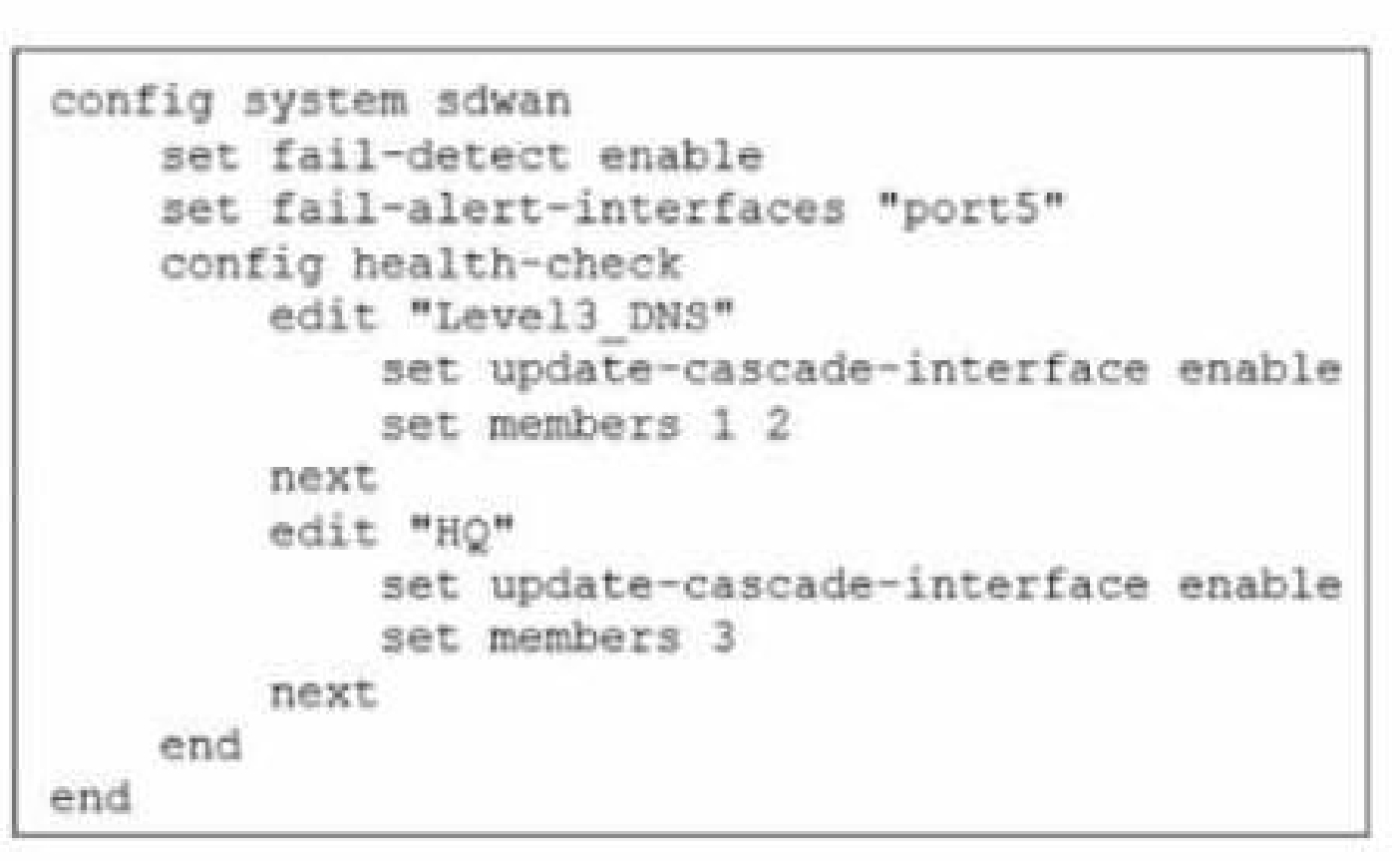
Exhibit.
Which action will FortiGate take if it detects SD-WAN members as dead?
Select the answer:Select the answer
1 correct answer
A.
FoftiGate bounces port5 after it detects all SD-WAN members as dead.
B.
FortiGate fails over to the secondary device after it detects port5 as dead.
C.
FortiGate sends alert messages through poft5 when it detects all SD-WAN members as dead
D.
FortiGate brings down port5 after it detects all SD-WAN members as dead.
The correct answer is C. FortiGate sends alert messages through port5 when it detects all SD-WAN members as dead. In this scenario, the key point is what FortiGate does when all SD-WAN members are considered dead. When SD-WAN health checks determine that every member in the SD-WAN zone has failed, FortiGate does not automatically bounce the interface, fail over to another device, or bring the port down by default. Instead, it can trigger an alert or notification action through the configured interface, in this case port5. Why the other options are incorrect: A. FortiGate bounces port5 after it detects all SD-WAN members as dead. This is not the default reaction. FortiGate does not automatically reset the physical port just because SD-WAN members fail. B. FortiGate fails over to the secondary device after it detects port5 as dead. This describes HA behavior, not SD-WAN dead-member handling. SD-WAN failure does not necessarily trigger HA failover. D. FortiGate brings down port5 after it detects all SD-WAN members as dead. FortiGate does not normally shut down the interface in this condition. The interface remains up unless there is a separate configuration or operational event that forces it down. Why C is correct: The exhibit implies that when all SD-WAN links are dead, FortiGate uses port5 to send alert messages. This matches the behavior of monitoring and notification rather than interface shutdown or device failover. In summary: FortiGate’s response here is to notify via port5, making option C the correct choice.
Right Answer: C
Quiz
Question 6/106/10
You are planning a large SD-WAN deployment with approximately 1000 spokes and want to allow ADVPN between the spokes. Some remote sites use FortiSASE to connect to the company's SD-WAN hub. Which overlay routing configuration should you use?
Select the answer:Select the answer
1 correct answer
A.
BGP on loopback with dynamic BGP for ADVPN shortcut routing.
B.
BGP on loopback with IPsec phase2 selectors for ADVPN shortcut routing.
C.
BGP per overlay with dynamic BGP for ADVPN shortcut routing.
D.
BGP per overlay with BGP next-hop convergence for ADVPN shortcut routing.
For a large-scale SD-WAN deployment (such as 1000 spokes) where ADVPN shortcut routing is required and some remote sites connect via FortiSASE, the recommended overlay routing configuration is BGP running on loopback interfaces, combined with dynamic BGP for ADVPN shortcut routing. This design leverages the scalability and resilience of BGP, allowing dynamic discovery and route exchange necessary for shortcut tunnels between spokes in ADVPN environments. Using loopback interfaces for BGP peering is considered best practice because it decouples routing protocol stability from physical link status, ensuring that if a physical underlay interface fails, the BGP session remains up as long as there’s an alternate path. With dynamic BGP, each spoke can efficiently learn the routes to other spokes and dynamically establish shortcuts, which is critical at this scale. This method also integrates smoothly with FortiSASE for remote connectivity to the SD-WAN hub, providing flexibility and centralized management. Reference: [FCSS_SDW_AR-7.4 1-0.docx Q6] Fortinet SD-WAN Reference Architecture Guide 7.4, “Scalable Routing with BGP on Loopback and ADVPN Shortcuts” Fortinet SD-WAN Concept Guide, “Overlay Routing Designs for Large Deployments”
Right Answer: A
Quiz
Question 7/107/10
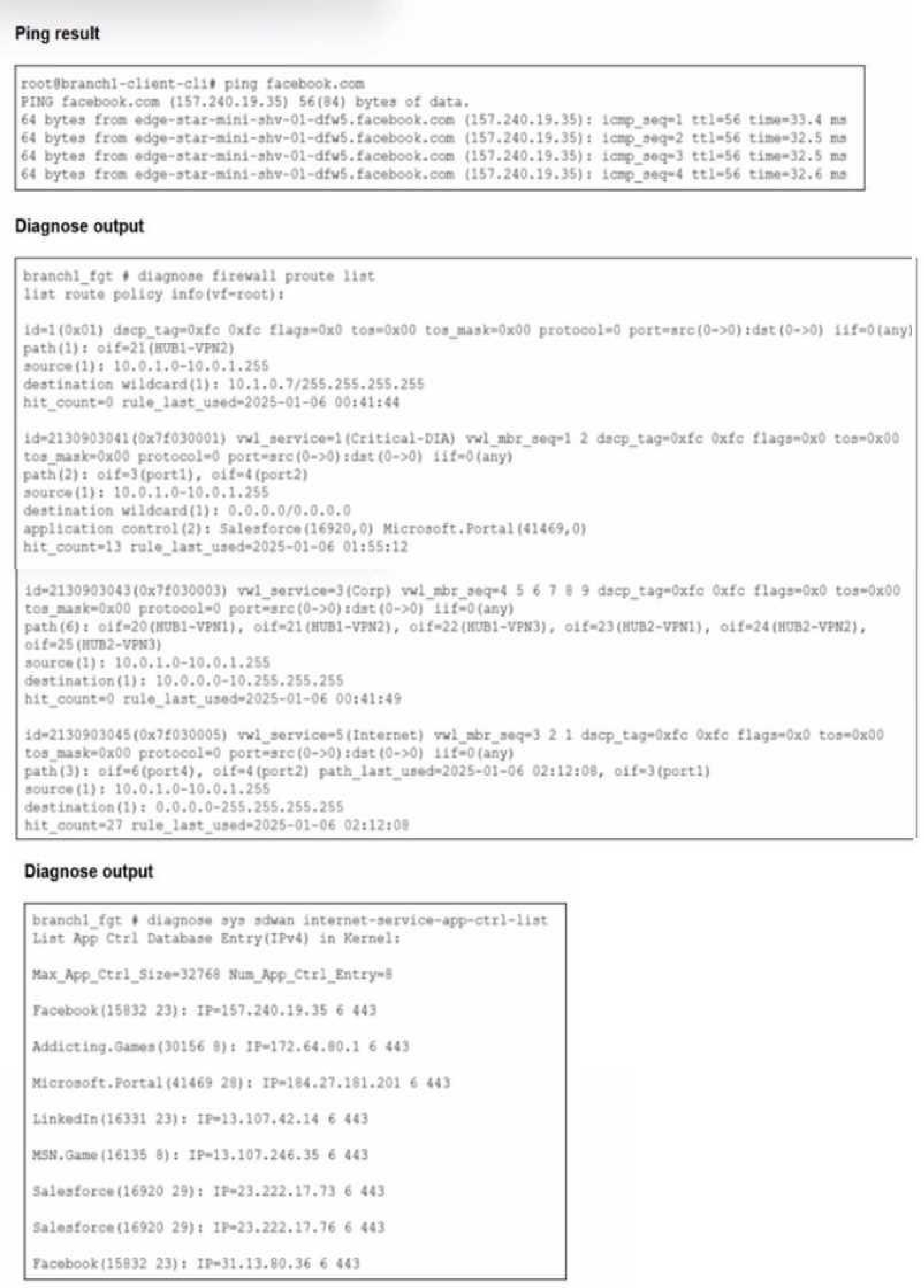
Refer to the exhibits.
You connect to a device behind a branch FortiGate device and initiate a ping test. The device is part of the LAN subnet and its IP address is 10.0.1.101. Based on the exhibits, which interface uses branch 1_fgt to steer the test traffic?
Select the answer:Select the answer
1 correct answer
A.
port4
B.
HUB1-VPN1
C.
port1
D.
port2
The correct answer is D. port2 The question asks which interface branch1_fgt uses to steer traffic when you initiate a ping test from a device behind the branch FortiGate. The device is on the LAN subnet with IP address 10.0.1.101, so the traffic is originating from the internal LAN side and must be forwarded toward the network path selected in the routing/SD-WAN setup shown in the exhibits. Why port2 is correct: - port2 is the LAN-side interface associated with the 10.0.1.0/24 subnet. - Since the target device is in the LAN subnet, traffic from branch1_fgt is steered through the interface that corresponds to that internal network path. - The exhibit indicates that port2 is the interface used for this branch traffic flow. Why the other options are not correct: - port4: This is not the interface associated with the LAN subnet in the exhibit. - HUB1-VPN1: This is a VPN tunnel interface, not the local LAN interface used to originate the test traffic from the branch device. - port1: This is not the interface selected for steering traffic to the LAN host in this scenario. In short, because the test involves a host in the branch LAN subnet, branch1_fgt uses port2 to steer the traffic. Answer: D. port2
Right Answer: D
Quiz
Question 8/108/10
You manage an SD-WAN topology. You will soon deploy 50 new branches. Which three tasks can you do in advance to simplify this deployment? (Choose three.)
Select multiple answer: (Choose 3)Select the answer
3 correct answers
A.
Update the DHCP server configuration.
B.
Create model devices.
C.
Create a ZTP template.
D.
Define metadata variables value for each device.
E.
Create policy blueprint.
When planning to deploy a large number of branches (e.g., 50), Fortinet recommends several preparatory steps to simplify and automate the rollout. Creating model devices allows you to predefine configurations and settings that can be cloned or adapted for each branch, saving time and minimizing manual errors. Preparing a Zero Touch Provisioning (ZTP) template enables automatic onboarding and provisioning of new FortiGates as soon as they come online, reducing manual intervention. Lastly, creating a policy blueprint allows for standardized policy deployment across all branches, ensuring consistent security and SD-WAN rule enforcement. This holistic approach streamlines the deployment process, allows for rapid scaling, and ensures that all devices are configured according to corporate policy from day one. Reference: [FCSS_SDW_AR-7.4 1-0.docx Q8] Fortinet SD-WAN 7.4 Reference Architecture, “ZTP and Model Device Strategies for Scalable Rollouts” FortiManager Admin Guide, “Policy Blueprints and Automation for Branch Deployment”
Right Answer: B, C, E
Quiz
Question 9/109/10
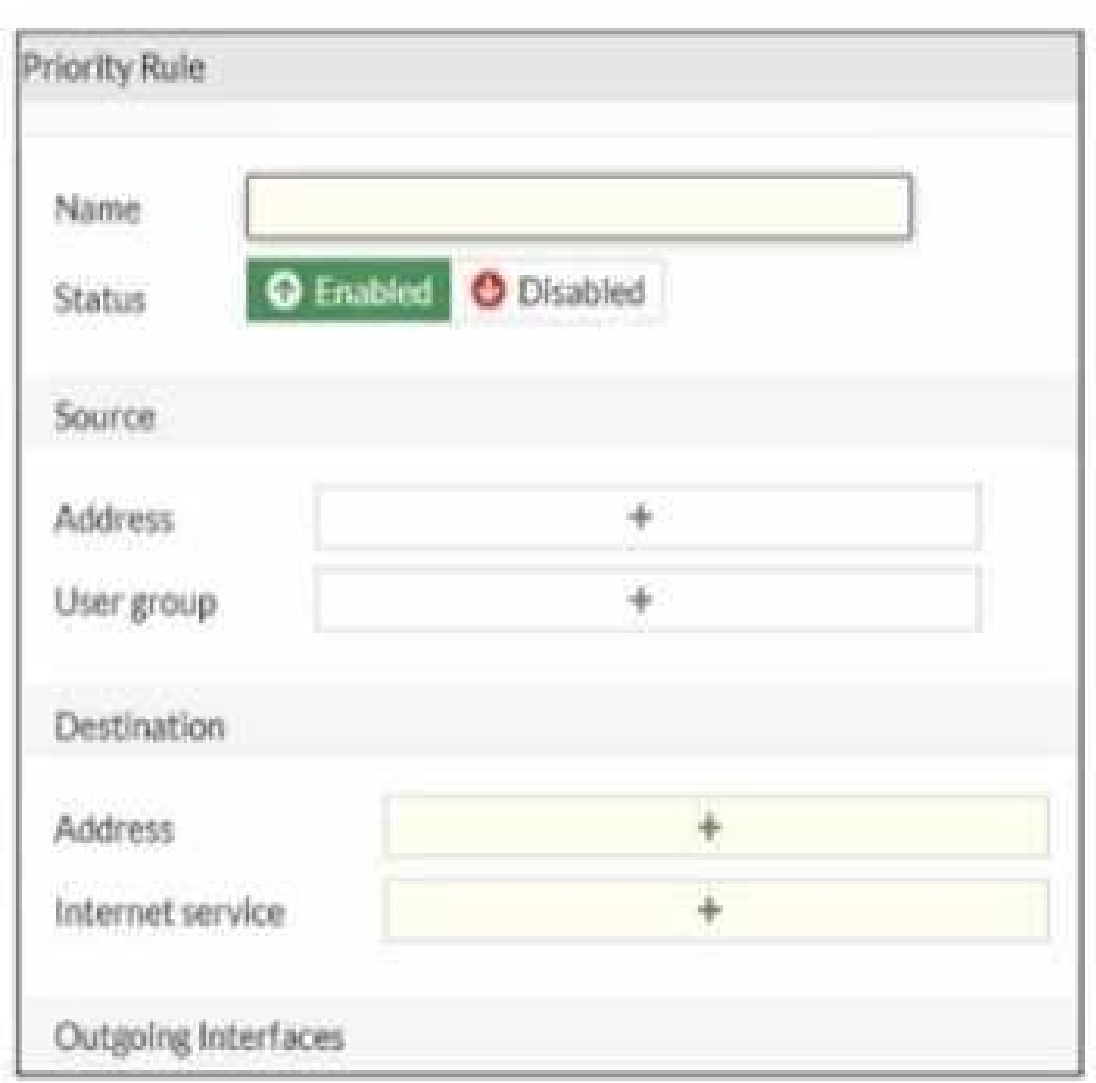
Refer to the exhibit.
An administrator configures SD-WAN rules for a DIA setup using the FortiGate GUI. The page to configure the source and destination part of the rule looks as shown in the exhibit. The GUI page shows no option to configure an application as the destination of the SD-WAN rule Why?
Select the answer:Select the answer
1 correct answer
A.
You cannot use applications as the destination when FortiGate is used for a DIA setup.
B.
FortiGate allows the configuration of applications as the destination of SD-WAN rules only on the CLI.
C.
You must enable the feature on the CLI.
D.
You must enable the feature first using the GUI menu System > Feature Visibility.
The correct answer is D. You must enable the feature first using the GUI menu System > Feature Visibility. In FortiGate SD-WAN rules, the ability to use an application as a destination is not always shown by default in the GUI. The option is controlled by feature visibility settings. If the feature is hidden, the GUI will only display the standard source and destination fields, and application-based matching will not appear as an available destination criterion. Why this happens: - FortiGate has many optional GUI features. - Some features are disabled or hidden to keep the interface simpler. - The SD-WAN rule option to use applications as destination criteria must be exposed through Feature Visibility. Why the other options are incorrect: - A is incorrect because application-based matching can be used in SD-WAN rules; it is not forbidden for DIA setups. - B is incorrect because this is not a CLI-only feature. It can be enabled in the GUI once the feature is visible. - C is incorrect because there is no special CLI-only enablement required for this feature in this context. So, if the application option is missing in the SD-WAN rule GUI, the administrator should go to: System > Feature Visibility and enable the relevant feature there.
Right Answer: D
Quiz
Question 10/1010/10
You are planning a new SD-WAN deployment with the following criteria: - Two regions - Most of the traffic is expected to remain within its region - No requirement for inter-region ADVPN To remain within the recommended best practices, which routing protocol should you select for the overlays?
Select the answer:Select the answer
1 correct answer
A.
OSPF for the routing within each region and EBGP between the regions.
B.
IBGP with BGP on loopback within each region and EBGP between the regions.
C.
IBGP with BGP per overlays within each region and IBGP with BGP on loopback between the regions.
D.
IBGP within each region and between the regions.
For SD-WAN deployments that span multiple regions—where most traffic is intra-region and there is no requirement for inter-region ADVPN—the best practice is to use IBGP with BGP on loopback interfaces for routing within each region and EBGP between the regions. This approach ensures robust and scalable routing, isolates regional routing domains, and enables policy control at region boundaries. BGP on loopback is preferred for its reliability and flexibility, as it enables peering that is not tied to specific physical interfaces. EBGP between regions allows each region to maintain independent routing policies and summarization, optimizing performance and manageability. By separating IBGP (intra-region) and EBGP (inter-region), you create a modular architecture that scales easily and simplifies fault isolation and troubleshooting. Reference: [FCSS_SDW_AR-7.4 1-0.docx Q10] Fortinet SD-WAN Reference Architecture Guide 7.4, “Regional Routing Best Practices” FortiOS 7.4 SD-WAN Overlay Design Guidelines
NSE6_SDW_AD-7.6: Fortinet NSE 6 - SD-WAN 7.6 Enterprise Administrator Practice test unlocks all online simulator questions
Thank you for choosing the free version of the NSE6_SDW_AD-7.6: Fortinet NSE 6 - SD-WAN 7.6 Enterprise Administrator practice test! Further deepen your knowledge on Fortinet Simulator; by unlocking the full version of our NSE6_SDW_AD-7.6: Fortinet NSE 6 - SD-WAN 7.6 Enterprise Administrator Simulator you will be able to take tests with over 95 constantly updated questions and easily pass your exam. 98% of people pass the exam in the first attempt after preparing with our 95 questions.
What to expect from our NSE6_SDW_AD-7.6: Fortinet NSE 6 - SD-WAN 7.6 Enterprise Administrator practice tests and how to prepare for any exam?
The NSE6_SDW_AD-7.6: Fortinet NSE 6 - SD-WAN 7.6 Enterprise Administrator Simulator Practice Tests are part of the Fortinet Database and are the best way to prepare for any NSE6_SDW_AD-7.6: Fortinet NSE 6 - SD-WAN 7.6 Enterprise Administrator exam. The NSE6_SDW_AD-7.6: Fortinet NSE 6 - SD-WAN 7.6 Enterprise Administrator practice tests consist of 95 questions and are written by experts to help you and prepare you to pass the exam on the first attempt. The NSE6_SDW_AD-7.6: Fortinet NSE 6 - SD-WAN 7.6 Enterprise Administrator database includes questions from previous and other exams, which means you will be able to practice simulating past and future questions. Preparation with NSE6_SDW_AD-7.6: Fortinet NSE 6 - SD-WAN 7.6 Enterprise Administrator Simulator will also give you an idea of the time it will take to complete each section of the NSE6_SDW_AD-7.6: Fortinet NSE 6 - SD-WAN 7.6 Enterprise Administrator practice test . It is important to note that the NSE6_SDW_AD-7.6: Fortinet NSE 6 - SD-WAN 7.6 Enterprise Administrator Simulator does not replace the classic NSE6_SDW_AD-7.6: Fortinet NSE 6 - SD-WAN 7.6 Enterprise Administrator study guides; however, the Simulator provides valuable insights into what to expect and how much work needs to be done to prepare for the NSE6_SDW_AD-7.6: Fortinet NSE 6 - SD-WAN 7.6 Enterprise Administrator exam.
NSE6_SDW_AD-7.6: Fortinet NSE 6 - SD-WAN 7.6 Enterprise Administrator Practice test therefore represents an excellent tool to prepare for the actual exam together with our Fortinet practice test . Our NSE6_SDW_AD-7.6: Fortinet NSE 6 - SD-WAN 7.6 Enterprise Administrator Simulator will help you assess your level of preparation and understand your strengths and weaknesses. Below you can read all the quizzes you will find in our NSE6_SDW_AD-7.6: Fortinet NSE 6 - SD-WAN 7.6 Enterprise Administrator Simulator and how our unique NSE6_SDW_AD-7.6: Fortinet NSE 6 - SD-WAN 7.6 Enterprise Administrator Database made up of real questions:
You can prepare for the NSE6_SDW_AD-7.6: Fortinet NSE 6 - SD-WAN 7.6 Enterprise Administrator exams with our mobile app. It is very easy to use and even works offline in case of network failure, with all the functions you need to study and practice with our NSE6_SDW_AD-7.6: Fortinet NSE 6 - SD-WAN 7.6 Enterprise Administrator Simulator.
Use our Mobile App, available for both Android and iOS devices, with our NSE6_SDW_AD-7.6: Fortinet NSE 6 - SD-WAN 7.6 Enterprise Administrator Simulator . You can use it anywhere and always remember that our mobile app is free and available on all stores.
Our Mobile App contains all NSE6_SDW_AD-7.6: Fortinet NSE 6 - SD-WAN 7.6 Enterprise Administrator practice tests which consist of 95 questions and also provide study material to pass the final NSE6_SDW_AD-7.6: Fortinet NSE 6 - SD-WAN 7.6 Enterprise Administrator exam with guaranteed success.
Our NSE6_SDW_AD-7.6: Fortinet NSE 6 - SD-WAN 7.6 Enterprise Administrator database contain hundreds of questions and Fortinet Tests related to NSE6_SDW_AD-7.6: Fortinet NSE 6 - SD-WAN 7.6 Enterprise Administrator Exam. This way you can practice anywhere you want, even offline without the internet.