20:00

Quiz NSE7_SOC_AR-7.6: Fortinet NSE 7 - Security Operations 7.6 Architect

Free Test
/ 10

Quiz

1/10
Review the incident report:
An attacker identified employee names, roles, and email patterns from public press
releases, which
were then used to craft tailored emails.
The emails were directed to recipients to review an attached agenda using a link hosted off
the
corporate domain.
Which two MITRE ATT&CK tactics best fit this report? (Choose two answers)
OPTIONS :
Select the answer
1 correct answer
A.
Reconnaissance
B.
Discovery
C.
Initial Access
D.
Defense Evasion Answer : A,C EXPLANATION : Comprehensive and Detailed Explanation From FortiSOAR 7.6., FortiSIEM 7.3 Exact Extract study guide: Based on the official documentation for FortiSIEM 7.3 (which utilizes the MITRE ATT&CK mapping for incident correlation) and FortiSOAR 7.6 (which uses these tactics for incident classification and playbook triggering): Reconnaissance (Tactic TA0043): This tactic consists of techniques that involve adversaries actively or passively gathering information that can be used to support targeting. In this scenario, the attacker identifies "employee names, roles, and email patterns from public press releases." This is categorized under Gather Victim Org Information (T1591) and Search Open Technical Databases (T1596). Since this activity happens prior to the compromise and involves gathering intelligence, it is strictly Reconnaissance. Initial Access (Tactic TA0001): This tactic covers techniques that use various entry vectors to gain an initial foothold within a network. The act of sending "tailored emails... to recipients to review an attached agenda using a link" is the definition of Phishing: Spearphishing Link (T1566.002). This is the specific delivery mechanism used to gain the initial entry. Why other options are incorrect: Discovery (B): This tactic involves techniques an adversary uses to gain knowledge about the internal network after they have already gained access. Since the attacker is looking at public press releases, they are operating outside the perimeter. Defense Evasion (D): This tactic consists of techniques that adversaries use to avoid detection throughout their compromise. While using an external link might bypass some basic reputation filters, the primary goal described in the report is the act of establishing contact and access, which is the core of the Initial Access tactic.

Quiz

2/10
Which three are threat hunting activities? (Choose three answers)
OPTIONS :
Select the answer
1 correct answer
A.
Enrich records with threat intelligence.
B.
Automate workflows.
C.
Generate a hypothesis.
D.
Perform packet analysis.
E.
Tune correlation rules. Answer : A,C,D EXPLANATION : Comprehensive and Detailed Explanation From FortiSOAR 7.6., FortiSIEM 7.3 Exact Extract study guide: According to the specialized threat hunting modules and frameworks within FortiSOAR 7.6 and the advanced analytics capabilities of FortiSIEM 7.3, threat hunting is defined as a proactive, human-led search for threats that have bypassed automated security controls. The three selected activities are core components of this lifecycle: Generate a hypothesis (C): This is the fundamental starting point of a "Structured Hunt." Analysts develop a testable theory—based on recent threat intelligence (such as a new TTP identified by FortiGuard) or environmental risk—about how an attacker might be operating undetected in the network. Enrich records with threat intelligence (A): During the investigation phase, hunters use the Threat Intelligence Management (TIM) module in FortiSOAR to enrich technical data (IPs, hashes, URLs) with external context. This helps determine if an anomaly discovered during the hunt is indeed malicious or part of a known campaign. Perform packet analysis (D): Since advanced threats often live in the "gaps" between log files, hunters frequently perform deep-packet or network-flow analysis using FortiSIEM’s query tools or integrated NDR (Network Detection and Response) data to identify suspicious lateral movement or C2 (Command and Control) communication patterns that standard alerts might miss. Why other options are excluded: Automate workflows (B): While SOAR is designed for automation, the act of "automating" is a DevOps or SOC engineering task. Threat hunting itself is a proactive investigation; while playbooks can assist a hunter (e.g., by automating the data gathering), the act of hunting remains a manual or semi-automated cognitive process. Tune correlation rules (E): Tuning rules is a reactive maintenance task or a "post-hunt" activity. Once a threat hunter finds a new attack pattern, they will then tune SIEM correlation rules to ensure that specific threat is detected automatically in the future. The tuning is the result of the hunt, not the activity of hunting itself.

Quiz

3/10
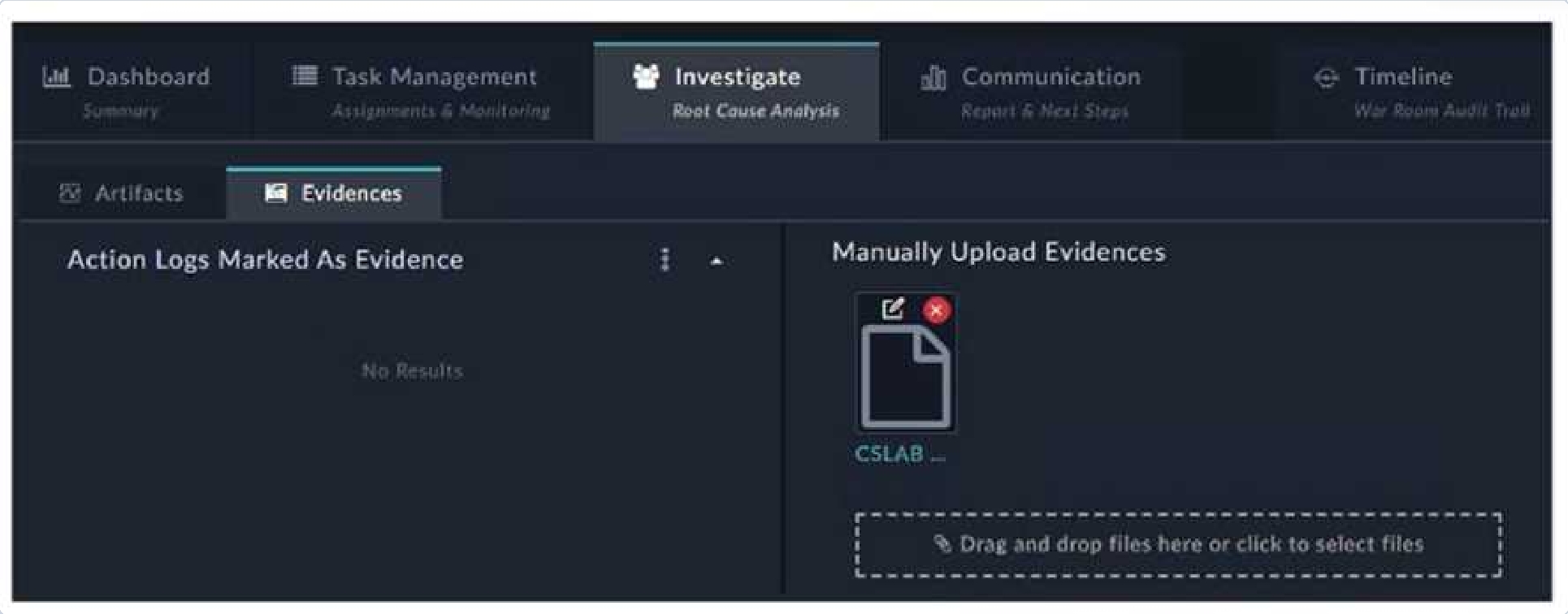
Refer to the exhibit.

Certification Exam NSE7_SOC_AR-7.6: Fortinet NSE 7 - Security Operations 7.6 Architect Fortinet Fortinet-NSE7_SOC_AR-7.6 1-2578273008

How do you add a piece of evidence to the Action Logs Marked As Evidence area?
(Choose one
OPTIONS :
Select the answer
1 correct answer
A.
See the Explanation. Answer : A EXPLANATION : ) A. By tagging output or a workspace comment with the keyword Evidence
B.
By linking an indicator to the war room
C.
By creating an evidence collection task and attaching a file
D.
By executing a playbook with the Save Execution Logs option enabled

Quiz

4/10
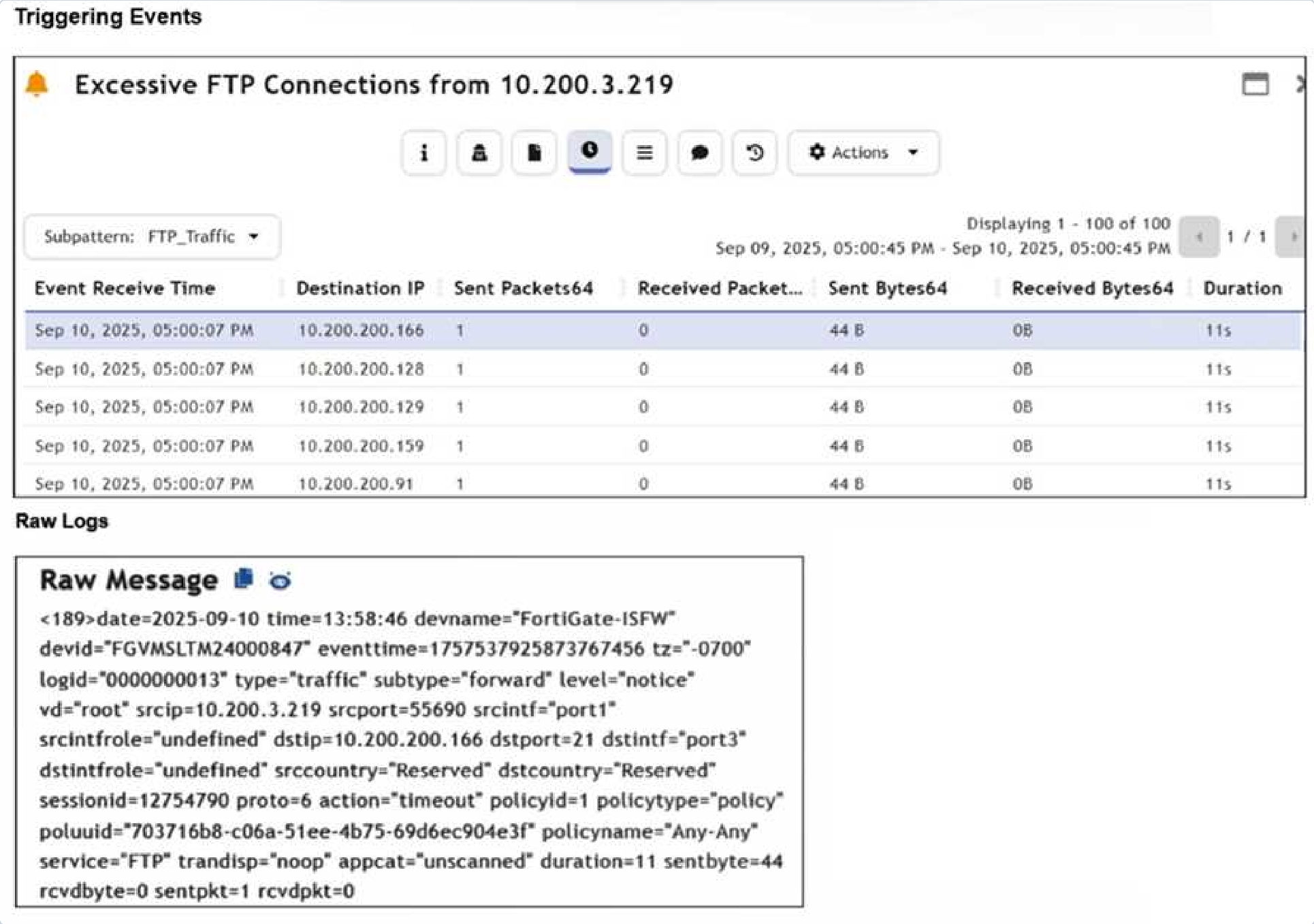
Refer to the exhibits.

Certification Exam NSE7_SOC_AR-7.6: Fortinet NSE 7 - Security Operations 7.6 Architect Fortinet Fortinet-NSE7_SOC_AR-7.6 2-4119730059

Assume that the traffic flows are identical, except for the destination IP address. There is
only one
FortiGate in network address translation (NAT) mode in this environment.
Based on the exhibits, which two conclusions can you make about this FortiSIEM incident?
(Choose
two answers)
OPTIONS :
Select the answer
1 correct answer
A.
The client 10.200.3.219 is conducting active reconnaissance.
B.
FortiGate is not routing the packets to the destination hosts.
C.
The destination hosts are not responding.
D.
FortiGate is blocking the return flows. Answer : A,C EXPLANATION : Comprehensive and Detailed Explanation From FortiSOAR 7.6., FortiSIEM 7.3 Exact Extract study guide: Based on the analysis of the Triggering Events and the Raw Message provided in the FortiSIEM 7.3 interface: Active Reconnaissance (A): The "Triggering Events" table shows a single source IP (10.200.3.219) attempting to connect to multiple different destination IP addresses (10.200.200.166, .128, .129, .159, .91) on the same service (FTP/Port 21). Each attempt consists of exactly 1 Sent Packet and 0 Received Packets. This pattern of "one-to-many" sequential connection attempts is the signature of a horizontal port scan, which is a primary technique in Active Reconnaissance. Destination hosts are not responding (C): The Raw Log shows the action as "timeout" and specifically lists "sentpkt=1 rcvdpkt=0". In FortiGate log logic (which FortiSIEM parses), a "timeout" with zero received packets indicates that the firewall allowed the packet out (Action was not 'deny'), but no SYN-ACK or response was received from the target host within the session timeout period. This confirms the destination hosts are either offline, non-existent, or silently dropping the traffic. Why other options are incorrect: FortiGate is not routing (B): If the FortiGate were not routing the packets, the logs would typically not show a successful session initialization ending in a "timeout," or they would show a routing error/deny. The fact that 44 bytes were sent indicates the FortiGate processed and attempted to forward the traffic. FortiGate is blocking return flows (D): If the return flow were being blocked by a security policy on the FortiGate, the action would typically be logged as "deny" for the return traffic, and the session state would reflect a policy violation rather than a generic session "timeout".

Quiz

5/10
When you use a manual trigger to save user input as a variable, what is the correct Jinja
expression
to reference the variable? (Choose one answer)
OPTIONS :
Select the answer
1 correct answer
A.
{{ vars.input.params.<variable_name> }}
B.
{{ globalVars.<variable_name> }}
C.
{{ vars.item.<variable_name> }}
D.
{{ vars.steps.<variable_name> }} Answer : A EXPLANATION : Comprehensive and Detailed Explanation From FortiSOAR 7.6., FortiSIEM 7.3 Exact Extract study guide: In FortiSOAR 7.6, the playbook engine utilizes Jinja2 expressions to handle dynamic data. When a playbook is configured with a Manual Trigger, the administrator can define input fields (such as text, picklists, or checkboxes) that an analyst must fill out when executing the playbook from a record. Input Parameter Mapping: Any data entered by the user during this manual trigger phase is automatically mapped to the input.params dictionary within the vars object. Therefore, the syntax to retrieve a specific input value is {{ vars.input.params.variable_name }}. Scope of Variables: This specific path ensures that the variable is pulled from the initial user input rather than from the output of a subsequent step (vars.steps) or a globally defined variable (globalVars).

Quiz

6/10
Based on the Pyramid of Pain model, which two statements accurately describe the value
of an
indicator and how difficult it is for an adversary to change? (Choose two answers)
OPTIONS :
Select the answer
1 correct answer
A.
IP addresses are easy because adversaries can spoof them or move them to new resources.
B.
Tactics, techniques, and procedures are hard because adversaries must adapt their methods.
C.
Artifacts are easy because adversaries can alter file paths or registry keys.
D.
Tools are easy because often, multiple alternatives exist. Answer : A,B EXPLANATION : Comprehensive and Detailed Explanation From FortiSOAR 7.6., FortiSIEM 7.3 Exact Extract study guide: The Pyramid of Pain (David Bianco) is a core concept taught in FortiSIEM 7.3 and FortiSOAR 7.6 curriculum to help SOC analysts prioritize threat intelligence and detection logic. The model ranks indicators based on the "pain" or effort they cause an adversary to change: IP Addresses (Easy): These are classified as "Easy" to change. An attacker can simply rotate through a proxy service, use a different VPS, or utilize a new compromised host to continue their campaign. While more valuable than a file hash, they provide relatively low-long term value to the defender because they are so ephemeral. TTPs (Tough/Hard): This is the apex of the pyramid. TTPs (Tactics, Techniques, and Procedures) represent the fundamental way an adversary operates. If a defender successfully detects and blocks a Tactic (e.g., a specific way an attacker performs privilege escalation), the adversary is forced to reinvent their entire operational process, which is time-consuming and difficult. Why other options are incorrect: Artifacts (C): According to the pyramid, Network/Host Artifacts are classified as "Annoying", not "Easy". While an attacker can change them, it requires modifying their code or script behavior, which causes more friction than simply switching an IP address. Tools (D): Tools are classified as "Challenging". While alternatives exist, an adversary usually invests significant time mastering a specific toolset; losing the ability to use that tool effectively disrupts their efficiency significantly.

Quiz

7/10
DRAG DROP


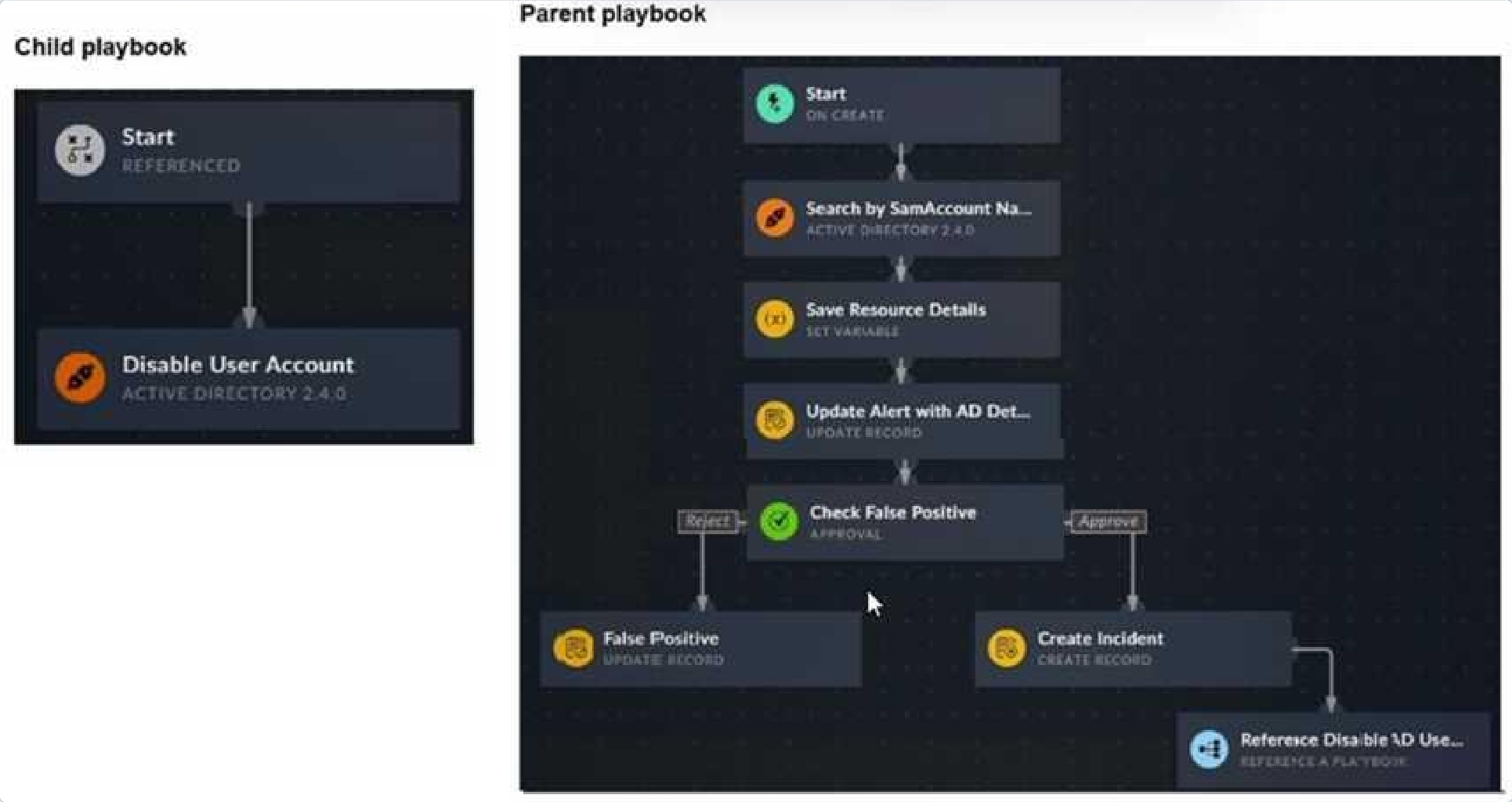
Refer to the exhibits.

Certification Exam NSE7_SOC_AR-7.6: Fortinet NSE 7 - Security Operations 7.6 Architect Fortinet Fortinet-NSE7_SOC_AR-7.6 3-776393299

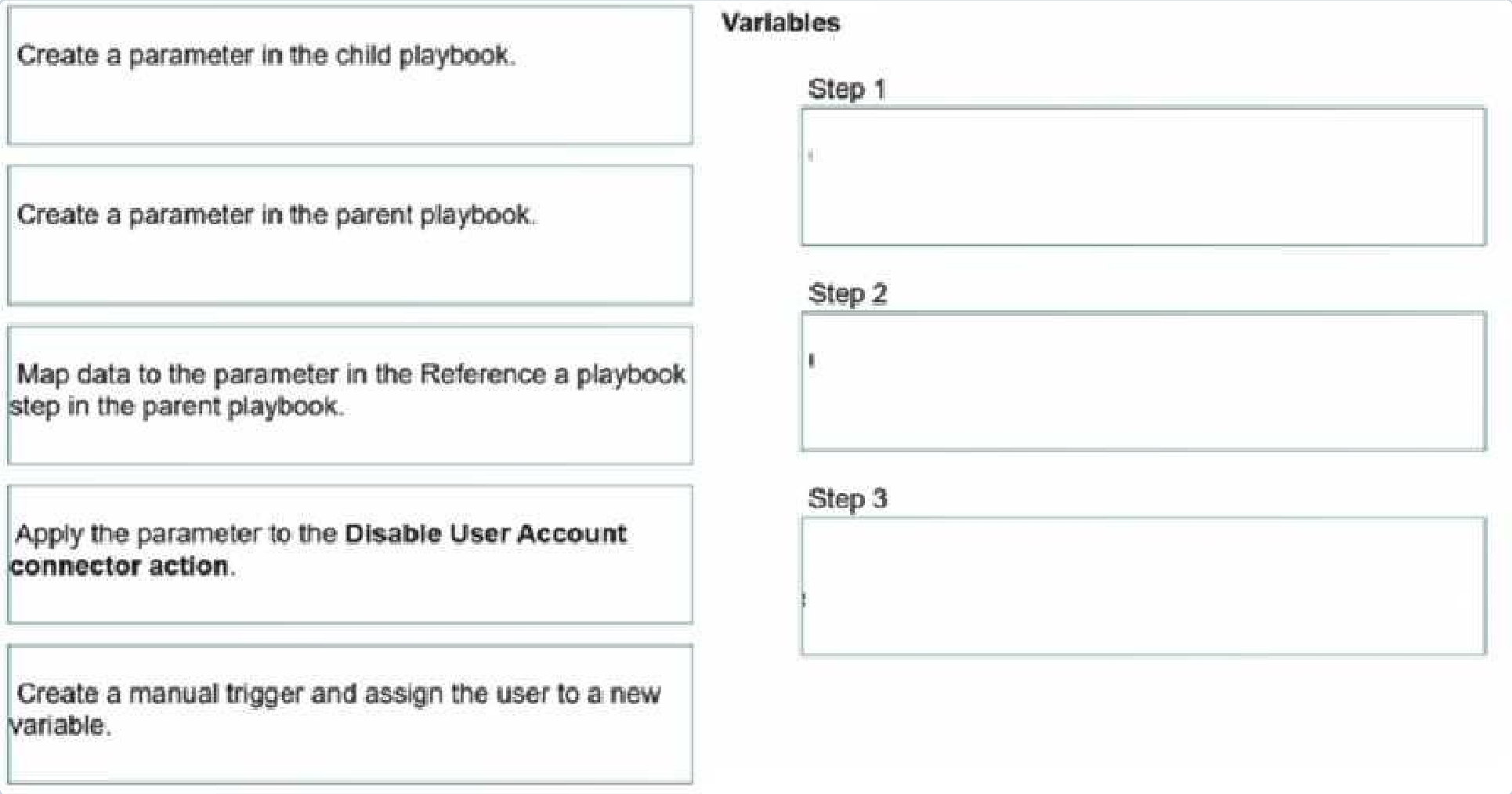
You have a playbook that, depending on whether an analyst deems the alert to be a true
positive,
could reference a child playbook. You need to pass variables from the parent playbook to
the child
playbook.
Place the steps needed to accomplish this in the correct order.
Certification Exam NSE7_SOC_AR-7.6: Fortinet NSE 7 - Security Operations 7.6 Architect Fortinet Fortinet-NSE7_SOC_AR-7.6 4-1976034696

OPTIONS :
Select the answer
1 correct answer
See the Explanation. Answer : A EXPLANATION : 1. Create a parameter in the child playbook. 2. Apply the parameter to the Disable User Account connector action. 3. Map data to the parameter in the Reference a playbook step in the parent playbook. Comprehensive and Detailed Explanation From FortiSOAR 7.6., FortiSIEM 7.3 Exact Extract study guide: In FortiSOAR 7.6, the methodology for passing data between playbooks—specifically from a parent to a "Referenced" (child) playbook—follows a strict data flow hierarchy: Step 1: Create a parameter in the child playbook. Before a parent can send data, the child playbook must be configured to receive it. This is done by adding "Input Parameters" in the Start step of the child playbook (configured as a "Referenced" trigger). These parameters act as the "inbox" for external data. Step 2: Apply the parameter to the connector action. Once the child playbook has the parameter defined (e.g., user_id), you must use a Jinja expression like {{vars.input.params.user_id}} within the child's action steps (such as the Active Directory: Disable User Account connector) so that the child playbook actually utilizes the data it receives. Step 3: Map data to the parameter in the parent playbook. Finally, in the parent playbook, when you add the Reference a Playbook step and select the child playbook, FortiSOAR automatically displays the parameters created in Step 1. You then map existing variables from the parent's environment (e.g., from a previous "Search by SamAccountName" step) into these fields to complete the hand-off. Why other options are excluded: Create a manual trigger and assign the user to a new variable: While manual triggers capture data, they are not the mechanism for passing data between nested playbooks; they are for user-to- system interaction. Create a parameter in the parent playbook: Parameters in a parent playbook are used to receive data from outside (like an external API or manual input), not to send data down to a child. The child defines what it needs; the parent simply provides it in the Reference step.

Quiz

8/10
Which three factors does the FortiSIEM rules engine use to determine the count when it
evaluates
the aggregate condition COUNT (Matched Events) on a specific subpattern? (Choose three
answers)
OPTIONS :
Select the answer
1 correct answer
A.
Group By attributes
B.
Data source
C.
Time window
D.
Search filter
E.
Incident action Answer : A,C,D EXPLANATION : Comprehensive and Detailed Explanation From FortiSOAR 7.6., FortiSIEM 7.3 Exact Extract study guide: The FortiSIEM rules engine evaluates subpatterns to detect complex attack behaviors. When a rule uses an aggregate condition like COUNT (Matched Events), the engine calculates this value based on specific architectural parameters: Group By attributes (A): The engine maintains a separate counter for each unique combination of "Group By" attributes defined in the subpattern. For example, if you group by "Source IP," the engine tracks the count of events for each unique IP address independently. Time window (C): The count is relative to a specific time duration (e.g., 5 minutes). The engine only counts events that fall within this sliding or fixed window. Once an event falls outside this window, it is no longer included in the aggregate count. Search filter (D): Only events that satisfy the specific "Search Filter" criteria (e.g., Event Type = "Failed Login") are considered "Matched Events." The filter defines the scope of the data that the rules engine processes before applying the count. Why other options are incorrect: Data source (B): While the data source determines where the logs come from, the rules engine itself uses the parsed attributes (defined in the search filter) rather than the raw data source to determine the count. Multiple data sources might contribute to the same filter and count. Incident action (E): Incident actions (such as sending an email or triggering a SOAR playbook) are the result of a rule firing. They do not influence the internal logic or calculation of the event count during the evaluation phase.

Quiz

9/10
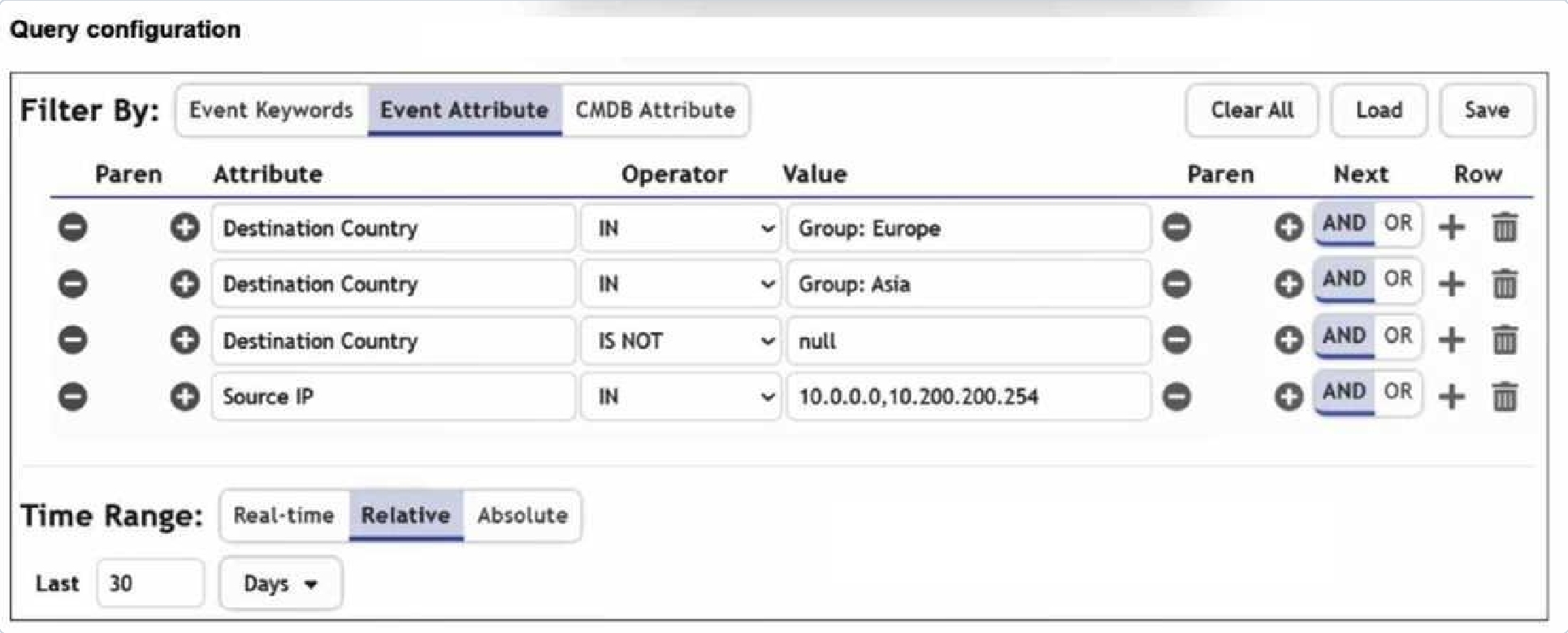
Refer to the exhibit.

Certification Exam NSE7_SOC_AR-7.6: Fortinet NSE 7 - Security Operations 7.6 Architect Fortinet Fortinet-NSE7_SOC_AR-7.6 5-3778134615

You are trying to find traffic flows to destinations that are in Europe or Asia, for hosts in the
local LAN
segment. However, the query returns no results. Assume these logs exist on FortiSIEM.
Which three mistakes can you see in the query shown in the exhibit? (Choose three
answers)
OPTIONS :
Select the answer
1 correct answer
A.
The null value cannot be used with the IS NOT operator.
B.
The time range must be Absolute for queries that use configuration management database (CMDB) groups.
C.
There are missing parentheses between the first row (Group: Europe) and the second row (Group: Asia).
D.
The Source IP row operator must be BETWEEN 10.0.0.0, 10.200.200.254.
E.
The logical operator for the first row (Group: Europe) must be OR. Answer : C,D,E EXPLANATION : Comprehensive and Detailed Explanation From FortiSOAR 7.6., FortiSIEM 7.3 Exact Extract study guide: Analyzing the Query Configuration exhibit in the context of FortiSIEM 7.3 search logic reveals several syntax and logical errors that prevent the query from returning results: Logical Operator Error (E): The user intends to find traffic to Europe OR Asia. In the exhibit, the first row (Group: Europe) is followed by a default AND operator. This forces the query to look for a single flow where the destination is simultaneously in Europe and Asia, which is logically impossible. It must be changed to OR. Missing Parentheses (C): When combining OR and AND logic in FortiSIEM, parentheses are required to define the order of operations. Without them, the query might evaluate "Asia AND Destination Country IS NOT null AND Source IP IN..." first. To correctly find (Europe OR Asia) that also matches the LAN segment, parentheses must group the first two rows. Incorrect Operator for IP Range (D): The exhibit uses the IN operator for the value 10.0.0.0, 10.200.200.254. In FortiSIEM, the IN operator is used for a comma-separated list of specific values or CMDB groups. To specify a continuous range of IP addresses (the "LAN segment"), the BETWEEN operator must be used. Why other options are incorrect: IS NOT null (A): In FortiSIEM, "IS NOT null" is a valid operator/value combination used to ensure a specific attribute has been successfully parsed and populated in the event record. Time Range (B): There is no requirement for a time range to be "Absolute" when using CMDB groups; "Relative" time ranges (like the "Last 30 Days" shown) are commonly used and fully supported for such queries. SOC Concepts and Frameworks

Quiz

10/10
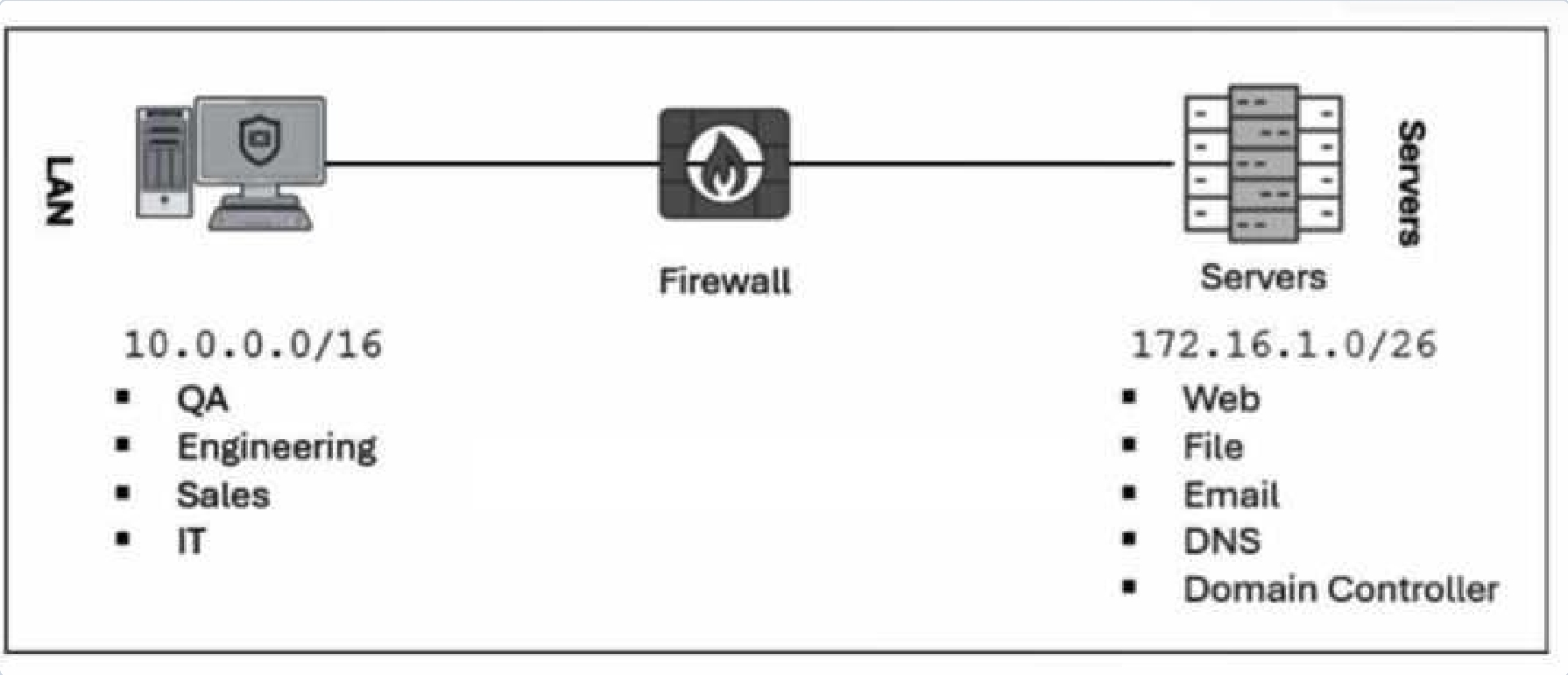
Refer to the exhibit.

Certification Exam NSE7_SOC_AR-7.6: Fortinet NSE 7 - Security Operations 7.6 Architect Fortinet Fortinet-NSE7_SOC_AR-7.6 6-575377619

Which method most effectively reduces the attack surface of this organization? (Choose
one answer)
OPTIONS :
Select the answer
1 correct answer
A.
Forward all firewall logs to the security information and event management (SIEM) system.
B.
Enable deep inspection on firewall policies.
C.
Implement macrosegmentation.
D.
Remove unused devices. Answer : D EXPLANATION : Comprehensive and Detailed Explanation From FortiSOAR 7.6., FortiSIEM 7.3 Exact Extract study guide: In the context of the Attack Surface Management modules within the FortiSIEM 7.3 and FortiSOAR 7.6 security frameworks, "reducing the attack surface" refers to the process of minimizing the number of possible entry points (attack vectors) that an unauthorized user could exploit. Definition of Attack Surface: The attack surface consists of all the different points where an attacker could try to enter data to or extract data from an environment. This includes hardware, software, SaaS components, and network interfaces. Effectiveness of Asset Removal: Removing unused devices, services, or software is the most fundamental and effective way to reduce the attack surface. By decommissioning an unused server or workstation (as shown in the LAN/Server diagram), you completely eliminate all potential vulnerabilities associated with that asset, its operating system, and its active services. Contrast with other methods: Forwarding logs (A) and Deep Inspection (B) are detective and preventive controls, respectively. They help manage the risk within the existing attack surface but do not actually shrink the size of the surface itself. Macrosegmentation (C) limits the "blast radius" or lateral movement after a compromise has occurred. While it secures the interior, it does not remove the initial entry points that define the external attack surface. Why other options are incorrect: Forwarding logs (A): This increases visibility but does not remove potential vulnerabilities. Deep Inspection (B): This is a security measure to detect threats within existing traffic but does not eliminate the target (the device) itself. Implement macrosegmentation (C): While highly recommended for security, it is a network architecture strategy to contain threats, whereas the prompt asks for the most effective method to reduce the surface. Removing the asset entirely (D) is the most absolute reduction possible.
Looking for more questions?Buy now

NSE7_SOC_AR-7.6: Fortinet NSE 7 - Security Operations 7.6 Architect Practice test unlocks all online simulator questions

Thank you for choosing the free version of the NSE7_SOC_AR-7.6: Fortinet NSE 7 - Security Operations 7.6 Architect practice test! Further deepen your knowledge on Fortinet Simulator; by unlocking the full version of our NSE7_SOC_AR-7.6: Fortinet NSE 7 - Security Operations 7.6 Architect Simulator you will be able to take tests with over 115 constantly updated questions and easily pass your exam. 98% of people pass the exam in the first attempt after preparing with our 115 questions.

BUY NOW

What to expect from our NSE7_SOC_AR-7.6: Fortinet NSE 7 - Security Operations 7.6 Architect practice tests and how to prepare for any exam?

The NSE7_SOC_AR-7.6: Fortinet NSE 7 - Security Operations 7.6 Architect Simulator Practice Tests are part of the Fortinet Database and are the best way to prepare for any NSE7_SOC_AR-7.6: Fortinet NSE 7 - Security Operations 7.6 Architect exam. The NSE7_SOC_AR-7.6: Fortinet NSE 7 - Security Operations 7.6 Architect practice tests consist of 115 questions and are written by experts to help you and prepare you to pass the exam on the first attempt. The NSE7_SOC_AR-7.6: Fortinet NSE 7 - Security Operations 7.6 Architect database includes questions from previous and other exams, which means you will be able to practice simulating past and future questions. Preparation with NSE7_SOC_AR-7.6: Fortinet NSE 7 - Security Operations 7.6 Architect Simulator will also give you an idea of the time it will take to complete each section of the NSE7_SOC_AR-7.6: Fortinet NSE 7 - Security Operations 7.6 Architect practice test . It is important to note that the NSE7_SOC_AR-7.6: Fortinet NSE 7 - Security Operations 7.6 Architect Simulator does not replace the classic NSE7_SOC_AR-7.6: Fortinet NSE 7 - Security Operations 7.6 Architect study guides; however, the Simulator provides valuable insights into what to expect and how much work needs to be done to prepare for the NSE7_SOC_AR-7.6: Fortinet NSE 7 - Security Operations 7.6 Architect exam.

BUY NOW

NSE7_SOC_AR-7.6: Fortinet NSE 7 - Security Operations 7.6 Architect Practice test therefore represents an excellent tool to prepare for the actual exam together with our Fortinet practice test . Our NSE7_SOC_AR-7.6: Fortinet NSE 7 - Security Operations 7.6 Architect Simulator will help you assess your level of preparation and understand your strengths and weaknesses. Below you can read all the quizzes you will find in our NSE7_SOC_AR-7.6: Fortinet NSE 7 - Security Operations 7.6 Architect Simulator and how our unique NSE7_SOC_AR-7.6: Fortinet NSE 7 - Security Operations 7.6 Architect Database made up of real questions:

Info quiz:

  • Quiz name:NSE7_SOC_AR-7.6: Fortinet NSE 7 - Security Operations 7.6 Architect
  • Total number of questions:115
  • Number of questions for the test:50
  • Pass score:80%

You can prepare for the NSE7_SOC_AR-7.6: Fortinet NSE 7 - Security Operations 7.6 Architect exams with our mobile app. It is very easy to use and even works offline in case of network failure, with all the functions you need to study and practice with our NSE7_SOC_AR-7.6: Fortinet NSE 7 - Security Operations 7.6 Architect Simulator.

Use our Mobile App, available for both Android and iOS devices, with our NSE7_SOC_AR-7.6: Fortinet NSE 7 - Security Operations 7.6 Architect Simulator . You can use it anywhere and always remember that our mobile app is free and available on all stores.

Our Mobile App contains all NSE7_SOC_AR-7.6: Fortinet NSE 7 - Security Operations 7.6 Architect practice tests which consist of 115 questions and also provide study material to pass the final NSE7_SOC_AR-7.6: Fortinet NSE 7 - Security Operations 7.6 Architect exam with guaranteed success. Our NSE7_SOC_AR-7.6: Fortinet NSE 7 - Security Operations 7.6 Architect database contain hundreds of questions and Fortinet Tests related to NSE7_SOC_AR-7.6: Fortinet NSE 7 - Security Operations 7.6 Architect Exam. This way you can practice anywhere you want, even offline without the internet.

BUY NOW