Quiz H12-351_V1.0: Huawei HCIE-WLAN (Written) V1.0
Quiz
employees and guests. However, guest data may pose security threats on the network. Which of the
following networking modes is applicable to this scenario?
Quiz
the network through encryption and authentication?
Quiz
to the other AP to tear down the
mesh connection.
Quiz
In mesh networking, APs have different roles. Drag the AP roles on the left to the role descriptions on
the right.
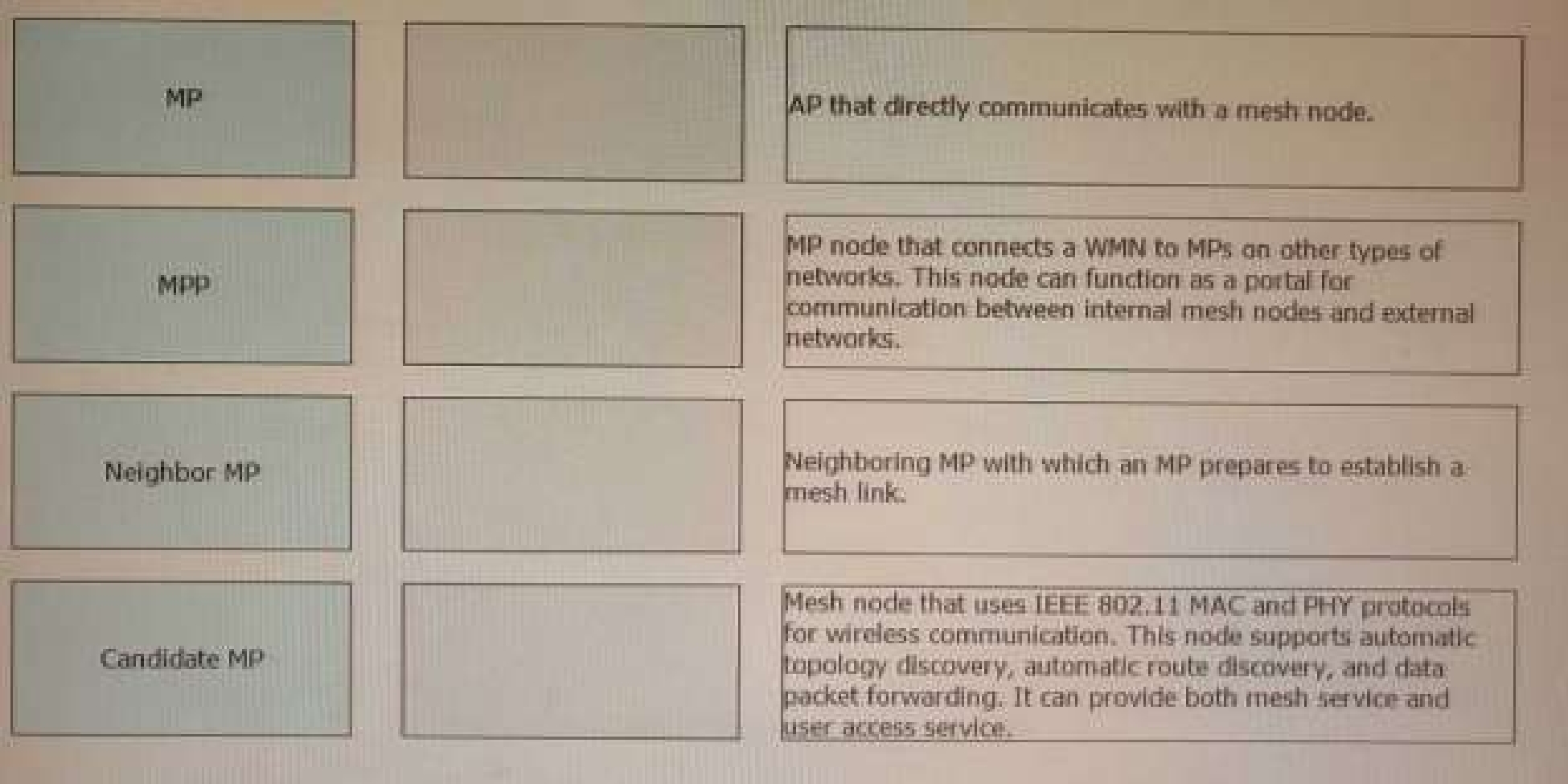
supports automatic topology discovery, automatic route discovery, and data packet forwarding. It
can provide both mesh service and user access service1.
MPP: MP node that connects a WMN to MPs on other types of networks. This node can function as a
portal for communication between internal mesh nodes and external networks1.
Neighbor MP: Neighboring MP with which an MP prepares to establish a mesh link1.
Candidate MP: AP that directly communicates with a mesh node2.
[https://support.huawei.com/enterprise/en/doc/EDOC1100064365/90f2391e/configuration-](https://support.huawei.com/enterprise/en/doc/EDOC1100064365/90f2391e/configuration-)
examples-for-mesh 2:
[https://support.huawei.com/enterprise/en/doc/EDOC1100169459/8d79210e/configuring-wireless-](https://support.huawei.com/enterprise/en/doc/EDOC1100169459/8d79210e/configuring-wireless-)
mesh-networking
Quiz
problems may occur after a master/backup switchover? (Select All that apply)
Quiz
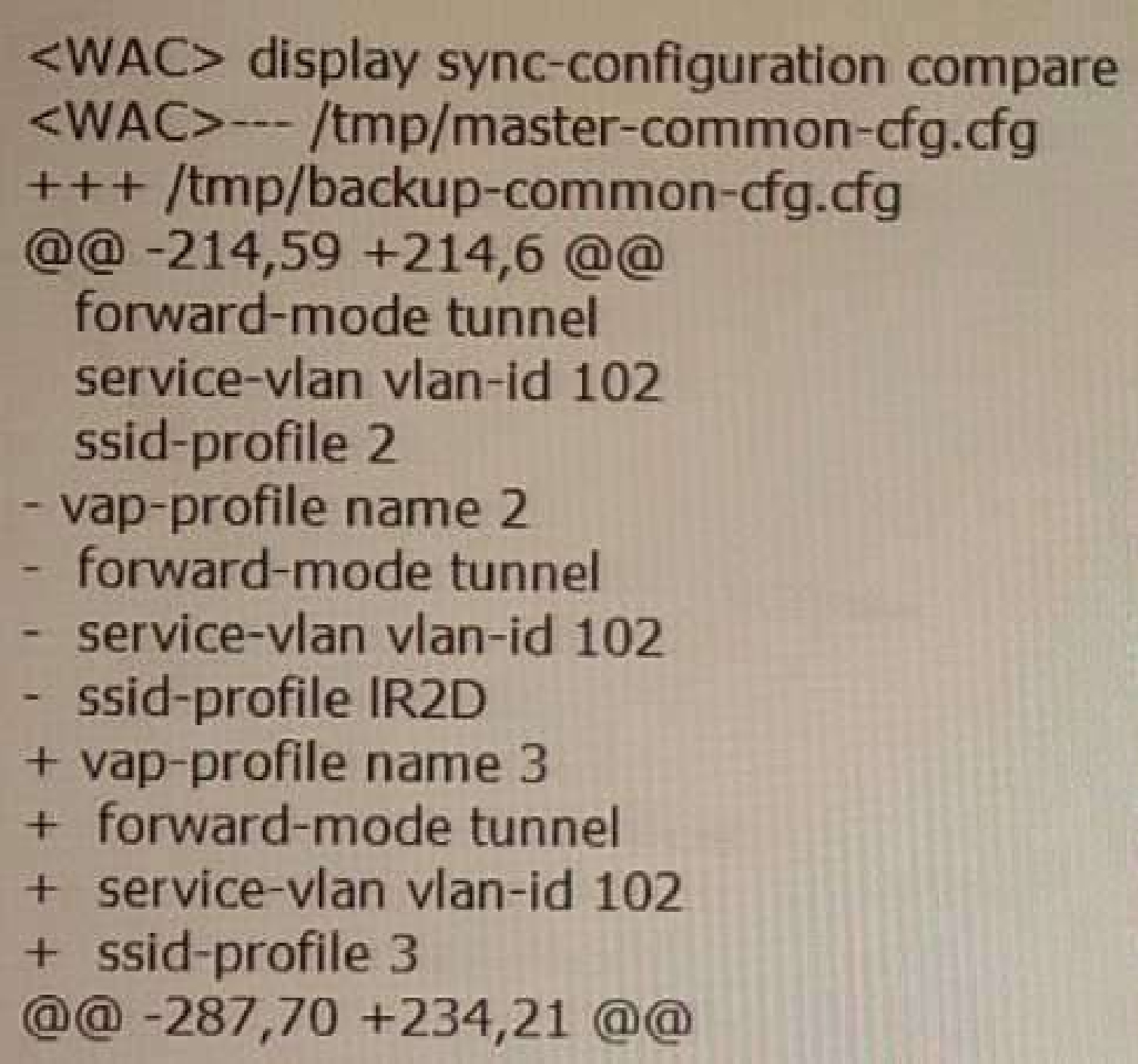
wireless configuration synchronization. Based on the command output, which of the following
statements are true? (Select All that apply)
Quiz
active link recovers, the AP detects that the original active link has a higher priority and triggers a
switchback. How many Echo intervals does the AP wait for before switching back to the original
primary WAC?
Quiz
which of the following types of packets does the AP periodically send to the WACs to detect link
status?
Quiz
Quiz
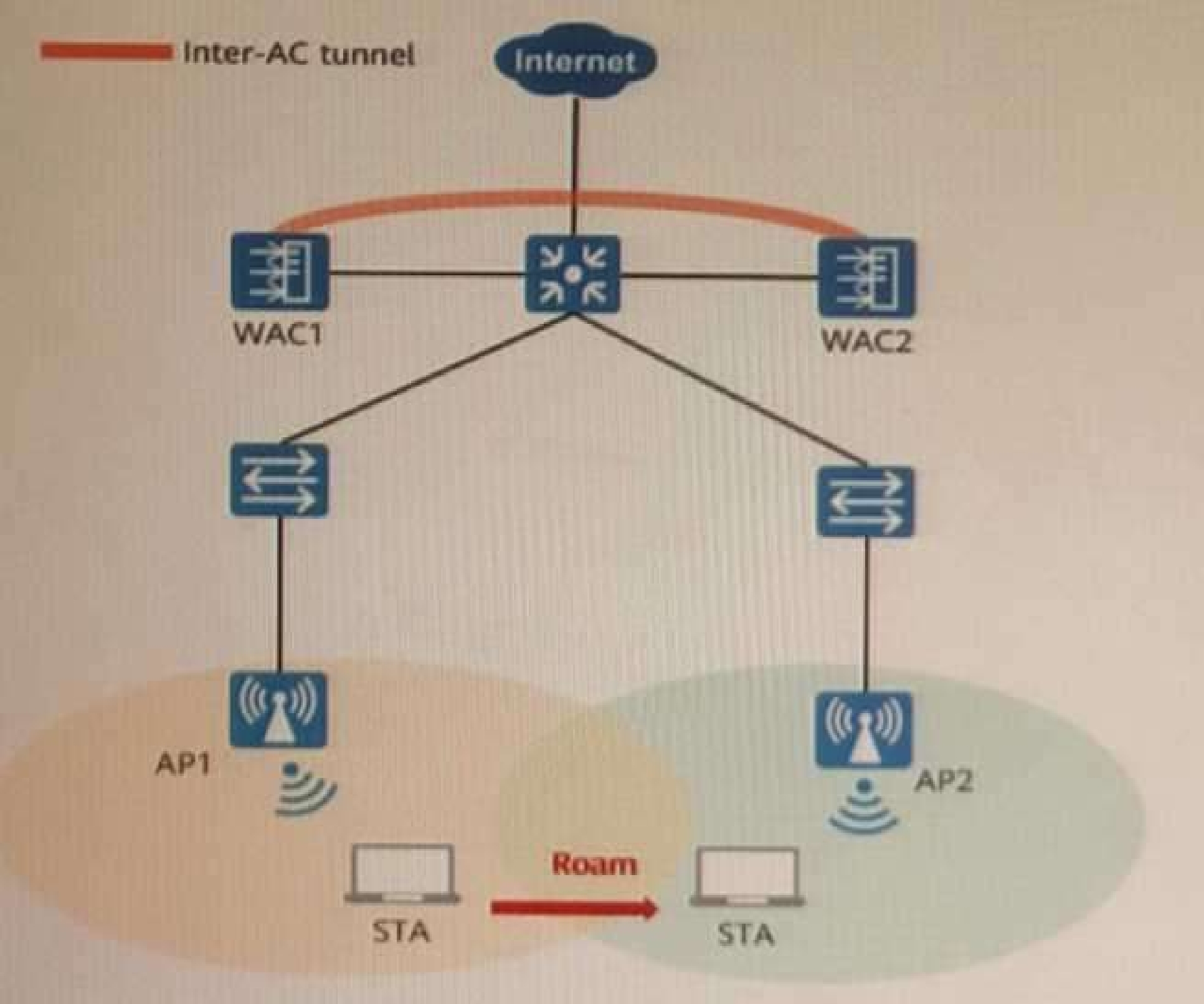
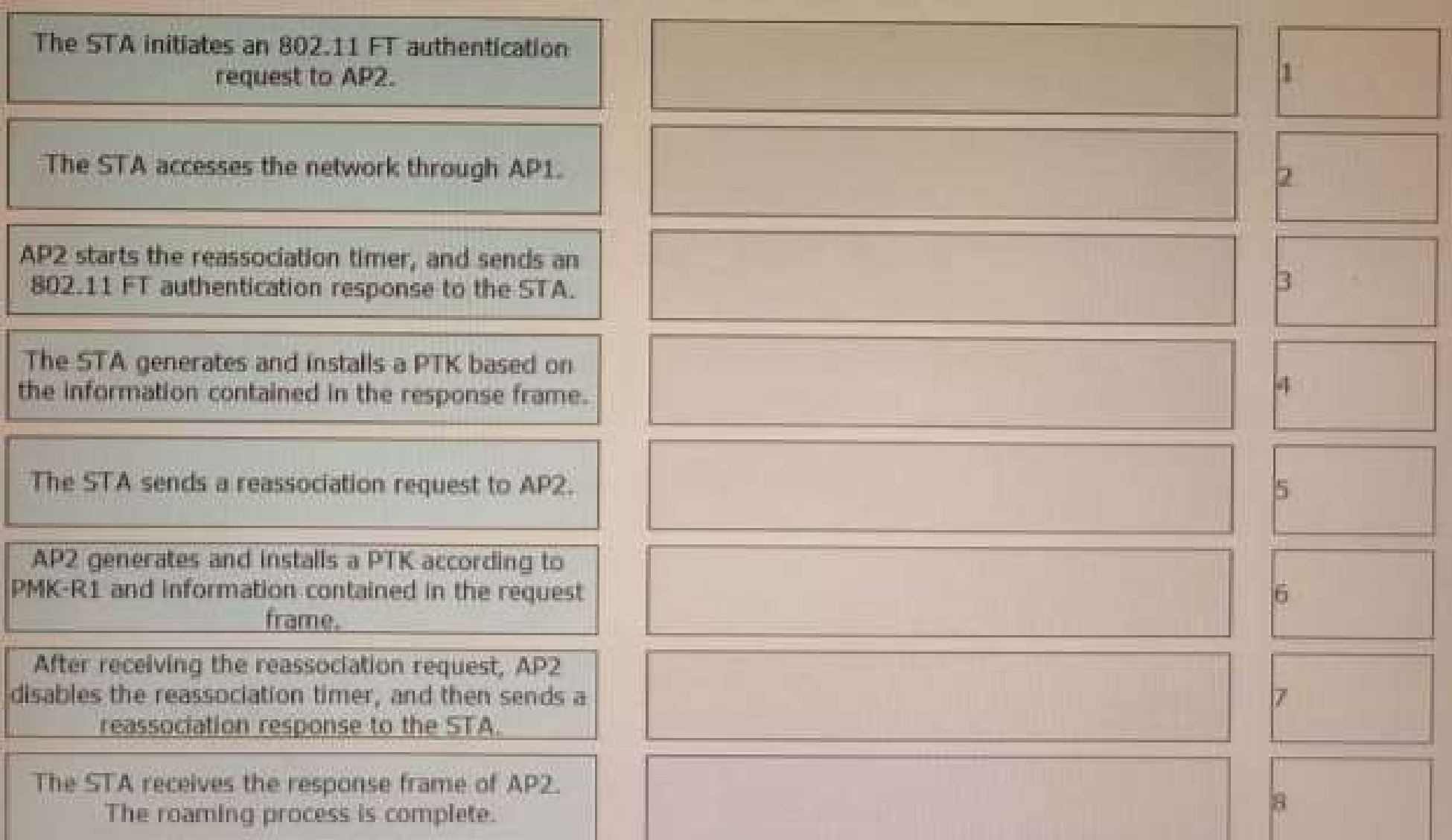
802. 11r fast roaming (over-the-air) is enabled on the WLAN shown in the figure. A STA roams from
AP1 to AP2. Sort the steps in chronological order during the 802.11r fast roaming process between
WACs.
H12-351_V1.0: Huawei HCIE-WLAN (Written) V1.0 Practice test unlocks all online simulator questions
Thank you for choosing the free version of the H12-351_V1.0: Huawei HCIE-WLAN (Written) V1.0 practice test! Further deepen your knowledge on Huawei Simulator; by unlocking the full version of our H12-351_V1.0: Huawei HCIE-WLAN (Written) V1.0 Simulator you will be able to take tests with over 60 constantly updated questions and easily pass your exam. 98% of people pass the exam in the first attempt after preparing with our 60 questions.
BUY NOWWhat to expect from our H12-351_V1.0: Huawei HCIE-WLAN (Written) V1.0 practice tests and how to prepare for any exam?
The H12-351_V1.0: Huawei HCIE-WLAN (Written) V1.0 Simulator Practice Tests are part of the Huawei Database and are the best way to prepare for any H12-351_V1.0: Huawei HCIE-WLAN (Written) V1.0 exam. The H12-351_V1.0: Huawei HCIE-WLAN (Written) V1.0 practice tests consist of 60 questions and are written by experts to help you and prepare you to pass the exam on the first attempt. The H12-351_V1.0: Huawei HCIE-WLAN (Written) V1.0 database includes questions from previous and other exams, which means you will be able to practice simulating past and future questions. Preparation with H12-351_V1.0: Huawei HCIE-WLAN (Written) V1.0 Simulator will also give you an idea of the time it will take to complete each section of the H12-351_V1.0: Huawei HCIE-WLAN (Written) V1.0 practice test . It is important to note that the H12-351_V1.0: Huawei HCIE-WLAN (Written) V1.0 Simulator does not replace the classic H12-351_V1.0: Huawei HCIE-WLAN (Written) V1.0 study guides; however, the Simulator provides valuable insights into what to expect and how much work needs to be done to prepare for the H12-351_V1.0: Huawei HCIE-WLAN (Written) V1.0 exam.
BUY NOWH12-351_V1.0: Huawei HCIE-WLAN (Written) V1.0 Practice test therefore represents an excellent tool to prepare for the actual exam together with our Huawei practice test . Our H12-351_V1.0: Huawei HCIE-WLAN (Written) V1.0 Simulator will help you assess your level of preparation and understand your strengths and weaknesses. Below you can read all the quizzes you will find in our H12-351_V1.0: Huawei HCIE-WLAN (Written) V1.0 Simulator and how our unique H12-351_V1.0: Huawei HCIE-WLAN (Written) V1.0 Database made up of real questions:
Info quiz:
- Quiz name:H12-351_V1.0: Huawei HCIE-WLAN (Written) V1.0
- Total number of questions:60
- Number of questions for the test:50
- Pass score:80%
You can prepare for the H12-351_V1.0: Huawei HCIE-WLAN (Written) V1.0 exams with our mobile app. It is very easy to use and even works offline in case of network failure, with all the functions you need to study and practice with our H12-351_V1.0: Huawei HCIE-WLAN (Written) V1.0 Simulator.
Use our Mobile App, available for both Android and iOS devices, with our H12-351_V1.0: Huawei HCIE-WLAN (Written) V1.0 Simulator . You can use it anywhere and always remember that our mobile app is free and available on all stores.
Our Mobile App contains all H12-351_V1.0: Huawei HCIE-WLAN (Written) V1.0 practice tests which consist of 60 questions and also provide study material to pass the final H12-351_V1.0: Huawei HCIE-WLAN (Written) V1.0 exam with guaranteed success. Our H12-351_V1.0: Huawei HCIE-WLAN (Written) V1.0 database contain hundreds of questions and Huawei Tests related to H12-351_V1.0: Huawei HCIE-WLAN (Written) V1.0 Exam. This way you can practice anywhere you want, even offline without the internet.
BUY NOW