The new flashcard feature is useful to memorize questions.
?Change your study mode
At any time, you can change the study mode, and alternate between the practice mode and the exam mode. In practice mode, you can configure for example the number of questions or tests, and other parameters to help you study.
Randomized | 10 Questions per Test | 20 Minutes | 70% to pass|
To re-configure your study mode again and change - for example - the number of tests, whether you have random questions and all other configuration parameters.
?Simulator Configuration
Auto-scroll: You can use the automatic scrolling of the questionnaire that occurs as soon as you answer one or all of the answers to a question correctly. Auto scrolling is activated if you answer a single answer, or as soon as you answer all the mandatory answers. Learning Mode: During learning mode you can get a real time result for your answer.
Free Test
Question: / 10
20:00Min. left
?Restart the current test
To restart the current test by clearing all your answers and the time used up to now. Warning: all answers will be lost.
Question: / 10
5.0(119 Votes)
Quiz
Question 1/101/10
An administrator is deploying Disaster Recovery for two NC2 clusters on AWS. The organization would prefer to use synchronous replication. What are two supported configurations for this type of implementation? (Choose two.)
Select multiple answer: (Choose 2)Select the answer
2 correct answers
A.
Two NC2 on AWS clusters in the same region using native networking on the primary cluster, and Flow Virtual Networking on the other remote cluster.
B.
Two NC2 on AWS clusters in different regions, using native networking on both clusters.
C.
Two NC2 on AWS clusters in different regions using native networking on the primary cluster, and Flow Virtual Networking on the other remote cluster.
D.
Two NC2 on AWS clusters in the same region, using native networking on both clusters.
The correct answers are A and D. Explanation Synchronous replication requires very low latency between the two sites because data is written to both locations at the same time. For NC2 on AWS, this means the supported Disaster Recovery configurations must keep the two clusters close enough to meet the latency requirements. Let’s review the options: A. Two NC2 on AWS clusters in the same region using native networking on the primary cluster, and Flow Virtual Networking on the other remote cluster. This is supported. The clusters are in the same AWS region, which helps minimize latency. Also, using native networking on one side and Flow Virtual Networking on the other is a supported design for this type of implementation. B. Two NC2 on AWS clusters in different regions, using native networking on both clusters. This is not supported for synchronous replication. Different regions usually introduce too much latency for synchronous DR. C. Two NC2 on AWS clusters in different regions using native networking on the primary cluster, and Flow Virtual Networking on the other remote cluster. This is also not supported for synchronous replication for the same reason: inter-region latency is generally too high. D. Two NC2 on AWS clusters in the same region, using native networking on both clusters. This is supported. Same-region deployment provides the low latency needed for synchronous replication, and native networking on both clusters is a valid configuration. Why A and D are correct The key requirement for synchronous replication is low latency, which is typically achievable only when both NC2 clusters are in the same AWS region. Both native networking and Flow Virtual Networking can be used depending on the specific side of the DR design, as long as the overall deployment follows supported architecture. Why B and C are incorrect Cross-region setups are better suited for asynchronous replication, not synchronous replication, because synchronous replication depends on immediate acknowledgment from both sites. The physical distance between regions makes this impractical. Final answer: A and D
Right Answer: A, D
Quiz
Question 2/102/10
What are the supported NC2 on AWS instance types?
Select the answer:Select the answer
1 correct answer
A.
i4i.4xlarge, i3.8xlarge, i7ie.2xlarge
B.
i3.metal, t2.micro, g4dn.xlarge, M5d.medium
C.
i3.metal, i3en.metal, i4i.metal
D.
i7ie.24xlarge, i4i.32xlarge, i3.12xlarge
The correct answer is C. i3.metal, i3en.metal, i4i.metal NC2 on AWS refers to Nutanix Cloud Clusters running on AWS, and it supports a specific set of bare-metal EC2 instance types. These are chosen because NC2 requires powerful, dedicated hardware with enough CPU, memory, storage performance, and network capability to run the Nutanix stack efficiently. Why C is correct: - i3.metal: Supported NC2 on AWS bare-metal instance type - i3en.metal: Supported NC2 on AWS bare-metal instance type - i4i.metal: Supported NC2 on AWS bare-metal instance type These are all metal instances, which is important because NC2 on AWS requires bare-metal instances rather than virtualized instance sizes. Why the other options are incorrect: A. i4i.4xlarge, i3.8xlarge, i7ie.2xlarge - These are not all supported NC2 on AWS instance types. - Some are not metal instances, and NC2 on AWS generally requires bare-metal EC2 instances. B. i3.metal, t2.micro, g4dn.xlarge, M5d.medium - Only i3.metal is in the supported set. - The others are not supported NC2 instance types, and some are far too small or not appropriate for NC2. D. i7ie.24xlarge, i4i.32xlarge, i3.12xlarge - These are large instance sizes, but they are not the standard supported NC2 on AWS bare-metal instance types. - NC2 support is tied to specific metal instances, not arbitrary large sizes. Key takeaway: For NC2 on AWS, the supported instance types are the bare-metal variants: - i3.metal - i3en.metal - i4i.metal So the correct answer is C.
Right Answer: C
Quiz
Question 3/103/10
An administrator plans to reserve Nutanix licenses for NC2 consumption. Which two statements are correct? (Choose two.)
Select multiple answer: (Choose 2)Select the answer
2 correct answers
A.
The license reservation must be deleted when terminating or hibernating an NC2 cluster.
B.
Capacity reserved from a license can cover usage for all NC2 clusters associated with that workspace.
C.
A reserved license can be unreserved and used it for an on-premises cluster by updating the reserved capacity of that license to zero.
D.
If one NC2 cluster is terminated and another NC2 cluster is created, the reserved capacity must be manually used to cover the new cluster’s usage.
The correct answers are B and C. Here is why: B. Capacity reserved from a license can cover usage for all NC2 clusters associated with that workspace. This is correct because Nutanix license reservation for NC2 is managed at the workspace level. The reserved capacity is not tied to just one single NC2 cluster. Instead, it can be applied across NC2 clusters that belong to the same workspace, so the reserved license capacity can be used flexibly within that scope. C. A reserved license can be unreserved and used for an on-premises cluster by updating the reserved capacity of that license to zero. This is also correct. If the reserved capacity is reduced to zero, the license is no longer reserved for NC2 consumption. That frees the license so it can be reassigned for other use cases, including on-premises clusters. Why the other options are incorrect: A. The license reservation must be deleted when terminating or hibernating an NC2 cluster. This is incorrect because terminating or hibernating an NC2 cluster does not automatically require deleting the reservation. The reserved capacity can remain available for future NC2 use or be adjusted as needed. D. If one NC2 cluster is terminated and another NC2 cluster is created, the reserved capacity must be manually used to cover the new cluster’s usage. This is incorrect because reserved capacity is associated with the workspace and can be reused without needing a manual one-to-one reassignment for each new cluster. The reservation is intended to provide flexible coverage for NC2 consumption in that workspace. In short: - B is correct because reservation applies across NC2 clusters in the workspace. - C is correct because setting reserved capacity to zero releases the license for other use.
Right Answer: B, C
Quiz
Question 4/104/10
An administrator wants to route the outbound and inbound traffic from the NC2 cluster through a proxy server. Which two statements are correct about using a proxy server? (Choose two.)
Select multiple answer: (Choose 2)Select the answer
2 correct answers
A.
The proxy configuration can be changed while tasks for adding or removing nodes are in progress.
B.
The proxy server must be configured only while creating a cluster because the proxy server settings cannot be configured after the cluster is deployed.
C.
A proxy server is only supported with AOS 6.7.1.6 or higher versions and only with user-created VPCs.
D.
NC2 clusters using Flow Virtual Networking do not support a proxy server.
The correct answers are C and D. A proxy server can be used to route outbound and inbound traffic for an NC2 cluster, but there are specific limitations on when and where it is supported. Why C is correct: NC2 proxy support is available only with AOS 6.7.1.6 or later versions, and only when the cluster is deployed in a user-created VPC. This means older AOS versions or certain networking setups do not support proxy configuration. Why D is correct: NC2 clusters that use Flow Virtual Networking do not support a proxy server. So if the cluster is using Flow Virtual Networking, proxy routing is not an available option. Why A is incorrect: The proxy configuration cannot be freely changed while node add/remove tasks are in progress. Doing so would interfere with cluster operations and is not supported in the way this option suggests. Why B is incorrect: Proxy settings are not limited only to cluster creation in the absolute sense described here. The statement is too restrictive and says the settings cannot be configured after deployment, which is not the correct general rule for NC2 proxy support. Summary: The key constraints are the AOS version, the VPC type, and the fact that Flow Virtual Networking is not supported with a proxy server. Therefore, C and D are the correct choices.
Right Answer: C, D
Quiz
Question 5/105/10
What should be checked within Flow Virtual Networking to ensure on premises traffic will be routed correctly?
Select the answer:Select the answer
1 correct answer
A.
Next Hop is the overlay-external-subnet-nonat
B.
Next Hop is the Transit Gateway P2P link
C.
Next Hop is the overlay-external-subnet-nat
D.
Next Hop is the ERP of the Transit Gateway
The correct answer is A. Next Hop is the overlay-external-subnet-nonat. In Flow Virtual Networking, the next hop determines where traffic is sent after it leaves the current network segment. If the goal is to make sure on-premises traffic is routed correctly, you need to verify that the route points to the non-NAT external subnet. This ensures that traffic destined for on-premises networks is forwarded without address translation, which is typically required for proper return routing and reachability. Why A is correct: - overlay-external-subnet-nonat indicates an external subnet path without NAT. - On-premises traffic usually needs its original source IP preserved. - Preserving the source IP helps the on-premises network know how to route replies back correctly. Why the other options are not correct: - B. Transit Gateway P2P link - This is a transport mechanism, but it is not the specific next hop value being checked for correct on-prem routing in this context. - C. overlay-external-subnet-nat - NAT changes the source IP, which can break expected return routing from on-premises networks unless specifically designed for that use. - D. ERP of the Transit Gateway - ERP is not the required next hop setting for validating on-premises routing here. In short, for on-premises traffic to route correctly, you should confirm the next hop is overlay-external-subnet-nonat so traffic is forwarded without NAT and can be properly returned by the on-premises side.
Right Answer: A
Quiz
Question 6/106/10
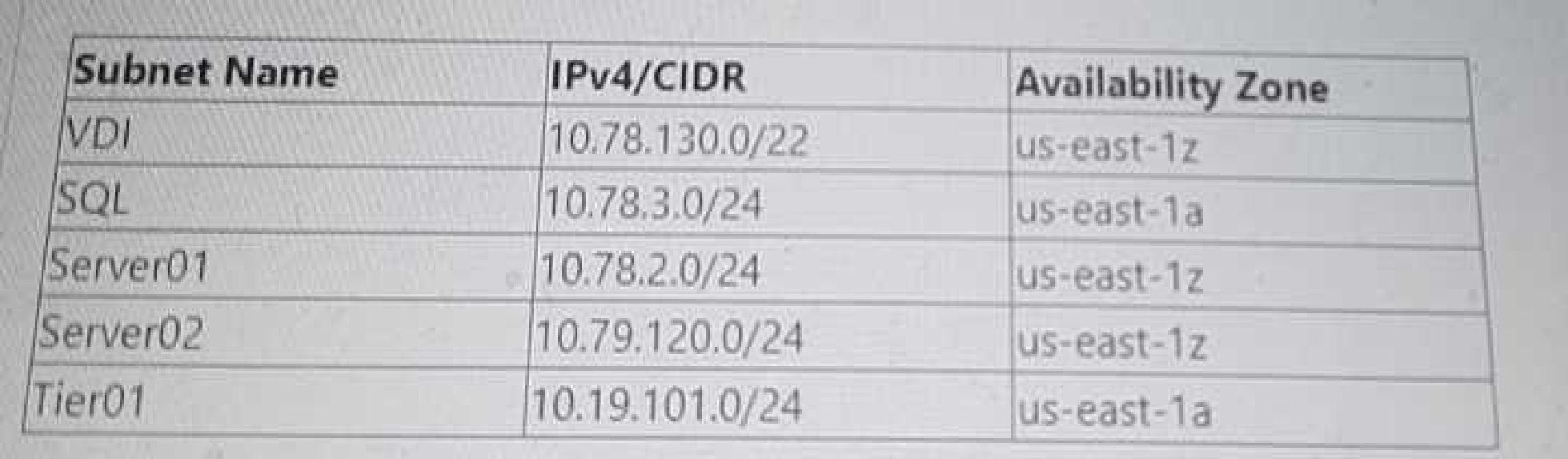
An administrator has recently deployed an NC2 on AWS cluster in the North Virginia region in availability zone us-east-1z. The clusters UUID is 0005F487-4962-91EA-4C98-C4284D123835. The cluster is consuming IPs from a 10.78.2.0/24 range. The AWS VPC has these available CIDR ranges: • 70.73.0.0/16 • 10.79.107.0/24 • 10.0.0.0/22
The following subnets have been configured in the NC2 AWS VPC:
The following tags have been applied to a Custom Network Security Group:
The Custom Network Security Group is allowing all inbound traffic from the 10.0.0.0/22 network. Which two subnets would be able to receive inbound traffic from AWS instances on a 10.0.0.0/22 network segment"? (Choose two.)
Select multiple answer: (Choose 2)Select the answer
2 correct answers
A.
Server01
B.
Tier01
C.
SQL
D.
VDl
To determine which subnets would be able to receive inbound traffic from AWS instances on a 10.0.0.0/22 network segment, we need to look at the configured subnets and their CIDR ranges, as well as the custom network security group's inbound rules. Available CIDR ranges in VPC: 70.73.0.0/16 10.79.107.0/24 10.0.0.0/22 Configured Subnets in NC2 AWS VPC: VDI: 10.78.130.0/22 SQL: 10.78.3.0/24 Server01: 10.78.2.0/24 Server02: 10.79.120.0/24 Tier01: 10.19.101.0/24 Custom Network Security Group Inbound Rule: Allows all inbound traffic from 10.0.0.0/22. Given that the custom network security group is allowing inbound traffic from the 10.0.0.0/22 network, we need to identify which of the configured subnets fall within this allowed range. Analysis: The subnets 10.78.130.0/22, 10.78.3.0/24, 10.78.2.0/24, 10.79.120.0/24, and 10.19.101.0/24 do not overlap with 10.0.0.0/22. Therefore, none of these subnets would naturally fall within the 10.0.0.0/22 range directly. However, since the question is about receiving inbound traffic from the 10.0.0.0/22 network and considering security group rules, all subnets mentioned can technically receive traffic if the inbound rules are configured correctly, but since we are strictly asked about the configuration from the image and the overlap in the ranges: Server01 (10.78.2.0/24) and Tier01 (10.19.101.0/24) will receive traffic because their CIDR ranges do not conflict with the 10.0.0.0/22 range, thus allowing traffic without additional restrictions. Reference: Nutanix Clusters on AWS Administration Guide AWS VPC and Subnet documentation Network Security Group rules configuration in Nutanix documentation
Right Answer: A, B
Quiz
Question 7/107/10
Preparing the landing zone networking resources for a Nutanix cluster on AWS. The administrator has created a VPC with two private subnets: one for cluster management and one for user VMs. What additional subnet must the administrator create?
Select the answer:Select the answer
1 correct answer
A.
Public subnet for S3 access
B.
Public subnet for Internet access
C.
Private subnet for VPN gateway
D.
Private subnet for Prism Central
When setting up a landing zone for Nutanix clusters on AWS, having only private subnets for cluster management and user VMs is not sufficient for full cluster functionality. Nutanix clusters often need to communicate with the internet for updates, patches, and other cloud services. VPC Configuration: The VPC already has two private subnets (one for cluster management and one for user VMs). Additional Requirements: To access public services like S3 or for the cluster nodes to reach Nutanix services for updates, a public subnet is essential. Why Public Subnet for Internet Access?: A public subnet allows resources within it to communicate directly with the internet, which is necessary for accessing Nutanix's update servers, applying patches, and other maintenance tasks. This subnet typically includes an internet gateway, enabling instances in the public subnet to receive and send traffic directly to the internet. Reference: Nutanix Cloud Clusters on AWS Administration Guide AWS Networking Best Practices Nutanix Networking and Subnet Configuration Guidelines
Right Answer: B
Quiz
Question 8/108/10
An organization wants to control network traffic at the individual User VM (UVM) subnet level. Which action will help achieve this goal?
Select the answer:Select the answer
1 correct answer
A.
Create a custom security group.
B.
Modify the default UVM security group.
C.
Modify the user management security group.
D.
Modify the internal management security group.
To control network traffic at the individual User VM (UVM) subnet level, creating a custom security group is the appropriate action. This approach allows for fine-grained control over inbound and outbound traffic rules that can be applied to specific subnets or individual instances within those subnets. Custom Security Group: Custom security groups enable administrators to define specific traffic rules tailored to the needs of individual subnets or VMs. This includes specifying allowed IP ranges, ports, and protocols. By applying these custom security groups to the UVMs, the organization can control access and enhance security according to their policies and requirements. Steps to Create a Custom Security Group: Navigate to the AWS Management Console and go to the VPC service. Select "Security Groups" under the "Security" section. Click on "Create Security Group" and define the name, description, and VPC. Add inbound and outbound rules according to the desired traffic control policies. Attach the custom security group to the UVMs or subnets in question. Reference: Nutanix Cloud Clusters on AWS Administration Guide AWS Security Group Documentation Nutanix Best Practices for Security Groups
Right Answer: A
Quiz
Question 9/109/10
When configuring an alert email in Prism Central deployed within an NC2 environment, what is required in order for the emails to be sent properly?
Select the answer:Select the answer
1 correct answer
A.
SMTP server configured in Prism Central settings
B.
Cluster Super Admin permissions
C.
Name servers configured in Prism Central
D.
A whitelisted public cloud console endpoint
To ensure that alert emails are sent properly from Prism Central within an NC2 environment, configuring an SMTP server in the Prism Central settings is required. The SMTP server facilitates the sending of email notifications for alerts and other communications. SMTP Configuration: Prism Central requires an SMTP server to send email alerts. This involves specifying the SMTP server address, port, and authentication details if needed. The configuration must include the email address from which the alerts will be sent and the recipient addresses. Steps to Configure SMTP Server in Prism Central: Log in to Prism Central. Navigate to the "Settings" menu. Select "Email Server" under the "Alerts" section. Enter the SMTP server details, including the server address, port, and authentication credentials. Test the configuration to ensure emails are sent correctly. Reference: Nutanix Prism Central Administration Guide Nutanix Support Documentation on Email Alert Configuration Best Practices for Configuring SMTP Servers in Cloud Environments
Right Answer: A
Quiz
Question 10/1010/10
An administrator has deployed an NC2 on AWS cluster and doesn't have connectivity back to the on- premises environment yet. The administrator wants to SSH into a CVM to edit a security setting and has deployed a Jump Host into an existing public subnet. What action must the administrator still take to gain access to the CVM?
Select the answer:Select the answer
1 correct answer
A.
Edit the CVM iptables to allow SSH.
B.
Edit the User Management Network Security Group to allow SSH from the Jump Host IP.
C.
Edit the UVM security group to allow SSH from the Jump Host IP and remove Cluster Lockdown.
D.
Create Custom Network Security Group at the subnet level and add the IP address of the Jump Host
To SSH into a Controller VM (CVM) in an NC2 on AWS cluster without on-premises connectivity, the administrator needs to ensure that the security settings allow SSH access from the Jump Host. This involves editing the User Management Network Security Group to permit SSH traffic from the Jump Host IP. Deploy Jump Host: Ensure the Jump Host is deployed in a public subnet with an Elastic IP (EIP) assigned for external access. Edit User Management Network Security Group: Locate the security group associated with the user management network. Modify the inbound rules to allow SSH (port 22) from the Jump Host's IP address. This ensures that the Jump Host can establish an SSH connection to the CVM. Steps to Edit Security Group: Navigate to the EC2 dashboard in the AWS Management Console. Select "Security Groups" under the "Network & Security" section. Find and select the appropriate security group. Edit the inbound rules to add a new rule: Type: SSH Protocol: TCP Port Range: 22 Source: Custom IP (enter the Jump Host's public IP address) Additional Configuration: Ensure that the CVM itself allows SSH connections and that no internal firewall rules block the traffic. Reference: Nutanix Cloud Clusters on AWS Administration Guide AWS Security Group Documentation Nutanix Best Practices for Secure Access
NCP-CI-AWS: Nutanix Certified Professional - Cloud Integration - AWS v6.7 Practice test unlocks all online simulator questions
Thank you for choosing the free version of the NCP-CI-AWS: Nutanix Certified Professional - Cloud Integration - AWS v6.7 practice test! Further deepen your knowledge on Nutanix Simulator; by unlocking the full version of our NCP-CI-AWS: Nutanix Certified Professional - Cloud Integration - AWS v6.7 Simulator you will be able to take tests with over 80 constantly updated questions and easily pass your exam. 98% of people pass the exam in the first attempt after preparing with our 80 questions.
What to expect from our NCP-CI-AWS: Nutanix Certified Professional - Cloud Integration - AWS v6.7 practice tests and how to prepare for any exam?
The NCP-CI-AWS: Nutanix Certified Professional - Cloud Integration - AWS v6.7 Simulator Practice Tests are part of the Nutanix Database and are the best way to prepare for any NCP-CI-AWS: Nutanix Certified Professional - Cloud Integration - AWS v6.7 exam. The NCP-CI-AWS: Nutanix Certified Professional - Cloud Integration - AWS v6.7 practice tests consist of 80 questions and are written by experts to help you and prepare you to pass the exam on the first attempt. The NCP-CI-AWS: Nutanix Certified Professional - Cloud Integration - AWS v6.7 database includes questions from previous and other exams, which means you will be able to practice simulating past and future questions. Preparation with NCP-CI-AWS: Nutanix Certified Professional - Cloud Integration - AWS v6.7 Simulator will also give you an idea of the time it will take to complete each section of the NCP-CI-AWS: Nutanix Certified Professional - Cloud Integration - AWS v6.7 practice test . It is important to note that the NCP-CI-AWS: Nutanix Certified Professional - Cloud Integration - AWS v6.7 Simulator does not replace the classic NCP-CI-AWS: Nutanix Certified Professional - Cloud Integration - AWS v6.7 study guides; however, the Simulator provides valuable insights into what to expect and how much work needs to be done to prepare for the NCP-CI-AWS: Nutanix Certified Professional - Cloud Integration - AWS v6.7 exam.
NCP-CI-AWS: Nutanix Certified Professional - Cloud Integration - AWS v6.7 Practice test therefore represents an excellent tool to prepare for the actual exam together with our Nutanix practice test . Our NCP-CI-AWS: Nutanix Certified Professional - Cloud Integration - AWS v6.7 Simulator will help you assess your level of preparation and understand your strengths and weaknesses. Below you can read all the quizzes you will find in our NCP-CI-AWS: Nutanix Certified Professional - Cloud Integration - AWS v6.7 Simulator and how our unique NCP-CI-AWS: Nutanix Certified Professional - Cloud Integration - AWS v6.7 Database made up of real questions:
You can prepare for the NCP-CI-AWS: Nutanix Certified Professional - Cloud Integration - AWS v6.7 exams with our mobile app. It is very easy to use and even works offline in case of network failure, with all the functions you need to study and practice with our NCP-CI-AWS: Nutanix Certified Professional - Cloud Integration - AWS v6.7 Simulator.
Use our Mobile App, available for both Android and iOS devices, with our NCP-CI-AWS: Nutanix Certified Professional - Cloud Integration - AWS v6.7 Simulator . You can use it anywhere and always remember that our mobile app is free and available on all stores.
Our Mobile App contains all NCP-CI-AWS: Nutanix Certified Professional - Cloud Integration - AWS v6.7 practice tests which consist of 80 questions and also provide study material to pass the final NCP-CI-AWS: Nutanix Certified Professional - Cloud Integration - AWS v6.7 exam with guaranteed success.
Our NCP-CI-AWS: Nutanix Certified Professional - Cloud Integration - AWS v6.7 database contain hundreds of questions and Nutanix Tests related to NCP-CI-AWS: Nutanix Certified Professional - Cloud Integration - AWS v6.7 Exam. This way you can practice anywhere you want, even offline without the internet.