The new flashcard feature is useful to memorize questions.
?Change your study mode
At any time, you can change the study mode, and alternate between the practice mode and the exam mode. In practice mode, you can configure for example the number of questions or tests, and other parameters to help you study.
Randomized | 10 Questions per Test | 20 Minutes | 70% to pass|
To re-configure your study mode again and change - for example - the number of tests, whether you have random questions and all other configuration parameters.
?Simulator Configuration
Auto-scroll: You can use the automatic scrolling of the questionnaire that occurs as soon as you answer one or all of the answers to a question correctly. Auto scrolling is activated if you answer a single answer, or as soon as you answer all the mandatory answers. Learning Mode: During learning mode you can get a real time result for your answer.
Free Test
Question: / 10
20:00Min. left
?Restart the current test
To restart the current test by clearing all your answers and the time used up to now. Warning: all answers will be lost.
Question: / 10
4.8(998 Votes)
Quiz
Question 1/101/10
An administrator responsible for a VDI environment needs to investigate reports of slow logins. The administrator finds that increasing the number of vCPUs from 2 to 4 will reduce the login times. Production workloads are consuming 75% of the host CPU on the cluster. The administrator increases the vCPU count on all of the VDI VMs. What are two impacts on the cluster? (Choose two.)
Select multiple answer: (Choose 2)Select the answer
2 correct answers
A.
Increase CPU utilization%
B.
Increase CPU ready%
C.
Increase memory utilization%
D.
Increasing CPU counts will decrease memory utilization
The correct answers are A. Increase CPU utilization% and B. Increase CPU ready%. Here’s why: In a VDI environment, increasing the number of vCPUs for each virtual desktop can help reduce login times if the guest OS and applications are CPU-constrained during startup. However, when the administrator increases the vCPU count on all VDI VMs in a cluster that is already running at 75% host CPU usage, it creates two important effects: 1. Increase CPU utilization% If each VDI VM is given more vCPUs, the total CPU demand placed on the cluster increases. Even if the workloads do not fully use every additional vCPU, the cluster now has more scheduled CPU resources to manage. This can raise overall CPU utilization because the hosts must support more virtual CPUs across all running VMs. 2. Increase CPU ready% CPU ready is the amount of time a VM is ready to run but is waiting for physical CPU time on the host. When more vCPUs are assigned to VMs, especially in an already busy cluster, the hypervisor has to coordinate and schedule a larger number of virtual processors. This can increase CPU contention and cause higher CPU ready time, because VMs may have to wait longer for CPU resources. Why the other options are incorrect: C. Increase memory utilization% This is not a direct impact of increasing vCPU count. Adding vCPUs does not automatically consume more memory. Memory usage is driven primarily by VM memory allocation, active guest memory consumption, and overhead, not CPU count. D. Increasing CPU counts will decrease memory utilization This is incorrect. Increasing CPU count does not reduce memory utilization. CPU and memory are separate resources, and increasing one does not inherently decrease the other. In summary, assigning more vCPUs to all VDI VMs in an already busy cluster will likely increase CPU utilization and CPU ready time, making A and B the correct choices.
Right Answer: A, B
Quiz
Question 2/102/10
An administrator is using Nutanix Move to migrate a Windows VM from ESXi to AHV. Automated guest preparation is failing with an error: Account has UAC enabled error The administrator is using the local built-in administrator account for the Windows VM Admin approval mode must remain enabled. What should the administrator do to continue with the migration with Nutanix Move?
A VM is exhibiting one or more of the following baseline values based on the past 30 days: • CPU usage < 20% • CPU ready time < 5% • Memory usage < 50% (moderately) or < 20% (severely) • Memory swap rate = 0 Kbps Which type of VM is being described?
Select the answer:Select the answer
1 correct answer
A.
Constrained VM
B.
Inactive VM
C.
Bully VM
D.
Over-Provisioned VM
Right Answer: D
Quiz
Question 4/104/10
An administrator receives reports that VDI desktop performance in an 8-node Nutanix VDI environment is poor. Opening applications takes between 1 and 2 minutes. When investigating the issue, the following conditions are found: • Cluster memory utilization: 80% • Cluster SSD utilization: 70% • Average VM CPU Wait Time: 11% • CVM CPU utilization: 75% Which action should be taken to improve VDI performance?
Select the answer:Select the answer
1 correct answer
A.
Increase the amount of SSD storage in the cluster.
B.
Add memory to the nodes in the cluster.
C.
Add CPU resources to the cluster.
D.
Increase the number of vCPU cores allocated to the CVM.
The correct answer is C. Add CPU resources to the cluster. This question is about identifying the likely performance bottleneck in a Nutanix VDI environment based on the reported cluster statistics. Let’s look at each metric: - Cluster memory utilization: 80% - This is somewhat high, but not automatically a problem. - Memory pressure would usually become more suspicious if it were much closer to saturation or if there were signs of swapping or ballooning. - Cluster SSD utilization: 70% - This is also not excessive. - If storage were the bottleneck, you would expect much higher utilization, latency symptoms, or storage-related wait issues. - Average VM CPU Wait Time: 11% - This is the key indicator. - CPU wait time reflects how often VMs are ready to run but must wait for available CPU resources. - An 11% average CPU wait time indicates CPU contention, which can cause sluggish application launches and poor desktop responsiveness. - CVM CPU utilization: 75% - The Controller VM is using a fair amount of CPU, but this alone does not point to the primary issue. - CVM CPU can matter, but the symptom here is broader VDI slowness and high VM CPU wait time, which points more strongly to insufficient compute resources overall. Why C is correct: - In a VDI environment, poor application launch performance and high VM CPU wait time usually indicate that the cluster needs more CPU capacity. - Adding CPU resources reduces contention and lowers wait time, improving desktop responsiveness. Why the other options are not best: A. Increase the amount of SSD storage in the cluster. - SSD utilization is only 70%, so storage capacity does not appear to be the limiting factor. - This would help only if storage were near full or latency was high. B. Add memory to the nodes in the cluster. - Memory utilization is 80%, which is elevated but not the strongest signal. - There is no indication of memory starvation, swapping, or ballooning as the main cause. D. Increase the number of vCPU cores allocated to the CVM. - This might help if the CVM were CPU constrained, but the question points to VM CPU wait time across the VDI workload. - Increasing CVM vCPUs does not directly solve compute contention for user VMs. Conclusion: The main symptom is elevated VM CPU wait time, which indicates CPU contention. The best action is to add CPU resources to the cluster. Answer: C
Right Answer: C
Quiz
Question 5/105/10
An administrator has a custom backup application that requires a 2TB disk and runs in Windows. Throughput is considerably lower than expected. The application was installed on a VM with the following configuration: • Four vCPUs with one core/vCPU • 4GB of Memory • One 50GB vDisk for the Windows installation • One 2TB vDisk for the application What is the recommended configuration change to improve throughput?
Select the answer:Select the answer
1 correct answer
A.
Increase the number of cores per vCPU
B.
Increase the vCPUs assigned to the VM
C.
Span the 2TB disk across four vDisks
D.
Add 4GB of memory to the VM
The correct answer is C. Span the 2TB disk across four vDisks. The main issue here is disk I/O performance. The application requires a large 2TB disk and is experiencing lower-than-expected throughput. Since the VM already has 4 vCPUs and 4 GB of memory, the most likely bottleneck is the single large virtual disk. Why C is correct: - A single 2TB vDisk can become a throughput bottleneck because all I/O is concentrated on one virtual disk. - Spanning the storage across four vDisks allows the application to distribute I/O operations across multiple disks. - This improves parallelism and can significantly increase throughput, especially for an application that is disk-intensive, like backup software. Why the other options are not the best choice: - A. Increase the number of cores per vCPU - This does not address the storage bottleneck. CPU cores are not the primary issue if disk throughput is the problem. - B. Increase the vCPUs assigned to the VM - More CPU resources may help if the application were CPU-bound, but here the performance issue is related to disk throughput. - D. Add 4GB of memory to the VM - More memory can help with caching, but it is unlikely to resolve a major disk throughput limitation caused by a single large vDisk. Key takeaway: For disk-intensive applications, especially backup workloads, spreading the workload across multiple virtual disks is often the best way to improve throughput. If you want, I can also explain why this is a common storage-performance best practice in virtualized environments.
Right Answer: C
Quiz
Question 6/106/10
A customer recently set up Async Replication between Site A and Site B. The customer wants to conduct a planned failover and clicks Activate on Site B. The customer then runs the following command on Site A: ncli pd deactivate_and destroy_vms name=<protection_domain_name> What does this do to the customer environment?
Select the answer:Select the answer
1 correct answer
A.
VMs get deleted from Site B. and the protection domain is now Active.
B.
VMs are powered off on Site A and must be manually powered on at Site B.
C.
VMs get deleted from Site A and the protection domain is no longer active.
D.
Customer must then manually power off VMs at Site A and power them on at Site B.
An administrator needs to forecast infrastructure requirements for a new program and its associated applications. Prior to the projected start of the new program, all existing applications will be decommissioned. How should the administrator perform this task?
Select the answer:Select the answer
1 correct answer
A.
Check the Disregard Existing Workloads radio button in the Runway scenario.
B.
Check the Disregard Existing Nodes radio button in the Runway scenario.
C.
Add up the recovered workloads and manually remove from the Runway configuration.
D.
Power down the workloads during a maintenance window and run the Capacity Runway.
The correct answer is A. Check the Disregard Existing Workloads radio button in the Runway scenario. The key requirement in the question is that all existing applications will be decommissioned before the new program starts. That means the administrator should forecast infrastructure only for the future-state workloads, not include the current workloads that will no longer exist. In a Runway scenario, the goal is to estimate whether the current infrastructure can support future demand over time. If the existing workloads are going away before the new program begins, they should not be considered in the forecast. The Disregard Existing Workloads option does exactly that by excluding the current workloads from the Runway calculation. Why the other options are incorrect: B. Check the Disregard Existing Nodes radio button in the Runway scenario. This would ignore the existing nodes, which is not the goal. The nodes represent the infrastructure resources. The question is about removing existing applications/workloads from the forecast, not the infrastructure itself. C. Add up the recovered workloads and manually remove from the Runway configuration. This is not the intended or efficient way to do the forecast. The scenario provides a direct option for excluding existing workloads, so manual adjustment is unnecessary and more error-prone. D. Power down the workloads during a maintenance window and run the Capacity Runway. Shutting down workloads is not required and would not be the correct way to model future decommissioning in a forecasting tool. The task is to plan based on projected future state, not to physically stop workloads just to run the analysis. Summary: Because the existing applications will be decommissioned before the new program begins, the administrator should exclude them from the forecast by selecting Disregard Existing Workloads in the Runway scenario.
Right Answer: A
Quiz
Question 8/108/10
A customer has a primary datacenter with 12 Nutanix blocks distributed across three racks. The customer wants to achieve the most resiliency possible. They also have a datacenter in a branch office that is 400 kilometers away from the primary datacenter. Which two solutions should be used? (Choose two.)
Select multiple answer: (Choose 2)Select the answer
2 correct answers
A.
Time Stream to a remote site
B.
Async DR to a remote site
C.
Rack awareness
D.
Block awareness
The correct answers are B. Async DR to a remote site and C. Rack awareness. Here is why: The customer’s goal is to achieve the most resiliency possible in a primary datacenter that contains 12 Nutanix blocks spread across three racks. They also have a branch-office datacenter located 400 kilometers away, which makes it suitable as a remote disaster recovery target. Let’s look at each option: A. Time Stream to a remote site Time Stream is a backup and recovery solution, but it is not the best fit here for maximizing resiliency in a Nutanix cluster across two datacenters. It is not the primary mechanism used for Nutanix disaster recovery in this scenario. B. Async DR to a remote site This is correct. Asynchronous disaster recovery to a remote site is the right choice when the secondary site is geographically distant, such as 400 kilometers away. It provides protection against site-level failures by replicating data to the branch office datacenter. Because synchronous replication is generally used only for much shorter distances, async DR is the appropriate resiliency solution here. C. Rack awareness This is correct. Rack awareness improves resiliency within the primary datacenter by ensuring data is distributed across different racks. Since the customer has 12 blocks across three racks, rack awareness helps protect against the failure of an entire rack. This is especially important for maximizing resiliency in the local site. D. Block awareness This is not the best answer in this case. Block awareness helps distribute data across different blocks, but the question specifically mentions three racks and asks for the most resiliency possible. Rack awareness is the more relevant and stronger fit for protecting against rack-level failures in this environment. Why B and C together? The best resiliency strategy here is a combination of local fault tolerance and remote disaster recovery: - Rack awareness protects against hardware/rack failure within the primary datacenter. - Async DR protects against a total site outage by replicating data to the distant branch office. So the final answer is: B. Async DR to a remote site C. Rack awareness
Right Answer: B, C
Quiz
Question 9/109/10
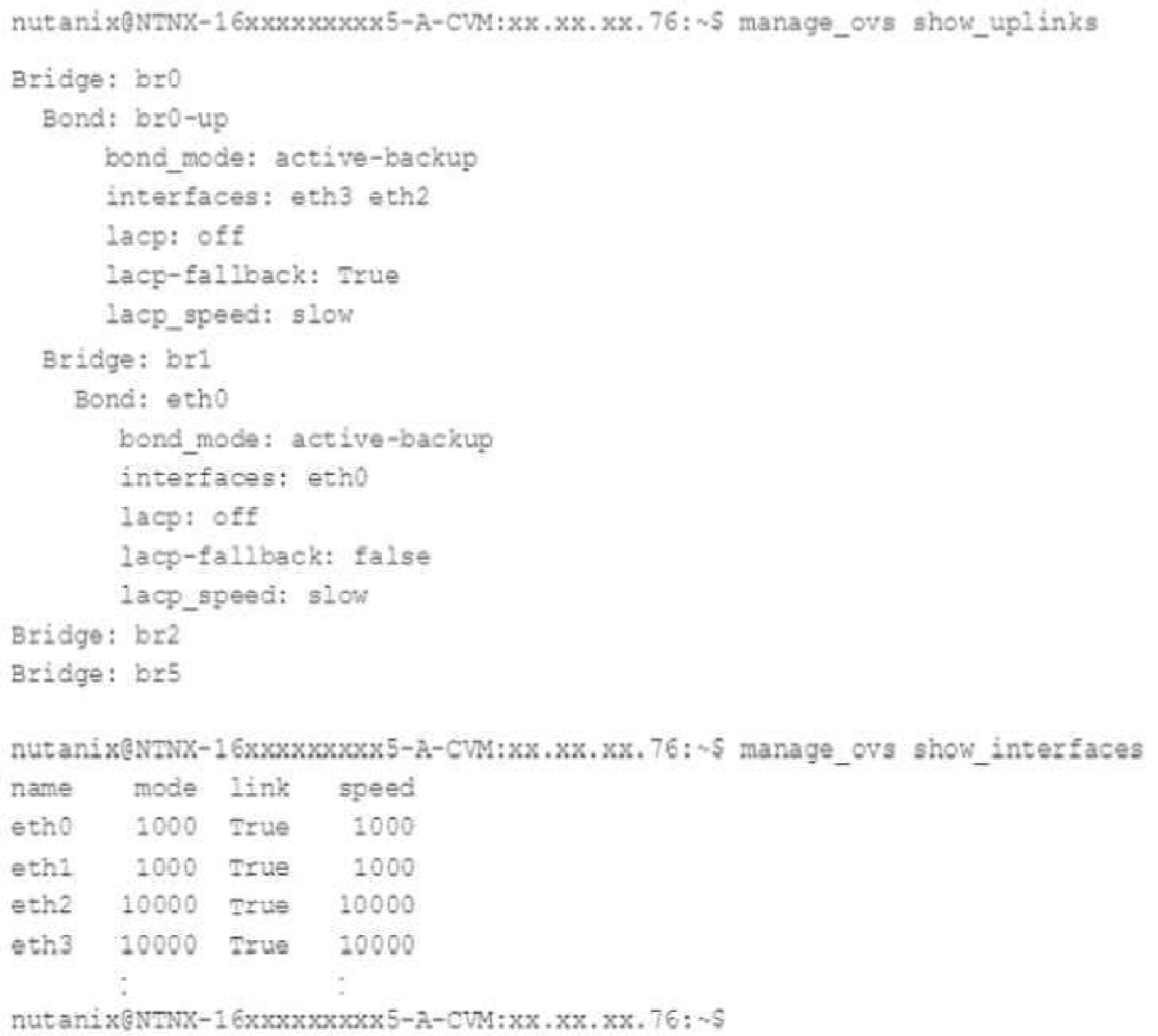
An administrator inherits a new Nutanix environment and logs in to a CVM to check the network configuration. The configuration is as follows:
Which action should the administrator take to improve network performance?
Select the answer:Select the answer
1 correct answer
A.
Configure VLAN tagging both on br0 and br1 and their physical interfaces.
B.
Add eth0 and eth1 to the br0-up bond
C.
Configure balance-sib or balance-tcp mode for br0-up if switch configuration allows
D.
Remove one 10 Gbs interface from br0-up to make sure all 10 Gbs can be used.
The correct answer is C. Configure balance-sib or balance-tcp mode for br0-up if switch configuration allows. In a Nutanix CVM, the network performance issue here is most likely related to how the uplink bond is configured. A bond with two 10 GbE interfaces can provide better throughput and redundancy, but only if the bonding mode is appropriate for the switch and network design. Why C is correct: - balance-sib and balance-tcp are bonding modes that can distribute traffic across multiple links. - These modes can improve bandwidth utilization and performance compared to a simple active-backup setup. - balance-tcp is especially useful when the switch supports LACP or similar configuration, because it can distribute traffic more efficiently across links. - If the switch configuration allows it, using one of these modes lets the environment better take advantage of both 10 Gb interfaces. Why the other options are incorrect: A. Configure VLAN tagging both on br0 and br1 and their physical interfaces. - VLAN tagging is about network segmentation, not improving raw network performance. - It does not solve bandwidth utilization issues on its own. B. Add eth0 and eth1 to the br0-up bond - A bond should already include the intended uplink interfaces. - Adding interfaces without verifying bonding mode and switch support does not inherently improve performance. - Also, eth0/eth1 may not be the correct interfaces for that role depending on the platform design. D. Remove one 10 Gbs interface from br0-up to make sure all 10 Gbs can be used. - Removing a 10 Gb interface would reduce total available bandwidth and hurt performance. - Two 10 Gb links can potentially provide more throughput, not less. Key takeaway: The best way to improve performance in this case is to configure the bond for link aggregation or load sharing, provided the physical switch infrastructure supports it. That is why option C is the correct choice.
Right Answer: C
Quiz
Question 10/1010/10
An administrator is concerned that Prism will be inaccessible if Active Directory is unable to process logins. Which method should the administrator use to access the cluster in the event of this type of outage?
Select the answer:Select the answer
1 correct answer
A.
Manage the cluster by using the "nutanix" user on the Prism leader CVM
B.
Create and use an emergency local account on the cluster
C.
Deploy an Active Directory server locally on the cluster
D.
Manage the cluster remotely by downloading ncli to a remote workstation
The correct answer is B. Create and use an emergency local account on the cluster. Prism typically relies on authentication sources such as Active Directory for user logins. If Active Directory is unavailable, administrators may not be able to sign in to Prism using domain credentials. To avoid losing access to the cluster during an AD outage, Nutanix recommends having a local emergency account configured on the cluster. This account is not dependent on AD and can be used to log in directly to Prism and manage the environment when directory services are down. Why the other options are incorrect: A. Manage the cluster by using the "nutanix" user on the Prism leader CVM The nutanix account on a CVM is not the standard or recommended method for Prism access in this situation. It is more of a system-level account and not intended as the primary failover login method for Prism administration. C. Deploy an Active Directory server locally on the cluster This would not solve the immediate problem of an AD outage. It also adds complexity and does not replace the need for a local fallback account. D. Manage the cluster remotely by downloading ncli to a remote workstation ncli is a command-line tool for certain cluster management tasks, but downloading it to a workstation does not provide a reliable alternative for Prism access during an authentication outage. It also does not address the login dependency on AD. Key takeaway: To maintain administrative access when Active Directory is unavailable, the best practice is to create and use a local emergency account that does not depend on external directory services.
NCS-Core: Nutanix Certified Services Core Infrastructure Professional Practice test unlocks all online simulator questions
Thank you for choosing the free version of the NCS-Core: Nutanix Certified Services Core Infrastructure Professional practice test! Further deepen your knowledge on Nutanix Simulator; by unlocking the full version of our NCS-Core: Nutanix Certified Services Core Infrastructure Professional Simulator you will be able to take tests with over 192 constantly updated questions and easily pass your exam. 98% of people pass the exam in the first attempt after preparing with our 192 questions.
What to expect from our NCS-Core: Nutanix Certified Services Core Infrastructure Professional practice tests and how to prepare for any exam?
The NCS-Core: Nutanix Certified Services Core Infrastructure Professional Simulator Practice Tests are part of the Nutanix Database and are the best way to prepare for any NCS-Core: Nutanix Certified Services Core Infrastructure Professional exam. The NCS-Core: Nutanix Certified Services Core Infrastructure Professional practice tests consist of 192 questions and are written by experts to help you and prepare you to pass the exam on the first attempt. The NCS-Core: Nutanix Certified Services Core Infrastructure Professional database includes questions from previous and other exams, which means you will be able to practice simulating past and future questions. Preparation with NCS-Core: Nutanix Certified Services Core Infrastructure Professional Simulator will also give you an idea of the time it will take to complete each section of the NCS-Core: Nutanix Certified Services Core Infrastructure Professional practice test . It is important to note that the NCS-Core: Nutanix Certified Services Core Infrastructure Professional Simulator does not replace the classic NCS-Core: Nutanix Certified Services Core Infrastructure Professional study guides; however, the Simulator provides valuable insights into what to expect and how much work needs to be done to prepare for the NCS-Core: Nutanix Certified Services Core Infrastructure Professional exam.
NCS-Core: Nutanix Certified Services Core Infrastructure Professional Practice test therefore represents an excellent tool to prepare for the actual exam together with our Nutanix practice test . Our NCS-Core: Nutanix Certified Services Core Infrastructure Professional Simulator will help you assess your level of preparation and understand your strengths and weaknesses. Below you can read all the quizzes you will find in our NCS-Core: Nutanix Certified Services Core Infrastructure Professional Simulator and how our unique NCS-Core: Nutanix Certified Services Core Infrastructure Professional Database made up of real questions:
Info quiz:
Quiz name:NCS-Core: Nutanix Certified Services Core Infrastructure Professional
Total number of questions:192
Number of questions for the test:50
Pass score:80%
You can prepare for the NCS-Core: Nutanix Certified Services Core Infrastructure Professional exams with our mobile app. It is very easy to use and even works offline in case of network failure, with all the functions you need to study and practice with our NCS-Core: Nutanix Certified Services Core Infrastructure Professional Simulator.
Use our Mobile App, available for both Android and iOS devices, with our NCS-Core: Nutanix Certified Services Core Infrastructure Professional Simulator . You can use it anywhere and always remember that our mobile app is free and available on all stores.
Our Mobile App contains all NCS-Core: Nutanix Certified Services Core Infrastructure Professional practice tests which consist of 192 questions and also provide study material to pass the final NCS-Core: Nutanix Certified Services Core Infrastructure Professional exam with guaranteed success.
Our NCS-Core: Nutanix Certified Services Core Infrastructure Professional database contain hundreds of questions and Nutanix Tests related to NCS-Core: Nutanix Certified Services Core Infrastructure Professional Exam. This way you can practice anywhere you want, even offline without the internet.