The new flashcard feature is useful to memorize questions.
?Change your study mode
At any time, you can change the study mode, and alternate between the practice mode and the exam mode. In practice mode, you can configure for example the number of questions or tests, and other parameters to help you study.
Randomized | 10 Questions per Test | 20 Minutes | 70% to pass|
To re-configure your study mode again and change - for example - the number of tests, whether you have random questions and all other configuration parameters.
?Simulator Configuration
Auto-scroll: You can use the automatic scrolling of the questionnaire that occurs as soon as you answer one or all of the answers to a question correctly. Auto scrolling is activated if you answer a single answer, or as soon as you answer all the mandatory answers. Learning Mode: During learning mode you can get a real time result for your answer.
Free Test
Question: / 10
20:00Min. left
?Restart the current test
To restart the current test by clearing all your answers and the time used up to now. Warning: all answers will be lost.
Question: / 10
4.9(156 Votes)
Quiz
Question 1/101/10
The Member Services team wants to view the information of a member’s recent transactions and manual adjustments on the Contact record. What are the two recommendations that an IT Administrator should suggest?
Select multiple answer: (Choose 2)Select the answer
2 correct answers
A.
Embed the ‘Member Summary Embedded Dashboard on the Contact record
B.
Embed the Member Service Manager Home Dashboard on the Contact record
C.
Add the ‘Transaction Journals’ related list to the Contact record
D.
Add the ‘View Member Profile’ component on the Contact record
To provide the Member Services team with the information they need directly on the Contact record, the IT Administrator can take two main actions. Firstly, embedding the 'Member Summary Embedded Dashboard' on the Contact record allows the team to have a visual and comprehensive overview of a member's loyalty activities, including recent transactions and adjustments, directly within the context of the contact. This dashboard is specifically designed to aggregate and display relevant loyalty information, making it a suitable tool for quick insights. Secondly, adding the 'Transaction Journals' related list to the Contact record enables the team to view detailed entries of each transaction and manual adjustment made by or for the member. This related list provides granular data about each activity, allowing for a deeper analysis and understanding of the member's loyalty interactions. These recommendations are based on best practices for Salesforce Loyalty Management, ensuring that the team has access to both summarized and detailed loyalty information within their usual workflows, enhancing efficiency and providing a holistic view of member activities.
Right Answer: A, C
Quiz
Question 2/102/10
What are the three required steps in settings up Loyalty promotion with Salesforce CDP and Marketing Cloud?
Select multiple answer: (Choose 3)Select the answer
3 correct answers
A.
Send Loyalty Promotion Segments to marketing Cloud
B.
Automatically Add a New Individual Relationship
C.
Activating and Publishing the Segment
D.
Enable Connector Settings on all the Loyalty Objects
E.
Enable Service Connector for Promotion Escalations.
Setting up a loyalty promotion with Salesforce CDP (Customer Data Platform) and Marketing Cloud involves several critical steps to ensure seamless integration and functionality. The first step, 'Send Loyalty Promotion Segments to Marketing Cloud,' involves identifying and segmenting your loyalty members in Salesforce CDP and then transferring these segments to Marketing Cloud for targeted marketing efforts. 'Activating and Publishing the Segment' is crucial as it makes the segment available for use within Marketing Cloud, allowing for personalized engagement with the segmented audience. Lastly, 'Enable Service Connector for Promotion Escalations' is essential for ensuring that any promotional activities or escalations are properly managed and communicated between Salesforce CDP, Loyalty Management, and Marketing Cloud, providing a cohesive experience across platforms.
Right Answer: A, C, E
Quiz
Question 3/103/10
Cloud kicks wants to identify specific tier members to be used for a journey within Marketing Cloud. The company wants to encourage Loyalty Tier B customers to become Loyalty Tier A customers. What objects must be synchronized into Marketing Cloud to achieve the segmentation for this audience.
Select the answer:Select the answer
1 correct answer
A.
Contact, Account, and Opportunity
B.
Contact, Member Rewards Tier, and Loyalty Member Tier and Campaign
C.
Voucher Definition, products, and Loyalty Member Tier
D.
Contact Loyalty Program Member, and Loyalty Member Tier
To segment and identify specific tier members for a journey within Marketing Cloud, it's essential to synchronize the right objects from Salesforce to Marketing Cloud. Synchronizing the 'Contact' object ensures that the basic member information is available. The 'Loyalty Program Member' object provides detailed information about the member's involvement in the loyalty program, and the 'Loyalty Member Tier' object offers insights into the member's current tier status. This setup allows for precise targeting and personalization of marketing efforts aimed at encouraging Loyalty Tier B customers to ascend to Loyalty Tier A, thereby enhancing member engagement and program value.
Right Answer: D
Quiz
Question 4/104/10
Which two features below are supported in the reference integration between Loyalty and Commerce Cloud?
Select multiple answer: (Choose 2)Select the answer
2 correct answers
A.
Loyalty membership merge
B.
Loyalty member profile
C.
Loyalty member enrollment
D.
Resetting tier points
In the reference integration between Salesforce Loyalty Management and Commerce Cloud, two key features are supported: 'Loyalty member profile' and 'Loyalty member enrollment.' The 'Loyalty member profile' feature allows for the management and viewing of loyalty member information within Commerce Cloud, providing a seamless experience for members as they interact with the brand across different platforms. The 'Loyalty member enrollment' feature enables new customers to join the loyalty program directly through Commerce Cloud, facilitating the growth of the loyalty program and enhancing customer engagement by leveraging the commerce platform.
Right Answer: B, C
Quiz
Question 5/105/10
Universal Container sells sports shoes through on eCommerce system. The Loyalty Program Members earn points in real-time with every purchase made. How can this be built into Salesforce?
Select the answer:Select the answer
1 correct answer
A.
Download an app from the AppExchange to connect Salesforce and the external system.
B.
Create customer web service with Order Object
C.
Create an schedule process to call the external system.
D.
Create with the external system to create Transaction Journals.
To integrate real-time point earning from an external eCommerce system into Salesforce Loyalty Management, utilizing an AppExchange app can be an efficient solution. These apps are designed to bridge Salesforce with external systems, enabling seamless data exchange. When a Loyalty Program Member makes a purchase on the eCommerce platform, the app can facilitate the automatic creation of 'Transaction Journals' in Salesforce, reflecting the earned points in real-time. This approach minimizes the need for custom development, leveraging pre-built solutions to enhance the loyalty experience and maintain accurate, up-to-date member point balances.
Right Answer: D
Quiz
Question 6/106/10
What is a business use case for integrating Marketing Cloud Personalization with Loyalty Management?
Select the answer:Select the answer
1 correct answer
A.
To enable the purchasing of products and take payment.
B.
To create unified profile from multiple source of truth and build a golden record.
C.
To be able to send personalized marketing emails in batches.
D.
To offer promotions in real-time to customers.
Integrating Marketing Cloud Personalization with Loyalty Management serves the crucial business use case of offering real-time promotions to customers. This integration allows for the dynamic presentation of personalized offers and promotions to loyalty members based on their current interactions, preferences, and loyalty status. By leveraging real-time data and personalized content, businesses can enhance customer engagement, encourage repeat purchases, and foster a deeper connection with their brand, ultimately driving loyalty program success and customer satisfaction.
Right Answer: D
Quiz
Question 7/107/10
What two fields are attributed to a Loyalty Program entity in the Salesforce Customer Data Platform?
Select multiple answer: (Choose 2)Select the answer
2 correct answers
A.
Created Date
B.
Last Modified Date
C.
Current Member Count
D.
Reporting Enabled (Boolean)
Within the Salesforce Customer Data Platform (CDP), the Loyalty Program entity is attributed with various fields that help in managing and analyzing the loyalty program's performance. Two essential fields attributed to this entity are Created Date and Last Modified Date. The Created Date field records the timestamp when the Loyalty Program entity was initially created in the system, providing a reference point for the program's inception. The Last Modified Date field, on the other hand, keeps track of the most recent update made to the Loyalty Program entity, offering insights into the program's maintenance and evolution over time. These fields are crucial for administrative and analytical purposes, allowing businesses to monitor the lifecycle of their loyalty programs and make data-driven decisions based on the program's history and modifications.
Right Answer: A, B
Quiz
Question 8/108/10
Northern Trail Outfitters wants to show member information in its member portal hosted outside of Salesforce. What is a prerequisite for using Loyalty APIs to fetch the member information?
Select the answer:Select the answer
1 correct answer
A.
Create custom objects in Loyalty
B.
Create a Connected App in Platform
C.
Create customer integration code
D.
Create Data Processing jobs
For Northern Trail Outfitters to display member information in its external member portal, a crucial prerequisite is the creation of a Connected App in Salesforce Platform. This Connected App facilitates secure API access to Salesforce data, including Loyalty Management information, by providing an authentication and authorization framework. By setting up a Connected App, Northern Trail Outfitters can establish a secure connection between its external member portal and Salesforce, enabling the retrieval of member information through Loyalty APIs. This setup ensures that the external portal can access up-to-date loyalty data, such as member points, tier status, and transaction history, in a secure and controlled manner, enhancing the member experience outside of Salesforce.
Right Answer: B
Quiz
Question 9/109/10
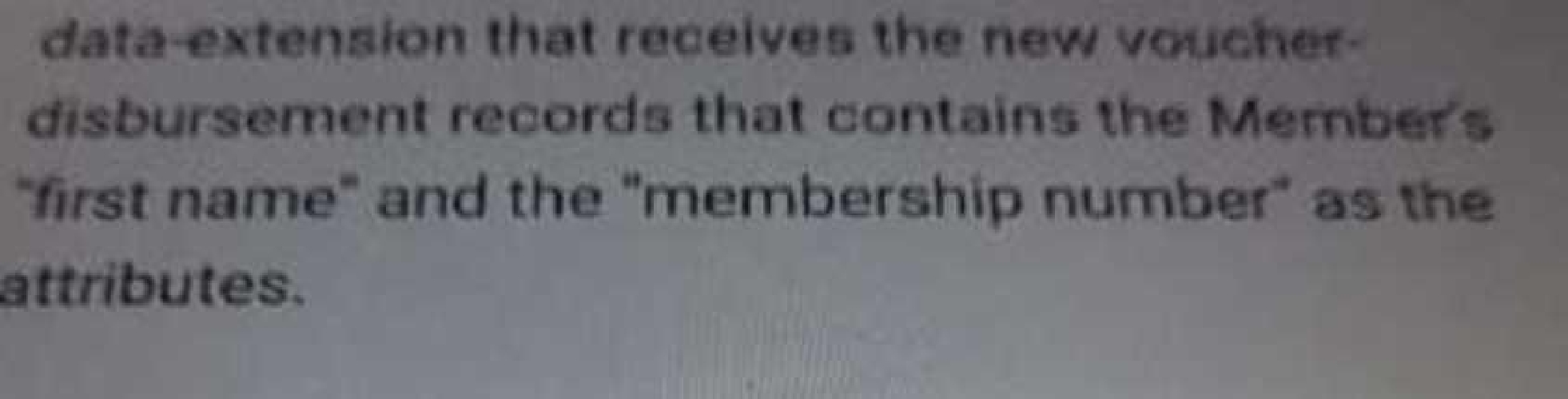
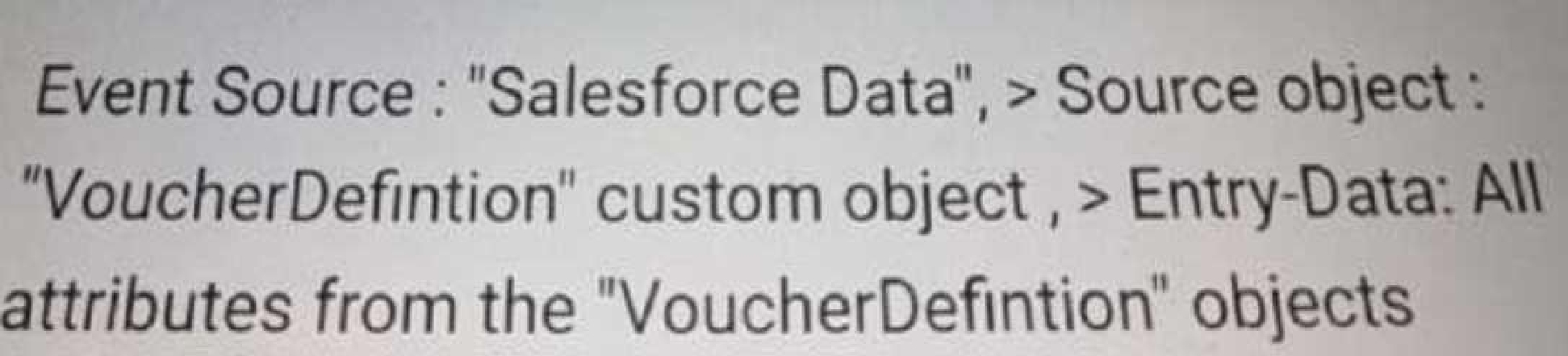
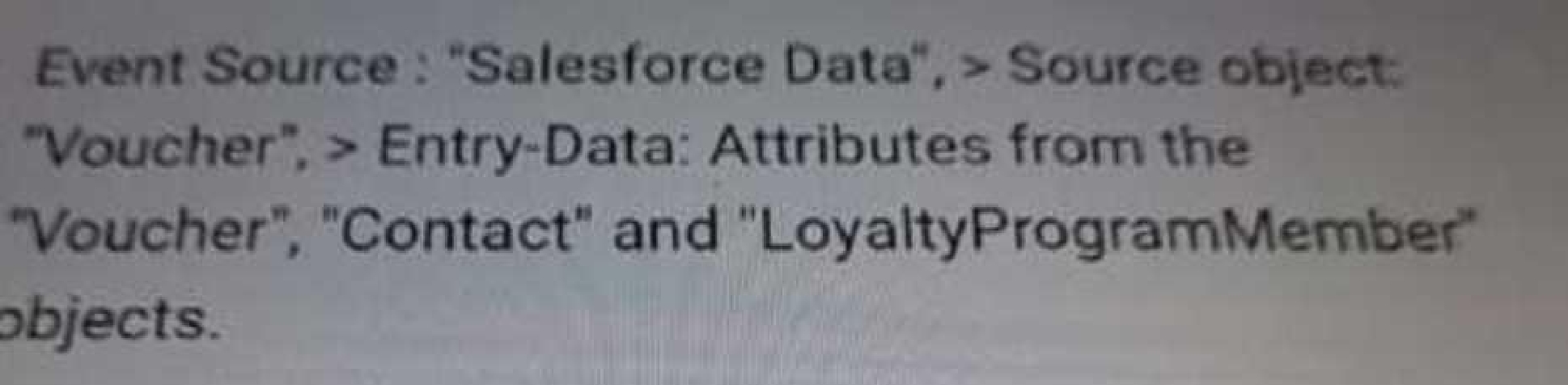
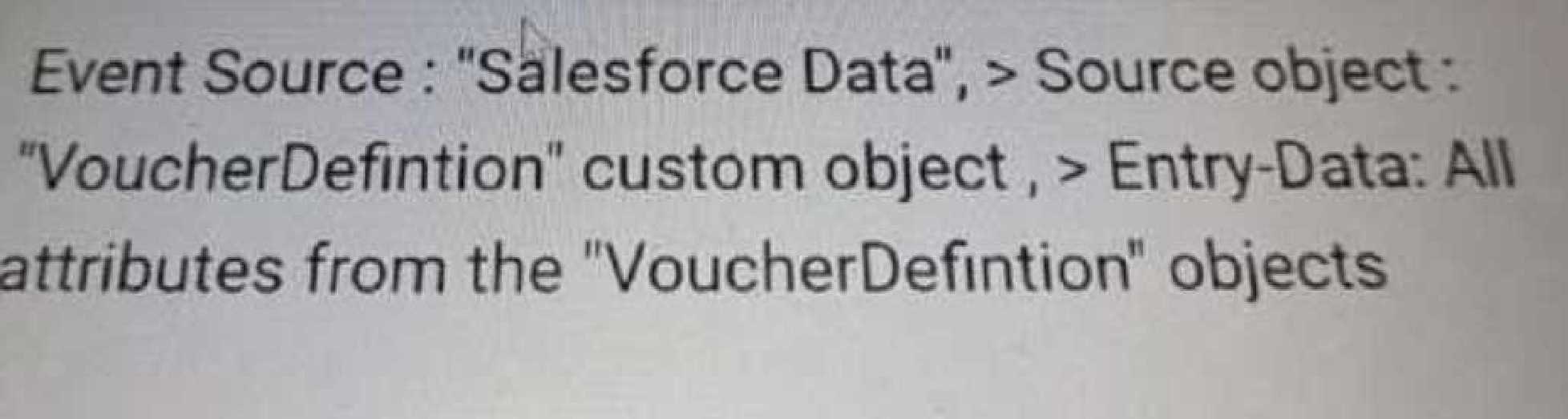
A loyalty Program would like to set up a new process where a push notification or email will be sent to the client immediately after a voucher is added to their member account within Salesforce Marketing Cloud. The notification message will require the “first name” and the “membership number” to personalize the message and, a custom object named “voucher issued” with the necessary data attributes. Which option for the entry event should be selected as the preferred implementation approach that can meet the requirements with the least amount of development effort?
A)
B)
C)
D)
Select the answer:Select the answer
1 correct answer
A.
Option A
B.
Option B
C.
Option C
D.
Option D
For the scenario described, where a loyalty program wants to send an immediate notification after a voucher is added to a member's account, the entry event in Salesforce Marketing Cloud needs to trigger off of the creation of a record in Salesforce that contains the necessary data attributes for personalization. Option C is the most suitable choice because it specifies an entry event based on the "Voucher," "Contact," and "LoyaltyProgramMember" objects. This approach aligns with the requirements because it directly utilizes the "first name" from the Contact object and the "membership number" from the LoyaltyProgramMember object, which are necessary for personalizing the notification message. Moreover, Option C would likely require the least amount of development effort because it leverages existing Salesforce data and related objects without the need for additional configuration or data extensions. In contrast, other options would require the setup of a data extension or custom objects that may not be directly tied to the triggering event, thereby increasing the complexity and development effort. In Salesforce Marketing Cloud, Journey Builder is the tool that would be used to create this customer journey. It allows for the configuration of entry events based on data changes in Salesforce, such as the addition of a voucher to a member's account. The real-time nature of this trigger is essential for the immediate notification requirement. According to Salesforce's official documentation, using Salesforce data as the entry source for a journey allows for real-time messaging based on record creation or updates. This means that as soon as a voucher record is created or updated in Salesforce, the entry event can trigger and begin the journey, which will send the personalized notification to the member. In practice, setting up this entry event in Journey Builder would involve specifying the criteria for the trigger (in this case, the creation of a voucher) and mapping the necessary data fields for personalization. This is consistent with Salesforce's best practices for creating personalized, real-time customer engagements through Journey Builder. Salesforce's documentation on Journey Builder and real-time event triggers provides further details on how to configure these types of journeys and can be referred to for step-by-step guidance and the latest feature updates.
Right Answer: C
Quiz
Question 10/1010/10
A Customer Support Manager noticed that the customers support team’s performance decreased since the company rolled out the Loyalty Program. The customer Support Agents complain that finding information about the Loyalty Program Member takes a lot of the time. What is the standard solution to display the information regarding the Loyalty? Program Member on the case detail page?
Select the answer:Select the answer
1 correct answer
A.
Create formula fields on Case Object
B.
Create a Screen Flow
C.
Embed Loyalty Member Profile Cards
D.
Develop a custom component
To efficiently display information about the Loyalty Program Member on the case detail page, embedding Loyalty Member Profile Cards is a standard solution. These profile cards are designed to provide a concise and comprehensive view of the member's loyalty information, including membership details, points balance, tier status, and recent transactions, directly within the context of a case. This allows customer support agents to quickly access relevant loyalty information without navigating away from the case record, improving efficiency and enabling better support. Salesforce documentation suggests using embedded components like profile cards to enhance user experience and access to information within record pages.
Salesforce-Loyalty-Management: Salesforce Loyalty Management Accredited Professional Practice test unlocks all online simulator questions
Thank you for choosing the free version of the Salesforce-Loyalty-Management: Salesforce Loyalty Management Accredited Professional practice test! Further deepen your knowledge on Salesforce Simulator; by unlocking the full version of our Salesforce-Loyalty-Management: Salesforce Loyalty Management Accredited Professional Simulator you will be able to take tests with over 104 constantly updated questions and easily pass your exam. 98% of people pass the exam in the first attempt after preparing with our 104 questions.
What to expect from our Salesforce-Loyalty-Management: Salesforce Loyalty Management Accredited Professional practice tests and how to prepare for any exam?
The Salesforce-Loyalty-Management: Salesforce Loyalty Management Accredited Professional Simulator Practice Tests are part of the Salesforce Database and are the best way to prepare for any Salesforce-Loyalty-Management: Salesforce Loyalty Management Accredited Professional exam. The Salesforce-Loyalty-Management: Salesforce Loyalty Management Accredited Professional practice tests consist of 104 questions and are written by experts to help you and prepare you to pass the exam on the first attempt. The Salesforce-Loyalty-Management: Salesforce Loyalty Management Accredited Professional database includes questions from previous and other exams, which means you will be able to practice simulating past and future questions. Preparation with Salesforce-Loyalty-Management: Salesforce Loyalty Management Accredited Professional Simulator will also give you an idea of the time it will take to complete each section of the Salesforce-Loyalty-Management: Salesforce Loyalty Management Accredited Professional practice test . It is important to note that the Salesforce-Loyalty-Management: Salesforce Loyalty Management Accredited Professional Simulator does not replace the classic Salesforce-Loyalty-Management: Salesforce Loyalty Management Accredited Professional study guides; however, the Simulator provides valuable insights into what to expect and how much work needs to be done to prepare for the Salesforce-Loyalty-Management: Salesforce Loyalty Management Accredited Professional exam.
Salesforce-Loyalty-Management: Salesforce Loyalty Management Accredited Professional Practice test therefore represents an excellent tool to prepare for the actual exam together with our Salesforce practice test . Our Salesforce-Loyalty-Management: Salesforce Loyalty Management Accredited Professional Simulator will help you assess your level of preparation and understand your strengths and weaknesses. Below you can read all the quizzes you will find in our Salesforce-Loyalty-Management: Salesforce Loyalty Management Accredited Professional Simulator and how our unique Salesforce-Loyalty-Management: Salesforce Loyalty Management Accredited Professional Database made up of real questions:
Info quiz:
Quiz name:Salesforce-Loyalty-Management: Salesforce Loyalty Management Accredited Professional
Total number of questions:104
Number of questions for the test:50
Pass score:80%
You can prepare for the Salesforce-Loyalty-Management: Salesforce Loyalty Management Accredited Professional exams with our mobile app. It is very easy to use and even works offline in case of network failure, with all the functions you need to study and practice with our Salesforce-Loyalty-Management: Salesforce Loyalty Management Accredited Professional Simulator.
Use our Mobile App, available for both Android and iOS devices, with our Salesforce-Loyalty-Management: Salesforce Loyalty Management Accredited Professional Simulator . You can use it anywhere and always remember that our mobile app is free and available on all stores.
Our Mobile App contains all Salesforce-Loyalty-Management: Salesforce Loyalty Management Accredited Professional practice tests which consist of 104 questions and also provide study material to pass the final Salesforce-Loyalty-Management: Salesforce Loyalty Management Accredited Professional exam with guaranteed success.
Our Salesforce-Loyalty-Management: Salesforce Loyalty Management Accredited Professional database contain hundreds of questions and Salesforce Tests related to Salesforce-Loyalty-Management: Salesforce Loyalty Management Accredited Professional Exam. This way you can practice anywhere you want, even offline without the internet.