The new flashcard feature is useful to memorize questions.
?Change your study mode
At any time, you can change the study mode, and alternate between the practice mode and the exam mode. In practice mode, you can configure for example the number of questions or tests, and other parameters to help you study.
Randomized | 10 Questions per Test | 20 Minutes | 70% to pass|
To re-configure your study mode again and change - for example - the number of tests, whether you have random questions and all other configuration parameters.
?Simulator Configuration
Auto-scroll: You can use the automatic scrolling of the questionnaire that occurs as soon as you answer one or all of the answers to a question correctly. Auto scrolling is activated if you answer a single answer, or as soon as you answer all the mandatory answers. Learning Mode: During learning mode you can get a real time result for your answer.
Free Test
Question: / 10
20:00Min. left
?Restart the current test
To restart the current test by clearing all your answers and the time used up to now. Warning: all answers will be lost.
Question: / 10
4.9(713 Votes)
Quiz
Question 1/101/10
What do you need to download before importing organization, pay, and job data into the system?
Select the answer:Select the answer
1 correct answer
A.
A blank CSV template for each object from the Manage Organization, Pay and Job Structures tool
B.
A CSV template containing all objects from the Import Foundation Data tool
C.
A CSV template containing all objects from the Manage Organization, Pay and Job Structures tool
D.
A blank CSV template for each object from the Import Foundation Data tool
The correct answer is D: A blank CSV template for each object from the Import Foundation Data tool. Before importing organization, pay, and job data into the system, you need to download blank CSV templates for each object from the Import Foundation Data tool. These templates provide the required structure and field layout so you can enter the data in the correct format before uploading it. Why the other options are incorrect: A. A blank CSV template for each object from the Manage Organization, Pay and Job Structures tool This is incorrect because the needed templates come from the Import Foundation Data tool, not the Manage Organization, Pay and Job Structures tool. B. A CSV template containing all objects from the Import Foundation Data tool This is incorrect because the templates are blank, not pre-filled with all objects. C. A CSV template containing all objects from the Manage Organization, Pay and Job Structures tool This is incorrect for two reasons: the tool name is wrong, and the template should be blank rather than containing all objects. In short, you must download blank CSV templates for each object from the Import Foundation Data tool before importing the data.
Right Answer: D
Quiz
Question 2/102/10
How do you translate the label for the Legal Entity object so that users in different countries can see the label on their own language?
Select the answer:Select the answer
1 correct answer
A.
Update the label in Text Replacement.
B.
Update the 'xmklang' attribute in the CSF Corporate Data Model.
C.
Update the 'xmklang' attribute in the Corporate Data Model.
D.
Update the label in Configure Object Definitions.
The correct answer is D. Update the label in Configure Object Definitions. In systems like SAP SuccessFactors, the label shown for an object such as Legal Entity is controlled in the object’s configuration. If you want users in different countries to see the label in their own language, you need to maintain the translation for that object label in Configure Object Definitions. Why D is correct: - Configure Object Definitions is where object metadata is managed. - The label of an object can be translated there so that the system displays the correct localized text based on the user’s language. - This is the standard place to maintain multilingual labels for objects like Legal Entity. Why the other options are incorrect: - A. Update the label in Text Replacement. - Text Replacement is used for replacing certain UI text strings, but it is not the standard place for object label translations in this case. - B. Update the 'xmklang' attribute in the CSF Corporate Data Model. - This attribute is related to configuration details in the Corporate Data Model, but it does not directly control the translated label shown to users. - C. Update the 'xmklang' attribute in the Corporate Data Model. - Same issue as option B. The language-specific label is not managed by changing this attribute. In short: If you want the Legal Entity object label to appear in each user’s language, you translate it in Configure Object Definitions.
Right Answer: D
Quiz
Question 3/103/10
You want to create a generic (MDF) object that has a composite association with two other MDF objects. Where do you define the association?
Select the answer:Select the answer
1 correct answer
A.
In the Corporate data model
B.
In the Manage Data tool
C.
In the Configure Object Definition tool
D.
In the Configure Business Rules tool
The correct answer is C. In the Configure Object Definition tool. A generic MDF object and its associations are defined at the object definition level. In SAP SuccessFactors Metadata Framework (MDF), you use the Configure Object Definition tool to create or edit MDF objects, including their fields, associations, and behaviors. Why C is correct: - A composite association is part of the MDF object structure. - Object relationships between MDF objects are configured in the object definition. - The Configure Object Definition tool is where you define: - fields - associations - whether an association is composite or not - cardinality and related properties Why the other options are incorrect: - A. In the Corporate data model - This is used for the Succession Data Model and HRIS elements, not for defining generic MDF object associations. - B. In the Manage Data tool - This tool is used to create, view, and edit data records for existing objects, not to define object relationships. - D. In the Configure Business Rules tool - This tool is used to create and manage business rules, not object associations. Summary: If you want to define a composite association between MDF objects, you do it in Configure Object Definition.
Right Answer: C
Quiz
Question 4/104/10
Where can a workflow contributor see the comments posted on a workflow request?
Select the answer:Select the answer
1 correct answer
A.
Pending Requests
B.
Manage Workflow Groups
C.
Manage Workflow Requests
D.
Email Notification Templates Settings
The correct answer is A. Pending Requests. A workflow contributor typically reviews and responds to workflow items from the Pending Requests area. This is where active or waiting workflow requests are listed, and where comments associated with a request can be viewed as part of the request details or discussion history. Why the other options are incorrect: B. Manage Workflow Groups This is usually used to organize or configure groups involved in workflow processing, not to view comments on individual requests. C. Manage Workflow Requests This sounds like an administrative area for creating, editing, or overseeing workflow requests, but not necessarily the place where a contributor checks posted comments. D. Email Notification Templates Settings This section is for configuring email templates and notification content, not for viewing request comments. So, the best answer is A because the Pending Requests area is where a workflow contributor can see the comments posted on a workflow request.
Right Answer: A
Quiz
Question 5/105/10
Your customer requires a new custom MDF foundation object (MDF FO) linked to legal entities to build their organization structure. What are possible steps? Note: There are 2 correct answers to this question.
Select the answer:Select the answer
1 correct answer
A.
Import the records using the Import and Export Data tool.
B.
Create records using the Manage Organization, Pay and Job Structures tool.
C.
Define the association to the legal entity with the Corporate data model.
D.
Define a custom object using the Configure Object Definitions tool.
The correct answers are: A. Import the records using the Import and Export Data tool. D. Define a custom object using the Configure Object Definitions tool. A custom MDF foundation object is created first as an object definition, and then its records can be loaded into the system. Since the object is linked to legal entities and used for organization structure, the usual setup involves both defining the object and creating/importing its data. Why A is correct: The Import and Export Data tool can be used to load MDF foundation object records in bulk after the object has been defined. This is a valid step for populating the organization structure. Why D is correct: The Configure Object Definitions tool is used to create a custom MDF object. This is the starting point when you need a new custom foundation object. Why B is not correct: The Manage Organization, Pay and Job Structures tool is used to maintain standard org, pay, and job structure data, but it is not the place to define a new custom MDF foundation object. Why C is not correct: The Corporate Data Model is used for configuring the company structure in Employee Central, but the association to legal entities for a custom MDF foundation object is not defined there in the way described in this question. Important note: If the question says the correct answer is A only, that appears inconsistent with standard MDF setup logic. In practice, creating a custom MDF foundation object requires defining it in Configure Object Definitions, so D should also be considered correct. If you want, I can also explain why this question is often confusing in SAP SuccessFactors exams.
Right Answer: A
Quiz
Question 6/106/10
Our customer asks you to create a custom field for employees in Germany to track personal information. Where would you configure this?
Select the answer:Select the answer
1 correct answer
A.
In the next custom field that is available in the personallnfo element of the country-specific Succession U Data Model
B.
In the next custom field that is available in the globallnfo element of the Succession Data Model
C.
In the next custom field that is available in the globallnfo element of the country-specific Succession Data V U Model
D.
In the next custom field that is available in the personallnfo element of the Succession Data Model
The correct answer is C. In SAP SuccessFactors Employee Central, when you need to create a custom field for employees in a specific country, such as Germany, you usually configure it in the country-specific Succession Data Model, not in the generic global or standard section. Let’s break down the options: A. In the next custom field that is available in the personalInfo element of the country-specific Succession U Data Model This is not correct because personalInfo is not where country-specific general employee data custom fields are typically added in this context. Also, the term “Succession U Data Model” is not the right model name here. B. In the next custom field that is available in the globalInfo element of the Succession Data Model This is not correct because globalInfo in the standard Succession Data Model is used for fields that apply globally to all employees, not country-specific fields like those needed only for Germany. C. In the next custom field that is available in the globalInfo element of the country-specific Succession Data Model This is correct because country-specific information should be maintained in the country-specific data model, and globalInfo is the appropriate area for employee data that is relevant to the country configuration in this scenario. The next available custom field there is where you would place the new field. D. In the next custom field that is available in the personalInfo element of the Succession Data Model This is not correct because personalInfo in the standard model is not the right place for a country-specific custom field. Why C is the best answer: - The requirement is for employees in Germany, so the field must be configured in the country-specific model. - The field is for personal information, which in this question is being handled under the country-specific globalInfo section. - Custom fields are added to the next available custom field slot in the relevant data model element. In short: Use the country-specific Succession Data Model and add the field in the globalInfo element, which is why C is correct.
Right Answer: C
Quiz
Question 7/107/10
A customer needs a generic (MDF) object to track employee membership to external organizations. For this purpose, you are creating the following fields: 1. Employee Name (Selected from the list of active employees) 2. Department (Selected from the existing departments in the company) 3. Organization Name 4. Membership Date Which data types does SAP SuccessFactors recommend for these fields?
Select the answer:Select the answer
1 correct answer
A.
User Foundation Object String Date
B.
User Picklist String Date
C.
User Generic Object String Date
The correct answer is C. User Generic Object String Date Here is why: The requirement is to create a generic MDF object to track employee membership in external organizations. For each field, SAP SuccessFactors recommends the following data types: 1. Employee Name - This should use the User data type. - Reason: The employee is selected from the list of active employees, which is represented by the User object in SuccessFactors. 2. Department - This should use a Generic Object data type, often referring to a Foundation Object or another MDF object depending on how the organization is modeled. - Since the question asks for a generic MDF object and the department is selected from existing departments in the company, the recommended type in this context is Generic Object. 3. Organization Name - This should use String. - Reason: It is simply a text field for the organization name. 4. Membership Date - This should use Date. - Reason: The value is a date. Why the other options are incorrect: A. User Foundation Object String Date - This seems close, but Foundation Object is not the recommended answer in the context of the question’s generic MDF object setup. - The correct option specifically uses Generic Object for the department field. B. User Picklist String Date - Picklist is not appropriate for Department here, because the department is selected from existing company departments, which are better represented by a Foundation Object or Generic Object reference rather than a picklist. - Also, the question’s intended answer is not based on a picklist. Summary: - Employee Name = User - Department = Generic Object - Organization Name = String - Membership Date = Date Therefore, the correct answer is C.
Right Answer: C
Quiz
Question 8/108/10
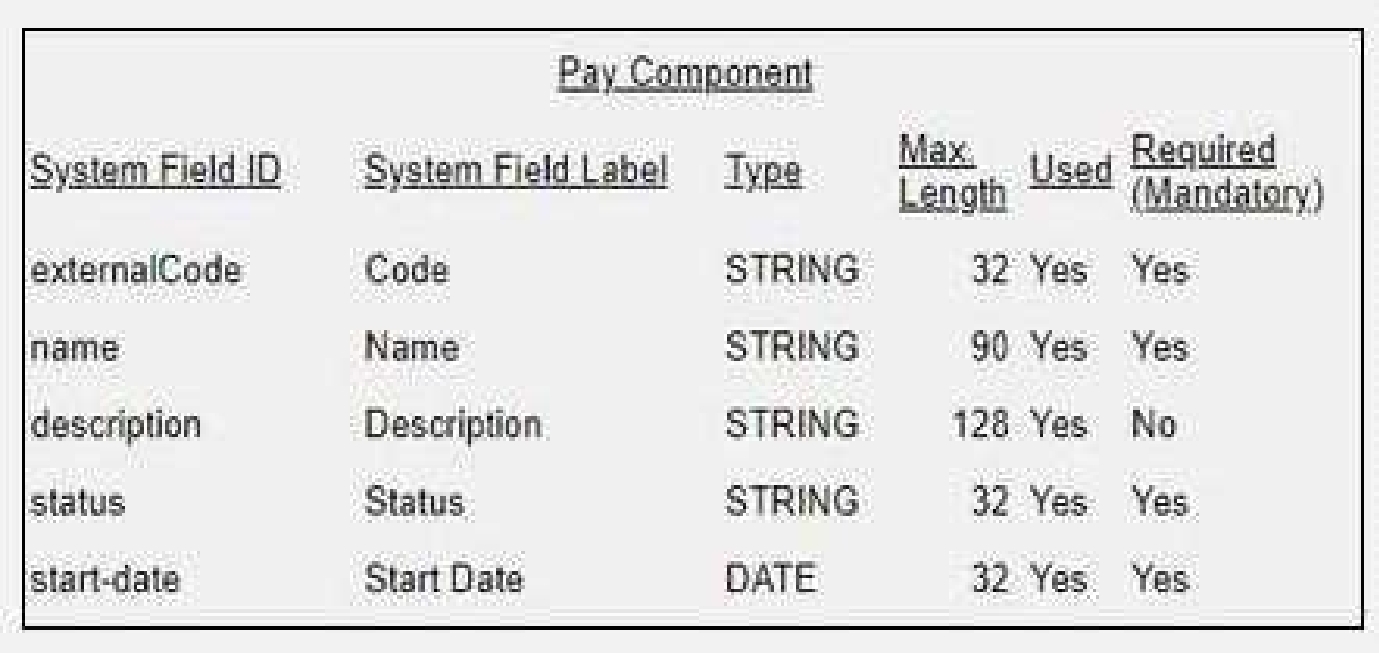
The following table shows an extract from a customer's configuration workbook. Which of the following XML configurations meet the customer's requirements?Note: There are 2 correct answers
to this question.
Select multiple answer: (Choose 2)Select the answer
The correct answers are C and D. Here is the reasoning behind each option: What the configuration workbook is asking for The customer’s workbook defines properties for specific fields, such as: - field ID - label - whether the field is required - whether it is visible - whether it contains personal data - maximum field length To be correct, the XML must match the workbook’s requirements exactly. Option A <hris-field-max-length=”128” id=”status” visibility=”both” required=”true” pii=”false”> <label>Status</label> </hris-field> This is not correct because the field definition does not match the expected configuration in the workbook for this field. Even though it looks syntactically similar, the attributes do not align with the required field settings. Option B <hris-field-max-length=”32” id=”externalCode” visibility=”both” required=”false”> <label>Code</label> </hris-field> This is not correct because the field identifier and/or required settings do not match the workbook requirements. The customer’s configuration does not call for this combination for externalCode. Option C <hris-field-max-length=”32” id=”start-date” visibility=”both” required=”true” pii=”false”> <label>Start Date</label> </hris-field> This is correct because it matches the workbook requirements: - field ID is start-date - label is Start Date - max length is 32 - visible in both contexts - required is true - pii is false Option D <hris-field-max-length=”90” id=”name” visibility=”both” required=”true”> <label>Name</label> </hris-field> This is correct because it matches the workbook requirements: - field ID is name - label is Name - max length is 90 - visible in both contexts - required is true Final answer: C and D If you want, I can also explain how to quickly eliminate the wrong options in SAP SuccessFactors XML questions like this.
Right Answer: C, D
Quiz
Question 9/109/10
Foundation Object records can be managed using these Admin Functions: There are 2 correct answers to this question.
Select multiple answer: (Choose 2)Select the answer
2 correct answers
A.
Import and Export Foundation Data
B.
Manage Data without admin functions
C.
Manage Organization, Pay, and Job Structures
D.
Import Foundation Data
The correct answers are C and D. Foundation Objects are part of the metadata and organizational structure in SAP SuccessFactors. They can be maintained through specific admin tools designed for HR structure management. Why C is correct: Manage Organization, Pay, and Job Structures is the standard admin function used to create, edit, and maintain Foundation Object records such as legal entities, departments, cost centers, job codes, pay ranges, and similar organizational structures. Why D is correct: Import Foundation Data is also used to manage Foundation Object records in bulk. This function allows administrators to upload Foundation Object data from a file, which is useful when creating or updating many records at once. Why A is not correct: Import and Export Foundation Data is not the standard admin function name expected here. The question asks specifically about admin functions used to manage Foundation Objects, and the recognized function is Import Foundation Data, not this combined option. Why B is not correct: Manage Data without admin functions is not a valid or appropriate tool for managing Foundation Object records in this context. It may be used for some general data maintenance, but it is not the correct admin function for Foundation Objects. In summary: Foundation Object records are managed through the organizational structure admin tool and through import capabilities, which makes C and D the correct answers.
Right Answer: C, D
Quiz
Question 10/1010/10
You need to define time account types for time types that have a balance that needs to be checked. So, for time types where you want to have a check against a balance you normally need to: There are 2 correct answers to this question.
Select multiple answer: (Choose 2)Select the answer
2 correct answers
A.
Configure a time account type to suit your needs and assign it to a work schedule type.
B.
Configure a time account type to suit your needs and assign it to a time account type.
C.
Define a rule governing how the accruals should be calculated, and assign it to a work schedule type.
D.
Define a rule governing how the accruals should be calculated, and assign it to a time account type.
The correct answers are B and D. When you want to check a balance for a time type, you are working with time accounts. In SAP time management, a time account type is the configuration object that controls how a balance is tracked and how accruals are managed. Let’s look at the options: B. Configure a time account type to suit your needs and assign it to a time account type. This is correct because the time account type must be defined/configured to represent the balance you want to track. The time type or absence type is then linked to that time account type so the system knows which balance to check. D. Define a rule governing how the accruals should be calculated, and assign it to a time account type. This is also correct because if the balance is to be maintained, the system needs an accrual rule to determine how much time is added to the account over time. That accrual rule belongs with the time account setup. Why the other options are incorrect: A. Configure a time account type to suit your needs and assign it to a work schedule type. This is incorrect because the time account type is not assigned to a work schedule type in this context. Work schedule types are used for scheduling work patterns, not for defining balance checks for time accounts. C. Define a rule governing how the accruals should be calculated, and assign it to a work schedule type. This is incorrect for the same reason. Accrual rules are related to time accounts, not directly to work schedule types. Summary: To manage time types with balance checks, you typically need: - a configured time account type - an accrual rule assigned to that time account type So the correct answers are B and D.
C_THR81_2105: Certified Application Associate - SAP SuccessFactors Employee Central Core 1H/2021 Practice test unlocks all online simulator questions
Thank you for choosing the free version of the C_THR81_2105: Certified Application Associate - SAP SuccessFactors Employee Central Core 1H/2021 practice test! Further deepen your knowledge on SAP Simulator; by unlocking the full version of our C_THR81_2105: Certified Application Associate - SAP SuccessFactors Employee Central Core 1H/2021 Simulator you will be able to take tests with over 286 constantly updated questions and easily pass your exam. 98% of people pass the exam in the first attempt after preparing with our 286 questions.
What to expect from our C_THR81_2105: Certified Application Associate - SAP SuccessFactors Employee Central Core 1H/2021 practice tests and how to prepare for any exam?
The C_THR81_2105: Certified Application Associate - SAP SuccessFactors Employee Central Core 1H/2021 Simulator Practice Tests are part of the SAP Database and are the best way to prepare for any C_THR81_2105: Certified Application Associate - SAP SuccessFactors Employee Central Core 1H/2021 exam. The C_THR81_2105: Certified Application Associate - SAP SuccessFactors Employee Central Core 1H/2021 practice tests consist of 286 questions and are written by experts to help you and prepare you to pass the exam on the first attempt. The C_THR81_2105: Certified Application Associate - SAP SuccessFactors Employee Central Core 1H/2021 database includes questions from previous and other exams, which means you will be able to practice simulating past and future questions. Preparation with C_THR81_2105: Certified Application Associate - SAP SuccessFactors Employee Central Core 1H/2021 Simulator will also give you an idea of the time it will take to complete each section of the C_THR81_2105: Certified Application Associate - SAP SuccessFactors Employee Central Core 1H/2021 practice test . It is important to note that the C_THR81_2105: Certified Application Associate - SAP SuccessFactors Employee Central Core 1H/2021 Simulator does not replace the classic C_THR81_2105: Certified Application Associate - SAP SuccessFactors Employee Central Core 1H/2021 study guides; however, the Simulator provides valuable insights into what to expect and how much work needs to be done to prepare for the C_THR81_2105: Certified Application Associate - SAP SuccessFactors Employee Central Core 1H/2021 exam.
C_THR81_2105: Certified Application Associate - SAP SuccessFactors Employee Central Core 1H/2021 Practice test therefore represents an excellent tool to prepare for the actual exam together with our SAP practice test . Our C_THR81_2105: Certified Application Associate - SAP SuccessFactors Employee Central Core 1H/2021 Simulator will help you assess your level of preparation and understand your strengths and weaknesses. Below you can read all the quizzes you will find in our C_THR81_2105: Certified Application Associate - SAP SuccessFactors Employee Central Core 1H/2021 Simulator and how our unique C_THR81_2105: Certified Application Associate - SAP SuccessFactors Employee Central Core 1H/2021 Database made up of real questions:
Info quiz:
Quiz name:C_THR81_2105: Certified Application Associate - SAP SuccessFactors Employee Central Core 1H/2021
Total number of questions:286
Number of questions for the test:50
Pass score:80%
You can prepare for the C_THR81_2105: Certified Application Associate - SAP SuccessFactors Employee Central Core 1H/2021 exams with our mobile app. It is very easy to use and even works offline in case of network failure, with all the functions you need to study and practice with our C_THR81_2105: Certified Application Associate - SAP SuccessFactors Employee Central Core 1H/2021 Simulator.
Use our Mobile App, available for both Android and iOS devices, with our C_THR81_2105: Certified Application Associate - SAP SuccessFactors Employee Central Core 1H/2021 Simulator . You can use it anywhere and always remember that our mobile app is free and available on all stores.
Our Mobile App contains all C_THR81_2105: Certified Application Associate - SAP SuccessFactors Employee Central Core 1H/2021 practice tests which consist of 286 questions and also provide study material to pass the final C_THR81_2105: Certified Application Associate - SAP SuccessFactors Employee Central Core 1H/2021 exam with guaranteed success.
Our C_THR81_2105: Certified Application Associate - SAP SuccessFactors Employee Central Core 1H/2021 database contain hundreds of questions and SAP Tests related to C_THR81_2105: Certified Application Associate - SAP SuccessFactors Employee Central Core 1H/2021 Exam. This way you can practice anywhere you want, even offline without the internet.