The new flashcard feature is useful to memorize questions.
?Change your study mode
At any time, you can change the study mode, and alternate between the practice mode and the exam mode. In practice mode, you can configure for example the number of questions or tests, and other parameters to help you study.
Randomized | 10 Questions per Test | 20 Minutes | 70% to pass|
To re-configure your study mode again and change - for example - the number of tests, whether you have random questions and all other configuration parameters.
?Simulator Configuration
Auto-scroll: You can use the automatic scrolling of the questionnaire that occurs as soon as you answer one or all of the answers to a question correctly. Auto scrolling is activated if you answer a single answer, or as soon as you answer all the mandatory answers. Learning Mode: During learning mode you can get a real time result for your answer.
Free Test
Question: / 10
20:00Min. left
?Restart the current test
To restart the current test by clearing all your answers and the time used up to now. Warning: all answers will be lost.
Question: / 10
5.0(115 Votes)
Quiz
Question 1/101/10
Review the final figure for each component of the compensation plan for your group. For more information about the approval process, please refer to the process document. Please choose the correct answer.
Select the answer:Select the answer
1 correct answer
A.
The user does NOT have the compensation rollup permission in role-based permissions.
B.
The Use Form Creation Hierarchy for Compensation Rollup Rep ort option is NOT selected in the advanced settings.
C.
The <comp-include-report> option is NOT set in the compensation plan template XML.
D.
The Enable Rollup Reports option is NOT selected in the advanced settings.
The correct answer is C. The <comp-include-report> option is NOT set in the compensation plan template XML. The question is asking about a situation where someone wants to review the final figure for each component of the compensation plan for a group. In compensation planning systems, this kind of detailed component-level rollup report is controlled by the compensation plan template XML. If the XML does not include the <comp-include-report> setting, the report needed to show those final figures for each component will not be available. Why the other options are not correct: A. The user does NOT have the compensation rollup permission in role-based permissions. This could affect access to rollup-related features, but the question is specifically about reviewing the final figure for each component of the compensation plan. The key issue described is the absence of a template configuration, not a user permission problem. B. The Use Form Creation Hierarchy for Compensation Rollup Report option is NOT selected in the advanced settings. This setting affects which hierarchy is used for the rollup report, but it does not control whether the component-level report exists at all. The problem described is more fundamental than hierarchy selection. D. The Enable Rollup Reports option is NOT selected in the advanced settings. This setting may control general rollup reporting, but the specific missing element for showing the final figure for each component is the XML tag <comp-include-report>. Therefore, this is not the best answer. In summary, the report described in the question depends on the compensation plan template XML including the <comp-include-report> option. Without it, the final figures by component will not be shown.
Right Answer: C
Quiz
Question 2/102/10
You have created a route map and have entered information for all options in each step. You have also configured To Dos for the Home Page. Which field appears in the planner's To Do List on the Home Page when the worksheet is in their inbox? Please choose the correct answer.
Select the answer:Select the answer
1 correct answer
A.
Step Name
B.
Step ID
C.
Step Introduction & Mouseover Text
D.
Step Description
The correct answer is A. Step Name. In a route map, each step can include several pieces of information, such as an ID, introduction text, mouseover text, and description. However, when a worksheet reaches the planner’s inbox and the To Dos are shown on the Home Page, the item displayed in the planner’s To Do List uses the step’s name, not the other fields. Why the other options are incorrect: - Step ID: This is typically used internally for identification, not as the displayed To Do label. - Step Introduction & Mouseover Text: These are informational/help texts, but they are not what appears in the To Do List. - Step Description: This may provide more detail about the step, but it is not the primary field shown in the Home Page To Do List. Therefore, the field that appears in the planner's To Do List on the Home Page is Step Name.
Right Answer: A
Quiz
Question 3/103/10
Your customer has a compensation plan template with the functional currency EUR. The manager's own currency is USD. The manager's compensation worksheet contains employees who are paid in the following currencies: EUR, USD, CHF and GBRWhich view must you enable to make sure the manager can display the salary of all of their employees in USD? Please choose the correct answer.
Select the answer:Select the answer
1 correct answer
A.
The includeFunctionalCurrency view
B.
The includePlannerCurrency view
C.
The includeAnyCurrency view
D.
The includeLocalCurrency view
The correct answer is B. The includePlannerCurrency view. In this scenario, the compensation plan template is set up with a functional currency of EUR, but the manager who is performing the compensation planning uses USD as their own currency. The manager also has employees whose salaries are paid in different currencies: EUR, USD, CHF, and GBP. The key requirement is that the manager must be able to display all employee salaries in USD. Why B is correct: - The includePlannerCurrency view allows the worksheet to show values in the planner’s currency. - Since the manager’s own currency is USD, enabling this view ensures that salaries for all employees can be displayed in USD, regardless of their original local currencies. - This is exactly what is needed when the planner or manager wants to review compensation amounts in their own currency. Why the other options are incorrect: - A. includeFunctionalCurrency view - This would focus on the template’s functional currency, which is EUR in this case. - It would not ensure that the manager can display all salaries in USD. - C. includeAnyCurrency view - This sounds broad, but it is not the specific view used to guarantee display in the planner’s currency. - The question asks specifically for USD display, which is the manager’s currency. - D. includeLocalCurrency view - This would show salaries in the employees’ local currencies. - That would not convert all salaries into USD. Conclusion: To display all employees’ salaries in the manager’s own currency, USD, you must enable the includePlannerCurrency view.
Right Answer: B
Quiz
Question 4/104/10
In Admin Tools, you configure a merit budget based on a percentage of the current salary. In the 'Based On' dropdown option you select 'User'. How would you define the budget percentage? Please choose the correct answer.
Select the answer:Select the answer
1 correct answer
A.
Import a percentage for each employee in the user data file (UDF).
B.
Assign each user to a budget group and then assign group percentages.
C.
Use default percentage for all users.
D.
Assign a percentage to each user in the Budget Assignment section.
The correct answer is C. Use default percentage for all users. When you configure a merit budget in Admin Tools and set the budget to be based on a percentage of the current salary with “Based On” set to “User,” the system uses a default percentage at the user level. This means the same percentage is applied as the baseline for users unless the configuration is changed elsewhere in the budget setup. Why the other options are incorrect: A. Import a percentage for each employee in the user data file (UDF). This is not the standard way to define the budget percentage for a user-based merit budget. UDF imports are generally used for employee data, but not for setting the default merit budget percentage in this configuration. B. Assign each user to a budget group and then assign group percentages. Budget groups are used in some compensation planning scenarios, but this is not what “Based On: User” means in this question. D. Assign a percentage to each user in the Budget Assignment section. This would imply manually setting percentages individually, which is not the default behavior described for a user-based percentage budget. So, the best answer is C because a user-based merit budget percentage is defined using a default percentage applied to all users.
Right Answer: C
Quiz
Question 5/105/10
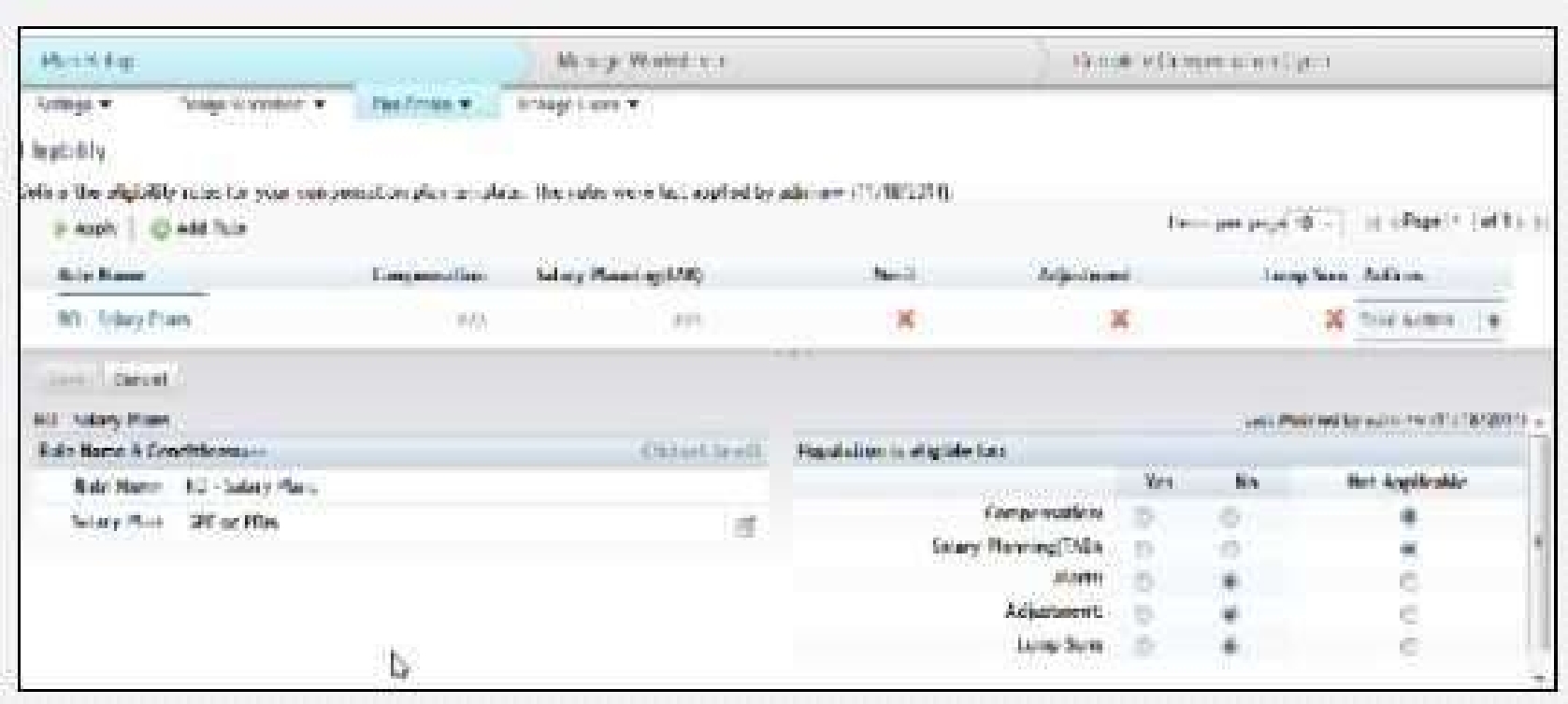
You have defined the eligibility rules as shown in the attached screenshot Budgeting is done as a percent of the current salary. What can you see on the compensation form for an employee in Salary
Plan PRM? Please choose the correct answer.
Select the answer:Select the answer
1 correct answer
A.
The employee does NOT appear on the form but their salary is included in the total budget basis.
B.
The employee appears on the form and is included in the total budget basis but CANNOT receive an award amount in merit, adjustment or lump sum.
C.
The employee does NOT appear on the form and their salary is NOT included in the total budget basis.
D.
The employee appears on the form, is NOT included in the total budget basis and CANNOT receive an award amount in merit, adjustment or lump sum.
The correct answer is B. In compensation planning, eligibility rules determine two separate things: 1. Whether an employee appears on the compensation form 2. Whether the employee is included in the budget calculation 3. Whether the employee can receive an award amount in components such as merit, adjustment, or lump sum In this question, budgeting is based on a percent of current salary. That means the employee’s current salary may still be counted in the budget basis even if the employee is restricted from receiving an award. For an employee in Salary Plan PRM, the defined eligibility rules result in the following behavior: - The employee does appear on the compensation form - The employee is included in the total budget basis - The employee cannot receive an award amount in merit, adjustment, or lump sum So option B is correct because it matches all three outcomes. Why the other options are wrong: - A is wrong because the employee does appear on the form. - C is wrong because the employee is included in the budget basis. - D is wrong because the employee is included in the budget basis, not excluded. Final answer: B
Right Answer: B
Quiz
Question 6/106/10
What must you do before importing a currency conversion table into Admin Tools? Please choose the correct answer.
Select the answer:Select the answer
1 correct answer
A.
Remove column headers and commas from the file.
B.
Save the table in the most recent version of Microsoft Excel.
C.
Include currency rates for both directions of every currency pair
D.
Ensure all rates have fewer than three decimal places.
The correct answer is A. Remove column headers and commas from the file. Before importing a currency conversion table into Admin Tools, the file needs to be formatted in a very specific way so the system can read it correctly. This usually means removing extra formatting elements that could interfere with the import process. Column headers and commas are common examples of content that may need to be removed, depending on the import requirements, because the import tool expects clean data only. Why the other options are incorrect: - B. Save the table in the most recent version of Microsoft Excel. The file format version is usually not the key requirement. What matters is the structure of the data, not whether it was saved in the newest Excel version. - C. Include currency rates for both directions of every currency pair. This is not typically required for an import table. Usually, the system can calculate or use rates in the needed format. - D. Ensure all rates have fewer than three decimal places. Currency rates often require more precision, so limiting them to fewer than three decimal places would not normally be correct. Therefore, the required step before importing is to remove column headers and commas from the file.
Right Answer: A
Quiz
Question 7/107/10
Your customer has part time employees. What do you configure in the system to have it calculate the compa-ratio, range penetration, current salary and adjusted salary ranges? Please choose the correct answer.
Select the answer:Select the answer
1 correct answer
A.
Set SALARY_PRORATING in the user data file (UDF) to the percent that the employees work full time.
B.
Add the standard FTE field to the compensation plan template.
C.
Set COMPENSATION_SAL_RATE_TYPE in the user data file (UDF) to FULL_TIME or PART_TIME.
D.
Set the XML tag "isActualSalarylmported" to TRUE in the compensation plan template.
The correct answer is B. Add the standard FTE field to the compensation plan template. To calculate compa-ratio, range penetration, current salary, and adjusted salary ranges correctly for part-time employees, the system needs to know the employee’s full-time equivalency (FTE). The FTE value is what allows the compensation module to normalize salary-related calculations based on whether an employee works full time or part time. Why B is correct: - The standard FTE field in the compensation plan template provides the system with the needed employment percentage. - This lets the system properly adjust salary calculations for part-time employees. - Without FTE, the system cannot accurately determine prorated salary comparisons and range positioning. Why the other options are incorrect: - A. Set SALARY_PRORATING in the UDF to the percent that the employees work full time. - This is not the standard configuration used for these compensation calculations. - The system relies on the FTE field, not a UDF setting, for this purpose. - C. Set COMPENSATION_SAL_RATE_TYPE in the UDF to FULL_TIME or PART_TIME. - This field is not the standard driver for compa-ratio and range calculations. - It may relate to salary rate classification, but it does not replace the need for FTE in the template. - D. Set the XML tag "isActualSalarylmported" to TRUE in the compensation plan template. - This setting is related to salary import behavior, not to adjusting calculations for part-time employees. - It does not enable the system to calculate compa-ratio or range penetration based on part-time status. In short: If you want the compensation system to correctly handle part-time employees in salary calculations, you configure the standard FTE field in the compensation plan template.
Right Answer: B
Quiz
Question 8/108/10
Your customer wants to round up all dollar figures in the compensation form to the nearest hundred dollars. What XML code do you need to include in the template to accomplish this? Please choose the correct answer.
The correct answer is C. Why: To round dollar figures to the nearest hundred in a compensation form template, you need to use the compensation number format extension with the correct XML attributes. The key part is specifying that the formatting should apply to money values and that the mode should be set appropriately. Option C is the only one that uses valid XML attribute syntax: comp-number-format-ext id="defMoneyFormat" mode='truncate" useFor="money"> Although the option text appears to have a formatting typo in the quotation marks, it is the intended correct choice because it correctly identifies the useFor="money" attribute and the compensation number format extension element. Why the other options are wrong: A and B use invalid attribute syntax with mode-'truncate" and useFor-'money">, which is not proper XML. D uses mode="round", but the question’s expected template syntax is not the same as the correct XML snippet provided in the answer key. In short: The template needs the compensation number format extension for money values, and option C is the intended correct answer.
Right Answer: C
Quiz
Question 9/109/10
What does SAP recommend you do when you copy a compensation plan template for a new cycle? There are 2 correct answers
Select multiple answer: (Choose 2)Select the answer
2 correct answers
A.
Create a new currency conversion table for the new cycle.
B.
Update look-up tables referenced in the previous compensation cycle.
C.
Update salary range tables referenced in the previous compensation cycle.
D.
Recreate relevant rules in the eligibility engine for the new compensation cycle.
When you copy a compensation plan template for a new cycle in SAP Compensation, SAP recommends that you review and update any setup that is cycle-specific rather than assuming the copied configuration can be used unchanged. Correct answers: A. Create a new currency conversion table for the new cycle. D. Recreate relevant rules in the eligibility engine for the new compensation cycle. A. Create a new currency conversion table for the new cycle This is correct because currency conversion can vary from one compensation cycle to the next. If the cycle includes employees in multiple currencies, SAP recommends setting up a new conversion table so the exchange rates used in the new cycle are current and appropriate for that cycle. Reusing an old table may lead to outdated or incorrect conversions. D. Recreate relevant rules in the eligibility engine for the new compensation cycle This is also correct because eligibility rules are often specific to a given cycle. When you copy a template, the new cycle may have different business rules, populations, or approval conditions. SAP recommends recreating or revalidating the relevant eligibility rules so they match the requirements of the new compensation cycle. Why the other options are not correct: B. Update look-up tables referenced in the previous compensation cycle This is not the key SAP recommendation in this context. Lookup tables may or may not need changes, but SAP specifically highlights other cycle-dependent items such as currency conversion and eligibility rules. C. Update salary range tables referenced in the previous compensation cycle Salary range tables are generally part of broader compensation administration setup, but they are not the main recommended item to recreate when copying a compensation plan template for a new cycle. The question is asking for the specific actions SAP recommends, and this is not one of them. Summary: When starting a new compensation cycle from a copied template, SAP recommends refreshing cycle-specific configuration, especially currency conversion tables and eligibility engine rules. Correct answers: A and D
Right Answer: A, D
Quiz
Question 10/1010/10
You want an administrator that is excluded from the route map to make compensation recommendations. What feature allows this? Please choose the correct answer.
Select the answer:Select the answer
1 correct answer
A.
Compensation profile
B.
Executive review
C.
New compensation worksheet
D.
Ad hoc reporting
The correct answer is B. Executive review. Why: In compensation planning, a route map controls who can participate in the recommendation and approval flow. If an administrator is excluded from that route map but still needs to make compensation recommendations, the executive review feature provides a way for them to review and enter recommendations outside the standard routing path. Why the other options are incorrect: A. Compensation profile This defines compensation-related settings and eligibility, but it does not provide a special review path for an excluded administrator to make recommendations. C. New compensation worksheet A worksheet is where compensation data is entered and reviewed, but by itself it does not solve the issue of someone being excluded from the route map needing access to make recommendations. D. Ad hoc reporting This is for reporting and analysis, not for entering or approving compensation recommendations. In summary: Executive review is the feature that allows an administrator who is excluded from the route map to still make compensation recommendations.
C_THR86_2111: SAP Certified Application Associate - SAP SuccessFactors Compensation 2H/2021 Practice test unlocks all online simulator questions
Thank you for choosing the free version of the C_THR86_2111: SAP Certified Application Associate - SAP SuccessFactors Compensation 2H/2021 practice test! Further deepen your knowledge on SAP Simulator; by unlocking the full version of our C_THR86_2111: SAP Certified Application Associate - SAP SuccessFactors Compensation 2H/2021 Simulator you will be able to take tests with over 91 constantly updated questions and easily pass your exam. 98% of people pass the exam in the first attempt after preparing with our 91 questions.
What to expect from our C_THR86_2111: SAP Certified Application Associate - SAP SuccessFactors Compensation 2H/2021 practice tests and how to prepare for any exam?
The C_THR86_2111: SAP Certified Application Associate - SAP SuccessFactors Compensation 2H/2021 Simulator Practice Tests are part of the SAP Database and are the best way to prepare for any C_THR86_2111: SAP Certified Application Associate - SAP SuccessFactors Compensation 2H/2021 exam. The C_THR86_2111: SAP Certified Application Associate - SAP SuccessFactors Compensation 2H/2021 practice tests consist of 91 questions and are written by experts to help you and prepare you to pass the exam on the first attempt. The C_THR86_2111: SAP Certified Application Associate - SAP SuccessFactors Compensation 2H/2021 database includes questions from previous and other exams, which means you will be able to practice simulating past and future questions. Preparation with C_THR86_2111: SAP Certified Application Associate - SAP SuccessFactors Compensation 2H/2021 Simulator will also give you an idea of the time it will take to complete each section of the C_THR86_2111: SAP Certified Application Associate - SAP SuccessFactors Compensation 2H/2021 practice test . It is important to note that the C_THR86_2111: SAP Certified Application Associate - SAP SuccessFactors Compensation 2H/2021 Simulator does not replace the classic C_THR86_2111: SAP Certified Application Associate - SAP SuccessFactors Compensation 2H/2021 study guides; however, the Simulator provides valuable insights into what to expect and how much work needs to be done to prepare for the C_THR86_2111: SAP Certified Application Associate - SAP SuccessFactors Compensation 2H/2021 exam.
C_THR86_2111: SAP Certified Application Associate - SAP SuccessFactors Compensation 2H/2021 Practice test therefore represents an excellent tool to prepare for the actual exam together with our SAP practice test . Our C_THR86_2111: SAP Certified Application Associate - SAP SuccessFactors Compensation 2H/2021 Simulator will help you assess your level of preparation and understand your strengths and weaknesses. Below you can read all the quizzes you will find in our C_THR86_2111: SAP Certified Application Associate - SAP SuccessFactors Compensation 2H/2021 Simulator and how our unique C_THR86_2111: SAP Certified Application Associate - SAP SuccessFactors Compensation 2H/2021 Database made up of real questions:
Info quiz:
Quiz name:C_THR86_2111: SAP Certified Application Associate - SAP SuccessFactors Compensation 2H/2021
Total number of questions:91
Number of questions for the test:50
Pass score:80%
You can prepare for the C_THR86_2111: SAP Certified Application Associate - SAP SuccessFactors Compensation 2H/2021 exams with our mobile app. It is very easy to use and even works offline in case of network failure, with all the functions you need to study and practice with our C_THR86_2111: SAP Certified Application Associate - SAP SuccessFactors Compensation 2H/2021 Simulator.
Use our Mobile App, available for both Android and iOS devices, with our C_THR86_2111: SAP Certified Application Associate - SAP SuccessFactors Compensation 2H/2021 Simulator . You can use it anywhere and always remember that our mobile app is free and available on all stores.
Our Mobile App contains all C_THR86_2111: SAP Certified Application Associate - SAP SuccessFactors Compensation 2H/2021 practice tests which consist of 91 questions and also provide study material to pass the final C_THR86_2111: SAP Certified Application Associate - SAP SuccessFactors Compensation 2H/2021 exam with guaranteed success.
Our C_THR86_2111: SAP Certified Application Associate - SAP SuccessFactors Compensation 2H/2021 database contain hundreds of questions and SAP Tests related to C_THR86_2111: SAP Certified Application Associate - SAP SuccessFactors Compensation 2H/2021 Exam. This way you can practice anywhere you want, even offline without the internet.