The new flashcard feature is useful to memorize questions.
?Change your study mode
At any time, you can change the study mode, and alternate between the practice mode and the exam mode. In practice mode, you can configure for example the number of questions or tests, and other parameters to help you study.
Randomized | 10 Questions per Test | 20 Minutes | 70% to pass|
To re-configure your study mode again and change - for example - the number of tests, whether you have random questions and all other configuration parameters.
?Simulator Configuration
Auto-scroll: You can use the automatic scrolling of the questionnaire that occurs as soon as you answer one or all of the answers to a question correctly. Auto scrolling is activated if you answer a single answer, or as soon as you answer all the mandatory answers. Learning Mode: During learning mode you can get a real time result for your answer.
Free Test
Question: / 10
20:00Min. left
?Restart the current test
To restart the current test by clearing all your answers and the time used up to now. Warning: all answers will be lost.
Question: / 10
4.9(517 Votes)
Quiz
Question 1/101/10
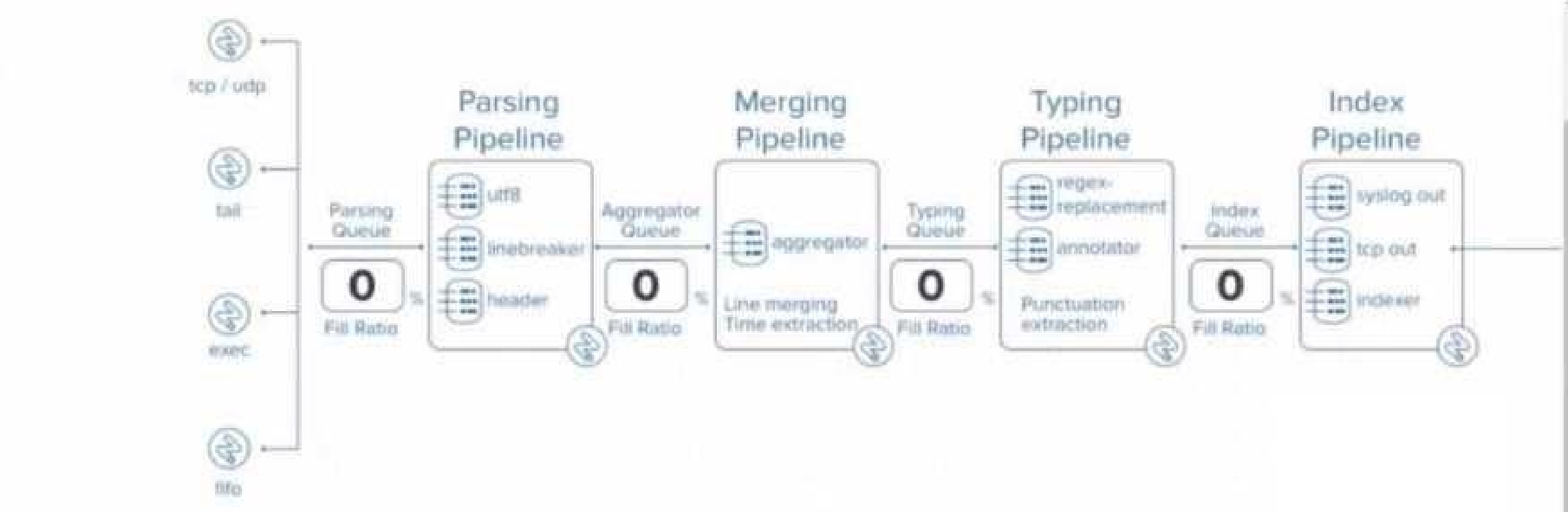
At what point in the indexing pipeline set is SEDCMD applied to data?
Select the answer:Select the answer
1 correct answer
A.
In the aggregator queue
B.
In the parsing queue
C.
In the exec pipeline
D.
In the typing pipeline
In Splunk, SEDCMD (Stream Editing Commands) is applied during the Typing Pipeline of the data indexing process. The Typing Pipeline is responsible for various tasks, such as applying regular expressions for field extractions, replacements, and data transformation operations that occur after the initial parsing and aggregation steps. Here’s how the indexing process works in more detail: Parsing Pipeline: In this stage, Splunk breaks incoming data into events, identifies timestamps, and assigns metadata. Merging Pipeline: This stage is responsible for merging events and handling time-based operations. Typing Pipeline: The Typing Pipeline is where SEDCMD operations occur. It applies regular expressions and replacements, which is essential for modifying raw data before indexing. This pipeline is also responsible for field extraction and other similar operations. Index Pipeline: Finally, the processed data is indexed and stored, where it becomes available for searching. Splunk Cloud Reference: To verify this information, you can refer to the official Splunk documentation on the data pipeline and indexing process, specifically focusing on the stages of the indexing pipeline and the roles they play. Splunk Docs often discuss the exact sequence of operations within the pipeline, highlighting when and where commands like SEDCMD are applied during data processing. Source: Splunk Docs: Managing Indexers and Clusters of Indexers Splunk Answers: Community discussions and expert responses frequently clarify where specific operations occur within the pipeline.
Right Answer: D
Quiz
Question 2/102/10
When monitoring directories that contain mixed file types, which setting should be omitted from inputs, conf and instead be overridden in propo.conf?
Select the answer:Select the answer
1 correct answer
A.
sourcetype
B.
host
C.
source
D.
index
When monitoring directories containing mixed file types, the sourcetype should typically be overridden in props.conf rather than defined in inputs.conf. This is because sourcetype is meant to classify the type of data being ingested, and when dealing with mixed file types, setting a single sourcetype in inputs.conf would not be effective for accurate data classification. Instead, you can use props.conf to define rules that apply different sourcetypes based on the file path, file name patterns, or other criteria. This allows for more granular and accurate assignment of sourcetypes, ensuring the data is properly parsed and indexed according to its type. Splunk Cloud Reference: For further clarification, refer to Splunk's official documentation on configuring inputs and props, especially the sections discussing monitoring directories and configuring sourcetypes. Source: Splunk Docs: Monitor files and directories Splunk Docs: Configure event line breaking and input settings with props.conf
Right Answer: A
Quiz
Question 3/103/10
How are HTTP Event Collector (HEC) tokens configured in a managed Splunk Cloud environment?
Select the answer:Select the answer
1 correct answer
A.
Any token will be accepted by HEC, the data may just end up in the wrong index.
B.
A token is generated when configuring a HEC input, which should be provided to the application developers.
C.
Obtain a token from the organization's application developers and apply it in Settings > Data Inputs > HTTP Event Collector > New Token.
D.
Open a support case for each new data input and a token will be provided.
In a managed Splunk Cloud environment, HTTP Event Collector (HEC) tokens are configured by an administrator through the Splunk Web interface. When setting up a new HEC input, a unique token is automatically generated. This token is then provided to application developers, who will use it to authenticate and send data to Splunk via the HEC endpoint. This token ensures that the data is correctly ingested and associated with the appropriate inputs and indexes. Unlike the other options, which either involve external tokens or support cases, option B reflects the standard procedure for configuring HEC tokens in Splunk Cloud, where control over tokens remains within the Splunk environment itself. Splunk Cloud Reference: Splunk's documentation on HEC inputs provides detailed steps on creating and managing tokens within Splunk Cloud. This includes the process of generating tokens, configuring data inputs, and distributing these tokens to application developers. Source: Splunk Docs: HTTP Event Collector in Splunk Cloud Platform Splunk Docs: Create and manage HEC tokens
Right Answer: B
Quiz
Question 4/104/10
Which of the following statements regarding apps in Splunk Cloud is true?
Select the answer:Select the answer
1 correct answer
A.
Self-service install of premium apps is possible.
B.
Only Cloud certified and vetted apps are supported.
C.
Any app that can be deployed in an on-prem Splunk Enterprise environment is also supported on Splunk Cloud.
D.
Self-service install is available for all apps on Splunkbase.
In Splunk Cloud, only apps that have been certified and vetted by Splunk are supported. This is because Splunk Cloud is a managed service, and Splunk ensures that all apps meet specific security, performance, and compatibility requirements before they can be installed. This certification process guarantees that the apps won’t negatively impact the overall environment, ensuring a stable and secure cloud service. Self-service installation is available, but it is limited to apps that are certified for Splunk Cloud. Non- certified apps cannot be installed directly; they require a review and approval process by Splunk support. Splunk Cloud Reference: Refer to Splunk’s documentation on app installation and the list of Cloud- vetted apps available on Splunkbase to understand which apps can be installed in Splunk Cloud. Source: Splunk Docs: About apps in Splunk Cloud Splunkbase: Splunk Cloud Apps
Right Answer: B
Quiz
Question 5/105/10
When using Splunk Universal Forwarders, which of the following is true?
Select the answer:Select the answer
1 correct answer
A.
No more than six Universal Forwarders may connect directly to Splunk Cloud.
B.
Any number of Universal Forwarders may connect directly to Splunk Cloud.
C.
Universal Forwarders must send data to an Intermediate Forwarder.
D.
There must be one Intermediate Forwarder for every three Universal Forwarders.
Universal Forwarders can connect directly to Splunk Cloud, and there is no limit on the number of Universal Forwarders that may connect directly to it. This capability allows organizations to scale their data ingestion easily by deploying as many Universal Forwarders as needed without the requirement for intermediate forwarders unless additional data processing, filtering, or load balancing is required. Splunk Documentation Reference: Forwarding Data to Splunk Cloud
Right Answer: B
Quiz
Question 6/106/10
In which of the following situations should Splunk Support be contacted?
Select the answer:Select the answer
1 correct answer
A.
When a custom search needs tuning due to not performing as expected.
B.
When an app on Splunkbase indicates Request Install.
C.
Before using the delete command.
D.
When a new role that mirrors sc_admin is required.
In Splunk Cloud, when an app on Splunkbase indicates "Request Install," it means that the app is not available for direct self-service installation and requires intervention from Splunk Support. This could be because the app needs to undergo an additional review for compatibility with the managed cloud environment or because it requires special installation procedures. In these cases, customers need to contact Splunk Support to request the installation of the app. Support will ensure that the app is properly vetted and compatible with Splunk Cloud before proceeding with the installation. Splunk Cloud Reference: For further details, consult Splunk’s guidelines on requesting app installations in Splunk Cloud and the processes involved in reviewing and approving apps for use in the cloud environment. Source: Splunk Docs: Install apps in Splunk Cloud Platform Splunkbase: App request procedures for Splunk Cloud
Right Answer: B
Quiz
Question 7/107/10
The following Apache access log is being ingested into Splunk via a monitor input:
How does Splunk determine the time zone for this event?
Select the answer:Select the answer
1 correct answer
A.
The value of the TZ attribute in props. cont for the a :ces3_ccwbined sourcetype.
B.
The value of the TZ attribute in props, conf for the my.webserver.example host.
C.
The time zone of the Heavy/Intermediate Forwarder with the monitor input.
D.
The time zone indicator in the raw event data.
In Splunk, when ingesting logs such as an Apache access log, the time zone for each event is typically determined by the time zone indicator present in the raw event data itself. In the log snippet you provided, the time zone is indicated by -0400, which specifies that the event's timestamp is 4 hours behind UTC (Coordinated Universal Time). Splunk uses this information directly from the event to properly parse the timestamp and apply the correct time zone. This ensures that the event's time is accurately reflected regardless of the time zone in which the Splunk instance or forwarder is located. Splunk Cloud Reference: For further details, you can review Splunk documentation on timestamp recognition and time zone handling, especially in relation to log files and data ingestion configurations. Source: Splunk Docs: How Splunk software handles timestamps Splunk Docs: Configure event timestamp recognition
Right Answer: D
Quiz
Question 8/108/10
What syntax is required in inputs.conf to ingest data from files or directories?
Select the answer:Select the answer
1 correct answer
A.
A monitor stanza, sourcetype, and Index is required to ingest data.
B.
A monitor stanza, sourcetype, index, and host is required to ingest data.
C.
A monitor stanza and sourcetype is required to ingest data.
D.
Only the monitor stanza is required to ingest data.
In Splunk, to ingest data from files or directories, the basic configuration in inputs.conf requires at least the following elements: monitor stanza: Specifies the file or directory to be monitored. sourcetype: Identifies the format or type of the incoming data, which helps Splunk to correctly parse it. index: Determines where the data will be stored within Splunk. The host attribute is optional, as Splunk can auto-assign a host value, but specifying it can be useful in certain scenarios. However, it is not mandatory for data ingestion. Splunk Cloud Reference: For more details, you can consult the Splunk documentation on inputs.conf file configuration and best practices. Source: Splunk Docs: Monitor files and directories Splunk Docs: Inputs.conf examples
Right Answer: A
Quiz
Question 9/109/10
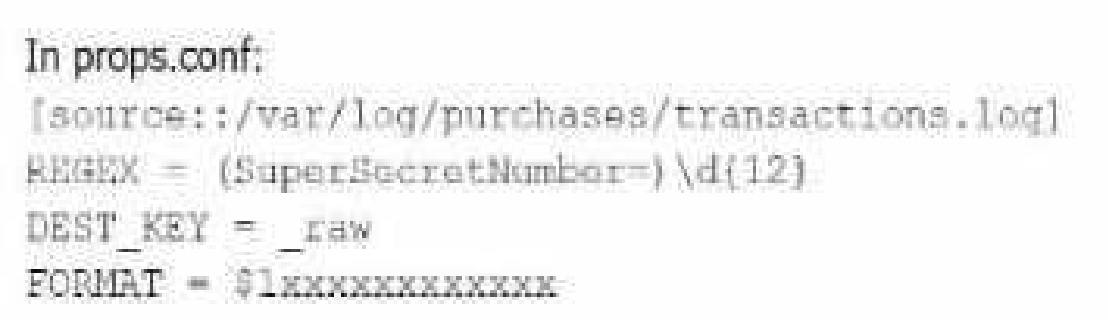
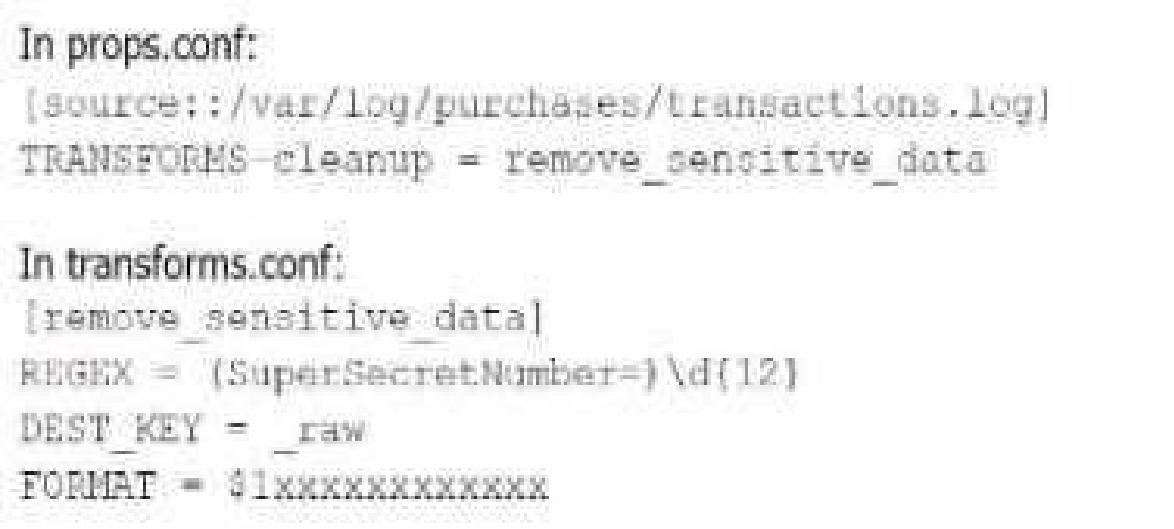
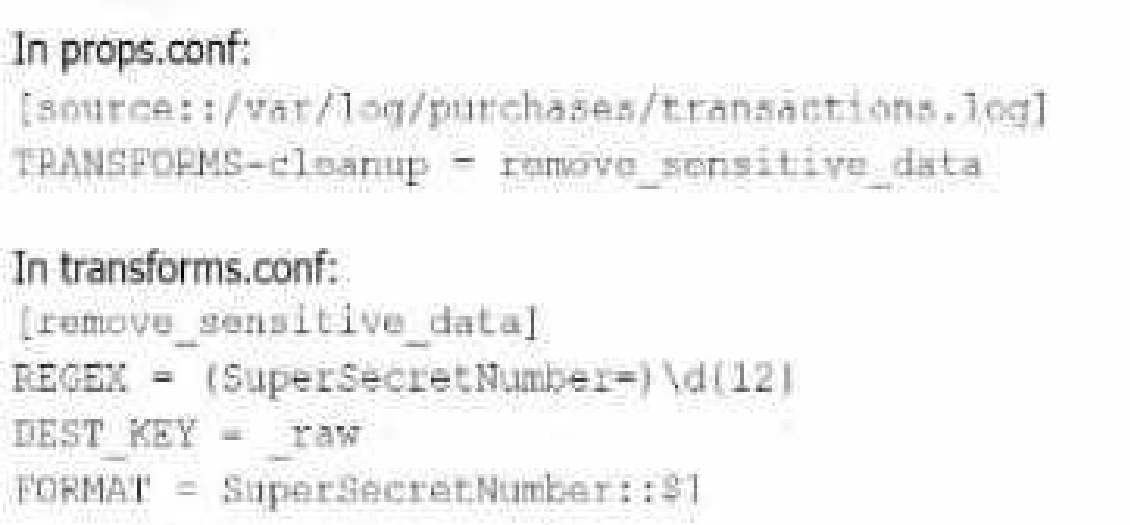
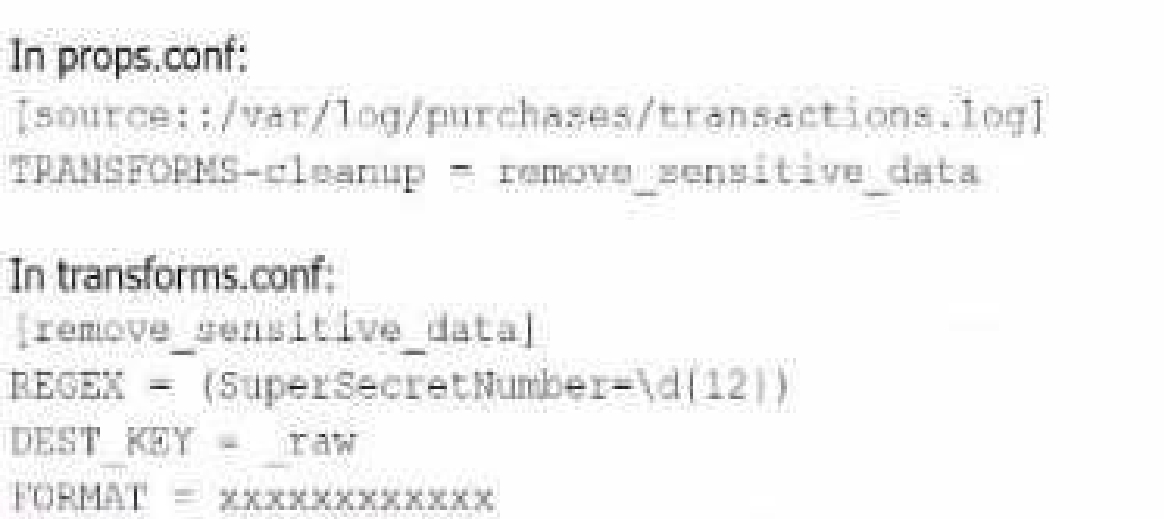
A user has been asked to mask some sensitive data without tampering with the structure of the file
/var/log/purchase/transactions. log that has the following format:
A)
B)
C)
D)
Select the answer:Select the answer
1 correct answer
A.
Option A
B.
Option B
C.
Option C
D.
Option D
Option B is the correct approach because it properly uses a TRANSFORMS stanza in props.conf to reference the transforms.conf for removing sensitive data. The transforms stanza in transforms.conf uses a regular expression (REGEX) to locate the sensitive data (in this case, the SuperSecretNumber) and replaces it with a masked version using the FORMAT directive. In detail: props.conf refers to the transforms.conf stanza remove_sensitive_data by setting TRANSFORMS- cleanup = remove_sensitive_data. transforms.conf defines the regular expression that matches the sensitive data and specifies how the sensitive data should be replaced in the FORMAT directive. This approach ensures that sensitive information is masked before indexing without altering the structure of the log files. Splunk Cloud Reference: For further reference, you can look at Splunk's documentation regarding data masking and transformation through props.conf and transforms.conf. Source: Splunk Docs: Anonymize data Splunk Docs: Props.conf and Transforms.conf
Right Answer: B
Quiz
Question 10/1010/10
Which of the following are valid settings for file and directory monitor inputs?
A)
B)
C)
D)
Select the answer:Select the answer
1 correct answer
A.
Option A
B.
Option B
C.
Option C
D.
Option D
In Splunk, when configuring file and directory monitor inputs, several settings are available that control how data is indexed and processed. These settings are defined in the inputs.conf file. Among the given options: host: Specifies the hostname associated with the data. It can be set to a static value, or dynamically assigned using settings like host_regex or host_segment. index: Specifies the index where the data will be stored. sourcetype: Defines the data type, which helps Splunk to correctly parse and process the data. TCP_Routing: Used to route data to specific indexers in a distributed environment based on TCP routing rules. host_regex: Allows you to extract the host from the path or filename using a regular expression. host_segment: Identifies the segment of the directory structure (path) to use as the host. Given the options: Option B is correct because it includes host, index, sourcetype, TCP_Routing, host_regex, and host_segment. These are all valid settings for file and directory monitor inputs in Splunk. Splunk Documentation Reference: Monitor Inputs (inputs.conf) Host Setting in Inputs TCP Routing in Inputs By referring to the Splunk documentation on configuring inputs, it's clear that Option B aligns with the valid settings used for file and directory monitoring, making it the correct choice.
SPLK-1005: Splunk Cloud Certified Admin Practice test unlocks all online simulator questions
Thank you for choosing the free version of the SPLK-1005: Splunk Cloud Certified Admin practice test! Further deepen your knowledge on Splunk Simulator; by unlocking the full version of our SPLK-1005: Splunk Cloud Certified Admin Simulator you will be able to take tests with over 80 constantly updated questions and easily pass your exam. 98% of people pass the exam in the first attempt after preparing with our 80 questions.
What to expect from our SPLK-1005: Splunk Cloud Certified Admin practice tests and how to prepare for any exam?
The SPLK-1005: Splunk Cloud Certified Admin Simulator Practice Tests are part of the Splunk Database and are the best way to prepare for any SPLK-1005: Splunk Cloud Certified Admin exam. The SPLK-1005: Splunk Cloud Certified Admin practice tests consist of 80 questions and are written by experts to help you and prepare you to pass the exam on the first attempt. The SPLK-1005: Splunk Cloud Certified Admin database includes questions from previous and other exams, which means you will be able to practice simulating past and future questions. Preparation with SPLK-1005: Splunk Cloud Certified Admin Simulator will also give you an idea of the time it will take to complete each section of the SPLK-1005: Splunk Cloud Certified Admin practice test . It is important to note that the SPLK-1005: Splunk Cloud Certified Admin Simulator does not replace the classic SPLK-1005: Splunk Cloud Certified Admin study guides; however, the Simulator provides valuable insights into what to expect and how much work needs to be done to prepare for the SPLK-1005: Splunk Cloud Certified Admin exam.
SPLK-1005: Splunk Cloud Certified Admin Practice test therefore represents an excellent tool to prepare for the actual exam together with our Splunk practice test . Our SPLK-1005: Splunk Cloud Certified Admin Simulator will help you assess your level of preparation and understand your strengths and weaknesses. Below you can read all the quizzes you will find in our SPLK-1005: Splunk Cloud Certified Admin Simulator and how our unique SPLK-1005: Splunk Cloud Certified Admin Database made up of real questions:
Info quiz:
Quiz name:SPLK-1005: Splunk Cloud Certified Admin
Total number of questions:80
Number of questions for the test:50
Pass score:80%
You can prepare for the SPLK-1005: Splunk Cloud Certified Admin exams with our mobile app. It is very easy to use and even works offline in case of network failure, with all the functions you need to study and practice with our SPLK-1005: Splunk Cloud Certified Admin Simulator.
Use our Mobile App, available for both Android and iOS devices, with our SPLK-1005: Splunk Cloud Certified Admin Simulator . You can use it anywhere and always remember that our mobile app is free and available on all stores.
Our Mobile App contains all SPLK-1005: Splunk Cloud Certified Admin practice tests which consist of 80 questions and also provide study material to pass the final SPLK-1005: Splunk Cloud Certified Admin exam with guaranteed success.
Our SPLK-1005: Splunk Cloud Certified Admin database contain hundreds of questions and Splunk Tests related to SPLK-1005: Splunk Cloud Certified Admin Exam. This way you can practice anywhere you want, even offline without the internet.