The new flashcard feature is useful to memorize questions.
?Change your study mode
At any time, you can change the study mode, and alternate between the practice mode and the exam mode. In practice mode, you can configure for example the number of questions or tests, and other parameters to help you study.
Randomized | 10 Questions per Test | 20 Minutes | 70% to pass|
To re-configure your study mode again and change - for example - the number of tests, whether you have random questions and all other configuration parameters.
?Simulator Configuration
Auto-scroll: You can use the automatic scrolling of the questionnaire that occurs as soon as you answer one or all of the answers to a question correctly. Auto scrolling is activated if you answer a single answer, or as soon as you answer all the mandatory answers. Learning Mode: During learning mode you can get a real time result for your answer.
Free Test
Question: / 10
20:00Min. left
?Restart the current test
To restart the current test by clearing all your answers and the time used up to now. Warning: all answers will be lost.
Question: / 10
5.0(148 Votes)
Quiz
Question 1/101/10
A data professional would like to combine multiple data sources into a relational database to improve their business efficiency. Which data integration initiative can help them achieve this?
Select the answer:Select the answer
1 correct answer
A.
Manually collect the data from various source interfaces, then clean and combine the data into one warehouse.
B.
Use a middleware application that acts as a mediator to normalize data and bring it into a master data pool.
C.
Create a data warehouse to run queries, reports, and analyses to retrieve data in a consistent format.
D.
leverage data lakes to manage complex and massive volumes of structured and unstructured data.
A middleware application is a software that acts as a mediator between different data sources and data consumers. It can normalize data and bring it into a master data pool, which is a centralized repository of consistent and quality data. This can help a data professional to combine multiple data sources into a relational database to improve their business efficiency. A middleware application can also provide data integration services such as data transformation, validation, cleansing, and enrichment. Reference: What is Data Integration?, What is Middleware?
Right Answer: B
Quiz
Question 2/102/10
Which tab provides lines of code generated for the selected component in Telend Studio?
Select the answer:Select the answer
1 correct answer
A.
Jobscript tab
B.
Code viewer tab
C.
Run consult
D.
Outline tab
The code viewer tab in Talend Studio provides lines of code generated for the selected component in a Job. It shows the code in the language of the component, such as Java or Perl. The code viewer tab allows the user to view and edit the code, as well as copy and paste it to another editor. The code viewer tab also displays errors and warnings related to the code. Reference: Code viewer tab
Right Answer: B
Quiz
Question 3/103/10
Which section in Talend Studio allows you to graphically connect components in a Job to run a dataflow process?
Select the answer:Select the answer
1 correct answer
A.
Design workspace
B.
Component view
C.
Repository
D.
Code
The design workspace in Talend Studio allows the user to graphically connect components in a Job to run a dataflow process. The design workspace is the main area where the user can design the data integration logic by dragging and dropping components from the palette and linking them with connectors. The design workspace also shows the schema of each component, which defines the structure and type of the data.
Right Answer: A
Quiz
Question 4/104/10
Which templates allow you to create ready-to-run Jobs in Talend Studio? Choose 2 answers
Select multiple answer: (Choose 2)Select the answer
2 correct answers
A.
Table to Table
B.
FileToDatabase.
C.
TahleToFile
D.
JobletToFile
Talend Studio provides templates that allow you to create ready-to-run Jobs for common scenarios, such as Table to Table, File to Database, Table to File, etc. You can access these templates from the Repository > Job Designs > Create Job from Template menu. Joblet to File is not a valid template name.
Right Answer: A, C
Quiz
Question 5/105/10
Which element carries data between two components in a Job?
Select the answer:Select the answer
1 correct answer
A.
Sublob
B.
Link
C.
Trigger
D.
Row
A row is an element that carries data between two components in a Job. A row is also called a link or a connector. A row can be of different types, such as Main, Lookup, Reject, Iterate, etc. A subjob is a group of components that are connected together and executed as a single unit. A trigger is an element that controls the execution flow of a Job or a subjob. A trigger can be of different types, such as OnSubjobOk, OnComponentOk, RunIf, etc.
Right Answer: D
Quiz
Question 6/106/10
Which statement is true about the Sync columns button on the Basic settings tab of the Component view? Choose 2 answers
Select multiple answer: (Choose 2)Select the answer
2 correct answers
A.
Retrieves and synchronizes the output file schema with the input file schema for tFileOutputed limited.
B.
Retrieves the schema of the current component to match the Next component
C.
Retrieves the schema from the input component connected in the lob.
D.
Retrieves and synchronizes the output schema with the input schema for tJavaRow.
The Sync columns button on the Basic settings tab of the Component view retrieves the schema from the input component connected in the Job and synchronizes it with the current component’s schema. This button is available for most of the components that have an input and an output schema, such as tJavaRow, tMap, tFileOutputDelimited, etc. However, this button does not retrieve and synchronize the output file schema with the input file schema for tFileOutputDelimited, as this component only has one output schema.
Right Answer: C, D
Quiz
Question 7/107/10
In some instances, after applying changes to a component schema, you are asked if you would like to propagate the changes. What is the significance of this prompt?
Select the answer:Select the answer
1 correct answer
A.
Confirm Out you want to apply the schema, changes to the previous component in the Job.
B.
Confirm That you want to apply the schema changes to the selected component.
C.
Confirm that you want to apply the schema changes to both the previous and next components in the Job.
D.
Confirm that you want to apply the schema changes to the next component in the Job.
In some instances, after applying changes to a component schema, you are asked if you would like to propagate the changes. This prompt is significant because it allows you to confirm that you want to apply the schema changes to the next component in the Job. This can save you time and effort by automatically updating the schema of the downstream component, instead of manually editing it. However, you should be careful when propagating changes, as it may overwrite existing schemas or cause errors in the Job logic. You can also choose to cancel the propagation and edit the schema manually.
Right Answer: D
Quiz
Question 8/108/10
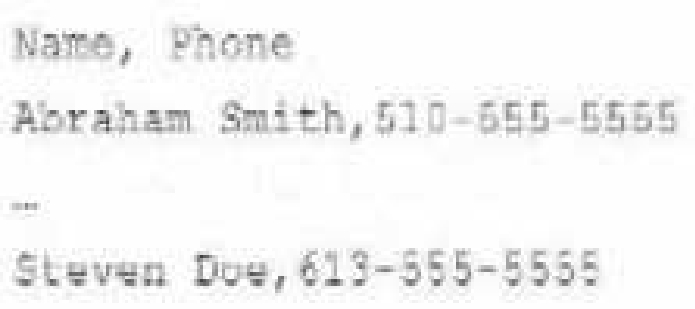
Using the following input file format as an example:
Which tFileinputDelimted component parameters should you configure to parse the input file correctly? Choose 3 answers
Select multiple answer: (Choose 3)Select the answer
3 correct answers
A.
Limit
B.
Schema
C.
Field separator
D.
Footer
E.
Header
Using the following input file format as an example: <OCR>Name, Phone Abraham Smith, 510-555-5555 … Steven Doe, 613-555-5555 </OCR> The tFileInputDelimited component parameters that you should configure to parse the input file correctly are Schema, Field separator, and Header. The Schema parameter defines the structure and type of the data in the input file. You can use a built-in schema or a repository schema to specify the columns and their properties. The Field separator parameter defines the character that separates each field in a row of data. In this case, it is a comma (,). The Header parameter defines the number of rows to be skipped at the beginning of the file. In this case, it is 1, as the first row contains the column names.
Right Answer: B, C, E
Quiz
Question 9/109/10
Which methods car you use to specify the schema in a tFilelnputDelimited component? Choose 3 answers
Select multiple answer: (Choose 3)Select the answer
3 correct answers
A.
Drag a generic schema metadata item onto the Designer.
B.
Add the component then drag and drop a generic schema metadata item onto the component.
C.
Add the schema to the component using the Schema Editor
D.
Drag a File delimited metadata item from the Repository onto the design workspace.
E.
Add the component, open the Component view, select the Built-in schema type, then click the Edit schema button.
The methods that you can use to specify the schema in a tFileInputDelimited component are: Add the component then drag and drop a generic schema metadata item onto the component. This method allows you to reuse an existing schema that is stored in the Metadata section of the Repository. A generic schema is a schema that is not associated with any specific file format or connection type. You can create a generic schema by right-clicking on Generic Schema in the Repository and selecting Create Generic Schema. Drag a File delimited metadata item from the Repository onto the design workspace. This method allows you to create a new tFileInputDelimited component with a predefined schema that is based on a specific delimited file. A File delimited metadata item is a metadata item that contains information about a delimited file, such as its path, format, encoding, field separator, etc. You can create a File delimited metadata item by right-clicking on File delimited in the Repository and selecting Create File delimited. Add the component, open the Component view, select the Built-in schema type, then click the Edit schema button. This method allows you to create a custom schema for the tFileInputDelimited component within the Component view. A built-in schema is a schema that is defined locally for a specific component and cannot be reused by other components. You can edit a built-in schema by clicking on the Edit schema button in the Basic settings tab of the Component view.
Right Answer: B, D, E
Quiz
Question 10/1010/10
You are using the tMap component to configure a mapping. What do the tables on the left side of the Map Editor window represent?
Select the answer:Select the answer
1 correct answer
A.
Explosions to apply to the input data
B.
Schemas of the output rows
C.
Schemas of the input rows
D.
Expression to apply to the output data
The tables on the left side of the Map Editor window represent the schemas of the input rows. The schemas define the structure and type of the data that is coming from the input components connected to the tMap component. You can drag and drop columns from the input tables to the output tables on the right side of the Map Editor window to create mappings and transformations.
Data-Integration-Developer: Talend Data Integration Certified Developer Practice test unlocks all online simulator questions
Thank you for choosing the free version of the Data-Integration-Developer: Talend Data Integration Certified Developer practice test! Further deepen your knowledge on Talend Simulator; by unlocking the full version of our Data-Integration-Developer: Talend Data Integration Certified Developer Simulator you will be able to take tests with over 55 constantly updated questions and easily pass your exam. 98% of people pass the exam in the first attempt after preparing with our 55 questions.
What to expect from our Data-Integration-Developer: Talend Data Integration Certified Developer practice tests and how to prepare for any exam?
The Data-Integration-Developer: Talend Data Integration Certified Developer Simulator Practice Tests are part of the Talend Database and are the best way to prepare for any Data-Integration-Developer: Talend Data Integration Certified Developer exam. The Data-Integration-Developer: Talend Data Integration Certified Developer practice tests consist of 55 questions and are written by experts to help you and prepare you to pass the exam on the first attempt. The Data-Integration-Developer: Talend Data Integration Certified Developer database includes questions from previous and other exams, which means you will be able to practice simulating past and future questions. Preparation with Data-Integration-Developer: Talend Data Integration Certified Developer Simulator will also give you an idea of the time it will take to complete each section of the Data-Integration-Developer: Talend Data Integration Certified Developer practice test . It is important to note that the Data-Integration-Developer: Talend Data Integration Certified Developer Simulator does not replace the classic Data-Integration-Developer: Talend Data Integration Certified Developer study guides; however, the Simulator provides valuable insights into what to expect and how much work needs to be done to prepare for the Data-Integration-Developer: Talend Data Integration Certified Developer exam.
Data-Integration-Developer: Talend Data Integration Certified Developer Practice test therefore represents an excellent tool to prepare for the actual exam together with our Talend practice test . Our Data-Integration-Developer: Talend Data Integration Certified Developer Simulator will help you assess your level of preparation and understand your strengths and weaknesses. Below you can read all the quizzes you will find in our Data-Integration-Developer: Talend Data Integration Certified Developer Simulator and how our unique Data-Integration-Developer: Talend Data Integration Certified Developer Database made up of real questions:
Info quiz:
Quiz name:Data-Integration-Developer: Talend Data Integration Certified Developer
Total number of questions:55
Number of questions for the test:50
Pass score:80%
You can prepare for the Data-Integration-Developer: Talend Data Integration Certified Developer exams with our mobile app. It is very easy to use and even works offline in case of network failure, with all the functions you need to study and practice with our Data-Integration-Developer: Talend Data Integration Certified Developer Simulator.
Use our Mobile App, available for both Android and iOS devices, with our Data-Integration-Developer: Talend Data Integration Certified Developer Simulator . You can use it anywhere and always remember that our mobile app is free and available on all stores.
Our Mobile App contains all Data-Integration-Developer: Talend Data Integration Certified Developer practice tests which consist of 55 questions and also provide study material to pass the final Data-Integration-Developer: Talend Data Integration Certified Developer exam with guaranteed success.
Our Data-Integration-Developer: Talend Data Integration Certified Developer database contain hundreds of questions and Talend Tests related to Data-Integration-Developer: Talend Data Integration Certified Developer Exam. This way you can practice anywhere you want, even offline without the internet.