The new flashcard feature is useful to memorize questions.
?Change your study mode
At any time, you can change the study mode, and alternate between the practice mode and the exam mode. In practice mode, you can configure for example the number of questions or tests, and other parameters to help you study.
Randomized | 10 Questions per Test | 20 Minutes | 70% to pass|
To re-configure your study mode again and change - for example - the number of tests, whether you have random questions and all other configuration parameters.
?Simulator Configuration
Auto-scroll: You can use the automatic scrolling of the questionnaire that occurs as soon as you answer one or all of the answers to a question correctly. Auto scrolling is activated if you answer a single answer, or as soon as you answer all the mandatory answers. Learning Mode: During learning mode you can get a real time result for your answer.
Free Test
Question: / 10
20:00Min. left
?Restart the current test
To restart the current test by clearing all your answers and the time used up to now. Warning: all answers will be lost.
Question: / 10
5.0(129 Votes)
Quiz
Question 1/101/10
What functionality does the Step Out action offer when a developer is reviewing a process during
debugging?
Select the answer:Select the answer
1 correct answer
A.
Re-executes the activity which threw an exception.
B.
Executes activities in the current container and then pauses the execution.
C.
Executes only one activity at a time and then pauses the execution.
D.
Steps out and stops current execution.
Comprehensive and Detailed Explanation From Exact Extract: The "Step Out" option in UiPath Studio’s Debugging toolbar, as shown in the image, is used when debugging a process and you have stepped inside a function, invoked workflow, or nested container. If you want to exit from the current container (e.g., a workflow or sequence) and return to the caller or parent scope, you use Step Out. It executes all remaining activities within the current container, and once complete, pauses the execution back at the point where that container was invoked. It does not stop execution, nor does it re-execute exceptions or pause after every activity (like Step Into or Step Over). Visual Confirmation from the Image: The "Step Out" button is highlighted in red, indicating it’s active and available during debugging. It is grouped alongside "Step Into" and "Step Over," all part of debug control options. Use Case: Suppose you're debugging a workflow and step into an invoked file or a "Then" branch. If everything looks fine, you can use Step Out to quickly exit and return control to the parent workflow without stepping through every line. UiPath Documentation Reference: Debugging in Studio – UiPath Docs
Right Answer: B
Quiz
Question 2/102/10
To determine the number of characters scraped from a website in an "ExtractedText" String variable, excluding leading and trailing white-space characters, what should a developer use?
Select the answer:Select the answer
1 correct answer
A.
ExtractedText.Trim.Chars
B.
ExtractedText.Length
C.
ExtractedText.Trim.Length
D.
ExtractedText.Chars
Comprehensive and Detailed Explanation From Exact Extract: To get the character count excluding leading and trailing spaces, .Trim() is used to remove whitespace and .Length provides the character count. So the correct expression is ExtractedText.Trim.Length. Trim: Removes all leading and trailing white-space characters. Length: Returns the number of characters in the string. UiPath Documentation Reference: String Manipulations in VB.NET – Microsoft Docs Also validated in UiPath Academy: Developer Foundation Course – String Manipulation Module
Right Answer: C
Quiz
Question 3/103/10
When training labels and general fields in UiPath Communications Mining, what is the recommended approach to training efficiency?
Select the answer:Select the answer
1 correct answer
A.
Focus on labels, and general fields will be trained automatically.
B.
Train both labels and general fields at the same time.
C.
Train only general fields for faster results.
D.
Train general fields first, then labels.
Comprehensive and Detailed Explanation From Exact Extract: The recommended practice in Communications Mining is to train both labels and general fields simultaneously. This ensures the system learns the relationships and intent expressions effectively. This approach helps improve the overall model accuracy by leveraging training signals from both classification and field extraction. UiPath Documentation Reference: UiPath Communications Mining Documentation – Labeling Strategy
Right Answer: B
Quiz
Question 4/104/10
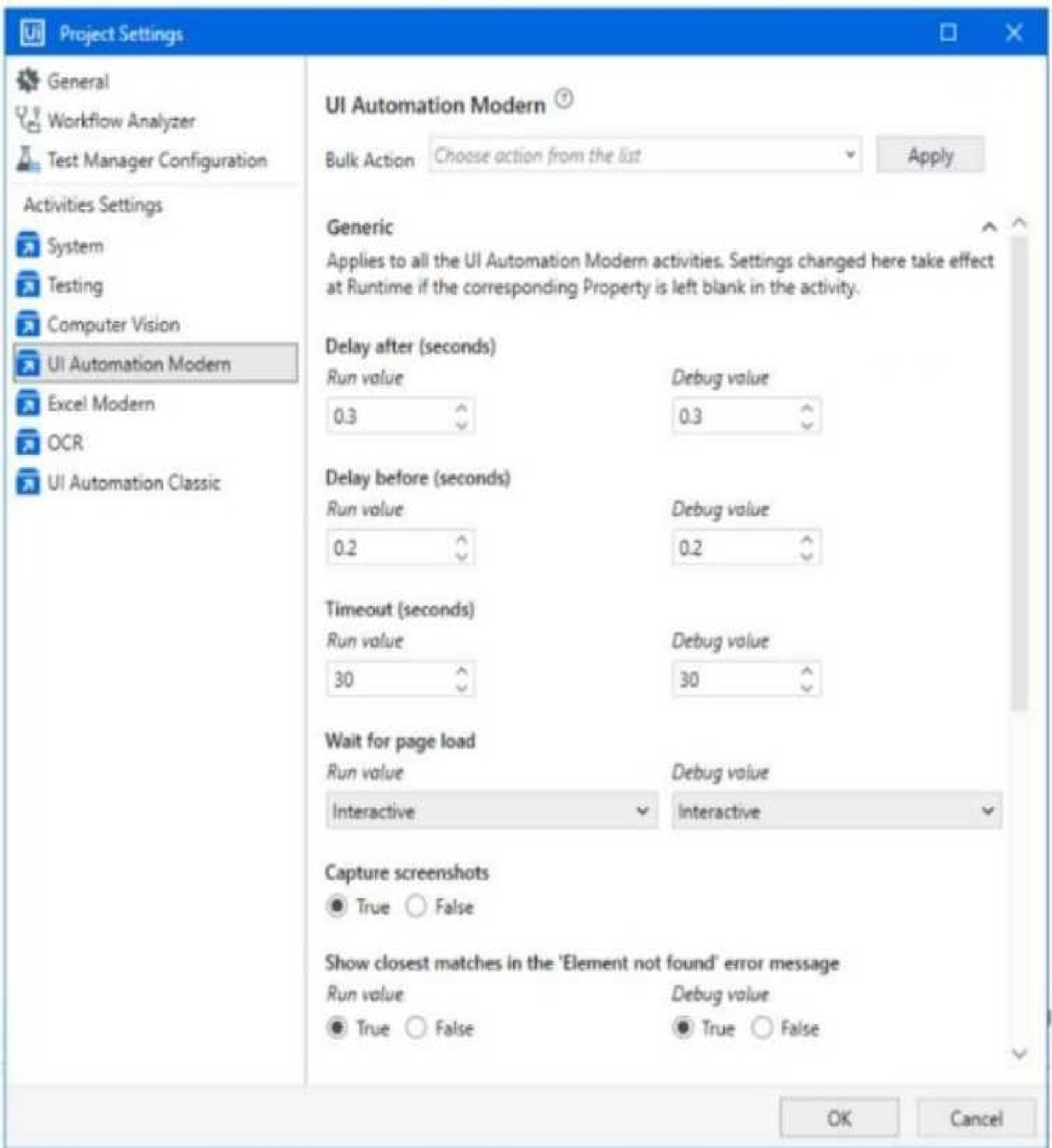
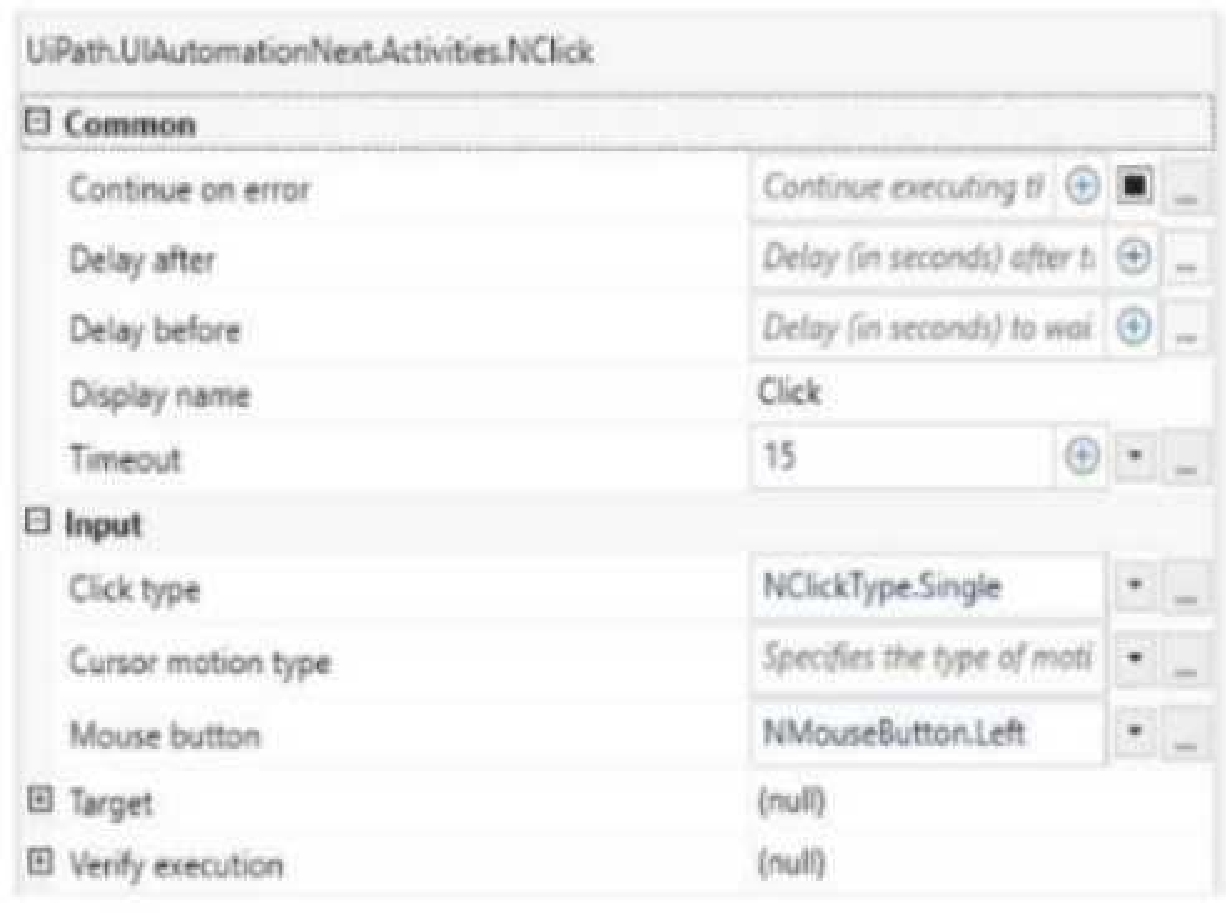
A developer configured the UI Automation Project Settings and the Properties of a Click activity as shown in the following exhibits:
If the target element is not found during execution in Run mode, how long will it take until an error is thrown (based on default project settings)?
Select the answer:Select the answer
1 correct answer
A.
0.15
B.
0.2
C.
15
D.
30
Comprehensive and Detailed Explanation From Exact Extract: In UiPath, when executing an activity such as Click, the timeout behavior is determined as follows: If the Timeout property in the activity is set, that value is used. If the Timeout is left blank, the system uses the default from Project Settings under UI Automation Modern → Timeout. In this case (based on the second image): The Click activity explicitly has Timeout set to 15 seconds. Therefore, this activity will override the project-level default timeout (which is 30 seconds as seen in the first image). Rule Applied: Activity Timeout > Project Settings Timeout (if defined) Hence, if the target element is not found, UiPath will wait for 15 seconds, as specified in the activity's Timeout field, before throwing an error. UiPath Documentation Reference: TimeoutMS Property – UiPath Docs
Right Answer: C
Quiz
Question 5/105/10
What is OCR (Optical Character Recognition)?
Select the answer:Select the answer
1 correct answer
A.
OCR is a document classification method.
B.
OCR is a method that reads text from images, recognizing each character and its position.
C.
OCR is a platform that enables you to do text-to-speech and speech-to-text.
D.
OCR is a tool used to interpret information extracted from documents.
Comprehensive and Detailed Explanation From Exact Extract: Optical Character Recognition (OCR) is a method used to convert different types of documents (PDFs, scanned paper documents, images) into editable and searchable data by recognizing characters and their positions. OCR is vital in Document Understanding to digitize unstructured data from images and scanned docs. UiPath Documentation Reference: OCR Engines in Document Understanding
Right Answer: B
Quiz
Question 6/106/10
Which of the following is a type of communication that is typically interpreted by UiPath Communications Mining?
Select the answer:Select the answer
1 correct answer
A.
Scanned letters
B.
Shared email inboxes
C.
Call data in real-time
D.
Real-time chat data
Comprehensive and Detailed Explanation From Exact Extract: UiPath Communications Mining is designed to process and analyze unstructured communications like those from shared email inboxes, support tickets, and text-based messages. It uses NLP models to classify, extract, and label insights from communication data, typically from email systems. UiPath Documentation Reference: Communications Mining Overview
Right Answer: B
Quiz
Question 7/107/10
What are the main components of a digital business process?
Select the answer:Select the answer
1 correct answer
A.
Inputs, Process flows, Assignees, Outputs
B.
Inputs, Process flows, Outputs
C.
Inputs, Source applications, Assignees
D.
Inputs, Process flows, Source applications, Outputs
Comprehensive and Detailed Explanation From Exact Extract: In the context of automation and digital workflows, a digital business process consists of: Inputs: The raw data required Process flows: The sequence of tasks or actions Outputs: The final results generated Assignees and source applications are supporting components, but not universally required in every digital process. UiPath Academy Reference: Automation Hub Training → Defining Business Processes UiPath Process Mining – Fundamentals
Right Answer: B
Quiz
Question 8/108/10
Can a custom-built extractor be used in the Data Extraction Scope activity?
Select the answer:Select the answer
1 correct answer
A.
Yes, by referencing UiPath.Documentprocessing.Contracts in the custom-built implementation.
B.
No, only out-of-the-box extractors can be used.
C.
Yes, by creating a new extractor that implements Form Extractor or Regex Based Extractor in the custom-built implementation.
D.
Yes, by using Coded Workflows.
Comprehensive and Detailed Explanation From Exact Extract: UiPath allows developers to build custom extractors that can be used within the Data Extraction Scope activity by implementing a specific interface. This is done by referencing the UiPath.DocumentProcessing.Contracts assembly in the custom extractor. This enables plugging custom ML models or logic into the Document Understanding workflow. Custom extractors must implement interfaces like IExtractor or IFormExtractor. UiPath Documentation Reference: Create a Custom Extractor – UiPath Docs
Right Answer: A
Quiz
Question 9/109/10
What is the main difference between an array and a list in UiPath?
Select the answer:Select the answer
1 correct answer
A.
An array is a fixed-size collection of elements of the same type while a list is a dynamic-sized collection of elements of different types.
B.
An array is a fixed-size collection of elements of different types while a list is a dynamic-sized collection of elements of the same type.
C.
An array is a dynamic-sized collection of elements of the same type while a list is a fixed-size collection of elements of the same type.
D.
An array is a fixed-size collection of elements of the same type while a list is a dynamic-sized collection of elements of the same type.
Comprehensive and Detailed Explanation From Exact Extract: Arrays in UiPath (VB.NET) are fixed-size and must be initialized with a defined number of elements of the same type. Lists (List<T>) are dynamic and allow you to add/remove elements at runtime, but still enforce type safety (same type elements). UiPath Documentation Reference: Collections in UiPath Academy → RPA Developer Foundation → Data Manipulation
Right Answer: D
Quiz
Question 10/1010/10
What is a recommended approach for increasing response accuracy when asking the Generative Extractor a question?
Select the answer:Select the answer
1 correct answer
A.
Specify an output format to standardize the response.
B.
Combine arithmetic operations with the question to create a better context.
C.
Combine complex if-then-else type logic questions to create a better context.
D.
Request confidence levels for predictions.
Comprehensive and Detailed Explanation From Exact Extract: When using the Generative Extractor in Document Understanding, the best way to increase accuracy and reliability is by specifying a clear output format. This helps the model understand what kind of response is expected and improves parsing consistency. Example: "What is the invoice number? Please return in the format: InvoiceNumber: <value>" UiPath Documentation Reference: Using Generative Extractor – Document Understanding
UiPath-SAIAv1: UiPath Specialized AI Associate Exam (2023.10) Practice test unlocks all online simulator questions
Thank you for choosing the free version of the UiPath-SAIAv1: UiPath Specialized AI Associate Exam (2023.10) practice test! Further deepen your knowledge on UiPath Simulator; by unlocking the full version of our UiPath-SAIAv1: UiPath Specialized AI Associate Exam (2023.10) Simulator you will be able to take tests with over 250 constantly updated questions and easily pass your exam. 98% of people pass the exam in the first attempt after preparing with our 250 questions.
What to expect from our UiPath-SAIAv1: UiPath Specialized AI Associate Exam (2023.10) practice tests and how to prepare for any exam?
The UiPath-SAIAv1: UiPath Specialized AI Associate Exam (2023.10) Simulator Practice Tests are part of the UiPath Database and are the best way to prepare for any UiPath-SAIAv1: UiPath Specialized AI Associate Exam (2023.10) exam. The UiPath-SAIAv1: UiPath Specialized AI Associate Exam (2023.10) practice tests consist of 250 questions and are written by experts to help you and prepare you to pass the exam on the first attempt. The UiPath-SAIAv1: UiPath Specialized AI Associate Exam (2023.10) database includes questions from previous and other exams, which means you will be able to practice simulating past and future questions. Preparation with UiPath-SAIAv1: UiPath Specialized AI Associate Exam (2023.10) Simulator will also give you an idea of the time it will take to complete each section of the UiPath-SAIAv1: UiPath Specialized AI Associate Exam (2023.10) practice test . It is important to note that the UiPath-SAIAv1: UiPath Specialized AI Associate Exam (2023.10) Simulator does not replace the classic UiPath-SAIAv1: UiPath Specialized AI Associate Exam (2023.10) study guides; however, the Simulator provides valuable insights into what to expect and how much work needs to be done to prepare for the UiPath-SAIAv1: UiPath Specialized AI Associate Exam (2023.10) exam.
UiPath-SAIAv1: UiPath Specialized AI Associate Exam (2023.10) Practice test therefore represents an excellent tool to prepare for the actual exam together with our UiPath practice test . Our UiPath-SAIAv1: UiPath Specialized AI Associate Exam (2023.10) Simulator will help you assess your level of preparation and understand your strengths and weaknesses. Below you can read all the quizzes you will find in our UiPath-SAIAv1: UiPath Specialized AI Associate Exam (2023.10) Simulator and how our unique UiPath-SAIAv1: UiPath Specialized AI Associate Exam (2023.10) Database made up of real questions:
Info quiz:
Quiz name:UiPath-SAIAv1: UiPath Specialized AI Associate Exam (2023.10)
Total number of questions:250
Number of questions for the test:50
Pass score:80%
You can prepare for the UiPath-SAIAv1: UiPath Specialized AI Associate Exam (2023.10) exams with our mobile app. It is very easy to use and even works offline in case of network failure, with all the functions you need to study and practice with our UiPath-SAIAv1: UiPath Specialized AI Associate Exam (2023.10) Simulator.
Use our Mobile App, available for both Android and iOS devices, with our UiPath-SAIAv1: UiPath Specialized AI Associate Exam (2023.10) Simulator . You can use it anywhere and always remember that our mobile app is free and available on all stores.
Our Mobile App contains all UiPath-SAIAv1: UiPath Specialized AI Associate Exam (2023.10) practice tests which consist of 250 questions and also provide study material to pass the final UiPath-SAIAv1: UiPath Specialized AI Associate Exam (2023.10) exam with guaranteed success.
Our UiPath-SAIAv1: UiPath Specialized AI Associate Exam (2023.10) database contain hundreds of questions and UiPath Tests related to UiPath-SAIAv1: UiPath Specialized AI Associate Exam (2023.10) Exam. This way you can practice anywhere you want, even offline without the internet.