20:00

Quiz Web-Development-Applications: WGU Web Development Applications (KVO1)

Free Test
/ 10

Quiz

1/10
What is the purpose of cascading style sheets (CSSs)?
OPTIONS :
Select the answer
1 correct answer
A.
Structuring and describing web page content
B.
Providing functionality that was previously provided by plug-ins
C.
Changing the content of a web page dynamically
D.
Setting rules to define how page content looks when rendered Answer : D EXPLANATION : Cascading Style Sheets (CSS) are used to control the presentation of web pages, including aspects such as layout, colors, fonts, and other visual styles. They are a cornerstone technology of the World Wide Web, along with HTML and JavaScript. Here’s a detailed breakdown: Purpose of CSS: CSS is designed to enable the separation of document content (written in HTML or a similar markup language) from document presentation, including elements such as the layout, colors, and fonts. This separation can improve content accessibility, provide more flexibility and control in the specification of presentation characteristics, enable multiple web pages to share formatting, and reduce complexity and repetition in the structural content. Setting Visual Rules: CSS allows developers to define rules that specify how different elements of a web page should be displayed. For example, CSS rules can change text color, font size, spacing between elements, and even the overall layout of the web page. These rules are applied by the browser to render the web page according to the defined styles. Cascading Nature: The term "cascading" in CSS refers to the process of combining multiple style sheets and resolving conflicts between different CSS rules. This allows developers to use different sources of style information, which can be combined in a hierarchical manner. For instance, a browser style sheet, an external style sheet, and inline styles can all contribute to the final rendering of a web page. Benefits of CSS: Consistency: By using CSS, developers can ensure a consistent look and feel across multiple web pages. Maintainability: CSS makes it easier to update the visual presentation of a web page without altering the HTML structure. This is particularly useful for maintaining large websites. Reusability: CSS rules can be reused across multiple pages, reducing redundancy and making it easier to implement changes globally. Examples of CSS: css Copy code body { background-color: lightblue; } h1 { color: navy; margin-left: 20px; } In this example, the body element is given a light blue background color, and the h1 element is styled with a navy color and a left margin of 20 pixels. Reference: MDN Web Docs on CSS W3C CSS Specifications

Quiz

2/10
Which feature was introduced in HTML5?
OPTIONS :
Select the answer
1 correct answer
A.
Addition of CSS in the HTML file
B.
Adherence to strict XML syntax rules
C.
Ability to hyperlink to multiple web pages
D.
Native drag-and-drop capability Answer : D EXPLANATION : HTML5 introduced several new features that enhanced web development capabilities significantly. One of the notable features is the native drag-and-drop capability. Native Drag-and-Drop Capability: Description: HTML5 allows developers to create drag-and-drop interfaces natively using the draggable attribute and the DragEvent interface. This means elements can be dragged and dropped within a web page without requiring external JavaScript libraries. Implementation: Making an Element Draggable: To make an element draggable, you set the draggable attribute to true: <div id="drag1" draggable="true">Drag me!</div> Handling Drag Events: You use event listeners for drag events such as dragstart, dragover, and drop: document.getElementById("drag1").addEventListener("dragstart", function(event) { event.dataTransfer.setData("text", event.target.id); }); document.getElementById("dropzone").addEventListener("dragover", function(event) { event.preventDefault(); }); document.getElementById("dropzone").addEventListener("drop", function(event) { event.preventDefault(); var data = event.dataTransfer.getData("text"); event.target.appendChild(document.getElementById(data)); }); Example: This example demonstrates a simple drag-and-drop operation: html Copy code <div id="drag1" draggable="true">Drag me!</div> <div id="dropzone" style="width: 200px; height: 200px; border: 1px solid black;">Drop here</div> Reference: W3C HTML5 Specification - Drag and Drop MDN Web Docs - HTML Drag and Drop API HTML5 Doctor - Drag and Drop HTML5's native drag-and-drop feature streamlines the process of creating interactive web applications by eliminating the need for third-party libraries, thus making it a powerful addition to the HTML standard.

Quiz

3/10
Which structure tag should a developer use to place contact information on a web page?
OPTIONS :
Select the answer
1 correct answer
A.
<Aside>
B.
<Main>
C.
<Nav>
D.
<footer> Answer : D EXPLANATION : The <footer> tag is used to define a footer for a document or a section. A footer typically contains information about the author of the document, contact information, copyright details, and links to terms of use, privacy policy, etc. It is a semantic element in HTML5, which means it clearly describes its meaning to both the browser and the developer. Purpose of <footer>: The <footer> element represents a footer for its nearest sectioning content or sectioning root element. It typically contains information like: Contact information Copyright information Links to related documents Information about the author Usage Example: <footer> <p>Contact us at: [email protected]</p> <p>© 2024 Example Company</p> </footer> In this example, the <footer> tag encloses contact information and copyright details. Semantic Importance: Using semantic elements like <footer> enhances the accessibility of the document and provides better context for search engines and other user devices. Reference: MDN Web Docs on <footer> W3C HTML5 Specification on <footer>

Quiz

4/10
Which HTML tag should a developer use to create a drop-down list?
OPTIONS :
Select the answer
1 correct answer
A.
<Option>
B.
<Section >
C.
<Output>
D.
<Select> Answer : D EXPLANATION : The <select> tag is used in HTML to create a drop-down list. It is used in conjunction with the <option> tags to define the list items within the drop-down menu. Purpose of <select>: The <select> element is used to create a control that provides a menu of options. The user can select one or more options from the list. Structure of Drop-down List: The <select> element encloses the <option> elements. Each <option> element represents an individual item in the drop-down list. Usage Example: <label for="cars">Choose a car:</label> <select id="cars" name="cars"> <option value="volvo">Volvo</option> <option value="saab">Saab</option> <option value="fiat">Fiat</option> <option value="audi">Audi</option> </select> In this example, the <select> tag creates a drop-down list with four options: Volvo, Saab, Fiat, and Audi. Attributes of <select>: name: Specifies the name of the control, which is submitted with the form data. id: Used to associate the <select> element with a label using the <label> tag's for attribute. multiple: Allows multiple selections if set. Reference: MDN Web Docs on <select> W3C HTML Specification on Forms

Quiz

5/10
What should a developer correct before revalidating after a code validator reports multiple
errors in
code?
OPTIONS :
Select the answer
1 correct answer
A.
Only CSS errors
B.
The last reported error
C.
Only JavaScript errors
D.
The first reported error Answer : D EXPLANATION : When using a code validator to check your HTML, CSS, or JavaScript code, it's essential to address errors in a systematic manner. The correct approach is to correct the first reported error before revalidating. This method is recommended because often, the first error can cause a cascade of subsequent errors or warnings. By fixing the first error, you may automatically resolve other errors that were reported later. Reasoning: Cascading Errors: The first error in the code might lead to multiple subsequent errors. Fixing it can sometimes resolve those cascading errors, reducing the overall number of errors in the next validation. Logical Flow: Addressing errors in the order they appear maintains a logical flow and makes debugging more manageable. Steps to Follow: Step 1: Run the code through the validator. Step 2: Identify the first reported error. Step 3: Correct the first error. Step 4: Revalidate the code to check if the error count has reduced or if new errors appear. Step 5: Repeat the process until all errors are resolved. Reference: W3C Markup Validation Service MDN Web Docs - Debugging HTML W3C CSS Validation Service

Quiz

6/10
Which HTML element should a developer use to logically group a set of related HTML
elements?
OPTIONS :
Select the answer
1 correct answer
A.
Datalist
B.
Select
C.
Fieldset
D.
input Answer : C EXPLANATION : The<fieldset>element is used to group a set of related HTML elements in a form. It provides a way to logically group related controls and labels. * Fieldset Element: The<fieldset>element can be used to create a group of form controls, along with an optional<legend>element that provides a caption for the group. * Usage Example: <fieldset> <legend>Personal Information</legend> <label for="name">Name:</label> <input type="text" id="name" name="name"> <label for="email">Email:</label> <input type="email" id="email" name="email"> </fieldset> This groups the name and email input fields under the legend "Personal Information". MDN Web Docs on<fieldset> W3C HTML Specification on Fieldset

Quiz

7/10
Given the following markup:


<p>Hello World </p>

Certification Exam Web-Development-Applications: WGU Web Development Applications (KVO1) WGU WGU-Web-Development-Applications 1-1844379343

Where does the image align in relation to the text?
OPTIONS :
Select the answer
1 correct answer
A.
The top of the image aligns to the top of 'Hello World'.
B.
The top of the image aligns to the bottom of 'Hello World'.
C.
The bottom of the image aligns to the bottom of 'Hello World'.
D.
The bottom of the image aligns to the top of 'Hello World'. Answer : C EXPLANATION : The CSS propertyvertical-align: baselinealigns the baseline of the element with the baseline of its parent. For inline elements like images, the baseline alignment means that the bottom of the image aligns with the bottom of the text. * CSSvertical-alignProperty: * Baseline Alignment: Aligns the baseline of the element with the baseline of its parent. * Example: <p>Hello World </p> * Analysis: * The<img>element withvertical-align: baselinewill align its bottom with the bottom of the surrounding text "Hello World". MDN Web Docs -vertical-align W3C CSS Inline Layout Module Level 3

Quiz

8/10
Which property should a developer use to ensure that a background image appears only
once?
OPTIONS :
Select the answer
1 correct answer
A.
background-origin
B.
background-size
C.
background-clip
D.
background-repeat Answer : D EXPLANATION : > "The ‘background-repeat’ property in CSS defines how background images are repeated. To prevent a background image from repeating, use ‘background-repeat: no-repeat; ." > > "The default value is ‘repeat’, which tiles the image both horizontally and vertically unless otherwise specified." References: * MDN Web Docs: background-repeat * CSS Backgrounds and Borders Module

Quiz

9/10
A web designer creates the following HTML code:

Certification Exam Web-Development-Applications: WGU Web Development Applications (KVO1) WGU WGU-Web-Development-Applications 2-2182968106

Which CSS selector applies only to the first line?
OPTIONS :
Select the answer
1 correct answer
A.
#Welcome
B.
.Welcome
C.
#Header
D.
.header Answer : A EXPLANATION : To apply CSS only to the first line of a particular HTML element, the ID selector#Welcomeshould be used as per the given HTML structure. * CSS ID Selector: The ID selector is used to style the element with a specific id. * Usage Example: #Welcome { color: red; } In this example, the#Welcomeselector will apply the red color style only to the element withid="Welcome". MDN Web Docs on ID Selectors W3C CSS Specification on Selectors Source clarification: #Welcome selects the entire element with id="Welcome"; selecting only the first rendered line of text would instead require the ::first-line pseudo-element. The PDF uses 'first line' to refer to its first HTML element.

Quiz

10/10
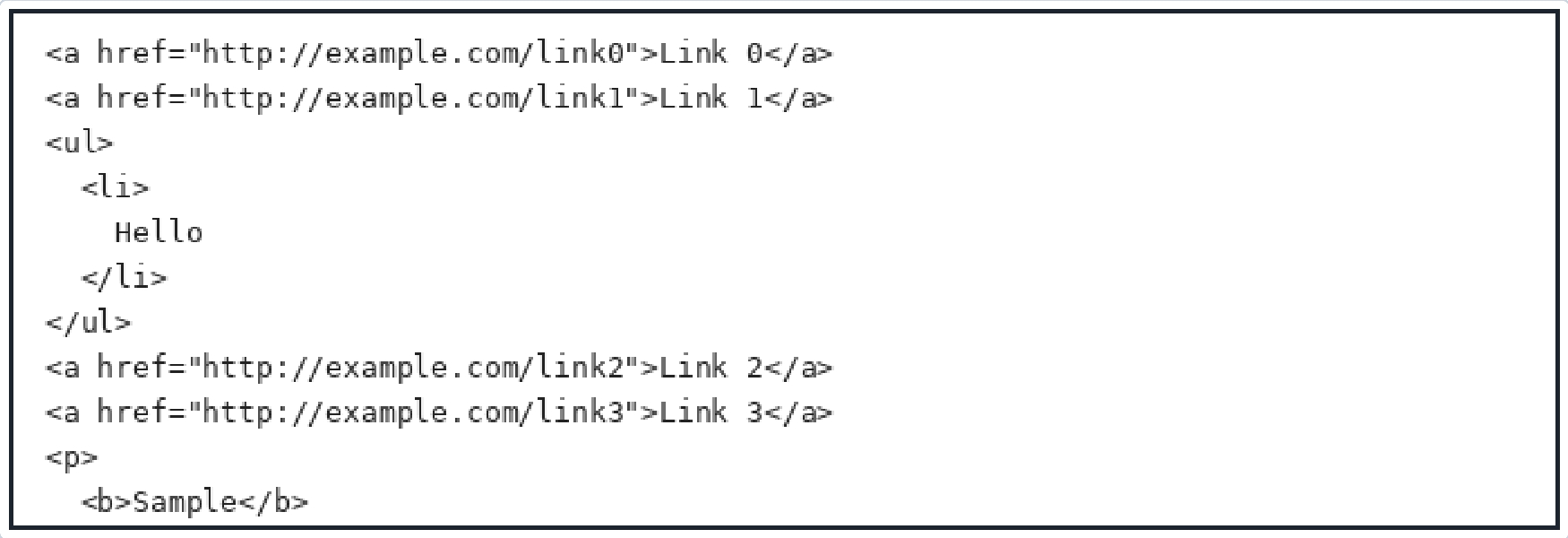
Given the following HTML code:

Certification Exam Web-Development-Applications: WGU Web Development Applications (KVO1) WGU WGU-Web-Development-Applications 3-4262864890

And given the following CSS selector: a, ul { color: red; }
Which elements will the CSS be applied to?
OPTIONS :
Select the answer
1 correct answer
A.
Any anchor (a) elements preceded by unordered list (ul) elements.
B.
All anchor (a) elements and all unordered list (ul) elements.
C.
Any anchor (a) elements followed by unordered list (ul) elements.
D.
All anchor (a) elements and elements preceded by an unordered list (ul). Answer : B EXPLANATION : Given the CSS selectora, ul, it targets all anchor (<a>) elements and all unordered list (<ul>) elements independently. This means the CSS rule will be applied to each<a>and<ul>element in the HTML document. * CSS Selector Analysis: * a: This part of the selector targets all<a>elements in the document. * |: The comma is a selector separator, meaning that each part of the selector list is applied independently. * ul: This part of the selector targets all<ul>elements in the document. * Example: * Given HTML: <p> <a href="[http://example.com/linkO"](http://example.com/linkO") >Link O0</a> <a href="[http://example.com/link1"](http://example.com/link1") >Link 1</a> </p> <ul> <li>Hello</li> </ul> <p> <a href="[http://example.com/link2"](http://example.com/link2") >Link 2</a> <a href="[https://example.com/link3">Link](https://example.com/link3">Link) 3</a> </p> <b>Sample</b> * Given CSS: a, ul { color: red; } * Affected Elements: All<a>and<ul>elements will have the color set to red. MDN Web Docs - Comma combinator W3C CSS Selectors Level 3 Source formatting clarification: The PDF omits the option label preceding the second choice and mislabels the later choices. The four choices have been placed in A–D order according to their printed sequence and the PDF's answer/explanation, with B representing the selector a, ul.
Looking for more questions?Buy now

Web-Development-Applications: WGU Web Development Applications (KVO1) Practice test unlocks all online simulator questions

Thank you for choosing the free version of the Web-Development-Applications: WGU Web Development Applications (KVO1) practice test! Further deepen your knowledge on WGU Simulator; by unlocking the full version of our Web-Development-Applications: WGU Web Development Applications (KVO1) Simulator you will be able to take tests with over 140 constantly updated questions and easily pass your exam. 98% of people pass the exam in the first attempt after preparing with our 140 questions.

BUY NOW

What to expect from our Web-Development-Applications: WGU Web Development Applications (KVO1) practice tests and how to prepare for any exam?

The Web-Development-Applications: WGU Web Development Applications (KVO1) Simulator Practice Tests are part of the WGU Database and are the best way to prepare for any Web-Development-Applications: WGU Web Development Applications (KVO1) exam. The Web-Development-Applications: WGU Web Development Applications (KVO1) practice tests consist of 140 questions and are written by experts to help you and prepare you to pass the exam on the first attempt. The Web-Development-Applications: WGU Web Development Applications (KVO1) database includes questions from previous and other exams, which means you will be able to practice simulating past and future questions. Preparation with Web-Development-Applications: WGU Web Development Applications (KVO1) Simulator will also give you an idea of the time it will take to complete each section of the Web-Development-Applications: WGU Web Development Applications (KVO1) practice test . It is important to note that the Web-Development-Applications: WGU Web Development Applications (KVO1) Simulator does not replace the classic Web-Development-Applications: WGU Web Development Applications (KVO1) study guides; however, the Simulator provides valuable insights into what to expect and how much work needs to be done to prepare for the Web-Development-Applications: WGU Web Development Applications (KVO1) exam.

BUY NOW

Web-Development-Applications: WGU Web Development Applications (KVO1) Practice test therefore represents an excellent tool to prepare for the actual exam together with our WGU practice test . Our Web-Development-Applications: WGU Web Development Applications (KVO1) Simulator will help you assess your level of preparation and understand your strengths and weaknesses. Below you can read all the quizzes you will find in our Web-Development-Applications: WGU Web Development Applications (KVO1) Simulator and how our unique Web-Development-Applications: WGU Web Development Applications (KVO1) Database made up of real questions:

Info quiz:

  • Quiz name:Web-Development-Applications: WGU Web Development Applications (KVO1)
  • Total number of questions:140
  • Number of questions for the test:50
  • Pass score:80%

You can prepare for the Web-Development-Applications: WGU Web Development Applications (KVO1) exams with our mobile app. It is very easy to use and even works offline in case of network failure, with all the functions you need to study and practice with our Web-Development-Applications: WGU Web Development Applications (KVO1) Simulator.

Use our Mobile App, available for both Android and iOS devices, with our Web-Development-Applications: WGU Web Development Applications (KVO1) Simulator . You can use it anywhere and always remember that our mobile app is free and available on all stores.

Our Mobile App contains all Web-Development-Applications: WGU Web Development Applications (KVO1) practice tests which consist of 140 questions and also provide study material to pass the final Web-Development-Applications: WGU Web Development Applications (KVO1) exam with guaranteed success. Our Web-Development-Applications: WGU Web Development Applications (KVO1) database contain hundreds of questions and WGU Tests related to Web-Development-Applications: WGU Web Development Applications (KVO1) Exam. This way you can practice anywhere you want, even offline without the internet.

BUY NOW